 wehub-resource-sync
372 lines
16 KiB
Markdown
372 lines
16 KiB
Markdown
<!-- WEHUB_ZH_README -->
|
||
> [!NOTE]
|
||
> 本文档由 WeHub 基于上游 README 翻译整理,属于社区翻译,非官方中文文档。
|
||
> [English](./README.en.md) · [原始项目](https://github.com/simular-ai/Agent-S) · [上游 README](https://github.com/simular-ai/Agent-S/blob/HEAD/README.md)
|
||
> 原作者、版权与许可证归属以原始项目及本仓库 LICENSE 文件为准。
|
||
|
||
<h1 align="center">
|
||
<img src="images/agent_s.png" alt="Logo" style="vertical-align:middle" width="60"> Agent S:
|
||
<small>像人类一样使用计算机</small>
|
||
</h1>
|
||
|
||
<h2 align="center">🏆 Agent S3:首个在 OSWorld 上超越人类表现(72.60%)</h2>
|
||
|
||
<p align="center">
|
||
🌐 <a href="https://www.simular.ai/articles/agent-s3">[S3 博客]</a>
|
||
📄 <a href="https://arxiv.org/abs/2510.02250">[S3 论文]</a>
|
||
🎥 <a href="https://www.youtube.com/watch?v=VHr0a3UBsh4">[S3 视频]</a>
|
||
</p>
|
||
|
||
<p align="center">
|
||
🌐 <a href="https://www.simular.ai/articles/agent-s2-technical-review">[S2 博客]</a>
|
||
📄 <a href="https://arxiv.org/abs/2504.00906">[S2 论文(COLM 2025)]</a>
|
||
🎥 <a href="https://www.youtube.com/watch?v=wUGVQl7c0eg">[S2 视频]</a>
|
||
</p>
|
||
|
||
<p align="center">
|
||
🌐 <a href="https://www.simular.ai/agent-s">[S1 博客]</a>
|
||
📄 <a href="https://arxiv.org/abs/2410.08164">[S1 论文(ICLR 2025)]</a>
|
||
🎥 <a href="https://www.youtube.com/watch?v=OBDE3Knte0g">[S1 视频]</a>
|
||
</p>
|
||
|
||
<p align="center">
|
||
<a href="https://trendshift.io/repositories/13151" target="_blank"><img src="https://trendshift.io/api/badge/repositories/13151" alt="simular-ai%2FAgent-S | Trendshift" style="width: 250px; height: 55px;" width="250" height="55"/></a>
|
||
</p>
|
||
|
||
<p align="center">
|
||
<img src="https://img.shields.io/badge/OS-Windows-blue?logo=windows&logoColor=white" alt="Windows">
|
||
<img src="https://img.shields.io/badge/OS-macOS-black?logo=apple&logoColor=white" alt="macOS">
|
||
<img src="https://img.shields.io/badge/OS-Linux-yellow?logo=linux&logoColor=black" alt="Linux">
|
||
<a href="https://discord.gg/E2XfsK9fPV">
|
||
<img src="https://dcbadge.limes.pink/api/server/https://discord.gg/E2XfsK9fPV?style=flat" alt="Discord">
|
||
</a>
|
||
|
||
<a href="https://pepy.tech/projects/gui-agents">
|
||
<img src="https://static.pepy.tech/badge/gui-agents" alt="PyPI Downloads">
|
||
</a>
|
||
</p>
|
||
|
||
<div align="center">
|
||
<!-- Keep these links. Translations will automatically update with the README. -->
|
||
<a href="https://www.readme-i18n.com/simular-ai/Agent-S?lang=de">Deutsch</a> |
|
||
<a href="https://www.readme-i18n.com/simular-ai/Agent-S?lang=es">Español</a> |
|
||
<a href="https://www.readme-i18n.com/simular-ai/Agent-S?lang=fr">français</a> |
|
||
<a href="https://www.readme-i18n.com/simular-ai/Agent-S?lang=ja">日本語</a> |
|
||
<a href="https://www.readme-i18n.com/simular-ai/Agent-S?lang=ko">한국어</a> |
|
||
<a href="https://www.readme-i18n.com/simular-ai/Agent-S?lang=pt">Português</a> |
|
||
<a href="https://www.readme-i18n.com/simular-ai/Agent-S?lang=ru">Русский</a> |
|
||
<a href="https://www.readme-i18n.com/simular-ai/Agent-S?lang=zh">中文</a>
|
||
</div>
|
||
|
||
<div align="center">
|
||
|
||
<p>跳过配置?在 <a href="https://cloud.simular.ai/">Simular Cloud</a> 中试用 Agent S
|
||
</div>
|
||
|
||
## 🥳 更新
|
||
- [x] **2025/12/15**:Agent S3 **首次**在 OSWorld 上以 **72.60%** 的出色成绩超越人类水平表现!
|
||
- [x] **2025/10/02**:发布 Agent S3 及其[技术论文](https://arxiv.org/abs/2510.02250), setting a new SOTA of **69.9%** on OSWorld (approaching 72% human performance), with strong generalizability on WindowsAgentArena and AndroidWorld! It is also simpler, faster, and more flexible.
|
||
- [x] **2025/08/01**:发布 Agent S2.5(gui-agents v0.2.5):更简单、更好、更快! 上创下新的 SOTA
|
||
- [x] **2025/07/07**:[Agent S2 论文](https://arxiv.org/abs/2504.00906) 被 COLM 2025 接收!蒙特利尔见!
|
||
- [x] **2025/04/27**:Agent S 论文在 ICLR 2025 Agentic AI for Science Workshop 荣获最佳论文奖 🏆!
|
||
- [x] **2025/04/01**:发布 [Agent S2 论文](https://arxiv.org/abs/2504.00906),在 OSWorld、WindowsAgentArena 和 AndroidWorld 上取得新的 SOTA 结果!
|
||
- [x] **2025/03/12**:发布 Agent S2 以及 [gui-agents](https://github.com/simular-ai/Agent-S), v0.2.0,成为计算机使用智能体(CUA)的新标杆,性能超越 OpenAI 的 CUA/Operator 和 Anthropic 的 Claude 3.7 Sonnet Computer-Use!
|
||
- [x] **2025/01/22**:[Agent S 论文](https://arxiv.org/abs/2410.08164) 被 ICLR 2025 接收!
|
||
- [x] **2025/01/21**:发布 [gui-agents](https://github.com/simular-ai/Agent-S) v0.1.2 库,支持 Linux 和 Windows!
|
||
- [x] **2024/12/05**:发布 [gui-agents](https://github.com/simular-ai/Agent-S) v0.1.0 库,让你轻松在 Mac、OSWorld 和 WindowsAgentArena 上使用 Agent-S!
|
||
- [x] **2024/10/10**:发布 [Agent S 论文](https://arxiv.org/abs/2410.08164) 及代码库!
|
||
|
||
## 目录
|
||
|
||
1. [💡 简介](#-introduction)
|
||
2. [🎯 当前成果](#-current-results)
|
||
3. [🛠️ 安装与配置](#%EF%B8%8F-installation--setup)
|
||
4. [🚀 用法](#-usage)
|
||
5. [🤝 致谢](#-acknowledgements)
|
||
6. [💬 引用](#-citation)
|
||
|
||
## 💡 简介
|
||
|
||
欢迎使用 **Agent S**,这是一个开源框架,旨在通过智能体-计算机接口(Agent-Computer Interface)实现与计算机的自主交互。我们的使命是构建智能 GUI 智能体,使其能够从过往经验中学习,并在你的计算机上自主完成复杂任务。
|
||
|
||
无论你是对 AI、自动化感兴趣,还是希望为前沿的智能体系统做贡献,我们都很高兴你能来到这里!
|
||
|
||
## 🎯 当前成果
|
||
|
||
<p align="center">
|
||
<img src="images/s3_results_new.png" alt="Agent S3 Results" width="700"/>
|
||
</p>
|
||
|
||
在 OSWorld 上,仅 Agent S3 在 100 步设置下即可达到 66%,已超过此前 63.4% 的最先进水平(GTA1 w/ GPT-5)。加入 Behavior Best-of-N 后,性能进一步提升至 72.6%,*超越* OSWorld 上的人类水平表现(约 72%)!
|
||
|
||
Agent S3 还展现出强大的零样本泛化能力!在 WindowsAgentArena 上,仅使用 Agent S3 时准确率为 50.2%,通过从 3 次 rollout 中择优选择可提升至 56.6%。在 AndroidWorld 上,性能也从 68.1% 提升至 71.6%
|
||
|
||
## 🛠️ 安装与配置
|
||
|
||
### 前置要求
|
||
- **单显示器**:我们的智能体面向单显示器屏幕设计
|
||
- **安全性**:该智能体会运行 Python 代码来控制你的计算机——请谨慎使用
|
||
- **支持的平台**:Linux、Mac 和 Windows
|
||
|
||
|
||
### 安装
|
||
若无需克隆仓库即可安装 Agent S3,请运行
|
||
```bash
|
||
pip install gui-agents
|
||
```
|
||
如果你想在修改代码的同时测试 Agent S3,请克隆仓库并按以下方式安装
|
||
```
|
||
pip install -e .
|
||
```
|
||
|
||
别忘了还要 `brew install tesseract`!Pytesseract 需要此额外安装才能正常工作。
|
||
|
||
### API 配置
|
||
|
||
#### 选项 1:环境变量
|
||
添加到你的 `.bashrc`(Linux)或 `.zshrc`(MacOS):
|
||
```bash
|
||
export OPENAI_API_KEY=<YOUR_API_KEY>
|
||
export ANTHROPIC_API_KEY=<YOUR_ANTHROPIC_API_KEY>
|
||
export HF_TOKEN=<YOUR_HF_TOKEN>
|
||
```
|
||
|
||
#### 选项 2:Python 脚本
|
||
```python
|
||
import os
|
||
os.environ["OPENAI_API_KEY"] = "<YOUR_API_KEY>"
|
||
```
|
||
|
||
### 支持的模型
|
||
我们支持 Azure OpenAI、Anthropic、Gemini、Open Router 和 vLLM 推理。详见 [models.md](models.md)。
|
||
|
||
### 定位模型(必需)
|
||
为获得最佳性能,我们推荐使用托管在 Hugging Face Inference Endpoints 或其他提供商上的 [UI-TARS-1.5-7B](https://huggingface.co/ByteDance-Seed/UI-TARS-1.5-7B)。设置说明请参阅 [Hugging Face Inference Endpoints](https://huggingface.co/learn/cookbook/en/enterprise_dedicated_endpoints)。
|
||
|
||
## 🚀 用法
|
||
|
||
|
||
> ⚡️ **推荐配置:**
|
||
> 为获得最佳配置,我们建议使用 **OpenAI gpt-5-2025-08-07** 作为主模型,并搭配 **UI-TARS-1.5-7B** 进行 grounding。
|
||
|
||
|
||
### CLI
|
||
|
||
请注意,这里运行的是我们改进后的 Agent S3,未使用 bBoN。
|
||
|
||
使用必需参数运行 Agent S3:
|
||
|
||
```bash
|
||
agent_s \
|
||
--provider openai \
|
||
--model gpt-5-2025-08-07 \
|
||
--ground_provider huggingface \
|
||
--ground_url http://localhost:8080 \
|
||
--ground_model ui-tars-1.5-7b \
|
||
--grounding_width 1920 \
|
||
--grounding_height 1080
|
||
```
|
||
|
||
#### 本地编码环境(可选)
|
||
对于需要执行代码的任务(例如数据处理、文件操作、系统自动化),你可以启用本地编码环境:
|
||
|
||
```bash
|
||
agent_s \
|
||
--provider openai \
|
||
--model gpt-5-2025-08-07 \
|
||
--ground_provider huggingface \
|
||
--ground_url http://localhost:8080 \
|
||
--ground_model ui-tars-1.5-7b \
|
||
--grounding_width 1920 \
|
||
--grounding_height 1080 \
|
||
--enable_local_env
|
||
```
|
||
|
||
⚠️ **警告**:本地编码环境会在你的计算机上本地执行任意 Python 和 Bash 代码。请仅在受信任的环境中、并使用受信任的输入时使用此功能。
|
||
|
||
#### 必需参数
|
||
- **`--provider`**:主生成模型提供商(例如 openai、anthropic 等)- 默认值:"openai"
|
||
- **`--model`**:主生成模型名称(例如 gpt-5-2025-08-07)- 默认值:"gpt-5-2025-08-07"
|
||
- **`--ground_provider`**:接地(grounding)模型的提供商 - **必需**
|
||
- **`--ground_url`**:接地模型的 URL - **必需**
|
||
- **`--ground_model`**:接地模型的模型名称 - **必需**
|
||
- **`--grounding_width`**:接地模型输出坐标分辨率的宽度 - **必需**
|
||
- **`--grounding_height`**:接地模型输出坐标分辨率的高度 - **必需**
|
||
|
||
#### 可选参数
|
||
- **`--model_temperature`**:将所有模型调用固定为此温度(对于 o3 等模型需要设置为 1.0,但对于其他模型可以留空)
|
||
|
||
#### 接地模型尺寸
|
||
接地宽度和高度应与你的接地模型的输出坐标分辨率相匹配:
|
||
- **UI-TARS-1.5-7B**:使用 `--grounding_width 1920 --grounding_height 1080`
|
||
- **UI-TARS-72B**:使用 `--grounding_width 1000 --grounding_height 1000`
|
||
|
||
#### 可选参数
|
||
- **`--model_url`**:主生成模型的自定义 API URL - 默认值:""
|
||
- **`--model_api_key`**:主生成模型的 API 密钥 - 默认值:""
|
||
- **`--ground_api_key`**:接地模型端点的 API 密钥 - 默认值:""
|
||
- **`--max_trajectory_length`**:轨迹中保留的最大图像轮次数量 - 默认值:8
|
||
- **`--enable_reflection`**:启用反思智能体(reflection agent)以辅助工作智能体 - 默认值:True
|
||
- **`--enable_local_env`**:启用用于代码执行的本地编码环境(警告:会在本地执行任意代码)- 默认值:False
|
||
|
||
#### 本地编码环境详情
|
||
本地编码环境使 Agent S3 能够直接在你的计算机上执行 Python 和 Bash 代码。这对于以下场景特别有用:
|
||
|
||
- **数据处理**:操作电子表格、CSV 文件或数据库
|
||
- **文件操作**:批量文件处理、内容提取或文件整理
|
||
- **系统自动化**:配置更改、系统设置或自动化脚本
|
||
- **代码开发**:编写、编辑或执行代码文件
|
||
- **文本处理**:文档操作、内容编辑或格式化
|
||
|
||
启用后,智能体可以使用 `call_code_agent` 操作来执行代码块,以完成可通过编程而非 GUI 交互完成的任务。
|
||
|
||
**要求:**
|
||
- **Python**:用于运行 Agent S3 的同一 Python 解释器(自动检测)
|
||
- **Bash**:位于 `/bin/bash`(在 macOS 和 Linux 上为标准配置)
|
||
- **系统权限**:智能体以执行它的用户相同的权限运行
|
||
|
||
**安全注意事项:**
|
||
- 本地环境以运行智能体的用户相同的权限执行任意代码
|
||
- 仅在受信任的环境中启用此功能
|
||
- 当智能体生成用于系统级操作的代码时要谨慎
|
||
- 对于不受信任的任务,考虑在沙盒环境中运行
|
||
- Bash 脚本以 30 秒超时执行,以防止进程挂起
|
||
|
||
### `gui_agents` SDK
|
||
|
||
首先,我们导入必要的模块。`AgentS3` 是 Agent S3 的主智能体类。`OSWorldACI` 是我们的接地智能体,它将智能体动作翻译为可执行的 Python 代码。
|
||
```python
|
||
import pyautogui
|
||
import io
|
||
from gui_agents.s3.agents.agent_s import AgentS3
|
||
from gui_agents.s3.agents.grounding import OSWorldACI
|
||
from gui_agents.s3.utils.local_env import LocalEnv # Optional: for local coding environment
|
||
|
||
# Load in your API keys.
|
||
from dotenv import load_dotenv
|
||
load_dotenv()
|
||
|
||
current_platform = "linux" # "darwin", "windows"
|
||
```
|
||
|
||
接下来,我们定义引擎参数。`engine_params` 用于主智能体,`engine_params_for_grounding` 用于接地。对于 `engine_params_for_grounding`,我们支持 HuggingFace TGI、vLLM 和 Open Router 等自定义端点。
|
||
|
||
```python
|
||
engine_params = {
|
||
"engine_type": provider,
|
||
"model": model,
|
||
"base_url": model_url, # Optional
|
||
"api_key": model_api_key, # Optional
|
||
"temperature": model_temperature # Optional
|
||
}
|
||
|
||
# Load the grounding engine from a custom endpoint
|
||
ground_provider = "<your_ground_provider>"
|
||
ground_url = "<your_ground_url>"
|
||
ground_model = "<your_ground_model>"
|
||
ground_api_key = "<your_ground_api_key>"
|
||
|
||
# Set grounding dimensions based on your model's output coordinate resolution
|
||
# UI-TARS-1.5-7B: grounding_width=1920, grounding_height=1080
|
||
# UI-TARS-72B: grounding_width=1000, grounding_height=1000
|
||
grounding_width = 1920 # Width of output coordinate resolution
|
||
grounding_height = 1080 # Height of output coordinate resolution
|
||
|
||
engine_params_for_grounding = {
|
||
"engine_type": ground_provider,
|
||
"model": ground_model,
|
||
"base_url": ground_url,
|
||
"api_key": ground_api_key, # Optional
|
||
"grounding_width": grounding_width,
|
||
"grounding_height": grounding_height,
|
||
}
|
||
```
|
||
|
||
然后,我们定义接地智能体和 Agent S3。
|
||
|
||
```python
|
||
# Optional: Enable local coding environment
|
||
enable_local_env = False # Set to True to enable local code execution
|
||
local_env = LocalEnv() if enable_local_env else None
|
||
|
||
grounding_agent = OSWorldACI(
|
||
env=local_env, # Pass local_env for code execution capability
|
||
platform=current_platform,
|
||
engine_params_for_generation=engine_params,
|
||
engine_params_for_grounding=engine_params_for_grounding,
|
||
width=1920, # Optional: screen width
|
||
height=1080 # Optional: screen height
|
||
)
|
||
|
||
agent = AgentS3(
|
||
engine_params,
|
||
grounding_agent,
|
||
platform=current_platform,
|
||
max_trajectory_length=8, # Optional: maximum image turns to keep
|
||
enable_reflection=True # Optional: enable reflection agent
|
||
)
|
||
```
|
||
|
||
最后,让我们查询智能体!
|
||
|
||
```python
|
||
# Get screenshot.
|
||
screenshot = pyautogui.screenshot()
|
||
buffered = io.BytesIO()
|
||
screenshot.save(buffered, format="PNG")
|
||
screenshot_bytes = buffered.getvalue()
|
||
|
||
obs = {
|
||
"screenshot": screenshot_bytes,
|
||
}
|
||
|
||
instruction = "Close VS Code"
|
||
info, action = agent.predict(instruction=instruction, observation=obs)
|
||
|
||
exec(action[0])
|
||
```
|
||
|
||
有关推理循环工作原理的更多详情,请参阅 `gui_agents/s3/cli_app.py`。
|
||
|
||
### OSWorld
|
||
|
||
要在 OSWorld 中部署 Agent S3,请遵循 [OSWorld 部署说明](osworld_setup/s3/OSWorld.md)。
|
||
|
||
## 💬 引用
|
||
|
||
如果你认为此代码库有用,请引用:
|
||
|
||
```
|
||
@misc{Agent-S3,
|
||
title={The Unreasonable Effectiveness of Scaling Agents for Computer Use},
|
||
author={Gonzalo Gonzalez-Pumariega and Vincent Tu and Chih-Lun Lee and Jiachen Yang and Ang Li and Xin Eric Wang},
|
||
year={2025},
|
||
eprint={2510.02250},
|
||
archivePrefix={arXiv},
|
||
primaryClass={cs.AI},
|
||
url={https://arxiv.org/abs/2510.02250},
|
||
}
|
||
|
||
@misc{Agent-S2,
|
||
title={Agent S2: A Compositional Generalist-Specialist Framework for Computer Use Agents},
|
||
author={Saaket Agashe and Kyle Wong and Vincent Tu and Jiachen Yang and Ang Li and Xin Eric Wang},
|
||
year={2025},
|
||
eprint={2504.00906},
|
||
archivePrefix={arXiv},
|
||
primaryClass={cs.AI},
|
||
url={https://arxiv.org/abs/2504.00906},
|
||
}
|
||
|
||
@inproceedings{Agent-S,
|
||
title={{Agent S: An Open Agentic Framework that Uses Computers Like a Human}},
|
||
author={Saaket Agashe and Jiuzhou Han and Shuyu Gan and Jiachen Yang and Ang Li and Xin Eric Wang},
|
||
booktitle={International Conference on Learning Representations (ICLR)},
|
||
year={2025},
|
||
url={https://arxiv.org/abs/2410.08164}
|
||
}
|
||
```
|
||
|
||
## Star 历史
|
||
|
||
[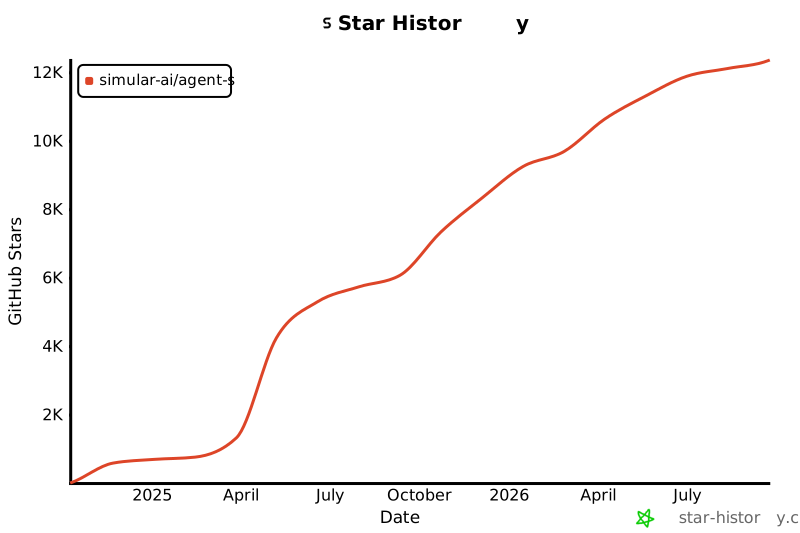](https://star-history.com/#simular-ai/Agent-S&Date)
|