 wehub-resource-sync
9194ef5abd
wehub-resource-sync
9194ef5abd
Docs/Test Workflow / Test docs build (push) Failing after 0s
Check links & references / links-check (push) Failing after 1s
Pytest/Test Workflow / Import Test and Pytest Run (ubuntu-latest, 3.10) (push) Failing after 0s
Pytest/Test Workflow / Import Test and Pytest Run (ubuntu-latest, 3.11) (push) Failing after 0s
PR Conflict Labeler / main (push) Failing after 2s
Pytest/Test Workflow / Import Test and Pytest Run (ubuntu-latest, 3.12) (push) Failing after 2s
Pytest/Test Workflow / Import Test and Pytest Run (ubuntu-latest, 3.13) (push) Failing after 0s
Pytest/Test Workflow / Build this Package (push) Failing after 5s
Pytest/Test Workflow / Import Test and Pytest Run (macos-latest, 3.10) (push) Has been cancelled
Pytest/Test Workflow / Import Test and Pytest Run (macos-latest, 3.11) (push) Has been cancelled
Pytest/Test Workflow / Import Test and Pytest Run (macos-latest, 3.12) (push) Has been cancelled
Pytest/Test Workflow / Import Test and Pytest Run (macos-latest, 3.13) (push) Has been cancelled
Pytest/Test Workflow / Import Test and Pytest Run (windows-latest, 3.10) (push) Has been cancelled
Pytest/Test Workflow / Import Test and Pytest Run (windows-latest, 3.11) (push) Has been cancelled
Pytest/Test Workflow / Import Test and Pytest Run (windows-latest, 3.12) (push) Has been cancelled
Pytest/Test Workflow / Import Test and Pytest Run (windows-latest, 3.13) (push) Has been cancelled
Pytest/Test Workflow / testing-guardian (push) Has been cancelled
348 lines
12 KiB
Markdown
348 lines
12 KiB
Markdown
---
|
|
comments: true
|
|
description: Detect small objects in images by applying SAHI inference slicing with supervision's InferenceSlicer — improve recall for tiny targets.
|
|
authors:
|
|
- name: Piotr Skalski
|
|
role: Computer Vision Engineer, Roboflow
|
|
github: https://github.com/SkalskiP
|
|
date_modified: 2026-04-22
|
|
---
|
|
|
|
# Detect Small Objects
|
|
|
|
This guide shows how to detect small objects with the [Inference](https://github.com/roboflow/inference), [Ultralytics](https://github.com/ultralytics/ultralytics) or [Transformers](https://github.com/huggingface/transformers) packages using [`InferenceSlicer`](https://supervision.roboflow.com/latest/detection/tools/inference_slicer/#supervision.detection.tools.inference_slicer.InferenceSlicer).
|
|
|
|
<video controls>
|
|
<source src="https://media.roboflow.com/supervision_detect_small_objects_example.mp4" type="video/mp4">
|
|
</video>
|
|
|
|
## Baseline Detection
|
|
|
|
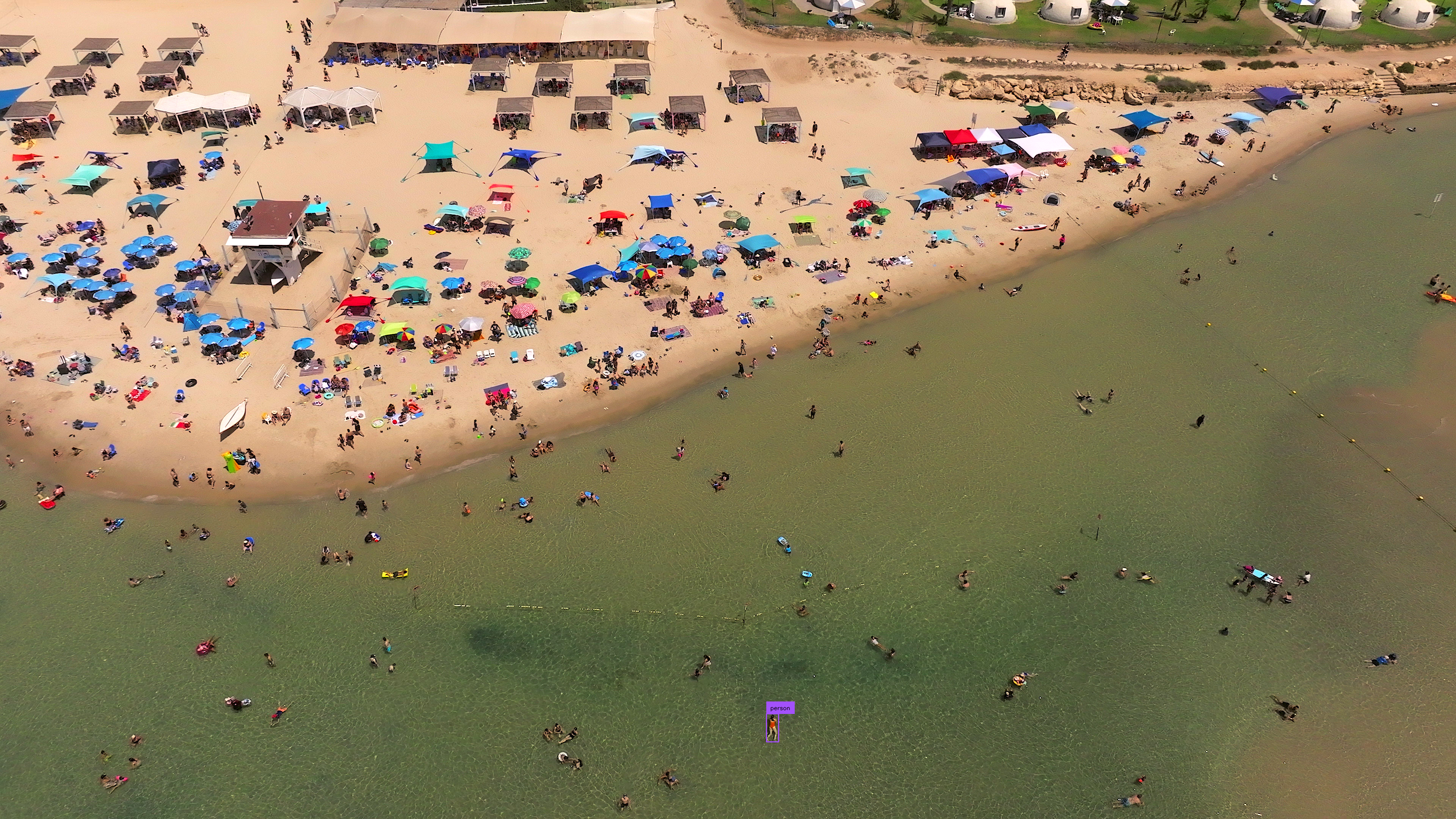
Small object detection in high-resolution images presents challenges due to the objects' size relative to the image resolution.
|
|
|
|
Running a standard detection model on the full image establishes a baseline for comparison. Load your chosen model, pass the image through it, and convert the results into a `Detections` object. This baseline reveals how many small objects the model misses at native resolution, motivating the sliced inference approach shown later.
|
|
|
|
=== "Inference"
|
|
|
|
```python
|
|
import cv2
|
|
import supervision as sv
|
|
from inference import get_model
|
|
|
|
model = get_model(model_id="yolov8x-640")
|
|
image = cv2.imread("<SOURCE_IMAGE_PATH>")
|
|
results = model.infer(image)[0]
|
|
detections = sv.Detections.from_inference(results)
|
|
|
|
box_annotator = sv.BoxAnnotator()
|
|
label_annotator = sv.LabelAnnotator()
|
|
|
|
annotated_image = box_annotator.annotate(
|
|
scene=image,
|
|
detections=detections,
|
|
)
|
|
annotated_image = label_annotator.annotate(
|
|
scene=annotated_image,
|
|
detections=detections,
|
|
)
|
|
```
|
|
|
|
=== "Ultralytics"
|
|
|
|
```python
|
|
import cv2
|
|
import supervision as sv
|
|
from ultralytics import YOLO
|
|
|
|
model = YOLO("yolov8x.pt")
|
|
image = cv2.imread("<SOURCE_IMAGE_PATH>")
|
|
results = model(image)[0]
|
|
detections = sv.Detections.from_ultralytics(results)
|
|
|
|
box_annotator = sv.BoxAnnotator()
|
|
label_annotator = sv.LabelAnnotator()
|
|
|
|
annotated_image = box_annotator.annotate(
|
|
scene=image,
|
|
detections=detections,
|
|
)
|
|
annotated_image = label_annotator.annotate(
|
|
scene=annotated_image,
|
|
detections=detections,
|
|
)
|
|
```
|
|
|
|
=== "Transformers"
|
|
|
|
```python
|
|
import torch
|
|
import supervision as sv
|
|
from PIL import Image
|
|
from transformers import DetrImageProcessor, DetrForSegmentation
|
|
|
|
processor = DetrImageProcessor.from_pretrained("facebook/detr-resnet-50")
|
|
model = DetrForSegmentation.from_pretrained("facebook/detr-resnet-50")
|
|
|
|
image = Image.open("<SOURCE_IMAGE_PATH>")
|
|
inputs = processor(images=image, return_tensors="pt")
|
|
|
|
with torch.no_grad():
|
|
outputs = model(**inputs)
|
|
|
|
width, height = image_slice.size
|
|
target_size = torch.tensor([[width, height]])
|
|
results = processor.post_process_object_detection(
|
|
outputs=outputs, target_sizes=target_size
|
|
)[0]
|
|
detections = sv.Detections.from_transformers(results)
|
|
|
|
box_annotator = sv.BoxAnnotator()
|
|
label_annotator = sv.LabelAnnotator()
|
|
|
|
labels = [model.config.id2label[class_id] for class_id in detections.class_id]
|
|
|
|
annotated_image = box_annotator.annotate(scene=image, detections=detections)
|
|
annotated_image = label_annotator.annotate(
|
|
scene=annotated_image, detections=detections, labels=labels
|
|
)
|
|
```
|
|
|
|
|
|
|
|
## Input Resolution
|
|
|
|
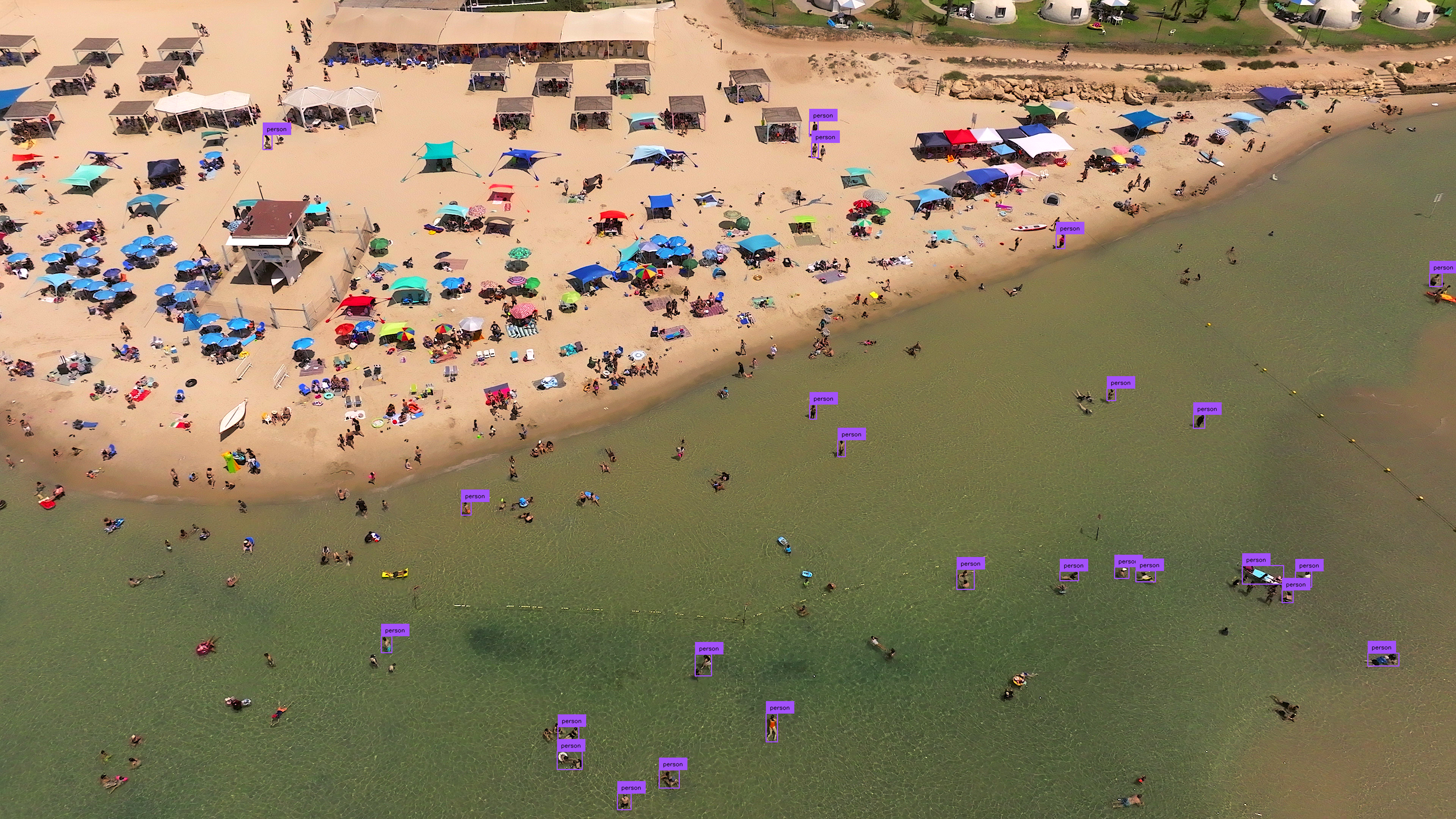
Modifying the input resolution of images before detection can enhance small object identification at the cost of processing speed and increased memory usage. This method is less effective for ultra-high-resolution images (4K and above).
|
|
|
|
=== "Inference"
|
|
|
|
```{ .py hl_lines="5" }
|
|
import cv2
|
|
import supervision as sv
|
|
from inference import get_model
|
|
|
|
model = get_model(model_id="yolov8x-1280")
|
|
image = cv2.imread("<SOURCE_IMAGE_PATH>")
|
|
results = model.infer(image)[0]
|
|
detections = sv.Detections.from_inference(results)
|
|
|
|
box_annotator = sv.BoxAnnotator()
|
|
label_annotator = sv.LabelAnnotator()
|
|
|
|
annotated_image = box_annotator.annotate(
|
|
scene=image, detections=detections)
|
|
annotated_image = label_annotator.annotate(
|
|
scene=annotated_image, detections=detections)
|
|
```
|
|
|
|
=== "Ultralytics"
|
|
|
|
```{ .py hl_lines="7" }
|
|
import cv2
|
|
import supervision as sv
|
|
from ultralytics import YOLO
|
|
|
|
model = YOLO("yolov8x.pt")
|
|
image = cv2.imread("<SOURCE_IMAGE_PATH>")
|
|
results = model(image, imgsz=1280)[0]
|
|
detections = sv.Detections.from_ultralytics(results)
|
|
|
|
box_annotator = sv.BoxAnnotator()
|
|
label_annotator = sv.LabelAnnotator()
|
|
|
|
annotated_image = box_annotator.annotate(
|
|
scene=image, detections=detections)
|
|
annotated_image = label_annotator.annotate(
|
|
scene=annotated_image, detections=detections)
|
|
```
|
|
|
|
|
|
|
|
## Inference Slicer
|
|
|
|
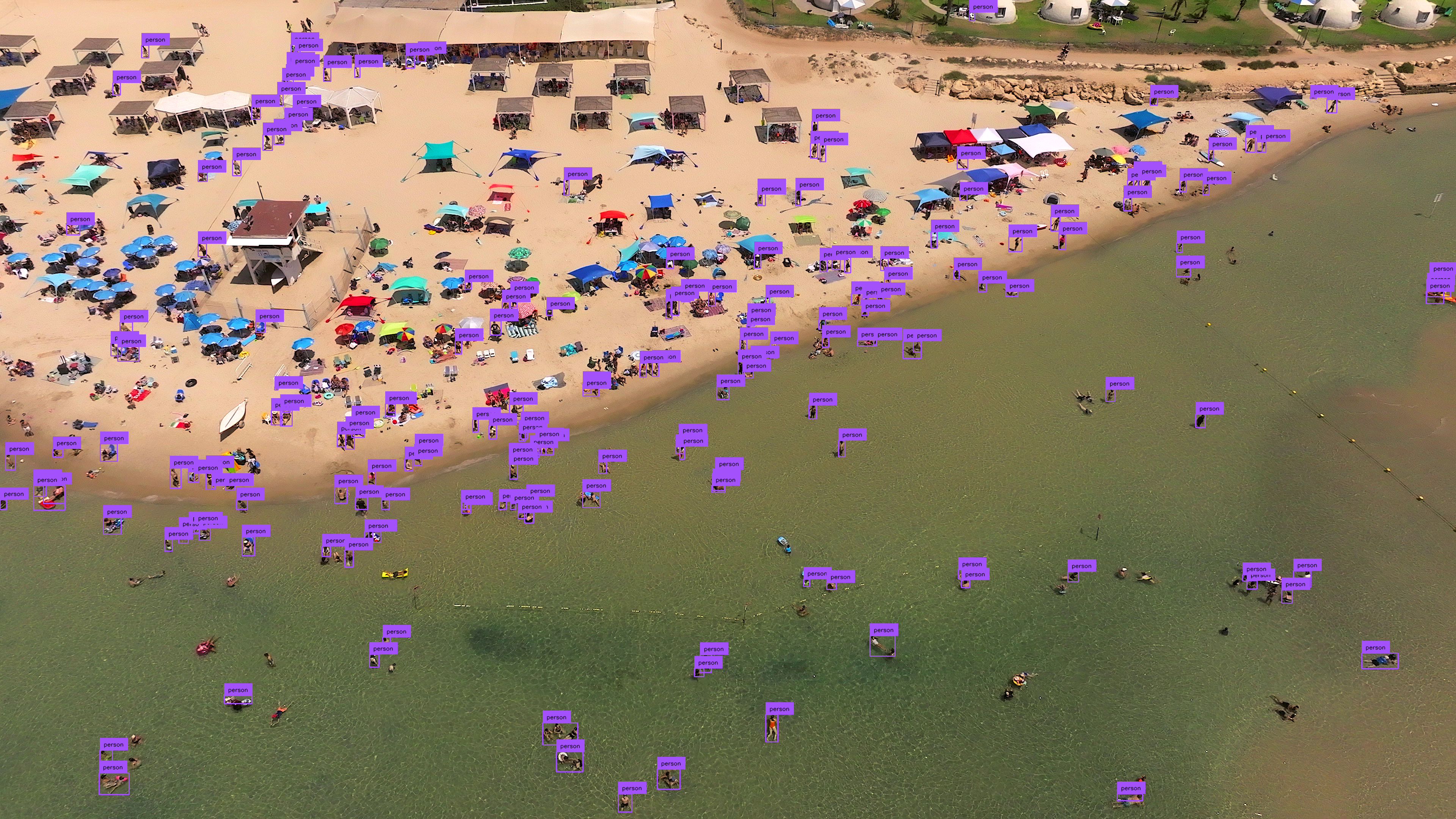
[`InferenceSlicer`](https://supervision.roboflow.com/latest/detection/tools/inference_slicer/#supervision.detection.tools.inference_slicer.InferenceSlicer) processes high-resolution images by dividing them into smaller segments, detecting objects within each, and aggregating the results.
|
|
|
|
<video controls>
|
|
<source src="https://media.roboflow.com/supervision_detect_small_objects_example_2.mp4" type="video/mp4">
|
|
</video>
|
|
|
|
=== "Inference"
|
|
|
|
```{ .py hl_lines="9-14" }
|
|
import cv2
|
|
import numpy as np
|
|
import supervision as sv
|
|
from inference import get_model
|
|
|
|
model = get_model(model_id="yolov8x-640")
|
|
image = cv2.imread("<SOURCE_IMAGE_PATH>")
|
|
|
|
def callback(image_slice: np.ndarray) -> sv.Detections:
|
|
results = model.infer(image_slice)[0]
|
|
return sv.Detections.from_inference(results)
|
|
|
|
slicer = sv.InferenceSlicer(callback = callback)
|
|
detections = slicer(image)
|
|
|
|
box_annotator = sv.BoxAnnotator()
|
|
label_annotator = sv.LabelAnnotator()
|
|
|
|
annotated_image = box_annotator.annotate(
|
|
scene=image, detections=detections)
|
|
annotated_image = label_annotator.annotate(
|
|
scene=annotated_image, detections=detections)
|
|
```
|
|
|
|
=== "Ultralytics"
|
|
|
|
```{ .py hl_lines="9-14" }
|
|
import cv2
|
|
import numpy as np
|
|
import supervision as sv
|
|
from ultralytics import YOLO
|
|
|
|
model = YOLO("yolov8x.pt")
|
|
image = cv2.imread("<SOURCE_IMAGE_PATH>")
|
|
|
|
def callback(image_slice: np.ndarray) -> sv.Detections:
|
|
result = model(image_slice)[0]
|
|
return sv.Detections.from_ultralytics(result)
|
|
|
|
slicer = sv.InferenceSlicer(callback = callback)
|
|
detections = slicer(image)
|
|
|
|
box_annotator = sv.BoxAnnotator()
|
|
label_annotator = sv.LabelAnnotator()
|
|
|
|
annotated_image = box_annotator.annotate(
|
|
scene=image, detections=detections)
|
|
annotated_image = label_annotator.annotate(
|
|
scene=annotated_image, detections=detections)
|
|
```
|
|
|
|
=== "Transformers"
|
|
|
|
```{ .py hl_lines="13-28" }
|
|
import cv2
|
|
import torch
|
|
import numpy as np
|
|
import supervision as sv
|
|
from PIL import Image
|
|
from transformers import DetrImageProcessor, DetrForObjectDetection
|
|
|
|
processor = DetrImageProcessor.from_pretrained("facebook/detr-resnet-50")
|
|
model = DetrForObjectDetection.from_pretrained("facebook/detr-resnet-50")
|
|
|
|
image = cv2.imread("<SOURCE_IMAGE_PATH>")
|
|
|
|
def callback(image_slice: np.ndarray) -> sv.Detections:
|
|
image_slice = cv2.cvtColor(image_slice, cv2.COLOR_BGR2RGB)
|
|
image_slice = Image.fromarray(image_slice)
|
|
inputs = processor(images=image_slice, return_tensors="pt")
|
|
|
|
with torch.no_grad():
|
|
outputs = model(**inputs)
|
|
|
|
width, height = image_slice.size
|
|
target_size = torch.tensor([[width, height]])
|
|
results = processor.post_process_object_detection(
|
|
outputs=outputs, target_sizes=target_size)[0]
|
|
return sv.Detections.from_transformers(results)
|
|
|
|
slicer = sv.InferenceSlicer(callback = callback)
|
|
detections = slicer(image)
|
|
|
|
box_annotator = sv.BoxAnnotator()
|
|
label_annotator = sv.LabelAnnotator()
|
|
|
|
labels = [
|
|
model.config.id2label[class_id]
|
|
for class_id
|
|
in detections.class_id
|
|
]
|
|
|
|
annotated_image = box_annotator.annotate(
|
|
scene=image, detections=detections)
|
|
annotated_image = label_annotator.annotate(
|
|
scene=annotated_image, detections=detections, labels=labels)
|
|
```
|
|
|
|
|
|
|
|
## Small Object Segmentation
|
|
|
|
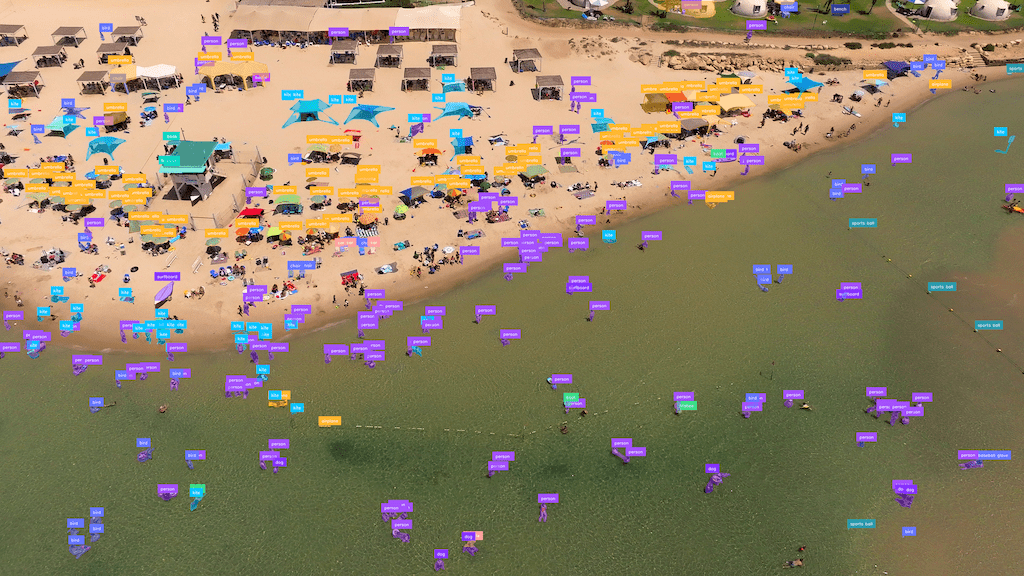
[`InferenceSlicer`](https://supervision.roboflow.com/latest/detection/tools/inference_slicer/#supervision.detection.tools.inference_slicer.InferenceSlicer) can perform segmentation tasks too.
|
|
|
|
=== "Inference"
|
|
|
|
```{ .py hl_lines="6 16 19-20" }
|
|
import cv2
|
|
import numpy as np
|
|
import supervision as sv
|
|
from inference import get_model
|
|
|
|
model = get_model(model_id="yolov8x-seg-640")
|
|
image = cv2.imread("<SOURCE_IMAGE_PATH>")
|
|
|
|
def callback(image_slice: np.ndarray) -> sv.Detections:
|
|
results = model.infer(image_slice)[0]
|
|
return sv.Detections.from_inference(results)
|
|
|
|
slicer = sv.InferenceSlicer(callback = callback)
|
|
detections = slicer(image)
|
|
|
|
mask_annotator = sv.MaskAnnotator()
|
|
label_annotator = sv.LabelAnnotator()
|
|
|
|
annotated_image = mask_annotator.annotate(
|
|
scene=image, detections=detections)
|
|
annotated_image = label_annotator.annotate(
|
|
scene=annotated_image, detections=detections)
|
|
```
|
|
|
|
=== "Ultralytics"
|
|
|
|
```{ .py hl_lines="6 16 19-20" }
|
|
import cv2
|
|
import numpy as np
|
|
import supervision as sv
|
|
from ultralytics import YOLO
|
|
|
|
model = YOLO("yolov8x-seg.pt")
|
|
image = cv2.imread("<SOURCE_IMAGE_PATH>")
|
|
|
|
def callback(image_slice: np.ndarray) -> sv.Detections:
|
|
result = model(image_slice)[0]
|
|
return sv.Detections.from_ultralytics(result)
|
|
|
|
slicer = sv.InferenceSlicer(callback = callback)
|
|
detections = slicer(image)
|
|
|
|
mask_annotator = sv.MaskAnnotator()
|
|
label_annotator = sv.LabelAnnotator()
|
|
|
|
annotated_image = mask_annotator.annotate(
|
|
scene=image, detections=detections)
|
|
annotated_image = label_annotator.annotate(
|
|
scene=annotated_image, detections=detections)
|
|
```
|
|
|
|
|
|
|
|
## Frequently Asked Questions
|
|
|
|
### How do I detect small objects with supervision?
|
|
|
|
Use `sv.InferenceSlicer` to split a high-resolution image into overlapping tiles, run detection on each tile, and merge results with non-maximum suppression. This dramatically improves recall for tiny targets.
|
|
|
|
### What overlap should I use between tiles?
|
|
|
|
`InferenceSlicer` takes overlap in pixels via `overlap_wh`, not as a percentage. The default is `100` pixels in both directions. Increase `overlap_wh` when objects are close to the tile size or often appear on tile boundaries, and decrease it when speed is more important.
|
|
|
|
### Can I use InferenceSlicer with any detection model?
|
|
|
|
Yes. Wrap any model or converter path that can produce `sv.Detections` in a callback, pass that callback to `sv.InferenceSlicer(callback=...)`, and then call the slicer with your image.
|
|
|
|
## Author
|
|
|
|
- [Piotr Skalski](https://github.com/SkalskiP) — Computer Vision Engineer, Roboflow
|