---
comments: true
description: Detect small objects in images by applying SAHI inference slicing with supervision's InferenceSlicer — improve recall for tiny targets.
authors:
- name: Piotr Skalski
role: Computer Vision Engineer, Roboflow
github: https://github.com/SkalskiP
date_modified: 2026-04-22
---
# Detect Small Objects
This guide shows how to detect small objects with the [Inference](https://github.com/roboflow/inference), [Ultralytics](https://github.com/ultralytics/ultralytics) or [Transformers](https://github.com/huggingface/transformers) packages using [`InferenceSlicer`](https://supervision.roboflow.com/latest/detection/tools/inference_slicer/#supervision.detection.tools.inference_slicer.InferenceSlicer).
## Baseline Detection
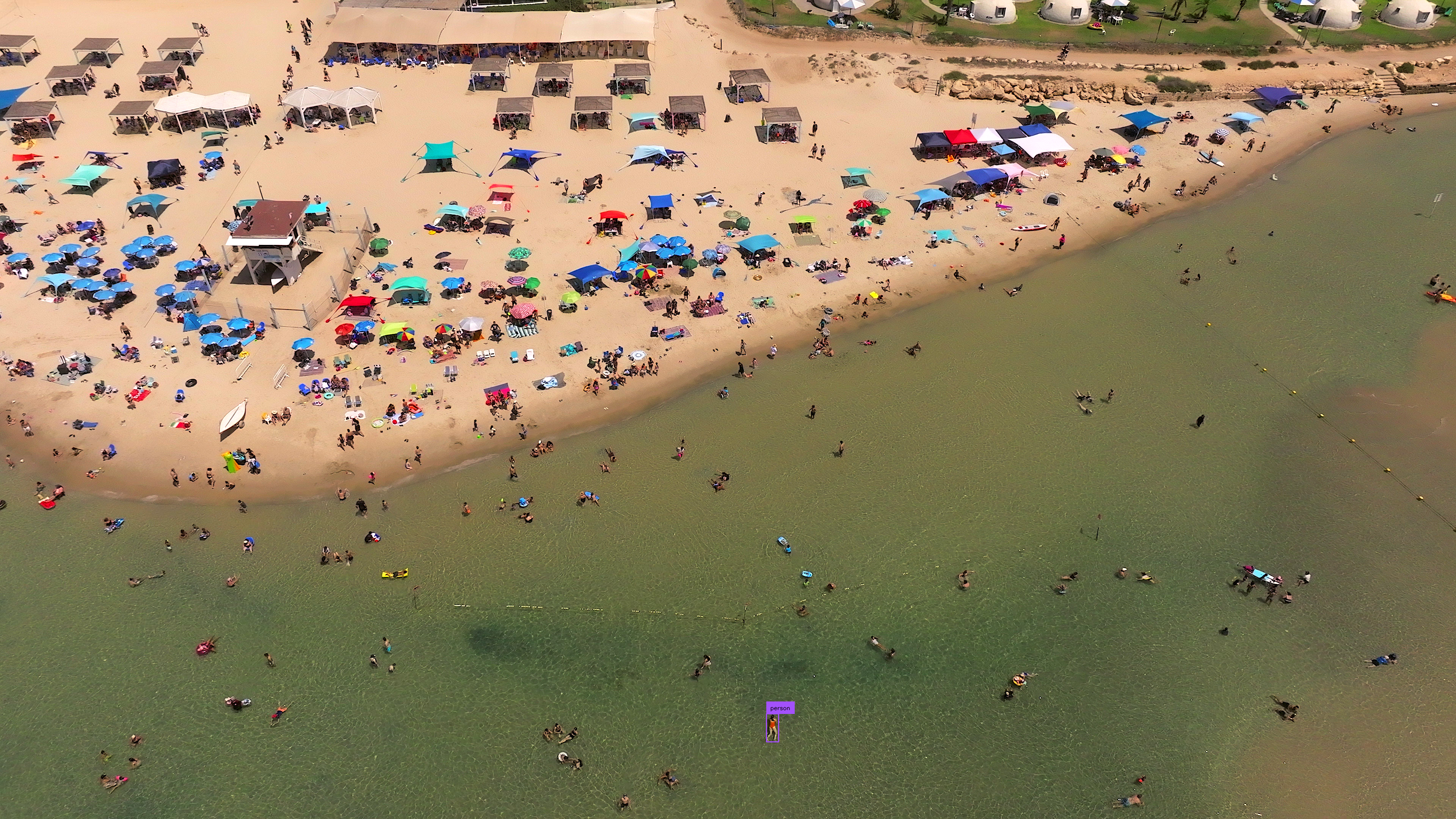
Small object detection in high-resolution images presents challenges due to the objects' size relative to the image resolution.
Running a standard detection model on the full image establishes a baseline for comparison. Load your chosen model, pass the image through it, and convert the results into a `Detections` object. This baseline reveals how many small objects the model misses at native resolution, motivating the sliced inference approach shown later.
=== "Inference"
```python
import cv2
import supervision as sv
from inference import get_model
model = get_model(model_id="yolov8x-640")
image = cv2.imread("")
results = model.infer(image)[0]
detections = sv.Detections.from_inference(results)
box_annotator = sv.BoxAnnotator()
label_annotator = sv.LabelAnnotator()
annotated_image = box_annotator.annotate(
scene=image,
detections=detections,
)
annotated_image = label_annotator.annotate(
scene=annotated_image,
detections=detections,
)
```
=== "Ultralytics"
```python
import cv2
import supervision as sv
from ultralytics import YOLO
model = YOLO("yolov8x.pt")
image = cv2.imread("")
results = model(image)[0]
detections = sv.Detections.from_ultralytics(results)
box_annotator = sv.BoxAnnotator()
label_annotator = sv.LabelAnnotator()
annotated_image = box_annotator.annotate(
scene=image,
detections=detections,
)
annotated_image = label_annotator.annotate(
scene=annotated_image,
detections=detections,
)
```
=== "Transformers"
```python
import torch
import supervision as sv
from PIL import Image
from transformers import DetrImageProcessor, DetrForSegmentation
processor = DetrImageProcessor.from_pretrained("facebook/detr-resnet-50")
model = DetrForSegmentation.from_pretrained("facebook/detr-resnet-50")
image = Image.open("")
inputs = processor(images=image, return_tensors="pt")
with torch.no_grad():
outputs = model(**inputs)
width, height = image_slice.size
target_size = torch.tensor([[width, height]])
results = processor.post_process_object_detection(
outputs=outputs, target_sizes=target_size
)[0]
detections = sv.Detections.from_transformers(results)
box_annotator = sv.BoxAnnotator()
label_annotator = sv.LabelAnnotator()
labels = [model.config.id2label[class_id] for class_id in detections.class_id]
annotated_image = box_annotator.annotate(scene=image, detections=detections)
annotated_image = label_annotator.annotate(
scene=annotated_image, detections=detections, labels=labels
)
```
## Input Resolution
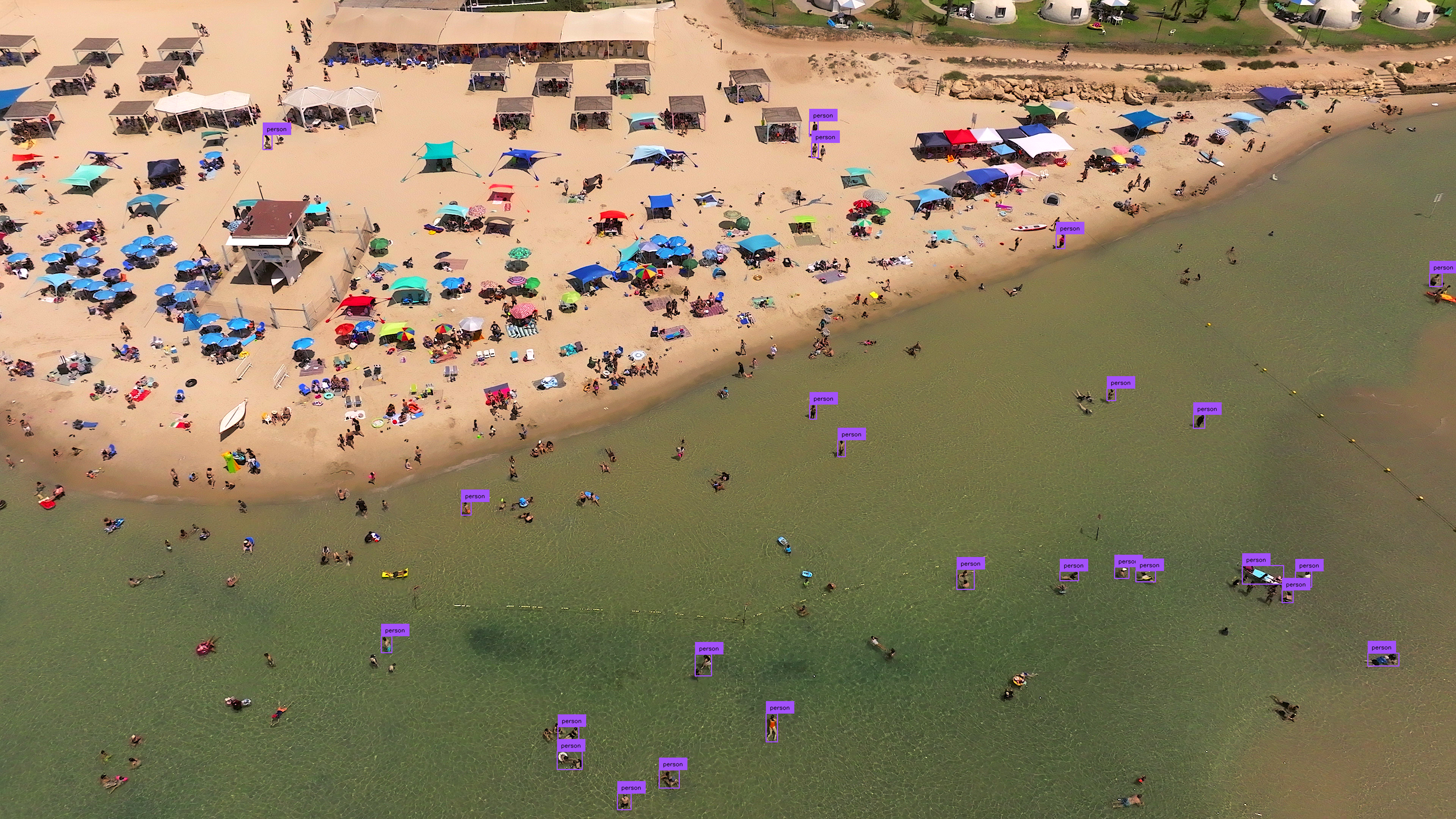
Modifying the input resolution of images before detection can enhance small object identification at the cost of processing speed and increased memory usage. This method is less effective for ultra-high-resolution images (4K and above).
=== "Inference"
```{ .py hl_lines="5" }
import cv2
import supervision as sv
from inference import get_model
model = get_model(model_id="yolov8x-1280")
image = cv2.imread("")
results = model.infer(image)[0]
detections = sv.Detections.from_inference(results)
box_annotator = sv.BoxAnnotator()
label_annotator = sv.LabelAnnotator()
annotated_image = box_annotator.annotate(
scene=image, detections=detections)
annotated_image = label_annotator.annotate(
scene=annotated_image, detections=detections)
```
=== "Ultralytics"
```{ .py hl_lines="7" }
import cv2
import supervision as sv
from ultralytics import YOLO
model = YOLO("yolov8x.pt")
image = cv2.imread("")
results = model(image, imgsz=1280)[0]
detections = sv.Detections.from_ultralytics(results)
box_annotator = sv.BoxAnnotator()
label_annotator = sv.LabelAnnotator()
annotated_image = box_annotator.annotate(
scene=image, detections=detections)
annotated_image = label_annotator.annotate(
scene=annotated_image, detections=detections)
```
## Inference Slicer
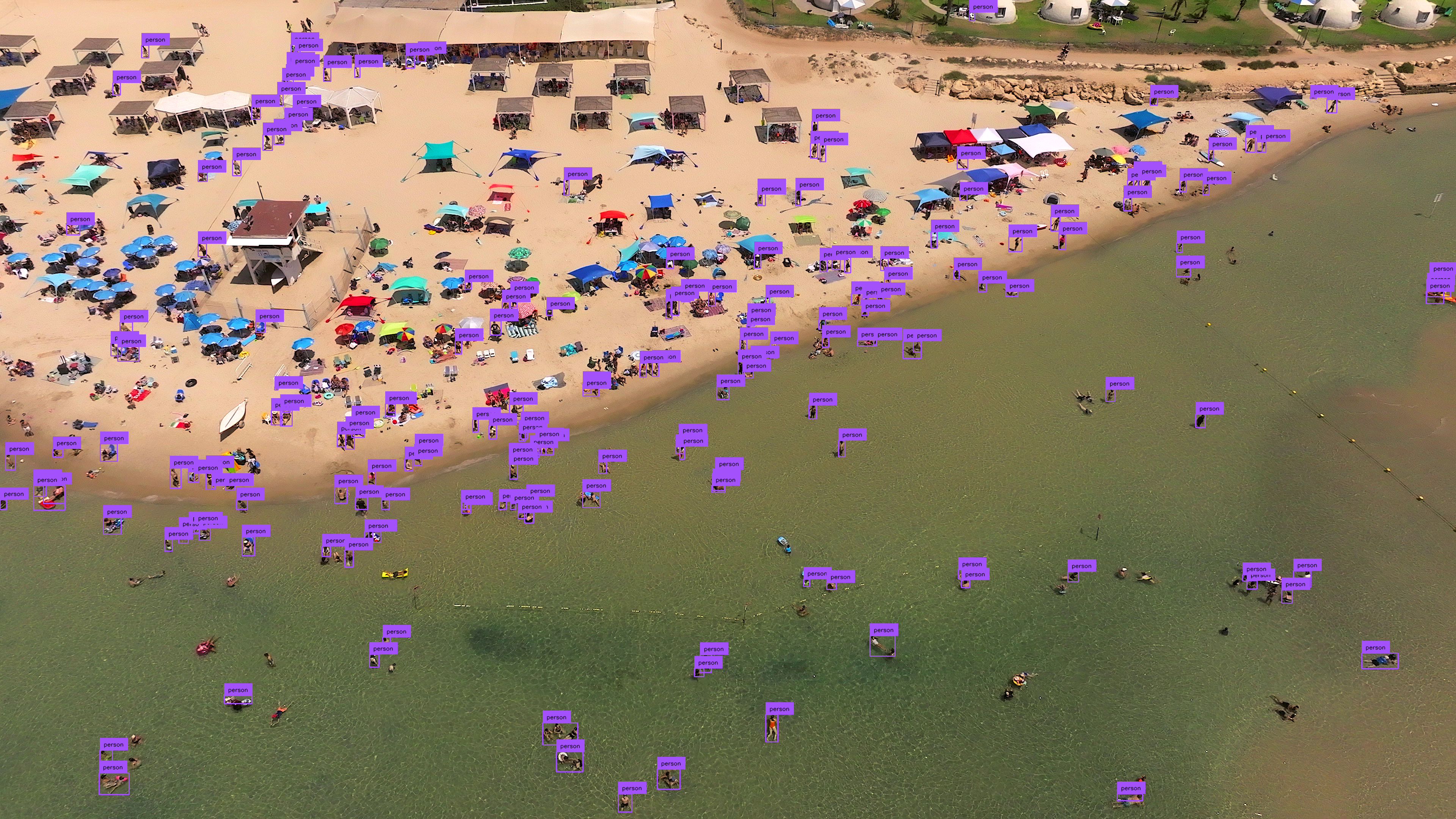
[`InferenceSlicer`](https://supervision.roboflow.com/latest/detection/tools/inference_slicer/#supervision.detection.tools.inference_slicer.InferenceSlicer) processes high-resolution images by dividing them into smaller segments, detecting objects within each, and aggregating the results.
=== "Inference"
```{ .py hl_lines="9-14" }
import cv2
import numpy as np
import supervision as sv
from inference import get_model
model = get_model(model_id="yolov8x-640")
image = cv2.imread("")
def callback(image_slice: np.ndarray) -> sv.Detections:
results = model.infer(image_slice)[0]
return sv.Detections.from_inference(results)
slicer = sv.InferenceSlicer(callback = callback)
detections = slicer(image)
box_annotator = sv.BoxAnnotator()
label_annotator = sv.LabelAnnotator()
annotated_image = box_annotator.annotate(
scene=image, detections=detections)
annotated_image = label_annotator.annotate(
scene=annotated_image, detections=detections)
```
=== "Ultralytics"
```{ .py hl_lines="9-14" }
import cv2
import numpy as np
import supervision as sv
from ultralytics import YOLO
model = YOLO("yolov8x.pt")
image = cv2.imread("")
def callback(image_slice: np.ndarray) -> sv.Detections:
result = model(image_slice)[0]
return sv.Detections.from_ultralytics(result)
slicer = sv.InferenceSlicer(callback = callback)
detections = slicer(image)
box_annotator = sv.BoxAnnotator()
label_annotator = sv.LabelAnnotator()
annotated_image = box_annotator.annotate(
scene=image, detections=detections)
annotated_image = label_annotator.annotate(
scene=annotated_image, detections=detections)
```
=== "Transformers"
```{ .py hl_lines="13-28" }
import cv2
import torch
import numpy as np
import supervision as sv
from PIL import Image
from transformers import DetrImageProcessor, DetrForObjectDetection
processor = DetrImageProcessor.from_pretrained("facebook/detr-resnet-50")
model = DetrForObjectDetection.from_pretrained("facebook/detr-resnet-50")
image = cv2.imread("")
def callback(image_slice: np.ndarray) -> sv.Detections:
image_slice = cv2.cvtColor(image_slice, cv2.COLOR_BGR2RGB)
image_slice = Image.fromarray(image_slice)
inputs = processor(images=image_slice, return_tensors="pt")
with torch.no_grad():
outputs = model(**inputs)
width, height = image_slice.size
target_size = torch.tensor([[width, height]])
results = processor.post_process_object_detection(
outputs=outputs, target_sizes=target_size)[0]
return sv.Detections.from_transformers(results)
slicer = sv.InferenceSlicer(callback = callback)
detections = slicer(image)
box_annotator = sv.BoxAnnotator()
label_annotator = sv.LabelAnnotator()
labels = [
model.config.id2label[class_id]
for class_id
in detections.class_id
]
annotated_image = box_annotator.annotate(
scene=image, detections=detections)
annotated_image = label_annotator.annotate(
scene=annotated_image, detections=detections, labels=labels)
```
## Small Object Segmentation
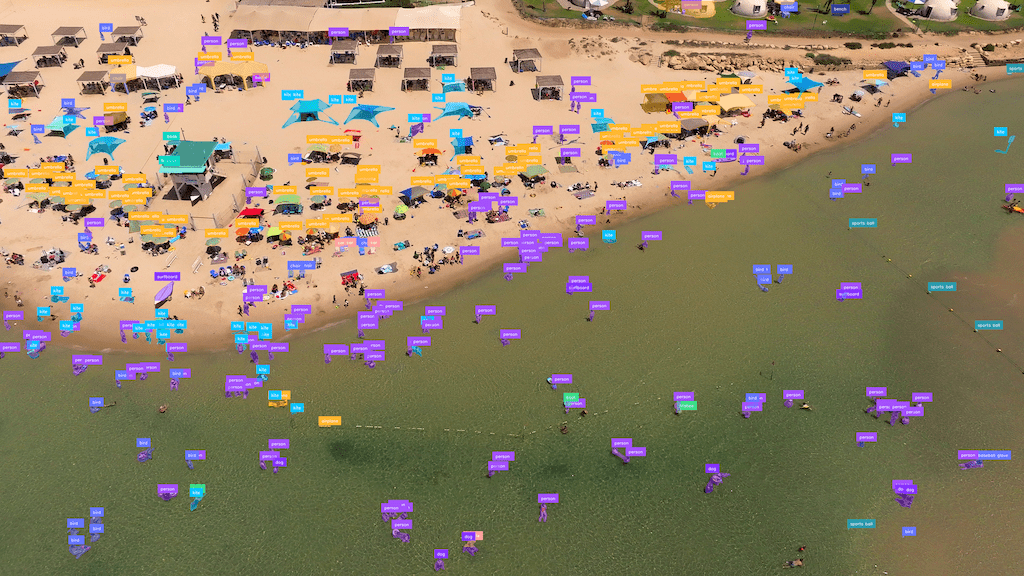
[`InferenceSlicer`](https://supervision.roboflow.com/latest/detection/tools/inference_slicer/#supervision.detection.tools.inference_slicer.InferenceSlicer) can perform segmentation tasks too.
=== "Inference"
```{ .py hl_lines="6 16 19-20" }
import cv2
import numpy as np
import supervision as sv
from inference import get_model
model = get_model(model_id="yolov8x-seg-640")
image = cv2.imread("")
def callback(image_slice: np.ndarray) -> sv.Detections:
results = model.infer(image_slice)[0]
return sv.Detections.from_inference(results)
slicer = sv.InferenceSlicer(callback = callback)
detections = slicer(image)
mask_annotator = sv.MaskAnnotator()
label_annotator = sv.LabelAnnotator()
annotated_image = mask_annotator.annotate(
scene=image, detections=detections)
annotated_image = label_annotator.annotate(
scene=annotated_image, detections=detections)
```
=== "Ultralytics"
```{ .py hl_lines="6 16 19-20" }
import cv2
import numpy as np
import supervision as sv
from ultralytics import YOLO
model = YOLO("yolov8x-seg.pt")
image = cv2.imread("")
def callback(image_slice: np.ndarray) -> sv.Detections:
result = model(image_slice)[0]
return sv.Detections.from_ultralytics(result)
slicer = sv.InferenceSlicer(callback = callback)
detections = slicer(image)
mask_annotator = sv.MaskAnnotator()
label_annotator = sv.LabelAnnotator()
annotated_image = mask_annotator.annotate(
scene=image, detections=detections)
annotated_image = label_annotator.annotate(
scene=annotated_image, detections=detections)
```
## Frequently Asked Questions
### How do I detect small objects with supervision?
Use `sv.InferenceSlicer` to split a high-resolution image into overlapping tiles, run detection on each tile, and merge results with non-maximum suppression. This dramatically improves recall for tiny targets.
### What overlap should I use between tiles?
`InferenceSlicer` takes overlap in pixels via `overlap_wh`, not as a percentage. The default is `100` pixels in both directions. Increase `overlap_wh` when objects are close to the tile size or often appear on tile boundaries, and decrease it when speed is more important.
### Can I use InferenceSlicer with any detection model?
Yes. Wrap any model or converter path that can produce `sv.Detections` in a callback, pass that callback to `sv.InferenceSlicer(callback=...)`, and then call the slicer with your image.
## Author
- [Piotr Skalski](https://github.com/SkalskiP) — Computer Vision Engineer, Roboflow