 wehub-resource-sync
212 lines
7.1 KiB
Markdown
212 lines
7.1 KiB
Markdown
<!-- WEHUB_ZH_README -->
|
||
> [!NOTE]
|
||
> 本文档由 WeHub 基于上游 README 翻译整理,属于社区翻译,非官方中文文档。
|
||
> [English](./README.en.md) · [原始项目](https://github.com/creativetimofficial/ui) · [上游 README](https://github.com/creativetimofficial/ui/blob/HEAD/README.md)
|
||
> 原作者、版权与许可证归属以原始项目及本仓库 LICENSE 文件为准。
|
||
|
||
[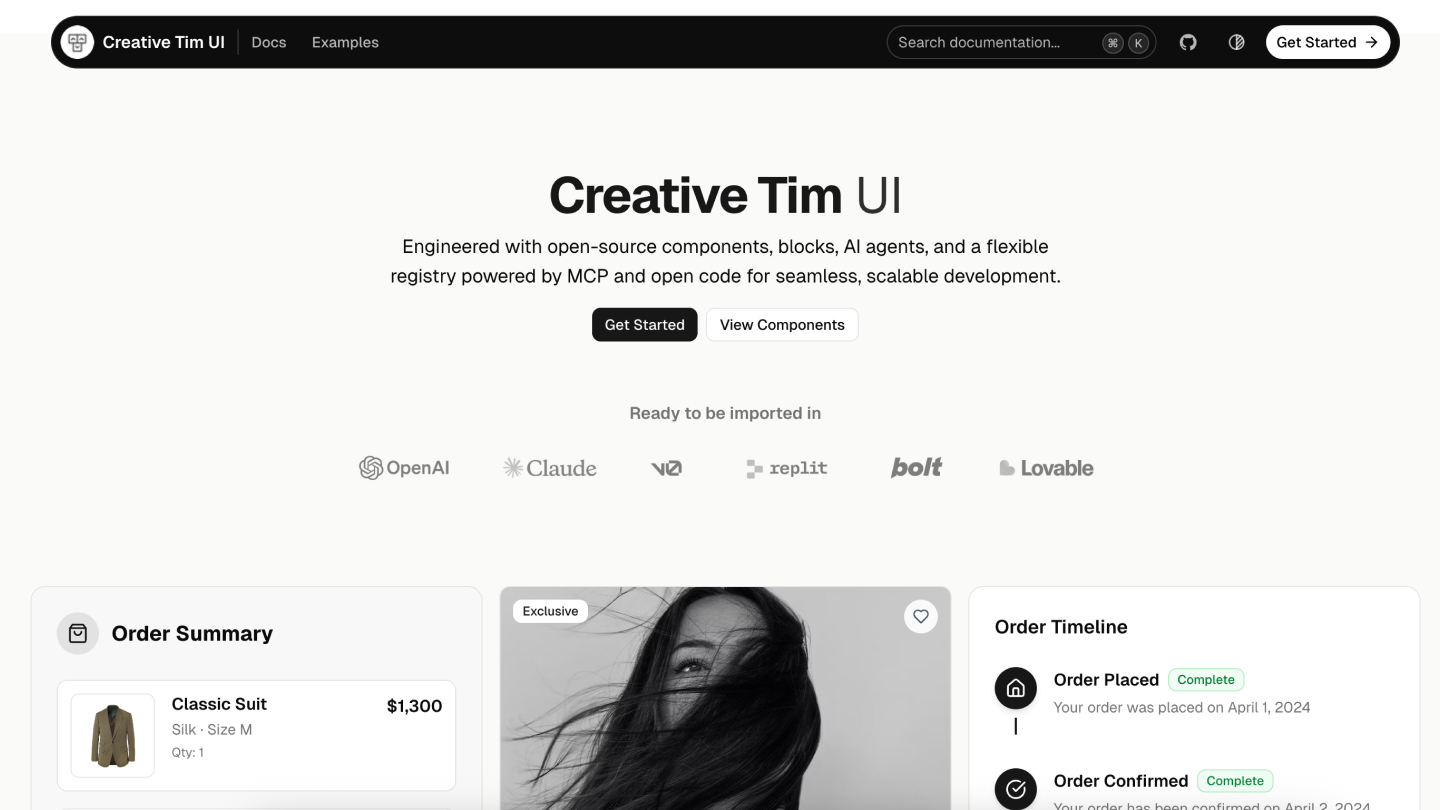](https://creative-tim.com/ui)
|
||
|
||
# Creative Tim UI
|
||
|
||
[Creative Tim UI](https://creative-tim.com/ui) 是一个基于 [shadcn/ui](https://ui.shadcn.com/) 构建的综合性组件库,可帮助你更快地开发现代 Web 应用。
|
||
|
||
## 概述
|
||
|
||
Creative Tim UI 提供预构建、可定制的 React 组件与区块,专为构建美观且可用于生产环境的 Web 应用而设计。
|
||
CLI 可让你轻松将这些组件添加到你的 Next.js 项目中。
|
||
|
||
## 安装
|
||
你可以直接使用 npx 运行 Creative Tim UI CLI,或进行全局安装:
|
||
```bash
|
||
# Use directly (recommended)
|
||
npx @creative-tim/ui@latest add <component-name>
|
||
|
||
# Or using shadcn cli
|
||
npx shadcn@latest add https://creative-tim.com/ui/r/all.json
|
||
```
|
||
|
||
## 前置要求
|
||
在使用 Creative Tim UI 之前,请确保你的 Next.js 项目满足以下要求:
|
||
- **Node.js 18** 或更高版本
|
||
- 项目中已初始化 **shadcn/ui**(npx shadcn@latest init)
|
||
- 已配置 **Tailwind CSS**
|
||
|
||
## 使用
|
||
|
||
### 安装全部组件
|
||
一次性安装所有可用的 Creative Tim UI 组件:
|
||
```bash
|
||
npx @creative-tim/ui@latest add all
|
||
```
|
||
该命令将:
|
||
- 若尚未配置,则设置 shadcn/ui
|
||
- 将所有 Creative Tim UI 组件安装到你配置的组件目录
|
||
- 向项目添加必要的依赖
|
||
|
||
### 安装指定组件
|
||
使用 `components add` 命令安装单个组件:
|
||
```bash
|
||
npx @creative-tim/ui@latest add <component-name>
|
||
```
|
||
示例:
|
||
```bash
|
||
# Install the orb component
|
||
npx @creative-tim/ui@latest add card
|
||
```
|
||
|
||
### 备选方案:使用 shadcn CLI
|
||
你也可以使用标准的 shadcn/ui CLI 安装组件:
|
||
```bash
|
||
# Install all components
|
||
npx shadcn@latest add https://creative-tim.com/ui/r/all.json
|
||
|
||
# Install a specific component
|
||
npx shadcn@latest add https://creative-tim.com/ui/r/button.json
|
||
```
|
||
|
||
所有可用组件可在[此处](https://creative-tim.com/ui/docs/components) 查看,也可在[此处](https://creative-tim.com/ui/blocks). 浏览示例区块列表。
|
||
|
||
## 区块
|
||
|
||
浏览我们按类别整理的即用型区块集合。每个区块均可完全自定义,并可通过一条命令添加到你的项目中。
|
||
|
||
### 应用 UI
|
||
|
||
<table>
|
||
<tr>
|
||
<td width="25%">
|
||
<a href="https://creative-tim.com/ui/blocks/modals">
|
||
<img src="https://raw.githubusercontent.com/creativetimofficial/public-assets/refs/heads/master/david-ui/thumbs/modals-thumbnail.jpg" alt="Modals" />
|
||
<br/>
|
||
<strong>Modals</strong><br/>
|
||
<em>5 Blocks</em>
|
||
</a>
|
||
</td>
|
||
<td width="25%">
|
||
<a href="https://creative-tim.com/ui/blocks/account">
|
||
<img src="https://raw.githubusercontent.com/creativetimofficial/public-assets/refs/heads/master/david-ui/thumbs/account-thumbnail.jpg" alt="Account" />
|
||
<br/>
|
||
<strong>Account</strong><br/>
|
||
<em>7 Blocks</em>
|
||
</a>
|
||
</td>
|
||
<td width="25%">
|
||
<a href="https://creative-tim.com/ui/blocks/billing">
|
||
<img src="https://raw.githubusercontent.com/creativetimofficial/public-assets/refs/heads/master/david-ui/thumbs/billing-thumbnail.jpg" alt="Billing" />
|
||
<br/>
|
||
<strong>Billing</strong><br/>
|
||
<em>5 Blocks</em>
|
||
</a>
|
||
</td>
|
||
</tr>
|
||
</table>
|
||
|
||
### 营销
|
||
|
||
<table>
|
||
<tr>
|
||
<td width="25%">
|
||
<a href="https://creative-tim.com/ui/blocks/testimonials">
|
||
<img src="https://raw.githubusercontent.com/creativetimofficial/public-assets/refs/heads/master/david-ui/thumbs/testimonial-thumbnail.jpg" alt="Testimonial Sections" />
|
||
<br/>
|
||
<strong>Testimonial Sections</strong><br/>
|
||
<em>17 Blocks</em>
|
||
</a>
|
||
</td>
|
||
<td width="25%">
|
||
<a href="https://creative-tim.com/ui/blocks/contact">
|
||
<img src="https://raw.githubusercontent.com/creativetimofficial/public-assets/refs/heads/master/david-ui/thumbs/contact-us-thumbnail.jpg" alt="Contact Sections" />
|
||
<br/>
|
||
<strong>Contact Sections</strong><br/>
|
||
<em>15 Blocks</em>
|
||
</a>
|
||
</td>
|
||
<td width="25%">
|
||
<a href="https://creative-tim.com/ui/blocks/footers">
|
||
<img src="https://raw.githubusercontent.com/creativetimofficial/public-assets/refs/heads/master/david-ui/thumbs/footer-thumbnail.jpg" alt="Footers" />
|
||
<br/>
|
||
<strong>Footers</strong><br/>
|
||
<em>16 Blocks</em>
|
||
</a>
|
||
</td>
|
||
</tr>
|
||
<tr>
|
||
<td width="25%">
|
||
<a href="https://creative-tim.com/ui/blocks/faqs">
|
||
<img src="https://raw.githubusercontent.com/creativetimofficial/public-assets/refs/heads/master/david-ui/thumbs/faq-thumbnail.jpg" alt="FAQs" />
|
||
<br/>
|
||
<strong>FAQs</strong><br/>
|
||
<em>6 Blocks</em>
|
||
</a>
|
||
</td>
|
||
<td width="25%">
|
||
<a href="https://creative-tim.com/ui/blocks/blog">
|
||
<img src="https://raw.githubusercontent.com/creativetimofficial/public-assets/refs/heads/master/david-ui/thumbs/blog-posts-thumbnail.jpg" alt="Blog" />
|
||
<br/>
|
||
<strong>Blog</strong><br/>
|
||
<em>15 Blocks</em>
|
||
</a>
|
||
</td>
|
||
</tr>
|
||
</table>
|
||
|
||
### 电商 UI
|
||
适用于产品列表、购物车和结账流程的即用型区块。
|
||
|
||
<table>
|
||
<tr>
|
||
<td width="25%">
|
||
<a href="https://creative-tim.com/ui/blocks/ecommerce">
|
||
<img src="https://raw.githubusercontent.com/creativetimofficial/public-assets/refs/heads/master/david-ui/thumbs/ecommerce-thumbnail.jpg" alt="Ecommerce Sections" />
|
||
<br/>
|
||
<strong>Ecommerce Sections</strong><br/>
|
||
<em>14 Blocks</em>
|
||
</a>
|
||
</td>
|
||
</tr>
|
||
</table>
|
||
|
||
### Web 3.0
|
||
为去中心化应用、区块链项目和加密货币平台打造的创新区块。
|
||
|
||
<table>
|
||
<tr>
|
||
<td width="25%">
|
||
<a href="https://creative-tim.com/ui/blocks/web3">
|
||
<img src="https://raw.githubusercontent.com/creativetimofficial/public-assets/refs/heads/master/david-ui/thumbs/collections-thumbnail.jpg" alt="Web 3.0 Cards" />
|
||
<br/>
|
||
<strong>Web 3.0 Cards</strong><br/>
|
||
<em>5 Blocks</em>
|
||
</a>
|
||
</td>
|
||
</tr>
|
||
</table>
|
||
|
||
## 贡献
|
||
|
||
如果你想为 Creative Tim UI 做出贡献,请按以下步骤操作:
|
||
|
||
1. Fork 该仓库
|
||
2. 创建新分支
|
||
3. 在 registry 中修改组件。
|
||
4. 向 main 分支提交 PR。
|
||
|
||
请阅读[贡献指南](/CONTRIBUTING.md)。
|
||
|
||
## 版权与许可
|
||
|
||
Creative Tim UI 建立在开源社区卓越工作的基础之上:
|
||
|
||
- **[shadcn/ui](https://ui.shadcn.com/)** - 文档结构、registry 系统以及基础(原子)组件均来自 shadcn/ui 的开源工作。[MIT License](https://github.com/shadcn-ui/ui/blob/main/LICENSE.md)
|
||
- **[Material Tailwind](https://material-tailwind.com/v3)** by Creative Tim - 区块与组件设计受 Material Tailwind Framework 启发并以其为基础。[MIT License](https://github.com/creativetimofficial/material-tailwind/blob/main/LICENSE.md)
|
||
- **[Eleven Labs UI](https://github.com/elevenlabs/elevenlabs-ui)** - 文档结构与区块设计思路的总体灵感来源。[MIT License](https://github.com/elevenlabs/ui/blob/main/LICENSE.md)
|
||
- **[Geist Font](https://vercel.com/font)** by Vercel - 界面中使用的优美字体。[SIL Open Font License 1.1](https://github.com/vercel/geist-font/blob/main/LICENSE.txt)
|
||
|
||
我们感谢这些项目在开源许可下公开其工作成果。
|
||
|
||
## 许可证
|
||
|
||
根据 [MIT license](https://github.com/creativetimofficial/ui/blob/main/LICENSE.md). 授权。
|
||
|
||
由 [Creative Tim](https://creative-tim.com). 倾心打造
|