 wehub-resource-sync
170 lines
9.8 KiB
Markdown
170 lines
9.8 KiB
Markdown
<!-- WEHUB_ZH_README -->
|
||
> [!NOTE]
|
||
> 本文档由 WeHub 基于上游 README 翻译整理,属于社区翻译,非官方中文文档。
|
||
> [English](./README.en.md) · [原始项目](https://github.com/upstash/context7) · [上游 README](https://github.com/upstash/context7/blob/HEAD/README.md)
|
||
> 原作者、版权与许可证归属以原始项目及本仓库 LICENSE 文件为准。
|
||
|
||

|
||
|
||
[](https://cursor.com/en/install-mcp?name=context7&config=eyJ1cmwiOiJodHRwczovL21jcC5jb250ZXh0Ny5jb20vbWNwIn0%3D)
|
||
|
||
# Context7 平台 — 为任意提示提供最新代码文档
|
||
|
||
[](https://context7.com) [](https://smithery.ai/server/@upstash/context7-mcp) [](https://www.npmjs.com/package/@upstash/context7-mcp) [](./LICENSE)
|
||
|
||
[](./i18n/README.zh-TW.md) [](./i18n/README.zh-CN.md) [](./i18n/README.ja.md) [](./i18n/README.ko.md) [](./i18n/README.es.md) [](./i18n/README.fr.md) [-purple>)](./i18n/README.pt-BR.md) [](./i18n/README.it.md) [](./i18n/README.id-ID.md) [](./i18n/README.de.md) [](./i18n/README.ru.md) [](./i18n/README.uk.md) [](./i18n/README.tr.md) [](./i18n/README.ar.md) [](./i18n/README.vi.md)
|
||
|
||
## ❌ 没有 Context7
|
||
|
||
LLM 依赖的是关于你所用库的过时或通用信息。你会遇到:
|
||
|
||
- ❌ 代码示例已过时,基于一年前的训练数据
|
||
- ❌ 臆造出根本不存在的 API
|
||
- ❌ 针对旧版软件包的通用回答
|
||
|
||
## ✅ 使用 Context7
|
||
|
||
Context7 直接从源头拉取最新、特定版本的文档和代码示例,并将其直接放入你的提示中。
|
||
|
||
```txt
|
||
Create a Next.js middleware that checks for a valid JWT in cookies
|
||
and redirects unauthenticated users to `/login`. use context7
|
||
```
|
||
|
||
```txt
|
||
Configure a Cloudflare Worker script to cache
|
||
JSON API responses for five minutes. use context7
|
||
```
|
||
|
||
```txt
|
||
Show me the Supabase auth API for email/password sign-up.
|
||
```
|
||
|
||
Context7 将最新的代码示例和文档直接获取到你的 LLM 上下文中。无需切换标签页,没有根本不存在的臆造 API,也不会生成过时代码。
|
||
|
||
支持两种模式:
|
||
|
||
- **CLI + Skills** — 安装一项技能,引导你的智能体使用 `ctx7` CLI 命令获取文档(无需 MCP)
|
||
- **MCP** — 注册 Context7 MCP 服务器,让你的智能体可以原生调用文档工具
|
||
|
||
## 安装
|
||
|
||
> [!NOTE]
|
||
> **建议使用 API Key**:在 [context7.com/dashboard](https://context7.com/dashboard) 获取免费 API key,以获得更高的速率限制。
|
||
|
||
一条命令即可为你的编程智能体配置 Context7。`ctx7` CLI 需要 Node.js 18 或更高版本。
|
||
|
||
```bash
|
||
npx ctx7 setup
|
||
```
|
||
|
||
通过 OAuth 进行身份验证,生成 API key,并安装相应的技能。你可以在 CLI + Skills 或 MCP 模式之间选择。使用 `--cursor`、`--claude` 或 `--opencode` 来指定目标智能体。
|
||
|
||
若要稍后移除生成的配置,请运行 `npx ctx7 remove`。如果你曾使用 `npm install -g ctx7` 全局安装了 CLI,请使用 `npm uninstall -g ctx7` 单独卸载该包。
|
||
|
||
若要手动配置,请在 MCP 客户端中使用 Context7 服务器 URL `https://mcp.context7.com/mcp`,并通过 `CONTEXT7_API_KEY` 请求头传入你的 API key。请参阅下方链接了解各客户端的具体配置说明。
|
||
|
||
**[手动安装 / 其他客户端 →](https://context7.com/docs/resources/all-clients)**
|
||
|
||
## 重要提示
|
||
|
||
### 使用库 ID(Library Id)
|
||
|
||
如果你已明确知道要使用哪个库,请在其提示中加入对应的 Context7 ID。这样 Context7 可以跳过库匹配步骤,直接检索文档。
|
||
|
||
```txt
|
||
Implement basic authentication with Supabase. use library /supabase/supabase for API and docs.
|
||
```
|
||
|
||
斜杠语法会明确告诉 Context7 要为哪个库加载文档。
|
||
|
||
### 指定版本
|
||
|
||
要获取特定库版本的文档,只需在提示中注明版本即可:
|
||
|
||
```txt
|
||
How do I set up Next.js 14 middleware? use context7
|
||
```
|
||
|
||
Context7 会自动匹配相应版本。
|
||
|
||
### 添加规则
|
||
|
||
如果你通过 `ctx7 setup` 安装,系统会自动配置一项技能,在遇到与库相关的问题时触发 Context7。若要改为手动设置规则,请在你的编程智能体中添加一条规则:
|
||
|
||
- **Cursor**:`Cursor Settings > Rules`
|
||
- **Claude Code**:`CLAUDE.md`
|
||
- 或在你所用编程智能体中的等效配置
|
||
|
||
**规则示例:**
|
||
|
||
```txt
|
||
Always use Context7 when I need library/API documentation, code generation, setup or configuration steps without me having to explicitly ask.
|
||
```
|
||
|
||
## 可用工具
|
||
|
||
### CLI 命令
|
||
|
||
- `ctx7 library <name> <query>`:按库名搜索 Context7 索引,并返回匹配的库及其 ID。
|
||
- `ctx7 docs <libraryId> <query>`:使用 Context7 兼容的库 ID 检索库的文档(例如 `/mongodb/docs`、`/vercel/next.js`)。
|
||
|
||
### MCP 工具
|
||
|
||
- `resolve-library-id`:将通用库名解析为 Context7 兼容的库 ID。
|
||
- `query`(必填):用户的问题或任务(用于按相关性对结果排序)
|
||
- `libraryName`(必填):要搜索的库名称
|
||
- `query-docs`:使用 Context7 兼容的库 ID 检索库的文档。
|
||
- `libraryId`(必填):精确的 Context7 兼容库 ID(例如 `/mongodb/docs`、`/vercel/next.js`)
|
||
- `query`(必填):用于获取相关文档的问题或任务
|
||
|
||
## 更多文档
|
||
|
||
- [CLI Reference](https://context7.com/docs/clients/cli) - 完整 CLI 文档
|
||
- [MCP Clients](https://context7.com/docs/resources/all-clients) - 30 多个客户端的手动 MCP 安装
|
||
- [Adding Libraries](https://context7.com/docs/adding-libraries) - 向 Context7 提交你的库
|
||
- [Troubleshooting](https://context7.com/docs/resources/troubleshooting) - 常见问题与解决方案
|
||
- [API Reference](https://context7.com/docs/api-guide) - REST API 文档
|
||
- [Developer Guide](https://context7.com/docs/resources/developer) - 在本地运行 Context7 MCP
|
||
|
||
## 软件包
|
||
|
||
- [`@upstash/context7-mcp`](https://www.npmjs.com/package/@upstash/context7-mcp) - MCP 服务器
|
||
- [`ctx7`](https://www.npmjs.com/package/ctx7) - CLI
|
||
- [`@upstash/context7-sdk`](https://www.npmjs.com/package/@upstash/context7-sdk) - TypeScript SDK
|
||
- [`@upstash/context7-tools-ai-sdk`](https://www.npmjs.com/package/@upstash/context7-tools-ai-sdk) - Vercel AI SDK 工具
|
||
- [`@upstash/context7-pi`](https://www.npmjs.com/package/@upstash/context7-pi) - pi.dev 扩展
|
||
|
||
## 免责声明
|
||
|
||
1- Context7 中的项目由社区贡献;我们虽力求保持高质量,但无法保证所有库文档的准确性、完整性或安全性。Context7 中列出的项目由其各自所有者开发与维护,而非 Context7。如遇到可疑、不当或可能有害的内容,请立即使用项目页面上的「Report」按钮通知我们。我们会认真对待每一份举报,并及时审查被标记的内容,以维护平台的完整性与安全。使用 Context7 即表示你确认自行酌情使用并承担相关风险。
|
||
|
||
2- 本仓库托管 MCP 服务器的源代码。配套组件——API 后端、解析引擎和爬取引擎——为私有,不在本仓库中。
|
||
|
||
## 🤝 与我们联系
|
||
|
||
获取最新动态并加入我们的社区:
|
||
|
||
- 📢 在 [X](https://x.com/context7ai) 上关注我们,获取最新新闻与更新
|
||
- 🌐 访问我们的[网站](https://context7.com)
|
||
- 💬 加入我们的 [Discord 社区](https://upstash.com/discord)
|
||
|
||
## 📺 Context7 媒体报道
|
||
|
||
- [Better Stack: "免费工具让 Cursor 智能提升 10 倍"](https://youtu.be/52FC3qObp9E)
|
||
- [Cole Medin: "毫无疑问,这是 AI 编程助手最佳 MCP 服务器"](https://www.youtube.com/watch?v=G7gK8H6u7Rs)
|
||
- [Income Stream Surfers: "Context7 + SequentialThinking MCP:这是 AGI 吗?"](https://www.youtube.com/watch?v=-ggvzyLpK6o)
|
||
- [Julian Goldie SEO: "Context7:MCP AI Agent 新更新"](https://www.youtube.com/watch?v=CTZm6fBYisc)
|
||
- [JeredBlu: "Context 7 MCP:即时获取文档 + VS Code 配置"](https://www.youtube.com/watch?v=-ls0D-rtET4)
|
||
- [Income Stream Surfers: "Context7:将改变 AI 编程的新 MCP 服务器"](https://www.youtube.com/watch?v=PS-2Azb-C3M)
|
||
- [AICodeKing: "Context7 + Cline & RooCode:这款 MCP 服务器让 CLINE 效率提升 100 倍!"](https://www.youtube.com/watch?v=qZfENAPMnyo)
|
||
- [Sean Kochel: "5 个助力 Vibe Coding 的 MCP 服务器(即插即用)"](https://www.youtube.com/watch?v=LqTQi8qexJM)
|
||
|
||
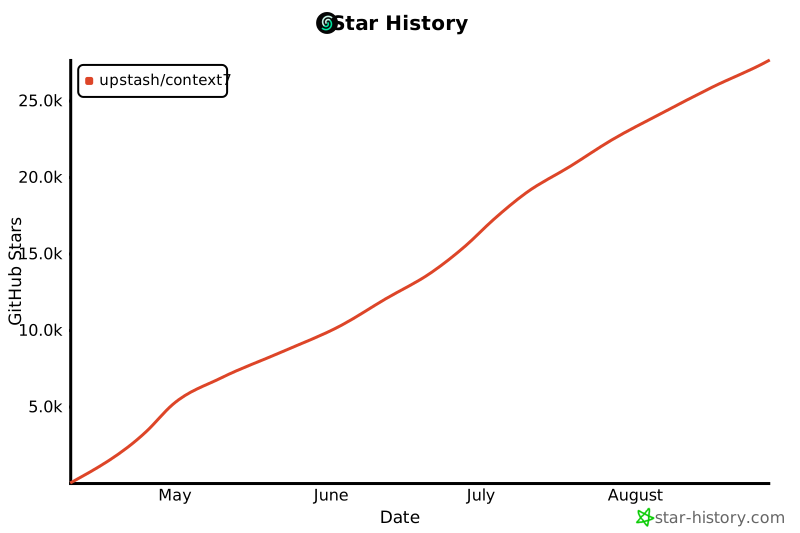
## ⭐ Star 历史
|
||
|
||
[](https://www.star-history.com/#upstash/context7&Date)
|
||
|
||
## 📄 许可证
|
||
|
||
MIT
|