 wehub-resource-sync
1284 lines
54 KiB
Markdown
1284 lines
54 KiB
Markdown
<!-- WEHUB_ZH_README -->
|
||
> [!NOTE]
|
||
> 本文档由 WeHub 基于上游 README 翻译整理,属于社区翻译,非官方中文文档。
|
||
> [English](./README.en.md) · [原始项目](https://github.com/unclecode/crawl4ai) · [上游 README](https://github.com/unclecode/crawl4ai/blob/HEAD/README.md)
|
||
> 原作者、版权与许可证归属以原始项目及本仓库 LICENSE 文件为准。
|
||
|
||
# 🚀🤖 Crawl4AI:面向 LLM 的开源友好型网页爬虫与抓取工具
|
||
|
||
<div align="center">
|
||
|
||
<a href="https://trendshift.io/repositories/11716" target="_blank"><img src="https://trendshift.io/api/badge/repositories/11716" alt="unclecode%2Fcrawl4ai | Trendshift" style="width: 250px; height: 55px;" width="250" height="55"/></a>
|
||
|
||
[](https://github.com/unclecode/crawl4ai/stargazers)
|
||
[](https://github.com/unclecode/crawl4ai/network/members)
|
||
|
||
[](https://badge.fury.io/py/crawl4ai)
|
||
[](https://pypi.org/project/crawl4ai/)
|
||
[](https://pepy.tech/project/crawl4ai)
|
||
[](https://github.com/sponsors/unclecode)
|
||
|
||
---
|
||
#### 🚀 Crawl4AI Cloud API — 封闭测试(即将推出)
|
||
可靠、大规模网页提取,现已打造为比现有任何方案都 _**大幅更省钱**_。
|
||
|
||
👉 **在此[申请](https://forms.gle/E9MyPaNXACnAMaqG7) 抢先体验**
|
||
_我们将分阶段接入,并与早期用户紧密协作。
|
||
名额有限。_
|
||
|
||
---
|
||
|
||
<p align="center">
|
||
<a href="https://x.com/crawl4ai">
|
||
<img src="https://img.shields.io/badge/Follow%20on%20X-000000?style=for-the-badge&logo=x&logoColor=white" alt="Follow on X" />
|
||
</a>
|
||
<a href="https://www.linkedin.com/company/crawl4ai">
|
||
<img src="https://img.shields.io/badge/Follow%20on%20LinkedIn-0077B5?style=for-the-badge&logo=linkedin&logoColor=white" alt="Follow on LinkedIn" />
|
||
</a>
|
||
<a href="https://discord.gg/jP8KfhDhyN">
|
||
<img src="https://img.shields.io/badge/Join%20our%20Discord-5865F2?style=for-the-badge&logo=discord&logoColor=white" alt="Join our Discord" />
|
||
</a>
|
||
</p>
|
||
</div>
|
||
|
||
Crawl4AI 将网页转化为干净、可供 LLM 使用的 Markdown,适用于 RAG、智能体(agent)与数据流水线。速度快、可控性强,并经过 5 万+ Star 社区的实战检验。
|
||
|
||
[✨ 查看最新更新 v0.9.1](#-recent-updates)
|
||
|
||
✨ **v0.9.1 新特性**:补丁版本,修复 Docker、浏览器与核心模块中的 12 个 bug。为 PruningContentFilter 新增 `preserve_classes`/`preserve_tags` 白名单,修复 Windows 浏览器崩溃、Docker 认证门 UI、HTTP 超时单位不一致等问题。[发布说明 →](https://github.com/unclecode/crawl4ai/blob/main/docs/blog/release-v0.9.1.md)
|
||
|
||
✨ 近期 v0.9.0:Docker API 服务器的重大“默认安全”版本。默认开启认证,除非提供 token 否则服务器绑定 loopback,且请求体现在被视为不可信信任边界。[发布说明 →](https://github.com/unclecode/crawl4ai/blob/main/docs/blog/release-v0.9.0.md)
|
||
|
||
✨ 近期 v0.8.7:安全加固版本。修复 Docker API 关键漏洞(RCE、SSRF、认证绕过、文件写入、XSS、硬编码 JWT 密钥),新增 DomainMapper,并交付抓取、深度爬取与 LLM 相关修复。[发布说明 →](https://github.com/unclecode/crawl4ai/blob/main/docs/blog/release-v0.8.7.md)
|
||
|
||
✨ 此前 v0.8.0:崩溃恢复与预取模式!深度爬取崩溃恢复,支持 `resume_state` 与 `on_state_change` 回调,用于长时间运行的爬取任务。全新 `prefetch=True` 模式,URL 发现速度提升 5–10 倍。[发布说明 →](https://github.com/unclecode/crawl4ai/blob/main/docs/blog/release-v0.8.0.md)
|
||
|
||
✨ 此前 v0.7.8:稳定性与 Bug 修复版本!11 项 bug 修复,涵盖 Docker API 问题、LLM 提取改进、URL 处理修复与依赖更新。[发布说明 →](https://github.com/unclecode/crawl4ai/blob/main/docs/blog/release-v0.7.8.md)
|
||
|
||
<details>
|
||
<summary>🤓 <strong>我的个人故事</strong></summary>
|
||
|
||
我从小就接触 Amstrad,这要感谢我父亲,之后也从未停止动手构建。研究生阶段我专攻 NLP,并为研究项目搭建爬虫——正是在那时,我深刻体会到提取质量有多重要。
|
||
|
||
2023 年,我需要把网页转成 Markdown。当时所谓的“开源”方案却要账号、API token,还要收 16 美元,效果仍不尽人意。我怒而加速开发,几天内做出 Crawl4AI,随后迅速走红。如今它已是 GitHub 上 Star 数最多的爬虫项目。
|
||
|
||
我把它开源是为了 **可用性(availability)**——任何人都能无障碍使用。现在我正在打造平台,追求 **可负担性(affordability)**——任何人都能运行严肃规模的爬取,而不必倾家荡产。若你认同这一方向,欢迎加入、反馈,或去爬取一些精彩内容。
|
||
</details>
|
||
|
||
|
||
<details>
|
||
<summary>开发者为何选择 Crawl4AI</summary>
|
||
|
||
- **LLM 就绪输出**,智能 Markdown,含标题、表格、代码与引用提示
|
||
- **实践中很快**,异步浏览器池、缓存、最少跳转
|
||
- **完全可控**,会话、代理、Cookie、用户脚本、钩子
|
||
- **自适应智能**,学习站点模式,只探索真正重要的部分
|
||
- **随处部署**,零密钥、CLI 与 Docker、云友好
|
||
</details>
|
||
|
||
|
||
## 🚀 快速开始
|
||
|
||
1. 安装 Crawl4AI:
|
||
```bash
|
||
# Install the package
|
||
pip install -U crawl4ai
|
||
|
||
# For pre release versions
|
||
pip install crawl4ai --pre
|
||
|
||
# Run post-installation setup
|
||
crawl4ai-setup
|
||
|
||
# Verify your installation
|
||
crawl4ai-doctor
|
||
```
|
||
|
||
如遇到任何与浏览器相关的问题,可手动安装:
|
||
```bash
|
||
python -m playwright install --with-deps chromium
|
||
```
|
||
|
||
2. 用 Python 运行一次简单网页爬取:
|
||
```python
|
||
import asyncio
|
||
from crawl4ai import *
|
||
|
||
async def main():
|
||
async with AsyncWebCrawler() as crawler:
|
||
result = await crawler.arun(
|
||
url="https://www.nbcnews.com/business",
|
||
)
|
||
print(result.markdown)
|
||
|
||
if __name__ == "__main__":
|
||
asyncio.run(main())
|
||
```
|
||
|
||
3. 或使用新的命令行界面:
|
||
```bash
|
||
# Basic crawl with markdown output
|
||
crwl https://www.nbcnews.com/business -o markdown
|
||
|
||
# Deep crawl with BFS strategy, max 10 pages
|
||
crwl https://docs.crawl4ai.com --deep-crawl bfs --max-pages 10
|
||
|
||
# Use LLM extraction with a specific question
|
||
crwl https://www.example.com/products -q "Extract all product prices"
|
||
```
|
||
|
||
## 💖 支持 Crawl4AI
|
||
|
||
> 🎉 **赞助计划现已开放!** 在赋能 51K+ 开发者并经历 1 年成长之后,Crawl4AI 正式为 **初创公司** 与 **企业** 推出专属支持。成为前 50 位 **创始赞助人(Founding Sponsors)**,在我们的名人堂中获得永久展示。
|
||
|
||
Crawl4AI 是 GitHub 上排名第一的热门开源网页爬虫。你的支持让它保持独立、持续创新,并对社区免费开放——同时你还能直接获得高级权益。
|
||
|
||
<div align="">
|
||
|
||
[](https://github.com/sponsors/unclecode)
|
||
[](https://github.com/sponsors/unclecode)
|
||
|
||
</div>
|
||
|
||
### 🤝 赞助档位
|
||
|
||
- **🌱 Believer($5/月)** — 加入数据民主化运动
|
||
- **🚀 Builder($50/月)** — 优先支持与功能抢先体验
|
||
- **💼 Growing Team($500/月)** — 双周同步与优化协助
|
||
- **🏢 Data Infrastructure Partner($2000/月)** — 全面合作与专属支持
|
||
*可定制合作方案 — 详见 [SPONSORS.md](SPONSORS.md) 了解详情与联系方式*
|
||
|
||
**为何赞助?**
|
||
没有限流 API。没有厂商锁定。在 Crawl4AI 创作者直接指导下,构建并拥有自己的数据流水线。
|
||
|
||
[查看全部档位与权益 →](https://github.com/sponsors/unclecode)
|
||
|
||
|
||
## ✨ 功能
|
||
|
||
<details>
|
||
<summary>📝 <strong>Markdown 生成</strong></summary>
|
||
|
||
- 🧹 **干净 Markdown**:生成干净、结构化的 Markdown,格式准确。
|
||
- 🎯 **适配 Markdown(Fit Markdown)**:基于启发式过滤,去除噪声与无关内容,便于 AI 处理。
|
||
- 🔗 **引用与参考**:将页面链接转换为带整洁引用的编号参考列表。
|
||
- 🛠️ **自定义策略**:用户可针对特定需求创建自己的 Markdown 生成策略。
|
||
- 📚 **BM25 算法**:采用基于 BM25 的过滤,提取核心信息并剔除无关内容。
|
||
</details>
|
||
|
||
<details>
|
||
<summary>📊 <strong>结构化数据提取(Structured Data Extraction)</strong></summary>
|
||
|
||
- 🤖 **LLM 驱动提取(LLM-Driven Extraction)**:支持所有 LLM(开源与专有)进行结构化数据提取。
|
||
- 🧱 **分块策略(Chunking Strategies)**:实现分块(基于主题、正则表达式、句子级别)以进行针对性内容处理。
|
||
- 🌌 **余弦相似度(Cosine Similarity)**:根据用户查询查找相关内容块,用于语义提取。
|
||
- 🔎 **基于 CSS 的提取(CSS-Based Extraction)**:使用 XPath 和 CSS 选择器进行快速的基于 schema 的数据提取。
|
||
- 🔧 **Schema 定义(Schema Definition)**:定义自定义 schema,从重复模式中提取结构化 JSON。
|
||
|
||
</details>
|
||
|
||
<details>
|
||
<summary>🌐 <strong>浏览器集成(Browser Integration)</strong></summary>
|
||
|
||
- 🖥️ **托管浏览器(Managed Browser)**:使用用户自有浏览器并完全控制,避免机器人检测。
|
||
- 🔄 **远程浏览器控制(Remote Browser Control)**:连接 Chrome Developer Tools Protocol(CDP),实现远程、大规模数据提取。
|
||
- 👤 **浏览器配置文件(Browser Profiler)**:创建并管理持久化配置文件,保存认证状态、Cookie 和设置。
|
||
- 🔒 **会话管理(Session Management)**:保留浏览器状态并在多步骤爬取中复用。
|
||
- 🧩 **代理支持(Proxy Support)**:无缝连接带认证的代理,实现安全访问。
|
||
- ⚙️ **完整浏览器控制(Full Browser Control)**:修改请求头、Cookie、User-Agent 等,定制爬取配置。
|
||
- 🌍 **多浏览器支持(Multi-Browser Support)**:兼容 Chromium、Firefox 和 WebKit。
|
||
- 📐 **动态视口调整(Dynamic Viewport Adjustment)**:自动调整浏览器视口以匹配页面内容,确保完整渲染并捕获所有元素。
|
||
|
||
</details>
|
||
|
||
<details>
|
||
<summary>🔎 <strong>爬取与抓取(Crawling & Scraping)</strong></summary>
|
||
|
||
- 🖼️ **媒体支持(Media Support)**:提取图片、音频、视频以及 `srcset`、`picture` 等响应式图片格式。
|
||
- 🚀 **动态爬取(Dynamic Crawling)**:执行 JS 并等待异步或同步操作,以提取动态内容。
|
||
- 📸 **截图(Screenshots)**:在爬取过程中捕获页面截图,用于调试或分析。
|
||
- 📂 **原始数据爬取(Raw Data Crawling)**:直接处理原始 HTML(`raw:`)或本地文件(`file://`)。
|
||
- 🔗 **全面链接提取(Comprehensive Link Extraction)**:提取内部链接、外部链接以及嵌入的 iframe 内容。
|
||
- 🛠️ **可定制钩子(Customizable Hooks)**:在每一步定义钩子以自定义爬取行为(支持字符串和基于函数的 API)。
|
||
- 💾 **缓存(Caching)**:缓存数据以提升速度并避免重复请求。
|
||
- 📄 **元数据提取(Metadata Extraction)**:从网页获取结构化元数据。
|
||
- 📡 **IFrame 内容提取(IFrame Content Extraction)**:无缝提取嵌入 iframe 中的内容。
|
||
- 🕵️ **懒加载处理(Lazy Load Handling)**:等待图片完全加载,确保不会因懒加载而遗漏内容。
|
||
- 🔄 **全页扫描(Full-Page Scanning)**:模拟滚动以加载并捕获所有动态内容,非常适合无限滚动页面。
|
||
|
||
</details>
|
||
|
||
<details>
|
||
<summary>🚀 <strong>部署(Deployment)</strong></summary>
|
||
|
||
- 🐳 **Docker 化部署(Dockerized Setup)**:优化的 Docker 镜像,内置 FastAPI 服务器,便于部署。
|
||
- 🔑 **安全认证(Secure Authentication)**:内置 JWT token 认证,保障 API 安全。
|
||
- 🔄 **API 网关(API Gateway)**:一键部署,配合安全 token 认证,适用于基于 API 的工作流。
|
||
- 🌐 **可扩展架构(Scalable Architecture)**:面向大规模生产环境设计,并优化服务器性能。
|
||
- ☁️ **云部署(Cloud Deployment)**:为主流云平台提供开箱即用的部署配置。
|
||
|
||
</details>
|
||
|
||
<details>
|
||
<summary>🎯 <strong>其他功能(Additional Features)</strong></summary>
|
||
|
||
- 🕶️ **隐身模式(Stealth Mode)**:通过模拟真实用户来规避机器人检测。
|
||
- 🏷️ **基于标签的内容提取(Tag-Based Content Extraction)**:根据自定义标签、请求头或元数据优化爬取。
|
||
- 🔗 **链接分析(Link Analysis)**:提取并分析所有链接,进行深入数据探索。
|
||
- 🛡️ **错误处理(Error Handling)**:健壮的错误管理,确保流程顺畅执行。
|
||
- 🔐 **CORS 与静态资源服务(CORS & Static Serving)**:支持基于文件系统的缓存与跨域请求。
|
||
- 📖 **清晰文档(Clear Documentation)**:简化且持续更新的指南,便于上手与进阶使用。
|
||
- 🙌 **社区认可(Community Recognition)**:致谢贡献者与 Pull Request,保持透明。
|
||
|
||
</details>
|
||
|
||
## 立即体验!
|
||
|
||
✨ 在这里试用 [](https://colab.research.google.com/drive/1SgRPrByQLzjRfwoRNq1wSGE9nYY_EE8C?usp=sharing)
|
||
|
||
✨ 访问我们的 [文档网站](https://docs.crawl4ai.com/)
|
||
|
||
## 安装 🛠️
|
||
|
||
Crawl4AI 提供灵活的安装方式,以适应不同使用场景。你可以将其作为 Python 包安装,或使用 Docker。
|
||
|
||
<details>
|
||
<summary>🐍 <strong>使用 pip</strong></summary>
|
||
|
||
选择最适合你需求的安装方式:
|
||
|
||
### 基础安装
|
||
|
||
适用于基础网页爬取与抓取任务:
|
||
|
||
```bash
|
||
pip install crawl4ai
|
||
crawl4ai-setup # Setup the browser
|
||
```
|
||
|
||
默认情况下,这将安装 Crawl4AI 的异步版本,并使用 Playwright 进行网页爬取。
|
||
|
||
👉 **注意**:安装 Crawl4AI 时,`crawl4ai-setup` 应会自动安装并配置 Playwright。不过,若遇到任何与 Playwright 相关的问题,你可以通过以下任一方式手动安装:
|
||
|
||
1. 通过命令行:
|
||
|
||
```bash
|
||
playwright install
|
||
```
|
||
|
||
2. 如果上述方法无效,可尝试更具体的命令:
|
||
|
||
```bash
|
||
python -m playwright install chromium
|
||
```
|
||
|
||
在某些情况下,第二种方法已被证明更可靠。
|
||
|
||
---
|
||
|
||
### 同步版本安装
|
||
|
||
同步版本已弃用,并将在未来版本中移除。若你需要使用 Selenium 的同步版本:
|
||
|
||
```bash
|
||
pip install crawl4ai[sync]
|
||
```
|
||
|
||
---
|
||
|
||
### 开发版安装
|
||
|
||
适用于计划修改源代码的贡献者:
|
||
|
||
```bash
|
||
git clone https://github.com/unclecode/crawl4ai.git
|
||
cd crawl4ai
|
||
pip install -e . # Basic installation in editable mode
|
||
```
|
||
|
||
安装可选功能:
|
||
|
||
```bash
|
||
pip install -e ".[torch]" # With PyTorch features
|
||
pip install -e ".[transformer]" # With Transformer features
|
||
pip install -e ".[cosine]" # With cosine similarity features
|
||
pip install -e ".[sync]" # With synchronous crawling (Selenium)
|
||
pip install -e ".[all]" # Install all optional features
|
||
```
|
||
|
||
</details>
|
||
|
||
<details>
|
||
<summary>🐳 <strong>Docker 部署(Docker Deployment)</strong></summary>
|
||
|
||
> 🚀 **现已可用!** 我们全面重构的 Docker 实现已上线!这一新方案让部署比以往更高效、更顺畅。
|
||
|
||
### 全新 Docker 功能
|
||
|
||
新的 Docker 实现包括:
|
||
- **实时监控面板(Real-time Monitoring Dashboard)**:实时系统指标与浏览器池可见性
|
||
- **浏览器池(Browser pooling)**:页面预热,加快响应速度
|
||
- **交互式 Playground(Interactive playground)**:测试并生成请求代码
|
||
- **MCP 集成(MCP integration)**:直接连接 Claude Code 等 AI 工具
|
||
- **全面的 API 端点(Comprehensive API endpoints)**:包括 HTML 提取、截图、PDF 生成与 JavaScript 执行
|
||
- **多架构支持(Multi-architecture support)**:自动检测(AMD64/ARM64)
|
||
- **资源优化(Optimized resources)**:改进内存管理
|
||
|
||
### 快速开始
|
||
|
||
```bash
|
||
# Pull and run the latest release
|
||
docker pull unclecode/crawl4ai:latest
|
||
docker run -d -p 11235:11235 --name crawl4ai --shm-size=1g unclecode/crawl4ai:latest
|
||
|
||
# Visit the monitoring dashboard at http://localhost:11235/dashboard
|
||
# Or the playground at http://localhost:11235/playground
|
||
```
|
||
|
||
### 快速测试
|
||
|
||
运行快速测试(两种 Docker 方式均适用):
|
||
|
||
```python
|
||
import requests
|
||
|
||
# Submit a crawl job
|
||
response = requests.post(
|
||
"http://localhost:11235/crawl",
|
||
json={"urls": ["https://example.com"], "priority": 10}
|
||
)
|
||
if response.status_code == 200:
|
||
print("Crawl job submitted successfully.")
|
||
|
||
if "results" in response.json():
|
||
results = response.json()["results"]
|
||
print("Crawl job completed. Results:")
|
||
for result in results:
|
||
print(result)
|
||
else:
|
||
task_id = response.json()["task_id"]
|
||
print(f"Crawl job submitted. Task ID:: {task_id}")
|
||
result = requests.get(f"http://localhost:11235/task/{task_id}")
|
||
```
|
||
|
||
更多示例请参阅 [Docker 示例](https://github.com/unclecode/crawl4ai/blob/main/docs/examples/docker_example.py). 高级配置、监控功能与生产部署请参阅 [自托管指南](https://docs.crawl4ai.com/core/self-hosting/).
|
||
</details>
|
||
|
||
</details>
|
||
|
||
---
|
||
|
||
## 🔬 高级用法示例 🔬
|
||
|
||
你可以在 [docs/examples](https://github.com/unclecode/crawl4ai/tree/main/docs/examples). 目录中查看项目结构。在那里你可以找到各种示例;此处分享一些热门示例。
|
||
|
||
<details>
|
||
<summary>📝 <strong>使用 Clean and Fit Markdown 进行启发式 Markdown 生成</strong></summary>
|
||
|
||
```python
|
||
import asyncio
|
||
from crawl4ai import AsyncWebCrawler, BrowserConfig, CrawlerRunConfig, CacheMode
|
||
from crawl4ai.content_filter_strategy import PruningContentFilter, BM25ContentFilter
|
||
from crawl4ai.markdown_generation_strategy import DefaultMarkdownGenerator
|
||
|
||
async def main():
|
||
browser_config = BrowserConfig(
|
||
headless=True,
|
||
verbose=True,
|
||
)
|
||
run_config = CrawlerRunConfig(
|
||
cache_mode=CacheMode.ENABLED,
|
||
markdown_generator=DefaultMarkdownGenerator(
|
||
content_filter=PruningContentFilter(threshold=0.48, threshold_type="fixed", min_word_threshold=0)
|
||
),
|
||
# markdown_generator=DefaultMarkdownGenerator(
|
||
# content_filter=BM25ContentFilter(user_query="WHEN_WE_FOCUS_BASED_ON_A_USER_QUERY", bm25_threshold=1.0)
|
||
# ),
|
||
)
|
||
|
||
async with AsyncWebCrawler(config=browser_config) as crawler:
|
||
result = await crawler.arun(
|
||
url="https://docs.micronaut.io/4.9.9/guide/",
|
||
config=run_config
|
||
)
|
||
print(len(result.markdown.raw_markdown))
|
||
print(len(result.markdown.fit_markdown))
|
||
|
||
if __name__ == "__main__":
|
||
asyncio.run(main())
|
||
```
|
||
|
||
</details>
|
||
|
||
<details>
|
||
<summary>🖥️ <strong>执行 JavaScript 并在无 LLM 的情况下提取结构化数据</strong></summary>
|
||
|
||
```python
|
||
import asyncio
|
||
from crawl4ai import AsyncWebCrawler, BrowserConfig, CrawlerRunConfig, CacheMode
|
||
from crawl4ai import JsonCssExtractionStrategy
|
||
import json
|
||
|
||
async def main():
|
||
schema = {
|
||
"name": "KidoCode Courses",
|
||
"baseSelector": "section.charge-methodology .w-tab-content > div",
|
||
"fields": [
|
||
{
|
||
"name": "section_title",
|
||
"selector": "h3.heading-50",
|
||
"type": "text",
|
||
},
|
||
{
|
||
"name": "section_description",
|
||
"selector": ".charge-content",
|
||
"type": "text",
|
||
},
|
||
{
|
||
"name": "course_name",
|
||
"selector": ".text-block-93",
|
||
"type": "text",
|
||
},
|
||
{
|
||
"name": "course_description",
|
||
"selector": ".course-content-text",
|
||
"type": "text",
|
||
},
|
||
{
|
||
"name": "course_icon",
|
||
"selector": ".image-92",
|
||
"type": "attribute",
|
||
"attribute": "src"
|
||
}
|
||
]
|
||
}
|
||
|
||
extraction_strategy = JsonCssExtractionStrategy(schema, verbose=True)
|
||
|
||
browser_config = BrowserConfig(
|
||
headless=False,
|
||
verbose=True
|
||
)
|
||
run_config = CrawlerRunConfig(
|
||
extraction_strategy=extraction_strategy,
|
||
js_code=["""(async () => {const tabs = document.querySelectorAll("section.charge-methodology .tabs-menu-3 > div");for(let tab of tabs) {tab.scrollIntoView();tab.click();await new Promise(r => setTimeout(r, 500));}})();"""],
|
||
cache_mode=CacheMode.BYPASS
|
||
)
|
||
|
||
async with AsyncWebCrawler(config=browser_config) as crawler:
|
||
|
||
result = await crawler.arun(
|
||
url="https://www.kidocode.com/degrees/technology",
|
||
config=run_config
|
||
)
|
||
|
||
companies = json.loads(result.extracted_content)
|
||
print(f"Successfully extracted {len(companies)} companies")
|
||
print(json.dumps(companies[0], indent=2))
|
||
|
||
|
||
if __name__ == "__main__":
|
||
asyncio.run(main())
|
||
```
|
||
|
||
</details>
|
||
|
||
<details>
|
||
<summary>📚 <strong>使用 LLM 提取结构化数据</strong></summary>
|
||
|
||
```python
|
||
import os
|
||
import asyncio
|
||
from crawl4ai import AsyncWebCrawler, BrowserConfig, CrawlerRunConfig, CacheMode, LLMConfig
|
||
from crawl4ai import LLMExtractionStrategy
|
||
from pydantic import BaseModel, Field
|
||
|
||
class OpenAIModelFee(BaseModel):
|
||
model_name: str = Field(..., description="Name of the OpenAI model.")
|
||
input_fee: str = Field(..., description="Fee for input token for the OpenAI model.")
|
||
output_fee: str = Field(..., description="Fee for output token for the OpenAI model.")
|
||
|
||
async def main():
|
||
browser_config = BrowserConfig(verbose=True)
|
||
run_config = CrawlerRunConfig(
|
||
word_count_threshold=1,
|
||
extraction_strategy=LLMExtractionStrategy(
|
||
# Here you can use any provider that Litellm library supports, for instance: ollama/qwen2
|
||
# provider="ollama/qwen2", api_token="no-token",
|
||
llm_config = LLMConfig(provider="openai/gpt-4o", api_token=os.getenv('OPENAI_API_KEY')),
|
||
schema=OpenAIModelFee.schema(),
|
||
extraction_type="schema",
|
||
instruction="""From the crawled content, extract all mentioned model names along with their fees for input and output tokens.
|
||
Do not miss any models in the entire content. One extracted model JSON format should look like this:
|
||
{"model_name": "GPT-4", "input_fee": "US$10.00 / 1M tokens", "output_fee": "US$30.00 / 1M tokens"}."""
|
||
),
|
||
cache_mode=CacheMode.BYPASS,
|
||
)
|
||
|
||
async with AsyncWebCrawler(config=browser_config) as crawler:
|
||
result = await crawler.arun(
|
||
url='https://openai.com/api/pricing/',
|
||
config=run_config
|
||
)
|
||
print(result.extracted_content)
|
||
|
||
if __name__ == "__main__":
|
||
asyncio.run(main())
|
||
```
|
||
|
||
</details>
|
||
|
||
<details>
|
||
<summary>🤖 <strong>使用自定义用户配置文件的自有浏览器</strong></summary>
|
||
|
||
```python
|
||
import os, sys
|
||
from pathlib import Path
|
||
import asyncio, time
|
||
from crawl4ai import AsyncWebCrawler, BrowserConfig, CrawlerRunConfig, CacheMode
|
||
|
||
async def test_news_crawl():
|
||
# Create a persistent user data directory
|
||
user_data_dir = os.path.join(Path.home(), ".crawl4ai", "browser_profile")
|
||
os.makedirs(user_data_dir, exist_ok=True)
|
||
|
||
browser_config = BrowserConfig(
|
||
verbose=True,
|
||
headless=True,
|
||
user_data_dir=user_data_dir,
|
||
use_persistent_context=True,
|
||
)
|
||
run_config = CrawlerRunConfig(
|
||
cache_mode=CacheMode.BYPASS
|
||
)
|
||
|
||
async with AsyncWebCrawler(config=browser_config) as crawler:
|
||
url = "ADDRESS_OF_A_CHALLENGING_WEBSITE"
|
||
|
||
result = await crawler.arun(
|
||
url,
|
||
config=run_config,
|
||
magic=True,
|
||
)
|
||
|
||
print(f"Successfully crawled {url}")
|
||
print(f"Content length: {len(result.markdown)}")
|
||
```
|
||
|
||
</details>
|
||
|
||
---
|
||
|
||
## ✨ 最近更新
|
||
|
||
<details open>
|
||
<summary><strong>版本 0.9.1 发布亮点 - 错误修复与 PruningContentFilter 白名单</strong></summary>
|
||
|
||
这是一个补丁版本,包含 12 项错误修复和一项新功能。`PruningContentFilter` 新增的 `preserve_classes` / `preserve_tags` 参数可让你将绝不应被剪枝的 CSS 类或 HTML 标签加入白名单——适用于保护作者名、时间戳等简短元数据元素。
|
||
|
||
错误修复涵盖 Docker(认证网关 UI、supervisord/redis 目录、FastAPI 兼容性、redis 认证)、browser(Windows channel 崩溃、context snapshot 泄漏)、core(HTTP 超时单位不匹配、best-first 排序)以及 extraction(html2text 表格属性)。
|
||
|
||
```bash
|
||
pip install -U crawl4ai
|
||
```
|
||
|
||
[完整 v0.9.1 发布说明 →](https://github.com/unclecode/crawl4ai/blob/main/docs/blog/release-v0.9.1.md)
|
||
|
||
</details>
|
||
|
||
<details>
|
||
<summary><strong>版本 0.9.0 发布亮点 - 默认安全的 Docker 服务器</strong></summary>
|
||
|
||
Docker API 服务器的一次重大、默认安全发布。开箱即用的部署通过纵深防御进行了加固:默认启用认证,除非你提供 token,否则服务器绑定到 loopback,且网络请求体被视为不受信任的信任边界。
|
||
|
||
```bash
|
||
pip install -U crawl4ai
|
||
```
|
||
|
||
[迁移指南 →](https://github.com/unclecode/crawl4ai/blob/main/deploy/docker/MIGRATION.md) · [完整 v0.9.0 发布说明 →](https://github.com/unclecode/crawl4ai/blob/main/docs/blog/release-v0.9.0.md)
|
||
</details>
|
||
|
||
</details>
|
||
|
||
<details>
|
||
<summary><strong>Version 0.8.7 发布亮点 - 安全加固、DomainMapper 与社区修复</strong></summary>
|
||
|
||
一次安全加固版本。修复了 Docker API 中的关键漏洞(AST 沙箱逃逸 RCE、hook 沙箱 RCE、硬编码 JWT 密钥、webhook 与 crawl 端点的 SSRF、任意文件写入、monitor 认证绕过、存储型 XSS,以及未经认证的 JS 执行),新增 DomainMapper 功能,并带来一批抓取、深度爬取与 LLM 相关修复。若你自行托管 Docker API,请立即升级。
|
||
|
||
```bash
|
||
pip install -U crawl4ai
|
||
```
|
||
|
||
[完整 v0.8.7 发布说明 →](https://github.com/unclecode/crawl4ai/blob/main/docs/blog/release-v0.8.7.md)
|
||
|
||
</details>
|
||
|
||
<details>
|
||
<summary><strong>Version 0.8.6 - 安全热修复:litellm 供应链修复</strong></summary>
|
||
|
||
由于 PyPI 供应链攻击影响了原始软件包,已将 `litellm` 依赖替换为 `unclecode-litellm`。若你使用的是 v0.8.5 或更早版本,请立即升级。
|
||
|
||
```bash
|
||
pip install -U crawl4ai
|
||
```
|
||
|
||
</details>
|
||
|
||
<details>
|
||
<summary><strong>Version 0.8.5 发布亮点 - 反机器人检测、Shadow DOM 与 60+ 项 Bug 修复</strong></summary>
|
||
|
||
自 v0.8.0 以来最大的一次发布。包含反机器人检测与代理升级、Shadow DOM 扁平化、深度爬取取消,以及超过 60 项 bug 修复。
|
||
|
||
- **🛡️ 反机器人检测与代理升级(Proxy Escalation)**:
|
||
- 三层检测:已知厂商、通用拦截指标、结构完整性检查
|
||
- 通过代理链与备用 fetch 函数自动重试
|
||
```python
|
||
from crawl4ai import CrawlerRunConfig
|
||
from crawl4ai.async_configs import ProxyConfig
|
||
|
||
config = CrawlerRunConfig(
|
||
proxy_config=[ProxyConfig.DIRECT, ProxyConfig(server="http://my-proxy:8080")],
|
||
max_retries=2,
|
||
fallback_fetch_function=my_web_unlocker,
|
||
)
|
||
```
|
||
|
||
- **🌑 Shadow DOM 扁平化**:
|
||
- 提取隐藏在 shadow DOM 组件内的内容
|
||
```python
|
||
config = CrawlerRunConfig(flatten_shadow_dom=True)
|
||
```
|
||
|
||
- **🛑 深度爬取取消**:
|
||
- 通过 `cancel()` 或 `should_cancel` 回调优雅停止长时间爬取
|
||
- 支持 BFS、DFS 与 BestFirst 策略
|
||
|
||
- **⚙️ 配置默认值 API**:
|
||
- BrowserConfig 与 CrawlerRunConfig 上的 `set_defaults()` / `get_defaults()` / `reset_defaults()`
|
||
|
||
- **🔒 关键安全修复**:
|
||
- Docker `/crawl` 端点反序列化导致的 RCE — 已移除 `eval()`,并新增白名单
|
||
- Redis CVE-2025-49844(CVSS 10.0)— 已升级至 7.2.7
|
||
|
||
- **60+ 项 Bug 修复**,涵盖浏览器管理、代理、深度爬取、提取、CLI 与 Docker
|
||
|
||
[完整 v0.8.5 发布说明 →](https://github.com/unclecode/crawl4ai/blob/main/docs/blog/release-v0.8.5.md)
|
||
|
||
</details>
|
||
|
||
<details>
|
||
<summary><strong>Version 0.8.0 发布亮点 - 崩溃恢复与预取模式</strong></summary>
|
||
|
||
本版本为深度爬取引入崩溃恢复、用于快速 URL 发现的全新预取模式,以及针对 Docker 部署的关键安全修复。
|
||
|
||
- **🔄 深度爬取崩溃恢复**:
|
||
- `on_state_change` 回调在每个 URL 处理后触发,实现实时状态持久化
|
||
- `resume_state` 参数用于从已保存的检查点继续
|
||
- 可 JSON 序列化的状态,便于 Redis/数据库存储
|
||
- 支持 BFS、DFS 与 Best-First 策略
|
||
```python
|
||
from crawl4ai.deep_crawling import BFSDeepCrawlStrategy
|
||
|
||
strategy = BFSDeepCrawlStrategy(
|
||
max_depth=3,
|
||
resume_state=saved_state, # Continue from checkpoint
|
||
on_state_change=save_to_redis, # Called after each URL
|
||
)
|
||
```
|
||
|
||
- **⚡ 用于快速 URL 发现的预取模式**:
|
||
- `prefetch=True` 跳过 markdown、提取与媒体处理
|
||
- 比完整处理快 5-10 倍
|
||
- 非常适合两阶段爬取:先发现,再选择性处理
|
||
```python
|
||
config = CrawlerRunConfig(prefetch=True)
|
||
result = await crawler.arun("https://example.com", config=config)
|
||
# Returns HTML and links only - no markdown generation
|
||
```
|
||
|
||
- **🔒 安全修复(Docker API)**:
|
||
- 默认禁用 hooks(`CRAWL4AI_HOOKS_ENABLED=false`)
|
||
- API 端点阻止 `file://` URL,以防 LFI
|
||
- 已从 hook 执行沙箱中移除 `__import__`
|
||
|
||
[完整 v0.8.0 发布说明 →](https://github.com/unclecode/crawl4ai/blob/main/docs/blog/release-v0.8.0.md)
|
||
|
||
</details>
|
||
|
||
<details>
|
||
<summary><strong>Version 0.7.8 发布亮点 - 稳定性与 Bug 修复版本</strong></summary>
|
||
|
||
本版本聚焦稳定性,包含 11 项 bug 修复,解决社区反馈的问题。无新功能,但可靠性显著提升。
|
||
|
||
- **🐳 Docker API 修复**:
|
||
- 修复深度爬取请求中的 `ContentRelevanceFilter` 反序列化问题(#1642)
|
||
- 修复 `BrowserConfig.to_dict()` 中 `ProxyConfig` JSON 序列化问题(#1629)
|
||
- 修复 Docker 镜像中 `.cache` 文件夹权限问题(#1638)
|
||
|
||
- **🤖 LLM 提取改进**:
|
||
- 可通过新的 `LLMConfig` 参数配置速率限制器退避(#1269):
|
||
```python
|
||
from crawl4ai import LLMConfig
|
||
|
||
config = LLMConfig(
|
||
provider="openai/gpt-4o-mini",
|
||
backoff_base_delay=5, # Wait 5s on first retry
|
||
backoff_max_attempts=5, # Try up to 5 times
|
||
backoff_exponential_factor=3 # Multiply delay by 3 each attempt
|
||
)
|
||
```
|
||
- `LLMExtractionStrategy` 支持 HTML 输入格式(#1178):
|
||
```python
|
||
from crawl4ai import LLMExtractionStrategy
|
||
|
||
strategy = LLMExtractionStrategy(
|
||
llm_config=config,
|
||
instruction="Extract table data",
|
||
input_format="html" # Now supports: "html", "markdown", "fit_markdown"
|
||
)
|
||
```
|
||
- 修复原始 HTML URL 变量 — 提取策略现在接收 `"Raw HTML"` 而非 HTML blob(#1116)
|
||
|
||
- **🔗 URL 处理**:
|
||
- 修复 JavaScript 重定向后的相对 URL 解析问题(#1268)
|
||
- 修复提取代码中 import 语句格式问题(#1181)
|
||
|
||
- **📦 依赖更新**:
|
||
- 用 pypdf 替换已弃用的 PyPDF2(#1412)
|
||
- Pydantic v2 ConfigDict 兼容性 — 不再出现弃用警告(#678)
|
||
|
||
- **🧠 AdaptiveCrawler**:
|
||
- 修复查询扩展,使其实际使用 LLM 而非硬编码模拟数据(#1621)
|
||
|
||
[完整 v0.7.8 发布说明 →](https://github.com/unclecode/crawl4ai/blob/main/docs/blog/release-v0.7.8.md)
|
||
|
||
</details>
|
||
|
||
<details>
|
||
<summary><strong>Version 0.7.7 发布亮点 - 自托管与监控更新</strong></summary>
|
||
|
||
- **📊 实时监控仪表板**:交互式 Web UI,提供实时系统指标与浏览器池可见性
|
||
```python
|
||
# Access the monitoring dashboard
|
||
# Visit: http://localhost:11235/dashboard
|
||
|
||
# Real-time metrics include:
|
||
# - System health (CPU, memory, network, uptime)
|
||
# - Active and completed request tracking
|
||
# - Browser pool management (permanent/hot/cold)
|
||
# - Janitor cleanup events
|
||
# - Error monitoring with full context
|
||
```
|
||
|
||
- **🔌 全面的 Monitor API**:完整的 REST API,用于以编程方式访问所有监控数据
|
||
```python
|
||
import httpx
|
||
|
||
async with httpx.AsyncClient() as client:
|
||
# System health
|
||
health = await client.get("http://localhost:11235/monitor/health")
|
||
|
||
# Request tracking
|
||
requests = await client.get("http://localhost:11235/monitor/requests")
|
||
|
||
# Browser pool status
|
||
browsers = await client.get("http://localhost:11235/monitor/browsers")
|
||
|
||
# Endpoint statistics
|
||
stats = await client.get("http://localhost:11235/monitor/endpoints/stats")
|
||
```
|
||
|
||
- **⚡ WebSocket 流式传输**:每 2 秒推送实时更新,适用于自定义仪表板
|
||
- **🔥 智能浏览器池**:三层架构(permanent/hot/cold),支持自动晋升与清理
|
||
- **🧹 Janitor 系统**:自动资源管理,并记录事件日志
|
||
- **🎮 控制操作**:通过 API 手动管理浏览器(kill、restart、cleanup)
|
||
- **📈 生产指标**:6 项关键运营指标,并集成 Prometheus
|
||
- **🐛 关键 Bug 修复**:
|
||
- 修复异步 LLM 提取阻塞问题(#1055)
|
||
- 增强 DFS 深度爬取策略(#1607)
|
||
- 修复 AsyncUrlSeeder 中的 sitemap 解析问题(#1598)
|
||
- 解决浏览器视口配置问题(#1495)
|
||
- 修复 CDP 时序问题,采用指数退避(#1528)
|
||
- pyOpenSSL 安全更新(>=25.3.0)
|
||
</details>
|
||
|
||
<details>
|
||
<summary><strong>Version 0.7.5 发布亮点 - Docker Hooks 与安全更新</strong></summary>
|
||
|
||
- **🔧 Docker Hooks 系统**:在 8 个关键节点通过用户提供的 Python 函数实现完整的流水线自定义
|
||
- **✨ 基于函数的 Hooks API(新增)**:将 hooks 编写为常规 Python 函数,获得完整的 IDE 支持:
|
||
```python
|
||
from crawl4ai import hooks_to_string
|
||
from crawl4ai.docker_client import Crawl4aiDockerClient
|
||
|
||
# Define hooks as regular Python functions
|
||
async def on_page_context_created(page, context, **kwargs):
|
||
"""Block images to speed up crawling"""
|
||
await context.route("**/*.{png,jpg,jpeg,gif,webp}", lambda route: route.abort())
|
||
await page.set_viewport_size({"width": 1920, "height": 1080})
|
||
return page
|
||
|
||
async def before_goto(page, context, url, **kwargs):
|
||
"""Add custom headers"""
|
||
await page.set_extra_http_headers({'X-Crawl4AI': 'v0.7.5'})
|
||
return page
|
||
|
||
# Option 1: Use hooks_to_string() utility for REST API
|
||
hooks_code = hooks_to_string({
|
||
"on_page_context_created": on_page_context_created,
|
||
"before_goto": before_goto
|
||
})
|
||
|
||
# Option 2: Docker client with automatic conversion (Recommended)
|
||
client = Crawl4aiDockerClient(base_url="http://localhost:11235")
|
||
results = await client.crawl(
|
||
urls=["https://httpbin.org/html"],
|
||
hooks={
|
||
"on_page_context_created": on_page_context_created,
|
||
"before_goto": before_goto
|
||
}
|
||
)
|
||
# ✓ Full IDE support, type checking, and reusability!
|
||
```
|
||
|
||
- **🤖 增强的 LLM 集成**:支持自定义提供商,并提供 temperature 控制与 base_url 配置
|
||
- **🔒 HTTPS 保持**:通过 `preserve_https_for_internal_links=True` 安全处理内部链接
|
||
- **🐍 Python 3.10+ 支持**:现代语言特性与更高性能
|
||
- **🛠️ Bug 修复**:修复了社区反馈的多项问题,包括 URL 处理、JWT 认证与代理配置
|
||
|
||
[完整 v0.7.5 发布说明 →](https://github.com/unclecode/crawl4ai/blob/main/docs/blog/release-v0.7.5.md)
|
||
|
||
</details>
|
||
|
||
<details>
|
||
<summary><strong>Version 0.7.4 发布亮点 - 智能表格提取与性能更新</strong></summary>
|
||
|
||
- **🚀 LLMTableExtraction**:革命性的表格提取,通过智能分块处理超大表格:
|
||
```python
|
||
from crawl4ai import LLMTableExtraction, LLMConfig
|
||
|
||
# Configure intelligent table extraction
|
||
table_strategy = LLMTableExtraction(
|
||
llm_config=LLMConfig(provider="openai/gpt-4.1-mini"),
|
||
enable_chunking=True, # Handle massive tables
|
||
chunk_token_threshold=5000, # Smart chunking threshold
|
||
overlap_threshold=100, # Maintain context between chunks
|
||
extraction_type="structured" # Get structured data output
|
||
)
|
||
|
||
config = CrawlerRunConfig(table_extraction_strategy=table_strategy)
|
||
result = await crawler.arun("https://complex-tables-site.com", config=config)
|
||
|
||
# Tables are automatically chunked, processed, and merged
|
||
for table in result.tables:
|
||
print(f"Extracted table: {len(table['data'])} rows")
|
||
```
|
||
|
||
- **⚡ Dispatcher Bug 修复**:修复了 arun_many 中快速完成任务时的顺序处理瓶颈
|
||
- **🧹 内存管理重构**:将内存工具整合到主 utils 模块,架构更清晰
|
||
- **🔧 Browser Manager 修复**:通过线程安全锁解决并发创建页面时的竞态条件
|
||
- **🔗 高级 URL 处理**:更好地处理 raw:// URL 与 base 标签链接解析
|
||
- **🛡️ 增强的代理支持**:灵活的代理配置,同时支持 dict 与 string 格式
|
||
|
||
[完整 v0.7.4 发布说明 →](https://github.com/unclecode/crawl4ai/blob/main/docs/blog/release-v0.7.4.md)
|
||
|
||
</details>
|
||
|
||
<details>
|
||
<summary><strong>Version 0.7.3 发布亮点 - 多配置智能更新</strong></summary>
|
||
|
||
- **🕵️ 反检测浏览器支持**:绕过复杂的机器人检测系统:
|
||
```python
|
||
from crawl4ai import AsyncWebCrawler, BrowserConfig
|
||
|
||
browser_config = BrowserConfig(
|
||
browser_type="undetected", # Use undetected Chrome
|
||
headless=True, # Can run headless with stealth
|
||
extra_args=[
|
||
"--disable-blink-features=AutomationControlled",
|
||
"--disable-web-security"
|
||
]
|
||
)
|
||
|
||
async with AsyncWebCrawler(config=browser_config) as crawler:
|
||
result = await crawler.arun("https://protected-site.com")
|
||
# Successfully bypass Cloudflare, Akamai, and custom bot detection
|
||
```
|
||
|
||
- **🎨 多 URL 配置**:在同一批次中为不同 URL 模式应用不同策略:
|
||
```python
|
||
from crawl4ai import CrawlerRunConfig, MatchMode, CacheMode
|
||
|
||
configs = [
|
||
# Documentation sites - aggressive caching
|
||
CrawlerRunConfig(
|
||
url_matcher=["*docs*", "*documentation*"],
|
||
cache_mode=CacheMode.WRITE_ONLY,
|
||
markdown_generator_options={"include_links": True}
|
||
),
|
||
|
||
# News/blog sites - fresh content
|
||
CrawlerRunConfig(
|
||
url_matcher=lambda url: 'blog' in url or 'news' in url,
|
||
cache_mode=CacheMode.BYPASS
|
||
),
|
||
|
||
# Fallback for everything else
|
||
CrawlerRunConfig()
|
||
]
|
||
|
||
results = await crawler.arun_many(urls, config=configs)
|
||
# Each URL gets the perfect configuration automatically
|
||
```
|
||
|
||
- **🧠 内存监控**:在爬取过程中跟踪并优化内存使用:
|
||
```python
|
||
from crawl4ai.memory_utils import MemoryMonitor
|
||
|
||
monitor = MemoryMonitor()
|
||
monitor.start_monitoring()
|
||
|
||
results = await crawler.arun_many(large_url_list)
|
||
|
||
report = monitor.get_report()
|
||
print(f"Peak memory: {report['peak_mb']:.1f} MB")
|
||
print(f"Efficiency: {report['efficiency']:.1f}%")
|
||
# Get optimization recommendations
|
||
```
|
||
|
||
- **📊 增强的表格提取**:将网页表格直接转换为 DataFrame:
|
||
```python
|
||
result = await crawler.arun("https://site-with-tables.com")
|
||
|
||
# New way - direct table access
|
||
if result.tables:
|
||
import pandas as pd
|
||
for table in result.tables:
|
||
df = pd.DataFrame(table['data'])
|
||
print(f"Table: {df.shape[0]} rows × {df.shape[1]} columns")
|
||
```
|
||
|
||
- **💰 GitHub Sponsors**:四级赞助体系,保障项目可持续发展
|
||
- **🐳 Docker LLM 灵活性**:通过环境变量配置提供商
|
||
|
||
[完整 v0.7.3 发布说明 →](https://github.com/unclecode/crawl4ai/blob/main/docs/blog/release-v0.7.3.md)
|
||
|
||
</details>
|
||
|
||
<details>
|
||
<summary><strong>Version 0.7.0 发布亮点 - 自适应智能更新</strong></summary>
|
||
|
||
- **🧠 自适应爬取(Adaptive Crawling)**:爬虫可自动学习并适应网站模式:
|
||
```python
|
||
config = AdaptiveConfig(
|
||
confidence_threshold=0.7, # Min confidence to stop crawling
|
||
max_depth=5, # Maximum crawl depth
|
||
max_pages=20, # Maximum number of pages to crawl
|
||
strategy="statistical"
|
||
)
|
||
|
||
async with AsyncWebCrawler() as crawler:
|
||
adaptive_crawler = AdaptiveCrawler(crawler, config)
|
||
state = await adaptive_crawler.digest(
|
||
start_url="https://news.example.com",
|
||
query="latest news content"
|
||
)
|
||
# Crawler learns patterns and improves extraction over time
|
||
```
|
||
|
||
- **🌊 虚拟滚动支持**:完整提取无限滚动页面的内容:
|
||
```python
|
||
scroll_config = VirtualScrollConfig(
|
||
container_selector="[data-testid='feed']",
|
||
scroll_count=20,
|
||
scroll_by="container_height",
|
||
wait_after_scroll=1.0
|
||
)
|
||
|
||
result = await crawler.arun(url, config=CrawlerRunConfig(
|
||
virtual_scroll_config=scroll_config
|
||
))
|
||
```
|
||
|
||
- **🔗 智能链接分析**:三层评分系统,实现智能链接优先级排序:
|
||
```python
|
||
link_config = LinkPreviewConfig(
|
||
query="machine learning tutorials",
|
||
score_threshold=0.3,
|
||
concurrent_requests=10
|
||
)
|
||
|
||
result = await crawler.arun(url, config=CrawlerRunConfig(
|
||
link_preview_config=link_config,
|
||
score_links=True
|
||
))
|
||
# Links ranked by relevance and quality
|
||
```
|
||
|
||
[完整 v0.7.7 发布说明 →](https://github.com/unclecode/crawl4ai/blob/main/docs/blog/release-v0.7.7.md)
|
||
|
||
</details>
|
||
|
||
- **🎣 异步 URL 播种器 (Async URL Seeder)**:数秒内发现数千个 URL:
|
||
```python
|
||
seeder = AsyncUrlSeeder(SeedingConfig(
|
||
source="sitemap+cc",
|
||
pattern="*/blog/*",
|
||
query="python tutorials",
|
||
score_threshold=0.4
|
||
))
|
||
|
||
urls = await seeder.discover("https://example.com")
|
||
```
|
||
|
||
- **⚡ 性能提升**:通过优化资源处理与内存效率,速度最高可达 3 倍
|
||
|
||
完整详情请参阅我们的 [0.7.0 发行说明](https://docs.crawl4ai.com/blog/release-v0.7.0),或查看 [CHANGELOG](https://github.com/unclecode/crawl4ai/blob/main/CHANGELOG.md).
|
||
|
||
</details>
|
||
|
||
## Crawl4AI 中的版本号规则
|
||
|
||
Crawl4AI 遵循标准的 Python 版本号约定(PEP 440),帮助用户理解每个版本的稳定性与功能特性。
|
||
|
||
<details>
|
||
<summary>📈 <strong>版本号说明</strong></summary>
|
||
|
||
我们的版本号遵循以下模式:`MAJOR.MINOR.PATCH`(例如 0.4.3)
|
||
|
||
#### 预发布版本
|
||
我们使用不同后缀表示开发阶段:
|
||
|
||
- `dev`(0.4.3dev1):开发版本,不稳定
|
||
- `a`(0.4.3a1):Alpha 版本,实验性功能
|
||
- `b`(0.4.3b1):Beta 版本,功能已完整但需测试
|
||
- `rc`(0.4.3):候选发布版本(Release Candidate),可能成为最终版本
|
||
|
||
#### 安装
|
||
- 常规安装(稳定版):
|
||
```bash
|
||
pip install -U crawl4ai
|
||
```
|
||
|
||
- 安装预发布版本:
|
||
```bash
|
||
pip install crawl4ai --pre
|
||
```
|
||
|
||
- 安装指定版本:
|
||
```bash
|
||
pip install crawl4ai==0.4.3b1
|
||
```
|
||
|
||
#### 为何提供预发布版本?
|
||
我们使用预发布版本来:
|
||
- 在真实场景中测试新功能
|
||
- 在正式发布前收集反馈
|
||
- 确保生产环境用户的稳定性
|
||
- 让早期采用者试用新功能
|
||
|
||
对于生产环境,我们建议使用稳定版本。若要测试新功能,可使用 `--pre` 标志选择安装预发布版本。
|
||
|
||
</details>
|
||
|
||
## 📖 文档与路线图
|
||
|
||
> 🚨 **文档更新提醒**:我们下周将进行一次大规模文档重构,以反映近期的更新与改进。敬请期待更全面、更及时的指南!
|
||
|
||
当前文档(含安装说明、高级功能与 API 参考)请访问我们的 [文档网站](https://docs.crawl4ai.com/).
|
||
|
||
若要了解开发计划与即将推出的功能,请访问我们的 [路线图](https://github.com/unclecode/crawl4ai/blob/main/ROADMAP.md).
|
||
|
||
<details>
|
||
<summary>📈 <strong>开发待办事项</strong></summary>
|
||
|
||
- [x] 0. 图爬虫 (Graph Crawler):使用图搜索算法进行智能网站遍历,实现全面的嵌套页面提取
|
||
- [x] 1. 问答式爬虫 (Question-Based Crawler):由自然语言驱动的网页发现与内容提取
|
||
- [x] 2. 知识最优爬虫 (Knowledge-Optimal Crawler):在最大化知识获取的同时最小化数据提取的智能爬取
|
||
- [x] 3. 智能体爬虫 (Agentic Crawler):用于复杂多步爬取操作的自主系统
|
||
- [x] 4. 自动化 Schema 生成器 (Automated Schema Generator):将自然语言转换为提取 Schema
|
||
- [x] 5. 领域专用抓取器 (Domain-Specific Scrapers):面向常见平台(学术、电商)的预配置提取器
|
||
- [x] 6. Web 嵌入索引 (Web Embedding Index):面向已爬取内容的语义搜索基础设施
|
||
- [x] 7. 交互式演练场 (Interactive Playground):用于测试、比较策略并提供 AI 辅助的 Web UI
|
||
- [x] 8. 性能监控器 (Performance Monitor):爬虫运行状态的实时洞察
|
||
- [ ] 9. 云集成 (Cloud Integration):跨云服务商的一键部署方案
|
||
- [x] 10. 赞助计划 (Sponsorship Program):带分级权益的结构化支持体系
|
||
- [ ] 11. 教育内容 (Educational Content):"如何爬取"视频系列与交互式教程
|
||
|
||
</details>
|
||
|
||
## 🤝 贡献
|
||
|
||
我们欢迎开源社区的贡献。更多信息请参阅我们的 [贡献指南](https://github.com/unclecode/crawl4ai/blob/main/CONTRIBUTORS.md)。
|
||
|
||
我将协助修改带徽章的许可证部分。关于半色调效果,这里是一版包含该效果的内容:
|
||
|
||
以下是更新后的许可证部分:
|
||
|
||
## 📄 许可证与署名
|
||
|
||
本项目采用 Apache License 2.0 许可,建议通过下方徽章进行署名。详情见 [Apache 2.0 许可证](https://github.com/unclecode/crawl4ai/blob/main/LICENSE) 文件。
|
||
|
||
### 署名要求
|
||
使用 Crawl4AI 时,必须采用以下署名方式之一:
|
||
|
||
<details>
|
||
<summary>📈 <strong>1. 徽章署名(推荐)</strong></summary>
|
||
在你的 README、文档或网站中添加以下徽章之一:
|
||
|
||
| 主题 | 徽章 |
|
||
|-------|-------|
|
||
| **Disco 主题(动画)** | <a href="https://github.com/unclecode/crawl4ai"><img src="./docs/assets/powered-by-disco.svg" alt="Powered by Crawl4AI" width="200"/></a> |
|
||
| **Night 主题(深色霓虹)** | <a href="https://github.com/unclecode/crawl4ai"><img src="./docs/assets/powered-by-night.svg" alt="Powered by Crawl4AI" width="200"/></a> |
|
||
| **Dark 主题(经典)** | <a href="https://github.com/unclecode/crawl4ai"><img src="./docs/assets/powered-by-dark.svg" alt="Powered by Crawl4AI" width="200"/></a> |
|
||
| **Light 主题(经典)** | <a href="https://github.com/unclecode/crawl4ai"><img src="./docs/assets/powered-by-light.svg" alt="Powered by Crawl4AI" width="200"/></a> |
|
||
|
||
|
||
添加徽章的 HTML 代码:
|
||
```html
|
||
<!-- Disco Theme (Animated) -->
|
||
<a href="https://github.com/unclecode/crawl4ai">
|
||
<img src="https://raw.githubusercontent.com/unclecode/crawl4ai/main/docs/assets/powered-by-disco.svg" alt="Powered by Crawl4AI" width="200"/>
|
||
</a>
|
||
|
||
<!-- Night Theme (Dark with Neon) -->
|
||
<a href="https://github.com/unclecode/crawl4ai">
|
||
<img src="https://raw.githubusercontent.com/unclecode/crawl4ai/main/docs/assets/powered-by-night.svg" alt="Powered by Crawl4AI" width="200"/>
|
||
</a>
|
||
|
||
<!-- Dark Theme (Classic) -->
|
||
<a href="https://github.com/unclecode/crawl4ai">
|
||
<img src="https://raw.githubusercontent.com/unclecode/crawl4ai/main/docs/assets/powered-by-dark.svg" alt="Powered by Crawl4AI" width="200"/>
|
||
</a>
|
||
|
||
<!-- Light Theme (Classic) -->
|
||
<a href="https://github.com/unclecode/crawl4ai">
|
||
<img src="https://raw.githubusercontent.com/unclecode/crawl4ai/main/docs/assets/powered-by-light.svg" alt="Powered by Crawl4AI" width="200"/>
|
||
</a>
|
||
|
||
<!-- Simple Shield Badge -->
|
||
<a href="https://github.com/unclecode/crawl4ai">
|
||
<img src="https://img.shields.io/badge/Powered%20by-Crawl4AI-blue?style=flat-square" alt="Powered by Crawl4AI"/>
|
||
</a>
|
||
```
|
||
|
||
</details>
|
||
|
||
<details>
|
||
<summary>📖 <strong>2. 文字署名</strong></summary>
|
||
在你的文档中加入以下一行:
|
||
```
|
||
This project uses Crawl4AI (https://github.com/unclecode/crawl4ai) for web data extraction.
|
||
```
|
||
</details>
|
||
|
||
## 📚 引用
|
||
|
||
若你在研究或项目中使用 Crawl4AI,请引用:
|
||
|
||
```bibtex
|
||
@software{crawl4ai2024,
|
||
author = {UncleCode},
|
||
title = {Crawl4AI: Open-source LLM Friendly Web Crawler & Scraper},
|
||
year = {2024},
|
||
publisher = {GitHub},
|
||
journal = {GitHub Repository},
|
||
howpublished = {\url{https://github.com/unclecode/crawl4ai}},
|
||
commit = {Please use the commit hash you're working with}
|
||
}
|
||
```
|
||
|
||
文本引用格式:
|
||
```
|
||
UncleCode. (2024). Crawl4AI: Open-source LLM Friendly Web Crawler & Scraper [Computer software].
|
||
GitHub. https://github.com/unclecode/crawl4ai
|
||
```
|
||
|
||
## 📧 联系方式
|
||
|
||
如有问题、建议或反馈,欢迎联系:
|
||
|
||
- GitHub: [unclecode](https://github.com/unclecode)
|
||
- Twitter: [@unclecode](https://twitter.com/unclecode)
|
||
- 网站: [crawl4ai.com](https://crawl4ai.com)
|
||
|
||
爬取愉快!🕸️🚀
|
||
|
||
## 🗾 使命
|
||
|
||
我们的使命是通过将数字足迹转化为结构化、可交易的资产,释放个人与企业数据的价值。Crawl4AI 以开源工具赋能个人与组织进行数据提取与结构化,推动共享数据经济。
|
||
|
||
我们展望这样的未来:AI 由真实人类知识驱动,确保数据创造者直接从其贡献中受益。通过数据民主化与合乎伦理的共享,我们正为真正的 AI 进步奠定基础。
|
||
|
||
<details>
|
||
<summary>🔑 <strong>关键机遇</strong></summary>
|
||
|
||
- **数据资本化**:将数字足迹转化为可度量、有价值的资产。
|
||
- **真实 AI 数据**:为 AI 系统提供真实人类洞察。
|
||
- **共享经济**:打造惠及数据创造者的公平数据市场。
|
||
|
||
</details>
|
||
|
||
<details>
|
||
<summary>🚀 <strong>Development Pathway(发展路径)</strong></summary>
|
||
|
||
1. **Open-Source Tools(开源工具)**:面向透明数据提取的社区驱动平台。
|
||
2. **Digital Asset Structuring(数字资产结构化)**:用于组织与评估数字知识的工具。
|
||
3. **Ethical Data Marketplace(伦理数据市场)**:用于交换结构化数据的安全、公平平台。
|
||
|
||
更多详情,请参阅我们的[完整使命声明](./MISSION.md)。
|
||
</details>
|
||
|
||
## 🌟 Current Sponsors(当前赞助商)
|
||
|
||
### 🤝 Strategic Partners(战略合作伙伴)
|
||
|
||
这些公司提供支撑 Crawl4AI 能力的核心基础设施与技术——从 Web 访问与代理网络,到 AI 工具与数据流水线。
|
||
|
||
| Company | About |
|
||
|------|------|
|
||
| <a href="https://www.joinmassive.com/" target="_blank"><picture><source media="(prefers-color-scheme: dark)" srcset="docs/assets/sponsors/massive_light.svg"><source media="(prefers-color-scheme: light)" srcset="docs/assets/sponsors/massive.svg"><img alt="Massive" src="docs/assets/sponsors/massive.svg" height="40"/></picture></a> | Massive 是一款 Web 访问 API,依托遍布 195+ 个国家/地区的数百万台志愿者设备。AI 智能体、模型与数据流水线可借助它可靠、实时、大规模地访问互联网上的任意网站。 |
|
||
|
||
### 🏢 Enterprise Sponsors(企业赞助商)
|
||
|
||
我们的企业赞助商支持 Crawl4AI,并帮助其扩展规模,以支撑生产级数据流水线。
|
||
|
||
| Company | About | Sponsorship Tier |
|
||
|------|------|----------------------------|
|
||
| <a href="https://kipo.ai" target="_blank"><img src="https://docs.crawl4ai.com/uploads/sponsors/20251013045751_2d54f57f117c651e.png" alt="DataSync" height="40"/></a> | 帮助工程师与采购人员在数秒内查找、比较并采购电子与工业零部件,并提供规格、价格、交期与替代方案。| 🥇 Gold |
|
||
| <a href="https://www.kidocode.com/" target="_blank"><img src="https://docs.crawl4ai.com/uploads/sponsors/20251013045045_bb8dace3f0440d65.svg" alt="Kidocode" height="40"/></a> | Kidocode 是一所面向 5–18 岁儿童的混合式技术与创业学校,提供线上与校园教育。 | 🥇 Gold |
|
||
| <a href="https://www.alephnull.sg/" target="_blank"><picture><source media="(prefers-color-scheme: dark)" srcset="docs/assets/sponsors/aleph_null_light.svg"><source media="(prefers-color-scheme: light)" srcset="docs/assets/sponsors/aleph_null.svg"><img alt="Aleph null" src="docs/assets/sponsors/aleph_null.svg" height="40"/></picture></a> | 总部位于新加坡的 Aleph Null 是亚洲领先的 edtech 中心,致力于以学生为中心、AI 驱动的教育——为学习者提供在快速变化的世界中茁壮成长的工具。 | 🥇 Gold |
|
||
|
||
---
|
||
|
||
### 💼 Become a Strategic Partner or Sponsor(成为战略合作伙伴或赞助商)
|
||
|
||
有兴趣与 Crawl4AI 合作?
|
||
|
||
无论你是代理提供商、AI 基础设施公司、云平台,还是希望支持 Crawl4AI 生态的组织,我们都欢迎与你联系。
|
||
|
||
📩 Contact: hello@crawl4ai.com
|
||
|
||
|
||
|
||
### 🧑🤝 Individual Sponsors(个人赞助商)
|
||
|
||
衷心感谢我们的个人支持者!每一份贡献都帮助我们保持开源使命的活力与持续发展!
|
||
|
||
<p align="left">
|
||
<a href="https://github.com/hafezparast"><img src="https://avatars.githubusercontent.com/u/14273305?s=60&v=4" style="border-radius:50%;" width="64px;"/></a>
|
||
<a href="https://github.com/ntohidi"><img src="https://avatars.githubusercontent.com/u/17140097?s=60&v=4" style="border-radius:50%;"width="64px;"/></a>
|
||
<a href="https://github.com/Sjoeborg"><img src="https://avatars.githubusercontent.com/u/17451310?s=60&v=4" style="border-radius:50%;"width="64px;"/></a>
|
||
<a href="https://github.com/romek-rozen"><img src="https://avatars.githubusercontent.com/u/30595969?s=60&v=4" style="border-radius:50%;"width="64px;"/></a>
|
||
<a href="https://github.com/Kourosh-Kiyani"><img src="https://avatars.githubusercontent.com/u/34105600?s=60&v=4" style="border-radius:50%;"width="64px;"/></a>
|
||
<a href="https://github.com/Etherdrake"><img src="https://avatars.githubusercontent.com/u/67021215?s=60&v=4" style="border-radius:50%;"width="64px;"/></a>
|
||
<a href="https://github.com/shaman247"><img src="https://avatars.githubusercontent.com/u/211010067?s=60&v=4" style="border-radius:50%;"width="64px;"/></a>
|
||
<a href="https://github.com/work-flow-manager"><img src="https://avatars.githubusercontent.com/u/217665461?s=60&v=4" style="border-radius:50%;"width="64px;"/></a>
|
||
</p>
|
||
|
||
> Want to join them? [Sponsor Crawl4AI →](https://github.com/sponsors/unclecode)
|
||
|
||
## Star History
|
||
|
||
[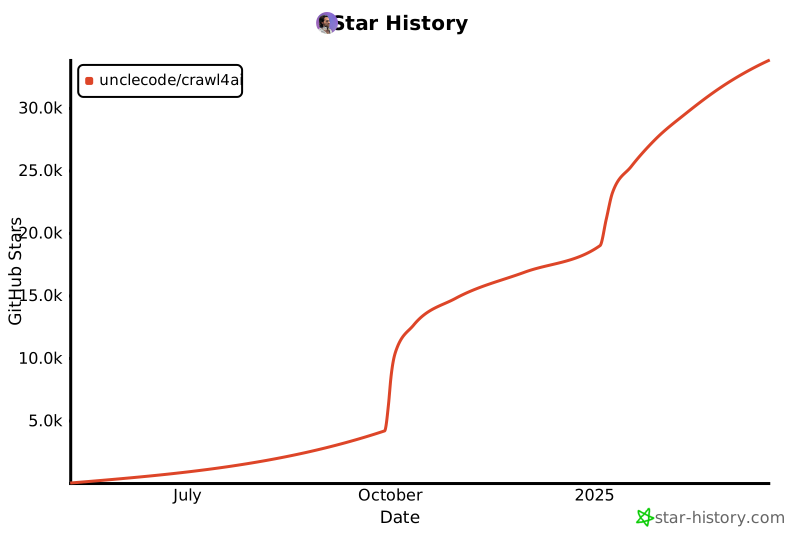](https://star-history.com/#unclecode/crawl4ai&Date)
|