 wehub-resource-sync
137 lines
9.2 KiB
Markdown
137 lines
9.2 KiB
Markdown
<!-- WEHUB_ZH_README -->
|
||
> [!NOTE]
|
||
> 本文档由 WeHub 基于上游 README 翻译整理,属于社区翻译,非官方中文文档。
|
||
> [English](./README.en.md) · [原始项目](https://github.com/triggerdotdev/trigger.dev) · [上游 README](https://github.com/triggerdotdev/trigger.dev/blob/HEAD/README.md)
|
||
> 原作者、版权与许可证归属以原始项目及本仓库 LICENSE 文件为准。
|
||
|
||
<div align="center">
|
||
|
||

|
||
|
||
### 构建并部署全托管 AI 智能体与工作流
|
||
|
||
[Website](https://trigger.dev) | [Docs](https://trigger.dev/docs) | [Issues](https://github.com/triggerdotdev/trigger.dev/issues) | [Example projects](https://github.com/triggerdotdev/examples) | [Feature requests](https://triggerdev.featurebase.app/) | [Public roadmap](https://triggerdev.featurebase.app/roadmap) | [Self-hosting](https://trigger.dev/docs/self-hosting/overview)
|
||
|
||
[](https://github.com/triggerdotdev/trigger.dev)
|
||
[](https://github.com/triggerdotdev/trigger.dev/blob/main/LICENSE)
|
||
[](https://www.npmjs.com/package/@trigger.dev/sdk)
|
||
[](https://www.npmjs.com/package/@trigger.dev/sdk)
|
||
|
||
[](https://twitter.com/triggerdotdev)
|
||
[](https://discord.gg/nkqV9xBYWy)
|
||
[](https://deepwiki.com/triggerdotdev/trigger.dev)
|
||
[](https://github.com/triggerdotdev/trigger.dev)
|
||
|
||
</div>
|
||
|
||
## 关于 Trigger.dev
|
||
|
||
Trigger.dev 是用于在 TypeScript 中构建 AI 工作流的开源平台。支持长时间运行的任务,并提供重试、队列、可观测性(observability)和弹性扩缩容。
|
||
|
||
## 专为构建 AI 智能体而设计的平台
|
||
|
||
使用你熟悉的各类框架、服务和 LLM 构建 [AI 智能体](https://trigger.dev/product/ai-agents),部署到 Trigger.dev 后,即可开箱即用地获得持久化、长时间运行的任务,以及重试、队列、可观测性和弹性扩缩容能力。
|
||
|
||
- **长时间运行、无超时限制**:与 AWS Lambda、Vercel 及其他 serverless 平台不同,你的任务可以完全没有超时限制地执行。
|
||
|
||
- **持久化、重试与队列**:借助持久化任务、重试、队列和幂等性(idempotency),构建稳定可靠的智能体与 AI 应用。
|
||
|
||
- **真正的运行时自由**:通过系统包自定义已部署的任务——可运行浏览器、Python 脚本、FFmpeg 等。
|
||
|
||
- **人机协同(Human-in-the-loop)**:以编程方式暂停任务,等待人工批准、拒绝或提供反馈。
|
||
|
||
- **实时应用与流式传输**:通过订阅运行(runs)或将 AI 响应流式推送到应用,把后台作业带到前台。
|
||
|
||
- **可观测性与监控**:每次运行都有完整的追踪与日志。配置错误告警,快速发现 bug。
|
||
|
||
## 核心功能:
|
||
|
||
- **[JavaScript and TypeScript SDK](https://trigger.dev/docs/tasks/overview)** - 使用熟悉的编程模型构建后台任务
|
||
- **[Long-running tasks](https://trigger.dev/docs/runs/max-duration)** - 处理资源密集型任务,无超时限制
|
||
- **[Durable cron schedules](https://trigger.dev/docs/tasks/scheduled#scheduled-tasks-cron)** - 创建并附加最长可达一年的周期性调度
|
||
- **[Trigger.dev Realtime](https://trigger.dev/docs/realtime/overview)** - 触发、订阅运行并获取实时更新,支持 LLM 流式传输
|
||
- **[Build extensions](https://trigger.dev/docs/config/extensions/overview#build-extensions)** - 直接接入构建系统并自定义构建流程。可运行 Python 脚本、FFmpeg、浏览器等。
|
||
- **[React hooks](https://trigger.dev/docs/frontend/react-hooks#react-hooks)** - 在前端通过 React hooks 包与 Trigger.dev API 交互
|
||
- **[Batch triggering](https://trigger.dev/docs/triggering#tasks-batchtrigger)** - 使用 batchTrigger() 以自定义 payload 和选项发起同一任务的多次运行
|
||
- **[Structured inputs / outputs](https://trigger.dev/docs/tasks/schemaTask#schematask)** - 为任务定义精确的数据 schema,并在运行时校验 payload
|
||
- **[Waits](https://trigger.dev/docs/wait)** - 在任务中添加等待,按指定时长暂停执行
|
||
- **[Preview branches](https://trigger.dev/docs/deployment/preview-branches)** - 创建隔离的测试与开发环境。可与 Vercel 和 git 工作流集成
|
||
- **[Waitpoints](https://trigger.dev/docs/wait-for-token#wait-for-token)** - 在关键决策点加入人机协同判断,而不中断工作流
|
||
- **[Concurrency & queues](https://trigger.dev/docs/queue-concurrency#concurrency-and-queues)** - 设置并发规则,管理多个任务的执行方式
|
||
- **[Multiple environments](https://trigger.dev/docs/how-it-works#dev-mode)** - 支持 DEV、PREVIEW、STAGING 和 PROD 环境
|
||
- **[No infrastructure to manage](https://trigger.dev/docs/how-it-works#trigger-dev-architecture)** - 自动扩缩容的基础设施,消除超时与服务器管理负担
|
||
- **[Automatic retries](https://trigger.dev/docs/errors-retrying)** - 若任务遇到未捕获错误,将自动尝试重新运行
|
||
- **[Checkpointing](https://trigger.dev/docs/how-it-works#the-checkpoint-resume-system)** - 借助检查点(checkpointing)功能,任务天然具备持久化能力
|
||
- **[Versioning](https://trigger.dev/docs/versioning)** - 原子化版本控制,可在不影响正在运行任务的情况下部署新版本
|
||
- **[Machines](https://trigger.dev/docs/machines)** - 配置任务使用的 vCPU 数量和 RAM(GB)
|
||
- **[Observability & monitoring](https://trigger.dev/product/observability-and-monitoring)** - 通过全面的日志与可视化工具监控任务性能的各个方面
|
||
- **[Logging & tracing](https://trigger.dev/docs/logging)** - 为所有任务提供全面的日志与追踪
|
||
- **[Tags](https://trigger.dev/docs/tags#tags)** - 为每次运行附加最多十个标签,可在 dashboard、realtime 和 SDK 中筛选
|
||
- **[Run metadata](https://trigger.dev/docs/runs/metadata#run-metadata)** - 为运行附加元数据,随运行进展更新,并可在前端用于实时更新
|
||
- **[Bulk actions](https://trigger.dev/docs/bulk-actions)** - 同时对多次运行执行操作,包括重放和取消
|
||
- **[Real-time alerts](https://trigger.dev/docs/troubleshooting-alerts#alerts)** - 为运行失败和部署选择你偏好的通知方式
|
||
|
||
## 在代码库中编写任务
|
||
|
||
在任务所属之处创建它们:你的代码库中。像往常一样进行版本控制、本地开发、测试和评审。
|
||
|
||
```ts
|
||
import { task } from "@trigger.dev/sdk";
|
||
|
||
//1. You need to export each task
|
||
export const helloWorld = task({
|
||
//2. Use a unique id for each task
|
||
id: "hello-world",
|
||
//3. The run function is the main function of the task
|
||
run: async (payload: { message: string }) => {
|
||
//4. You can write code that runs for a long time here, there are no timeouts
|
||
console.log(payload.message);
|
||
},
|
||
});
|
||
```
|
||
|
||
## 部署
|
||
|
||
使用我们的 SDK 在代码库中编写任务。无需管理基础设施,任务会自动扩缩容并连接到我们的云端。你也可以随时选择自托管。
|
||
|
||
## 环境
|
||
|
||
我们支持 `Development`、`Staging`、`Preview` 和 `Production` 环境,让你在部署到生产环境之前测试任务。
|
||
|
||
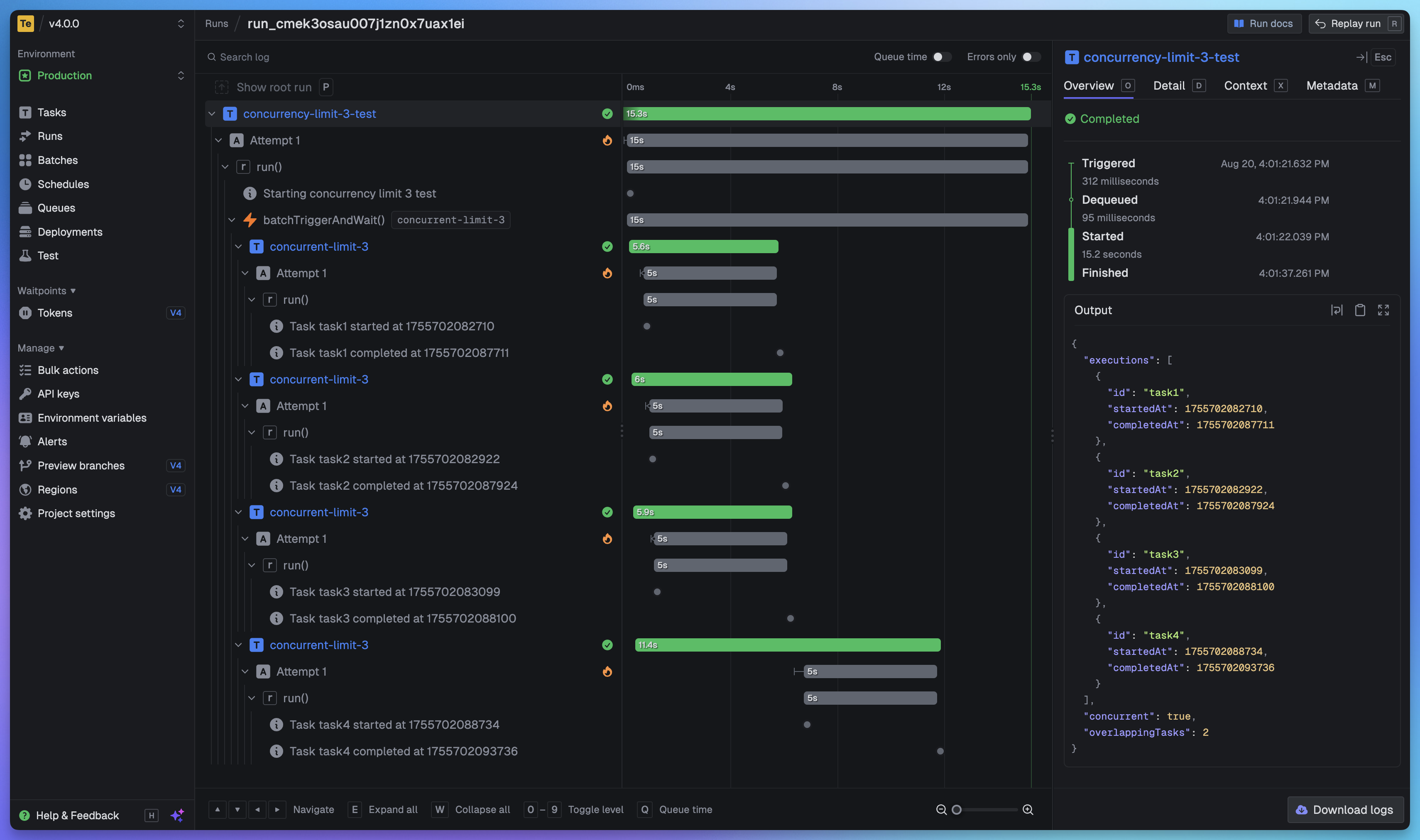
## 全面掌握每次作业运行
|
||
|
||
查看每次运行中的每个任务,准确了解发生了什么。我们为每次任务运行提供完整的追踪视图,让你看清每一步的情况。
|
||
|
||
|
||
|
||
# 快速开始
|
||
|
||
最快的入门方式是在我们的 [web app](https://cloud.trigger.dev), 中创建账户和项目,并按照入门引导中的说明操作。几分钟内即可构建并部署你的第一个任务。
|
||
|
||
### 实用链接:
|
||
|
||
- [Quick start](https://trigger.dev/docs/quick-start) - 几分钟内即可上手
|
||
- [How it works](https://trigger.dev/docs/how-it-works) - 了解 Trigger.dev 的底层工作原理
|
||
- [Guides and examples](https://trigger.dev/docs/guides/introduction) - 针对流行框架和用例的逐步指南与代码示例
|
||
|
||
## 自托管(Self-hosting)
|
||
|
||
如果你希望自行托管 Trigger.dev,可以按照我们的 [自托管指南](https://trigger.dev/docs/self-hosting/overview):
|
||
|
||
- [Docker 自托管指南](https://trigger.dev/docs/self-hosting/docker) - 使用 Docker Compose 快速启动 Trigger.dev 实例
|
||
- [Kubernetes 自托管指南](https://trigger.dev/docs/self-hosting/kubernetes) - 使用官方 Helm chart 将 Trigger.dev 部署到你的 Kubernetes 集群
|
||
|
||
## 支持与社区
|
||
|
||
我们在官方 [Discord 服务器](https://trigger.dev/discord) 拥有活跃的大型社区,可提供支持,其中包含专用于自托管的频道。
|
||
|
||
## 开发
|
||
|
||
如需在本地搭建开发环境或为开源项目贡献代码,请参阅我们的 [开发指南](./CONTRIBUTING.md)。
|
||
|
||
## 认识项目背后的杰出贡献者:
|
||
|
||
<a href="https://github.com/triggerdotdev/trigger.dev/graphs/contributors">
|
||
<img src="https://contrib.rocks/image?repo=triggerdotdev/trigger.dev" />
|
||
</a>
|