 wehub-resource-sync
e52ddb7dd4
wehub-resource-sync
e52ddb7dd4
CodeQL / Analyze (python) (push) Failing after 1s
Linting and testing / build (3.11) (push) Failing after 0s
Package exe with PyInstaller - Windows / build (push) Failing after 2s
Linting and testing / build (3.10) (push) Failing after 1s
Linting and testing / minimal-install (push) Failing after 1s
Update sites rating and statistics / build (push) Failing after 1s
Build docker image and push to DockerHub / docker (push) Failing after 1s
Linting and testing / build (3.12) (push) Failing after 1s
Linting and testing / build (3.14) (push) Failing after 1s
Linting and testing / build (3.13) (push) Failing after 2s
390 lines
17 KiB
Markdown
390 lines
17 KiB
Markdown
# Maigret
|
||
|
||
<div align="center">
|
||
<div>
|
||
<a href="https://pypi.org/project/maigret/">
|
||
<img alt="PyPI version badge for Maigret" src="https://img.shields.io/pypi/v/maigret?style=flat-square" />
|
||
</a>
|
||
<a href="https://pepy.tech/project/maigret">
|
||
<img alt="Total downloads" src="https://static.pepy.tech/badge/maigret" />
|
||
<img alt="Downloads/month" src="https://static.pepy.tech/badge/maigret/month" />
|
||
</a>
|
||
</div>
|
||
<div>
|
||
<a href="https://github.com/soxoj/maigret">
|
||
<img alt="View count for Maigret project" src="https://komarev.com/ghpvc/?username=maigret&color=brightgreen&label=views&style=flat-square" />
|
||
</a>
|
||
<a href="https://github.com/soxoj/maigret">
|
||
<img alt="Minimum Python version required: 3.10+" src="https://img.shields.io/badge/Python-3.10%2B-brightgreen?style=flat-square" />
|
||
</a>
|
||
<a href="https://github.com/soxoj/maigret/blob/main/LICENSE">
|
||
<img alt="License badge for Maigret" src="https://img.shields.io/github/license/soxoj/maigret?style=flat-square" />
|
||
</a>
|
||
</div>
|
||
<br>
|
||
<div>
|
||
<img src="https://raw.githubusercontent.com/soxoj/maigret/main/static/maigret.png" height="300" alt="Maigret logo"/>
|
||
</div>
|
||
<br>
|
||
<div>
|
||
<a href="https://codewiki.google/github.com/soxoj/maigret">
|
||
<img alt="Ask Code Wiki about Maigret" src="https://img.shields.io/badge/Code_Wiki-ask_about_repo-yellow?logo=googlegemini" />
|
||
</a>
|
||
<a href="https://deepwiki.com/soxoj/maigret">
|
||
<img alt="Ask DeepWiki about Maigret" src="https://img.shields.io/badge/DeepWiki-ask_about_repo-yellow" />
|
||
</a>
|
||
</div>
|
||
<br>
|
||
<div>
|
||
<b>English</b> · <a href="README.zh-CN.md">简体中文</a>
|
||
</div>
|
||
<br>
|
||
</div>
|
||
|
||
**Maigret** collects a dossier on a person **by username only**, checking for accounts on a huge number of sites and gathering all the available information from web pages. No API keys required. **[AI profiling (demo)](#ai-analysis)**.
|
||
|
||
## Sponsors
|
||
|
||
<p align="center">
|
||
<a href="https://www.711proxy.com/?utm_t=1&utm_i=538">
|
||
<img src="https://i.imgur.com/s1JHMun.gif" width="250" alt="711Proxy">
|
||
</a>
|
||
</p>
|
||
|
||
<p>
|
||
<a href="https://www.711proxy.com/?utm_t=1&utm_i=538"><b>711Proxy</b></a> provides reliable residential proxies for web scraping, username lookups, and public data collection. Over <b>100M</b> residential IPs across <b>200+</b> countries • High Success Rates • Fast & Reliable Connections. <br>
|
||
<b>Special Offer</b>: Free trial available! Rotating residential proxies from just <b>$0.55/GB</b>. Unlimited residential proxies from <b>$15/hour</b> with no concurrency limits.
|
||
</p>
|
||
|
||
<br>
|
||
|
||
<p align="center">
|
||
<a href="https://9proxy.com/?utm_source=Github&utm_campaign=obscura">
|
||
<img src="https://i.imgur.com/FleHdvu.gif" width="250" alt="9Proxy">
|
||
</a>
|
||
</p>
|
||
|
||
<p>
|
||
<a href="https://9proxy.com/?utm_source=Github&utm_campaign=obscura"><b>9Proxy</b></a> provides residential proxies from just <b>$0.018/IP or $0.68/GB</b>. 20M+ IPs across 90+ countries. Sticky or rotating sessions, managed from desktop or mobile app.
|
||
</p>
|
||
|
||
<br>
|
||
|
||
<p align="center">
|
||
<a href="https://www.rapidproxy.io/?ref=soxoj">
|
||
<img src="https://github.com/user-attachments/assets/4ed589d1-37cb-4a40-9273-bff4d6f1a514" width="500" alt="RapidProxy">
|
||
</a>
|
||
</p>
|
||
|
||
<p>
|
||
<a href="https://www.rapidproxy.io/?ref=soxoj"><b>RapidProxy</b></a> provides high-performance residential proxies for Twitter scraping, Selenium automation, and web data extraction. 90M+ IPs • Smart rotation • Anti-block • Non-expiring traffic. <br>
|
||
<b>Special Offer</b>: Try it free — Plans from $0.65/GB. Use code <b>RAPID10</b> for 10% off.
|
||
</p>
|
||
|
||
## Contents
|
||
|
||
- [In one minute](#in-one-minute)
|
||
- [Main features](#main-features)
|
||
- [Demo](#demo)
|
||
- [Installation](#installation)
|
||
- [Usage](#usage)
|
||
- [Contributing](#contributing)
|
||
- [Commercial Use](#commercial-use)
|
||
- [About](#about)
|
||
|
||
<a id="one-minute"></a>
|
||
## In one minute
|
||
|
||
Ensure you have Python 3.10 or higher.
|
||
|
||
```bash
|
||
pip install maigret
|
||
maigret YOUR_USERNAME
|
||
```
|
||
|
||
No install? Try the [community Telegram bot](https://sites.google.com/view/maigret-bot-link) or a [Cloud Shell](#cloud-shells).
|
||
|
||
Want a web UI? See [how to launch it](#web-interface).
|
||
|
||
See also: [Quick start](https://maigret.readthedocs.io/en/latest/quick-start.html).
|
||
|
||
## Main features
|
||
|
||
- Supports 3,000+ sites ([see full list](https://github.com/soxoj/maigret/blob/main/sites.md)). A default run checks the 500 highest-ranked sites by traffic; pass `-a` to scan everything, or `--tags` to narrow by category/country.
|
||
- Embeddable in Python projects — import `maigret` and run searches programmatically (see [library usage](https://maigret.readthedocs.io/en/latest/library-usage.html)).
|
||
- [Extracts](https://github.com/soxoj/socid_extractor) all available information about the account owner from profile pages and site APIs, including links to other accounts.
|
||
- Performs recursive search using discovered usernames and other IDs.
|
||
- Allows filtering by tags (site categories, countries).
|
||
- Detects and partially bypasses blocks, censorship, and CAPTCHA.
|
||
- Fetches an [auto-updated site database](https://maigret.readthedocs.io/en/latest/settings.html#database-auto-update) from GitHub each run (once per 24 hours), and falls back to the built-in database if offline.
|
||
- Works with Tor and I2P websites; able to check domains.
|
||
- Ships with a [web interface](#web-interface) for browsing results as a graph and downloading reports in every format from a single page.
|
||
- Optional [AI analysis mode](#ai-analysis) (`--ai`) that turns raw findings into a short investigation summary using an OpenAI-compatible API.
|
||
|
||
For the complete feature list, see the [features documentation](https://maigret.readthedocs.io/en/latest/features.html).
|
||
|
||
### Used by
|
||
|
||
Professional OSINT and social-media analysis tools built on Maigret:
|
||
|
||
<a href="https://github.com/SocialLinks-IO/sociallinks-api"><img height="60" alt="Social Links API" src="https://github.com/user-attachments/assets/789747b2-d7a0-4d4e-8868-ffc4427df660"></a>
|
||
<a href="https://sociallinks.io/products/sl-crimewall"><img height="60" alt="Social Links Crimewall" src="https://github.com/user-attachments/assets/0b18f06c-2f38-477b-b946-1be1a632a9d1"></a>
|
||
<a href="https://usersearch.ai/"><img height="60" alt="UserSearch" src="https://github.com/user-attachments/assets/66daa213-cf7d-40cf-9267-42f97cf77580"></a>
|
||
|
||
## Demo
|
||
|
||
### Video
|
||
|
||
<a href="https://asciinema.org/a/Ao0y7N0TTxpS0pisoprQJdylZ">
|
||
<img src="https://asciinema.org/a/Ao0y7N0TTxpS0pisoprQJdylZ.svg" alt="asciicast" width="600">
|
||
</a>
|
||
|
||
### Reports
|
||
|
||
[PDF report](https://raw.githubusercontent.com/soxoj/maigret/main/static/report_alexaimephotographycars.pdf), [HTML report](https://htmlpreview.github.io/?https://raw.githubusercontent.com/soxoj/maigret/main/static/report_alexaimephotographycars.html)
|
||
|
||
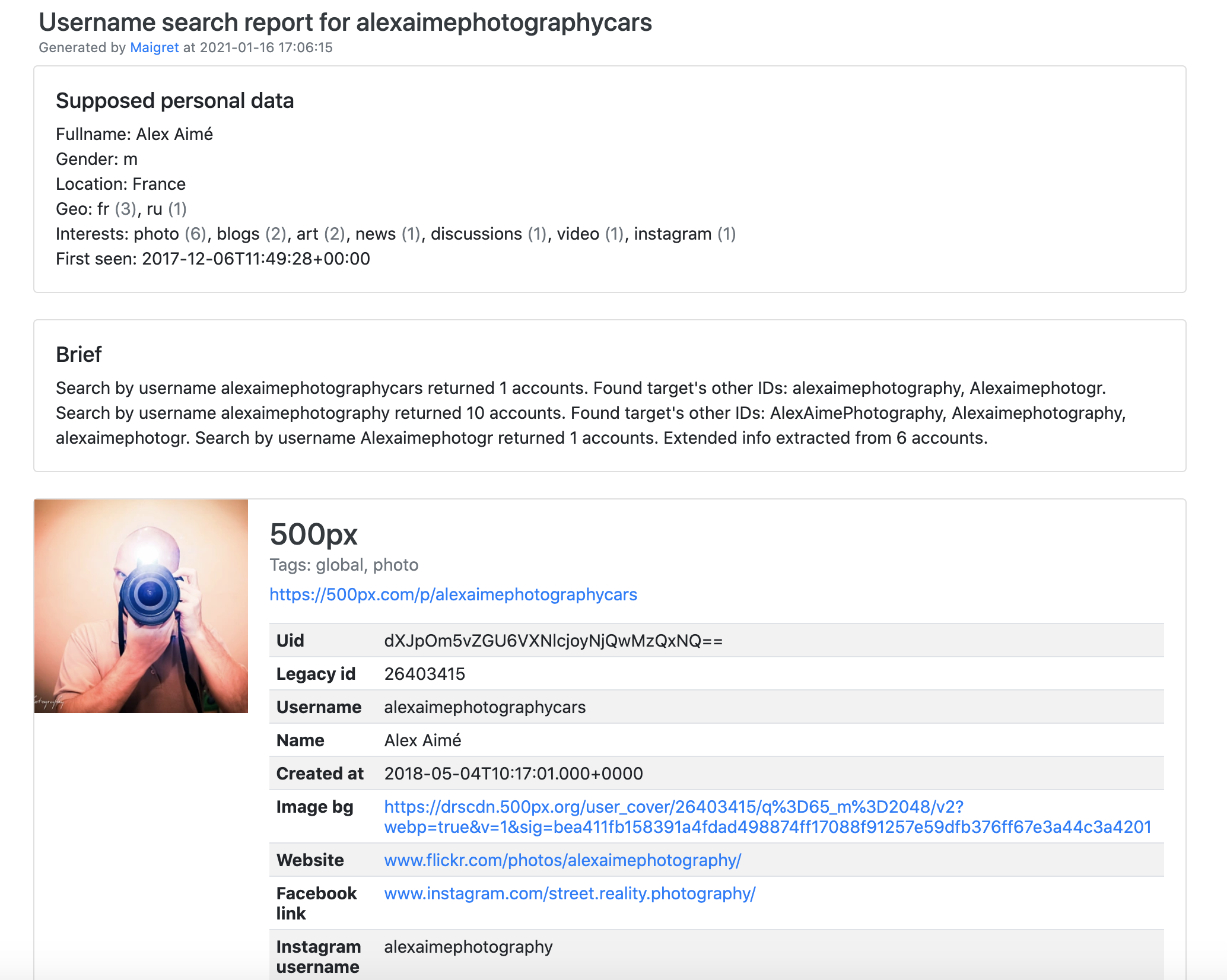
|
||
|
||
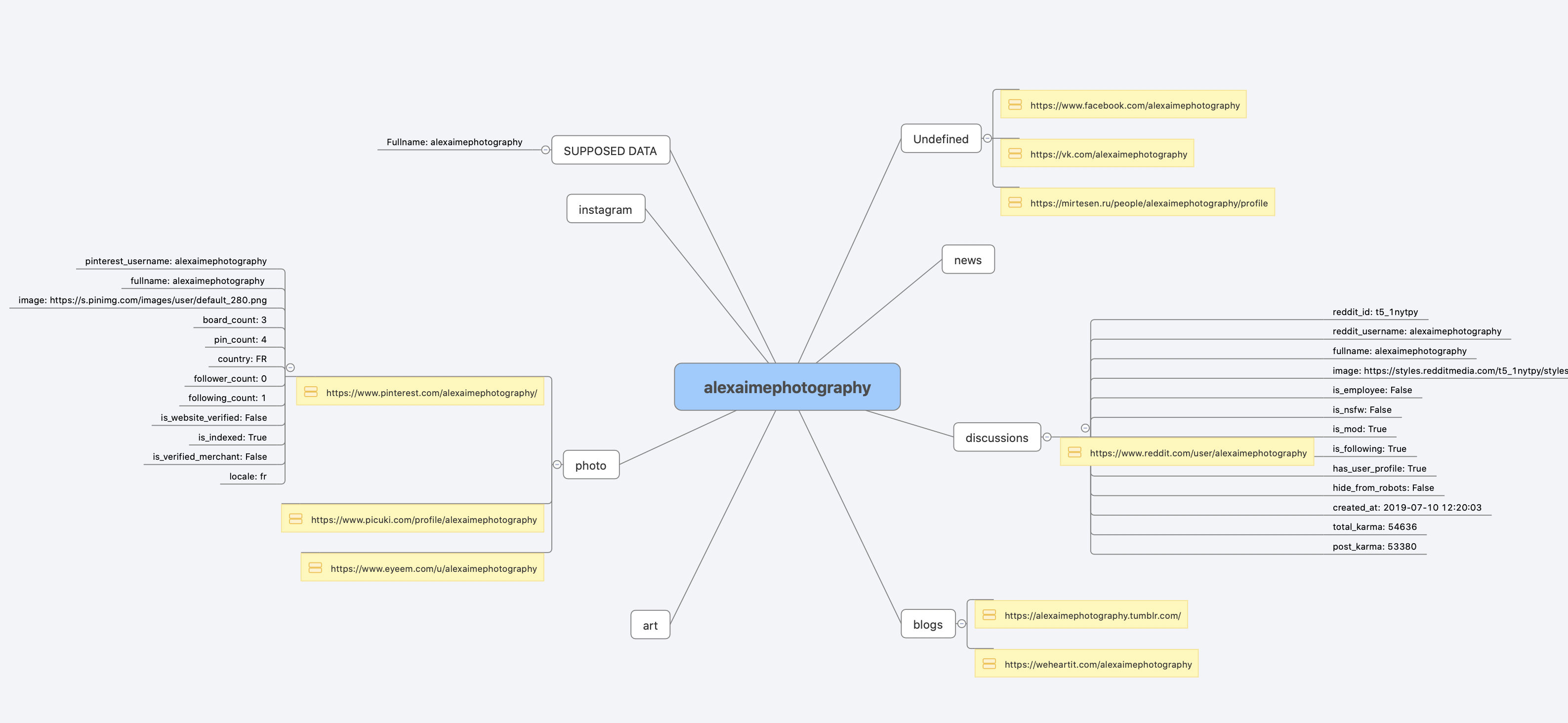
|
||
|
||
[Full console output](https://raw.githubusercontent.com/soxoj/maigret/main/static/recursive_search.md)
|
||
|
||
## Installation
|
||
|
||
Already ran the [In one minute](#one-minute) steps? You're set. Below are alternative methods.
|
||
|
||
Don't want to install anything? Use the [community Telegram bot](https://sites.google.com/view/maigret-bot-link).
|
||
|
||
### Windows
|
||
|
||
Download `maigret_standalone.exe` from [Releases](https://github.com/soxoj/maigret/releases). You can launch it two ways:
|
||
|
||
- **Double-click it** — Maigret will ask for a username, run a default search, and wait at the end so the report links stay visible.
|
||
- **Run it from a terminal** — open Command Prompt (press `Win+R`, type `cmd`, hit Enter) or PowerShell to pass extra options:
|
||
|
||
```cmd
|
||
cd %USERPROFILE%\Downloads
|
||
maigret_standalone.exe USERNAME
|
||
maigret_standalone.exe USERNAME --html :: also save an HTML report
|
||
maigret_standalone.exe --help :: list all options
|
||
```
|
||
|
||
Video guide: https://youtu.be/qIgwTZOmMmM.
|
||
|
||
<a id="cloud-shells"></a>
|
||
### Cloud Shells
|
||
|
||
Run Maigret in the browser via cloud shells or Jupyter notebooks:
|
||
|
||
<a href="https://console.cloud.google.com/cloudshell/open?git_repo=https://github.com/soxoj/maigret&tutorial=cloudshell-tutorial.md"><img src="https://user-images.githubusercontent.com/27065646/92304704-8d146d80-ef80-11ea-8c29-0deaabb1c702.png" alt="Open in Cloud Shell" height="50"></a>
|
||
<a href="https://repl.it/github/soxoj/maigret"><img src="https://replit.com/badge/github/soxoj/maigret" alt="Run on Replit" height="50"></a>
|
||
|
||
<a href="https://colab.research.google.com/gist/soxoj/879b51bc3b2f8b695abb054090645000/maigret-collab.ipynb"><img src="https://colab.research.google.com/assets/colab-badge.svg" alt="Open In Colab" height="45"></a>
|
||
<a href="https://mybinder.org/v2/gist/soxoj/9d65c2f4d3bec5dd25949197ea73cf3a/HEAD"><img src="https://mybinder.org/badge_logo.svg" alt="Open In Binder" height="45"></a>
|
||
|
||
### Local installation (pip)
|
||
|
||
```bash
|
||
# install from pypi
|
||
pip3 install maigret
|
||
|
||
# usage
|
||
maigret username
|
||
```
|
||
|
||
### From source
|
||
|
||
```bash
|
||
# or clone and install manually
|
||
git clone https://github.com/soxoj/maigret && cd maigret
|
||
|
||
# build and install
|
||
pip3 install .
|
||
|
||
# usage
|
||
maigret username
|
||
```
|
||
|
||
### Docker
|
||
|
||
Two image variants are published:
|
||
|
||
- `soxoj/maigret:latest` — CLI mode (default)
|
||
- `soxoj/maigret:web` — auto-launches the [web interface](#web-interface)
|
||
|
||
```bash
|
||
# official image (CLI)
|
||
docker pull soxoj/maigret
|
||
|
||
# CLI usage
|
||
docker run -v /mydir:/app/reports soxoj/maigret:latest username --html
|
||
|
||
# Web UI (open http://localhost:5000)
|
||
docker run -p 5000:5000 soxoj/maigret:web
|
||
|
||
# Web UI on a custom port
|
||
docker run -e PORT=8080 -p 8080:8080 soxoj/maigret:web
|
||
|
||
# manual build
|
||
docker build -t maigret . # CLI image (default target)
|
||
docker build --target web -t maigret-web . # Web UI image
|
||
```
|
||
|
||
### Troubleshooting
|
||
|
||
Build errors? See the [troubleshooting guide](https://maigret.readthedocs.io/en/latest/installation.html#troubleshooting).
|
||
|
||
PDF reports (`--pdf`) are an optional extra — install with `pip install 'maigret[pdf]'`. They need system-level graphics libraries on Linux/macOS; see the [PDF reports section](https://maigret.readthedocs.io/en/latest/installation.html#optional-pdf-reports-maigret-pdf) for per-OS install steps.
|
||
|
||
## Usage
|
||
|
||
### Examples
|
||
|
||
```bash
|
||
# make HTML, PDF, and Xmind8 reports
|
||
maigret user --html
|
||
maigret user --pdf
|
||
maigret user --xmind #Output not compatible with xmind 2022+
|
||
|
||
# machine-readable exports
|
||
maigret user --json ndjson # newline-delimited JSON (also: --json simple)
|
||
maigret user --csv
|
||
maigret user --txt
|
||
maigret user --graph # interactive D3 graph (HTML)
|
||
maigret user --neo4j # Neo4j Cypher script (graph database)
|
||
|
||
# search on sites marked with tags photo & dating
|
||
maigret user --tags photo,dating
|
||
|
||
# search on sites marked with tag us
|
||
maigret user --tags us
|
||
|
||
# highlight sites whose page also mentions specific keywords
|
||
maigret user --keywords python rust
|
||
# keyword-matched sites are shown with "[++]" in bright green
|
||
|
||
# search for three usernames on all available sites
|
||
maigret user1 user2 user3 -a
|
||
|
||
# AI-assisted investigation summary (needs OPENAI_API_KEY)
|
||
maigret user --ai
|
||
```
|
||
|
||
`--neo4j` writes a `*_neo4j.cypher` script of the results graph; import it with `cypher-shell -u neo4j -p <password> < report_user_neo4j.cypher` or paste it into the Neo4j Browser. Re-imports are idempotent. See the [Neo4j export docs](https://maigret.readthedocs.io/en/latest/command-line-options.html#neo4j-export).
|
||
|
||
Run `maigret --help` for all options. Docs: [CLI options](https://maigret.readthedocs.io/en/latest/command-line-options.html), [more examples](https://maigret.readthedocs.io/en/latest/usage-examples.html). Running into 403s or timeouts? See [TROUBLESHOOTING.md](TROUBLESHOOTING.md).
|
||
|
||
<a id="web-interface"></a>
|
||
### Web interface
|
||
|
||
Maigret has a built-in web UI with a results graph and downloadable reports.
|
||
|
||
<details>
|
||
<summary>Web Interface Screenshots</summary>
|
||
|
||
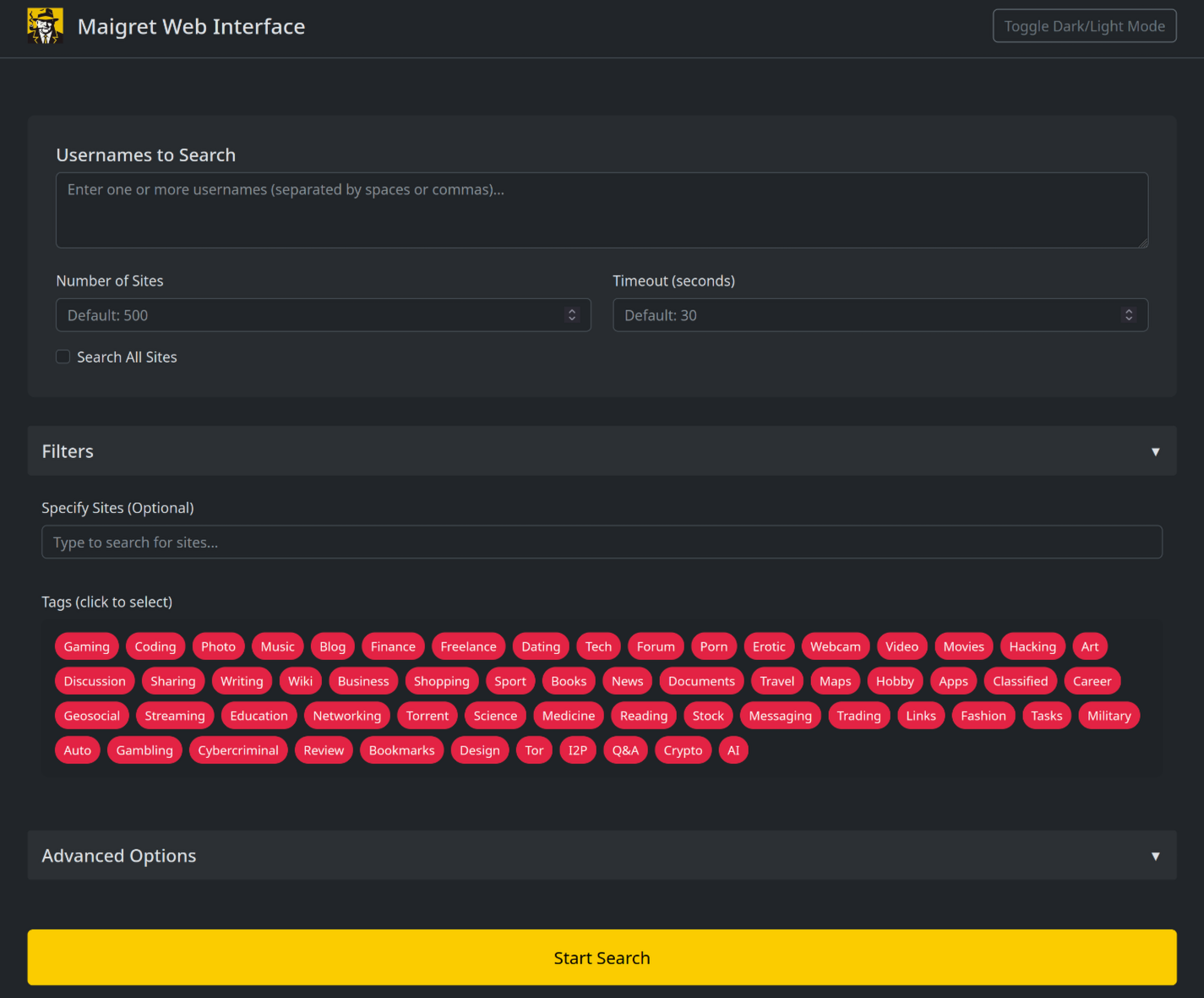
|
||
|
||
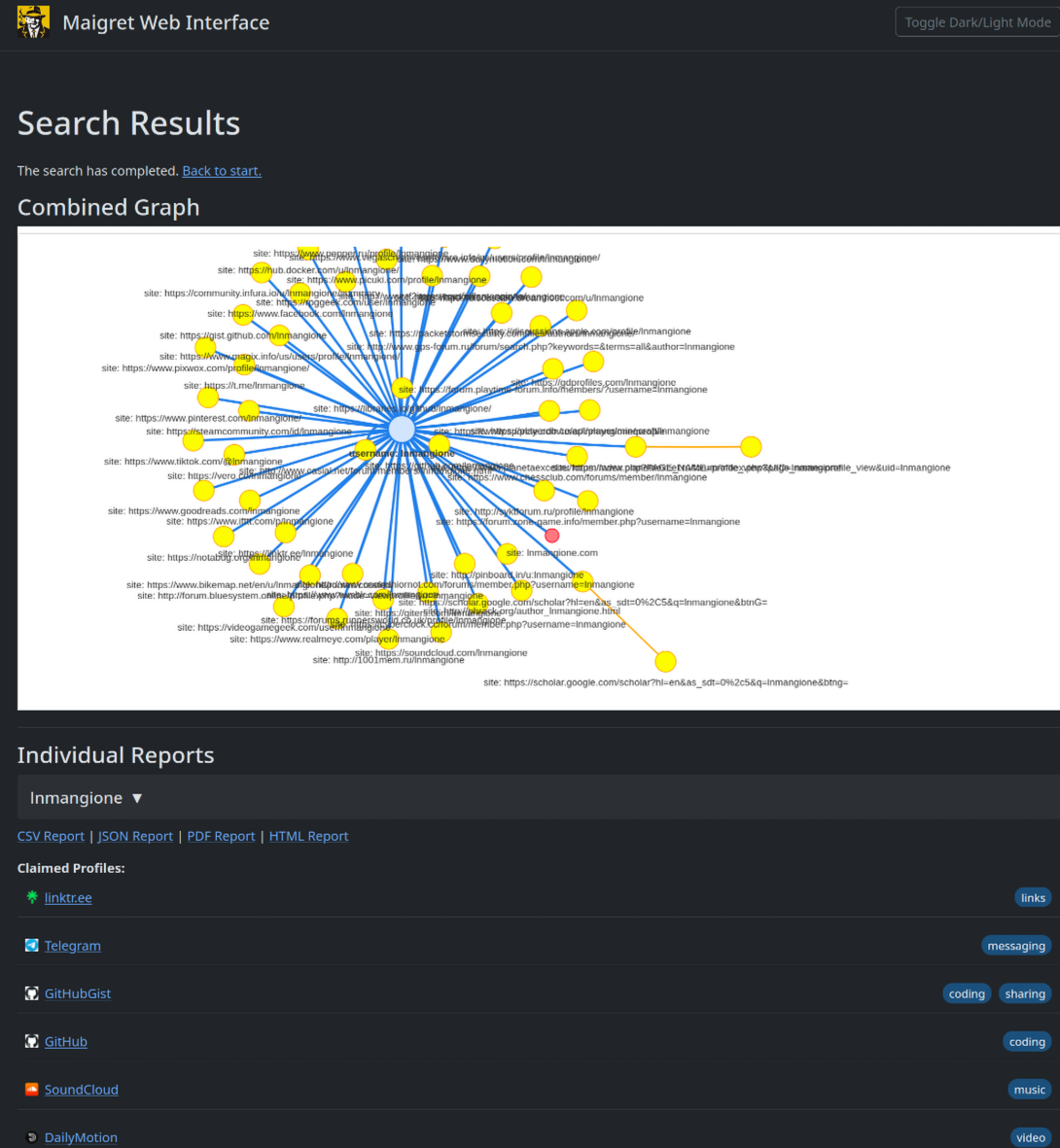
|
||
|
||
</details>
|
||
|
||
```console
|
||
maigret --web 5000
|
||
```
|
||
|
||
Open http://127.0.0.1:5000, enter a username, and view results.
|
||
|
||
### Python library
|
||
|
||
**Maigret can be embedded in your own Python projects.** The CLI is a thin wrapper around an async function you can call directly — build custom pipelines, feed results into your own tooling, or run it inside a larger OSINT workflow.
|
||
|
||
See the full [library usage guide](https://maigret.readthedocs.io/en/latest/library-usage.html) for a working example, async patterns, and how to filter sites by tag.
|
||
|
||
### Useful CLI flags
|
||
|
||
- `--parse URL` — parse a profile page, extract IDs/usernames, and use them to kick off a recursive search.
|
||
- `--permute` — generate likely username variants from two or more inputs (e.g. `john doe` → `johndoe`, `j.doe`, …) and search for all of them.
|
||
- `--self-check [--auto-disable]` — verify `usernameClaimed` / `usernameUnclaimed` pairs against live sites for maintainers auditing the database.
|
||
- `--ai` / `--ai-model` — run the [AI analysis](#ai-analysis) over the search results and stream a short investigation summary to the terminal.
|
||
|
||
<a id="ai-analysis"></a>
|
||
### AI analysis
|
||
|
||
[](https://asciinema.org/a/979404)
|
||
|
||
`--ai` collects the search results, builds an internal Markdown report, and sends it to an OpenAI-compatible chat completion endpoint to produce a short, neutral investigation summary (likely real name, location, occupation, interests, languages, confidence, follow-up leads). Per-site progress is suppressed and the model's output is streamed to stdout.
|
||
|
||
```bash
|
||
export OPENAI_API_KEY=sk-...
|
||
maigret user --ai
|
||
|
||
# pick a different model
|
||
maigret user --ai --ai-model gpt-4o-mini
|
||
```
|
||
|
||
The key can also be set as `openai_api_key` in `settings.json`. The endpoint defaults to `https://api.openai.com/v1`, but `openai_api_base_url` in `settings.json` can point to any OpenAI-compatible API (Azure OpenAI, OpenRouter, a local server, …). See the [settings docs](https://maigret.readthedocs.io/en/latest/settings.html) for the full list of options.
|
||
|
||
### Tor / I2P / proxies
|
||
|
||
Maigret can route checks through a proxy, Tor, or I2P — useful for `.onion` / `.i2p` sites and for bypassing WAFs that block datacenter IPs.
|
||
|
||
```bash
|
||
# any HTTP/SOCKS proxy
|
||
maigret user --proxy socks5://127.0.0.1:1080
|
||
|
||
# Tor (default gateway socks5://127.0.0.1:9050)
|
||
maigret user --tor-proxy socks5://127.0.0.1:9050
|
||
|
||
# I2P (default gateway http://127.0.0.1:4444)
|
||
maigret user --i2p-proxy http://127.0.0.1:4444
|
||
```
|
||
|
||
Start your Tor / I2P daemon before running the command — Maigret does not manage these gateways.
|
||
|
||
### Cloudflare bypass
|
||
|
||
> **Experimental.** The Cloudflare webgate is under active development; the configuration schema, CLI behaviour, and the set of routed sites may change without backwards-compatibility guarantees.
|
||
|
||
A subset of sites in the database require a real browser to solve a JavaScript challenge. Maigret can offload these checks to a local [FlareSolverr](https://github.com/FlareSolverr/FlareSolverr) instance:
|
||
|
||
```bash
|
||
docker run -d -p 8191:8191 --name flaresolverr ghcr.io/flaresolverr/flaresolverr:latest
|
||
maigret --cloudflare-bypass <username>
|
||
```
|
||
|
||
The bypass is opt-in (`--cloudflare-bypass` or `cloudflare_bypass.enabled` in `settings.json`) and only fires for sites whose `protection` field matches. See the [feature docs](https://maigret.readthedocs.io/en/latest/features.html#cloudflare-bypass) for backend options and configuration.
|
||
|
||
## Contributing
|
||
|
||
Add or fix new sites surgically in `data.json` (no `json.load`/`json.dump`), then run `./utils/update_site_data.py` to regenerate `sites.md` and the database metadata, and open a pull request. For more details, see the [CONTRIBUTING guide](https://github.com/soxoj/maigret/blob/main/CONTRIBUTING.md) and [development docs](https://maigret.readthedocs.io/en/latest/development.html). Release history: [CHANGELOG.md](CHANGELOG.md).
|
||
|
||
## Commercial Use
|
||
|
||
The open-source Maigret is MIT-licensed and free for commercial use without restriction — but site checks break over time and need active maintenance.
|
||
|
||
For serious commercial use — with a **daily-updated site database** or a **username-check API** — reach out: 📧 [maigret@soxoj.com](mailto:maigret@soxoj.com)
|
||
|
||
- Private site database — 5 000+ sites, updated daily (separate from the public open-source database)
|
||
- Username check API — integrate Maigret into your product
|
||
|
||
## About
|
||
|
||
### Disclaimer
|
||
|
||
**For educational and lawful purposes only.** You are responsible for complying with all applicable laws (GDPR, CCPA, etc.) in your jurisdiction. The authors bear no responsibility for misuse.
|
||
|
||
### Feedback
|
||
|
||
[Open an issue](https://github.com/soxoj/maigret/issues) · [GitHub Discussions](https://github.com/soxoj/maigret/discussions) · [Telegram](https://t.me/soxoj)
|
||
|
||
### SOWEL classification
|
||
|
||
OSINT techniques used:
|
||
- [SOTL-2.2. Search For Accounts On Other Platforms](https://sowel.soxoj.com/other-platform-accounts)
|
||
- [SOTL-6.1. Check Logins Reuse To Find Another Account](https://sowel.soxoj.com/logins-reuse)
|
||
- [SOTL-6.2. Check Nicknames Reuse To Find Another Account](https://sowel.soxoj.com/nicknames-reuse)
|
||
|
||
### License
|
||
|
||
MIT © [Maigret](https://github.com/soxoj/maigret)
|