 wehub-resource-sync
c65045501d
wehub-resource-sync
c65045501d
Build docker image and push to DockerHub / docker (push) Has been cancelled
Linting and testing / build (3.11) (push) Has been cancelled
Linting and testing / build (3.12) (push) Has been cancelled
Linting and testing / build (3.13) (push) Has been cancelled
Linting and testing / build (3.14) (push) Has been cancelled
Linting and testing / minimal-install (push) Has been cancelled
CodeQL / Analyze (python) (push) Has been cancelled
Package exe with PyInstaller - Windows / build (push) Has been cancelled
Linting and testing / build (3.10) (push) Has been cancelled
Update sites rating and statistics / build (push) Has been cancelled
399 lines
18 KiB
Markdown
399 lines
18 KiB
Markdown
<!-- WEHUB_ZH_README -->
|
|
> [!NOTE]
|
|
> 本文档由 WeHub 基于上游 README 翻译整理,属于社区翻译,非官方中文文档。
|
|
> [English](./README.en.md) · [原始项目](https://github.com/soxoj/maigret) · [上游 README](https://github.com/soxoj/maigret/blob/HEAD/README.md)
|
|
> 原作者、版权与许可证归属以原始项目及本仓库 LICENSE 文件为准。
|
|
|
|
# Maigret
|
|
|
|
<div align="center">
|
|
<div>
|
|
<a href="https://pypi.org/project/maigret/">
|
|
<img alt="Maigret 的 PyPI 版本" src="https://img.shields.io/pypi/v/maigret?style=flat-square" />
|
|
</a>
|
|
<a href="https://pepy.tech/project/maigret">
|
|
<img alt="Maigret 总下载量" src="https://static.pepy.tech/badge/maigret" />
|
|
<img alt="Maigret 月下载量" src="https://static.pepy.tech/badge/maigret/month" />
|
|
</a>
|
|
</div>
|
|
<div>
|
|
<a href="https://github.com/soxoj/maigret">
|
|
<img alt="Maigret 项目访问量" src="https://komarev.com/ghpvc/?username=maigret&color=brightgreen&label=views&style=flat-square" />
|
|
</a>
|
|
<a href="https://github.com/soxoj/maigret">
|
|
<img alt="所需最低 Python 版本:3.10+" src="https://img.shields.io/badge/Python-3.10%2B-brightgreen?style=flat-square" />
|
|
</a>
|
|
<a href="https://github.com/soxoj/maigret/blob/main/LICENSE">
|
|
<img alt="Maigret 的开源许可证" src="https://img.shields.io/github/license/soxoj/maigret?style=flat-square" />
|
|
</a>
|
|
</div>
|
|
<br>
|
|
<div>
|
|
<img src="https://raw.githubusercontent.com/soxoj/maigret/main/static/maigret.png" height="300" alt="Maigret logo"/>
|
|
</div>
|
|
<br>
|
|
<div>
|
|
<a href="https://codewiki.google/github.com/soxoj/maigret">
|
|
<img alt="向 Code Wiki 询问 Maigret" src="https://img.shields.io/badge/Code_Wiki-ask_about_repo-yellow?logo=googlegemini" />
|
|
</a>
|
|
<a href="https://deepwiki.com/soxoj/maigret">
|
|
<img alt="向 DeepWiki 询问 Maigret" src="https://img.shields.io/badge/DeepWiki-ask_about_repo-yellow" />
|
|
</a>
|
|
</div>
|
|
<br>
|
|
<div>
|
|
<a href="README.md">English</a> · <b>简体中文</b>
|
|
</div>
|
|
<br>
|
|
</div>
|
|
|
|
**Maigret** 仅凭一个用户名,就能在大量站点上查找其账号,并从网页中收集所有可获取的公开信息,为目标人物生成一份档案。无需任何 API 密钥。**[AI 画像(演示)](#ai-analysis)**。
|
|
|
|
## 赞助商
|
|
|
|
<p align="center">
|
|
<a href="https://www.711proxy.com/?utm_t=1&utm_i=538">
|
|
<img src="https://i.imgur.com/s1JHMun.gif" width="250" alt="711Proxy">
|
|
</a>
|
|
</p>
|
|
|
|
<p>
|
|
<a href="https://www.711proxy.com/?utm_t=1&utm_i=538"><b>711Proxy</b></a> 提供可靠的住宅代理,适用于网页抓取、用户名查询及公开数据采集。覆盖 <b>200+</b> 个国家超 <b>1 亿</b>住宅 IP · 高成功率 · 稳定快速。<br>
|
|
<b>特别优惠</b>:免费试用!轮换住宅代理低至 <b>$0.55/GB</b>。无并发限制的不限量住宅代理低至 <b>$15/小时</b>。
|
|
</p>
|
|
|
|
<br>
|
|
|
|
<p align="center">
|
|
<a href="https://9proxy.com/?utm_source=Github&utm_campaign=obscura">
|
|
<img src="https://i.imgur.com/FleHdvu.gif" width="250" alt="9Proxy">
|
|
</a>
|
|
</p>
|
|
|
|
<p>
|
|
<a href="https://9proxy.com/?utm_source=Github&utm_campaign=obscura"><b>9Proxy</b></a> 提供住宅代理,低至 <b>$0.018/IP 或 $0.68/GB</b>。覆盖 90+ 国家超 2000 万 IP,支持长效或轮换会话,可通过桌面或移动端应用管理。
|
|
</p>
|
|
|
|
<br>
|
|
|
|
<p align="center">
|
|
<a href="https://www.rapidproxy.io/?ref=soxoj">
|
|
<img src="https://github.com/user-attachments/assets/4ed589d1-37cb-4a40-9273-bff4d6f1a514" width="500" alt="RapidProxy">
|
|
</a>
|
|
</p>
|
|
|
|
<p>
|
|
<a href="https://www.rapidproxy.io/?ref=soxoj"><b>RapidProxy</b></a> 提供高性能住宅代理,适用于 Twitter 抓取、Selenium 自动化和网页数据提取。9000万+ IP · 智能轮换 · 反封锁 · 流量永不过期。<br>
|
|
<b>特别优惠</b>:免费试用 — 套餐低至 $0.65/GB。使用优惠码 <b>RAPID10</b> 享九折优惠。
|
|
</p>
|
|
|
|
## 目录
|
|
|
|
- [一分钟上手](#one-minute)
|
|
- [核心特性](#main-features)
|
|
- [演示](#demo)
|
|
- [安装](#installation)
|
|
- [使用](#usage)
|
|
- [参与贡献](#contributing)
|
|
- [商业使用](#commercial-use)
|
|
- [关于](#about)
|
|
|
|
<a id="one-minute"></a>
|
|
## 一分钟上手
|
|
|
|
请先确认本机的 Python 版本不低于 3.10。
|
|
|
|
```bash
|
|
pip install maigret
|
|
maigret YOUR_USERNAME
|
|
```
|
|
|
|
不想本地安装?可以试试[社区 Telegram 机器人](https://sites.google.com/view/maigret-bot-link),或者使用[云端 Shell](#cloud-shells)。
|
|
|
|
想要一个 Web 界面?参见[启动方式](#web-interface)。
|
|
|
|
延伸阅读:[快速入门](https://maigret.readthedocs.io/en/latest/quick-start.html)。
|
|
|
|
<a id="main-features"></a>
|
|
## 核心特性
|
|
|
|
- 支持 3000+ 站点(完整列表见 [sites.md](https://github.com/soxoj/maigret/blob/main/sites.md))。默认仅检查访问量排名前 500 的站点;加上 `-a` 可全量扫描,或使用 `--tags` 按分类/国家筛选。
|
|
- 可作为 Python 库嵌入到自己的项目中——直接 `import maigret` 即可在代码里发起搜索(参见[库使用文档](https://maigret.readthedocs.io/en/latest/library-usage.html))。
|
|
- 通过 [socid_extractor](https://github.com/soxoj/socid_extractor) 从个人主页和站点 API 中[提取](https://github.com/soxoj/socid_extractor)账号所有者的所有可获取信息,包括指向其他账号的链接。
|
|
- 基于已发现的用户名和其他 ID,执行递归搜索。
|
|
- 支持按标签(站点分类、国家)进行筛选。
|
|
- 能够检测并部分绕过封锁、审查和 CAPTCHA。
|
|
- 每次运行时(每 24 小时一次)从 GitHub 拉取一份[自动更新的站点数据库](https://maigret.readthedocs.io/en/latest/settings.html#database-auto-update);离线时会回退到内置数据库。
|
|
- 可访问 Tor 与 I2P 站点;支持检查域名。
|
|
- 自带一个 [Web 界面](#web-interface),可在同一页面将结果以图谱方式浏览,并下载各种格式的报告。
|
|
- 可选的 [AI 分析模式](#ai-analysis)(`--ai`),通过 OpenAI 兼容 API 将原始搜索结果整理成一份简短的调查摘要。
|
|
|
|
完整特性列表请见[特性文档](https://maigret.readthedocs.io/en/latest/features.html)。
|
|
|
|
### 谁在使用
|
|
|
|
基于 Maigret 构建的专业 OSINT 与社交媒体分析工具:
|
|
|
|
<a href="https://github.com/SocialLinks-IO/sociallinks-api"><img height="60" alt="Social Links API" src="https://github.com/user-attachments/assets/789747b2-d7a0-4d4e-8868-ffc4427df660"></a>
|
|
<a href="https://sociallinks.io/products/sl-crimewall"><img height="60" alt="Social Links Crimewall" src="https://github.com/user-attachments/assets/0b18f06c-2f38-477b-b946-1be1a632a9d1"></a>
|
|
<a href="https://usersearch.ai/"><img height="60" alt="UserSearch" src="https://github.com/user-attachments/assets/66daa213-cf7d-40cf-9267-42f97cf77580"></a>
|
|
|
|
<a id="demo"></a>
|
|
## 演示
|
|
|
|
### 视频
|
|
|
|
<a href="https://asciinema.org/a/Ao0y7N0TTxpS0pisoprQJdylZ">
|
|
<img src="https://asciinema.org/a/Ao0y7N0TTxpS0pisoprQJdylZ.svg" alt="asciicast" width="600">
|
|
</a>
|
|
|
|
### 报告示例
|
|
|
|
[PDF 报告](https://raw.githubusercontent.com/soxoj/maigret/main/static/report_alexaimephotographycars.pdf)、[HTML 报告](https://htmlpreview.github.io/?https://raw.githubusercontent.com/soxoj/maigret/main/static/report_alexaimephotographycars.html)
|
|
|
|
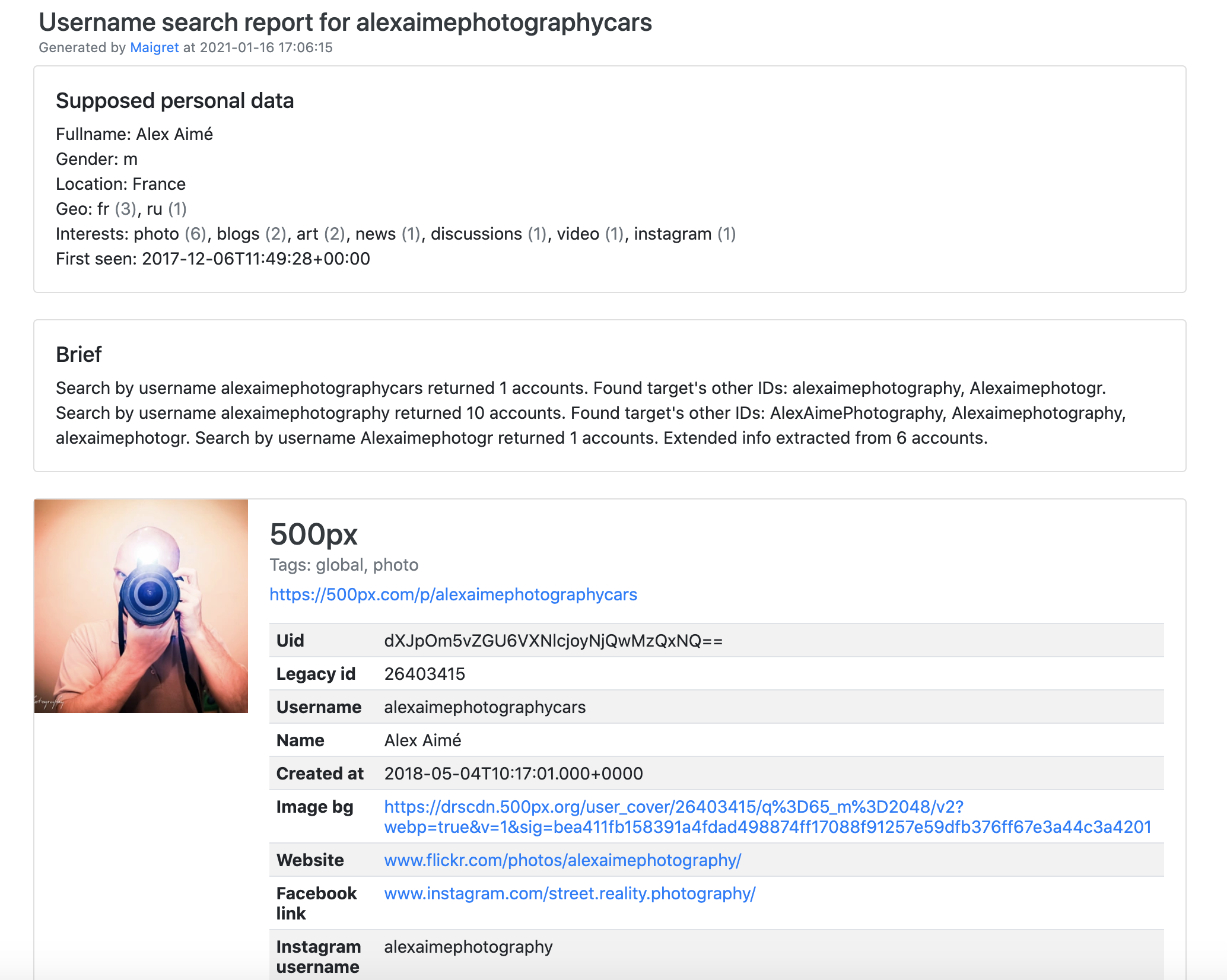
|
|
|
|
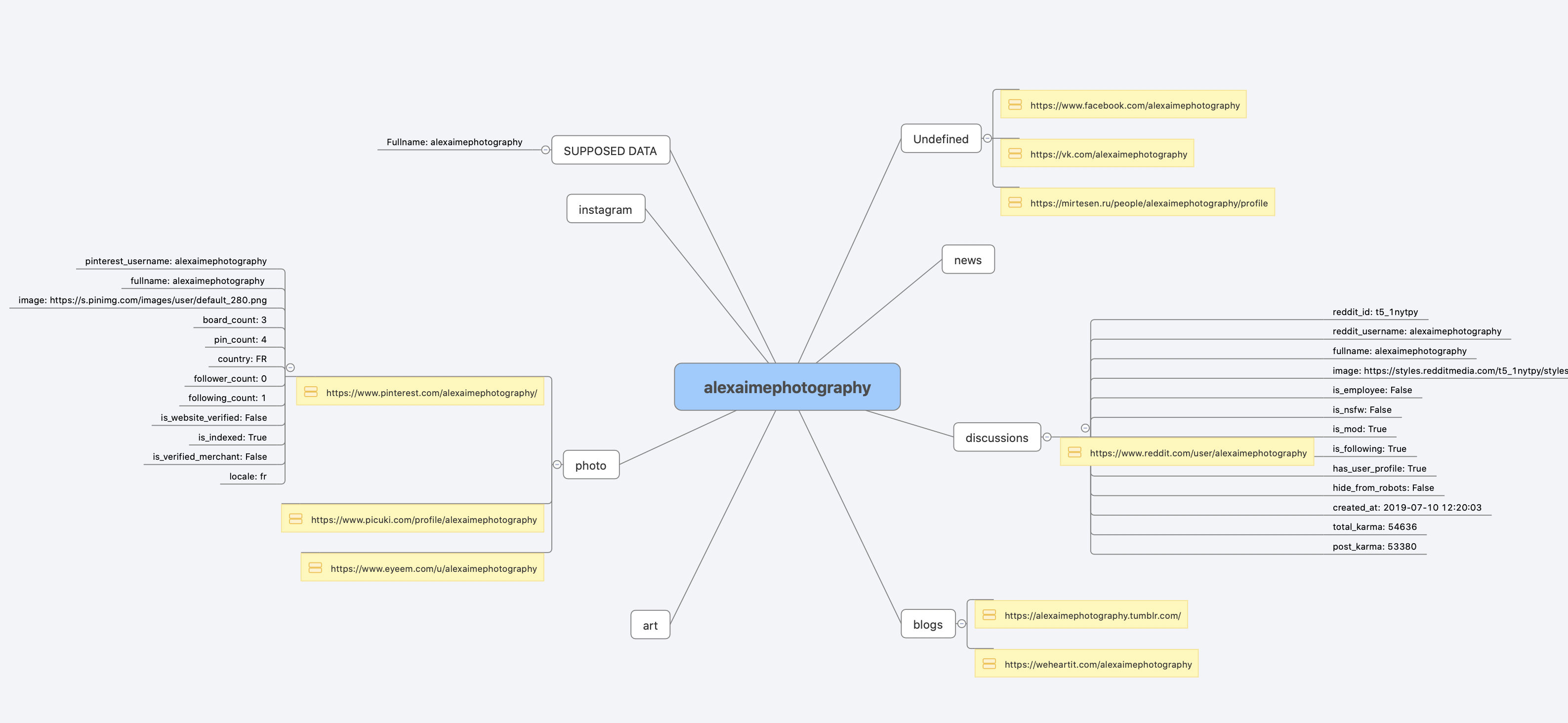
|
|
|
|
[完整的命令行输出示例](https://raw.githubusercontent.com/soxoj/maigret/main/static/recursive_search.md)
|
|
|
|
<a id="installation"></a>
|
|
## 安装
|
|
|
|
如果你已经按[一分钟上手](#one-minute)的步骤跑通了,就无需再装。下面列出几种可选的安装方式。
|
|
|
|
什么都不想装?直接用[社区 Telegram 机器人](https://sites.google.com/view/maigret-bot-link)。
|
|
|
|
### Windows
|
|
|
|
从 [Releases](https://github.com/soxoj/maigret/releases) 下载 `maigret_standalone.exe`。有两种启动方式:
|
|
|
|
- **双击运行** —— Maigret 会询问用户名、执行一次默认搜索,并在结束时停留,方便你查看报告链接。
|
|
- **从终端运行** —— 打开命令提示符(按 `Win+R`,输入 `cmd`,回车)或 PowerShell,以便传入额外参数:
|
|
|
|
```cmd
|
|
cd %USERPROFILE%\Downloads
|
|
maigret_standalone.exe USERNAME
|
|
maigret_standalone.exe USERNAME --html :: 同时保存 HTML 报告
|
|
maigret_standalone.exe --help :: 列出所有选项
|
|
```
|
|
|
|
视频指引:https://youtu.be/qIgwTZOmMmM。
|
|
|
|
<a id="cloud-shells"></a>
|
|
### 云端 Shell
|
|
|
|
通过云端 Shell 或 Jupyter Notebook 在浏览器里运行 Maigret:
|
|
|
|
<a href="https://console.cloud.google.com/cloudshell/open?git_repo=https://github.com/soxoj/maigret&tutorial=cloudshell-tutorial.md"><img src="https://user-images.githubusercontent.com/27065646/92304704-8d146d80-ef80-11ea-8c29-0deaabb1c702.png" alt="Open in Cloud Shell" height="50"></a>
|
|
<a href="https://repl.it/github/soxoj/maigret"><img src="https://replit.com/badge/github/soxoj/maigret" alt="Run on Replit" height="50"></a>
|
|
|
|
<a href="https://colab.research.google.com/gist/soxoj/879b51bc3b2f8b695abb054090645000/maigret-collab.ipynb"><img src="https://colab.research.google.com/assets/colab-badge.svg" alt="Open In Colab" height="45"></a>
|
|
<a href="https://mybinder.org/v2/gist/soxoj/9d65c2f4d3bec5dd25949197ea73cf3a/HEAD"><img src="https://mybinder.org/badge_logo.svg" alt="Open In Binder" height="45"></a>
|
|
|
|
### 本地安装(pip)
|
|
|
|
```bash
|
|
# 从 PyPI 安装
|
|
pip3 install maigret
|
|
|
|
# 使用
|
|
maigret username
|
|
```
|
|
|
|
### 从源码安装
|
|
|
|
```bash
|
|
# 也可以克隆仓库后手动安装
|
|
git clone https://github.com/soxoj/maigret && cd maigret
|
|
|
|
# 构建并安装
|
|
pip3 install .
|
|
|
|
# 使用
|
|
maigret username
|
|
```
|
|
|
|
### Docker
|
|
|
|
官方提供两个镜像变体:
|
|
|
|
- `soxoj/maigret:latest` —— CLI 模式(默认)
|
|
- `soxoj/maigret:web` —— 自动启动 [Web 界面](#web-interface)
|
|
|
|
```bash
|
|
# 拉取官方镜像(CLI)
|
|
docker pull soxoj/maigret
|
|
|
|
# CLI 用法
|
|
docker run -v /mydir:/app/reports soxoj/maigret:latest username --html
|
|
|
|
# Web UI(在 http://localhost:5000 打开)
|
|
docker run -p 5000:5000 soxoj/maigret:web
|
|
|
|
# 自定义 Web UI 端口
|
|
docker run -e PORT=8080 -p 8080:8080 soxoj/maigret:web
|
|
|
|
# 手动构建
|
|
docker build -t maigret . # CLI 镜像(默认 target)
|
|
docker build --target web -t maigret-web . # Web UI 镜像
|
|
```
|
|
|
|
### 故障排查
|
|
|
|
构建报错?请见[故障排查指南](https://maigret.readthedocs.io/en/latest/installation.html#troubleshooting)。
|
|
|
|
PDF 报告(`--pdf`)是可选扩展 —— 通过 `pip install 'maigret[pdf]'` 安装。在 Linux/macOS 上还需要系统级图形库;各操作系统的安装步骤详见 [PDF 报告章节](https://maigret.readthedocs.io/en/latest/installation.html#optional-pdf-reports-maigret-pdf)。
|
|
|
|
<a id="usage"></a>
|
|
## 使用
|
|
|
|
### 示例
|
|
|
|
```bash
|
|
# 生成 HTML、PDF、XMind 8 报告
|
|
maigret user --html
|
|
maigret user --pdf
|
|
maigret user --xmind # 与 XMind 2022+ 不兼容
|
|
|
|
# 机器可读的导出格式
|
|
maigret user --json ndjson # 行分隔 JSON(也支持 --json simple)
|
|
maigret user --csv
|
|
maigret user --txt
|
|
maigret user --graph # 交互式 D3 图谱(HTML)
|
|
maigret user --neo4j # Neo4j Cypher 脚本(图数据库)
|
|
|
|
# 仅在带有 photo 与 dating 标签的站点上搜索
|
|
maigret user --tags photo,dating
|
|
|
|
# 仅在带有 us 标签的站点上搜索
|
|
maigret user --tags us
|
|
|
|
# 同时在所有站点上搜索三个用户名
|
|
maigret user1 user2 user3 -a
|
|
|
|
# AI 辅助调查摘要(需要 OPENAI_API_KEY)
|
|
maigret user --ai
|
|
```
|
|
|
|
`--neo4j` 会生成结果图谱的 `*_neo4j.cypher` 脚本;可用 `cypher-shell -u neo4j -p <password> < report_user_neo4j.cypher` 导入,或粘贴到 Neo4j Browser 中。重复导入是幂等的。详见 [Neo4j 导出文档](https://maigret.readthedocs.io/en/latest/command-line-options.html#neo4j-export)。
|
|
|
|
完整选项请运行 `maigret --help`。文档:[命令行选项](https://maigret.readthedocs.io/en/latest/command-line-options.html)、[更多示例](https://maigret.readthedocs.io/en/latest/usage-examples.html)。遇到 403 或超时?参见 [TROUBLESHOOTING.md](TROUBLESHOOTING.md)。
|
|
|
|
<a id="web-interface"></a>
|
|
### Web 界面
|
|
|
|
Maigret 内置一个 Web UI,提供结果图谱视图和报告下载。
|
|
|
|
<details>
|
|
<summary>Web 界面截图</summary>
|
|
|
|
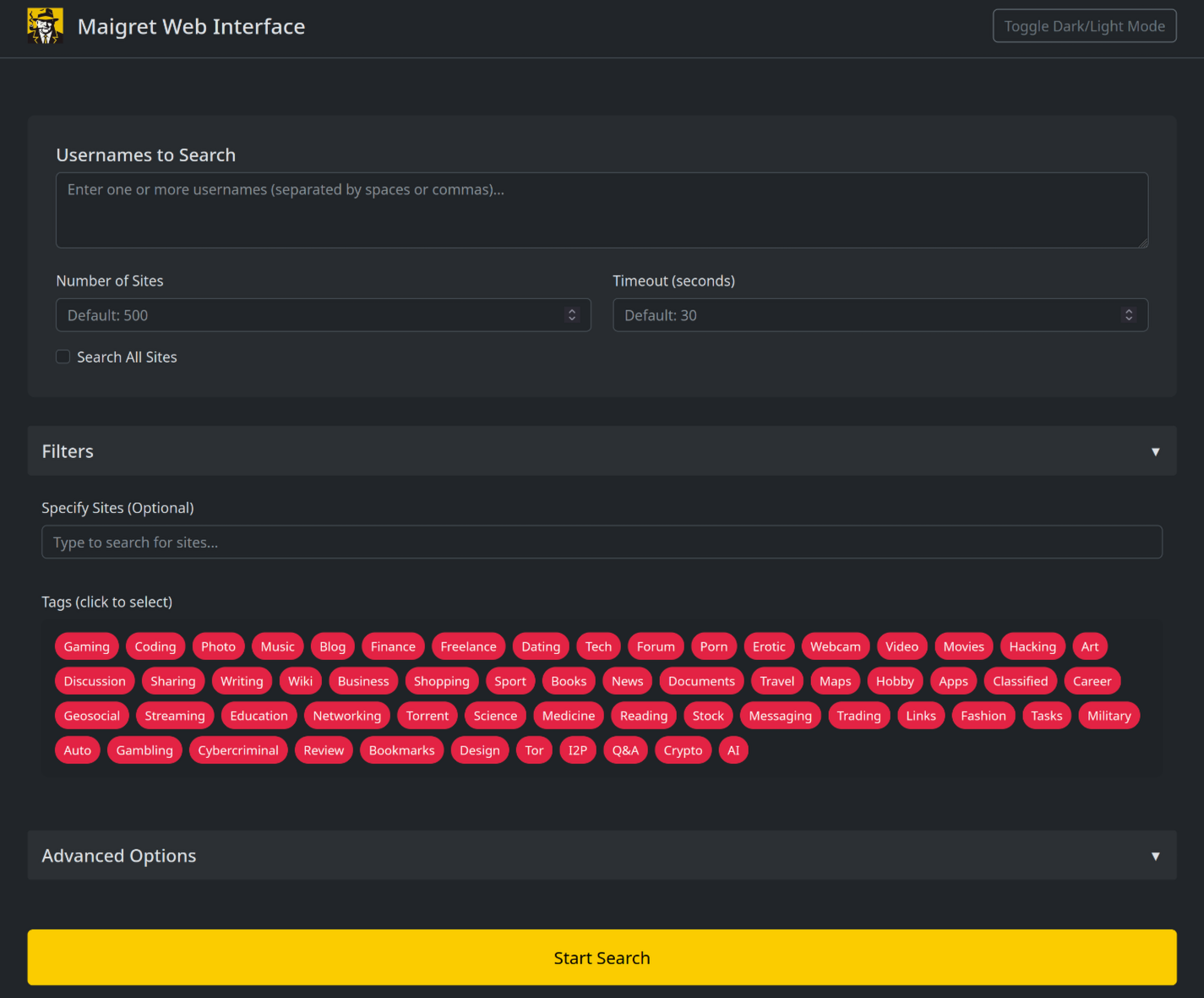
|
|
|
|
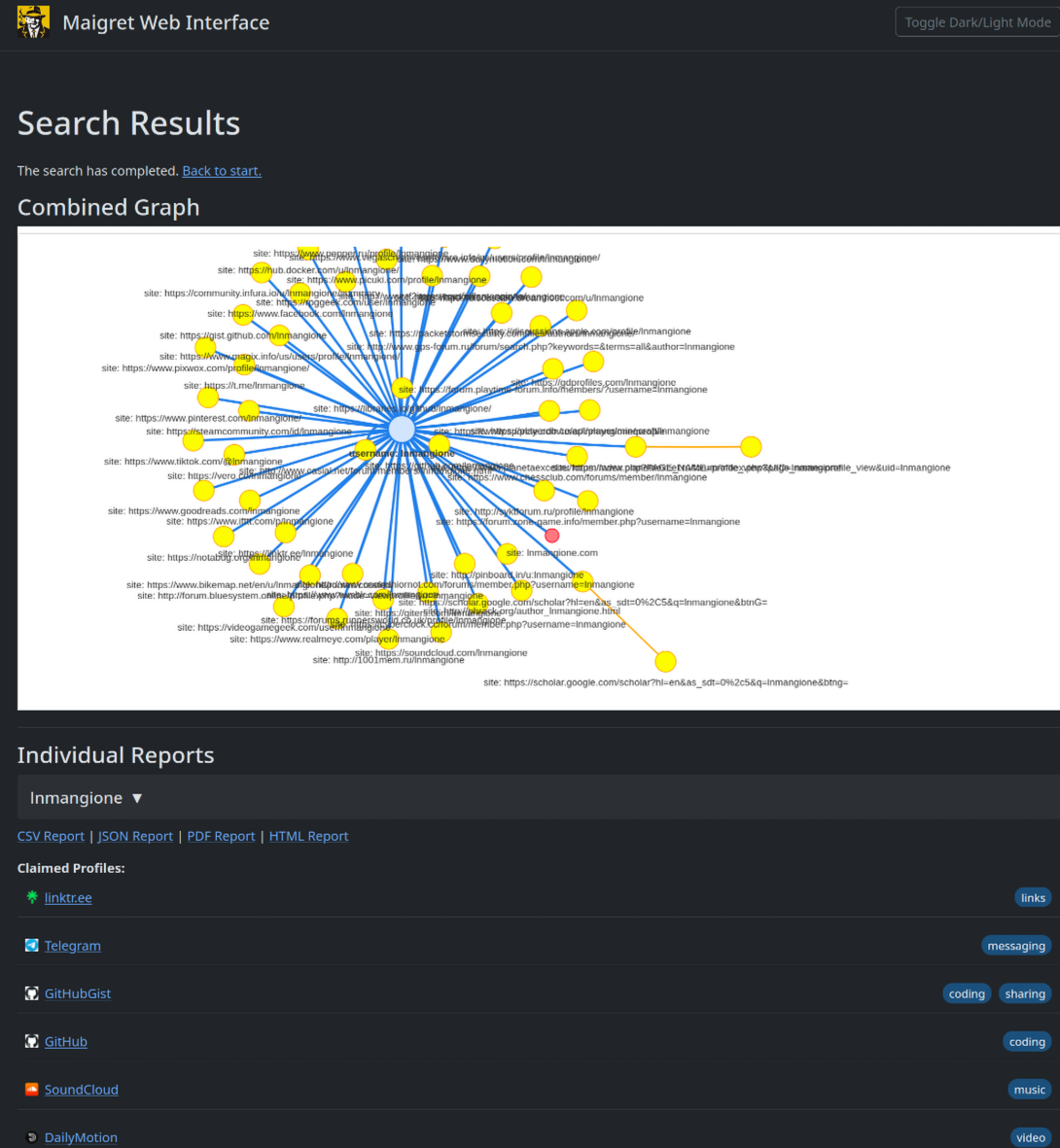
|
|
|
|
</details>
|
|
|
|
```console
|
|
maigret --web 5000
|
|
```
|
|
|
|
在浏览器中打开 http://127.0.0.1:5000,输入用户名即可查看结果。
|
|
|
|
### Python 库
|
|
|
|
**Maigret 可以嵌入到你自己的 Python 项目里使用。** CLI 只是对一个异步函数的薄包装,你完全可以直接调用它——构建自定义流水线、把结果接入自家工具,或将其嵌入更大的 OSINT 工作流。
|
|
|
|
完整示例(包含异步用法和按标签筛选站点)请参见[库使用指南](https://maigret.readthedocs.io/en/latest/library-usage.html)。
|
|
|
|
### 常用 CLI 参数
|
|
|
|
- `--parse URL` —— 解析一个个人主页,从中提取 ID/用户名,并以此为起点发起递归搜索。
|
|
- `--permute` —— 基于两个或更多输入生成可能的用户名变体(例如 `john doe` → `johndoe`、`j.doe` …)并对其逐一搜索。
|
|
- `--self-check [--auto-disable]` —— 维护者用于核对数据库的工具:针对线上站点验证 `usernameClaimed` / `usernameUnclaimed` 配对是否仍然有效。
|
|
- `--ai` / `--ai-model` —— 启用 [AI 分析](#ai-analysis),将搜索结果交给 OpenAI 兼容 API,并把简短的调查摘要流式输出到终端。
|
|
|
|
<a id="ai-analysis"></a>
|
|
### AI 分析
|
|
|
|
[](https://asciinema.org/a/979404)
|
|
|
|
`--ai` 会先收集搜索结果、在内存中构建 Markdown 报告,再将其发送到一个 OpenAI 兼容的 chat completion 接口,生成一份简短、克制的调查摘要(最可能的真实姓名、所在地、职业、兴趣、语言、置信度以及后续线索)。开启该模式后,逐站点的进度输出会被静默,模型的输出会以流式方式打印到 stdout。
|
|
|
|
```bash
|
|
export OPENAI_API_KEY=sk-...
|
|
maigret user --ai
|
|
|
|
# 切换到其它模型
|
|
maigret user --ai --ai-model gpt-4o-mini
|
|
```
|
|
|
|
API key 也可以写入 `settings.json` 的 `openai_api_key` 字段。接口地址默认为 `https://api.openai.com/v1`,通过在 `settings.json` 中设置 `openai_api_base_url`,可以指向任何 OpenAI 兼容的服务(Azure OpenAI、OpenRouter、本地推理服务等)。完整选项见[配置文档](https://maigret.readthedocs.io/en/latest/settings.html)。
|
|
|
|
### Tor / I2P / 代理
|
|
|
|
Maigret 支持通过代理、Tor 或 I2P 转发请求——这对访问 `.onion` / `.i2p` 站点,以及绕过会拦截数据中心 IP 的 WAF 都很有用。
|
|
|
|
```bash
|
|
# 任意 HTTP/SOCKS 代理
|
|
maigret user --proxy socks5://127.0.0.1:1080
|
|
|
|
# Tor(默认网关 socks5://127.0.0.1:9050)
|
|
maigret user --tor-proxy socks5://127.0.0.1:9050
|
|
|
|
# I2P(默认网关 http://127.0.0.1:4444)
|
|
maigret user --i2p-proxy http://127.0.0.1:4444
|
|
```
|
|
|
|
请先启动 Tor / I2P 守护进程再运行上述命令——Maigret 不会替你管理这些网关。
|
|
|
|
### Cloudflare 绕过
|
|
|
|
> **实验特性。** Cloudflare webgate 仍在积极开发中;配置项、CLI 行为以及命中该机制的站点集合都可能发生变化,不保证向后兼容。
|
|
|
|
数据库中有一部分站点需要真实浏览器才能通过 JavaScript 挑战。Maigret 可以将这些检查转交给本地运行的 [FlareSolverr](https://github.com/FlareSolverr/FlareSolverr):
|
|
|
|
```bash
|
|
docker run -d -p 8191:8191 --name flaresolverr ghcr.io/flaresolverr/flaresolverr:latest
|
|
maigret --cloudflare-bypass <username>
|
|
```
|
|
|
|
该功能为按需启用(命令行加 `--cloudflare-bypass`,或在 `settings.json` 中设置 `cloudflare_bypass.enabled`),并且只对 `protection` 字段匹配的站点生效。后端选项与配置详见[功能文档](https://maigret.readthedocs.io/en/latest/features.html#cloudflare-bypass)。
|
|
|
|
<a id="contributing"></a>
|
|
## 参与贡献
|
|
|
|
请精确地在 `data.json` 里新增或修复站点(不要使用 `json.load`/`json.dump` 整体读写),然后运行 `./utils/update_site_data.py` 重新生成 `sites.md` 和数据库元数据,再提交 Pull Request。更多细节见 [CONTRIBUTING 指南](https://github.com/soxoj/maigret/blob/main/CONTRIBUTING.md) 和[开发文档](https://maigret.readthedocs.io/en/latest/development.html)。版本历史见 [CHANGELOG.md](CHANGELOG.md)。
|
|
|
|
<a id="commercial-use"></a>
|
|
## 商业使用
|
|
|
|
开源版本的 Maigret 采用 MIT 许可证,可不受限制地用于商业用途——但站点检查会随时间失效,需要持续维护。
|
|
|
|
如果你有更严肃的商业需求——希望使用**每日更新的站点数据库**或**用户名查询 API**——欢迎联系:📧 [maigret@soxoj.com](mailto:maigret@soxoj.com)
|
|
|
|
- 私有站点数据库 —— 5000+ 站点,每日更新(独立于公开开源数据库)
|
|
- 用户名查询 API —— 将 Maigret 集成进你的产品
|
|
|
|
<a id="about"></a>
|
|
## 关于
|
|
|
|
### 免责声明
|
|
|
|
**仅供教育与合法用途。** 使用者需自行承担遵守所在司法辖区相关法律(GDPR、CCPA 等)的责任。作者不对任何滥用行为负责。
|
|
|
|
### 反馈
|
|
|
|
[提交 issue](https://github.com/soxoj/maigret/issues) · [GitHub Discussions](https://github.com/soxoj/maigret/discussions) · [Telegram](https://t.me/soxoj)
|
|
|
|
### SOWEL 分类
|
|
|
|
涉及到的 OSINT 技术:
|
|
- [SOTL-2.2. Search For Accounts On Other Platforms](https://sowel.soxoj.com/other-platform-accounts)
|
|
- [SOTL-6.1. Check Logins Reuse To Find Another Account](https://sowel.soxoj.com/logins-reuse)
|
|
- [SOTL-6.2. Check Nicknames Reuse To Find Another Account](https://sowel.soxoj.com/nicknames-reuse)
|
|
|
|
### 许可证
|
|
|
|
MIT © [Maigret](https://github.com/soxoj/maigret)
|