 wehub-resource-sync
9194ef5abd
wehub-resource-sync
9194ef5abd
Docs/Test Workflow / Test docs build (push) Failing after 0s
Check links & references / links-check (push) Failing after 1s
Pytest/Test Workflow / Import Test and Pytest Run (ubuntu-latest, 3.10) (push) Failing after 0s
Pytest/Test Workflow / Import Test and Pytest Run (ubuntu-latest, 3.11) (push) Failing after 0s
PR Conflict Labeler / main (push) Failing after 2s
Pytest/Test Workflow / Import Test and Pytest Run (ubuntu-latest, 3.12) (push) Failing after 2s
Pytest/Test Workflow / Import Test and Pytest Run (ubuntu-latest, 3.13) (push) Failing after 0s
Pytest/Test Workflow / Build this Package (push) Failing after 5s
Pytest/Test Workflow / Import Test and Pytest Run (macos-latest, 3.10) (push) Has been cancelled
Pytest/Test Workflow / Import Test and Pytest Run (macos-latest, 3.11) (push) Has been cancelled
Pytest/Test Workflow / Import Test and Pytest Run (macos-latest, 3.12) (push) Has been cancelled
Pytest/Test Workflow / Import Test and Pytest Run (macos-latest, 3.13) (push) Has been cancelled
Pytest/Test Workflow / Import Test and Pytest Run (windows-latest, 3.10) (push) Has been cancelled
Pytest/Test Workflow / Import Test and Pytest Run (windows-latest, 3.11) (push) Has been cancelled
Pytest/Test Workflow / Import Test and Pytest Run (windows-latest, 3.12) (push) Has been cancelled
Pytest/Test Workflow / Import Test and Pytest Run (windows-latest, 3.13) (push) Has been cancelled
Pytest/Test Workflow / testing-guardian (push) Has been cancelled
461 lines
17 KiB
Markdown
461 lines
17 KiB
Markdown
---
|
|
comments: true
|
|
description: Learn to load model predictions, create Detections objects, and annotate images with bounding boxes, labels, and masks using supervision.
|
|
authors:
|
|
- name: Piotr Skalski
|
|
role: Computer Vision Engineer, Roboflow
|
|
github: https://github.com/SkalskiP
|
|
- name: Borda
|
|
role: Open Source Engineer, Roboflow
|
|
github: https://github.com/borda
|
|
date_modified: 2026-04-22
|
|
---
|
|
|
|
# Detect and Annotate
|
|
|
|
!!! tip "Sample Image"
|
|
|
|
Don't have an image? Download the one used in this tutorial:
|
|
|
|
```bash
|
|
wget https://media.roboflow.com/notebooks/examples/dog.jpeg
|
|
```
|
|
|
|
```
|
|
Then replace `<SOURCE_IMAGE_PATH>` with `"dog.jpeg"`.
|
|
```
|
|
|
|
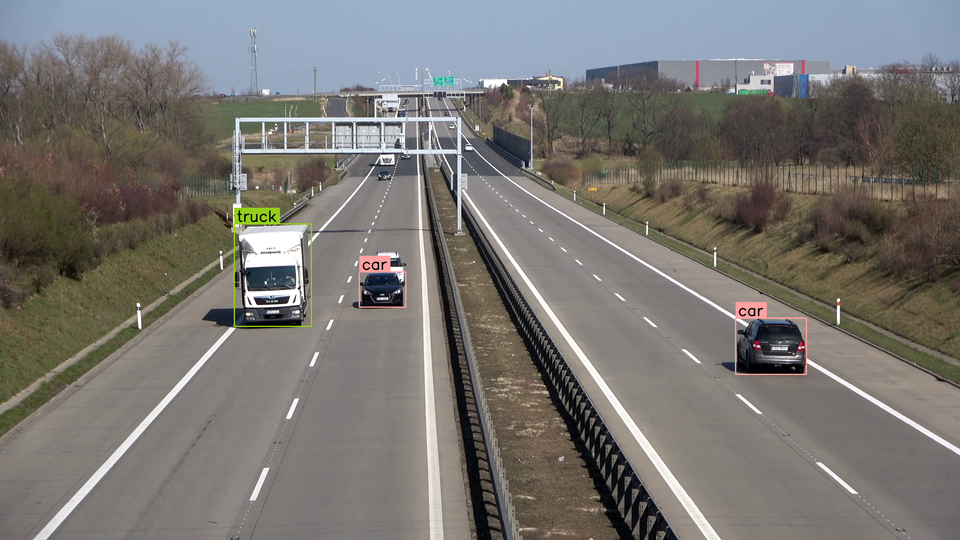
Supervision provides a seamless process for annotating predictions generated by various object detection and segmentation models. This guide shows how to perform inference with the [Inference](https://github.com/roboflow/inference), [Ultralytics](https://github.com/ultralytics/ultralytics) or [Transformers](https://github.com/huggingface/transformers) packages. Following this, you'll learn how to import these predictions into Supervision and use them to annotate source image.
|
|
|
|
|
|
|
|
## Run Detection
|
|
|
|
First, you'll need to obtain predictions from your object detection or segmentation model.
|
|
|
|
To run inference, initialize your chosen model and pass the source image to its predict or infer method. Supervision supports Roboflow Inference, Ultralytics YOLO, and Hugging Face Transformers -- select the tab matching your framework. The result is a framework-specific object you will convert to a `Detections` instance in the next step.
|
|
|
|
=== "Inference"
|
|
|
|
```python
|
|
import cv2
|
|
from inference import get_model
|
|
|
|
model = get_model(model_id="yolov8n-640")
|
|
image = cv2.imread("dog.jpeg")
|
|
results = model.infer(image)[0]
|
|
```
|
|
|
|
=== "Ultralytics"
|
|
|
|
```python
|
|
import cv2
|
|
from ultralytics import YOLO
|
|
|
|
model = YOLO("yolov8n.pt")
|
|
image = cv2.imread("dog.jpeg")
|
|
results = model(image)[0]
|
|
```
|
|
|
|
=== "Transformers"
|
|
|
|
```python
|
|
import torch
|
|
from PIL import Image
|
|
from transformers import DetrImageProcessor, DetrForObjectDetection
|
|
|
|
processor = DetrImageProcessor.from_pretrained("facebook/detr-resnet-50")
|
|
model = DetrForObjectDetection.from_pretrained("facebook/detr-resnet-50")
|
|
|
|
image = Image.open("dog.jpeg")
|
|
inputs = processor(images=image, return_tensors="pt")
|
|
|
|
with torch.no_grad():
|
|
outputs = model(**inputs)
|
|
|
|
width, height = image.size
|
|
target_size = torch.tensor([[height, width]])
|
|
results = processor.post_process_object_detection(
|
|
outputs=outputs, target_sizes=target_size
|
|
)[0]
|
|
```
|
|
|
|
## Load Predictions into Supervision
|
|
|
|
Now that we have predictions from a model, we can load them into Supervision.
|
|
|
|
Each supported framework has a dedicated class method on `sv.Detections` that converts raw model output into a unified Supervision object. Call `from_inference`, `from_ultralytics`, or `from_transformers` depending on the package you used for inference. This normalization step ensures all downstream annotators and filters work identically regardless of the source model.
|
|
|
|
=== "Inference"
|
|
|
|
We can do so using the [`sv.Detections.from_inference`](https://supervision.roboflow.com/latest/detection/core/#supervision.detection.core.Detections.from_inference) method, which accepts model results from both detection and segmentation models.
|
|
|
|
```{ .py hl_lines="2 8" }
|
|
import cv2
|
|
import supervision as sv
|
|
from inference import get_model
|
|
|
|
model = get_model(model_id="yolov8n-640")
|
|
image = cv2.imread("dog.jpeg")
|
|
results = model.infer(image)[0]
|
|
detections = sv.Detections.from_inference(results)
|
|
```
|
|
|
|
=== "Ultralytics"
|
|
|
|
We can do so using the [`sv.Detections.from_ultralytics`](https://supervision.roboflow.com/latest/detection/core/#supervision.detection.core.Detections.from_ultralytics) method, which accepts model results from both detection and segmentation models.
|
|
|
|
```{ .py hl_lines="2 8" }
|
|
import cv2
|
|
import supervision as sv
|
|
from ultralytics import YOLO
|
|
|
|
model = YOLO("yolov8n.pt")
|
|
image = cv2.imread("dog.jpeg")
|
|
results = model(image)[0]
|
|
detections = sv.Detections.from_ultralytics(results)
|
|
```
|
|
|
|
=== "Transformers"
|
|
|
|
We can do so using the [`sv.Detections.from_transformers`](https://supervision.roboflow.com/latest/detection/core/#supervision.detection.core.Detections.from_transformers) method, which accepts model results from both detection and segmentation models.
|
|
|
|
```{ .py hl_lines="2 19-21" }
|
|
import torch
|
|
import supervision as sv
|
|
from PIL import Image
|
|
from transformers import DetrImageProcessor, DetrForObjectDetection
|
|
|
|
processor = DetrImageProcessor.from_pretrained("facebook/detr-resnet-50")
|
|
model = DetrForObjectDetection.from_pretrained("facebook/detr-resnet-50")
|
|
|
|
image = Image.open("dog.jpeg")
|
|
inputs = processor(images=image, return_tensors="pt")
|
|
|
|
with torch.no_grad():
|
|
outputs = model(**inputs)
|
|
|
|
width, height = image.size
|
|
target_size = torch.tensor([[height, width]])
|
|
results = processor.post_process_object_detection(
|
|
outputs=outputs, target_sizes=target_size)[0]
|
|
detections = sv.Detections.from_transformers(
|
|
transformers_results=results,
|
|
id2label=model.config.id2label)
|
|
```
|
|
|
|
You can load predictions from other computer vision frameworks and libraries using:
|
|
|
|
- [`from_deepsparse`](https://supervision.roboflow.com/latest/detection/core/#supervision.detection.core.Detections.from_deepsparse) ([Deepsparse](https://github.com/neuralmagic/deepsparse))
|
|
- [`from_detectron2`](https://supervision.roboflow.com/latest/detection/core/#supervision.detection.core.Detections.from_detectron2) ([Detectron2](https://github.com/facebookresearch/detectron2))
|
|
- [`from_mmdetection`](https://supervision.roboflow.com/latest/detection/core/#supervision.detection.core.Detections.from_mmdetection) ([MMDetection](https://github.com/open-mmlab/mmdetection))
|
|
- [`from_sam`](https://supervision.roboflow.com/latest/detection/core/#supervision.detection.core.Detections.from_sam) ([Segment Anything Model](https://github.com/facebookresearch/segment-anything))
|
|
- [`from_yolo_nas`](https://supervision.roboflow.com/latest/detection/core/#supervision.detection.core.Detections.from_yolo_nas) ([YOLO-NAS](https://github.com/Deci-AI/super-gradients/blob/master/YOLONAS.md))
|
|
|
|
## Annotate Image with Detections
|
|
|
|
Finally, we can annotate the image with the predictions. Since we are working with an object detection model, we will use the [`sv.BoxAnnotator`](https://supervision.roboflow.com/latest/detection/annotators/#supervision.annotators.core.BoxAnnotator) and [`sv.LabelAnnotator`](https://supervision.roboflow.com/latest/detection/annotators/#supervision.annotators.core.LabelAnnotator) classes.
|
|
|
|
To draw bounding boxes and class labels on your image, create a `BoxAnnotator` and a `LabelAnnotator`, then call their `annotate` methods in sequence. Each annotator returns the modified image, so you can chain multiple annotators together. The result is a single NumPy array with all visual overlays rendered and ready for display or saving.
|
|
|
|
=== "Inference"
|
|
|
|
```{ .py hl_lines="10-16" }
|
|
import cv2
|
|
import supervision as sv
|
|
from inference import get_model
|
|
|
|
model = get_model(model_id="yolov8n-640")
|
|
image = cv2.imread("dog.jpeg")
|
|
results = model.infer(image)[0]
|
|
detections = sv.Detections.from_inference(results)
|
|
|
|
box_annotator = sv.BoxAnnotator()
|
|
label_annotator = sv.LabelAnnotator()
|
|
|
|
annotated_image = box_annotator.annotate(
|
|
scene=image, detections=detections)
|
|
annotated_image = label_annotator.annotate(
|
|
scene=annotated_image, detections=detections)
|
|
```
|
|
|
|
=== "Ultralytics"
|
|
|
|
```{ .py hl_lines="10-16" }
|
|
import cv2
|
|
import supervision as sv
|
|
from ultralytics import YOLO
|
|
|
|
model = YOLO("yolov8n.pt")
|
|
image = cv2.imread("dog.jpeg")
|
|
results = model(image)[0]
|
|
detections = sv.Detections.from_ultralytics(results)
|
|
|
|
box_annotator = sv.BoxAnnotator()
|
|
label_annotator = sv.LabelAnnotator()
|
|
|
|
annotated_image = box_annotator.annotate(
|
|
scene=image, detections=detections)
|
|
annotated_image = label_annotator.annotate(
|
|
scene=annotated_image, detections=detections)
|
|
```
|
|
|
|
=== "Transformers"
|
|
|
|
```{ .py hl_lines="23-30" }
|
|
import torch
|
|
import supervision as sv
|
|
from PIL import Image
|
|
from transformers import DetrImageProcessor, DetrForObjectDetection
|
|
|
|
processor = DetrImageProcessor.from_pretrained("facebook/detr-resnet-50")
|
|
model = DetrForObjectDetection.from_pretrained("facebook/detr-resnet-50")
|
|
|
|
image = Image.open("dog.jpeg")
|
|
inputs = processor(images=image, return_tensors="pt")
|
|
|
|
with torch.no_grad():
|
|
outputs = model(**inputs)
|
|
|
|
width, height = image.size
|
|
target_size = torch.tensor([[height, width]])
|
|
results = processor.post_process_object_detection(
|
|
outputs=outputs, target_sizes=target_size)[0]
|
|
detections = sv.Detections.from_transformers(
|
|
transformers_results=results,
|
|
id2label=model.config.id2label)
|
|
|
|
box_annotator = sv.BoxAnnotator()
|
|
label_annotator = sv.LabelAnnotator()
|
|
|
|
annotated_image = box_annotator.annotate(
|
|
scene=image, detections=detections)
|
|
annotated_image = label_annotator.annotate(
|
|
scene=annotated_image, detections=detections)
|
|
```
|
|
|
|

|
|
|
|
## Display Custom Labels
|
|
|
|
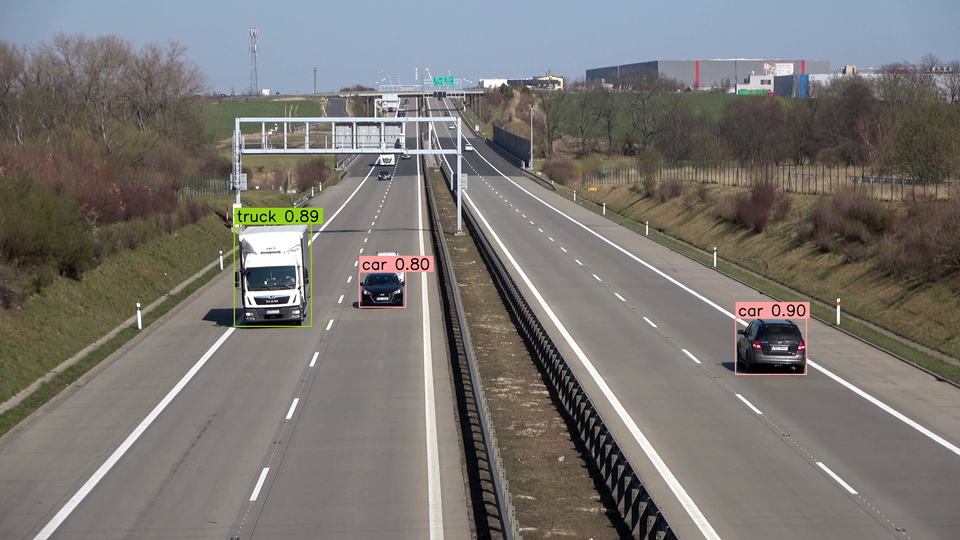
By default, [`sv.LabelAnnotator`](https://supervision.roboflow.com/latest/detection/annotators/#supervision.annotators.core.LabelAnnotator) will label each detection with its `class_name` (if possible) or `class_id`. You can override this behavior by passing a list of custom `labels` to the `annotate` method.
|
|
|
|
=== "Inference"
|
|
|
|
```{ .py hl_lines="13-17 22" }
|
|
import cv2
|
|
import supervision as sv
|
|
from inference import get_model
|
|
|
|
model = get_model(model_id="yolov8n-640")
|
|
image = cv2.imread("dog.jpeg")
|
|
results = model.infer(image)[0]
|
|
detections = sv.Detections.from_inference(results)
|
|
|
|
box_annotator = sv.BoxAnnotator()
|
|
label_annotator = sv.LabelAnnotator()
|
|
|
|
labels = [
|
|
f"{class_name} {confidence:.2f}"
|
|
for class_name, confidence
|
|
in zip(detections['class_name'], detections.confidence)
|
|
]
|
|
|
|
annotated_image = box_annotator.annotate(
|
|
scene=image, detections=detections)
|
|
annotated_image = label_annotator.annotate(
|
|
scene=annotated_image, detections=detections, labels=labels)
|
|
```
|
|
|
|
=== "Ultralytics"
|
|
|
|
```{ .py hl_lines="13-17 22" }
|
|
import cv2
|
|
import supervision as sv
|
|
from ultralytics import YOLO
|
|
|
|
model = YOLO("yolov8n.pt")
|
|
image = cv2.imread("dog.jpeg")
|
|
results = model(image)[0]
|
|
detections = sv.Detections.from_ultralytics(results)
|
|
|
|
box_annotator = sv.BoxAnnotator()
|
|
label_annotator = sv.LabelAnnotator()
|
|
|
|
labels = [
|
|
f"{class_name} {confidence:.2f}"
|
|
for class_name, confidence
|
|
in zip(detections['class_name'], detections.confidence)
|
|
]
|
|
|
|
annotated_image = box_annotator.annotate(
|
|
scene=image, detections=detections)
|
|
annotated_image = label_annotator.annotate(
|
|
scene=annotated_image, detections=detections, labels=labels)
|
|
```
|
|
|
|
=== "Transformers"
|
|
|
|
```{ .py hl_lines="26-30 35" }
|
|
import torch
|
|
import supervision as sv
|
|
from PIL import Image
|
|
from transformers import DetrImageProcessor, DetrForObjectDetection
|
|
|
|
processor = DetrImageProcessor.from_pretrained("facebook/detr-resnet-50")
|
|
model = DetrForObjectDetection.from_pretrained("facebook/detr-resnet-50")
|
|
|
|
image = Image.open("dog.jpeg")
|
|
inputs = processor(images=image, return_tensors="pt")
|
|
|
|
with torch.no_grad():
|
|
outputs = model(**inputs)
|
|
|
|
width, height = image.size
|
|
target_size = torch.tensor([[height, width]])
|
|
results = processor.post_process_object_detection(
|
|
outputs=outputs, target_sizes=target_size)[0]
|
|
detections = sv.Detections.from_transformers(
|
|
transformers_results=results,
|
|
id2label=model.config.id2label)
|
|
|
|
box_annotator = sv.BoxAnnotator()
|
|
label_annotator = sv.LabelAnnotator()
|
|
|
|
labels = [
|
|
f"{class_name} {confidence:.2f}"
|
|
for class_name, confidence
|
|
in zip(detections['class_name'], detections.confidence)
|
|
]
|
|
|
|
annotated_image = box_annotator.annotate(
|
|
scene=image, detections=detections)
|
|
annotated_image = label_annotator.annotate(
|
|
scene=annotated_image, detections=detections, labels=labels)
|
|
```
|
|
|
|
|
|
|
|
## Annotate Image with Segmentations
|
|
|
|
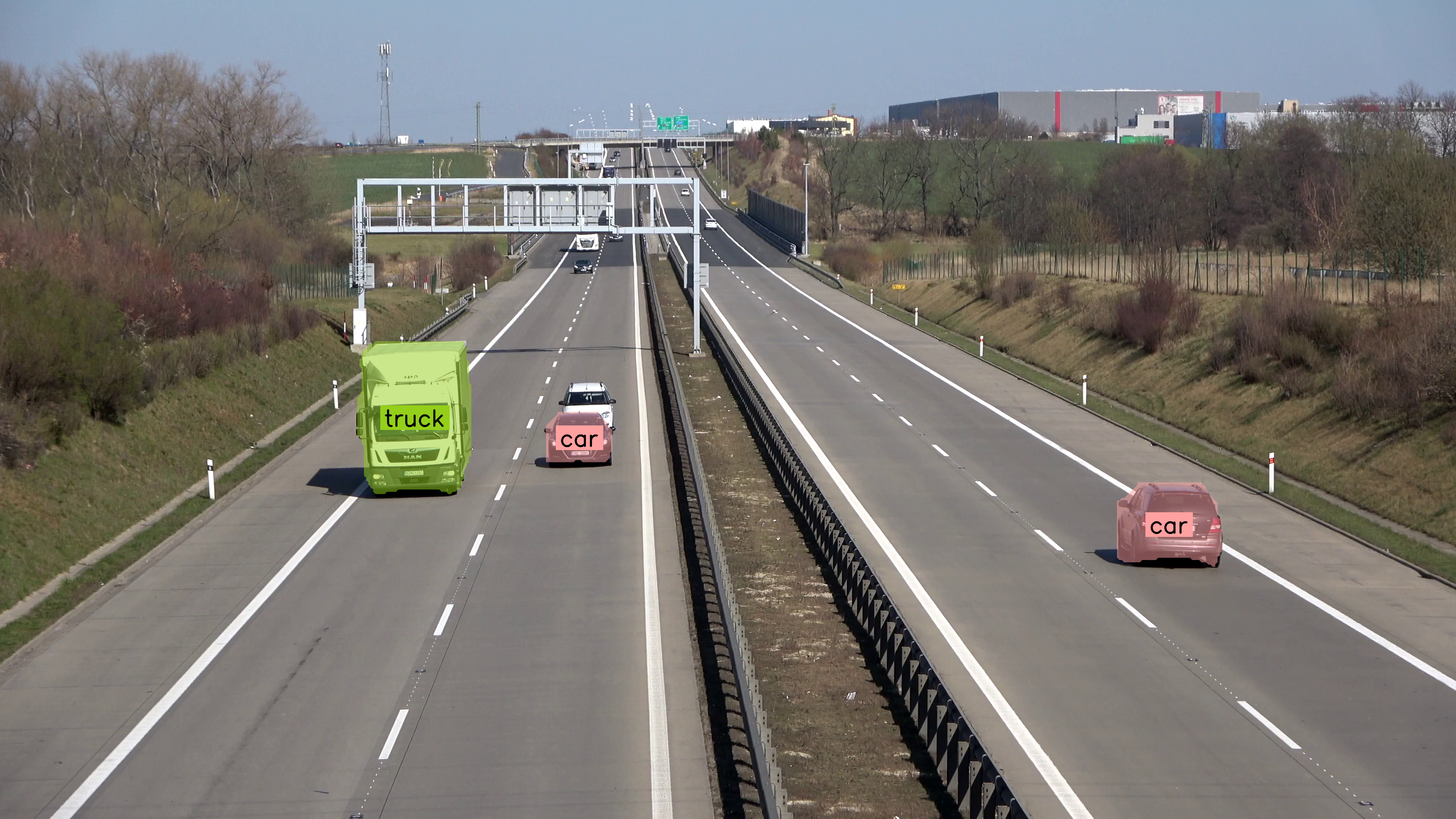
If you are running the segmentation model [`sv.MaskAnnotator`](https://supervision.roboflow.com/latest/detection/annotators/#supervision.annotators.core.MaskAnnotator) is a drop-in replacement for [`sv.BoxAnnotator`](https://supervision.roboflow.com/latest/detection/annotators/#supervision.annotators.core.BoxAnnotator) that will allow you to draw masks instead of boxes.
|
|
|
|
=== "Inference"
|
|
|
|
```python
|
|
import cv2
|
|
import supervision as sv
|
|
from inference import get_model
|
|
|
|
model = get_model(model_id="yolov8n-seg-640")
|
|
image = cv2.imread("dog.jpeg")
|
|
results = model.infer(image)[0]
|
|
detections = sv.Detections.from_inference(results)
|
|
|
|
mask_annotator = sv.MaskAnnotator()
|
|
label_annotator = sv.LabelAnnotator(text_position=sv.Position.CENTER_OF_MASS)
|
|
|
|
annotated_image = mask_annotator.annotate(
|
|
scene=image,
|
|
detections=detections,
|
|
)
|
|
annotated_image = label_annotator.annotate(
|
|
scene=annotated_image,
|
|
detections=detections,
|
|
)
|
|
sv.plot_image(annotated_image)
|
|
```
|
|
|
|
=== "Ultralytics"
|
|
|
|
```python
|
|
import cv2
|
|
import supervision as sv
|
|
from ultralytics import YOLO
|
|
|
|
model = YOLO("yolov8n-seg.pt")
|
|
image = cv2.imread("dog.jpeg")
|
|
results = model(image)[0]
|
|
detections = sv.Detections.from_ultralytics(results)
|
|
|
|
mask_annotator = sv.MaskAnnotator()
|
|
label_annotator = sv.LabelAnnotator(text_position=sv.Position.CENTER_OF_MASS)
|
|
|
|
annotated_image = mask_annotator.annotate(
|
|
scene=image,
|
|
detections=detections,
|
|
)
|
|
annotated_image = label_annotator.annotate(
|
|
scene=annotated_image,
|
|
detections=detections,
|
|
)
|
|
```
|
|
|
|
=== "Transformers"
|
|
|
|
```python
|
|
import torch
|
|
import supervision as sv
|
|
from PIL import Image
|
|
from transformers import DetrImageProcessor, DetrForSegmentation
|
|
|
|
processor = DetrImageProcessor.from_pretrained("facebook/detr-resnet-50-panoptic")
|
|
model = DetrForSegmentation.from_pretrained("facebook/detr-resnet-50-panoptic")
|
|
|
|
image = Image.open("dog.jpeg")
|
|
inputs = processor(images=image, return_tensors="pt")
|
|
|
|
with torch.no_grad():
|
|
outputs = model(**inputs)
|
|
|
|
width, height = image.size
|
|
target_size = torch.tensor([[height, width]])
|
|
results = processor.post_process_segmentation(
|
|
outputs=outputs, target_sizes=target_size
|
|
)[0]
|
|
detections = sv.Detections.from_transformers(
|
|
transformers_results=results, id2label=model.config.id2label
|
|
)
|
|
|
|
mask_annotator = sv.MaskAnnotator()
|
|
label_annotator = sv.LabelAnnotator(text_position=sv.Position.CENTER_OF_MASS)
|
|
|
|
labels = [
|
|
f"{class_name} {confidence:.2f}"
|
|
for class_name, confidence in zip(
|
|
detections["class_name"],
|
|
detections.confidence,
|
|
)
|
|
]
|
|
|
|
annotated_image = mask_annotator.annotate(scene=image, detections=detections)
|
|
annotated_image = label_annotator.annotate(
|
|
scene=annotated_image, detections=detections, labels=labels
|
|
)
|
|
```
|
|
|
|
|
|
|
|
## Frequently Asked Questions
|
|
|
|
### How do I detect and annotate objects with supervision?
|
|
|
|
Pass any model's output to `sv.Detections.from_<model>()` to create a unified `Detections` object. Then pass it to `sv.BoxAnnotator` or `sv.MaskAnnotator` to draw predictions on an image.
|
|
|
|
### Can I annotate both bounding boxes and masks at the same time?
|
|
|
|
Yes. Chain annotators: first draw boxes with `BoxAnnotator`, then overlay masks with `MaskAnnotator` on the same scene.
|
|
|
|
### How do I label detections with class names?
|
|
|
|
Use `sv.LabelAnnotator` and pass custom text with the `labels` parameter. If a connector provides class names, they are stored in `detections["class_name"]` / `detections.data["class_name"]`; when `labels` is omitted, `LabelAnnotator` uses class names first, then class IDs, then detection indices.
|
|
|
|
### Can I use supervision with Hugging Face models?
|
|
|
|
Yes. `sv.Detections.from_transformers()` accepts supported Hugging Face object detection and segmentation outputs. Vision-language model outputs are handled through `sv.Detections.from_vlm(...)`, for example with `sv.VLM.FLORENCE_2` or `sv.VLM.PALIGEMMA`.
|
|
|
|
## Authors
|
|
|
|
- [Piotr Skalski](https://github.com/SkalskiP) — Computer Vision Engineer, Roboflow
|
|
- [Borda](https://github.com/borda) — Open Source Engineer, Roboflow
|