 wehub-resource-sync
57 lines
2.5 KiB
Markdown
57 lines
2.5 KiB
Markdown
---
|
|
title: Overview
|
|
order: 0
|
|
---
|
|
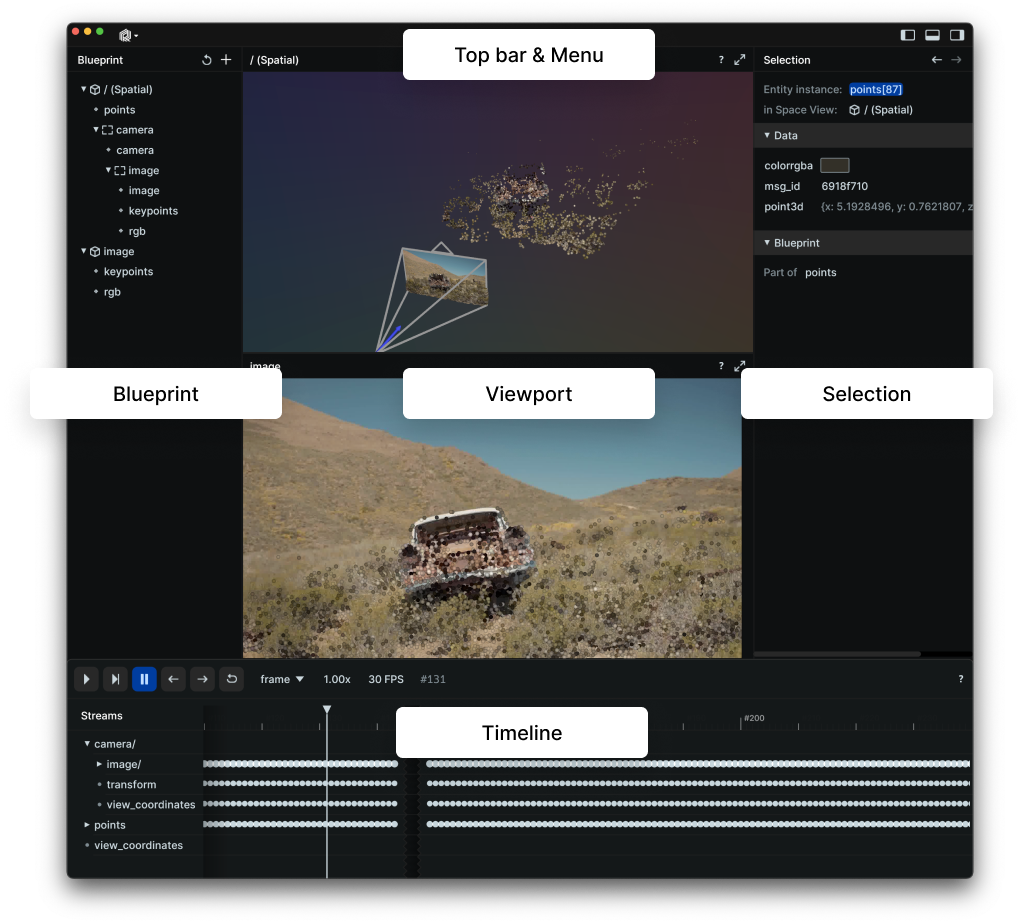
The following sections give an overview of the basic UI concepts and where to find which functionality.
|
|
|
|
Generally, the Viewer tries to be as self-explaining as possible - most items in the UI show a tooltip upon hovering which should give additional information.
|
|
If you are missing a piece of information, don't hesitate to [file an issue](https://github.com/rerun-io/rerun/issues/new/choose)!
|
|
|
|
Overview
|
|
--------------------------
|
|
|
|
|
|
### [Blueprint](blueprints.md)
|
|
The Blueprint view is where you see and edit the Blueprint for the whole viewer, i.e. what is shown in the Viewer (and how it is shown).
|
|
|
|
### [Selection](selection.md)
|
|
The Selection view let's you see details and edit configurations of the current selection(s).
|
|
|
|
### [Timeline](timeline.md)
|
|
The timeline panel gives you controls over what point in time you're looking at on which [timeline](../../concepts/logging-and-ingestion/timelines.md) for the rest of the viewer.
|
|
Additionally, it gives you an overview of all events on a given timeline.
|
|
|
|
### [Viewport](viewport.md)
|
|
The viewport is where your visualizations live. It is composed of one or more Views that you can arrange freely.
|
|
|
|
### Top bar & menu
|
|
The top bar contains operating system controls and generic information.
|
|
In the menu you find application wide options and actions.
|
|
Use the buttons at the top right corner to hide/show parts of the viewer.
|
|
|
|
Command Palette
|
|
----------------------------
|
|
The command palette is a powerful tool to reach arbitrary actions from anywhere via a simple text search.
|
|
You reach it with `cmd/ctrl + P` or via the menu.
|
|
|
|
<picture>
|
|
<source media="(max-width: 480px)" srcset="https://static.rerun.io/command-palette/76d89ff6d2b768c718c84462c6e2bdaa54e40e54/480w.png">
|
|
<img src="https://static.rerun.io/command-palette/76d89ff6d2b768c718c84462c6e2bdaa54e40e54/full.png" alt="screenshot of the command palette">
|
|
</picture>
|
|
|
|
|
|
Once it's open just start typing to filter and press `Enter` to execute the selected action or cancel with `Esc`.
|
|
|
|
[TODO(#1132)](https://github.com/rerun-io/rerun/issues/1132): The command palette is too limited right now.
|
|
|
|
Help icons
|
|
----------
|
|
Most views have an info icon at the top right corner.
|
|
|
|
<picture>
|
|
<img src="https://static.rerun.io/help-icon/d6268a4576bad594b0c29cf77881d7f1bb9bb889/full.png" alt="help icon">
|
|
</picture>
|
|
|
|
|
|
On hover it displays additional information on how to use a view.
|