 wehub-resource-sync
7df9ebf22c
wehub-resource-sync
7df9ebf22c
Sync labels / sync (push) Failing after 1m9s
Publish Container Image / Build and publish container image (push) Has been cancelled
Deploy Website / Deploy to GitHub Pages (push) Has been cancelled
Deploy Website / Build website and demo (push) Has been cancelled
Deploy viewer / Deploy viewer proxy to Cloudflare Workers (push) Has been cancelled
Deploy tiles / Deploy planetary tile proxy to Cloudflare Workers (push) Has been cancelled
Deploy collab / Deploy collaboration relay to Cloudflare Workers (push) Has been cancelled
CI / Dependency audit (push) Has been cancelled
CI / E2E smoke (Playwright) (push) Has been cancelled
CI / Validate CITATION.cff (push) Has been cancelled
CI / Build and test (push) Has been cancelled
37 lines
2.9 KiB
Markdown
37 lines
2.9 KiB
Markdown
# Plugins & Marketplace
|
|
|
|
Much of GeoLibre's functionality ships as plugins. The **Plugins** menu activates built-in plugins, and the **Manage Plugins** dialog (under Settings) installs, updates, and removes external plugins from a curated registry.
|
|
|
|
## The Plugins menu
|
|
|
|
The **Plugins** menu lists every available plugin under **Activate plugin**. Click a plugin to toggle it on or off; a check mark shows which are active. Built-in plugins include the Layer Control, Basemaps, Components (Measure, Bookmark, Legend, Colorbar, Minimap, View State, Search, Print, HTML), GeoEditor, Time Slider, Layer Swipe, Street View, LiDAR Viewer, Overture Maps, GeoAgent, Historical Imagery, and the federal **Web Services** group. See [Data Integrations](data-integrations.md).
|
|
|
|
For plugins that add an on-map control, a submenu lets you **position** the control in any corner: top left, top right, bottom left, or bottom right.
|
|
|
|
## Manage Plugins
|
|
|
|
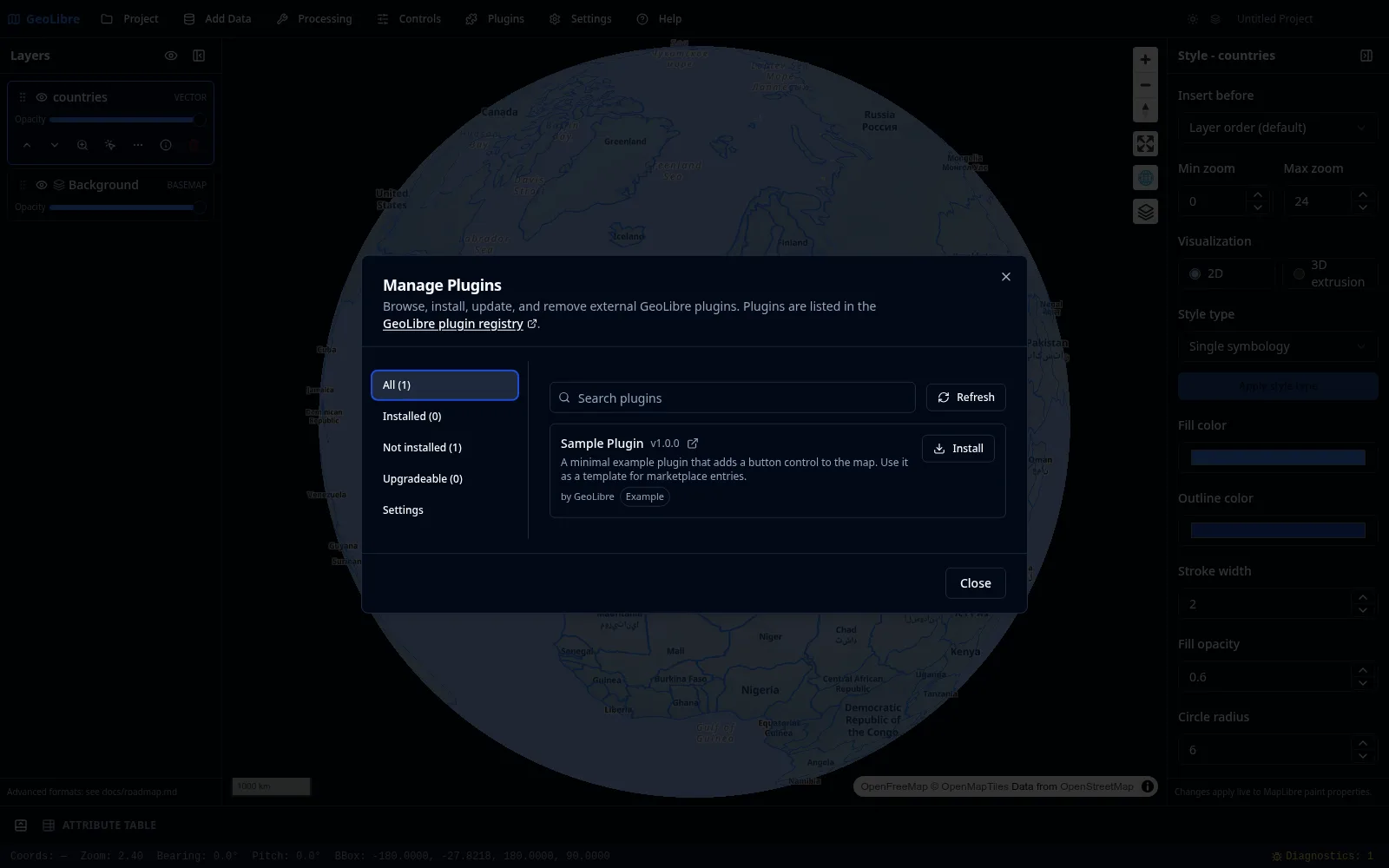
Open **Settings → Manage Plugins** to browse the marketplace. The dialog is modeled on QGIS, with sections for **All**, **Installed**, **Not installed**, **Upgradeable**, and **Settings**.
|
|
|
|
|
|
|
|
- **Search** the registry and **Install** an entry with one click. Installation records the plugin's manifest URL and registers it immediately, with no restart.
|
|
- **Update** appears when a newer version is published; it re-fetches and re-registers the plugin in place, keeping the old version if the update fails.
|
|
- **Uninstall** (after a confirmation) unregisters the plugin at runtime and tears down any active control.
|
|
- The **Settings** section manages additional plugin sources: extra local directories and manual manifest URLs.
|
|
|
|
Compatibility is checked against each entry's `minGeoLibreVersion`, so incompatible plugins are flagged rather than installed.
|
|
|
|
!!! note "Trust model"
|
|
The registry is a curated allowlist, manifests require HTTPS (or HTTP on localhost, 127.0.0.1, or `[::1]` for development), and every install requires explicit consent, because plugins run as trusted code. The curated registry and the install confirmation are the primary safeguards.
|
|
|
|
## Where plugins come from
|
|
|
|
- **Curated registry**: the marketplace fetches a versioned JSON registry, hosted by default at `plugins.geolibre.app`. The registry and plugin bundles live in the [opengeos/geolibre-plugins](https://github.com/opengeos/geolibre-plugins) repository.
|
|
- **Manifest URL**: point the Settings section at any `plugin.json` manifest URL.
|
|
- **Local directory**: load a plugin from a local folder (desktop app).
|
|
- **Bundled drop-ins**: plugins placed in `public/plugins/<id>/` load automatically in a build.
|
|
|
|
## Writing your own plugin
|
|
|
|
To build a plugin, see [Reference → Plugin API](../plugin-api.md) for the TypeScript interfaces, the `plugin.json` manifest contract, and the list of built-in plugins.
|