 wehub-resource-sync
9b395f5cc3
wehub-resource-sync
9b395f5cc3
E2E Headed Chrome / e2e-headed (macos-15) (push) Has been cancelled
E2E Headed Chrome / e2e-headed (ubuntu-latest) (push) Has been cancelled
E2E Headed Chrome / e2e-headed (windows-latest) (push) Has been cancelled
CI / build (macos-latest) (push) Has been cancelled
CI / build (ubuntu-latest) (push) Has been cancelled
CI / build (windows-latest) (push) Has been cancelled
CI / unit-test (push) Has been cancelled
CI / bun-test (push) Has been cancelled
CI / adapter-test (push) Has been cancelled
CI / smoke-test (macos-latest) (push) Has been cancelled
CI / smoke-test (ubuntu-latest) (push) Has been cancelled
Security Audit / audit (push) Has been cancelled
Build Chrome Extension / build (push) Has been cancelled
Trigger Website Rebuild (Docs Updated) / dispatch (push) Has been cancelled
301 lines
18 KiB
Markdown
301 lines
18 KiB
Markdown
# OpenCLI
|
|
|
|
> **Convert any website into a CLI & run Browser Use on your logged-in Chrome.**
|
|
> Turn websites, browser sessions, Electron apps, and local tools into deterministic interfaces for humans and AI agents.
|
|
> Or run Browser Use against any page — navigate, fill forms, click, extract, automate.
|
|
|
|
[](./README.zh-CN.md)
|
|
[](https://www.npmjs.com/package/@jackwener/opencli)
|
|
[](https://nodejs.org)
|
|
[](./LICENSE)
|
|
|
|
OpenCLI gives you one surface for three different kinds of automation:
|
|
|
|
- **Use built-in adapters** for sites like Bilibili, Zhihu, Xiaohongshu, Reddit, HackerNews, Twitter/X, and [many more](#built-in-commands).
|
|
- **Let AI Agents operate any website** — install the `opencli-browser` skill in your AI agent (Claude Code, Cursor, etc.), and it can navigate, click, type/fill, extract, and inspect any page through your logged-in browser via `opencli browser` primitives.
|
|
- **Write new adapters** end-to-end with `opencli browser` + the `opencli-adapter-author` skill, which guides from first recon through field decoding, code, and `opencli browser verify`.
|
|
|
|
It also works as a **CLI hub** for local tools such as `gh`, `docker`, `longbridge`, `tg`, `discord`, `wx`, `ntn` (Notion), and other binaries you register yourself, plus **desktop app adapters** for Electron apps like Cursor, Trae CN, Codex, Antigravity, ChatGPT, and Trae SOLO.
|
|
|
|
## Quick Start
|
|
|
|
### 1. Install OpenCLI
|
|
|
|
For desktop use, start with **OpenCLIApp**. It bundles the OpenCLI runtime,
|
|
keeps the managed `opencli` command installed, and gives you a system tray UI
|
|
for setup, diagnostics, updates, browser-login keepalive, and Web → Markdown.
|
|
|
|
**Option A — OpenCLIApp (recommended for macOS / Windows):**
|
|
Download the latest app from <https://opencli.info/download>, install it, then
|
|
open the app once and use the System page to install or repair the `opencli`
|
|
command.
|
|
|
|
**Option B — npm global install (CLI-only / CI / servers):**
|
|
OpenCLI requires **Node.js >= 20** when installed through npm.
|
|
|
|
```bash
|
|
node --version
|
|
npm install -g @jackwener/opencli
|
|
```
|
|
|
|
### 2. Install the Browser Bridge Extension
|
|
|
|
OpenCLI connects to Chrome/Chromium through a lightweight Browser Bridge extension plus a small local daemon. The daemon auto-starts when needed.
|
|
|
|
**Option A — Chrome Web Store (recommended):**
|
|
Install **OpenCLI** from the [Chrome Web Store](https://chromewebstore.google.com/detail/opencli/ildkmabpimmkaediidaifkhjpohdnifk).
|
|
|
|
**Option B — Manual install:**
|
|
1. Download the latest `opencli-extension-v{version}.zip` from the GitHub [Releases page](https://github.com/jackwener/opencli/releases).
|
|
2. Unzip it, open `chrome://extensions`, and enable **Developer mode**.
|
|
3. Click **Load unpacked** and select the unzipped folder.
|
|
|
|
### 3. Verify the setup
|
|
|
|
```bash
|
|
opencli doctor
|
|
```
|
|
|
|
### 4. Optional: name your Chrome profile
|
|
|
|
Each Chrome profile runs its own OpenCLI extension instance. If you use multiple Chrome profiles, list the connected profiles and assign local aliases:
|
|
|
|
```bash
|
|
opencli profile list
|
|
opencli profile rename <contextId> work
|
|
opencli profile use work
|
|
opencli --profile work browser main state
|
|
```
|
|
|
|
With only one connected profile, OpenCLI uses it automatically. With multiple connected profiles and no default, OpenCLI asks you to choose instead of guessing.
|
|
|
|
### 5. Run your first commands
|
|
|
|
```bash
|
|
opencli list
|
|
opencli hackernews top --limit 5
|
|
opencli bilibili hot --limit 5
|
|
```
|
|
|
|
## For Humans
|
|
|
|
Use OpenCLI directly when you want a reliable command instead of a live browser session:
|
|
|
|
- `opencli list` shows every registered command.
|
|
- `opencli <site> <command>` runs a built-in or generated adapter.
|
|
- `opencli external register mycli` exposes a local CLI through the same discovery surface.
|
|
- `opencli doctor` helps diagnose browser connectivity.
|
|
|
|
## Extending OpenCLI
|
|
|
|
If you want to add your own commands, start with the [Extending OpenCLI guide](./docs/guide/extending-opencli.md). README keeps this short; the guide covers the directory layout, source-control model, and install commands.
|
|
|
|
| Need | Recommended path |
|
|
|------|------------------|
|
|
| Keep personal website commands in your own Git repo | `opencli plugin create` + `opencli plugin install file://...` |
|
|
| Quickly draft a private local adapter | `opencli browser init <site>/<command>` in `~/.opencli/clis/` |
|
|
| Modify an official adapter locally | `opencli adapter eject <site>` + `opencli adapter reset <site>` |
|
|
| Publish or install third-party commands | `opencli plugin install github:user/repo` |
|
|
| Wrap an existing local binary | `opencli external register <name>` |
|
|
|
|
## For AI Agents
|
|
|
|
OpenCLI's browser commands are designed to be used by AI Agents — not run manually. Install skills into your AI agent (Claude Code, Cursor, etc.), and the agent operates websites on your behalf using your logged-in Chrome session.
|
|
|
|
### Install skills (also refreshes existing installs)
|
|
|
|
```bash
|
|
npx skills add jackwener/opencli
|
|
```
|
|
|
|
Or install only what you need:
|
|
|
|
```bash
|
|
npx skills add jackwener/opencli --skill opencli-adapter-author
|
|
npx skills add jackwener/opencli --skill opencli-autofix
|
|
npx skills add jackwener/opencli --skill opencli-browser
|
|
npx skills add jackwener/opencli --skill opencli-browser-sitemap
|
|
npx skills add jackwener/opencli --skill opencli-sitemap-author
|
|
npx skills add jackwener/opencli --skill opencli-usage
|
|
```
|
|
|
|
### Which skill to use
|
|
|
|
| Skill | When to use | Example prompt to your AI agent |
|
|
|-------|------------|-------------------------------|
|
|
| **opencli-adapter-author** | Write a reusable adapter for a new site or add a command to an existing site | "Write an adapter for douyin trending" / "Make a command that grabs the top posts from this page" |
|
|
| **opencli-autofix** | Repair a broken adapter when a built-in command fails | "`opencli zhihu hot` is returning empty — fix it" |
|
|
| **opencli-browser** | Drive a real Chrome page ad-hoc — navigate, fill forms, click, extract | "Help me check my Xiaohongshu notifications" / "Help me fill out this form" / "Use browser commands to scrape this page" |
|
|
| **opencli-browser-sitemap** | Consume site sitemap context while driving a browser task | "Use the sitemap to navigate this website without blind clicking" |
|
|
| **opencli-sitemap-author** | Create or update site sitemap knowledge for browser agents | "Record the stable workflow you just discovered for this site" |
|
|
| **opencli-usage** | Quick reference for all OpenCLI commands and sites | "What commands does OpenCLI have for Twitter?" |
|
|
|
|
### How it works
|
|
|
|
Once `opencli-browser` is installed, your AI agent can:
|
|
|
|
1. **Navigate** to any URL using your logged-in browser
|
|
2. **Read** page content via structured DOM snapshots (not screenshots)
|
|
3. **Interact** — click buttons, fill forms, select options, press keys
|
|
4. **Extract** data from the page or intercept network API responses
|
|
5. **Wait** for elements, text, or page transitions
|
|
|
|
The agent handles all the `opencli browser` commands internally — you just describe what you want done in natural language.
|
|
|
|
**Skill references:**
|
|
- [`skills/opencli-browser/SKILL.md`](./skills/opencli-browser/SKILL.md) — drive Chrome ad-hoc (navigate, fill forms, click, extract)
|
|
- [`skills/opencli-browser-sitemap/SKILL.md`](./skills/opencli-browser-sitemap/SKILL.md) — use sitemap context while driving a browser task
|
|
- [`skills/opencli-sitemap-author/SKILL.md`](./skills/opencli-sitemap-author/SKILL.md) — create or update site sitemap knowledge
|
|
- [`skills/opencli-adapter-author/SKILL.md`](./skills/opencli-adapter-author/SKILL.md) — write a new adapter end-to-end
|
|
- [`skills/opencli-autofix/SKILL.md`](./skills/opencli-autofix/SKILL.md) — repair broken adapters
|
|
- [`skills/opencli-usage/SKILL.md`](./skills/opencli-usage/SKILL.md) — command and site reference
|
|
|
|
Available browser commands include `open`, `state`, `click`, `type`, `fill`, `select`, `keys`, `wait`, `get`, `find`, `extract`, `frames`, `screenshot`, `scroll`, `back`, `eval`, `network`, `tab list`, `tab new`, `tab select`, `tab close`, `init`, `verify`, and `close`.
|
|
|
|
`opencli browser` commands require a `<session>` positional immediately after `browser`. `opencli browser work open <url>` and `opencli browser work tab new [url]` both return a target ID. Use `opencli browser work tab list` to inspect target IDs, then pass `--tab <targetId>` to route a command to a specific tab. `tab new` creates a new tab without changing the default browser target; only `tab select <targetId>` promotes that tab to the default target for later untargeted commands in the same session.
|
|
|
|
## Writing a new adapter
|
|
|
|
When the site you need is not yet covered, use the `opencli-adapter-author` skill end-to-end:
|
|
|
|
1. **Recon** the site and pick a pattern (SPA / SSR / JSONP / Token / Streaming).
|
|
2. **Discover** the right endpoint — network inspection, initial state, bundle search, token trace, or interceptor fallback.
|
|
3. **Pick auth** — `PUBLIC` / `COOKIE` / `INTERCEPT` / `UI` / `LOCAL`.
|
|
4. **Decode** response fields and design output columns.
|
|
5. `opencli browser recon analyze <url>` → `opencli browser recon init <site>/<name>` → write adapter → `opencli browser recon verify <site>/<name>`.
|
|
6. Site knowledge persists to `~/.opencli/sites/<site>/` so the next adapter for the same site starts from context.
|
|
|
|
## Configuration
|
|
|
|
| Variable | Default | Description |
|
|
|----------|---------|-------------|
|
|
| `OPENCLI_PROFILE` | — | Browser Bridge profile alias/contextId to use when multiple Chrome profiles are connected |
|
|
| `OPENCLI_WINDOW` | command default | Set to `foreground` or `background` to override Browser Bridge window placement. Browser-backed commands also accept `--window <foreground\|background>`. |
|
|
| `OPENCLI_BROWSER_CONNECT_TIMEOUT` | `45` | Seconds to wait for browser connection |
|
|
| `OPENCLI_BROWSER_COMMAND_TIMEOUT` | `60` | Seconds to wait for a single browser command |
|
|
| `OPENCLI_CDP_ENDPOINT` | — | Chrome DevTools Protocol endpoint for remote browser or Electron apps |
|
|
| `OPENCLI_CDP_TARGET` | — | Filter CDP targets by URL substring (e.g. `detail.1688.com`) |
|
|
| `OPENCLI_VERBOSE` | `false` | Enable verbose logging (`-v` flag also works) |
|
|
| `DEBUG_SNAPSHOT` | — | Set to `1` for DOM snapshot debug output |
|
|
|
|
`opencli browser *` requires an explicit `<session>` positional, uses a foreground browser window by default, and keeps that session's tab lease until `opencli browser <session> close` or idle cleanup. Browser-backed adapters use a background adapter window and release one-shot tab leases by default. Interactive adapters can declare `siteSession: 'persistent'` to keep a stable site tab for continuity; pass `--site-session ephemeral` for a one-shot tab.
|
|
|
|
## Built-in Commands
|
|
|
|
| Site | Commands |
|
|
|------|----------|
|
|
| **xiaohongshu** | `search` `ask` `note` `comments` `feed` `user` `download` `publish` `follow` `unfollow` `notifications` `creator-notes` `creator-notes-summary` `creator-note-detail` `creator-profile` `creator-stats` |
|
|
| **bilibili** | `hot` `search` `history` `feed` `ranking` `download` `comments` `dynamic` `favorite` `following` `follow` `unfollow` `me` `subtitle` `summary` `video` `user-videos` |
|
|
| **zhihu** | `hot` `search` `question` `download` `follow` `like` `favorite` `comment` `answer` |
|
|
| **hackernews** | `top` `new` `best` `ask` `show` `jobs` `search` `user` |
|
|
| **hltv** | `search` `player-summary` `player-matches` `player-form` `player-map-pool` `player-vs-team` `player-teammate-impact` `player-duel` `match-map` `match-series` `team-matches` `team-map-pool` `event-matches` |
|
|
| **geogebra** | `eval` `add-point` `add-line` `add-circle` `add-polygon` `triangle` `hexagon` `list` `info` |
|
|
| **linkedin** | `connect` `inbox` `job-detail` `jobs-preferences` `post-analytics` `posts` `profile-experience` `profile-projects` `profile-read` `profile-analytics` `safe-send` `search` `services-read` `sent-invitations` `thread-snapshot` `timeline` `salesnav-search` `salesnav-inbox` `salesnav-message` `salesnav-thread` |
|
|
| **reddit** | `hot` `frontpage` `popular` `search` `subreddit` `read` `user` `user-posts` `user-comments` `upvote` `upvoted` `save` `saved` `comment` `subscribe` |
|
|
| **twitter** | `trending` `search` `timeline` `tweets` `lists` `list-tweets` `list-create` `list-delete` `list-add` `list-add-batch` `list-remove` `list-remove-batch` `bookmarks` `post` `download` `profile` `article` `like` `likes` `notifications` `reply` `reply-dm` `thread` `follow` `unfollow` `followers` `following` `block` `unblock` `bookmark` `unbookmark` `delete` `hide-reply` `accept` |
|
|
| **claude** | `ask` `send` `new` `status` `read` `history` `detail` |
|
|
| **gemini** | `new` `ask` `image` `deep-research` `deep-research-result` |
|
|
| **notebooklm** | `status` `list` `open` `current` `get` `history` `summary` `note-list` `notes-get` `source-list` `source-get` `source-fulltext` `source-guide` |
|
|
| **amazon** | `bestsellers` `search` `product` `offer` `discussion` `movers-shakers` `new-releases` `rankings` |
|
|
| **upwork** | `search` `feed` `detail` |
|
|
| **slock** | `message-send` `message-read` `message-search` `channel-list` `channel-info` `channel-create` `channel-members` `channel-join` `task-list` `task-create` `task-claim` `task-status` `task-convert` `task-delete` `thread-list` `thread-follow` `attachment-upload` `attachment-download` `bookmark-add` `inbox` `dm-list` `server-list` `server-use` `whoami` |
|
|
| **huodongxing** | `events` |
|
|
|
|
Curated highlights — **[→ see all 100+ supported sites & commands](./docs/adapters/index.md)** (douyin / weibo / spotify / 1688 / quark / nowcoder / google-scholar / hupu / xianyu / weread / weread-official / xiaoyuzhou / Chess.com / and more).
|
|
|
|
## CLI Hub
|
|
|
|
Unified passthrough for your existing command-line tools. Run `opencli <tool> ...` for any of:
|
|
|
|
`gh` · `docker` · `vercel` · `wrangler` · `obsidian` · `longbridge` · `lark-cli` · `ntn(notion)` · `dws(DingTalk Workspace)` · `wecom-cli(企业微信)` · `tg(tg-cli)` · `discord(discord-cli)` · `wx(wx-cli)`
|
|
|
|
Register your own with `opencli external register <name>`; list everything with `opencli external list`.
|
|
|
|
**Desktop app adapters** (Electron, via CDP): Cursor / Trae CN / Codex / Antigravity / ChatGPT App / ChatWise / Qoder / Discord / Doubao / Trae SOLO — see [`docs/adapters/desktop/`](./docs/adapters/desktop/).
|
|
|
|
## Download Support
|
|
|
|
OpenCLI supports downloading images, videos, and articles from supported platforms.
|
|
|
|
| Platform | Content Types | Notes |
|
|
|----------|---------------|-------|
|
|
| **xiaohongshu** | Images, Videos | Downloads all media from a note |
|
|
| **rednote** | Images, Videos | Downloads all media from a signed rednote note URL |
|
|
| **bilibili** | Videos | Requires `yt-dlp` installed |
|
|
| **twitter** | Images, Videos | From user media tab or single tweet |
|
|
| **douban** | Images | Poster / still image lists |
|
|
| **pixiv** | Images | Original-quality illustrations, multi-page |
|
|
| **1688** | Images, Videos | Downloads page-visible product media from item pages |
|
|
| **xiaoyuzhou** | Audio, Transcript | Downloads episode audio and transcript JSON/text with local credentials |
|
|
| **zhihu** | Articles (Markdown) | Exports with optional image download |
|
|
| **weixin** | Articles (Markdown) | WeChat Official Account articles |
|
|
|
|
For video downloads, install `yt-dlp` first: `brew install yt-dlp`
|
|
|
|
```bash
|
|
opencli xiaohongshu download "https://www.xiaohongshu.com/search_result/<id>?xsec_token=..." --output ./xhs
|
|
opencli xiaohongshu download "https://xhslink.com/..." --output ./xhs
|
|
opencli rednote download "https://www.rednote.com/search_result/<id>?xsec_token=..." --output ./rednote
|
|
opencli bilibili download BV1xxx --output ./bilibili
|
|
opencli twitter download elonmusk --limit 20 --output ./twitter
|
|
opencli 1688 download 841141931191 --output ./1688-downloads
|
|
opencli xiaoyuzhou download 69b3b675772ac2295bfc01d0 --output ./xiaoyuzhou
|
|
opencli xiaoyuzhou transcript 69dd0c98e2c8be31551f6a33 --output ./xiaoyuzhou-transcripts
|
|
```
|
|
|
|
`opencli xiaoyuzhou download` and `transcript` require local Xiaoyuzhou credentials in `~/.opencli/xiaoyuzhou.json`.
|
|
|
|
## Output Formats
|
|
|
|
All built-in commands support `--format` / `-f` with `table` (default), `json`, `yaml`, `md`, and `csv`.
|
|
|
|
```bash
|
|
opencli bilibili hot -f json # Pipe to jq or LLMs
|
|
opencli bilibili hot -f csv # Spreadsheet-friendly
|
|
opencli bilibili hot -v # Verbose: show pipeline debug steps
|
|
```
|
|
|
|
## Exit Codes
|
|
|
|
opencli follows Unix `sysexits.h` so CI / scripts can branch on failure mode: `0` success, `66` empty result, `69` Browser Bridge down, `75` timeout, `77` auth required, `78` config error, `130` Ctrl-C. Full reference: [docs/guide/exit-codes.md](./docs/guide/exit-codes.md).
|
|
|
|
## Plugins
|
|
|
|
Extend OpenCLI with community-contributed adapters:
|
|
|
|
```bash
|
|
opencli plugin install github:user/opencli-plugin-my-tool
|
|
opencli plugin list
|
|
opencli plugin update --all
|
|
opencli plugin uninstall my-tool
|
|
```
|
|
|
|
| Plugin | Type | Description |
|
|
|--------|------|-------------|
|
|
| [opencli-plugin-github-trending](https://github.com/ByteYue/opencli-plugin-github-trending) | JS | GitHub Trending repositories |
|
|
| [opencli-plugin-hot-digest](https://github.com/ByteYue/opencli-plugin-hot-digest) | JS | Multi-platform trending aggregator |
|
|
| [opencli-plugin-juejin](https://github.com/Astro-Han/opencli-plugin-juejin) | JS | 稀土掘金 (Juejin) hot articles |
|
|
| [opencli-plugin-vk](https://github.com/flobo3/opencli-plugin-vk) | JS | VK (VKontakte) wall, feed, and search |
|
|
|
|
See [Plugins Guide](./docs/guide/plugins.md) for creating your own plugin.
|
|
|
|
## Testing
|
|
|
|
See **[TESTING.md](./TESTING.md)** for how to run and write tests.
|
|
|
|
## Troubleshooting
|
|
|
|
- **"Extension not connected"** — Ensure the Browser Bridge extension is installed from the [Chrome Web Store](https://chromewebstore.google.com/detail/opencli/ildkmabpimmkaediidaifkhjpohdnifk) and **enabled** in `chrome://extensions`.
|
|
- **"attach failed: Cannot access a chrome-extension:// URL"** — Another extension may be interfering. Try disabling other extensions temporarily.
|
|
- **Empty data or 'Unauthorized' error** — Your Chrome/Chromium login session may have expired. Navigate to the target site and log in again.
|
|
- **Node API errors / missing `fetch` / startup crash on old Node** — OpenCLI requires **Node.js >= 20**. Run `node --version`, upgrade Node if needed, then retry.
|
|
- **Daemon issues** — Check status: `curl localhost:19825/status` · View logs: `curl localhost:19825/logs`
|
|
|
|
## Star History
|
|
|
|
[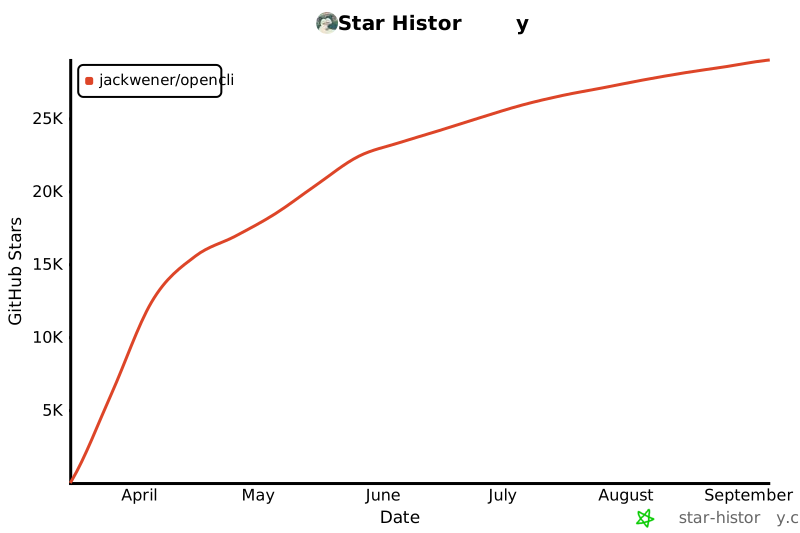](https://star-history.com/#jackwener/opencli&Date)
|
|
|
|
## License
|
|
|
|
[Apache-2.0](./LICENSE)
|