 wehub-resource-sync
292 lines
11 KiB
Markdown
292 lines
11 KiB
Markdown
<!-- WEHUB_ZH_README -->
|
||
> [!NOTE]
|
||
> 本文档由 WeHub 基于上游 README 翻译整理,属于社区翻译,非官方中文文档。
|
||
> [English](./README.en.md) · [原始项目](https://github.com/InsForge/InsForge) · [上游 README](https://github.com/InsForge/InsForge/blob/HEAD/README.md)
|
||
> 原作者、版权与许可证归属以原始项目及本仓库 LICENSE 文件为准。
|
||
|
||
<div align="center">
|
||
<a href="https://insforge.dev">
|
||
<picture>
|
||
<source media="(prefers-color-scheme: dark)" srcset="assets/logo-dark.svg">
|
||
<source media="(prefers-color-scheme: light)" srcset="assets/logo-light.svg">
|
||
<img src="assets/logo-dark.svg" alt="InsForge" width="500">
|
||
</picture>
|
||
</a>
|
||
|
||
<p>
|
||
面向智能体编程(agentic coding)的一体化开源后端平台。<br />
|
||
</p>
|
||
|
||
<p>
|
||
<a href="https://opensource.org/licenses/Apache-2.0"><img src="https://img.shields.io/badge/License-Apache%202.0-orange.svg" alt="License"></a>
|
||
<a href="https://www.npmjs.com/package/@insforge/sdk"><img src="https://img.shields.io/npm/dt/@insforge/sdk?color=blue&label=downloads" alt="Downloads"></a>
|
||
<a href="https://github.com/InsForge/InsForge/graphs/contributors"><img src="https://img.shields.io/github/contributors/InsForge/InsForge?color=green" alt="Contributors"></a>
|
||
<a href="https://insforge.dev"><img src="https://img.shields.io/badge/Visit-InsForge.dev-181818?logoColor=white&labelColor=555555&logo=data:image/svg%2bxml;base64,PHN2ZyB3aWR0aD0iMjQwIiBoZWlnaHQ9IjI0MCIgdmlld0JveD0iMCAwIDI0MCAyNDAiIGZpbGw9Im5vbmUiIHhtbG5zPSJodHRwOi8vd3d3LnczLm9yZy8yMDAwL3N2ZyI+PHBhdGggZD0iTTI2LjExODQgMTAxLjZDMjMuMjkzOSA5OC43ODMzIDIzLjI5MzkgOTQuMjE2NiAyNi4xMTg0IDkxLjRMOTcuNzE2NyAyMEwyMDAgMjBMNzcuMjYgMTQyLjRDNzQuNDM1NSAxNDUuMjE3IDY5Ljg1NjIgMTQ1LjIxNyA2Ny4wMzE3IDE0Mi40TDI2LjExODQgMTAxLjZaIiBmaWxsPSJ3aGl0ZSIvPjxwYXRoIGQ9Ik0xNTUuMjUxIDc3LjM3NUwyMDAgMTIyVjIyNEwxMDQuMTA5IDEyOC4zNzVMMTU1LjI1MSA3Ny4zNzVaIiBmaWxsPSJ3aGl0ZSIvPjwvc3ZnPgo=" alt="Visit InsForge.dev"></a>
|
||
<a href="https://gitcgr.com/InsForge/InsForge">
|
||
<img src="https://gitcgr.com/badge/InsForge/InsForge.svg" alt="gitcgr" />
|
||
</a>
|
||
</p>
|
||
<p>
|
||
<a href="https://x.com/InsForge"><img src="https://img.shields.io/badge/Follow%20on%20X-000000?logo=x&logoColor=white&style=for-the-badge" alt="Follow on X"></a>
|
||
<a href="https://www.linkedin.com/company/insforge"><img src="https://img.shields.io/badge/Follow%20on%20LinkedIn-0A66C2?logo=linkedin&logoColor=white&style=for-the-badge" alt="Follow on LinkedIn"></a>
|
||
<a href="https://discord.com/invite/MPxwj5xVvW"><img src="https://img.shields.io/badge/Join%20our%20Discord-5865F2?logo=discord&logoColor=white&style=for-the-badge" alt="Join our Discord"></a>
|
||
</p>
|
||
<a href="https://trendshift.io/repositories/19834" target="_blank">
|
||
<img src="https://trendshift.io/api/badge/repositories/19834" alt="InsForge%2FInsForge | Trendshift" style="width: 250px; height: 55px;" width="250" height="55"/>
|
||
</a>
|
||
<br /><br />
|
||
<a href="https://vercel.com/oss">
|
||
<img alt="Vercel OSS Program" src="https://vercel.com/oss/program-badge-2026.svg" />
|
||
</a>
|
||
</div>
|
||
|
||
<p align="center">
|
||
⭐ <em>帮助我们触达更多开发者并壮大 InsForge 社区。请为本仓库点亮 Star!</em>
|
||
</p>
|
||
|
||
## InsForge
|
||
面向智能体编程(agentic coding)的一体化开源后端平台。InsForge 为你的编码智能体提供数据库、认证(auth)、存储、计算、托管和 AI 网关,助你端到端交付全栈应用。
|
||
|
||
https://github.com/user-attachments/assets/345efbc6-ca63-4189-bde0-12ef3bda561b
|
||
|
||
### 工作原理
|
||
|
||
编码智能体可通过以下两种接口之一与 InsForge 交互:
|
||
|
||
- **MCP Server**(自托管与云端):将 InsForge 的操作暴露为工具,任何兼容 MCP 的智能体均可调用。
|
||
- **CLI + Skills**(仅云端):命令行界面,配合 Skills,供智能体在终端中直接调用。
|
||
|
||
两种接口都让编码智能体像后端工程师一样操作后端:
|
||
|
||
- **读取后端上下文与状态**:拉取文档、模式(schema)、元数据(已部署函数、存储桶内容、认证配置)以及运行时日志,让智能体具备编写代码、验证构建成果以及在出问题时进行调试所需的信息。
|
||
- **配置基础能力**:直接部署边缘函数、运行数据库迁移、创建存储桶、设置认证提供方,并配置其他后端资源。
|
||
|
||
```mermaid
|
||
graph TB
|
||
|
||
subgraph TOP[" "]
|
||
AG[AI Coding Agents]
|
||
end
|
||
|
||
subgraph MID[" "]
|
||
SL[InsForge]
|
||
end
|
||
|
||
AG --> SL
|
||
|
||
SL --> AUTH[Authentication]
|
||
SL --> DB[Database]
|
||
SL --> ST[Storage]
|
||
SL --> EF[Edge Functions]
|
||
SL --> MG[Model Gateway]
|
||
SL --> CP[Compute]
|
||
SL --> DEP[Deployment]
|
||
|
||
classDef bar fill:#0b0f14,stroke:#30363d,stroke-width:1px,color:#ffffff
|
||
classDef card fill:#161b22,stroke:#30363d,stroke-width:1px,color:#ffffff
|
||
|
||
class AG,SL bar
|
||
class AUTH,DB,ST,EF,MG,CP,DEP card
|
||
|
||
style TOP fill:transparent,stroke:transparent
|
||
style MID fill:transparent,stroke:transparent
|
||
|
||
linkStyle default stroke:#30363d,stroke-width:1px
|
||
```
|
||
|
||
### 核心产品:
|
||
- **Authentication**:用户管理、认证与会话
|
||
- **Database**:Postgres 关系型数据库
|
||
- **Storage**:兼容 S3 的文件存储
|
||
- **Model Gateway**:跨多家 LLM 提供商的 OpenAI 兼容 API
|
||
- **Edge Functions**:在边缘运行的无服务器代码
|
||
- **Compute**(私有预览):长期运行的容器服务
|
||
- **Site Deployment**:站点构建与部署
|
||
|
||
|
||
## ⭐️ 为仓库点亮 Star
|
||
|
||
<p align="center">
|
||
<img src="assets/insforge-star.gif" alt="Star InsForge" width="100%">
|
||
</p>
|
||
|
||
如果你觉得 InsForge 有用或有趣,非常欢迎点亮 GitHub Star ⭐️。
|
||
|
||
## 快速开始
|
||
|
||
### 云端托管:[insforge.dev](https://insforge.dev)
|
||
|
||
<a href="https://insforge.dev" target="_blank" rel="noopener noreferrer"><img src="https://img.shields.io/badge/insforge.dev-181818?logo=data:image/svg%2bxml;base64,PHN2ZyB3aWR0aD0iMjQwIiBoZWlnaHQ9IjI0MCIgdmlld0JveD0iMCAwIDI0MCAyNDAiIGZpbGw9Im5vbmUiIHhtbG5zPSJodHRwOi8vd3d3LnczLm9yZy8yMDAwL3N2ZyI+PHBhdGggZD0iTTI2LjExODQgMTAxLjZDMjMuMjkzOSA5OC43ODMzIDIzLjI5MzkgOTQuMjE2NiAyNi4xMTg0IDkxLjRMOTcuNzE2NyAyMEwyMDAgMjBMNzcuMjYgMTQyLjRDNzQuNDM1NSAxNDUuMjE3IDY5Ljg1NjIgMTQ1LjIxNyA2Ny4wMzE3IDE0Mi40TDI2LjExODQgMTAxLjZaIiBmaWxsPSJ3aGl0ZSIvPjxwYXRoIGQ9Ik0xNTUuMjUxIDc3LjM3NUwyMDAgMTIyVjIyNEwxMDQuMTA5IDEyOC4zNzVMMTU1LjI1MSA3Ny4zNzVaIiBmaWxsPSJ3aGl0ZSIvPjwvc3ZnPgo=&logoColor=white" alt="InsForge.dev"></a>
|
||
|
||
### 自托管:Docker Compose
|
||
|
||
前置要求:[Docker](https://www.docker.com/) + [Node.js](https://nodejs.org/)
|
||
|
||
#### 1. 安装配置
|
||
|
||
你可以使用 Docker Compose 在本地运行 InsForge。这会在你的机器上启动一个本地 InsForge 实例。
|
||
|
||
[![Deploy on Docker][docker-btn]][docker-deploy]
|
||
|
||
或从源码运行:
|
||
```bash
|
||
# Run with Docker
|
||
git clone https://github.com/InsForge/InsForge.git
|
||
cd insforge
|
||
cp .env.example .env
|
||
docker compose -f docker-compose.prod.yml up
|
||
```
|
||
|
||
#### 2. 连接 InsForge MCP
|
||
|
||
打开 [http://localhost:7130](http://localhost:7130)
|
||
|
||
按照步骤连接 InsForge MCP Server
|
||
|
||
<div align="center">
|
||
<img src="assets/connect.png" alt="Connect InsForge MCP" width="600">
|
||
</div>
|
||
|
||
#### 3. 验证安装
|
||
|
||
要验证连接,请向你的智能体发送以下提示:
|
||
```
|
||
I'm using InsForge as my backend platform, call InsForge MCP's fetch-docs tool to learn about InsForge instructions.
|
||
```
|
||
|
||
#### 4. 运行多个项目
|
||
|
||
你可以在同一主机上通过使用不同端口和项目名称来运行多个 InsForge 项目。
|
||
|
||
```bash
|
||
# Create a separate env file for each project
|
||
cp .env.example .env.project1
|
||
cp .env.example .env.project2
|
||
```
|
||
|
||
编辑 `.env.project2`,使用不同端口:
|
||
```
|
||
POSTGRES_PORT=5442
|
||
POSTGREST_PORT=5440
|
||
APP_PORT=7230
|
||
AUTH_PORT=7231
|
||
DENO_PORT=7233
|
||
```
|
||
|
||
使用唯一名称启动每个项目:
|
||
```bash
|
||
docker compose -f docker-compose.prod.yml --env-file .env.project1 -p project1 up -d
|
||
docker compose -f docker-compose.prod.yml --env-file .env.project2 -p project2 up -d
|
||
```
|
||
|
||
每个项目都会获得各自独立的数据库、存储和配置。使用以下命令管理它们:
|
||
```bash
|
||
docker compose -f docker-compose.prod.yml --env-file .env.project1 -p project1 ps # status
|
||
docker compose -f docker-compose.prod.yml --env-file .env.project1 -p project1 logs -f # logs
|
||
docker compose -f docker-compose.prod.yml --env-file .env.project1 -p project1 down # stop
|
||
```
|
||
|
||
### 一键部署
|
||
|
||
除了在本地运行 InsForge,你还可以通过预配置方案启动 InsForge。这样无需在本地安装 Docker,即可快速上手 InsForge。
|
||
|
||
| Railway | Zeabur | Sealos |
|
||
| --- | --- | --- |
|
||
| [](https://railway.com/deploy/insforge) | [](https://zeabur.com/templates/Q82M3Y) | [](https://sealos.io/products/app-store/insforge) |
|
||
|
||
|
||
## 贡献
|
||
|
||
**贡献**:如有兴趣参与贡献,可参阅我们的指南 [CONTRIBUTING.md](CONTRIBUTING.md)。我们非常欢迎 Pull Request(PR),任何形式的帮助都令人感激!
|
||
|
||
**支持**:如需帮助或支持,欢迎在 [Discord 频道](https://discord.com/invite/MPxwj5xVvW), 与我们交流,也可发邮件至 [info@insforge.dev](mailto:info@insforge.dev)!
|
||
|
||
|
||
## 文档与支持
|
||
|
||
### 文档
|
||
- **[官方文档](https://docs.insforge.dev/introduction)** - 全面的指南与 API 参考
|
||
|
||
### 社区
|
||
- **[Discord](https://discord.com/invite/MPxwj5xVvW)** - 加入我们的活跃社区
|
||
- **[Twitter](https://x.com/InsForge)** - 关注以获取更新与技巧
|
||
|
||
### 联系方式
|
||
- **Email**:info@insforge.dev
|
||
|
||
## 许可证
|
||
|
||
本项目采用 Apache License 2.0 许可证——详情请参阅 [LICENSE](LICENSE) 文件。
|
||
|
||
---
|
||
|
||
[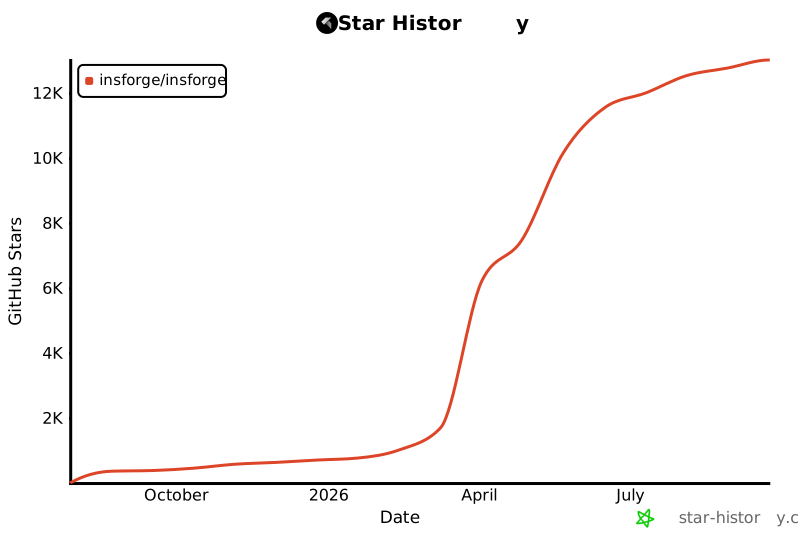](https://www.star-history.com/#InsForge/InsForge&Date)
|
||
|
||
## 徽章
|
||
|
||
展示你的项目基于 InsForge 构建。
|
||
|
||
### Made with InsForge
|
||
|
||
<a href="https://insforge.dev">
|
||
<img
|
||
width="168"
|
||
height="30"
|
||
src="https://insforge.dev/badge-made-with-insforge.svg"
|
||
alt="Made with InsForge"
|
||
/>
|
||
</a>
|
||
|
||
**Markdown:**
|
||
```md
|
||
[](https://insforge.dev)
|
||
```
|
||
|
||
**HTML:**
|
||
```html
|
||
<a href="https://insforge.dev">
|
||
<img
|
||
width="168"
|
||
height="30"
|
||
src="https://insforge.dev/badge-made-with-insforge.svg"
|
||
alt="Made with InsForge"
|
||
/>
|
||
</a>
|
||
```
|
||
|
||
### Made with InsForge (dark)
|
||
|
||
<a href="https://insforge.dev">
|
||
<img
|
||
width="168"
|
||
height="30"
|
||
src="https://insforge.dev/badge-made-with-insforge-dark.svg"
|
||
alt="Made with InsForge"
|
||
/>
|
||
</a>
|
||
|
||
**Markdown:**
|
||
```md
|
||
[](https://insforge.dev)
|
||
```
|
||
|
||
**HTML:**
|
||
```html
|
||
<a href="https://insforge.dev">
|
||
<img
|
||
width="168"
|
||
height="30"
|
||
src="https://insforge.dev/badge-made-with-insforge-dark.svg"
|
||
alt="Made with InsForge"
|
||
/>
|
||
</a>
|
||
```
|
||
|
||
|
||
<p align="center">⭐ <b>在 GitHub 上为我们 Star</b>,以便及时获知新版本发布!</p>
|
||
|
||
<!-- LINK GROUPS -->
|
||
|
||
[docker-btn]: ./deploy/buttons/docker.png
|
||
[docker-deploy]: ./deploy/docker-deploy.md
|