 wehub-resource-sync
131 lines
4.5 KiB
Markdown
131 lines
4.5 KiB
Markdown
# swot-agent
|
|
|
|
[](https://www.python.org/downloads/release/python-3100/)
|
|
[](https://fastapi.tiangolo.com)
|
|
[](https://github.com/psf/black)
|
|
|
|
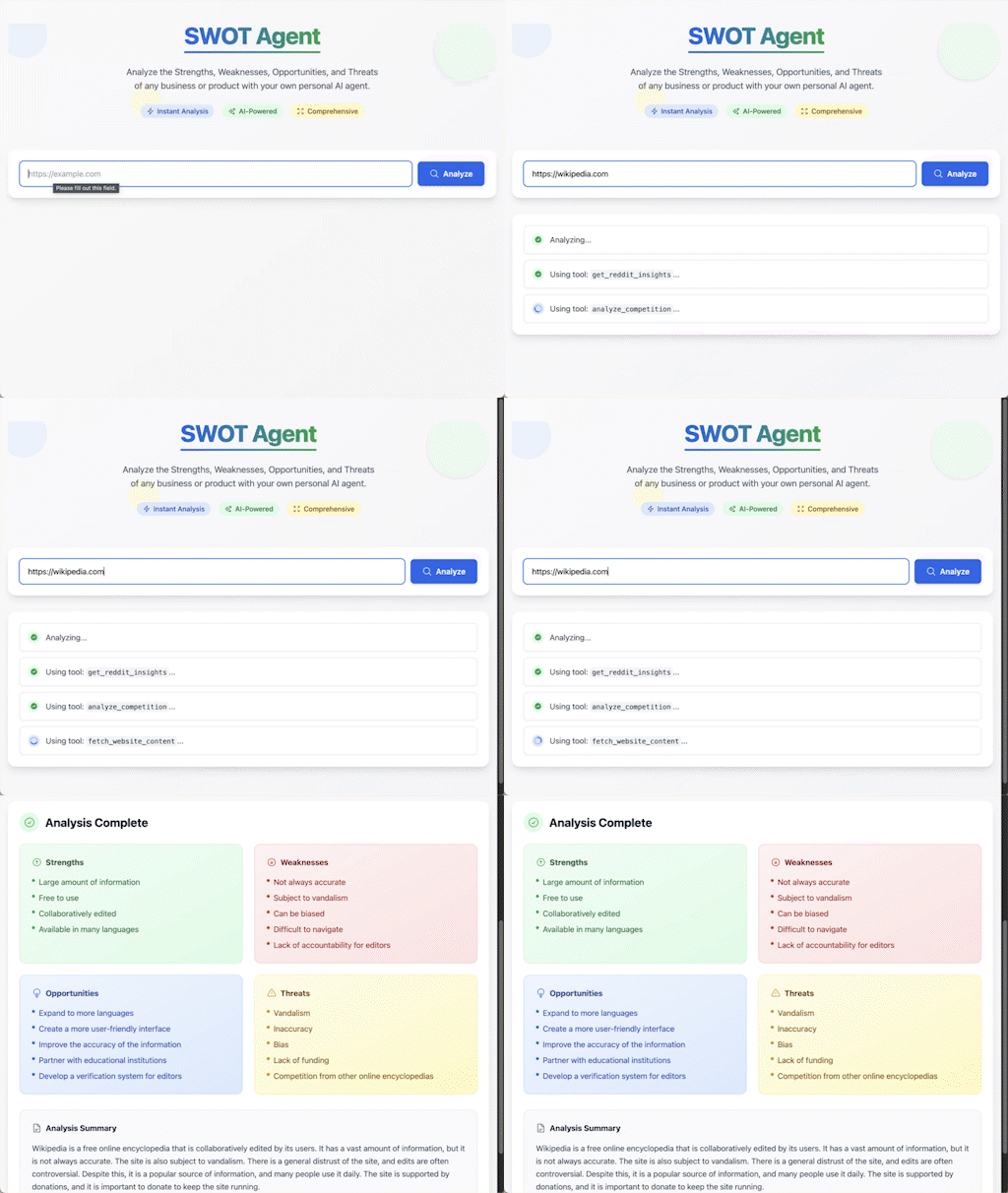
A web application that performs automated [SWOT analysis](https://en.wikipedia.org/wiki/SWOT_analysis) (Strengths, Weaknesses, Opportunities, Threats) analysis using the [Gemini 2.0 Flash model](https://ai.google.dev/gemini-api/docs/models/gemini-v2) and the [Pydantic AI](https://ai.pydantic.dev/) agent framework. The application is built with [FastAPI](https://fastapi.tiangolo.com/), [HTMX](https://htmx.org/), and [Tailwind CSS](https://tailwindcss.com/).
|
|
|
|
|
|
|
|
The agent includes three tools:
|
|
|
|
- **Content Extraction**: Extracts content from a web page given a URL
|
|
- **Community Insights**: Calls Reddit API to get community insights from relevant subreddits
|
|
- **Competitive Analysis**: Calls Gemini API to get competitive analysis
|
|
|
|
## Getting Started
|
|
|
|
### Prerequisites
|
|
|
|
- Python 3.10+
|
|
- Google Cloud API credentials
|
|
- Optional: [Reddit API credentials](https://www.reddit.com/prefs/apps) (for Reddit content extraction)
|
|
|
|
### Installation
|
|
|
|
1. Clone the repository and change to the `swot-agent` directory.
|
|
|
|
1. Install the required dependencies:
|
|
|
|
```bash
|
|
pip install -r requirements.txt
|
|
```
|
|
|
|
1. Set up your environment variables:
|
|
|
|
```bash
|
|
# Google Cloud settings
|
|
export GOOGLE_CLOUD_PROJECT=your_project_id
|
|
export GOOGLE_APPLICATION_CREDENTIALS=path_to_service_account.json
|
|
|
|
# (Optional) Reddit API credentials
|
|
export REDDIT_CLIENT_ID=your_reddit_client_id
|
|
export REDDIT_CLIENT_SECRET=your_reddit_client_secret
|
|
|
|
# (Optional) Application settings
|
|
export APP_SECRET_KEY=your_secret_key
|
|
```
|
|
|
|
1. Run the application:
|
|
|
|
```bash
|
|
python main.py
|
|
```
|
|
|
|
You can also use the [FastAPI CLI](https://fastapi.tiangolo.com/fastapi-cli/):
|
|
|
|
```bash
|
|
fastapi dev --port 8080
|
|
```
|
|
|
|
1. Open your web browser and navigate to `http://localhost:8080`.
|
|
|
|
## Usage
|
|
|
|
1. Enter a valid URL in the input field
|
|
1. Click **"Analyze"** to initiate the AI SWOT analysis
|
|
1. The AI agent will:
|
|
- Extract content from the provided URL
|
|
- Process the content using Gemini 2.0
|
|
- Generate structured SWOT insights
|
|
- Present results in an organized format
|
|
1. View the SWOT analysis results
|
|
|
|
## Deployment
|
|
|
|
To deploy the application to [Google Cloud Run](https://cloud.google.com/run), run the following command:
|
|
|
|
```bash
|
|
gcloud run deploy swot-agent --source . --region us-central1 --allow-unauthenticated
|
|
```
|
|
|
|
You may need to add the `aiplatform.user` [IAM role](https://cloud.google.com/vertex-ai/docs/general/access-control#aiplatform.user) to your service account.
|
|
|
|
[Configure secrets](https://cloud.google.com/run/docs/configuring/services/secrets) for the `APP_SECRET_KEY`, `REDDIT_CLIENT_ID`, and `REDDIT_CLIENT_SECRET`. You can run the application without setting these, but the Reddit tool will not be available.
|
|
|
|
## Troubleshooting
|
|
|
|
If you receive an error about the Gemini quota being exceeded, you can [request a quota increase](https://cloud.google.com/vertex-ai/docs/generative-ai/quotas-genai) or try another model.
|
|
|
|
## Testing
|
|
|
|
The project includes test suites for both the AI agent and the FastAPI application in the `tests` directory.
|
|
|
|
### Running Tests
|
|
|
|
1. Install test dependencies:
|
|
|
|
```bash
|
|
pip install pytest pytest-asyncio httpx
|
|
```
|
|
|
|
1. Run all tests:
|
|
|
|
```bash
|
|
pytest -v
|
|
```
|
|
|
|
## Project Structure
|
|
|
|
```text
|
|
swot-agent/
|
|
├── main.py # FastAPI application and server setup
|
|
├── agent.py # SWOT analysis agent implementation
|
|
├── tests/ # Test suites
|
|
│ ├── __init__.py # To make tests a Python package
|
|
│ ├── test_agent.py # AI agent test suite
|
|
│ └── test_main.py # FastAPI endpoint test suite
|
|
├── templates/ # HTML templates
|
|
│ ├── index.html # Main application page
|
|
│ ├── status.html # Analysis status updates
|
|
│ └── result.html # SWOT analysis results
|
|
├── requirements.txt # Python dependencies
|
|
├── LICENSE # License information
|
|
└── README.md # Project documentation
|
|
```
|
|
|
|
## Contributing
|
|
|
|
Contributions are welcome! Please feel free to submit a Pull Request.
|