 wehub-resource-sync
7b4a55b283
wehub-resource-sync
7b4a55b283
CI / format-check (push) Has been cancelled
CI / test (3.10) (push) Has been cancelled
Auto Update PR / update-prs (push) Has been cancelled
CI / test (3.11) (push) Has been cancelled
CI / test-fork-pr (push) Has been cancelled
CI / test (3.12) (push) Has been cancelled
CI / live-api-tests (push) Has been cancelled
CI / plugin-integration-test (push) Has been cancelled
CI / ollama-integration-test (push) Has been cancelled
505 lines
20 KiB
Markdown
505 lines
20 KiB
Markdown
<!-- WEHUB_ZH_README -->
|
||
> [!NOTE]
|
||
> 本文档由 WeHub 基于上游 README 翻译整理,属于社区翻译,非官方中文文档。
|
||
> [English](./README.en.md) · [原始项目](https://github.com/google/langextract) · [上游 README](https://github.com/google/langextract/blob/HEAD/README.md)
|
||
> 原作者、版权与许可证归属以原始项目及本仓库 LICENSE 文件为准。
|
||
|
||
<p align="center">
|
||
<a href="https://github.com/google/langextract">
|
||
<img src="https://raw.githubusercontent.com/google/langextract/main/docs/_static/logo.svg" alt="LangExtract Logo" width="128" />
|
||
</a>
|
||
</p>
|
||
|
||
# LangExtract
|
||
|
||
[](https://pypi.org/project/langextract/)
|
||
[](https://github.com/google/langextract)
|
||

|
||
[](https://doi.org/10.5281/zenodo.17015089)
|
||
|
||
## 目录
|
||
|
||
- [简介](#introduction)
|
||
- [为什么选择 LangExtract?](#why-langextract)
|
||
- [快速入门](#quick-start)
|
||
- [安装](#installation)
|
||
- [云端模型的 API 密钥配置](#api-key-setup-for-cloud-models)
|
||
- [添加自定义模型提供商](#adding-custom-model-providers)
|
||
- [使用 OpenAI 模型](#using-openai-models)
|
||
- [通过 Ollama 使用本地 LLM](#using-local-llms-with-ollama)
|
||
- [更多示例](#more-examples)
|
||
- [*Romeo and Juliet* 全文抽取](#romeo-and-juliet-full-text-extraction)
|
||
- [用药信息抽取](#medication-extraction)
|
||
- [放射学报告结构化:RadExtract](#radiology-report-structuring-radextract)
|
||
- [社区提供商](#community-providers)
|
||
- [贡献](#contributing)
|
||
- [测试](#testing)
|
||
- [免责声明](#disclaimer)
|
||
|
||
## 简介
|
||
|
||
LangExtract 是一个 Python 库,可根据用户定义的指令,使用 LLM 从非结构化文本文档中抽取结构化信息。它可处理临床笔记或报告等材料,识别并整理关键细节,同时确保抽取的数据与源文本相对应。
|
||
|
||
## 为什么选择 LangExtract?
|
||
|
||
1. **精确的源文本锚定(Source Grounding):** 将每次抽取映射到源文本中的确切位置,支持可视化高亮,便于追溯与核验。
|
||
2. **可靠的结构化输出:** 基于你的少样本(few-shot)示例强制执行一致的输出模式(schema),并在 Gemini 等支持的模型中利用受控生成(controlled generation),以保证稳健、结构化的结果。
|
||
3. **针对长文档优化:** 通过优化的文本分块、并行处理与多轮遍历策略,克服大型文档抽取中的“大海捞针”难题,提高召回率。
|
||
4. **交互式可视化:** 即时生成自包含的交互式 HTML 文件,在原始上下文中可视化并审阅数千条抽取实体。
|
||
5. **灵活的 LLM 支持:** 支持你所偏好的模型,从 Google Gemini 系列等云端 LLM,到通过内置 Ollama 接口使用的本地开源模型。
|
||
6. **适配任意领域:** 仅用少量示例即可为任意领域定义抽取任务。LangExtract 可按需适配,无需对模型进行微调。
|
||
7. **利用 LLM 世界知识:** 通过精确的提示词措辞与少样本示例,影响抽取任务对 LLM 知识的运用方式。任何推断信息的准确性及其对任务规范的遵循程度,取决于所选 LLM、任务复杂度、提示指令的清晰度以及示例的性质。
|
||
|
||
## 快速入门
|
||
|
||
> **注意:** 使用 Gemini 等云端托管模型需要 API 密钥。请参阅 [API 密钥配置](#api-key-setup-for-cloud-models) 一节,了解如何获取并配置密钥。
|
||
|
||
只需几行代码即可抽取结构化信息。
|
||
|
||
### 1. 定义抽取任务
|
||
|
||
首先,编写一段清晰描述你想抽取内容的提示词。然后,提供一个高质量示例以引导模型。
|
||
|
||
```python
|
||
import langextract as lx
|
||
import textwrap
|
||
|
||
# 1. Define the prompt and extraction rules
|
||
prompt = textwrap.dedent("""\
|
||
Extract characters, emotions, and relationships in order of appearance.
|
||
Use exact text for extractions. Do not paraphrase or overlap entities.
|
||
Provide meaningful attributes for each entity to add context.""")
|
||
|
||
# 2. Provide a high-quality example to guide the model
|
||
examples = [
|
||
lx.data.ExampleData(
|
||
text="ROMEO. But soft! What light through yonder window breaks? It is the east, and Juliet is the sun.",
|
||
extractions=[
|
||
lx.data.Extraction(
|
||
extraction_class="character",
|
||
extraction_text="ROMEO",
|
||
attributes={"emotional_state": "wonder"}
|
||
),
|
||
lx.data.Extraction(
|
||
extraction_class="emotion",
|
||
extraction_text="But soft!",
|
||
attributes={"feeling": "gentle awe"}
|
||
),
|
||
lx.data.Extraction(
|
||
extraction_class="relationship",
|
||
extraction_text="Juliet is the sun",
|
||
attributes={"type": "metaphor"}
|
||
),
|
||
]
|
||
)
|
||
]
|
||
```
|
||
|
||
> **注意:** 示例驱动模型行为。每个 `extraction_text` 理想情况下应与示例中的 `text` 逐字一致(不要改写),并按出现顺序列出。若示例未遵循该模式,LangExtract 默认会发出 `Prompt alignment` 警告——请解决这些问题以获得最佳效果。
|
||
>
|
||
> **锚定(Grounding):** LLM 偶尔可能从少样本示例而非输入文本中抽取内容。LangExtract 会自动检测这一点:无法在源文本中定位的抽取结果将带有 `char_interval = None`。使用 `[e for e in result.extractions if e.char_interval]` 过滤这些结果,仅保留已锚定的结果。
|
||
|
||
### 2. 运行抽取
|
||
|
||
将你的输入文本与提示材料传入 `lx.extract` 函数。
|
||
|
||
```python
|
||
# The input text to be processed
|
||
input_text = "Lady Juliet gazed longingly at the stars, her heart aching for Romeo"
|
||
|
||
# Run the extraction
|
||
result = lx.extract(
|
||
text_or_documents=input_text,
|
||
prompt_description=prompt,
|
||
examples=examples,
|
||
model_id="gemini-3.5-flash",
|
||
)
|
||
```
|
||
|
||
对于超出示例范围的高级约束(例如抽取属性上的枚举值),Gemini 与 OpenAI 支持带或不带少样本示例的 `output_schema`。请参阅
|
||
[自定义输出模式](docs/examples/output_schema.md)。
|
||
|
||
> **模型选择**:`gemini-3.5-flash` 是推荐的默认选项,在 LangExtract 的模式约束工作流中可提供较强的抽取质量。对于高吞吐量或成本敏感的工作负载,可考虑当前稳定的 Flash-Lite 模型 `gemini-3.1-flash-lite`;对于需要更深推理的高度复杂任务,可评估官方模型文档中的当前 Gemini Pro 模型。对于大规模或生产环境使用,建议使用付费 Gemini 套餐以提高吞吐量并避免速率限制。详情请参阅[速率限制文档](https://ai.google.dev/gemini-api/docs/rate-limits#usage-tiers)。
|
||
>
|
||
> **模型生命周期**:请注意,Gemini 模型具有定义了退役日期的生命周期。用户应查阅[官方模型版本文档](https://cloud.google.com/vertex-ai/generative-ai/docs/learn/model-versions),以了解最新的稳定版与旧版信息。
|
||
|
||
### 3. 可视化结果
|
||
|
||
抽取结果可保存为 `.jsonl` 文件——这是处理语言模型数据的常用格式。LangExtract 随后可基于该文件生成交互式 HTML 可视化,以便在上下文中审阅实体。
|
||
|
||
```python
|
||
# Save the results to a JSONL file
|
||
lx.io.save_annotated_documents([result], output_name="extraction_results.jsonl", output_dir=".")
|
||
|
||
# Generate the visualization from the file
|
||
html_content = lx.visualize("extraction_results.jsonl")
|
||
with open("visualization.html", "w") as f:
|
||
if hasattr(html_content, 'data'):
|
||
f.write(html_content.data) # For Jupyter/Colab
|
||
else:
|
||
f.write(html_content)
|
||
```
|
||
|
||
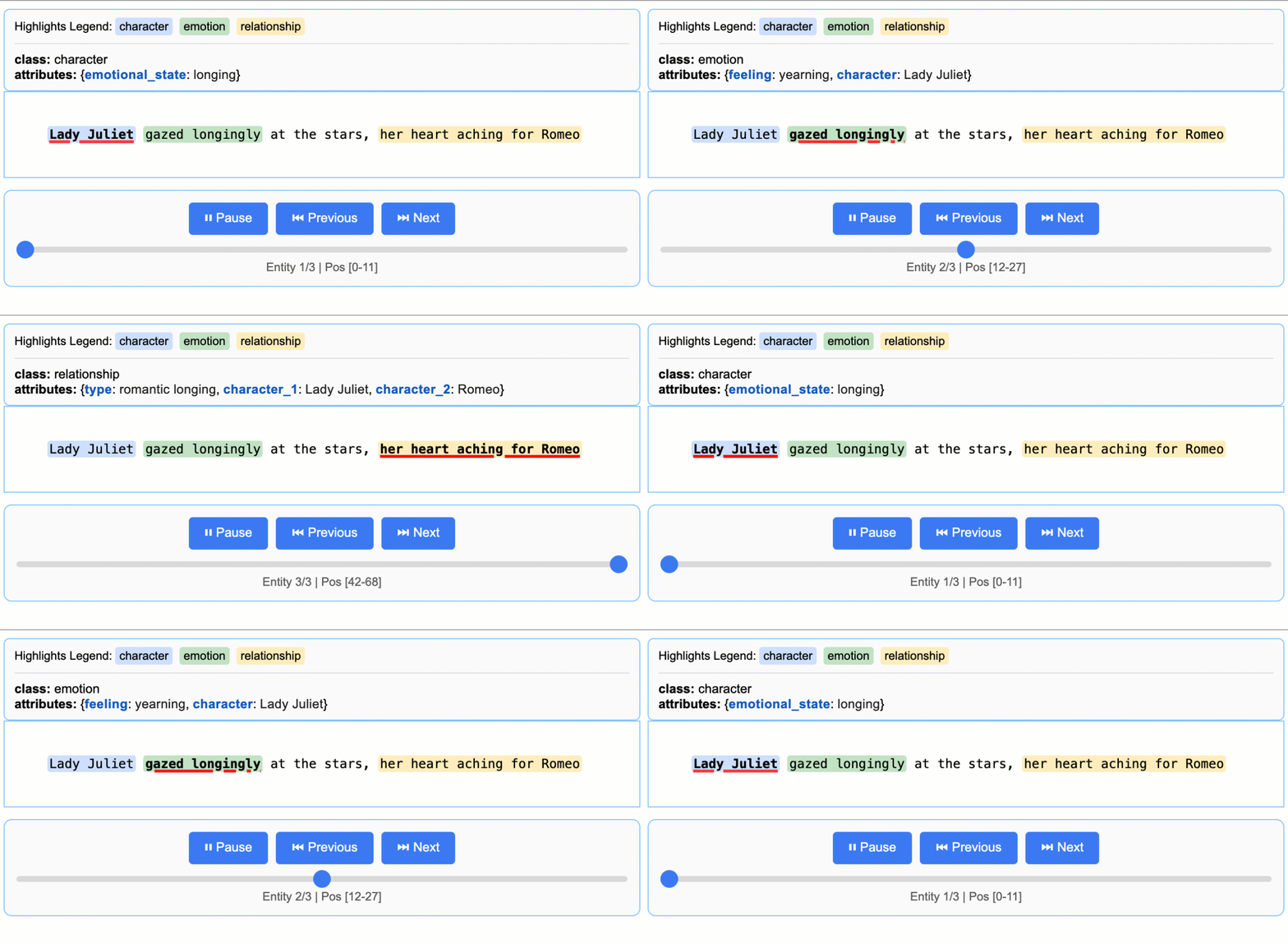
这将创建一个带动画效果的交互式 HTML 文件:
|
||
|
||
|
||
|
||
> **关于 LLM 知识运用的说明:** 本示例演示的抽取结果紧贴文本证据——为 Lady Juliet 的情绪状态抽取“longing”,并从“gazed longingly at the stars”中识别“yearning”。该任务可修改为生成更多依赖 LLM 世界知识的属性(例如添加 `"identity": "Capulet family daughter"` 或 `"literary_context": "tragic heroine"`)。文本证据与知识推断之间的平衡,由你的提示指令与示例属性控制。
|
||
|
||
### 扩展到更长文档
|
||
|
||
对于较长的文本,你可以通过并行处理和增强的敏感度,直接从 URL 处理整篇文档:
|
||
|
||
```python
|
||
# Process Romeo & Juliet directly from Project Gutenberg
|
||
result = lx.extract(
|
||
text_or_documents="https://www.gutenberg.org/files/1513/1513-0.txt",
|
||
prompt_description=prompt,
|
||
examples=examples,
|
||
model_id="gemini-3.5-flash",
|
||
extraction_passes=3, # Improves recall through multiple passes
|
||
max_workers=20, # Parallel processing for speed
|
||
max_char_buffer=1000 # Smaller contexts for better accuracy
|
||
)
|
||
```
|
||
|
||
这种方法可以从完整小说中抽取数百个实体,同时保持高准确度。交互式可视化可无缝处理大型结果集,便于从输出的 JSONL 文件中探索数百个实体。**[查看完整的 *Romeo and Juliet* 抽取示例 →](https://github.com/google/langextract/blob/main/docs/examples/longer_text_example.md)** for detailed results and performance insights.
|
||
|
||
### Vertex AI 批处理
|
||
|
||
通过启用 Vertex AI Batch API,并配合包含 `vertexai=True`、`project`、`location` 以及 `batch` 配置的 `language_model_params`,可在大规模任务中节省成本。
|
||
|
||
在 [此示例](docs/examples/batch_api_example.md) 中查看 Vertex AI Batch API 的用法示例。
|
||
|
||
## 安装
|
||
|
||
### 从 PyPI 安装
|
||
|
||
```bash
|
||
pip install langextract
|
||
```
|
||
|
||
*推荐大多数用户使用。对于隔离环境,建议使用虚拟环境:*
|
||
|
||
```bash
|
||
python -m venv langextract_env
|
||
source langextract_env/bin/activate # On Windows: langextract_env\Scripts\activate
|
||
pip install langextract
|
||
```
|
||
|
||
### 从源码安装
|
||
|
||
LangExtract 使用现代 Python 打包方式,并通过 `pyproject.toml` 进行依赖管理:
|
||
|
||
*使用 `-e` 安装会将软件包置于开发模式,允许你在不重新安装的情况下修改代码。*
|
||
|
||
|
||
```bash
|
||
git clone https://github.com/google/langextract.git
|
||
cd langextract
|
||
|
||
# For basic installation:
|
||
pip install -e .
|
||
|
||
# For development (includes linting tools):
|
||
pip install -e ".[dev]"
|
||
|
||
# For testing (includes pytest):
|
||
pip install -e ".[test]"
|
||
```
|
||
|
||
### Docker
|
||
|
||
```bash
|
||
docker build -t langextract .
|
||
docker run --rm -e LANGEXTRACT_API_KEY="your-api-key" langextract python your_script.py
|
||
```
|
||
|
||
## 云模型 API 密钥配置
|
||
|
||
在 LangExtract 中使用云端托管模型(如 Gemini 或 OpenAI)时,你需要
|
||
配置 API 密钥。本地设备上的模型不需要 API 密钥。对于使用本地 LLM 的开发者,
|
||
LangExtract 内置支持 Ollama,并可通过更新推理端点扩展至其他第三方 API。
|
||
|
||
### API 密钥来源
|
||
|
||
从以下来源获取 API 密钥:
|
||
|
||
* [AI Studio](https://aistudio.google.com/app/apikey) for Gemini models
|
||
* [Vertex AI](https://cloud.google.com/vertex-ai/generative-ai/docs/sdks/overview) for enterprise use
|
||
* [OpenAI Platform](https://platform.openai.com/api-keys) for OpenAI models
|
||
|
||
### 在环境中配置 API 密钥
|
||
|
||
**选项 1:环境变量**
|
||
|
||
```bash
|
||
export LANGEXTRACT_API_KEY="your-api-key-here"
|
||
```
|
||
|
||
**选项 2:.env 文件(推荐)**
|
||
|
||
将 API 密钥添加到 `.env` 文件中:
|
||
|
||
```bash
|
||
# Add API key to .env file
|
||
cat >> .env << 'EOF'
|
||
LANGEXTRACT_API_KEY=your-api-key-here
|
||
EOF
|
||
|
||
# Keep your API key secure
|
||
echo '.env' >> .gitignore
|
||
```
|
||
|
||
在 Python 代码中:
|
||
```python
|
||
import langextract as lx
|
||
|
||
result = lx.extract(
|
||
text_or_documents=input_text,
|
||
prompt_description="Extract information...",
|
||
examples=[...],
|
||
model_id="gemini-3.5-flash"
|
||
)
|
||
```
|
||
|
||
**选项 3:直接传入 API 密钥(不建议用于生产环境)**
|
||
|
||
你也可以在代码中直接提供 API 密钥,但不建议在生产环境中这样做:
|
||
|
||
```python
|
||
result = lx.extract(
|
||
text_or_documents=input_text,
|
||
prompt_description="Extract information...",
|
||
examples=[...],
|
||
model_id="gemini-3.5-flash",
|
||
api_key="your-api-key-here" # Only use this for testing/development
|
||
)
|
||
```
|
||
|
||
**选项 4:Vertex AI(服务账号)**
|
||
|
||
使用 [Vertex AI](https://cloud.google.com/vertex-ai/docs/start/introduction-unified-platform) for authentication with service accounts:
|
||
|
||
```python
|
||
result = lx.extract(
|
||
text_or_documents=input_text,
|
||
prompt_description="Extract information...",
|
||
examples=[...],
|
||
model_id="gemini-3.5-flash",
|
||
language_model_params={
|
||
"vertexai": True,
|
||
"project": "your-project-id",
|
||
"location": "global" # or regional endpoint
|
||
}
|
||
)
|
||
```
|
||
|
||
## 添加自定义模型提供方
|
||
|
||
LangExtract 通过轻量级插件系统支持自定义 LLM 提供方。你可以在不修改核心代码的情况下添加对新模型的支持。
|
||
|
||
- 独立于核心库添加新模型支持
|
||
- 将你的提供方作为独立的 Python 软件包分发
|
||
- 隔离自定义依赖
|
||
- 通过基于优先级的解析覆盖或扩展内置提供方
|
||
|
||
请参阅 [Provider System Documentation(提供方系统文档)](langextract/providers/README.md) 中的详细指南,了解如何:
|
||
|
||
- 使用 `@router.register(...)` 从 `langextract.providers` 注册提供方
|
||
- 发布用于发现的入口点(entry point)
|
||
- 可选地使用 `get_schema_class()` 提供结构化输出的 schema
|
||
- 通过 `create_model(...)` 与工厂(factory)集成
|
||
|
||
## 使用 OpenAI 模型
|
||
|
||
LangExtract 支持 OpenAI 模型(需要可选依赖:`pip install langextract[openai]`):
|
||
|
||
```python
|
||
import langextract as lx
|
||
|
||
# OPENAI_API_KEY in the environment is picked up automatically; pass
|
||
# api_key=... explicitly only if you need to override it.
|
||
result = lx.extract(
|
||
text_or_documents=input_text,
|
||
prompt_description=prompt,
|
||
examples=examples,
|
||
model_id="gpt-4o", # Automatically selects OpenAI provider
|
||
)
|
||
```
|
||
|
||
OpenAI 提供方使用结构化输出(structured outputs)或 JSON 模式,并自动确定
|
||
围栏(fence)行为——请将 `fence_output` 和 `use_schema_constraints` 留空。
|
||
对于支持结构化输出的 OpenAI 模型,还支持 `output_schema`;请提供 LangExtract 输出封装(output-envelope)JSON schema,最好配合
|
||
`lx.schema` 辅助工具使用。
|
||
|
||
对于大规模、对延迟不敏感的 OpenAI 工作负载,可通过 `language_model_params` 启用 OpenAI Batch API。
|
||
批处理模式为可选启用,当提示(prompt)数量低于配置阈值时会回退到实时调用。
|
||
|
||
```python
|
||
result = lx.extract(
|
||
text_or_documents=documents,
|
||
prompt_description=prompt,
|
||
examples=examples,
|
||
model_id="gpt-4o-mini",
|
||
language_model_params={
|
||
"batch": {
|
||
"enabled": True,
|
||
"threshold": 50,
|
||
"poll_interval": 10,
|
||
}
|
||
},
|
||
)
|
||
```
|
||
|
||
对于 OpenAI 兼容端点或非 GPT 模型 ID(会跳过自动路由),请使用 `ModelConfig` 并显式指定提供方:
|
||
|
||
```python
|
||
from langextract.factory import ModelConfig
|
||
|
||
result = lx.extract(
|
||
text_or_documents=input_text,
|
||
prompt_description=prompt,
|
||
examples=examples,
|
||
config=ModelConfig(
|
||
model_id="my-openai-compatible-model",
|
||
provider="openai",
|
||
provider_kwargs={"api_key": "sk-...", "base_url": "https://..."},
|
||
),
|
||
)
|
||
```
|
||
|
||
## 使用 Ollama 运行本地 LLM
|
||
LangExtract 支持通过 Ollama 进行本地推理,无需 API 密钥即可运行模型:
|
||
|
||
```python
|
||
import langextract as lx
|
||
|
||
result = lx.extract(
|
||
text_or_documents=input_text,
|
||
prompt_description=prompt,
|
||
examples=examples,
|
||
model_id="gemma2:2b", # Automatically selects Ollama provider
|
||
model_url="http://localhost:11434",
|
||
)
|
||
```
|
||
|
||
Ollama 提供方为 JSON 模式公开了 `FormatModeSchema`。请将 `fence_output`
|
||
和 `use_schema_constraints` 留空,以便工厂根据提供方的
|
||
schema 自动配置。Ollama 目前不支持 `output_schema`。
|
||
|
||
**快速设置:** 从 [ollama.com](https://ollama.com/), 安装 Ollama,运行 `ollama pull gemma2:2b`,然后执行 `ollama serve`。
|
||
|
||
有关详细安装、Docker 配置和示例,请参阅 [`examples/ollama/`](examples/ollama/)。
|
||
|
||
## 更多示例
|
||
|
||
LangExtract 的更多实际应用示例:
|
||
|
||
### *Romeo and Juliet* 全文抽取
|
||
|
||
LangExtract 可直接从 URL 处理完整文档。本示例演示从 Project Gutenberg 上的 *Romeo and Juliet* 全文(147,843 个字符)中进行抽取,展示并行处理、顺序抽取轮次以及长文档处理的性能优化。
|
||
|
||
**[查看 *Romeo and Juliet* 全文示例 →](https://github.com/google/langextract/blob/main/docs/examples/longer_text_example.md)**
|
||
|
||
### 药物提取
|
||
|
||
> **免责声明:** 本演示仅用于说明 LangExtract 的基线能力,不代表成品或已获批产品,不用于诊断或建议任何疾病或病症的治疗,且不应作为医疗建议使用。
|
||
|
||
LangExtract 擅长从临床文本中提取结构化医疗信息。以下示例展示了基础实体识别(药物名称、剂量、给药途径)与关系提取(将药物与其属性关联),体现了 LangExtract 在医疗场景中的有效性。
|
||
|
||
**[查看药物提取示例 →](https://github.com/google/langextract/blob/main/docs/examples/medication_examples.md)**
|
||
|
||
### 放射学报告结构化:RadExtract
|
||
|
||
探索 RadExtract——HuggingFace Spaces 上的实时交互式演示,展示 LangExtract 如何自动结构化放射学报告。无需任何配置,直接在浏览器中试用。
|
||
|
||
**[查看 RadExtract 演示 →](https://huggingface.co/spaces/google/radextract)**
|
||
|
||
## 社区提供商(Community Providers)
|
||
|
||
使用自定义模型提供商扩展 LangExtract!查看我们的[社区提供商插件](COMMUNITY_PROVIDERS.md)注册表,发现社区创建的提供商或添加你自己的。
|
||
|
||
有关创建提供商插件的详细说明,请参阅[自定义提供商插件示例](examples/custom_provider_plugin/)。
|
||
|
||
## 贡献
|
||
|
||
欢迎贡献!请参阅 [CONTRIBUTING.md](https://github.com/google/langextract/blob/main/CONTRIBUTING.md) 了解如何开始开发、测试和提交拉取请求。提交补丁前,你必须签署[贡献者许可协议](https://cla.developers.google.com/about)
|
||
(Contributor License Agreement)。
|
||
|
||
## 测试
|
||
|
||
从源码在本地运行测试:
|
||
|
||
```bash
|
||
# Clone the repository
|
||
git clone https://github.com/google/langextract.git
|
||
cd langextract
|
||
|
||
# Install with test dependencies
|
||
pip install -e ".[test]"
|
||
|
||
# Run all tests
|
||
pytest tests
|
||
```
|
||
|
||
或使用 tox 在本地复现完整 CI 矩阵:
|
||
|
||
```bash
|
||
tox # runs pylint + pytest on Python 3.10 and 3.11
|
||
```
|
||
|
||
### Ollama 集成测试
|
||
|
||
若本地已安装 Ollama,可运行集成测试:
|
||
|
||
```bash
|
||
# Test Ollama integration (requires Ollama running with gemma2:2b model)
|
||
tox -e ollama-integration
|
||
```
|
||
|
||
该测试会自动检测 Ollama 是否可用,并运行真实推理测试。
|
||
|
||
## 开发
|
||
|
||
### 代码格式化
|
||
|
||
本项目使用自动化格式化工具以保持一致的代码风格:
|
||
|
||
```bash
|
||
# Auto-format all code
|
||
./autoformat.sh
|
||
|
||
# Or run formatters separately
|
||
isort langextract tests --profile google --line-length 80
|
||
pyink langextract tests --config pyproject.toml
|
||
```
|
||
|
||
### Pre-commit 钩子
|
||
|
||
自动格式化检查:
|
||
|
||
```bash
|
||
pre-commit install # One-time setup
|
||
pre-commit run --all-files # Manual run
|
||
```
|
||
|
||
### 代码检查(Linting)
|
||
|
||
提交 PR 前请运行代码检查:
|
||
|
||
```bash
|
||
pylint --rcfile=.pylintrc langextract tests
|
||
```
|
||
|
||
完整开发指南请参阅 [CONTRIBUTING.md](CONTRIBUTING.md)。
|
||
|
||
## 免责声明
|
||
|
||
这不是 Google 官方支持的产品。若你在生产环境或出版物中使用 LangExtract,请按规定引用并注明使用情况。使用须遵守 [Apache 2.0 许可证](https://github.com/google/langextract/blob/main/LICENSE).
|
||
。对于医疗相关应用,LangExtract 的使用还须遵守[Health AI Developer Foundations 使用条款](https://developers.google.com/health-ai-developer-foundations/terms).
|
||
|
||
---
|
||
|
||
**祝你提取愉快!**
|