 wehub-resource-sync
5d4cec7c2b
wehub-resource-sync
5d4cec7c2b
Build Opik Docker Images / set-version (push) Has been cancelled
Release Drafter / update_release_draft (push) Has been cancelled
🐙 Code Quality / detect (push) Has been cancelled
🐙 Code Quality / summary (push) Has been cancelled
Build Opik Docker Images / build-backend (push) Has been cancelled
Build Opik Docker Images / build-sandbox-executor-python (push) Has been cancelled
Build Opik Docker Images / build-python-backend (push) Has been cancelled
Build Opik Docker Images / build-frontend (push) Has been cancelled
Build Opik Docker Images / create-git-tag (push) Has been cancelled
🐙 Code Quality / lint (${{ matrix.leg.name }}) (push) Has been cancelled
325 lines
31 KiB
Markdown
325 lines
31 KiB
Markdown
<!-- WEHUB_ZH_README -->
|
||
> [!NOTE]
|
||
> 本文档由 WeHub 基于上游 README 翻译整理,属于社区翻译,非官方中文文档。
|
||
> [English](./README.en.md) · [原始项目](https://github.com/comet-ml/opik) · [上游 README](https://github.com/comet-ml/opik/blob/HEAD/README.md)
|
||
> 原作者、版权与许可证归属以原始项目及本仓库 LICENSE 文件为准。
|
||
|
||
> 注意:此文件使用AI进行机器翻译。欢迎对翻译进行改进!
|
||
|
||
<div align="center"><b><a href="README.md">English</a> | <a href="readme_CN.md">简体中文</a> | <a href="readme_JP.md">日本語</a> | <a href="readme_PT_BR.md">Português (Brasil)</a> | <a href="readme_KO.md">한국어</a><br><a href="readme_ES.md">Español</a> | <a href="readme_FR.md">Français</a> | <a href="readme_DE.md">Deutsch</a> | <a href="readme_RU.md">Русский</a> | <a href="readme_AR.md">العربية</a> | <a href="readme_HI.md">हिन्दी</a> | <a href="readme_TR.md">Türkçe</a></b></div>
|
||
|
||
<h1 align="center" style="border-bottom: none">
|
||
<div>
|
||
<a href="https://www.comet.com/site/products/opik/?from=llm&utm_source=opik&utm_medium=github&utm_content=header_img&utm_campaign=opik"><picture>
|
||
<source media="(prefers-color-scheme: dark)" srcset="https://raw.githubusercontent.com/comet-ml/opik/refs/heads/main/apps/opik-documentation/documentation/static/img/logo-dark-mode.svg">
|
||
<source media="(prefers-color-scheme: light)" srcset="https://raw.githubusercontent.com/comet-ml/opik/refs/heads/main/apps/opik-documentation/documentation/static/img/opik-logo.svg">
|
||
<img alt="Comet Opik logo" src="https://raw.githubusercontent.com/comet-ml/opik/refs/heads/main/apps/opik-documentation/documentation/static/img/opik-logo.svg" width="200" />
|
||
</picture></a>
|
||
<br>
|
||
Opik
|
||
</div>
|
||
</h1>
|
||
<h2 align="center" style="border-bottom: none">开源 AI 可观测性、评估与优化平台</h2>
|
||
<p align="center">
|
||
Opik 帮助您构建、测试并优化生成式 AI 应用,使其从原型到生产环境运行得更好。从 RAG 聊天机器人到代码助手再到复杂的智能体系统,Opik 提供全面的跟踪、评估,以及自动化的提示与工具优化,消除 AI 开发中的猜测。
|
||
</p>
|
||
|
||
<div align="center">
|
||
|
||
[](https://pypi.org/project/opik/)
|
||
[](https://github.com/comet-ml/opik/blob/main/LICENSE)
|
||
[](https://github.com/comet-ml/opik/actions/workflows/build_apps.yml)
|
||
<!-- [](https://colab.research.google.com/github/comet-ml/opik/blob/main/apps/opik-documentation/documentation/docs/cookbook/opik_quickstart.ipynb) -->
|
||
|
||
</div>
|
||
|
||
<p align="center">
|
||
<a href="https://www.comet.com/site/products/opik/?from=llm&utm_source=opik&utm_medium=github&utm_content=website_button&utm_campaign=opik"><b>官网</b></a> •
|
||
<a href="https://chat.comet.com"><b>Slack 社区</b></a> •
|
||
<a href="https://x.com/Cometml"><b>Twitter</b></a> •
|
||
<a href="https://www.comet.com/docs/opik/changelog"><b>更新日志</b></a> •
|
||
<a href="https://www.comet.com/docs/opik/?from=llm&utm_source=opik&utm_medium=github&utm_content=docs_button&utm_campaign=opik"><b>文档</b></a>
|
||
</p>
|
||
|
||
<div align="center" style="margin-top: 1em; margin-bottom: 1em;">
|
||
<a href="#-什么是-opik">🚀 什么是 Opik?</a> • <a href="#-opik-服务端安装">🛠️ Opik 服务端安装</a> • <a href="#-opik-客户端-sdk">💻 Opik 客户端 SDK</a> • <a href="#-日志跟踪与集成">📝 日志跟踪与集成</a><br>
|
||
<a href="#🧑⚖-作为裁判的-llm">🧑⚖️ 作为裁判的 LLM</a> • <a href="#-评估您的应用">🔍 评估您的应用</a> • <a href="#-在-github-上给我们加星">⭐ 在 GitHub 上给我们加星</a> • <a href="#🤝-贡献指南">🤝 贡献指南</a>
|
||
</div>
|
||
|
||
<br>
|
||
|
||
[](https://www.comet.com/signup?from=llm&utm_source=opik&utm_medium=github&utm_content=readme_banner&utm_campaign=opik)
|
||
|
||
<a id="-什么是-opik"></a>
|
||
## 🚀 什么是 Opik?
|
||
|
||
Opik(由 [Comet](https://www.comet.com?from=llm&utm_source=opik&utm_medium=github&utm_content=what_is_opik_link&utm_campaign=opik) 开发)是一款开源平台,旨在简化整个 LLM 应用生命周期。它让开发者能够评估、测试、监控和优化模型及智能体系统。主要功能包括:
|
||
|
||
- **全面可观测性**:深度跟踪 LLM 调用、对话日志及智能体活动。
|
||
- **高级评估**:强大的提示评估、LLM-as-a-judge 及实验管理。
|
||
- **生产就绪**:可扩展的监控仪表板和在线评估规则。
|
||
- **Opik Agent Optimizer**:用于提升提示和智能体的专用 SDK 与优化器。
|
||
- **Opik Guardrails**:帮助您实施安全且负责任的 AI 实践。
|
||
|
||
<br>
|
||
|
||
主要功能包括:
|
||
|
||
- **开发与跟踪:**
|
||
- 在开发和生产环境中跟踪所有 LLM 调用和详细跟踪信息 ([快速开始](https://www.comet.com/docs/opik/quickstart/?from=llm&utm_source=opik&utm_medium=github&utm_content=quickstart_link&utm_campaign=opik))
|
||
- 丰富的第三方集成:原生支持 Google ADK、Autogen、Flowise AI 等主流框架 ([集成列表](https://www.comet.com/docs/opik/integrations/overview/?from=llm&utm_source=opik&utm_medium=github&utm_content=integrations_link&utm_campaign=opik))
|
||
- 通过 [Python SDK](https://www.comet.com/docs/opik/tracing/annotate_traces/#annotating-traces-and-spans-using-the-sdk?from=llm&utm_source=opik&utm_medium=github&utm_content=sdk_link&utm_campaign=opik) 或 [UI](https://www.comet.com/docs/opik/tracing/annotate_traces/#annotating-traces-through-the-ui?from=llm&utm_source=opik&utm_medium=github&utm_content=ui_link&utm_campaign=opik) 为跟踪和跨度添加反馈分数注释
|
||
- 在 [Prompt Playground](https://www.comet.com/docs/opik/prompt_engineering/playground) 中试验提示和模型
|
||
|
||
- **评估与测试**:
|
||
- 使用 [Datasets](https://www.comet.com/docs/opik/evaluation/manage_datasets/?from=llm&utm_source=opik&utm_medium=github&utm_content=datasets_link&utm_campaign=opik) 和 [Experiments](https://www.comet.com/docs/opik/evaluation/evaluate_your_llm/?from=llm&utm_source=opik&utm_medium=github&utm_content=eval_link&utm_campaign=opik) 自动化 LLM 应用评估
|
||
- 利用 LLM-as-a-judge 指标进行复杂任务评估,如 [幻觉检测](https://www.comet.com/docs/opik/evaluation/metrics/hallucination/?from=llm&utm_source=opik&utm_medium=github&utm_content=hallucination_link&utm_campaign=opik)、[内容审核](https://www.comet.com/docs/opik/evaluation/metrics/moderation/?from=llm&utm_source=opik&utm_medium=github&utm_content=moderation_link&utm_campaign=opik) 和 RAG 评估([回答相关性](https://www.comet.com/docs/opik/evaluation/metrics/answer_relevance/?from=llm&utm_source=opik&utm_medium=github&utm_content=alex_link&utm_campaign=opik)、[上下文精确度](https://www.comet.com/docs/opik/evaluation/metrics/context_precision/?from=llm&utm_source=opik&utm_medium=github&utm_content=context_link&utm_campaign=opik))
|
||
- 使用 [PyTest 集成](https://www.comet.com/docs/opik/testing/pytest_integration/?from=llm&utm_source=opik&utm_medium=github&utm_content=pytest_link&utm_campaign=opik) 将评估纳入 CI/CD 流水线
|
||
|
||
- **生产监控与优化**:
|
||
- 高吞吐量生产跟踪:支持每日 4,000 万+ 跟踪记录
|
||
- 在 [Opik 仪表板](https://www.comet.com/docs/opik/production/production_monitoring/?from=llm&utm_source=opik&utm_medium=github&utm_content=dashboard_link&utm_campaign=opik) 中监控反馈分数、跟踪计数和令牌使用量
|
||
- 使用 [在线评估规则](https://www.comet.com/docs/opik/production/rules/?from=llm&utm_source=opik&utm_medium=github&utm_content=dashboard_link&utm_campaign=opik) 和 LLM-as-a-Judge 指标检测生产问题
|
||
- 利用 **Opik Agent Optimizer** 和 **Opik Guardrails** 持续改进和保护您的 LLM 应用
|
||
|
||
> [!TIP]
|
||
> 如果您需要 Opik 当前尚不支持的功能,请提交新的 [功能请求](https://github.com/comet-ml/opik/issues/new/choose) 🚀
|
||
|
||
<br>
|
||
|
||
<a id="-opik-服务端安装"></a>
|
||
## 🛠️ Opik 服务端安装
|
||
|
||
几分钟内即可运行 Opik 服务端,选择最适合您的方案:
|
||
|
||
### 方案 1:Comet.com 云(最简易 & 推荐)
|
||
|
||
无需维护,立即体验 Opik。适合快速启动和无忧维护。
|
||
|
||
👉 [创建免费 Comet 帐号](https://www.comet.com/signup?from=llm&utm_source=opik&utm_medium=github&utm_content=install_create_link&utm_campaign=opik)
|
||
|
||
### 方案 2:自托管(完全掌控)
|
||
|
||
在您自己的环境中部署 Opik,本地开发可选 Docker Compose,大规模生产推荐 Kubernetes & Helm。
|
||
|
||
#### Docker Compose(本地开发 & 测试)
|
||
|
||
最简方式启动本地 Opik 实例,使用全新 `.opik.sh` 安装脚本:
|
||
|
||
On Linux or Mac Environment:
|
||
|
||
```bash
|
||
# 克隆 Opik 仓库
|
||
git clone https://github.com/comet-ml/opik.git
|
||
|
||
# 进入仓库目录
|
||
cd opik
|
||
|
||
# 启动 Opik 平台
|
||
./opik.sh
|
||
```
|
||
|
||
On Windows Environment:
|
||
|
||
```powershell
|
||
# 克隆 Opik 仓库
|
||
git clone https://github.com/comet-ml/opik.git
|
||
|
||
# 进入仓库目录
|
||
cd opik
|
||
|
||
# 启动 Opik 平台
|
||
powershell -ExecutionPolicy ByPass -c ".\\opik.ps1"
|
||
```
|
||
|
||
**开发服务配置文件**
|
||
|
||
Opik 安装脚本现在支持针对不同开发场景的服务配置文件:
|
||
|
||
```bash
|
||
# 完整 Opik 套件(默认行为)
|
||
./opik.sh
|
||
|
||
# 仅基础设施服务(数据库、缓存等)
|
||
./opik.sh --infra
|
||
|
||
# 基础设施 + 后端服务
|
||
./opik.sh --backend
|
||
|
||
# 在任何配置文件中启用守护栏
|
||
./opik.sh --guardrails # 完整 Opik 套件 + 守护栏
|
||
./opik.sh --backend --guardrails # 基础设施 + 后端 + 守护栏
|
||
```
|
||
|
||
使用 `--help` 或 `--info` 查看更多选项。Dockerfile 已确保容器以非 root 用户运行以增强安全性。启动成功后,打开浏览器访问 [localhost:5173](http://localhost:5173)。详情请见 [本地部署指南](https://www.comet.com/docs/opik/self-host/local_deployment?from=llm&utm_source=opik&utm_medium=github&utm_content=self_host_link&utm_campaign=opik)。
|
||
|
||
#### Kubernetes & Helm(大规模生产)
|
||
|
||
适用于生产或大规模自托管场景,通过 Helm Chart 在 Kubernetes 集群中安装 Opik:
|
||
|
||
[](https://www.comet.com/docs/opik/self-host/kubernetes/#kubernetes-installation?from=llm&utm_source=opik&utm_medium=github&utm_content=kubernetes_link&utm_campaign=opik)
|
||
|
||
> [!IMPORTANT]
|
||
> **版本 1.7.0 变更**:请查看 [更新日志](https://github.com/comet-ml/opik/blob/main/CHANGELOG.md) 以了解重要更新和破坏性变更。
|
||
|
||
<a id="-opik-客户端-sdk"></a>
|
||
## 💻 Opik 客户端 SDK
|
||
|
||
Opik 提供一系列客户端库和 REST API 与 Opik 服务端交互,包含 Python、TypeScript 和 Ruby(通过 OpenTelemetry)SDK,方便集成到各类工作流中。详细 API 与 SDK 参考见 [客户端参考文档](https://www.comet.com/docs/opik/reference/overview?from=llm&utm_source=opik&utm_medium=github&utm_content=reference_link&utm_campaign=opik)。
|
||
|
||
### Python SDK 快速开始
|
||
|
||
安装包:
|
||
|
||
```bash
|
||
# 使用 pip 安装
|
||
pip install opik
|
||
|
||
# 或使用 uv 安装
|
||
uv pip install opik
|
||
```
|
||
|
||
运行 `opik configure`,并按提示输入 Opik 服务端地址(自托管)或 API key 与 workspace(Comet.com):
|
||
|
||
```bash
|
||
opik configure
|
||
```
|
||
|
||
> [!TIP]
|
||
> 您也可以在代码中调用 `opik.configure(use_local=True)` 来配置本地自托管,或直接在代码中提供 API key 和 workspace。更多配置选项请参阅 [Python SDK 文档](https://www.comet.com/docs/opik/python-sdk-reference/?from=llm&utm_source=opik&utm_medium=github&utm_content=python_sdk_docs_link&utm_campaign=opik)。
|
||
|
||
现在您可以使用 [Python SDK](https://www.comet.com/docs/opik/python-sdk-reference/?from=llm&utm_source=opik&utm_medium=github&utm_content=sdk_link2&utm_campaign=opik) 记录跟踪!
|
||
|
||
<a id="-日志跟踪与集成"></a>
|
||
### 📝 日志跟踪与集成
|
||
|
||
最简单的跟踪方式是使用直接集成,Opik 支持多种框架,包括 Google ADK、Autogen、AG2 和 Flowise AI 等:
|
||
|
||
| 集成 | 描述 | 文档 |
|
||
| ------------------------- | ----------------------------------------------- | --------------------------------------------------------------------------------------------------------------------------------------------------------------------- |
|
||
| **ADK** | 记录 Google Agent Development Kit (ADK) 的跟踪 | [文档](https://www.comet.com/docs/opik/integrations/adk?utm_source=opik&utm_medium=github&utm_content=google_adk_link&utm_campaign=opik) |
|
||
| **AG2** | 记录 AG2 LLM 调用的跟踪 | [文档](https://www.comet.com/docs/opik/integrations/ag2?utm_source=opik&utm_medium=github&utm_content=ag2_link&utm_campaign=opik) |
|
||
| **aisuite** | 记录 aisuite LLM 调用的跟踪 | [文档](https://www.comet.com/docs/opik/integrations/aisuite?utm_source=opik&utm_medium=github&utm_content=aisuite_link&utm_campaign=opik) |
|
||
| **Agent Spec** | 记录 Agent Spec 调用的跟踪 | [文档](https://www.comet.com/docs/opik/integrations/agentspec?utm_source=opik&utm_medium=github&utm_content=agentspec_link&utm_campaign=opik) |
|
||
| **Agno** | 记录 Agno 智能体编排框架调用的跟踪 | [文档](https://www.comet.com/docs/opik/integrations/agno?utm_source=opik&utm_medium=github&utm_content=agno_link&utm_campaign=opik) |
|
||
| **Anthropic** | 记录 Anthropic LLM 调用的跟踪 | [文档](https://www.comet.com/docs/opik/integrations/anthropic?utm_source=opik&utm_medium=github&utm_content=anthropic_link&utm_campaign=opik) |
|
||
| **Autogen** | 记录 Autogen 智能体工作流的跟踪 | [文档](https://www.comet.com/docs/opik/integrations/autogen?utm_source=opik&utm_medium=github&utm_content=autogen_link&utm_campaign=opik) |
|
||
| **Bedrock** | 记录 Amazon Bedrock LLM 调用的跟踪 | [文档](https://www.comet.com/docs/opik/integrations/bedrock?utm_source=opik&utm_medium=github&utm_content=bedrock_link&utm_campaign=opik) |
|
||
| **BeeAI (Python)** | 记录 BeeAI Python 智能体框架调用的跟踪 | [文档](https://www.comet.com/docs/opik/integrations/beeai?utm_source=opik&utm_medium=github&utm_content=beeai_link&utm_campaign=opik) |
|
||
| **BeeAI (TypeScript)** | 记录 BeeAI TypeScript 智能体框架调用的跟踪 | [文档](https://www.comet.com/docs/opik/integrations/beeai-typescript?utm_source=opik&utm_medium=github&utm_content=beeai_typescript_link&utm_campaign=opik) |
|
||
| **BytePlus** | 记录 BytePlus LLM 调用的跟踪 | [文档](https://www.comet.com/docs/opik/integrations/byteplus?utm_source=opik&utm_medium=github&utm_content=byteplus_link&utm_campaign=opik) |
|
||
| **CrewAI** | 记录 CrewAI 调用的跟踪 | [文档](https://www.comet.com/docs/opik/integrations/crewai?utm_source=opik&utm_medium=github&utm_content=crewai_link&utm_campaign=opik) |
|
||
| **Cloudflare Workers AI** | 记录 Cloudflare Workers AI 调用的跟踪 | [文档](https://www.comet.com/docs/opik/integrations/cloudflare-workers-ai?utm_source=opik&utm_medium=github&utm_content=cloudflare_workers_ai_link&utm_campaign=opik) |
|
||
| **Cohere** | 记录 Cohere LLM 调用的跟踪 | [文档](https://www.comet.com/docs/opik/integrations/cohere?utm_source=opik&utm_medium=github&utm_content=cohere_link&utm_campaign=opik) |
|
||
| **Cursor** | 记录 Cursor 对话的跟踪 | [文档](https://www.comet.com/docs/opik/integrations/cursor?utm_source=opik&utm_medium=github&utm_content=cursor_link&utm_campaign=opik) |
|
||
| **DeepSeek** | 记录 DeepSeek LLM 调用的跟踪 | [文档](https://www.comet.com/docs/opik/integrations/deepseek?utm_source=opik&utm_medium=github&utm_content=deepseek_link&utm_campaign=opik) |
|
||
| **Dify** | 记录 Dify 智能体运行的跟踪 | [文档](https://www.comet.com/docs/opik/integrations/dify?utm_source=opik&utm_medium=github&utm_content=dify_link&utm_campaign=opik) |
|
||
| **DSPy** | 记录 DSPy 运行的跟踪 | [文档](https://www.comet.com/docs/opik/integrations/dspy?utm_source=opik&utm_medium=github&utm_content=dspy_link&utm_campaign=opik) |
|
||
| **Flowise AI** | 记录 Flowise AI 可视化 LLM 应用的跟踪 | [文档](https://www.comet.com/docs/opik/integrations/flowise?utm_source=opik&utm_medium=github&utm_content=flowise_link&utm_campaign=opik) |
|
||
| **Fireworks AI** | 记录 Fireworks AI LLM 调用的跟踪 | [文档](https://www.comet.com/docs/opik/integrations/fireworks-ai?utm_source=opik&utm_medium=github&utm_content=fireworks_ai_link&utm_campaign=opik) |
|
||
| **Gemini (Python)** | 记录 Google Gemini LLM 调用的跟踪 | [文档](https://www.comet.com/docs/opik/integrations/gemini?utm_source=opik&utm_medium=github&utm_content=gemini_link&utm_campaign=opik) |
|
||
| **Gemini (TypeScript)** | 记录 Google Gemini TypeScript SDK 调用的跟踪 | [文档](https://www.comet.com/docs/opik/integrations/gemini-typescript?utm_source=opik&utm_medium=github&utm_content=gemini_typescript_link&utm_campaign=opik) |
|
||
| **Groq** | 记录 Groq LLM 调用的跟踪 | [文档](https://www.comet.com/docs/opik/integrations/groq?utm_source=opik&utm_medium=github&utm_content=groq_link&utm_campaign=opik) |
|
||
| **Guardrails** | 记录 Guardrails AI 验证的跟踪 | [文档](https://www.comet.com/docs/opik/integrations/guardrails-ai?utm_source=opik&utm_medium=github&utm_content=guardrails_link&utm_campaign=opik) |
|
||
| **Haystack** | 记录 Haystack 调用的跟踪 | [文档](https://www.comet.com/docs/opik/integrations/haystack?utm_source=opik&utm_medium=github&utm_content=haystack_link&utm_campaign=opik) |
|
||
| **Harbor** | 记录 Harbor 基准评估试验的跟踪 | [文档](https://www.comet.com/docs/opik/integrations/harbor?utm_source=opik&utm_medium=github&utm_content=harbor_link&utm_campaign=opik) |
|
||
| **Instructor** | 记录 Instructor LLM 调用的跟踪 | [文档](https://www.comet.com/docs/opik/integrations/instructor?utm_source=opik&utm_medium=github&utm_content=instructor_link&utm_campaign=opik) |
|
||
| **LangChain (Python)** | 记录 LangChain LLM 调用的跟踪 | [文档](https://www.comet.com/docs/opik/integrations/langchain?utm_source=opik&utm_medium=github&utm_content=langchain_link&utm_campaign=opik) |
|
||
| **LangChain (JS/TS)** | 记录 LangChain JavaScript/TypeScript 调用的跟踪 | [文档](https://www.comet.com/docs/opik/integrations/langchainjs?utm_source=opik&utm_medium=github&utm_content=langchainjs_link&utm_campaign=opik) |
|
||
| **LangGraph** | 记录 LangGraph 执行的跟踪 | [文档](https://www.comet.com/docs/opik/integrations/langgraph?utm_source=opik&utm_medium=github&utm_content=langgraph_link&utm_campaign=opik) |
|
||
| **Langflow** | 记录 Langflow 可视化 AI 应用的跟踪 | [文档](https://www.comet.com/docs/opik/integrations/langflow?utm_source=opik&utm_medium=github&utm_content=langflow_link&utm_campaign=opik) |
|
||
| **LiteLLM** | 记录 LiteLLM 模型调用的跟踪 | [文档](https://www.comet.com/docs/opik/integrations/litellm?utm_source=opik&utm_medium=github&utm_content=litellm_link&utm_campaign=opik) |
|
||
| **LiveKit Agents** | 记录 LiveKit Agents AI 智能体框架调用的跟踪 | [文档](https://www.comet.com/docs/opik/integrations/livekit?utm_source=opik&utm_medium=github&utm_content=livekit_link&utm_campaign=opik) |
|
||
| **Mastra** | 记录 Mastra AI 工作流框架调用的跟踪 | [文档](https://www.comet.com/docs/opik/integrations/mastra?utm_source=opik&utm_medium=github&utm_content=mastra_link&utm_campaign=opik) |
|
||
| **Microsoft Agent Framework (Python)** | 记录 Microsoft Agent Framework 调用的跟踪 | [文档](https://www.comet.com/docs/opik/integrations/microsoft-agent-framework?utm_source=opik&utm_medium=github&utm_content=agent_framework_link&utm_campaign=opik) |
|
||
| **Microsoft Agent Framework (.NET)** | 记录 Microsoft Agent Framework .NET 调用的跟踪 | [文档](https://www.comet.com/docs/opik/integrations/microsoft-agent-framework-dotnet?utm_source=opik&utm_medium=github&utm_content=agent_framework_dotnet_link&utm_campaign=opik) |
|
||
| **Mistral AI** | 记录 Mistral AI LLM 调用的跟踪 | [文档](https://www.comet.com/docs/opik/integrations/mistral?utm_source=opik&utm_medium=github&utm_content=mistral_link&utm_campaign=opik) |
|
||
| **n8n** | 记录 n8n 工作流执行的跟踪 | [文档](https://www.comet.com/docs/opik/integrations/n8n?utm_source=opik&utm_medium=github&utm_content=n8n_link&utm_campaign=opik) |
|
||
| **LlamaIndex** | 记录 LlamaIndex LLM 调用的跟踪 | [文档](https://www.comet.com/docs/opik/integrations/llama_index?utm_source=opik&utm_medium=github&utm_content=llama_index_link&utm_campaign=opik) |
|
||
| **Ollama** | 记录 Ollama LLM 调用的跟踪 | [文档](https://www.comet.com/docs/opik/integrations/ollama?utm_source=opik&utm_medium=github&utm_content=ollama_link&utm_campaign=opik) |
|
||
| **OpenAI (Python)** | 记录 OpenAI LLM 调用的跟踪 | [文档](https://www.comet.com/docs/opik/integrations/openai?utm_source=opik&utm_medium=github&utm_content=openai_link&utm_campaign=opik) |
|
||
| **OpenAI (JS/TS)** | 记录 OpenAI JavaScript/TypeScript 调用的跟踪 | [文档](https://www.comet.com/docs/opik/integrations/openai-typescript?utm_source=opik&utm_medium=github&utm_content=openai_typescript_link&utm_campaign=opik) |
|
||
| **OpenAI Agents** | 记录 OpenAI Agents SDK 调用的跟踪 | [文档](https://www.comet.com/docs/opik/integrations/openai_agents?utm_source=opik&utm_medium=github&utm_content=openai_agents_link&utm_campaign=opik) |
|
||
| **OpenClaw** | 记录 OpenClaw 智能体运行的跟踪 | [文档](https://www.comet.com/docs/opik/integrations/openclaw?utm_source=opik&utm_medium=github&utm_content=openclaw_link&utm_campaign=opik) |
|
||
| **Novita AI** | 记录 Novita AI LLM 调用的跟踪 | [文档](https://www.comet.com/docs/opik/integrations/novita-ai?utm_source=opik&utm_medium=github&utm_content=novita_ai_link&utm_campaign=opik) |
|
||
| **OpenRouter** | 记录 OpenRouter LLM 调用的跟踪 | [文档](https://www.comet.com/docs/opik/integrations/openrouter?utm_source=opik&utm_medium=github&utm_content=openrouter_link&utm_campaign=opik) |
|
||
| **OpenTelemetry** | 记录 OpenTelemetry 支持的调用跟踪 | [文档](https://www.comet.com/docs/opik/tracing/opentelemetry/overview?utm_source=opik&utm_medium=github&utm_content=opentelemetry_link&utm_campaign=opik) |
|
||
| **OpenWebUI** | 记录 OpenWebUI 对话的跟踪 | [文档](https://www.comet.com/docs/opik/integrations/openwebui?utm_source=opik&utm_medium=github&utm_content=openwebui_link&utm_campaign=opik) |
|
||
| **Pipecat** | 记录 Pipecat 实时语音智能体调用的跟踪 | [文档](https://www.comet.com/docs/opik/integrations/pipecat?utm_source=opik&utm_medium=github&utm_content=pipecat_link&utm_campaign=opik) |
|
||
| **Predibase** | 记录 Predibase LLM 调用的跟踪 | [文档](https://www.comet.com/docs/opik/integrations/predibase?utm_source=opik&utm_medium=github&utm_content=predibase_link&utm_campaign=opik) |
|
||
| **Pydantic AI** | 记录 PydanticAI 智能体调用的跟踪 | [文档](https://www.comet.com/docs/opik/integrations/pydantic-ai?utm_source=opik&utm_medium=github&utm_content=pydantic_ai_link&utm_campaign=opik) |
|
||
| **Ragas** | 记录 Ragas 评估的跟踪 | [文档](https://www.comet.com/docs/opik/integrations/ragas?utm_source=opik&utm_medium=github&utm_content=ragas_link&utm_campaign=opik) |
|
||
| **Smolagents** | 记录 Smolagents 智能体调用的跟踪 | [文档](https://www.comet.com/docs/opik/integrations/smolagents?utm_source=opik&utm_medium=github&utm_content=smolagents_link&utm_campaign=opik) |
|
||
| **Semantic Kernel** | 记录 Microsoft Semantic Kernel 调用的跟踪 | [文档](https://www.comet.com/docs/opik/integrations/semantic-kernel?utm_source=opik&utm_medium=github&utm_content=semantic_kernel_link&utm_campaign=opik) |
|
||
| **Spring AI** | 记录 Spring AI 框架调用的跟踪 | [文档](https://www.comet.com/docs/opik/integrations/spring-ai?utm_source=opik&utm_medium=github&utm_content=spring_ai_link&utm_campaign=opik) |
|
||
| **Strands Agents** | 记录 Strands Agents 调用的跟踪 | [文档](https://www.comet.com/docs/opik/integrations/strands-agents?utm_source=opik&utm_medium=github&utm_content=strands_agents_link&utm_campaign=opik) |
|
||
| **Together AI** | 记录 Together AI LLM 调用的跟踪 | [文档](https://www.comet.com/docs/opik/integrations/together-ai?utm_source=opik&utm_medium=github&utm_content=together_ai_link&utm_campaign=opik) |
|
||
| **Vercel AI SDK** | 记录 Vercel AI SDK 调用的跟踪 | [文档](https://www.comet.com/docs/opik/integrations/vercel-ai-sdk?utm_source=opik&utm_medium=github&utm_content=vercel_ai_sdk_link&utm_campaign=opik) |
|
||
| **VoltAgent** | 记录 VoltAgent 智能体框架调用的跟踪 | [文档](https://www.comet.com/docs/opik/integrations/voltagent?utm_source=opik&utm_medium=github&utm_content=voltagent_link&utm_campaign=opik) |
|
||
| **watsonx** | 记录 IBM watsonx LLM 调用的跟踪 | [文档](https://www.comet.com/docs/opik/integrations/watsonx?utm_source=opik&utm_medium=github&utm_content=watsonx_link&utm_campaign=opik) |
|
||
| **xAI Grok** | 记录 xAI Grok LLM 调用的跟踪 | [文档](https://www.comet.com/docs/opik/integrations/xai-grok?utm_source=opik&utm_medium=github&utm_content=xai_grok_link&utm_campaign=opik) |
|
||
|
||
> [!TIP]
|
||
> 如果您使用的框架不在上述列表中,请 [打开 Issue](https://github.com/comet-ml/opik/issues) 或提交 PR。
|
||
|
||
如果您未使用任何框架,也可以使用 `track` 装饰器记录跟踪([详情](https://www.comet.com/docs/opik/tracing/log_traces/?from=llm&utm_source=opik&utm_medium=github&utm_content=traces_link&utm_campaign=opik)):
|
||
|
||
```python
|
||
import opik
|
||
|
||
opik.configure(use_local=True) # 本地运行
|
||
|
||
@opik.track
|
||
def my_llm_function(user_question: str) -> str:
|
||
# 在此处编写您的 LLM 代码
|
||
return "你好"
|
||
```
|
||
|
||
> [!TIP]
|
||
> `track` 装饰器可与任何集成结合使用,亦可用于跟踪嵌套函数调用。
|
||
|
||
<a id="🧑⚖-作为裁判的-llm"></a>
|
||
### 🧑⚖️ 作为裁判的 LLM
|
||
|
||
Python Opik SDK 包含多种 LLM-as-a-judge 指标,可帮助您评估 LLM 应用。详情请参阅 [指标文档](https://www.comet.com/docs/opik/evaluation/metrics/overview/?from=llm&utm_source=opik&utm_medium=github&utm_content=metrics_2_link&utm_campaign=opik)。
|
||
|
||
使用示例:
|
||
|
||
```python
|
||
from opik.evaluation.metrics import Hallucination
|
||
|
||
metric = Hallucination()
|
||
score = metric.score(
|
||
input="法国的首都是哪里?",
|
||
output="巴黎",
|
||
context=["法国是欧洲的一个国家。"]
|
||
)
|
||
print(score)
|
||
```
|
||
|
||
Opik 还提供多种预构建启发式指标,并支持创建自定义指标。更多信息请参阅同一 [指标文档](https://www.comet.com/docs/opik/evaluation/metrics/overview/?from=llm&utm_source=opik&utm_medium=github&utm_content=metrics_3_link&utm_campaign=opik)。
|
||
|
||
<a id="-评估您的应用"></a>
|
||
### 🔍 评估您的应用
|
||
|
||
在开发过程中,可使用 [Datasets](https://www.comet.com/docs/opik/evaluation/manage_datasets/?from=llm&utm_source=opik&utm_medium=github&utm_content=datasets_2_link&utm_campaign=opik) 和 [Experiments](https://www.comet.com/docs/opik/evaluation/evaluate_your_llm/?from=llm&utm_source=opik&utm_medium=github&utm_content=experiments_link&utm_campaign=opik) 进行评估。Opik 仪表板提供增强的实验图表并改进大规模跟踪处理。您还可以使用 [PyTest 集成](https://www.comet.com/docs/opik/testing/pytest_integration/?from=llm&utm_source=opik&utm_medium=github&utm_content=pytest_2_link&utm_campaign=opik) 将评估纳入 CI/CD 流程。
|
||
|
||
<a id="-在-github-上给我们加星"></a>
|
||
## ⭐ 在 GitHub 上给我们加星
|
||
|
||
如果您觉得 Opik 有用,请在 GitHub 上给我们加星!您的支持有助于我们壮大社区并持续改进产品。
|
||
|
||
[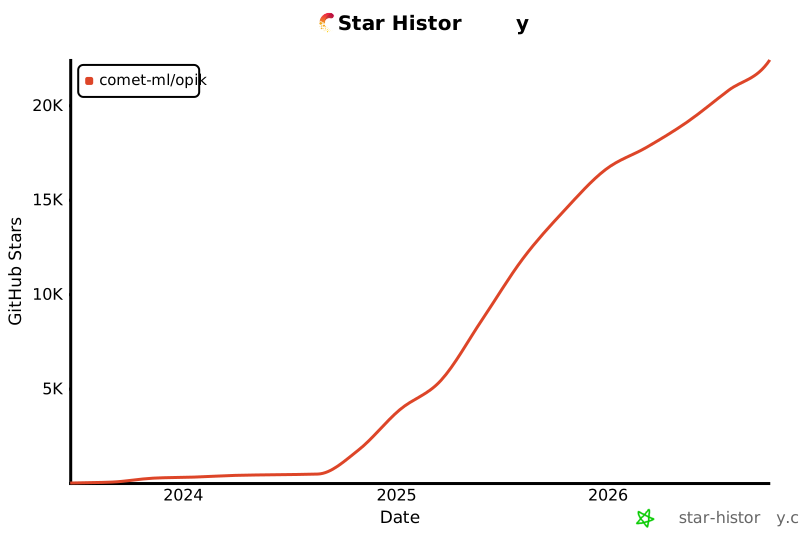](https://github.com/comet-ml/opik)
|
||
|
||
<a id="🤝-贡献指南"></a>
|
||
## 🤝 贡献指南
|
||
|
||
贡献 Opik 的方式有很多:
|
||
|
||
- 提交 [错误报告](https://github.com/comet-ml/opik/issues) 和 [功能请求](https://github.com/comet-ml/opik/issues)
|
||
- 审阅文档并提交 [Pull Requests](https://github.com/comet-ml/opik/pulls) 改进文档
|
||
- 在演讲或文章中介绍 Opik 并[告诉我们](https://chat.comet.com)
|
||
- 为热门 [功能请求](https://github.com/comet-ml/opik/issues?q=is%3Aissue+is%3Aopen+label%3A%22enhancement%22) 投票表示支持
|
||
|
||
更多详情请参阅 [CONTRIBUTING.md](CONTRIBUTING.md)。
|