 wehub-resource-sync
299 lines
10 KiB
Markdown
299 lines
10 KiB
Markdown
<!-- WEHUB_ZH_README -->
|
||
> [!NOTE]
|
||
> 本文档由 WeHub 基于上游 README 翻译整理,属于社区翻译,非官方中文文档。
|
||
> [English](./README.en.md) · [原始项目](https://github.com/bentoml/OpenLLM) · [上游 README](https://github.com/bentoml/OpenLLM/blob/HEAD/README.md)
|
||
> 原作者、版权与许可证归属以原始项目及本仓库 LICENSE 文件为准。
|
||
|
||
<div align="center">
|
||
|
||
<h1>🦾 OpenLLM:轻松自托管 LLM</h1>
|
||
|
||
[](https://github.com/bentoml/OpenLLM/blob/main/LICENSE)
|
||
[](https://pypi.org/project/openllm)
|
||
[](https://results.pre-commit.ci/latest/github/bentoml/OpenLLM/main)
|
||
[](https://twitter.com/bentomlai)
|
||
[](https://l.bentoml.com/join-slack)
|
||
|
||
</div>
|
||
|
||
OpenLLM 让开发者只需一条命令,即可将**任意开源 LLM**(Llama 3.3、Qwen2.5、Phi3 及[更多](#supported-models))或**自定义模型**作为**兼容 OpenAI 的 API** 运行。它提供[内置聊天 UI](#chat-ui)、最先进的推理后端,以及通过 Docker、Kubernetes 和 [BentoCloud](#deploy-to-bentocloud) 创建企业级云部署的简化工作流。
|
||
|
||
了解 [OpenLLM 的设计理念](https://www.bentoml.com/blog/from-ollama-to-openllm-running-llms-in-the-cloud).
|
||
|
||
## 快速开始
|
||
|
||
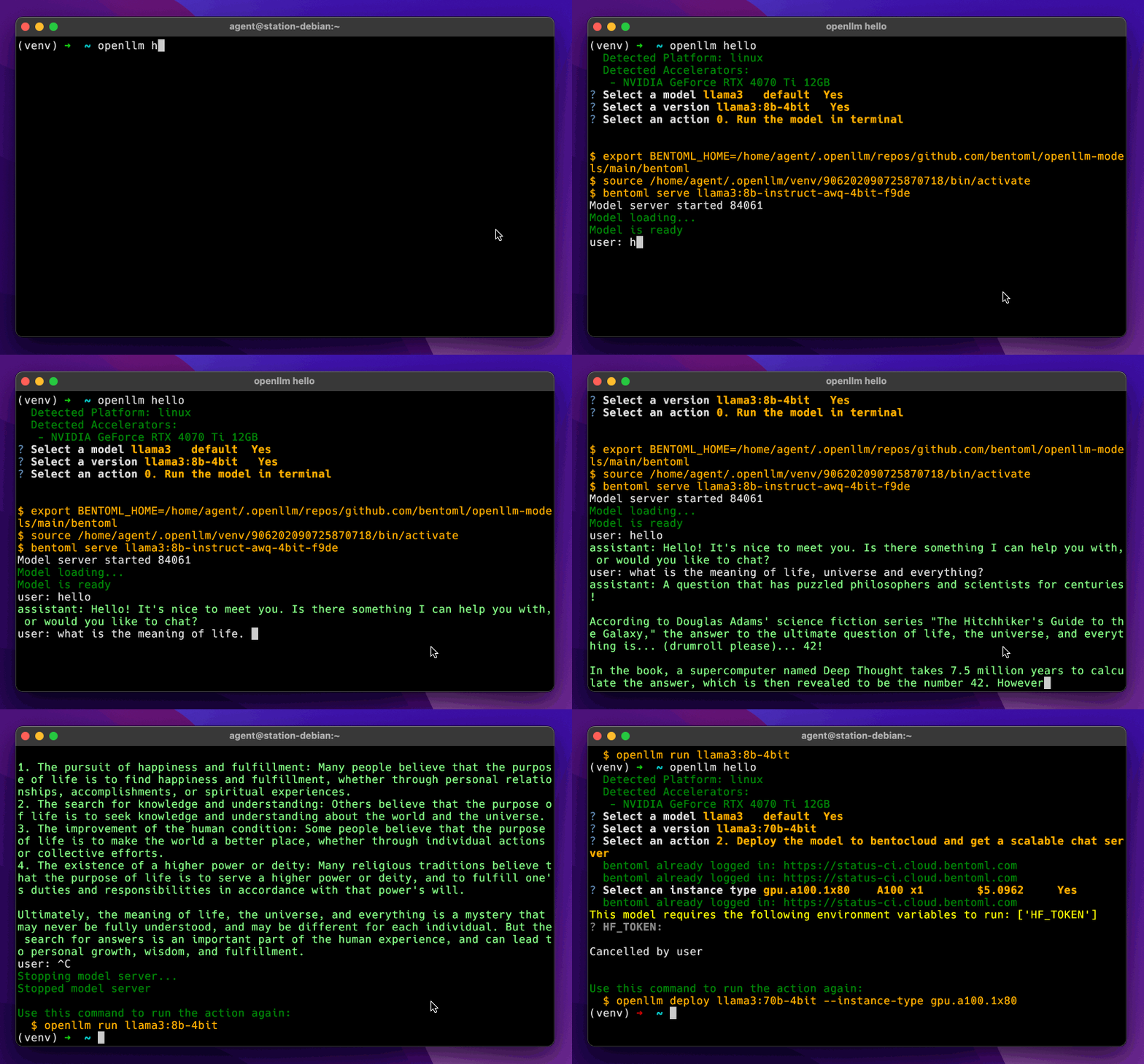
运行以下命令安装 OpenLLM 并交互式探索。
|
||
|
||
```bash
|
||
pip install openllm # or pip3 install openllm
|
||
openllm hello
|
||
```
|
||
|
||
|
||
|
||
## 支持的模型
|
||
|
||
OpenLLM 支持广泛的最先进开源 LLM。你也可以添加[模型仓库以运行自定义模型](#set-up-a-custom-repository) 并在 OpenLLM 中使用。
|
||
|
||
<table>
|
||
<tr>
|
||
<th>模型</th>
|
||
<th>参数量</th>
|
||
<th>所需 GPU</th>
|
||
<th>启动服务</th>
|
||
</tr>
|
||
<tr>
|
||
<td>deepseek</td>
|
||
<td>r1-671b</td>
|
||
<td>80Gx16</td>
|
||
<td><code>openllm serve deepseek:r1-671b</code></td>
|
||
</tr>
|
||
<tr>
|
||
<td>gemma2</td>
|
||
<td>2b</td>
|
||
<td>12G</td>
|
||
<td><code>openllm serve gemma2:2b</code></td>
|
||
</tr>
|
||
<tr>
|
||
<td>gemma3</td>
|
||
<td>3b</td>
|
||
<td>12G</td>
|
||
<td><code>openllm serve gemma3:3b</code></td>
|
||
</tr>
|
||
<tr>
|
||
<td>jamba1.5</td>
|
||
<td>mini-ff0a</td>
|
||
<td>80Gx2</td>
|
||
<td><code>openllm serve jamba1.5:mini-ff0a</code></td>
|
||
</tr>
|
||
<tr>
|
||
<td>llama3.1</td>
|
||
<td>8b</td>
|
||
<td>24G</td>
|
||
<td><code>openllm serve llama3.1:8b</code></td>
|
||
</tr>
|
||
<tr>
|
||
<td>llama3.2</td>
|
||
<td>1b</td>
|
||
<td>24G</td>
|
||
<td><code>openllm serve llama3.2:1b</code></td>
|
||
</tr>
|
||
<tr>
|
||
<td>llama3.3</td>
|
||
<td>70b</td>
|
||
<td>80Gx2</td>
|
||
<td><code>openllm serve llama3.3:70b</code></td>
|
||
</tr>
|
||
<tr>
|
||
<td>llama4</td>
|
||
<td>17b16e</td>
|
||
<td>80Gx8</td>
|
||
<td><code>openllm serve llama4:17b16e</code></td>
|
||
</tr>
|
||
<tr>
|
||
<td>mistral</td>
|
||
<td>8b-2410</td>
|
||
<td>24G</td>
|
||
<td><code>openllm serve mistral:8b-2410</code></td>
|
||
</tr>
|
||
<tr>
|
||
<td>mistral-large</td>
|
||
<td>123b-2407</td>
|
||
<td>80Gx4</td>
|
||
<td><code>openllm serve mistral-large:123b-2407</code></td>
|
||
</tr>
|
||
<tr>
|
||
<td>phi4</td>
|
||
<td>14b</td>
|
||
<td>80G</td>
|
||
<td><code>openllm serve phi4:14b</code></td>
|
||
</tr>
|
||
<tr>
|
||
<td>pixtral</td>
|
||
<td>12b-2409</td>
|
||
<td>80G</td>
|
||
<td><code>openllm serve pixtral:12b-2409</code></td>
|
||
</tr>
|
||
<tr>
|
||
<td>qwen2.5</td>
|
||
<td>7b</td>
|
||
<td>24G</td>
|
||
<td><code>openllm serve qwen2.5:7b</code></td>
|
||
</tr>
|
||
<tr>
|
||
<td>qwen2.5-coder</td>
|
||
<td>3b</td>
|
||
<td>24G</td>
|
||
<td><code>openllm serve qwen2.5-coder:3b</code></td>
|
||
</tr>
|
||
<tr>
|
||
<td>qwq</td>
|
||
<td>32b</td>
|
||
<td>80G</td>
|
||
<td><code>openllm serve qwq:32b</code></td>
|
||
</tr>
|
||
</table>
|
||
|
||
完整模型列表请参阅 [OpenLLM 模型仓库](https://github.com/bentoml/openllm-models).
|
||
|
||
## 启动 LLM 服务
|
||
|
||
要在本地启动 LLM 服务,请使用 `openllm serve` 命令并指定模型版本。
|
||
|
||
> [!NOTE]
|
||
> OpenLLM 不存储模型权重。访问受限(gated)模型需要 Hugging Face 令牌(HF_TOKEN)。
|
||
>
|
||
> 1. 在[此处](https://huggingface.co/settings/tokens). 创建你的 Hugging Face 令牌
|
||
> 2. 申请受限模型的访问权限,例如 [meta-llama/Llama-3.2-1B-Instruct](https://huggingface.co/meta-llama/Llama-3.2-1B-Instruct).
|
||
> 3. 通过运行以下命令将令牌设置为环境变量:
|
||
> ```bash
|
||
> export HF_TOKEN=<your token>
|
||
> ```
|
||
|
||
```bash
|
||
openllm serve llama3.2:1b
|
||
```
|
||
|
||
服务将在 [http://localhost:3000](http://localhost:3000/), 处可用,提供兼容 OpenAI 的 API 用于交互。你可以使用支持兼容 OpenAI API 的不同框架和工具调用端点。通常,你可能需要指定以下内容:
|
||
|
||
- **API 主机地址**:默认情况下,LLM 托管于 [http://localhost:3000](http://localhost:3000/).
|
||
- **模型名称:** 名称可能因你使用的工具而异。
|
||
- **API 密钥**:用于客户端身份验证的 API 密钥。此项为可选。
|
||
|
||
以下是一些示例:
|
||
|
||
<details>
|
||
|
||
<summary>OpenAI Python 客户端</summary>
|
||
|
||
```python
|
||
from openai import OpenAI
|
||
|
||
client = OpenAI(base_url='http://localhost:3000/v1', api_key='na')
|
||
|
||
# Use the following func to get the available models
|
||
# model_list = client.models.list()
|
||
# print(model_list)
|
||
|
||
chat_completion = client.chat.completions.create(
|
||
model="meta-llama/Llama-3.2-1B-Instruct",
|
||
messages=[
|
||
{
|
||
"role": "user",
|
||
"content": "Explain superconductors like I'm five years old"
|
||
}
|
||
],
|
||
stream=True,
|
||
)
|
||
for chunk in chat_completion:
|
||
print(chunk.choices[0].delta.content or "", end="")
|
||
```
|
||
|
||
</details>
|
||
|
||
<details>
|
||
|
||
<summary>LlamaIndex</summary>
|
||
|
||
```python
|
||
from llama_index.llms.openai import OpenAI
|
||
|
||
llm = OpenAI(api_bese="http://localhost:3000/v1", model="meta-llama/Llama-3.2-1B-Instruct", api_key="dummy")
|
||
...
|
||
```
|
||
|
||
</details>
|
||
|
||
## 聊天 UI
|
||
|
||
OpenLLM 在 `/chat` 端点为 http://localhost:3000/chat. 上启动的 LLM 服务提供聊天 UI。
|
||
|
||
<img width="800" alt="openllm_ui" src="https://github.com/bentoml/OpenLLM/assets/5886138/8b426b2b-67da-4545-8b09-2dc96ff8a707">
|
||
|
||
## 在 CLI 中与模型对话
|
||
|
||
要在 CLI 中开始聊天对话,请使用 `openllm run` 命令并指定模型版本。
|
||
|
||
```bash
|
||
openllm run llama3:8b
|
||
```
|
||
|
||
## 模型仓库
|
||
|
||
OpenLLM 中的模型仓库表示你可运行的可用 LLM 目录。OpenLLM 提供默认模型仓库,包含 Llama 3、Mistral 和 Qwen2 等最新开源 LLM,托管于[此 GitHub 仓库](https://github.com/bentoml/openllm-models). 要查看默认仓库及任何已添加仓库中的所有可用模型,请运行:
|
||
|
||
```bash
|
||
openllm model list
|
||
```
|
||
|
||
为确保本地模型列表与所有已连接仓库的最新更新同步,请运行:
|
||
|
||
```bash
|
||
openllm repo update
|
||
```
|
||
|
||
要查看模型信息,请运行:
|
||
|
||
```bash
|
||
openllm model get llama3.2:1b
|
||
```
|
||
|
||
### 向默认模型仓库添加模型
|
||
|
||
你可以通过添加他人可使用的新模型来为默认模型仓库做贡献。这涉及创建并提交 LLM 的 Bento。更多信息请参阅此[示例拉取请求](https://github.com/bentoml/openllm-models/pull/1).
|
||
|
||
### 设置自定义仓库
|
||
|
||
你可以将包含自定义模型的自有仓库添加到 OpenLLM。为此,请遵循默认 OpenLLM 模型仓库的格式,使用 `bentos` 目录存储自定义 LLM。你需要[使用 BentoML 构建 Bentos](https://docs.bentoml.com/en/latest/guides/build-options.html) 并将其提交到你的模型仓库。
|
||
|
||
首先,按照 [BentoML 构建 Bentos 指南](https://docs.bentoml.com/en/latest/guides/build-options.html). 在 `bentos` 目录中准备自定义模型。可参考[默认模型仓库](https://github.com/bentoml/openllm-repo) 示例,并阅读[开发者指南](https://github.com/bentoml/OpenLLM/blob/main/DEVELOPMENT.md) 了解详情。
|
||
|
||
接下来,在 OpenLLM 中注册你的自定义模型仓库:
|
||
|
||
```bash
|
||
openllm repo add <repo-name> <repo-url>
|
||
```
|
||
|
||
**注意**:目前,OpenLLM 仅支持添加公开仓库。
|
||
|
||
## 部署到 BentoCloud
|
||
|
||
OpenLLM 支持通过 BentoML(统一模型服务框架)和 BentoCloud(面向企业 AI 团队的 AI 推理平台)进行 LLM 云端部署。BentoCloud 提供针对 LLM 推理优化的全托管基础设施,具备自动扩缩容、模型编排、可观测性等众多功能,让你能够在云端运行任意 AI 模型。
|
||
|
||
[注册 BentoCloud](https://www.bentoml.com/) 免费账号,并[登录](https://docs.bentoml.com/en/latest/bentocloud/how-tos/manage-access-token.html). 然后运行 `openllm deploy` 将模型部署到 BentoCloud:
|
||
|
||
```bash
|
||
openllm deploy llama3.2:1b --env HF_TOKEN
|
||
```
|
||
|
||
> [!NOTE]
|
||
> 如果你正在部署受限(gated)模型,请确保在环境变量中设置 HF_TOKEN。
|
||
|
||
部署完成后,你可以在 BentoCloud 控制台运行模型推理:
|
||
|
||
<img width="800" alt="bentocloud_ui" src="https://github.com/bentoml/OpenLLM/assets/65327072/4f7819d9-73ea-488a-a66c-f724e5d063e6">
|
||
|
||
## 社区
|
||
|
||
OpenLLM 由 BentoML 团队积极维护。欢迎与我们联系,加入我们一起让 LLM 更易获取、更易使用的努力 👉 [加入我们的 Slack 社区!](https://l.bentoml.com/join-slack)
|
||
|
||
## 贡献
|
||
|
||
作为开源项目,我们欢迎各类贡献,例如新功能、缺陷修复和文档改进。以下是一些贡献方式:
|
||
|
||
- 通过[创建 GitHub issue](https://github.com/bentoml/OpenLLM/issues/new/choose). 报告缺陷
|
||
- [提交 pull request](https://github.com/bentoml/OpenLLM/compare),或帮助审查其他开发者的 [pull request](https://github.com/bentoml/OpenLLM/pulls).
|
||
- 将 LLM 添加到 OpenLLM 默认模型仓库,以便其他用户运行你的模型。请参阅 [pull request 模板](https://github.com/bentoml/openllm-models/pull/1).
|
||
- 查看[开发者指南](https://github.com/bentoml/OpenLLM/blob/main/DEVELOPMENT.md) 了解更多。
|
||
|
||
## 致谢
|
||
|
||
本项目使用了以下开源项目:
|
||
|
||
- [bentoml/bentoml](https://github.com/bentoml/bentoml) 用于生产级模型服务
|
||
- [vllm-project/vllm](https://github.com/vllm-project/vllm) 用于生产级 LLM 后端
|
||
- [blrchen/chatgpt-lite](https://github.com/blrchen/chatgpt-lite) 用于精美的 Web 聊天 UI
|
||
- [astral-sh/uv](https://github.com/astral-sh/uv) 用于极速安装模型依赖
|
||
|
||
我们感谢这些项目的开发者和贡献者所付出的辛勤工作与奉献。
|