 wehub-resource-sync
495 lines
19 KiB
Markdown
495 lines
19 KiB
Markdown
<!-- WEHUB_ZH_README -->
|
||
> [!NOTE]
|
||
> 本文档由 WeHub 基于上游 README 翻译整理,属于社区翻译,非官方中文文档。
|
||
> [English](./README.en.md) · [原始项目](https://github.com/Andyyyy64/whichllm) · [上游 README](https://github.com/Andyyyy64/whichllm/blob/HEAD/README.md)
|
||
> 原作者、版权与许可证归属以原始项目及本仓库 LICENSE 文件为准。
|
||
|
||
# whichllm
|
||
|
||
[](https://pypi.org/project/whichllm/)
|
||
[](https://www.python.org/downloads/)
|
||
[](https://opensource.org/licenses/MIT)
|
||
[](https://github.com/Andyyyy64/whichllm/actions/workflows/test.yml)
|
||
[](https://github.com/sponsors/Andyyyy64)
|
||
|
||
<p align="center">
|
||
<a href="https://trendshift.io/repositories/30336" target="_blank"><img src="https://trendshift.io/api/badge/repositories/30336" alt="Andyyyy64%2Fwhichllm | Trendshift" style="width: 250px; height: 55px;" width="250" height="55"/></a>
|
||
</p>
|
||
|
||
**找到真正能在你硬件上运行的最佳本地 LLM。**
|
||
|
||
自动检测你的 GPU/CPU/RAM,并从 HuggingFace 中按适配度对适合你系统的顶级模型进行排名。
|
||
|
||
[日本語版はこちら](docs/README.ja.md)
|
||
|
||
## 快速开始
|
||
|
||
无需项目配置,运行一次推荐命令即可。
|
||
|
||
```bash
|
||
uvx whichllm@latest
|
||
```
|
||
|
||
在购买硬件之前模拟 GPU。
|
||
|
||
```bash
|
||
uvx whichllm@latest --gpu "RTX 4090"
|
||
```
|
||
|
||
若经常使用,可安装到本地。
|
||
|
||
```bash
|
||
uv tool install whichllm
|
||
uv tool upgrade whichllm # update an existing install
|
||
```
|
||
|
||
其他安装方式。
|
||
|
||
```bash
|
||
brew install andyyyy64/whichllm/whichllm
|
||
pip install whichllm
|
||
```
|
||
|
||
## 想要更稳妥的选择?
|
||
|
||
默认情况下,whichllm 较为激进。它会对你机器上看起来可运行的最佳模型进行排名,包括部分 RAM 卸载(offload)以及看似可用的接近显存上限的 VRAM 配置。
|
||
|
||
若你想要更接近 LM Studio 风格的舒适推荐,可从以下方式开始:
|
||
|
||
```bash
|
||
uvx whichllm@latest --gpu-only --speed usable --vram-headroom 1GB
|
||
```
|
||
|
||
这样只会保留完全装入 GPU VRAM 的模型,过滤掉速度较慢的估算结果,并预留额外 VRAM 以应对运行时开销。
|
||
|
||
若 LM Studio 仍提示模型略大,可增加余量:
|
||
|
||
```bash
|
||
uvx whichllm@latest --gpu-only --speed usable --vram-headroom 1.5GB
|
||
```
|
||
|
||
## 常见工作流
|
||
|
||
安装后,直接运行 `whichllm`。若只需一次性运行,将 `whichllm`
|
||
替换为 `uvx whichllm@latest`。
|
||
|
||
```bash
|
||
# Best models for this machine
|
||
whichllm
|
||
|
||
# Pretend you have a specific GPU
|
||
whichllm --gpu "RTX 4090"
|
||
|
||
# Override detected iGPU/unified-memory limits
|
||
whichllm --vram 8 --ram-bandwidth 68
|
||
|
||
# Only show models that fit fully in GPU VRAM
|
||
whichllm --gpu-only
|
||
whichllm --fit gpu
|
||
|
||
# Simulate a multi-GPU workstation
|
||
whichllm --gpu "2x RTX 4090"
|
||
|
||
# Hide models that are technically runnable but too slow
|
||
whichllm --speed usable
|
||
whichllm --speed fast
|
||
|
||
# Pasteable GitHub / Slack / Discord output
|
||
whichllm --markdown
|
||
|
||
# Compare upgrade candidates
|
||
whichllm upgrade "RTX 4090" "RTX 5090" "H100"
|
||
|
||
# Find the GPU needed for a model
|
||
whichllm plan "llama 3 70b"
|
||
|
||
# Start a chat with a model
|
||
whichllm run "qwen 2.5 1.5b gguf"
|
||
|
||
# Print copy-paste Python
|
||
whichllm snippet "qwen 7b"
|
||
|
||
# Return JSON for scripts
|
||
whichllm --top 1 --json
|
||
```
|
||
|
||

|
||
|
||
## 眼见为实
|
||
|
||
```text
|
||
$ whichllm --gpu "RTX 4090"
|
||
|
||
#1 Qwen/Qwen3.6-27B 27.8B Q5_K_M score 92.8 27 t/s
|
||
#2 Qwen/Qwen3-32B 32.0B Q4_K_M score 83.0 31 t/s
|
||
#3 Qwen/Qwen3-30B-A3B 30.0B Q5_K_M score 82.7 102 t/s
|
||
```
|
||
|
||
32B 模型**完全适配你的显卡**——whichllm 仍将 27B 排在第 1 位,
|
||
因为它在真实基准测试中得分更高,且属于更新一代。
|
||
仅按尺寸判断「能跑什么?」的工具会把更大的模型推荐给你。这种差距正是 whichllm 的价值所在。(注 #3:MoE 模型达 102 t/s——速度按*活跃*参数量排名,质量按*总*参数量评估。)
|
||
|
||
## 我能运行什么?
|
||
|
||
真实精选推荐(快照 2026-05——你的结果会跟踪 **实时** HuggingFace
|
||
数据,这不是静态列表):
|
||
|
||
| Hardware | VRAM | Top pick | Speed |
|
||
|---|---|---|---|
|
||
| RTX 5090 | 32 GB | `Qwen3.6-27B` · Q6_K · score 94.7 | ~40 t/s |
|
||
| RTX 4090 / 3090 | 24 GB | `Qwen3.6-27B` · Q5_K_M · score 92.8 | ~27 t/s |
|
||
| RTX 4060 | 8 GB | `Qwen3-14B` · Q3_K_M · score 71.0 | ~22 t/s |
|
||
| Apple M3 Max | 36 GB | `Qwen3.6-27B` · Q5_K_M · score 89.4 | ~9 t/s |
|
||
| CPU only | — | `gpt-oss-20b` (MoE) · Q4_K_M · score 45.2 | ~6 t/s |
|
||
|
||
`whichllm --gpu "<your card>"` 可在购买前模拟上述任意配置。
|
||
默认情况下,排名会包含全 GPU、部分卸载和仅 CPU 的候选(在可用时)。若你只想选择完全装入 GPU VRAM 的模型,请使用 `--gpu-only` 或 `--fit full-gpu`。
|
||
默认表格会显示内存、预估生成速度、适配类型和发布日期。速度按实际可用性着色:低于 4 tok/s 为红色,
|
||
4-10 为黄色,10-30 为绿色,30+ 为亮绿色。`~` / `?` 仍会标注
|
||
估算置信度。
|
||
|
||
## 为什么选择 whichllm?
|
||
|
||
把模型塞进 VRAM 并不难。难的是知道**在能跑的模型里,哪一个才是真正最好的**——而这正是
|
||
whichllm 要解决的问题。
|
||
|
||
- **基于证据的排名,而非尺寸启发式** —— 首选来自合并的真实基准测试(LiveBench、Artificial Analysis、
|
||
Aider、多模态/视觉、Chatbot Arena ELO、Open LLM Leaderboard)——
|
||
绝不是「碰巧能塞进去的最大模型」。
|
||
- **重视时效性** —— 过时的排行榜会沿各模型谱系降权,因此 2024 年的模型不能凭过时分数压过当前一代。
|
||
每次排名下方都会打印基准快照日期,过时推荐一目了然,而非被默默采信。
|
||
- **证据分级与防护** —— 每个分数都会标注
|
||
`direct` / `variant` / `base` / `interpolated` / `self-reported`,并
|
||
按置信度折减。上传者的虚假声明和跨系列继承(小分支借用大得多的基座分数)会被主动拒绝。
|
||
- **架构感知的估算** —— VRAM = 权重 + GQA KV cache +
|
||
激活 + 开销;速度受带宽限制,并考虑各量化效率、各后端因子、MoE 活跃/总参数拆分,以及统一内存与离散 PCIe 部分卸载建模。
|
||
- **一条命令,可脚本化** —— `whichllm` 直接输出答案;添加
|
||
`--json | jq` 即可接入流水线。无 TUI,无需记忆快捷键。
|
||
- **实时数据** —— 模型直接从 HuggingFace API 获取,并为离线或限流场景提供精选的冻结回退数据。
|
||
|
||
## 功能特性
|
||
|
||
- **自动检测硬件** —— NVIDIA、AMD、Intel、Apple Silicon、仅 CPU
|
||
- **智能排名** —— 按 VRAM 适配、速度和基准质量为模型打分
|
||
- **一条命令聊天** —— `whichllm run` 即时下载并启动聊天会话
|
||
- **代码片段** —— `whichllm snippet` 为任意模型输出可直接运行的 Python 代码
|
||
- **实时数据** —— 直接从 HuggingFace 获取模型(带缓存以提升性能)
|
||
- **基准感知** —— 整合真实评测分数,并按置信度衰减
|
||
- **任务配置** —— 按通用、编程、视觉或数学场景筛选
|
||
- **GPU 模拟** —— 用任意 GPU 测试:`whichllm --gpu "RTX 4090"`
|
||
- **多 GPU 模拟** —— 重复 `--gpu`、使用逗号分隔,或编写 `2x RTX 4090`
|
||
- **全 GPU 筛选** —— `--gpu-only` / `--fit full-gpu` 隐藏卸载候选
|
||
- **速度感知筛选** —— `--speed usable|fast` 按阈值隐藏较慢行
|
||
- **Markdown 输出** —— `--markdown` / `-m` 输出可粘贴的 GFM 表格
|
||
- **运行时内存预算** —— `--vram-headroom` 和 `--ram-budget` 避免临界适配
|
||
- **硬件规划** —— 反向查询:`whichllm plan "llama 3 70b"`
|
||
- **升级规划** —— 将当前机器与候选 GPU 对比
|
||
- **JSON 输出** —— 便于管道处理:`whichllm --json`
|
||
|
||
## 运行与代码片段
|
||
|
||
用一条命令试用任意模型。无需手动安装——whichllm
|
||
通过 `uv` 创建隔离环境,安装依赖,下载
|
||
模型,并启动交互式聊天。
|
||
|
||

|
||
|
||
```bash
|
||
# Chat with a model (auto-picks the best GGUF variant)
|
||
whichllm run "qwen 2.5 1.5b gguf"
|
||
|
||
# Auto-pick the best model for your hardware and chat
|
||
whichllm run
|
||
|
||
# CPU-only mode
|
||
whichllm run "phi 3 mini gguf" --cpu-only
|
||
```
|
||
|
||
支持**所有模型格式**:
|
||
- **GGUF** — 通过 `llama-cpp-python`(轻量、快速)
|
||
- **AWQ / GPTQ** — 通过 `transformers` + `autoawq` / `auto-gptq`
|
||
- **FP16 / BF16** — 通过 `transformers`
|
||
|
||
也可直接获取**可复制粘贴的 Python 代码片段**:
|
||
|
||
```bash
|
||
whichllm snippet "qwen 7b"
|
||
```
|
||
|
||
```python
|
||
from llama_cpp import Llama
|
||
|
||
llm = Llama.from_pretrained(
|
||
repo_id="Qwen/Qwen2.5-7B-Instruct-GGUF",
|
||
filename="qwen2.5-7b-instruct-q4_k_m.gguf",
|
||
n_ctx=4096,
|
||
n_gpu_layers=-1,
|
||
verbose=False,
|
||
)
|
||
|
||
output = llm.create_chat_completion(
|
||
messages=[{"role": "user", "content": "Hello!"}],
|
||
)
|
||
print(output["choices"][0]["message"]["content"])
|
||
```
|
||
|
||
## 用法
|
||
|
||
```bash
|
||
# Auto-detect hardware and show best models
|
||
whichllm
|
||
|
||
# Simulate a GPU (e.g. planning a purchase)
|
||
whichllm --gpu "RTX 4090"
|
||
whichllm --gpu "RTX 5090"
|
||
# Specify variant
|
||
whichllm --gpu "RTX 5060 16"
|
||
# Override detected iGPU/unified-memory limits
|
||
whichllm --vram 8 --ram-bandwidth 68
|
||
# Simulate multiple GPUs
|
||
whichllm --gpu "2x RTX 4090"
|
||
whichllm --gpu "RTX 4090" --gpu "RTX 3090"
|
||
whichllm --gpu "RTX 4090, RTX 3090"
|
||
|
||
# Only show models that fit entirely in GPU VRAM
|
||
whichllm --gpu-only
|
||
whichllm --fit gpu
|
||
whichllm --fit full-gpu
|
||
|
||
# Avoid edge fits and background-RAM surprises
|
||
whichllm --vram-headroom 1.5GB
|
||
whichllm --ram-budget available
|
||
whichllm --ram-budget 8GB
|
||
|
||
# CPU-only mode
|
||
whichllm --cpu-only
|
||
|
||
# More results / filters
|
||
whichllm --top 20
|
||
whichllm --details # show Downloads metadata instead of runtime columns
|
||
whichllm --speed usable # minimum 10 tok/s
|
||
whichllm --speed fast # minimum 30 tok/s
|
||
whichllm --min-speed 4 # exact tok/s floor
|
||
whichllm --markdown # pasteable GitHub-Flavored Markdown table
|
||
whichllm --profile coding
|
||
whichllm --context-length 64k
|
||
whichllm --quant Q4_K_M
|
||
whichllm --min-speed 30 # exact tok/s floor
|
||
whichllm --evidence base # allow id/base-model matches
|
||
whichllm --evidence strict # id-exact only (same as --direct)
|
||
whichllm --direct
|
||
|
||
# JSON output
|
||
whichllm --json
|
||
|
||
# Force refresh (ignore cache)
|
||
whichllm --refresh
|
||
|
||
# Show hardware info only
|
||
whichllm hardware
|
||
|
||
# Plan: what GPU do I need for a specific model?
|
||
whichllm plan "llama 3 70b"
|
||
whichllm plan "Qwen2.5-72B" --quant Q8_0
|
||
whichllm plan "mistral 7b" --context-length 32768
|
||
|
||
# Upgrade: compare your current machine against candidate GPUs
|
||
whichllm upgrade "RTX 4090" "RTX 5090" "H100"
|
||
whichllm upgrade "Apple M4 Max" --top 5
|
||
|
||
# Run: download and chat with a model instantly
|
||
whichllm run "qwen 2.5 1.5b gguf"
|
||
whichllm run # auto-pick best for your hardware
|
||
|
||
# Snippet: print ready-to-run Python code
|
||
whichllm snippet "qwen 7b"
|
||
whichllm snippet "llama 3 8b gguf" --quant Q5_K_M
|
||
```
|
||
|
||
Markdown 输出适用于 GitHub issues、README、Slack、Discord 和博客文章:
|
||
|
||
```bash
|
||
whichllm --markdown
|
||
whichllm -m --top 5 --gpu "RTX 4090"
|
||
```
|
||
|
||
JSON 模型行包含 `fit_type`、`vram_required_bytes`、
|
||
`vram_available_bytes`、`uses_multi_gpu`、`multi_gpu_effective_vram_bytes`、
|
||
`estimated_tok_per_sec`、`speed_confidence`、`speed_range_tok_per_sec`、
|
||
`speed_notes`、`benchmark_source` 以及 `benchmark_confidence`。速度范围
|
||
是规划参考区间,而非实时基准测试结果。
|
||
|
||
## 集成
|
||
|
||
### Ollama
|
||
|
||
使用 JSON 输出为脚本提供数据,将 HuggingFace ID 映射到本地 Ollama
|
||
模型名称:
|
||
|
||
```bash
|
||
# Pick the top HuggingFace model ID
|
||
whichllm --top 1 --json | jq -r '.models[0].model_id'
|
||
|
||
# Find the best coding model ID
|
||
whichllm --profile coding --top 1 --json | jq -r '.models[0].model_id'
|
||
```
|
||
|
||
Ollama 模型名称并不总与 HuggingFace 仓库 ID 一致,因此在执行 `ollama run` 之前通常需要一步简单映射。
|
||
|
||
### Shell 别名
|
||
|
||
添加到你的 `.bashrc` / `.zshrc`:
|
||
|
||
```bash
|
||
alias bestllm='whichllm --top 1 --json | jq -r ".models[0].model_id"'
|
||
# Usage: ollama run $(bestllm)
|
||
```
|
||
|
||
## 评分
|
||
|
||
每个模型获得 0–100 分。基准测试质量与模型规模构成核心;
|
||
证据置信度与运行时适配随后进行缩放,速度、来源可信度与流行度作为调整项。
|
||
|
||
| 因素 | 作用 | 说明 |
|
||
|--------|--------|-------------|
|
||
| 基准测试质量 | 核心 | 合并 LiveBench / Artificial Analysis / Aider / Vision / Arena ELO / Open LLM Leaderboard,按来源置信度加权 |
|
||
| 模型规模 | 最高 35 | 经 `log2` 缩放的世界知识代理指标(MoE 使用总参数量) |
|
||
| 量化 | × 惩罚 | 低位数量化按乘法折减 |
|
||
| 证据置信度 | ×0.55–1.0 | 无 / 自报 ×0.55,继承 ×0.78,直接完整 |
|
||
| 运行时适配 | ×0.50–1.0 | 部分卸载(partial-offload)×0.72,仅 CPU ×0.50 |
|
||
| 速度 | -8 至 +8 | 可用性门槛对比与适配类型相关的 tok/s 下限;附带置信度与区间元数据报告 |
|
||
| 来源可信度 | -5 至 +5 | 官方机构加分,已知重打包者减分 |
|
||
| 流行度 | 决胜项 | 下载量/点赞数;证据越强权重越小 |
|
||
|
||
评分标记:
|
||
- **`~`**(黄色)— 无直接基准测试;分数从模型家族继承/插值
|
||
- **`!sr`**(亮黄色)— 仅有上传者报告的基准测试,未经独立验证
|
||
- **`?`**(红色)— 无可用基准测试数据
|
||
|
||
速度显示:
|
||
- **red** — 生成速度较慢(`<4 tok/s`)
|
||
- **yellow** — 生成速度勉强可用(`4-10 tok/s`)
|
||
- **green** — 生成速度可用(`10-30 tok/s`)
|
||
- **bright green** — 本地生成速度快(`>=30 tok/s`)
|
||
- **`~`**(黄色)— 提供估算的 tok/s 区间
|
||
- **`?`**(红色)— 低置信度速度估算;对后端/运行时敏感度高
|
||
|
||
## 文档
|
||
|
||
- [CLI 参考](docs/cli.md)
|
||
- [工作原理](docs/how-it-works.md)
|
||
- [评分](docs/scoring.md)
|
||
- [硬件检测与模拟](docs/hardware.md)
|
||
- [运行与代码片段](docs/run-snippet.md)
|
||
- [故障排除](docs/troubleshooting.md)
|
||
|
||
## 工作原理
|
||
|
||
### 数据流水线
|
||
|
||
1. **模型获取** — 从 HuggingFace API 获取热门模型:
|
||
- 文本生成(按下载量 + 最近更新)
|
||
- GGUF 过滤(单独查询以覆盖)
|
||
- 视觉模型(`image-text-to-text`),当 `--profile vision` 或 `any` 时
|
||
2. **基准测试来源** — *当前层级*(LiveBench、Artificial Analysis
|
||
Index、Aider)在可访问时实时合并,外加精选的多模态 /
|
||
视觉指数;*冻结层级*(Open LLM Leaderboard v2、Chatbot Arena
|
||
ELO)。各层级设有独立上限,并配合谱系感知的时效性降权,使过时排行榜不再过度奖励旧代模型。
|
||
3. **基准测试证据** — 五个解析层级,折扣递增:
|
||
- `direct` — 精确模型 ID 匹配
|
||
- `variant` — 去除后缀或 -Instruct 变体
|
||
- `base_model` — 来自 cardData 的基础模型
|
||
- `line_interp` — 模型家族内按规模感知的插值
|
||
- `self_reported` — 上传者声称的评测(大幅折减)
|
||
|
||
当模型参数量与其家族主导成员相差超过 2× 时,拒绝继承,
|
||
以捕获与更大基础模型共享 `family_id` 的 draft / MTP / abliterated 分支。
|
||
4. **缓存** — 通常为 `~/.cache/whichllm/`,或将 `XDG_CACHE_HOME` 设为绝对路径时使用 `$XDG_CACHE_HOME/whichllm/`:
|
||
- `models.json` — 6h TTL
|
||
- `benchmark.json` — 24h TTL
|
||
|
||
### 排序引擎
|
||
|
||
1. **硬件检测** — NVIDIA(nvidia-ml-py)、AMD(ROCm/dbgpu)、Intel、Apple Silicon(Metal)、CPU 核心数、RAM、磁盘
|
||
2. **VRAM 估算** — 权重 + KV cache + 激活值 + 框架开销(约 500MB)
|
||
3. **兼容性** — 全 GPU / 部分卸载(Partial Offload)/ 仅 CPU;计算能力与操作系统检查
|
||
4. **速度** — 根据 GPU 内存带宽、量化、后端、适配类型与 MoE 活跃参数量计算 tok/s
|
||
5. **评分** — 基准测试(含置信度衰减)、规模、量化惩罚、适配类型、速度、流行度、来源可信度(官方 vs 重打包者)
|
||
6. **后端过滤** — Apple Silicon 与仅 CPU 为稳定性限制为 GGUF;Linux+NVIDIA 允许 AWQ/GPTQ
|
||
|
||
### 项目结构
|
||
|
||
```
|
||
src/whichllm/
|
||
├── cli.py # Typer CLI: main, plan, run, snippet, hardware
|
||
├── constants.py # Backward-compatible exports for registry data
|
||
├── data/ # GPU, quantization, framework, and lineage registries
|
||
├── hardware/
|
||
│ ├── detector.py # Orchestrates GPU/CPU/RAM detection
|
||
│ ├── nvidia.py # NVIDIA GPU via nvidia-ml-py
|
||
│ ├── amd.py # AMD GPU (Linux)
|
||
│ ├── apple.py # Apple Silicon (Metal)
|
||
│ ├── cpu.py # CPU name, cores, AVX support
|
||
│ ├── memory.py # RAM and disk free
|
||
│ ├── gpu_simulator.py # --gpu flag: synthetic GPU from name
|
||
│ └── types.py # GPUInfo, HardwareInfo
|
||
├── models/
|
||
│ ├── fetcher.py # HuggingFace API, model parsing, evalResults
|
||
│ ├── benchmark.py # Arena ELO, Leaderboard (parquet/rows API)
|
||
│ ├── grouper.py # Family grouping by base_model and name
|
||
│ ├── cache.py # JSON cache with TTL
|
||
│ └── types.py # ModelInfo, GGUFVariant, ModelFamily
|
||
├── engine/
|
||
│ ├── vram.py # VRAM = weights + KV cache + activation + overhead
|
||
│ ├── compatibility.py# Fit type, disk check, compute/OS warnings
|
||
│ ├── performance.py # tok/s from bandwidth
|
||
│ ├── quantization.py # Bytes per weight, quality penalty, non-GGUF inference
|
||
│ ├── ranker.py # Scoring, evidence filter, profile/match
|
||
│ └── types.py # CompatibilityResult
|
||
└── output/
|
||
├── ranking.py # Rich hardware and recommendation tables
|
||
├── json_output.py # Ranking, plan, and upgrade JSON
|
||
├── plan.py # plan command display
|
||
├── upgrade.py # upgrade comparison display
|
||
└── display.py # Compatibility re-export shim
|
||
```
|
||
|
||
## Development
|
||
|
||
```bash
|
||
git clone https://github.com/Andyyyy64/whichllm.git
|
||
cd whichllm
|
||
uv sync --dev
|
||
uv run whichllm
|
||
uv run pytest
|
||
```
|
||
|
||
## Contributing
|
||
|
||
欢迎贡献!请参阅 [CONTRIBUTING.md](CONTRIBUTING.md) 了解指南。
|
||
|
||
## Support
|
||
|
||
如果 whichllm 帮你找到了合适的模型,或避免了一次糟糕的硬件猜测,
|
||
欢迎赞助。这有助于维持项目:硬件报告、打包、测试夹具(test fixtures)、基准测试更新,
|
||
以及对更多设备的支持。
|
||
|
||
无论是否赞助,whichllm 都会保持开源。Issues 和 PR 始终欢迎。
|
||
|
||
觉得有用?GitHub star 能帮助其他人发现它,我也很想知道
|
||
它为你的配置选了什么。欢迎在 [Issues](https://github.com/Andyyyy64/whichllm/issues).
|
||
|
||
## Star History
|
||
|
||
[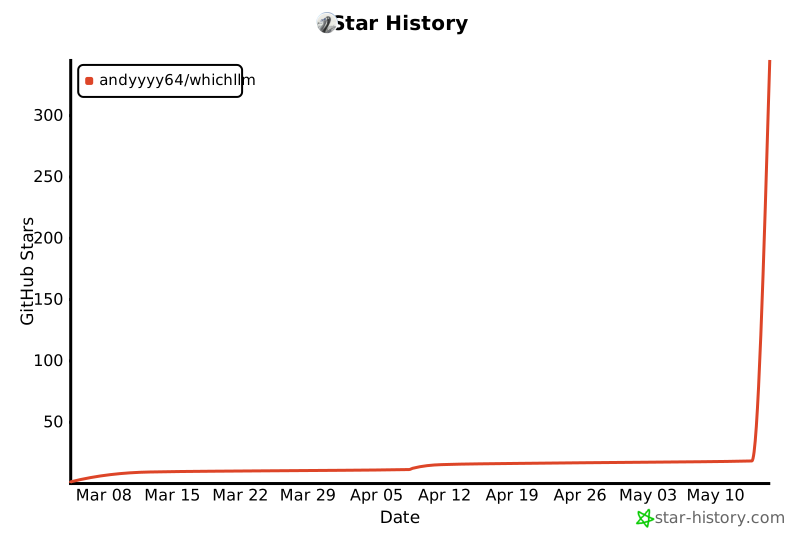](https://www.star-history.com/#Andyyyy64/whichllm&Date)
|
||
|
||
## Requirements
|
||
|
||
- Python 3.11+
|
||
- 通过 `nvidia-ml-py` 检测 NVIDIA GPU(默认已包含)
|
||
- AMD / Apple Silicon 可自动检测
|
||
|
||
## License
|
||
|
||
MIT
|