 wehub-resource-sync
97e91a83f3
wehub-resource-sync
97e91a83f3
10 KiB
title, description
| title | description |
|---|---|
| Extracting Tables from Images using GPT-Vision | Learn how to use Python and GPT-Vision to extract and convert tables from images into markdown for data analysis. |
See Also
- Vision Processing - More vision-based table extraction
- Multi-Modal Processing - Using Gemini for vision tasks
- Image Processing Examples - More vision examples
- Raw Response - Access original LLM responses
Extracting Tables using GPT-Vision
This post demonstrates how to use Python's type annotations and OpenAI's new vision model to extract tables from images and convert them into markdown format. This method is particularly useful for data analysis and automation tasks.
The full code is available on GitHub
Building the Custom Type for Markdown Tables
First, we define a custom type, MarkdownDataFrame, to handle pandas DataFrames formatted in markdown. This type uses Python's Annotated and InstanceOf types, along with decorators BeforeValidator and PlainSerializer, to process and serialize the data.
from io import StringIO
from typing import Annotated, Any
from pydantic import BeforeValidator, PlainSerializer, InstanceOf, WithJsonSchema
import pandas as pd


def md_to_df(data: Any) -> Any:
    # Convert markdown to DataFrame
    if isinstance(data, str):
        return (
            pd.read_csv(
                StringIO(data),  # Process data
                sep="|",
                index_col=1,
            )
            .dropna(axis=1, how="all")
            .iloc[1:]
            .applymap(lambda x: x.strip())
        )
    return data


MarkdownDataFrame = Annotated[
    InstanceOf[pd.DataFrame],
    BeforeValidator(md_to_df),
    PlainSerializer(lambda df: df.to_markdown()),
    WithJsonSchema(
        {
            "type": "string",
            "description": "The markdown representation of the table, each one should be tidy, do not try to join tables that should be seperate",
        }
    ),
]
Defining the Table Class
The Table class is essential for organizing the extracted data. It includes a caption and a dataframe, processed as a markdown table. Since most of the complexity is handled by the MarkdownDataFrame type, the Table class is straightforward!
from pydantic import BaseModel

# <%hide%>
from io import StringIO
from typing import Annotated, Any
from pydantic import BeforeValidator, PlainSerializer, InstanceOf, WithJsonSchema
import pandas as pd


def md_to_df(data: Any) -> Any:
    # Convert markdown to DataFrame
    if isinstance(data, str):
        return (
            pd.read_csv(
                StringIO(data),  # Process data
                sep="|",
                index_col=1,
            )
            .dropna(axis=1, how="all")
            .iloc[1:]
            .applymap(lambda x: x.strip())
        )
    return data


MarkdownDataFrame = Annotated[
    InstanceOf[pd.DataFrame],
    BeforeValidator(md_to_df),
    PlainSerializer(lambda df: df.to_markdown()),
    WithJsonSchema(
        {
            "type": "string",
            "description": "The markdown representation of the table, each one should be tidy, do not try to join tables that should be seperate",
        }
    ),
]
# <%hide%>


class Table(BaseModel):
    caption: str
    dataframe: MarkdownDataFrame
Extracting Tables from Images
The extract_table function uses OpenAI's vision model to process an image URL and extract tables in markdown format. We utilize the instructor library to patch the OpenAI client for this purpose.
import instructor
from typing import Iterable

# <%hide%>
from pydantic import BaseModel
from io import StringIO
from typing import Annotated, Any
from pydantic import BeforeValidator, PlainSerializer, InstanceOf, WithJsonSchema
import pandas as pd


def md_to_df(data: Any) -> Any:
    # Convert markdown to DataFrame
    if isinstance(data, str):
        return (
            pd.read_csv(
                StringIO(data),  # Process data
                sep="|",
                index_col=1,
            )
            .dropna(axis=1, how="all")
            .iloc[1:]
            .applymap(lambda x: x.strip())
        )
    return data


MarkdownDataFrame = Annotated[
    InstanceOf[pd.DataFrame],
    BeforeValidator(md_to_df),
    PlainSerializer(lambda df: df.to_markdown()),
    WithJsonSchema(
        {
            "type": "string",
            "description": "The markdown representation of the table, each one should be tidy, do not try to join tables that should be separate",
        }
    ),
]


class Table(BaseModel):
    caption: str
    dataframe: MarkdownDataFrame


# <%hide%>

# Use MD_JSON mode since the vision model does not support any special structured output mode
client = instructor.from_provider("openai/gpt-4o-mini", mode=instructor.Mode.MD_JSON)


def extract_table(url: str) -> Iterable[Table]:
    return client.create(
        model="gpt-4o-mini",
        response_model=Iterable[Table],
        max_tokens=1800,
        messages=[
            {
                "role": "user",
                "content": [
                    {"type": "text", "text": "Extract table from image."},
                    {"type": "image_url", "image_url": {"url": url}},
                ],
            }
        ],
    )
Practical Example
In this example, we apply the method to extract data from an image showing the top grossing apps in Ireland for October 2023.
# <%hide%>
import instructor
from typing import Iterable
from pydantic import BaseModel
from io import StringIO
from typing import Annotated, Any
from pydantic import BeforeValidator, PlainSerializer, InstanceOf, WithJsonSchema
import pandas as pd


def md_to_df(data: Any) -> Any:
    # Convert markdown to DataFrame
    if isinstance(data, str):
        return (
            pd.read_csv(
                StringIO(data),  # Process data
                sep="|",
                index_col=1,
            )
            .dropna(axis=1, how="all")
            .iloc[1:]
            .applymap(lambda x: x.strip())
        )
    return data


MarkdownDataFrame = Annotated[
    InstanceOf[pd.DataFrame],
    BeforeValidator(md_to_df),
    PlainSerializer(lambda df: df.to_markdown()),
    WithJsonSchema(
        {
            "type": "string",
            "description": "The markdown representation of the table, each one should be tidy, do not try to join tables that should be separate",
        }
    ),
]


class Table(BaseModel):
    caption: str
    dataframe: MarkdownDataFrame


client = instructor.from_provider("openai/gpt-5-nano")


def extract_table(url: str) -> Iterable[Table]:
    return client.create(
        model="gpt-4o",
        response_model=Iterable[Table],
        max_tokens=1800,
        messages=[
            {
                "role": "user",
                "content": [
                    {"type": "text", "text": "Extract table from image."},
                    {"type": "image_url", "image_url": {"url": url}},
                ],
            }
        ],
    )


# <%hide%>

url = "https://a.storyblok.com/f/47007/2400x2000/bf383abc3c/231031_uk-ireland-in-three-charts_table_v01_b.png"
tables = extract_table(url)
for table in tables:

    print(table.dataframe)
    """
                                      Android App   ... Category
     Android Rank                                   ...
    1                                   Google One  ...    Social networking
    2                                      Disney+  ...        Entertainment
    3                TikTok - Videos, Music & LIVE  ...        Entertainment
    4                             Candy Crush Saga  ...        Entertainment
    5               Tinder: Dating, Chat & Friends  ...                Games
    6                                  Coin Master  ...        Entertainment
    7                                       Roblox  ...               Dating
    8               Bumble - Dating & Make Friends  ...                Games
    9                                  Royal Match  ...             Business
    10                 Spotify: Music and Podcasts  ...            Education

    [10 rows x 5 columns]
    """
??? Note "Expand to see the output"
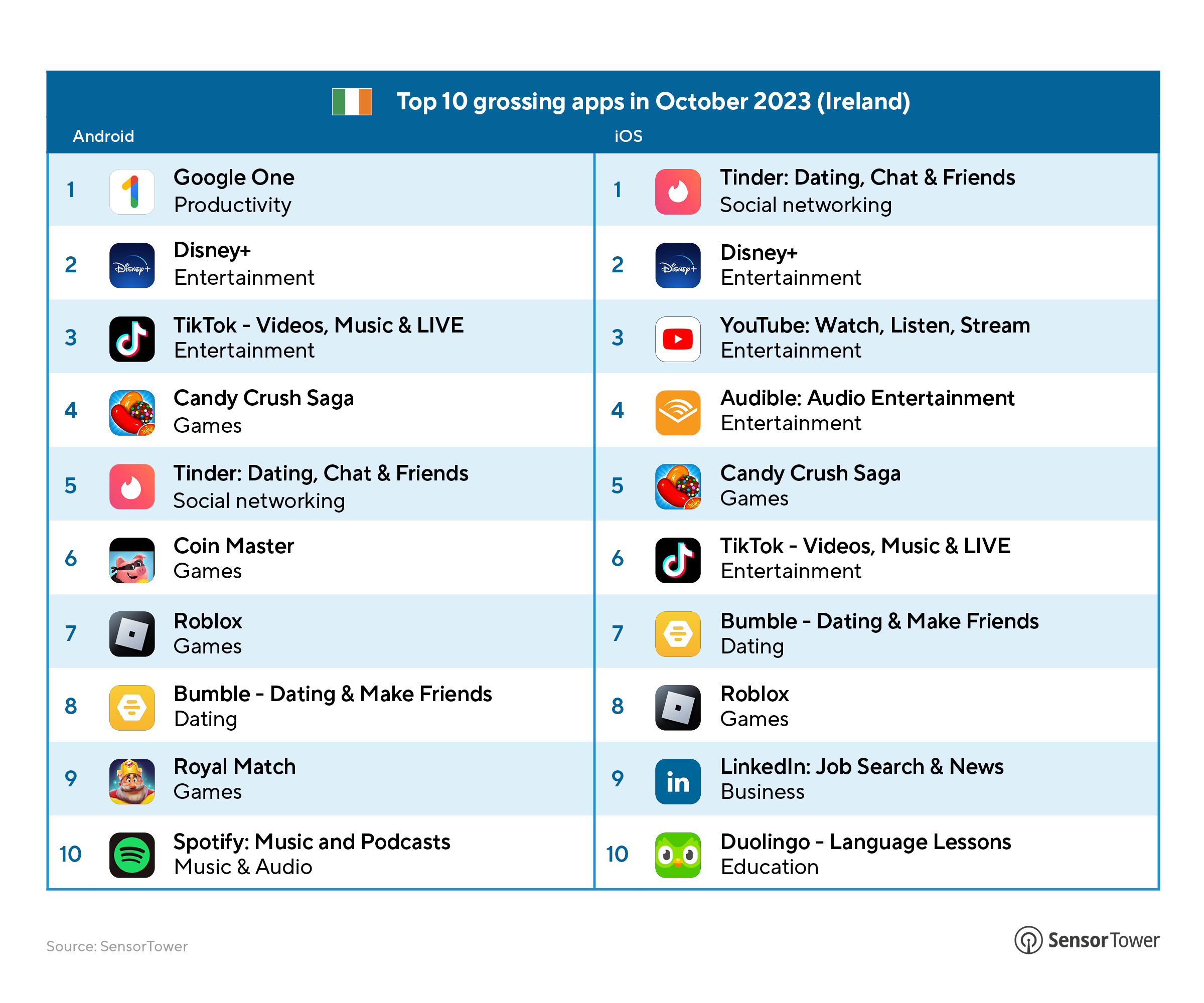
### Top 10 Grossing Apps in October 2023 (Ireland) for Android Platforms
| Rank | App Name | Category |
|------|----------------------------------|--------------------|
| 1 | Google One | Productivity |
| 2 | Disney+ | Entertainment |
| 3 | TikTok - Videos, Music & LIVE | Entertainment |
| 4 | Candy Crush Saga | Games |
| 5 | Tinder: Dating, Chat & Friends | Social networking |
| 6 | Coin Master | Games |
| 7 | Roblox | Games |
| 8 | Bumble - Dating & Make Friends | Dating |
| 9 | Royal Match | Games |
| 10 | Spotify: Music and Podcasts | Music & Audio |
### Top 10 Grossing Apps in October 2023 (Ireland) for iOS Platforms
| Rank | App Name | Category |
|------|----------------------------------|--------------------|
| 1 | Tinder: Dating, Chat & Friends | Social networking |
| 2 | Disney+ | Entertainment |
| 3 | YouTube: Watch, Listen, Stream | Entertainment |
| 4 | Audible: Audio Entertainment | Entertainment |
| 5 | Candy Crush Saga | Games |
| 6 | TikTok - Videos, Music & LIVE | Entertainment |
| 7 | Bumble - Dating & Make Friends | Dating |
| 8 | Roblox | Games |
| 9 | LinkedIn: Job Search & News | Business |
| 10 | Duolingo - Language Lessons | Education |