Compare commits
6 Commits
| Author | SHA1 | Date | |
|---|---|---|---|
 liangxinbing liangxinbing
|
13f98a0fde | ||
|
liangxinbing
|
487b44fda8 | ||
|
mannaandpoem
|
737abe4f90 | ||
|
Mingchen Zhuge
|
cbef113736 | ||
|
Mingchen Zhuge
|
dc8ed530f0 | ||
|
Mingchen Zhuge
|
62cfcb182e |
@@ -0,0 +1,4 @@
|
||||
blank_issues_enabled: false
|
||||
contact_links:
|
||||
- name: "📑 Read online docs"
|
||||
about: Find tutorials, use cases, and guides in the OpenManus documentation.
|
||||
@@ -1,5 +0,0 @@
|
||||
blank_issues_enabled: false
|
||||
contact_links:
|
||||
- name: "Join the Community Group"
|
||||
about: Join the OpenManus community to discuss and get help from others
|
||||
url: https://github.com/FoundationAgents/OpenManus?tab=readme-ov-file#community-group
|
||||
@@ -0,0 +1,14 @@
|
||||
---
|
||||
name: "🤔 Request new features"
|
||||
about: Suggest ideas or features you’d like to see implemented in OpenManus.
|
||||
title: ''
|
||||
labels: kind/features
|
||||
assignees: ''
|
||||
---
|
||||
|
||||
**Feature description**
|
||||
<!-- Provide a clear and concise description of the proposed feature -->
|
||||
|
||||
**Your Feature**
|
||||
<!-- Explain your idea or implementation process. Optionally, include a Pull Request URL. -->
|
||||
<!-- Ensure accompanying docs/tests/examples are provided for review. -->
|
||||
@@ -1,21 +0,0 @@
|
||||
name: "🤔 Request new features"
|
||||
description: Suggest ideas or features you’d like to see implemented in OpenManus.
|
||||
labels: enhancement
|
||||
body:
|
||||
- type: textarea
|
||||
id: feature-description
|
||||
attributes:
|
||||
label: Feature description
|
||||
description: |
|
||||
Provide a clear and concise description of the proposed feature
|
||||
validations:
|
||||
required: true
|
||||
- type: textarea
|
||||
id: your-feature
|
||||
attributes:
|
||||
label: Your Feature
|
||||
description: |
|
||||
Explain your idea or implementation process, if any. Optionally, include a Pull Request URL.
|
||||
Ensure accompanying docs/tests/examples are provided for review.
|
||||
validations:
|
||||
required: false
|
||||
@@ -0,0 +1,25 @@
|
||||
---
|
||||
name: "🪲 Show me the Bug"
|
||||
about: Report a bug encountered while using OpenManus and seek assistance.
|
||||
title: ''
|
||||
labels: kind/bug
|
||||
assignees: ''
|
||||
---
|
||||
|
||||
**Bug description**
|
||||
<!-- Clearly describe the bug you encountered -->
|
||||
|
||||
**Bug solved method**
|
||||
<!-- If resolved, explain the solution. Optionally, include a Pull Request URL. -->
|
||||
<!-- If unresolved, provide additional details to aid investigation -->
|
||||
|
||||
**Environment information**
|
||||
<!-- System: e.g., Ubuntu 22.04, Python: e.g., 3.12, OpenManus version: e.g., 0.1.0 -->
|
||||
|
||||
- System version:
|
||||
- Python version:
|
||||
- OpenManus version or branch:
|
||||
- Installation method (e.g., `pip install -r requirements.txt` or `pip install -e .`):
|
||||
|
||||
**Screenshots or logs**
|
||||
<!-- Attach screenshots or logs to help diagnose the issue -->
|
||||
@@ -1,44 +0,0 @@
|
||||
name: "🪲 Show me the Bug"
|
||||
description: Report a bug encountered while using OpenManus and seek assistance.
|
||||
labels: bug
|
||||
body:
|
||||
- type: textarea
|
||||
id: bug-description
|
||||
attributes:
|
||||
label: Bug Description
|
||||
description: |
|
||||
Clearly describe the bug you encountered
|
||||
validations:
|
||||
required: true
|
||||
- type: textarea
|
||||
id: solve-method
|
||||
attributes:
|
||||
label: Bug solved method
|
||||
description: |
|
||||
If resolved, explain the solution. Optionally, include a Pull Request URL.
|
||||
If unresolved, provide additional details to aid investigation
|
||||
validations:
|
||||
required: true
|
||||
- type: textarea
|
||||
id: environment-information
|
||||
attributes:
|
||||
label: Environment information
|
||||
description: |
|
||||
System: e.g., Ubuntu 22.04
|
||||
Python: e.g., 3.12
|
||||
OpenManus version: e.g., 0.1.0
|
||||
value: |
|
||||
- System version:
|
||||
- Python version:
|
||||
- OpenManus version or branch:
|
||||
- Installation method (e.g., `pip install -r requirements.txt` or `pip install -e .`):
|
||||
validations:
|
||||
required: true
|
||||
- type: textarea
|
||||
id: extra-information
|
||||
attributes:
|
||||
label: Extra information
|
||||
description: |
|
||||
For example, attach screenshots or logs to help diagnose the issue
|
||||
validations:
|
||||
required: false
|
||||
@@ -1,58 +0,0 @@
|
||||
version: 2
|
||||
updates:
|
||||
- package-ecosystem: "pip"
|
||||
directory: "/"
|
||||
schedule:
|
||||
interval: "weekly"
|
||||
open-pull-requests-limit: 4
|
||||
groups:
|
||||
# Group critical packages that might need careful review
|
||||
core-dependencies:
|
||||
patterns:
|
||||
- "pydantic*"
|
||||
- "openai"
|
||||
- "fastapi"
|
||||
- "tiktoken"
|
||||
browsergym-related:
|
||||
patterns:
|
||||
- "browsergym*"
|
||||
- "browser-use"
|
||||
- "playwright"
|
||||
search-tools:
|
||||
patterns:
|
||||
- "googlesearch-python"
|
||||
- "baidusearch"
|
||||
- "duckduckgo_search"
|
||||
pre-commit:
|
||||
patterns:
|
||||
- "pre-commit"
|
||||
security-all:
|
||||
applies-to: "security-updates"
|
||||
patterns:
|
||||
- "*"
|
||||
version-all:
|
||||
applies-to: "version-updates"
|
||||
patterns:
|
||||
- "*"
|
||||
exclude-patterns:
|
||||
- "pydantic*"
|
||||
- "openai"
|
||||
- "fastapi"
|
||||
- "tiktoken"
|
||||
- "browsergym*"
|
||||
- "browser-use"
|
||||
- "playwright"
|
||||
- "googlesearch-python"
|
||||
- "baidusearch"
|
||||
- "duckduckgo_search"
|
||||
- "pre-commit"
|
||||
|
||||
- package-ecosystem: "github-actions"
|
||||
directory: "/"
|
||||
schedule:
|
||||
interval: "weekly"
|
||||
open-pull-requests-limit: 4
|
||||
groups:
|
||||
actions:
|
||||
patterns:
|
||||
- "*"
|
||||
@@ -1,33 +0,0 @@
|
||||
name: Environment Corruption Check
|
||||
on:
|
||||
push:
|
||||
branches: ["main"]
|
||||
paths:
|
||||
- requirements.txt
|
||||
pull_request:
|
||||
branches: ["main"]
|
||||
paths:
|
||||
- requirements.txt
|
||||
concurrency:
|
||||
group: ${{ github.workflow }}-${{ github.event_name }}-${{ github.ref }}
|
||||
cancel-in-progress: true
|
||||
jobs:
|
||||
test-python-versions:
|
||||
runs-on: ubuntu-latest
|
||||
strategy:
|
||||
matrix:
|
||||
python-version: ["3.11.11", "3.12.8", "3.13.2"]
|
||||
fail-fast: false
|
||||
steps:
|
||||
- name: Checkout repository
|
||||
uses: actions/checkout@v4
|
||||
- name: Set up Python ${{ matrix.python-version }}
|
||||
uses: actions/setup-python@v5
|
||||
with:
|
||||
python-version: ${{ matrix.python-version }}
|
||||
- name: Upgrade pip
|
||||
run: |
|
||||
python -m pip install --upgrade pip
|
||||
- name: Install dependencies
|
||||
run: |
|
||||
pip install -r requirements.txt
|
||||
@@ -1,138 +0,0 @@
|
||||
name: PR Diff Summarization
|
||||
on:
|
||||
# pull_request:
|
||||
# branches: [main]
|
||||
# types: [opened, ready_for_review, reopened]
|
||||
issue_comment:
|
||||
types: [created]
|
||||
permissions:
|
||||
contents: read
|
||||
pull-requests: write
|
||||
jobs:
|
||||
pr-diff-summarization:
|
||||
runs-on: ubuntu-latest
|
||||
if: |
|
||||
(github.event_name == 'pull_request') ||
|
||||
(github.event_name == 'issue_comment' &&
|
||||
contains(github.event.comment.body, '!pr-diff') &&
|
||||
(github.event.comment.author_association == 'CONTRIBUTOR' || github.event.comment.author_association == 'COLLABORATOR' || github.event.comment.author_association == 'MEMBER' || github.event.comment.author_association == 'OWNER') &&
|
||||
github.event.issue.pull_request)
|
||||
steps:
|
||||
- name: Get PR head SHA
|
||||
id: get-pr-sha
|
||||
run: |
|
||||
PR_URL="${{ github.event.issue.pull_request.url || github.event.pull_request.url }}"
|
||||
# https://api.github.com/repos/OpenManus/pulls/1
|
||||
RESPONSE=$(curl -s -H "Authorization: Bearer ${{ secrets.GITHUB_TOKEN }}" $PR_URL)
|
||||
SHA=$(echo $RESPONSE | jq -r '.head.sha')
|
||||
TARGET_BRANCH=$(echo $RESPONSE | jq -r '.base.ref')
|
||||
echo "pr_sha=$SHA" >> $GITHUB_OUTPUT
|
||||
echo "target_branch=$TARGET_BRANCH" >> $GITHUB_OUTPUT
|
||||
echo "Retrieved PR head SHA from API: $SHA, target branch: $TARGET_BRANCH"
|
||||
- name: Check out code
|
||||
uses: actions/checkout@v4
|
||||
with:
|
||||
ref: ${{ steps.get-pr-sha.outputs.pr_sha }}
|
||||
fetch-depth: 0
|
||||
- name: Set up Python
|
||||
uses: actions/setup-python@v5
|
||||
with:
|
||||
python-version: '3.11'
|
||||
- name: Install dependencies
|
||||
run: |
|
||||
python -m pip install --upgrade pip
|
||||
pip install openai requests
|
||||
- name: Create and run Python script
|
||||
env:
|
||||
OPENAI_API_KEY: ${{ secrets.OPENAI_API_KEY }}
|
||||
OPENAI_BASE_URL: ${{ secrets.OPENAI_BASE_URL }}
|
||||
GH_TOKEN: ${{ github.token }}
|
||||
PR_NUMBER: ${{ github.event.pull_request.number || github.event.issue.number }}
|
||||
TARGET_BRANCH: ${{ steps.get-pr-sha.outputs.target_branch }}
|
||||
run: |-
|
||||
cat << 'EOF' > /tmp/_workflow_core.py
|
||||
import os
|
||||
import subprocess
|
||||
import json
|
||||
import requests
|
||||
from openai import OpenAI
|
||||
|
||||
def get_diff():
|
||||
result = subprocess.run(
|
||||
['git', 'diff', 'origin/' + os.getenv('TARGET_BRANCH') + '...HEAD'],
|
||||
capture_output=True, text=True, check=True)
|
||||
return '\n'.join(
|
||||
line for line in result.stdout.split('\n')
|
||||
if any(line.startswith(c) for c in ('+', '-'))
|
||||
and not line.startswith(('---', '+++'))
|
||||
)[:round(200000 * 0.4)] # Truncate to prevent overflow
|
||||
|
||||
def generate_comment(diff_content):
|
||||
client = OpenAI(
|
||||
base_url=os.getenv("OPENAI_BASE_URL"),
|
||||
api_key=os.getenv("OPENAI_API_KEY")
|
||||
)
|
||||
|
||||
guidelines = '''
|
||||
1. English version first, Chinese Simplified version after
|
||||
2. Example format:
|
||||
# Diff Report
|
||||
## English
|
||||
- Added `ABC` class
|
||||
- Fixed `f()` behavior in `foo` module
|
||||
|
||||
### Comments Highlight
|
||||
- `config.toml` needs to be configured properly to make sure new features work as expected.
|
||||
|
||||
### Spelling/Offensive Content Check
|
||||
- No spelling mistakes or offensive content found in the code or comments.
|
||||
|
||||
## 中文(简体)
|
||||
- 新增了 `ABC` 类
|
||||
- `foo` 模块中的 `f()` 行为已修复
|
||||
|
||||
### 评论高亮
|
||||
- `config.toml` 需要正确配置才能确保新功能正常运行。
|
||||
|
||||
### 内容检查
|
||||
- 没有发现代码或注释中的拼写错误或不当措辞。
|
||||
|
||||
3. Highlight non-English comments
|
||||
4. Check for spelling/offensive content'''
|
||||
|
||||
response = client.chat.completions.create(
|
||||
model="o3-mini",
|
||||
messages=[{
|
||||
"role": "system",
|
||||
"content": "Generate bilingual code review feedback."
|
||||
}, {
|
||||
"role": "user",
|
||||
"content": f"Review these changes per guidelines:\n{guidelines}\n\nDIFF:\n{diff_content}"
|
||||
}]
|
||||
)
|
||||
return response.choices[0].message.content
|
||||
|
||||
def post_comment(comment):
|
||||
repo = os.getenv("GITHUB_REPOSITORY")
|
||||
pr_number = os.getenv("PR_NUMBER")
|
||||
|
||||
headers = {
|
||||
"Authorization": f"Bearer {os.getenv('GH_TOKEN')}",
|
||||
"Accept": "application/vnd.github.v3+json"
|
||||
}
|
||||
url = f"https://api.github.com/repos/{repo}/issues/{pr_number}/comments"
|
||||
|
||||
requests.post(url, json={"body": comment}, headers=headers)
|
||||
|
||||
if __name__ == "__main__":
|
||||
diff_content = get_diff()
|
||||
if not diff_content.strip():
|
||||
print("No meaningful diff detected.")
|
||||
exit(0)
|
||||
|
||||
comment = generate_comment(diff_content)
|
||||
post_comment(comment)
|
||||
print("Comment posted successfully.")
|
||||
EOF
|
||||
|
||||
python /tmp/_workflow_core.py
|
||||
@@ -11,7 +11,7 @@ jobs:
|
||||
issues: write
|
||||
pull-requests: write
|
||||
steps:
|
||||
- uses: actions/stale@v9
|
||||
- uses: actions/stale@v5
|
||||
with:
|
||||
days-before-issue-stale: 30
|
||||
days-before-issue-close: 14
|
||||
|
||||
@@ -1,29 +0,0 @@
|
||||
name: Top issues
|
||||
on:
|
||||
schedule:
|
||||
- cron: '0 0/2 * * *'
|
||||
workflow_dispatch:
|
||||
jobs:
|
||||
ShowAndLabelTopIssues:
|
||||
permissions:
|
||||
issues: write
|
||||
pull-requests: write
|
||||
actions: read
|
||||
contents: read
|
||||
name: Display and label top issues
|
||||
runs-on: ubuntu-latest
|
||||
if: github.repository == 'FoundationAgents/OpenManus'
|
||||
steps:
|
||||
- name: Run top issues action
|
||||
uses: rickstaa/top-issues-action@7e8dda5d5ae3087670f9094b9724a9a091fc3ba1 # v1.3.101
|
||||
env:
|
||||
github_token: ${{ secrets.GITHUB_TOKEN }}
|
||||
with:
|
||||
label: true
|
||||
dashboard: true
|
||||
dashboard_show_total_reactions: true
|
||||
top_issues: true
|
||||
top_features: true
|
||||
top_bugs: true
|
||||
top_pull_requests: true
|
||||
top_list_size: 14
|
||||
+6
-28
@@ -1,14 +1,3 @@
|
||||
### Project-specific ###
|
||||
# Logs
|
||||
logs/
|
||||
|
||||
# Data
|
||||
data/
|
||||
|
||||
# Workspace
|
||||
workspace/
|
||||
|
||||
### Python ###
|
||||
# Byte-compiled / optimized / DLL files
|
||||
__pycache__/
|
||||
*.py[cod]
|
||||
@@ -181,22 +170,11 @@ cython_debug/
|
||||
# PyPI configuration file
|
||||
.pypirc
|
||||
|
||||
### Visual Studio Code ###
|
||||
.vscode/*
|
||||
!.vscode/settings.json
|
||||
!.vscode/tasks.json
|
||||
!.vscode/launch.json
|
||||
!.vscode/extensions.json
|
||||
!.vscode/*.code-snippets
|
||||
# Logs
|
||||
logs/
|
||||
|
||||
# Local History for Visual Studio Code
|
||||
.history/
|
||||
# Data
|
||||
data/
|
||||
|
||||
# Built Visual Studio Code Extensions
|
||||
*.vsix
|
||||
|
||||
# OSX
|
||||
.DS_Store
|
||||
|
||||
# node
|
||||
node_modules
|
||||
# Workspace
|
||||
workspace/
|
||||
|
||||
Vendored
-8
@@ -1,8 +0,0 @@
|
||||
{
|
||||
"recommendations": [
|
||||
"tamasfe.even-better-toml",
|
||||
"ms-python.black-formatter",
|
||||
"ms-python.isort"
|
||||
],
|
||||
"unwantedRecommendations": []
|
||||
}
|
||||
Vendored
-20
@@ -1,20 +0,0 @@
|
||||
{
|
||||
"[python]": {
|
||||
"editor.defaultFormatter": "ms-python.black-formatter",
|
||||
"editor.codeActionsOnSave": {
|
||||
"source.organizeImports": "always"
|
||||
}
|
||||
},
|
||||
"[toml]": {
|
||||
"editor.defaultFormatter": "tamasfe.even-better-toml",
|
||||
},
|
||||
"pre-commit-helper.runOnSave": "none",
|
||||
"pre-commit-helper.config": ".pre-commit-config.yaml",
|
||||
"evenBetterToml.schema.enabled": true,
|
||||
"evenBetterToml.schema.associations": {
|
||||
"^.+config[/\\\\].+\\.toml$": "../config/schema.config.json"
|
||||
},
|
||||
"files.insertFinalNewline": true,
|
||||
"files.trimTrailingWhitespace": true,
|
||||
"editor.formatOnSave": true
|
||||
}
|
||||
+1
-1
@@ -130,7 +130,7 @@ minimizing disruptions. Let’s work together to build a supportive and welcomin
|
||||
provide context.
|
||||
- Keep discussions in public channels whenever possible to allow others to benefit from the conversation, unless the
|
||||
matter is sensitive or private.
|
||||
- Always adhere to [our standards](https://github.com/FoundationAgents/OpenManus/blob/main/CODE_OF_CONDUCT.md#our-standards)
|
||||
- Always adhere to [our standards](https://github.com/mannaandpoem/OpenManus/blob/main/CODE_OF_CONDUCT.md#our-standards)
|
||||
to ensure a welcoming and collaborative environment.
|
||||
- If you choose to mute a channel, consider setting up alerts for topics that still interest you to stay engaged. For
|
||||
Slack, Go to Settings → Notifications → My Keywords to add specific keywords that will notify you when mentioned. For
|
||||
|
||||
-13
@@ -1,13 +0,0 @@
|
||||
FROM python:3.12-slim
|
||||
|
||||
WORKDIR /app/OpenManus
|
||||
|
||||
RUN apt-get update && apt-get install -y --no-install-recommends git curl \
|
||||
&& rm -rf /var/lib/apt/lists/* \
|
||||
&& (command -v uv >/dev/null 2>&1 || pip install --no-cache-dir uv)
|
||||
|
||||
COPY . .
|
||||
|
||||
RUN uv pip install --system -r requirements.txt
|
||||
|
||||
CMD ["bash"]
|
||||
@@ -1,196 +1,160 @@
|
||||
<p align="center">
|
||||
<img src="assets/logo.jpg" width="200"/>
|
||||
</p>
|
||||
|
||||
English | [中文](README_zh.md) | [한국어](README_ko.md) | [日本語](README_ja.md)
|
||||
|
||||
[](https://github.com/FoundationAgents/OpenManus/stargazers)
|
||||
 
|
||||
[](https://opensource.org/licenses/MIT)  
|
||||
[](https://discord.gg/DYn29wFk9z)
|
||||
[](https://huggingface.co/spaces/lyh-917/OpenManusDemo)
|
||||
[](https://doi.org/10.5281/zenodo.15186407)
|
||||
|
||||
# 👋 OpenManus
|
||||
|
||||
Manus is incredible, but OpenManus can achieve any idea without an *Invite Code* 🛫!
|
||||
|
||||
Our team members [@Xinbin Liang](https://github.com/mannaandpoem) and [@Jinyu Xiang](https://github.com/XiangJinyu) (core authors), along with [@Zhaoyang Yu](https://github.com/MoshiQAQ), [@Jiayi Zhang](https://github.com/didiforgithub), and [@Sirui Hong](https://github.com/stellaHSR), we are from [@MetaGPT](https://github.com/geekan/MetaGPT). The prototype is launched within 3 hours and we are keeping building!
|
||||
|
||||
It's a simple implementation, so we welcome any suggestions, contributions, and feedback!
|
||||
|
||||
Enjoy your own agent with OpenManus!
|
||||
|
||||
We're also excited to introduce [OpenManus-RL](https://github.com/OpenManus/OpenManus-RL), an open-source project dedicated to reinforcement learning (RL)- based (such as GRPO) tuning methods for LLM agents, developed collaboratively by researchers from UIUC and OpenManus.
|
||||
|
||||
## Project Demo
|
||||
|
||||
<video src="https://private-user-images.githubusercontent.com/61239030/420168772-6dcfd0d2-9142-45d9-b74e-d10aa75073c6.mp4?jwt=eyJhbGciOiJIUzI1NiIsInR5cCI6IkpXVCJ9.eyJpc3MiOiJnaXRodWIuY29tIiwiYXVkIjoicmF3LmdpdGh1YnVzZXJjb250ZW50LmNvbSIsImtleSI6ImtleTUiLCJleHAiOjE3NDEzMTgwNTksIm5iZiI6MTc0MTMxNzc1OSwicGF0aCI6Ii82MTIzOTAzMC80MjAxNjg3NzItNmRjZmQwZDItOTE0Mi00NWQ5LWI3NGUtZDEwYWE3NTA3M2M2Lm1wND9YLUFtei1BbGdvcml0aG09QVdTNC1ITUFDLVNIQTI1NiZYLUFtei1DcmVkZW50aWFsPUFLSUFWQ09EWUxTQTUzUFFLNFpBJTJGMjAyNTAzMDclMkZ1cy1lYXN0LTElMkZzMyUyRmF3czRfcmVxdWVzdCZYLUFtei1EYXRlPTIwMjUwMzA3VDAzMjIzOVomWC1BbXotRXhwaXJlcz0zMDAmWC1BbXotU2lnbmF0dXJlPTdiZjFkNjlmYWNjMmEzOTliM2Y3M2VlYjgyNDRlZDJmOWE3NWZhZjE1MzhiZWY4YmQ3NjdkNTYwYTU5ZDA2MzYmWC1BbXotU2lnbmVkSGVhZGVycz1ob3N0In0.UuHQCgWYkh0OQq9qsUWqGsUbhG3i9jcZDAMeHjLt5T4" data-canonical-src="https://private-user-images.githubusercontent.com/61239030/420168772-6dcfd0d2-9142-45d9-b74e-d10aa75073c6.mp4?jwt=eyJhbGciOiJIUzI1NiIsInR5cCI6IkpXVCJ9.eyJpc3MiOiJnaXRodWIuY29tIiwiYXVkIjoicmF3LmdpdGh1YnVzZXJjb250ZW50LmNvbSIsImtleSI6ImtleTUiLCJleHAiOjE3NDEzMTgwNTksIm5iZiI6MTc0MTMxNzc1OSwicGF0aCI6Ii82MTIzOTAzMC80MjAxNjg3NzItNmRjZmQwZDItOTE0Mi00NWQ5LWI3NGUtZDEwYWE3NTA3M2M2Lm1wND9YLUFtei1BbGdvcml0aG09QVdTNC1ITUFDLVNIQTI1NiZYLUFtei1DcmVkZW50aWFsPUFLSUFWQ09EWUxTQTUzUFFLNFpBJTJGMjAyNTAzMDclMkZ1cy1lYXN0LTElMkZzMyUyRmF3czRfcmVxdWVzdCZYLUFtei1EYXRlPTIwMjUwMzA3VDAzMjIzOVomWC1BbXotRXhwaXJlcz0zMDAmWC1BbXotU2lnbmF0dXJlPTdiZjFkNjlmYWNjMmEzOTliM2Y3M2VlYjgyNDRlZDJmOWE3NWZhZjE1MzhiZWY4YmQ3NjdkNTYwYTU5ZDA2MzYmWC1BbXotU2lnbmVkSGVhZGVycz1ob3N0In0.UuHQCgWYkh0OQq9qsUWqGsUbhG3i9jcZDAMeHjLt5T4" controls="controls" muted="muted" class="d-block rounded-bottom-2 border-top width-fit" style="max-height:640px; min-height: 200px"></video>
|
||||
|
||||
## Installation
|
||||
|
||||
We provide two installation methods. Method 2 (using uv) is recommended for faster installation and better dependency management.
|
||||
|
||||
### Method 1: Using conda
|
||||
|
||||
1. Create a new conda environment:
|
||||
|
||||
```bash
|
||||
conda create -n open_manus python=3.12
|
||||
conda activate open_manus
|
||||
```
|
||||
|
||||
2. Clone the repository:
|
||||
|
||||
```bash
|
||||
git clone https://github.com/FoundationAgents/OpenManus.git
|
||||
cd OpenManus
|
||||
```
|
||||
|
||||
3. Install dependencies:
|
||||
|
||||
```bash
|
||||
pip install -r requirements.txt
|
||||
```
|
||||
|
||||
### Method 2: Using uv (Recommended)
|
||||
|
||||
1. Install uv (A fast Python package installer and resolver):
|
||||
|
||||
```bash
|
||||
curl -LsSf https://astral.sh/uv/install.sh | sh
|
||||
```
|
||||
|
||||
2. Clone the repository:
|
||||
|
||||
```bash
|
||||
git clone https://github.com/FoundationAgents/OpenManus.git
|
||||
cd OpenManus
|
||||
```
|
||||
|
||||
3. Create a new virtual environment and activate it:
|
||||
|
||||
```bash
|
||||
uv venv --python 3.12
|
||||
source .venv/bin/activate # On Unix/macOS
|
||||
# Or on Windows:
|
||||
# .venv\Scripts\activate
|
||||
```
|
||||
|
||||
4. Install dependencies:
|
||||
|
||||
```bash
|
||||
uv pip install -r requirements.txt
|
||||
```
|
||||
|
||||
### Browser Automation Tool (Optional)
|
||||
```bash
|
||||
playwright install
|
||||
```
|
||||
|
||||
## Configuration
|
||||
|
||||
OpenManus requires configuration for the LLM APIs it uses. Follow these steps to set up your configuration:
|
||||
|
||||
1. Create a `config.toml` file in the `config` directory (you can copy from the example):
|
||||
|
||||
```bash
|
||||
cp config/config.example.toml config/config.toml
|
||||
```
|
||||
|
||||
2. Edit `config/config.toml` to add your API keys and customize settings:
|
||||
|
||||
```toml
|
||||
# Global LLM configuration
|
||||
[llm]
|
||||
model = "gpt-4o"
|
||||
base_url = "https://api.openai.com/v1"
|
||||
api_key = "sk-..." # Replace with your actual API key
|
||||
max_tokens = 4096
|
||||
temperature = 0.0
|
||||
|
||||
# Optional configuration for specific LLM models
|
||||
[llm.vision]
|
||||
model = "gpt-4o"
|
||||
base_url = "https://api.openai.com/v1"
|
||||
api_key = "sk-..." # Replace with your actual API key
|
||||
```
|
||||
|
||||
## Quick Start
|
||||
|
||||
One line for run OpenManus:
|
||||
|
||||
```bash
|
||||
python main.py
|
||||
```
|
||||
|
||||
Then input your idea via terminal!
|
||||
|
||||
For MCP tool version, you can run:
|
||||
```bash
|
||||
python run_mcp.py
|
||||
```
|
||||
|
||||
For unstable multi-agent version, you also can run:
|
||||
|
||||
```bash
|
||||
python run_flow.py
|
||||
```
|
||||
|
||||
### Custom Adding Multiple Agents
|
||||
|
||||
Currently, besides the general OpenManus Agent, we have also integrated the DataAnalysis Agent, which is suitable for data analysis and data visualization tasks. You can add this agent to `run_flow` in `config.toml`.
|
||||
|
||||
```toml
|
||||
# Optional configuration for run-flow
|
||||
[runflow]
|
||||
use_data_analysis_agent = true # Disabled by default, change to true to activate
|
||||
```
|
||||
In addition, you need to install the relevant dependencies to ensure the agent runs properly: [Detailed Installation Guide](app/tool/chart_visualization/README.md##Installation)
|
||||
|
||||
## How to contribute
|
||||
|
||||
We welcome any friendly suggestions and helpful contributions! Just create issues or submit pull requests.
|
||||
|
||||
Or contact @mannaandpoem via 📧email: mannaandpoem@gmail.com
|
||||
|
||||
**Note**: Before submitting a pull request, please use the pre-commit tool to check your changes. Run `pre-commit run --all-files` to execute the checks.
|
||||
|
||||
## Community Group
|
||||
Join our networking group on Feishu and share your experience with other developers!
|
||||
|
||||
<div align="center" style="display: flex; gap: 20px;">
|
||||
<img src="assets/community_group.jpg" alt="OpenManus 交流群" width="300" />
|
||||
</div>
|
||||
|
||||
## Star History
|
||||
|
||||
[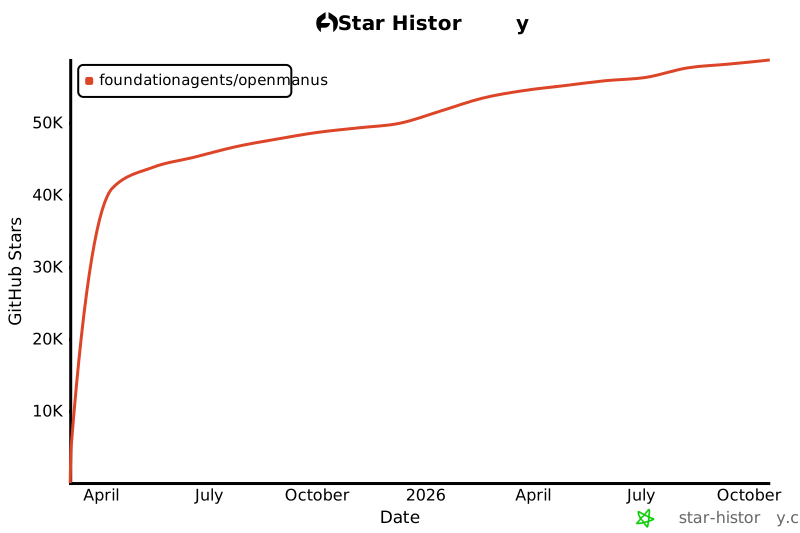](https://star-history.com/#FoundationAgents/OpenManus&Date)
|
||||
|
||||
## Sponsors
|
||||
Thanks to [PPIO](https://ppinfra.com/user/register?invited_by=OCPKCN&utm_source=github_openmanus&utm_medium=github_readme&utm_campaign=link) for computing source support.
|
||||
> PPIO: The most affordable and easily-integrated MaaS and GPU cloud solution.
|
||||
|
||||
|
||||
## Acknowledgement
|
||||
|
||||
Thanks to [anthropic-computer-use](https://github.com/anthropics/anthropic-quickstarts/tree/main/computer-use-demo)
|
||||
and [browser-use](https://github.com/browser-use/browser-use) for providing basic support for this project!
|
||||
|
||||
Additionally, we are grateful to [AAAJ](https://github.com/metauto-ai/agent-as-a-judge), [MetaGPT](https://github.com/geekan/MetaGPT), [OpenHands](https://github.com/All-Hands-AI/OpenHands) and [SWE-agent](https://github.com/SWE-agent/SWE-agent).
|
||||
|
||||
We also thank stepfun(阶跃星辰) for supporting our Hugging Face demo space.
|
||||
|
||||
OpenManus is built by contributors from MetaGPT. Huge thanks to this agent community!
|
||||
|
||||
## Cite
|
||||
```bibtex
|
||||
@misc{openmanus2025,
|
||||
author = {Xinbin Liang and Jinyu Xiang and Zhaoyang Yu and Jiayi Zhang and Sirui Hong and Sheng Fan and Xiao Tang},
|
||||
title = {OpenManus: An open-source framework for building general AI agents},
|
||||
year = {2025},
|
||||
publisher = {Zenodo},
|
||||
doi = {10.5281/zenodo.15186407},
|
||||
url = {https://doi.org/10.5281/zenodo.15186407},
|
||||
}
|
||||
```
|
||||
English | [中文](README_zh.md)
|
||||
|
||||
[](https://github.com/mannaandpoem/OpenManus/stargazers)
|
||||
 
|
||||
[](https://opensource.org/licenses/MIT)  
|
||||
[](https://discord.gg/DYn29wFk9z)
|
||||
|
||||
# 👋 OpenManus
|
||||
|
||||
Manus is incredible, but OpenManus can achieve any idea without an *Invite Code* 🛫!
|
||||
|
||||
Our team members [@Xinbin Liang](https://github.com/mannaandpoem) and [@Jinyu Xiang](https://github.com/XiangJinyu) (core authors), along with [@Zhaoyang Yu](https://github.com/MoshiQAQ), [@Jiayi Zhang](https://github.com/didiforgithub), and [@Sirui Hong](https://github.com/stellaHSR), we are from [@MetaGPT](https://github.com/geekan/MetaGPT). The prototype is launched within 3 hours and we are keeping building!
|
||||
|
||||
It's a simple implementation, so we welcome any suggestions, contributions, and feedback!
|
||||
|
||||
Enjoy your own agent with OpenManus!
|
||||
|
||||
We're also excited to introduce [OpenManus-RL](https://github.com/OpenManus/OpenManus-RL), an open-source project dedicated to reinforcement learning (RL)- based (such as GRPO) tuning methods for LLM agents, developed collaboratively by researchers from UIUC and OpenManus.
|
||||
|
||||
## Project Demo
|
||||
|
||||
<video src="https://private-user-images.githubusercontent.com/61239030/420168772-6dcfd0d2-9142-45d9-b74e-d10aa75073c6.mp4?jwt=eyJhbGciOiJIUzI1NiIsInR5cCI6IkpXVCJ9.eyJpc3MiOiJnaXRodWIuY29tIiwiYXVkIjoicmF3LmdpdGh1YnVzZXJjb250ZW50LmNvbSIsImtleSI6ImtleTUiLCJleHAiOjE3NDEzMTgwNTksIm5iZiI6MTc0MTMxNzc1OSwicGF0aCI6Ii82MTIzOTAzMC80MjAxNjg3NzItNmRjZmQwZDItOTE0Mi00NWQ5LWI3NGUtZDEwYWE3NTA3M2M2Lm1wND9YLUFtei1BbGdvcml0aG09QVdTNC1ITUFDLVNIQTI1NiZYLUFtei1DcmVkZW50aWFsPUFLSUFWQ09EWUxTQTUzUFFLNFpBJTJGMjAyNTAzMDclMkZ1cy1lYXN0LTElMkZzMyUyRmF3czRfcmVxdWVzdCZYLUFtei1EYXRlPTIwMjUwMzA3VDAzMjIzOVomWC1BbXotRXhwaXJlcz0zMDAmWC1BbXotU2lnbmF0dXJlPTdiZjFkNjlmYWNjMmEzOTliM2Y3M2VlYjgyNDRlZDJmOWE3NWZhZjE1MzhiZWY4YmQ3NjdkNTYwYTU5ZDA2MzYmWC1BbXotU2lnbmVkSGVhZGVycz1ob3N0In0.UuHQCgWYkh0OQq9qsUWqGsUbhG3i9jcZDAMeHjLt5T4" data-canonical-src="https://private-user-images.githubusercontent.com/61239030/420168772-6dcfd0d2-9142-45d9-b74e-d10aa75073c6.mp4?jwt=eyJhbGciOiJIUzI1NiIsInR5cCI6IkpXVCJ9.eyJpc3MiOiJnaXRodWIuY29tIiwiYXVkIjoicmF3LmdpdGh1YnVzZXJjb250ZW50LmNvbSIsImtleSI6ImtleTUiLCJleHAiOjE3NDEzMTgwNTksIm5iZiI6MTc0MTMxNzc1OSwicGF0aCI6Ii82MTIzOTAzMC80MjAxNjg3NzItNmRjZmQwZDItOTE0Mi00NWQ5LWI3NGUtZDEwYWE3NTA3M2M2Lm1wND9YLUFtei1BbGdvcml0aG09QVdTNC1ITUFDLVNIQTI1NiZYLUFtei1DcmVkZW50aWFsPUFLSUFWQ09EWUxTQTUzUFFLNFpBJTJGMjAyNTAzMDclMkZ1cy1lYXN0LTElMkZzMyUyRmF3czRfcmVxdWVzdCZYLUFtei1EYXRlPTIwMjUwMzA3VDAzMjIzOVomWC1BbXotRXhwaXJlcz0zMDAmWC1BbXotU2lnbmF0dXJlPTdiZjFkNjlmYWNjMmEzOTliM2Y3M2VlYjgyNDRlZDJmOWE3NWZhZjE1MzhiZWY4YmQ3NjdkNTYwYTU5ZDA2MzYmWC1BbXotU2lnbmVkSGVhZGVycz1ob3N0In0.UuHQCgWYkh0OQq9qsUWqGsUbhG3i9jcZDAMeHjLt5T4" controls="controls" muted="muted" class="d-block rounded-bottom-2 border-top width-fit" style="max-height:640px; min-height: 200px"></video>
|
||||
|
||||
## Installation
|
||||
|
||||
We provide two installation methods. Method 2 (using uv) is recommended for faster installation and better dependency management.
|
||||
|
||||
### Method 1: Using conda
|
||||
|
||||
1. Create a new conda environment:
|
||||
|
||||
```bash
|
||||
conda create -n open_manus python=3.12
|
||||
conda activate open_manus
|
||||
```
|
||||
|
||||
2. Clone the repository:
|
||||
|
||||
```bash
|
||||
git clone https://github.com/mannaandpoem/OpenManus.git
|
||||
cd OpenManus
|
||||
```
|
||||
|
||||
3. Install dependencies:
|
||||
|
||||
```bash
|
||||
pip install -r requirements.txt
|
||||
```
|
||||
|
||||
### Method 2: Using uv (Recommended)
|
||||
|
||||
1. Install uv (A fast Python package installer and resolver):
|
||||
|
||||
```bash
|
||||
curl -LsSf https://astral.sh/uv/install.sh | sh
|
||||
```
|
||||
|
||||
2. Clone the repository:
|
||||
|
||||
```bash
|
||||
git clone https://github.com/mannaandpoem/OpenManus.git
|
||||
cd OpenManus
|
||||
```
|
||||
|
||||
3. Create a new virtual environment and activate it:
|
||||
|
||||
```bash
|
||||
uv venv
|
||||
source .venv/bin/activate # On Unix/macOS
|
||||
# Or on Windows:
|
||||
# .venv\Scripts\activate
|
||||
```
|
||||
|
||||
4. Install dependencies:
|
||||
|
||||
```bash
|
||||
uv pip install -r requirements.txt
|
||||
```
|
||||
|
||||
## Configuration
|
||||
|
||||
OpenManus requires configuration for the LLM APIs it uses. Follow these steps to set up your configuration:
|
||||
|
||||
1. Create a `config.toml` file in the `config` directory (you can copy from the example):
|
||||
|
||||
```bash
|
||||
cp config/config.example.toml config/config.toml
|
||||
```
|
||||
|
||||
2. Edit `config/config.toml` to add your API keys and customize settings:
|
||||
|
||||
```toml
|
||||
# Global LLM configuration
|
||||
[llm]
|
||||
model = "gpt-4o"
|
||||
base_url = "https://api.openai.com/v1"
|
||||
api_key = "sk-..." # Replace with your actual API key
|
||||
max_tokens = 4096
|
||||
temperature = 0.0
|
||||
|
||||
# Optional configuration for specific LLM models
|
||||
[llm.vision]
|
||||
model = "gpt-4o"
|
||||
base_url = "https://api.openai.com/v1"
|
||||
api_key = "sk-..." # Replace with your actual API key
|
||||
```
|
||||
|
||||
## Quick Start
|
||||
|
||||
One line for run OpenManus:
|
||||
|
||||
```bash
|
||||
python main.py
|
||||
```
|
||||
|
||||
Then input your idea via terminal!
|
||||
|
||||
For unstable version, you also can run:
|
||||
|
||||
```bash
|
||||
python run_flow.py
|
||||
```
|
||||
|
||||
## How to contribute
|
||||
|
||||
We welcome any friendly suggestions and helpful contributions! Just create issues or submit pull requests.
|
||||
|
||||
Or contact @mannaandpoem via 📧email: mannaandpoem@gmail.com
|
||||
|
||||
## Community Group
|
||||
Join our networking group on Feishu and share your experience with other developers!
|
||||
|
||||
<div align="center" style="display: flex; gap: 20px;">
|
||||
<img src="assets/community_group.jpg" alt="OpenManus 交流群" width="300" />
|
||||
</div>
|
||||
|
||||
## Star History
|
||||
|
||||
[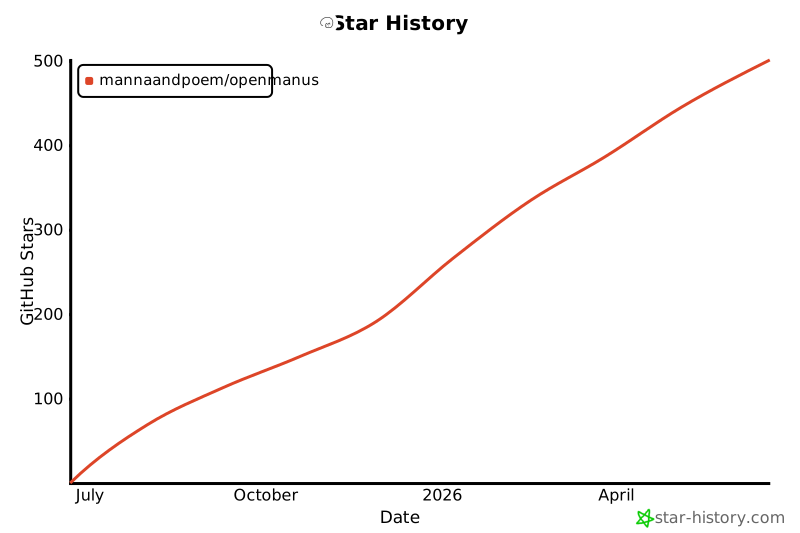](https://star-history.com/#mannaandpoem/OpenManus&Date)
|
||||
|
||||
## Acknowledgement
|
||||
|
||||
Thanks to [anthropic-computer-use](https://github.com/anthropics/anthropic-quickstarts/tree/main/computer-use-demo)
|
||||
and [browser-use](https://github.com/browser-use/browser-use) for providing basic support for this project!
|
||||
|
||||
Additionally, we are grateful to [AAAJ](https://github.com/metauto-ai/agent-as-a-judge), [MetaGPT](https://github.com/geekan/MetaGPT) and [OpenHands](https://github.com/All-Hands-AI/OpenHands).
|
||||
|
||||
OpenManus is built by contributors from MetaGPT. Huge thanks to this agent community!
|
||||
|
||||
## Cite
|
||||
```bibtex
|
||||
@misc{openmanus2025,
|
||||
author = {Xinbin Liang and Jinyu Xiang and Zhaoyang Yu and Jiayi Zhang and Sirui Hong},
|
||||
title = {OpenManus: An open-source framework for building general AI agents},
|
||||
year = {2025},
|
||||
publisher = {GitHub},
|
||||
journal = {GitHub repository},
|
||||
howpublished = {\url{https://github.com/mannaandpoem/OpenManus}},
|
||||
}
|
||||
```
|
||||
|
||||
-193
@@ -1,193 +0,0 @@
|
||||
<p align="center">
|
||||
<img src="assets/logo.jpg" width="200"/>
|
||||
</p>
|
||||
|
||||
[English](README.md) | [中文](README_zh.md) | [한국어](README_ko.md) | 日本語
|
||||
|
||||
[](https://github.com/FoundationAgents/OpenManus/stargazers)
|
||||
 
|
||||
[](https://opensource.org/licenses/MIT)  
|
||||
[](https://discord.gg/DYn29wFk9z)
|
||||
[](https://huggingface.co/spaces/lyh-917/OpenManusDemo)
|
||||
[](https://doi.org/10.5281/zenodo.15186407)
|
||||
|
||||
# 👋 OpenManus
|
||||
|
||||
Manusは素晴らしいですが、OpenManusは*招待コード*なしでどんなアイデアも実現できます!🛫
|
||||
|
||||
私たちのチームメンバー [@Xinbin Liang](https://github.com/mannaandpoem) と [@Jinyu Xiang](https://github.com/XiangJinyu)(主要開発者)、そして [@Zhaoyang Yu](https://github.com/MoshiQAQ)、[@Jiayi Zhang](https://github.com/didiforgithub)、[@Sirui Hong](https://github.com/stellaHSR) は [@MetaGPT](https://github.com/geekan/MetaGPT) から来ました。プロトタイプは3時間以内に立ち上げられ、継続的に開発を進めています!
|
||||
|
||||
これはシンプルな実装ですので、どんな提案、貢献、フィードバックも歓迎します!
|
||||
|
||||
OpenManusで自分だけのエージェントを楽しみましょう!
|
||||
|
||||
また、UIUCとOpenManusの研究者が共同開発した[OpenManus-RL](https://github.com/OpenManus/OpenManus-RL)をご紹介できることを嬉しく思います。これは強化学習(RL)ベース(GRPOなど)のLLMエージェントチューニング手法に特化したオープンソースプロジェクトです。
|
||||
|
||||
## プロジェクトデモ
|
||||
|
||||
<video src="https://private-user-images.githubusercontent.com/61239030/420168772-6dcfd0d2-9142-45d9-b74e-d10aa75073c6.mp4?jwt=eyJhbGciOiJIUzI1NiIsInR5cCI6IkpXVCJ9.eyJpc3MiOiJnaXRodWIuY29tIiwiYXVkIjoicmF3LmdpdGh1YnVzZXJjb250ZW50LmNvbSIsImtleSI6ImtleTUiLCJleHAiOjE3NDEzMTgwNTksIm5iZiI6MTc0MTMxNzc1OSwicGF0aCI6Ii82MTIzOTAzMC80MjAxNjg3NzItNmRjZmQwZDItOTE0Mi00NWQ5LWI3NGUtZDEwYWE3NTA3M2M2Lm1wND9YLUFtei1BbGdvcml0aG09QVdTNC1ITUFDLVNIQTI1NiZYLUFtei1DcmVkZW50aWFsPUFLSUFWQ09EWUxTQTUzUFFLNFpBJTJGMjAyNTAzMDclMkZ1cy1lYXN0LTElMkZzMyUyRmF3czRfcmVxdWVzdCZYLUFtei1EYXRlPTIwMjUwMzA3VDAzMjIzOVomWC1BbXotRXhwaXJlcz0zMDAmWC1BbXotU2lnbmF0dXJlPTdiZjFkNjlmYWNjMmEzOTliM2Y3M2VlYjgyNDRlZDJmOWE3NWZhZjE1MzhiZWY4YmQ3NjdkNTYwYTU5ZDA2MzYmWC1BbXotU2lnbmVkSGVhZGVycz1ob3N0In0.UuHQCgWYkh0OQq9qsUWqGsUbhG3i9jcZDAMeHjLt5T4" data-canonical-src="https://private-user-images.githubusercontent.com/61239030/420168772-6dcfd0d2-9142-45d9-b74e-d10aa75073c6.mp4?jwt=eyJhbGciOiJIUzI1NiIsInR5cCI6IkpXVCJ9.eyJpc3MiOiJnaXRodWIuY29tIiwiYXVkIjoicmF3LmdpdGh1YnVzZXJjb250ZW50LmNvbSIsImtleSI6ImtleTUiLCJleHAiOjE3NDEzMTgwNTksIm5iZiI6MTc0MTMxNzc1OSwicGF0aCI6Ii82MTIzOTAzMC80MjAxNjg3NzItNmRjZmQwZDItOTE0Mi00NWQ5LWI3NGUtZDEwYWE3NTA3M2M2Lm1wND9YLUFtei1BbGdvcml0aG09QVdTNC1ITUFDLVNIQTI1NiZYLUFtei1DcmVkZW50aWFsPUFLSUFWQ09EWUxTQTUzUFFLNFpBJTJGMjAyNTAzMDclMkZ1cy1lYXN0LTElMkZzMyUyRmF3czRfcmVxdWVzdCZYLUFtei1EYXRlPTIwMjUwMzA3VDAzMjIzOVomWC1BbXotRXhwaXJlcz0zMDAmWC1BbXotU2lnbmF0dXJlPTdiZjFkNjlmYWNjMmEzOTliM2Y3M2VlYjgyNDRlZDJmOWE3NWZhZjE1MzhiZWY4YmQ3NjdkNTYwYTU5ZDA2MzYmWC1BbXotU2lnbmVkSGVhZGVycz1ob3N0In0.UuHQCgWYkh0OQq9qsUWqGsUbhG3i9jcZDAMeHjLt5T4" controls="controls" muted="muted" class="d-block rounded-bottom-2 border-top width-fit" style="max-height:640px; min-height: 200px"></video>
|
||||
|
||||
## インストール方法
|
||||
|
||||
インストール方法は2つ提供しています。方法2(uvを使用)は、より高速なインストールと優れた依存関係管理のため推奨されています。
|
||||
|
||||
### 方法1:condaを使用
|
||||
|
||||
1. 新しいconda環境を作成します:
|
||||
|
||||
```bash
|
||||
conda create -n open_manus python=3.12
|
||||
conda activate open_manus
|
||||
```
|
||||
|
||||
2. リポジトリをクローンします:
|
||||
|
||||
```bash
|
||||
git clone https://github.com/FoundationAgents/OpenManus.git
|
||||
cd OpenManus
|
||||
```
|
||||
|
||||
3. 依存関係をインストールします:
|
||||
|
||||
```bash
|
||||
pip install -r requirements.txt
|
||||
```
|
||||
|
||||
### 方法2:uvを使用(推奨)
|
||||
|
||||
1. uv(高速なPythonパッケージインストーラーと管理機能)をインストールします:
|
||||
|
||||
```bash
|
||||
curl -LsSf https://astral.sh/uv/install.sh | sh
|
||||
```
|
||||
|
||||
2. リポジトリをクローンします:
|
||||
|
||||
```bash
|
||||
git clone https://github.com/FoundationAgents/OpenManus.git
|
||||
cd OpenManus
|
||||
```
|
||||
|
||||
3. 新しい仮想環境を作成してアクティベートします:
|
||||
|
||||
```bash
|
||||
uv venv --python 3.12
|
||||
source .venv/bin/activate # Unix/macOSの場合
|
||||
# Windowsの場合:
|
||||
# .venv\Scripts\activate
|
||||
```
|
||||
|
||||
4. 依存関係をインストールします:
|
||||
|
||||
```bash
|
||||
uv pip install -r requirements.txt
|
||||
```
|
||||
|
||||
### ブラウザ自動化ツール(オプション)
|
||||
```bash
|
||||
playwright install
|
||||
```
|
||||
|
||||
## 設定
|
||||
|
||||
OpenManusを使用するには、LLM APIの設定が必要です。以下の手順に従って設定してください:
|
||||
|
||||
1. `config`ディレクトリに`config.toml`ファイルを作成します(サンプルからコピーできます):
|
||||
|
||||
```bash
|
||||
cp config/config.example.toml config/config.toml
|
||||
```
|
||||
|
||||
2. `config/config.toml`を編集してAPIキーを追加し、設定をカスタマイズします:
|
||||
|
||||
```toml
|
||||
# グローバルLLM設定
|
||||
[llm]
|
||||
model = "gpt-4o"
|
||||
base_url = "https://api.openai.com/v1"
|
||||
api_key = "sk-..." # 実際のAPIキーに置き換えてください
|
||||
max_tokens = 4096
|
||||
temperature = 0.0
|
||||
|
||||
# 特定のLLMモデル用のオプション設定
|
||||
[llm.vision]
|
||||
model = "gpt-4o"
|
||||
base_url = "https://api.openai.com/v1"
|
||||
api_key = "sk-..." # 実際のAPIキーに置き換えてください
|
||||
```
|
||||
|
||||
## クイックスタート
|
||||
|
||||
OpenManusを実行する一行コマンド:
|
||||
|
||||
```bash
|
||||
python main.py
|
||||
```
|
||||
|
||||
その後、ターミナルからプロンプトを入力してください!
|
||||
|
||||
MCP ツールバージョンを使用する場合は、以下を実行します:
|
||||
```bash
|
||||
python run_mcp.py
|
||||
```
|
||||
|
||||
開発中のマルチエージェントバージョンを試すには、以下を実行します:
|
||||
|
||||
```bash
|
||||
python run_flow.py
|
||||
```
|
||||
|
||||
## カスタムマルチエージェントの追加
|
||||
|
||||
現在、一般的なOpenManusエージェントに加えて、データ分析とデータ可視化タスクに適したDataAnalysisエージェントが組み込まれています。このエージェントを`config.toml`の`run_flow`に追加することができます。
|
||||
|
||||
```toml
|
||||
# run-flowのオプション設定
|
||||
[runflow]
|
||||
use_data_analysis_agent = true # デフォルトでは無効、trueに変更すると有効化されます
|
||||
```
|
||||
|
||||
これに加えて、エージェントが正常に動作するために必要な依存関係をインストールする必要があります:[具体的なインストールガイド](app/tool/chart_visualization/README_ja.md##インストール)
|
||||
|
||||
|
||||
## 貢献方法
|
||||
|
||||
我々は建設的な意見や有益な貢献を歓迎します!issueを作成するか、プルリクエストを提出してください。
|
||||
|
||||
または @mannaandpoem に📧メールでご連絡ください:mannaandpoem@gmail.com
|
||||
|
||||
**注意**: プルリクエストを送信する前に、pre-commitツールを使用して変更を確認してください。`pre-commit run --all-files`を実行してチェックを実行します。
|
||||
|
||||
## コミュニティグループ
|
||||
Feishuのネットワーキンググループに参加して、他の開発者と経験を共有しましょう!
|
||||
|
||||
<div align="center" style="display: flex; gap: 20px;">
|
||||
<img src="assets/community_group.jpg" alt="OpenManus 交流群" width="300" />
|
||||
</div>
|
||||
|
||||
## スター履歴
|
||||
|
||||
[](https://star-history.com/#FoundationAgents/OpenManus&Date)
|
||||
|
||||
## 謝辞
|
||||
|
||||
このプロジェクトの基本的なサポートを提供してくれた[anthropic-computer-use](https://github.com/anthropics/anthropic-quickstarts/tree/main/computer-use-demo)
|
||||
と[browser-use](https://github.com/browser-use/browser-use)に感謝します!
|
||||
|
||||
さらに、[AAAJ](https://github.com/metauto-ai/agent-as-a-judge)、[MetaGPT](https://github.com/geekan/MetaGPT)、[OpenHands](https://github.com/All-Hands-AI/OpenHands)、[SWE-agent](https://github.com/SWE-agent/SWE-agent)にも感謝します。
|
||||
|
||||
また、Hugging Face デモスペースをサポートしてくださった阶跃星辰 (stepfun)にも感謝いたします。
|
||||
|
||||
OpenManusはMetaGPTのコントリビューターによって構築されました。このエージェントコミュニティに大きな感謝を!
|
||||
|
||||
## 引用
|
||||
```bibtex
|
||||
@misc{openmanus2025,
|
||||
author = {Xinbin Liang and Jinyu Xiang and Zhaoyang Yu and Jiayi Zhang and Sirui Hong and Sheng Fan and Xiao Tang},
|
||||
title = {OpenManus: An open-source framework for building general AI agents},
|
||||
year = {2025},
|
||||
publisher = {Zenodo},
|
||||
doi = {10.5281/zenodo.15186407},
|
||||
url = {https://doi.org/10.5281/zenodo.15186407},
|
||||
}
|
||||
```
|
||||
-192
@@ -1,192 +0,0 @@
|
||||
<p align="center">
|
||||
<img src="assets/logo.jpg" width="200"/>
|
||||
</p>
|
||||
|
||||
[English](README.md) | [中文](README_zh.md) | 한국어 | [日本語](README_ja.md)
|
||||
|
||||
[](https://github.com/FoundationAgents/OpenManus/stargazers)
|
||||
 
|
||||
[](https://opensource.org/licenses/MIT)  
|
||||
[](https://discord.gg/DYn29wFk9z)
|
||||
[](https://huggingface.co/spaces/lyh-917/OpenManusDemo)
|
||||
[](https://doi.org/10.5281/zenodo.15186407)
|
||||
|
||||
# 👋 OpenManus
|
||||
|
||||
Manus는 놀라운 도구지만, OpenManus는 *초대 코드* 없이도 모든 아이디어를 실현할 수 있습니다! 🛫
|
||||
|
||||
우리 팀의 멤버인 [@Xinbin Liang](https://github.com/mannaandpoem)와 [@Jinyu Xiang](https://github.com/XiangJinyu) (핵심 작성자), 그리고 [@Zhaoyang Yu](https://github.com/MoshiQAQ), [@Jiayi Zhang](https://github.com/didiforgithub), [@Sirui Hong](https://github.com/stellaHSR)이 함께 했습니다. 우리는 [@MetaGPT](https://github.com/geekan/MetaGPT)로부터 왔습니다. 프로토타입은 단 3시간 만에 출시되었으며, 계속해서 발전하고 있습니다!
|
||||
|
||||
이 프로젝트는 간단한 구현에서 시작되었으며, 여러분의 제안, 기여 및 피드백을 환영합니다!
|
||||
|
||||
OpenManus를 통해 여러분만의 에이전트를 즐겨보세요!
|
||||
|
||||
또한 [OpenManus-RL](https://github.com/OpenManus/OpenManus-RL)을 소개하게 되어 기쁩니다. OpenManus와 UIUC 연구자들이 공동 개발한 이 오픈소스 프로젝트는 LLM 에이전트에 대해 강화 학습(RL) 기반 (예: GRPO) 튜닝 방법을 제공합니다.
|
||||
|
||||
## 프로젝트 데모
|
||||
|
||||
<video src="https://private-user-images.githubusercontent.com/61239030/420168772-6dcfd0d2-9142-45d9-b74e-d10aa75073c6.mp4?jwt=eyJhbGciOiJIUzI1NiIsInR5cCI6IkpXVCJ9.eyJpc3MiOiJnaXRodWIuY29tIiwiYXVkIjoicmF3LmdpdGh1YnVzZXJjb250ZW50LmNvbSIsImtleSI6ImtleTUiLCJleHAiOjE3NDEzMTgwNTksIm5iZiI6MTc0MTMxNzc1OSwicGF0aCI6Ii82MTIzOTAzMC80MjAxNjg3NzItNmRjZmQwZDItOTE0Mi00NWQ5LWI3NGUtZDEwYWE3NTA3M2M2Lm1wND9YLUFtei1BbGdvcml0aG09QVdTNC1ITUFDLVNIQTI1NiZYLUFtei1DcmVkZW50aWFsPUFLSUFWQ09EWUxTQTUzUFFLNFpBJTJGMjAyNTAzMDclMkZ1cy1lYXN0LTElMkZzMyUyRmF3czRfcmVxdWVzdCZYLUFtei1EYXRlPTIwMjUwMzA3VDAzMjIzOVomWC1BbXotRXhwaXJlcz0zMDAmWC1BbXotU2lnbmF0dXJlPTdiZjFkNjlmYWNjMmEzOTliM2Y3M2VlYjgyNDRlZDJmOWE3NWZhZjE1MzhiZWY4YmQ3NjdkNTYwYTU5ZDA2MzYmWC1BbXotU2lnbmVkSGVhZGVycz1ob3N0In0.UuHQCgWYkh0OQq9qsUWqGsUbhG3i9jcZDAMeHjLt5T4" data-canonical-src="https://private-user-images.githubusercontent.com/61239030/420168772-6dcfd0d2-9142-45d9-b74e-d10aa75073c6.mp4?jwt=eyJhbGciOiJIUzI1NiIsInR5cCI6IkpXVCJ9.eyJpc3MiOiJnaXRodWIuY29tIiwiYXVkIjoicmF3LmdpdGh1YnVzZXJjb250ZW50LmNvbSIsImtleSI6ImtleTUiLCJleHAiOjE3NDEzMTgwNTksIm5iZiI6MTc0MTMxNzc1OSwicGF0aCI6Ii82MTIzOTAzMC80MjAxNjg3NzItNmRjZmQwZDItOTE0Mi00NWQ5LWI3NGUtZDEwYWE3NTA3M2M2Lm1wND9YLUFtei1BbGdvcml0aG09QVdTNC1ITUFDLVNIQTI1NiZYLUFtei1DcmVkZW50aWFsPUFLSUFWQ09EWUxTQTUzUFFLNFpBJTJGMjAyNTAzMDclMkZ1cy1lYXN0LTElMkZzMyUyRmF3czRfcmVxdWVzdCZYLUFtei1EYXRlPTIwMjUwMzA3VDAzMjIzOVomWC1BbXotRXhwaXJlcz0zMDAmWC1BbXotU2lnbmF0dXJlPTdiZjFkNjlmYWNjMmEzOTliM2Y3M2VlYjgyNDRlZDJmOWE3NWZhZjE1MzhiZWY4YmQ3NjdkNTYwYTU5ZDA2MzYmWC1BbXotU2lnbmVkSGVhZGVycz1ob3N0In0.UuHQCgWYkh0OQq9qsUWqGsUbhG3i9jcZDAMeHjLt5T4" controls="controls" muted="muted" class="d-block rounded-bottom-2 border-top width-fit" style="max-height:640px; min-height: 200px"></video>
|
||||
|
||||
## 설치 방법
|
||||
|
||||
두 가지 설치 방법을 제공합니다. **방법 2 (uv 사용)** 이 더 빠른 설치와 효율적인 종속성 관리를 위해 권장됩니다.
|
||||
|
||||
### 방법 1: conda 사용
|
||||
|
||||
1. 새로운 conda 환경을 생성합니다:
|
||||
|
||||
```bash
|
||||
conda create -n open_manus python=3.12
|
||||
conda activate open_manus
|
||||
```
|
||||
|
||||
2. 저장소를 클론합니다:
|
||||
|
||||
```bash
|
||||
git clone https://github.com/FoundationAgents/OpenManus.git
|
||||
cd OpenManus
|
||||
```
|
||||
|
||||
3. 종속성을 설치합니다:
|
||||
|
||||
```bash
|
||||
pip install -r requirements.txt
|
||||
```
|
||||
|
||||
### 방법 2: uv 사용 (권장)
|
||||
|
||||
1. uv를 설치합니다. (빠른 Python 패키지 설치 및 종속성 관리 도구):
|
||||
|
||||
```bash
|
||||
curl -LsSf https://astral.sh/uv/install.sh | sh
|
||||
```
|
||||
|
||||
2. 저장소를 클론합니다:
|
||||
|
||||
```bash
|
||||
git clone https://github.com/FoundationAgents/OpenManus.git
|
||||
cd OpenManus
|
||||
```
|
||||
|
||||
3. 새로운 가상 환경을 생성하고 활성화합니다:
|
||||
|
||||
```bash
|
||||
uv venv --python 3.12
|
||||
source .venv/bin/activate # Unix/macOS의 경우
|
||||
# Windows의 경우:
|
||||
# .venv\Scripts\activate
|
||||
```
|
||||
|
||||
4. 종속성을 설치합니다:
|
||||
|
||||
```bash
|
||||
uv pip install -r requirements.txt
|
||||
```
|
||||
|
||||
### 브라우저 자동화 도구 (선택사항)
|
||||
```bash
|
||||
playwright install
|
||||
```
|
||||
|
||||
## 설정 방법
|
||||
|
||||
OpenManus를 사용하려면 사용하는 LLM API에 대한 설정이 필요합니다. 아래 단계를 따라 설정을 완료하세요:
|
||||
|
||||
1. `config` 디렉토리에 `config.toml` 파일을 생성하세요 (예제 파일을 복사하여 사용할 수 있습니다):
|
||||
|
||||
```bash
|
||||
cp config/config.example.toml config/config.toml
|
||||
```
|
||||
|
||||
2. `config/config.toml` 파일을 편집하여 API 키를 추가하고 설정을 커스터마이징하세요:
|
||||
|
||||
```toml
|
||||
# 전역 LLM 설정
|
||||
[llm]
|
||||
model = "gpt-4o"
|
||||
base_url = "https://api.openai.com/v1"
|
||||
api_key = "sk-..." # 실제 API 키로 변경하세요
|
||||
max_tokens = 4096
|
||||
temperature = 0.0
|
||||
|
||||
# 특정 LLM 모델에 대한 선택적 설정
|
||||
[llm.vision]
|
||||
model = "gpt-4o"
|
||||
base_url = "https://api.openai.com/v1"
|
||||
api_key = "sk-..." # 실제 API 키로 변경하세요
|
||||
```
|
||||
|
||||
## 빠른 시작
|
||||
|
||||
OpenManus를 실행하는 한 줄 명령어:
|
||||
|
||||
```bash
|
||||
python main.py
|
||||
```
|
||||
|
||||
이후 터미널에서 아이디어를 작성하세요!
|
||||
|
||||
MCP 도구 버전을 사용하려면 다음을 실행하세요:
|
||||
```bash
|
||||
python run_mcp.py
|
||||
```
|
||||
|
||||
불안정한 멀티 에이전트 버전을 실행하려면 다음을 실행할 수 있습니다:
|
||||
|
||||
```bash
|
||||
python run_flow.py
|
||||
```
|
||||
|
||||
### 사용자 정의 다중 에이전트 추가
|
||||
|
||||
현재 일반 OpenManus 에이전트 외에도 데이터 분석 및 데이터 시각화 작업에 적합한 DataAnalysis 에이전트를 통합했습니다. 이 에이전트를 `config.toml`의 `run_flow`에 추가할 수 있습니다.
|
||||
|
||||
```toml
|
||||
# run-flow에 대한 선택적 구성
|
||||
[runflow]
|
||||
use_data_analysis_agent = true # 기본적으로 비활성화되어 있으며, 활성화하려면 true로 변경
|
||||
```
|
||||
|
||||
또한, 에이전트가 제대로 작동하도록 관련 종속성을 설치해야 합니다: [상세 설치 가이드](app/tool/chart_visualization/README.md##Installation)
|
||||
|
||||
## 기여 방법
|
||||
|
||||
모든 친절한 제안과 유용한 기여를 환영합니다! 이슈를 생성하거나 풀 리퀘스트를 제출해 주세요.
|
||||
|
||||
또는 📧 메일로 연락주세요. @mannaandpoem : mannaandpoem@gmail.com
|
||||
|
||||
**참고**: pull request를 제출하기 전에 pre-commit 도구를 사용하여 변경 사항을 확인하십시오. `pre-commit run --all-files`를 실행하여 검사를 실행합니다.
|
||||
|
||||
## 커뮤니티 그룹
|
||||
Feishu 네트워킹 그룹에 참여하여 다른 개발자들과 경험을 공유하세요!
|
||||
|
||||
<div align="center" style="display: flex; gap: 20px;">
|
||||
<img src="assets/community_group.jpg" alt="OpenManus 交流群" width="300" />
|
||||
</div>
|
||||
|
||||
## Star History
|
||||
|
||||
[](https://star-history.com/#FoundationAgents/OpenManus&Date)
|
||||
|
||||
## 감사의 글
|
||||
|
||||
이 프로젝트에 기본적인 지원을 제공해 주신 [anthropic-computer-use](https://github.com/anthropics/anthropic-quickstarts/tree/main/computer-use-demo)와
|
||||
[browser-use](https://github.com/browser-use/browser-use)에게 감사드립니다!
|
||||
|
||||
또한, [AAAJ](https://github.com/metauto-ai/agent-as-a-judge), [MetaGPT](https://github.com/geekan/MetaGPT), [OpenHands](https://github.com/All-Hands-AI/OpenHands), [SWE-agent](https://github.com/SWE-agent/SWE-agent)에 깊은 감사를 드립니다.
|
||||
|
||||
또한 Hugging Face 데모 공간을 지원해 주신 阶跃星辰 (stepfun)에게 감사드립니다.
|
||||
|
||||
OpenManus는 MetaGPT 기여자들에 의해 개발되었습니다. 이 에이전트 커뮤니티에 깊은 감사를 전합니다!
|
||||
|
||||
## 인용
|
||||
```bibtex
|
||||
@misc{openmanus2025,
|
||||
author = {Xinbin Liang and Jinyu Xiang and Zhaoyang Yu and Jiayi Zhang and Sirui Hong and Sheng Fan and Xiao Tang},
|
||||
title = {OpenManus: An open-source framework for building general AI agents},
|
||||
year = {2025},
|
||||
publisher = {Zenodo},
|
||||
doi = {10.5281/zenodo.15186407},
|
||||
url = {https://doi.org/10.5281/zenodo.15186407},
|
||||
}
|
||||
```
|
||||
+10
-58
@@ -1,22 +1,16 @@
|
||||
<p align="center">
|
||||
<img src="assets/logo.jpg" width="200"/>
|
||||
</p>
|
||||
[English](README.md) | 中文
|
||||
|
||||
[English](README.md) | 中文 | [한국어](README_ko.md) | [日本語](README_ja.md)
|
||||
|
||||
[](https://github.com/FoundationAgents/OpenManus/stargazers)
|
||||
[](https://github.com/mannaandpoem/OpenManus/stargazers)
|
||||
 
|
||||
[](https://opensource.org/licenses/MIT)  
|
||||
[](https://discord.gg/DYn29wFk9z)
|
||||
[](https://huggingface.co/spaces/lyh-917/OpenManusDemo)
|
||||
[](https://doi.org/10.5281/zenodo.15186407)
|
||||
|
||||
# 👋 OpenManus
|
||||
|
||||
Manus 非常棒,但 OpenManus 无需邀请码即可实现任何创意 🛫!
|
||||
|
||||
我们的团队成员 [@Xinbin Liang](https://github.com/mannaandpoem) 和 [@Jinyu Xiang](https://github.com/XiangJinyu)(核心作者),以及 [@Zhaoyang Yu](https://github.com/MoshiQAQ)、[@Jiayi Zhang](https://github.com/didiforgithub) 和 [@Sirui Hong](https://github.com/stellaHSR),来自 [@MetaGPT](https://github.com/geekan/MetaGPT)团队。我们在 3
|
||||
小时内完成了开发并持续迭代中!
|
||||
我们的团队成员 [@mannaandpoem](https://github.com/mannaandpoem) [@XiangJinyu](https://github.com/XiangJinyu) [@MoshiQAQ](https://github.com/MoshiQAQ) [@didiforgithub](https://github.com/didiforgithub) https://github.com/stellaHSR 来自 [@MetaGPT](https://github.com/geekan/MetaGPT) 组织,我们在 3
|
||||
小时内完成了原型开发并持续迭代中!
|
||||
|
||||
这是一个简洁的实现方案,欢迎任何建议、贡献和反馈!
|
||||
|
||||
@@ -44,7 +38,7 @@ conda activate open_manus
|
||||
2. 克隆仓库:
|
||||
|
||||
```bash
|
||||
git clone https://github.com/FoundationAgents/OpenManus.git
|
||||
git clone https://github.com/mannaandpoem/OpenManus.git
|
||||
cd OpenManus
|
||||
```
|
||||
|
||||
@@ -65,14 +59,14 @@ curl -LsSf https://astral.sh/uv/install.sh | sh
|
||||
2. 克隆仓库:
|
||||
|
||||
```bash
|
||||
git clone https://github.com/FoundationAgents/OpenManus.git
|
||||
git clone https://github.com/mannaandpoem/OpenManus.git
|
||||
cd OpenManus
|
||||
```
|
||||
|
||||
3. 创建并激活虚拟环境:
|
||||
|
||||
```bash
|
||||
uv venv --python 3.12
|
||||
uv venv
|
||||
source .venv/bin/activate # Unix/macOS 系统
|
||||
# Windows 系统使用:
|
||||
# .venv\Scripts\activate
|
||||
@@ -84,11 +78,6 @@ source .venv/bin/activate # Unix/macOS 系统
|
||||
uv pip install -r requirements.txt
|
||||
```
|
||||
|
||||
### 浏览器自动化工具(可选)
|
||||
```bash
|
||||
playwright install
|
||||
```
|
||||
|
||||
## 配置说明
|
||||
|
||||
OpenManus 需要配置使用的 LLM API,请按以下步骤设置:
|
||||
@@ -127,36 +116,18 @@ python main.py
|
||||
|
||||
然后通过终端输入你的创意!
|
||||
|
||||
如需使用 MCP 工具版本,可运行:
|
||||
```bash
|
||||
python run_mcp.py
|
||||
```
|
||||
|
||||
如需体验不稳定的多智能体版本,可运行:
|
||||
如需体验开发中版本,可运行:
|
||||
|
||||
```bash
|
||||
python run_flow.py
|
||||
```
|
||||
|
||||
## 添加自定义多智能体
|
||||
|
||||
目前除了通用的 OpenManus Agent, 我们还内置了DataAnalysis Agent,适用于数据分析和数据可视化任务,你可以在`config.toml`中将这个智能体加入到`run_flow`中
|
||||
```toml
|
||||
# run-flow可选配置
|
||||
[runflow]
|
||||
use_data_analysis_agent = true # 默认关闭,将其改为true则为激活
|
||||
```
|
||||
除此之外,你还需要安装相关的依赖来确保智能体正常运行:[具体安装指南](app/tool/chart_visualization/README_zh.md##安装)
|
||||
|
||||
|
||||
## 贡献指南
|
||||
|
||||
我们欢迎任何友好的建议和有价值的贡献!可以直接创建 issue 或提交 pull request。
|
||||
|
||||
或通过 📧 邮件联系 @mannaandpoem:mannaandpoem@gmail.com
|
||||
|
||||
**注意**: 在提交 pull request 之前,请使用 pre-commit 工具检查您的更改。运行 `pre-commit run --all-files` 来执行检查。
|
||||
|
||||
## 交流群
|
||||
|
||||
加入我们的飞书交流群,与其他开发者分享经验!
|
||||
@@ -167,32 +138,13 @@ use_data_analysis_agent = true # 默认关闭,将其改为true则为激活
|
||||
|
||||
## Star 数量
|
||||
|
||||
[](https://star-history.com/#FoundationAgents/OpenManus&Date)
|
||||
|
||||
|
||||
## 赞助商
|
||||
感谢[PPIO](https://ppinfra.com/user/register?invited_by=OCPKCN&utm_source=github_openmanus&utm_medium=github_readme&utm_campaign=link) 提供的算力支持。
|
||||
> PPIO派欧云:一键调用高性价比的开源模型API和GPU容器
|
||||
[](https://star-history.com/#mannaandpoem/OpenManus&Date)
|
||||
|
||||
## 致谢
|
||||
|
||||
特别感谢 [anthropic-computer-use](https://github.com/anthropics/anthropic-quickstarts/tree/main/computer-use-demo)
|
||||
和 [browser-use](https://github.com/browser-use/browser-use) 为本项目提供的基础支持!
|
||||
|
||||
此外,我们感谢 [AAAJ](https://github.com/metauto-ai/agent-as-a-judge),[MetaGPT](https://github.com/geekan/MetaGPT),[OpenHands](https://github.com/All-Hands-AI/OpenHands) 和 [SWE-agent](https://github.com/SWE-agent/SWE-agent).
|
||||
|
||||
我们也感谢阶跃星辰 (stepfun) 提供的 Hugging Face 演示空间支持。
|
||||
此外,我们感谢 [AAAJ](https://github.com/metauto-ai/agent-as-a-judge),[MetaGPT](https://github.com/geekan/MetaGPT) 和 [OpenHands](https://github.com/All-Hands-AI/OpenHands).
|
||||
|
||||
OpenManus 由 MetaGPT 社区的贡献者共同构建,感谢这个充满活力的智能体开发者社区!
|
||||
|
||||
## 引用
|
||||
```bibtex
|
||||
@misc{openmanus2025,
|
||||
author = {Xinbin Liang and Jinyu Xiang and Zhaoyang Yu and Jiayi Zhang and Sirui Hong and Sheng Fan and Xiao Tang},
|
||||
title = {OpenManus: An open-source framework for building general AI agents},
|
||||
year = {2025},
|
||||
publisher = {Zenodo},
|
||||
doi = {10.5281/zenodo.15186407},
|
||||
url = {https://doi.org/10.5281/zenodo.15186407},
|
||||
}
|
||||
```
|
||||
|
||||
@@ -1,10 +0,0 @@
|
||||
# Python version check: 3.11-3.13
|
||||
import sys
|
||||
|
||||
|
||||
if sys.version_info < (3, 11) or sys.version_info > (3, 13):
|
||||
print(
|
||||
"Warning: Unsupported Python version {ver}, please use 3.11-3.13".format(
|
||||
ver=".".join(map(str, sys.version_info))
|
||||
)
|
||||
)
|
||||
|
||||
@@ -1,6 +1,5 @@
|
||||
from app.agent.base import BaseAgent
|
||||
from app.agent.browser import BrowserAgent
|
||||
from app.agent.mcp import MCPAgent
|
||||
from app.agent.planning import PlanningAgent
|
||||
from app.agent.react import ReActAgent
|
||||
from app.agent.swe import SWEAgent
|
||||
from app.agent.toolcall import ToolCallAgent
|
||||
@@ -8,9 +7,8 @@ from app.agent.toolcall import ToolCallAgent
|
||||
|
||||
__all__ = [
|
||||
"BaseAgent",
|
||||
"BrowserAgent",
|
||||
"PlanningAgent",
|
||||
"ReActAgent",
|
||||
"SWEAgent",
|
||||
"ToolCallAgent",
|
||||
"MCPAgent",
|
||||
]
|
||||
|
||||
+10
-13
@@ -1,13 +1,12 @@
|
||||
from abc import ABC, abstractmethod
|
||||
from contextlib import asynccontextmanager
|
||||
from typing import List, Optional
|
||||
from typing import List, Literal, Optional
|
||||
|
||||
from pydantic import BaseModel, Field, model_validator
|
||||
|
||||
from app.llm import LLM
|
||||
from app.llm.inference import LLM
|
||||
from app.logger import logger
|
||||
from app.sandbox.client import SANDBOX_CLIENT
|
||||
from app.schema import ROLE_TYPE, AgentState, Memory, Message
|
||||
from app.schema import AgentState, Memory, Message
|
||||
|
||||
|
||||
class BaseAgent(BaseModel, ABC):
|
||||
@@ -83,9 +82,8 @@ class BaseAgent(BaseModel, ABC):
|
||||
|
||||
def update_memory(
|
||||
self,
|
||||
role: ROLE_TYPE, # type: ignore
|
||||
role: Literal["user", "system", "assistant", "tool"],
|
||||
content: str,
|
||||
base64_image: Optional[str] = None,
|
||||
**kwargs,
|
||||
) -> None:
|
||||
"""Add a message to the agent's memory.
|
||||
@@ -93,7 +91,6 @@ class BaseAgent(BaseModel, ABC):
|
||||
Args:
|
||||
role: The role of the message sender (user, system, assistant, tool).
|
||||
content: The message content.
|
||||
base64_image: Optional base64 encoded image.
|
||||
**kwargs: Additional arguments (e.g., tool_call_id for tool messages).
|
||||
|
||||
Raises:
|
||||
@@ -109,9 +106,9 @@ class BaseAgent(BaseModel, ABC):
|
||||
if role not in message_map:
|
||||
raise ValueError(f"Unsupported message role: {role}")
|
||||
|
||||
# Create message with appropriate parameters based on role
|
||||
kwargs = {"base64_image": base64_image, **(kwargs if role == "tool" else {})}
|
||||
self.memory.add_message(message_map[role](content, **kwargs))
|
||||
msg_factory = message_map[role]
|
||||
msg = msg_factory(content, **kwargs) if role == "tool" else msg_factory(content)
|
||||
self.memory.add_message(msg)
|
||||
|
||||
async def run(self, request: Optional[str] = None) -> str:
|
||||
"""Execute the agent's main loop asynchronously.
|
||||
@@ -147,10 +144,10 @@ class BaseAgent(BaseModel, ABC):
|
||||
results.append(f"Step {self.current_step}: {step_result}")
|
||||
|
||||
if self.current_step >= self.max_steps:
|
||||
self.current_step = 0
|
||||
self.state = AgentState.IDLE
|
||||
self.current_step = 0 # setting back to 0 when reached max steps
|
||||
self.state = AgentState.IDLE # setting the status
|
||||
results.append(f"Terminated: Reached max steps ({self.max_steps})")
|
||||
await SANDBOX_CLIENT.cleanup()
|
||||
|
||||
return "\n".join(results) if results else "No steps executed"
|
||||
|
||||
@abstractmethod
|
||||
|
||||
@@ -1,124 +0,0 @@
|
||||
import json
|
||||
from typing import TYPE_CHECKING, Optional
|
||||
|
||||
from pydantic import Field, model_validator
|
||||
|
||||
from app.agent.toolcall import ToolCallAgent
|
||||
from app.logger import logger
|
||||
from app.prompt.browser import NEXT_STEP_PROMPT, SYSTEM_PROMPT
|
||||
from app.schema import Message, ToolChoice
|
||||
from app.tool import BrowserUseTool, Terminate, ToolCollection
|
||||
|
||||
|
||||
# Avoid circular import if BrowserAgent needs BrowserContextHelper
|
||||
if TYPE_CHECKING:
|
||||
from app.agent.base import BaseAgent # Or wherever memory is defined
|
||||
|
||||
|
||||
class BrowserContextHelper:
|
||||
def __init__(self, agent: "BaseAgent"):
|
||||
self.agent = agent
|
||||
self._current_base64_image: Optional[str] = None
|
||||
|
||||
async def get_browser_state(self) -> Optional[dict]:
|
||||
browser_tool = self.agent.available_tools.get_tool(BrowserUseTool().name)
|
||||
if not browser_tool or not hasattr(browser_tool, "get_current_state"):
|
||||
logger.warning("BrowserUseTool not found or doesn't have get_current_state")
|
||||
return None
|
||||
try:
|
||||
result = await browser_tool.get_current_state()
|
||||
if result.error:
|
||||
logger.debug(f"Browser state error: {result.error}")
|
||||
return None
|
||||
if hasattr(result, "base64_image") and result.base64_image:
|
||||
self._current_base64_image = result.base64_image
|
||||
else:
|
||||
self._current_base64_image = None
|
||||
return json.loads(result.output)
|
||||
except Exception as e:
|
||||
logger.debug(f"Failed to get browser state: {str(e)}")
|
||||
return None
|
||||
|
||||
async def format_next_step_prompt(self) -> str:
|
||||
"""Gets browser state and formats the browser prompt."""
|
||||
browser_state = await self.get_browser_state()
|
||||
url_info, tabs_info, content_above_info, content_below_info = "", "", "", ""
|
||||
results_info = "" # Or get from agent if needed elsewhere
|
||||
|
||||
if browser_state and not browser_state.get("error"):
|
||||
url_info = f"\n URL: {browser_state.get('url', 'N/A')}\n Title: {browser_state.get('title', 'N/A')}"
|
||||
tabs = browser_state.get("tabs", [])
|
||||
if tabs:
|
||||
tabs_info = f"\n {len(tabs)} tab(s) available"
|
||||
pixels_above = browser_state.get("pixels_above", 0)
|
||||
pixels_below = browser_state.get("pixels_below", 0)
|
||||
if pixels_above > 0:
|
||||
content_above_info = f" ({pixels_above} pixels)"
|
||||
if pixels_below > 0:
|
||||
content_below_info = f" ({pixels_below} pixels)"
|
||||
|
||||
if self._current_base64_image:
|
||||
image_message = Message.user_message(
|
||||
content="Current browser screenshot:",
|
||||
base64_image=self._current_base64_image,
|
||||
)
|
||||
self.agent.memory.add_message(image_message)
|
||||
self._current_base64_image = None # Consume the image after adding
|
||||
|
||||
return NEXT_STEP_PROMPT.format(
|
||||
url_placeholder=url_info,
|
||||
tabs_placeholder=tabs_info,
|
||||
content_above_placeholder=content_above_info,
|
||||
content_below_placeholder=content_below_info,
|
||||
results_placeholder=results_info,
|
||||
)
|
||||
|
||||
async def cleanup_browser(self):
|
||||
browser_tool = self.agent.available_tools.get_tool(BrowserUseTool().name)
|
||||
if browser_tool and hasattr(browser_tool, "cleanup"):
|
||||
await browser_tool.cleanup()
|
||||
|
||||
|
||||
class BrowserAgent(ToolCallAgent):
|
||||
"""
|
||||
A browser agent that uses the browser_use library to control a browser.
|
||||
|
||||
This agent can navigate web pages, interact with elements, fill forms,
|
||||
extract content, and perform other browser-based actions to accomplish tasks.
|
||||
"""
|
||||
|
||||
name: str = "browser"
|
||||
description: str = "A browser agent that can control a browser to accomplish tasks"
|
||||
|
||||
system_prompt: str = SYSTEM_PROMPT
|
||||
next_step_prompt: str = NEXT_STEP_PROMPT
|
||||
|
||||
max_observe: int = 10000
|
||||
max_steps: int = 20
|
||||
|
||||
# Configure the available tools
|
||||
available_tools: ToolCollection = Field(
|
||||
default_factory=lambda: ToolCollection(BrowserUseTool(), Terminate())
|
||||
)
|
||||
|
||||
# Use Auto for tool choice to allow both tool usage and free-form responses
|
||||
tool_choices: ToolChoice = ToolChoice.AUTO
|
||||
special_tool_names: list[str] = Field(default_factory=lambda: [Terminate().name])
|
||||
|
||||
browser_context_helper: Optional[BrowserContextHelper] = None
|
||||
|
||||
@model_validator(mode="after")
|
||||
def initialize_helper(self) -> "BrowserAgent":
|
||||
self.browser_context_helper = BrowserContextHelper(self)
|
||||
return self
|
||||
|
||||
async def think(self) -> bool:
|
||||
"""Process current state and decide next actions using tools, with browser state info added"""
|
||||
self.next_step_prompt = (
|
||||
await self.browser_context_helper.format_next_step_prompt()
|
||||
)
|
||||
return await super().think()
|
||||
|
||||
async def cleanup(self):
|
||||
"""Clean up browser agent resources by calling parent cleanup."""
|
||||
await self.browser_context_helper.cleanup_browser()
|
||||
@@ -1,37 +0,0 @@
|
||||
from pydantic import Field
|
||||
|
||||
from app.agent.toolcall import ToolCallAgent
|
||||
from app.config import config
|
||||
from app.prompt.visualization import NEXT_STEP_PROMPT, SYSTEM_PROMPT
|
||||
from app.tool import Terminate, ToolCollection
|
||||
from app.tool.chart_visualization.chart_prepare import VisualizationPrepare
|
||||
from app.tool.chart_visualization.data_visualization import DataVisualization
|
||||
from app.tool.chart_visualization.python_execute import NormalPythonExecute
|
||||
|
||||
|
||||
class DataAnalysis(ToolCallAgent):
|
||||
"""
|
||||
A data analysis agent that uses planning to solve various data analysis tasks.
|
||||
|
||||
This agent extends ToolCallAgent with a comprehensive set of tools and capabilities,
|
||||
including Data Analysis, Chart Visualization, Data Report.
|
||||
"""
|
||||
|
||||
name: str = "Data_Analysis"
|
||||
description: str = "An analytical agent that utilizes python and data visualization tools to solve diverse data analysis tasks"
|
||||
|
||||
system_prompt: str = SYSTEM_PROMPT.format(directory=config.workspace_root)
|
||||
next_step_prompt: str = NEXT_STEP_PROMPT
|
||||
|
||||
max_observe: int = 15000
|
||||
max_steps: int = 20
|
||||
|
||||
# Add general-purpose tools to the tool collection
|
||||
available_tools: ToolCollection = Field(
|
||||
default_factory=lambda: ToolCollection(
|
||||
NormalPythonExecute(),
|
||||
VisualizationPrepare(),
|
||||
DataVisualization(),
|
||||
Terminate(),
|
||||
)
|
||||
)
|
||||
+16
-145
@@ -1,165 +1,36 @@
|
||||
from typing import Dict, List, Optional
|
||||
from pydantic import Field
|
||||
|
||||
from pydantic import Field, model_validator
|
||||
|
||||
from app.agent.browser import BrowserContextHelper
|
||||
from app.agent.toolcall import ToolCallAgent
|
||||
from app.config import config
|
||||
from app.logger import logger
|
||||
from app.prompt.manus import NEXT_STEP_PROMPT, SYSTEM_PROMPT
|
||||
from app.tool import Terminate, ToolCollection
|
||||
from app.tool.ask_human import AskHuman
|
||||
from app.tool.browser_use_tool import BrowserUseTool
|
||||
from app.tool.mcp import MCPClients, MCPClientTool
|
||||
from app.tool.file_saver import FileSaver
|
||||
from app.tool.google_search import GoogleSearch
|
||||
from app.tool.python_execute import PythonExecute
|
||||
from app.tool.str_replace_editor import StrReplaceEditor
|
||||
|
||||
|
||||
class Manus(ToolCallAgent):
|
||||
"""A versatile general-purpose agent with support for both local and MCP tools."""
|
||||
"""
|
||||
A versatile general-purpose agent that uses planning to solve various tasks.
|
||||
|
||||
This agent extends PlanningAgent with a comprehensive set of tools and capabilities,
|
||||
including Python execution, web browsing, file operations, and information retrieval
|
||||
to handle a wide range of user requests.
|
||||
"""
|
||||
|
||||
name: str = "Manus"
|
||||
description: str = "A versatile agent that can solve various tasks using multiple tools including MCP-based tools"
|
||||
description: str = (
|
||||
"A versatile agent that can solve various tasks using multiple tools"
|
||||
)
|
||||
|
||||
system_prompt: str = SYSTEM_PROMPT.format(directory=config.workspace_root)
|
||||
system_prompt: str = SYSTEM_PROMPT
|
||||
next_step_prompt: str = NEXT_STEP_PROMPT
|
||||
|
||||
max_observe: int = 10000
|
||||
max_steps: int = 20
|
||||
|
||||
# MCP clients for remote tool access
|
||||
mcp_clients: MCPClients = Field(default_factory=MCPClients)
|
||||
|
||||
# Add general-purpose tools to the tool collection
|
||||
available_tools: ToolCollection = Field(
|
||||
default_factory=lambda: ToolCollection(
|
||||
PythonExecute(),
|
||||
BrowserUseTool(),
|
||||
StrReplaceEditor(),
|
||||
AskHuman(),
|
||||
Terminate(),
|
||||
PythonExecute(), GoogleSearch(), BrowserUseTool(), FileSaver(), Terminate()
|
||||
)
|
||||
)
|
||||
|
||||
special_tool_names: list[str] = Field(default_factory=lambda: [Terminate().name])
|
||||
browser_context_helper: Optional[BrowserContextHelper] = None
|
||||
|
||||
# Track connected MCP servers
|
||||
connected_servers: Dict[str, str] = Field(
|
||||
default_factory=dict
|
||||
) # server_id -> url/command
|
||||
_initialized: bool = False
|
||||
|
||||
@model_validator(mode="after")
|
||||
def initialize_helper(self) -> "Manus":
|
||||
"""Initialize basic components synchronously."""
|
||||
self.browser_context_helper = BrowserContextHelper(self)
|
||||
return self
|
||||
|
||||
@classmethod
|
||||
async def create(cls, **kwargs) -> "Manus":
|
||||
"""Factory method to create and properly initialize a Manus instance."""
|
||||
instance = cls(**kwargs)
|
||||
await instance.initialize_mcp_servers()
|
||||
instance._initialized = True
|
||||
return instance
|
||||
|
||||
async def initialize_mcp_servers(self) -> None:
|
||||
"""Initialize connections to configured MCP servers."""
|
||||
for server_id, server_config in config.mcp_config.servers.items():
|
||||
try:
|
||||
if server_config.type == "sse":
|
||||
if server_config.url:
|
||||
await self.connect_mcp_server(server_config.url, server_id)
|
||||
logger.info(
|
||||
f"Connected to MCP server {server_id} at {server_config.url}"
|
||||
)
|
||||
elif server_config.type == "stdio":
|
||||
if server_config.command:
|
||||
await self.connect_mcp_server(
|
||||
server_config.command,
|
||||
server_id,
|
||||
use_stdio=True,
|
||||
stdio_args=server_config.args,
|
||||
)
|
||||
logger.info(
|
||||
f"Connected to MCP server {server_id} using command {server_config.command}"
|
||||
)
|
||||
except Exception as e:
|
||||
logger.error(f"Failed to connect to MCP server {server_id}: {e}")
|
||||
|
||||
async def connect_mcp_server(
|
||||
self,
|
||||
server_url: str,
|
||||
server_id: str = "",
|
||||
use_stdio: bool = False,
|
||||
stdio_args: List[str] = None,
|
||||
) -> None:
|
||||
"""Connect to an MCP server and add its tools."""
|
||||
if use_stdio:
|
||||
await self.mcp_clients.connect_stdio(
|
||||
server_url, stdio_args or [], server_id
|
||||
)
|
||||
self.connected_servers[server_id or server_url] = server_url
|
||||
else:
|
||||
await self.mcp_clients.connect_sse(server_url, server_id)
|
||||
self.connected_servers[server_id or server_url] = server_url
|
||||
|
||||
# Update available tools with only the new tools from this server
|
||||
new_tools = [
|
||||
tool for tool in self.mcp_clients.tools if tool.server_id == server_id
|
||||
]
|
||||
self.available_tools.add_tools(*new_tools)
|
||||
|
||||
async def disconnect_mcp_server(self, server_id: str = "") -> None:
|
||||
"""Disconnect from an MCP server and remove its tools."""
|
||||
await self.mcp_clients.disconnect(server_id)
|
||||
if server_id:
|
||||
self.connected_servers.pop(server_id, None)
|
||||
else:
|
||||
self.connected_servers.clear()
|
||||
|
||||
# Rebuild available tools without the disconnected server's tools
|
||||
base_tools = [
|
||||
tool
|
||||
for tool in self.available_tools.tools
|
||||
if not isinstance(tool, MCPClientTool)
|
||||
]
|
||||
self.available_tools = ToolCollection(*base_tools)
|
||||
self.available_tools.add_tools(*self.mcp_clients.tools)
|
||||
|
||||
async def cleanup(self):
|
||||
"""Clean up Manus agent resources."""
|
||||
if self.browser_context_helper:
|
||||
await self.browser_context_helper.cleanup_browser()
|
||||
# Disconnect from all MCP servers only if we were initialized
|
||||
if self._initialized:
|
||||
await self.disconnect_mcp_server()
|
||||
self._initialized = False
|
||||
|
||||
async def think(self) -> bool:
|
||||
"""Process current state and decide next actions with appropriate context."""
|
||||
if not self._initialized:
|
||||
await self.initialize_mcp_servers()
|
||||
self._initialized = True
|
||||
|
||||
original_prompt = self.next_step_prompt
|
||||
recent_messages = self.memory.messages[-3:] if self.memory.messages else []
|
||||
browser_in_use = any(
|
||||
tc.function.name == BrowserUseTool().name
|
||||
for msg in recent_messages
|
||||
if msg.tool_calls
|
||||
for tc in msg.tool_calls
|
||||
)
|
||||
|
||||
if browser_in_use:
|
||||
self.next_step_prompt = (
|
||||
await self.browser_context_helper.format_next_step_prompt()
|
||||
)
|
||||
|
||||
result = await super().think()
|
||||
|
||||
# Restore original prompt
|
||||
self.next_step_prompt = original_prompt
|
||||
|
||||
return result
|
||||
max_steps: int = 20
|
||||
|
||||
@@ -1,185 +0,0 @@
|
||||
from typing import Any, Dict, List, Optional, Tuple
|
||||
|
||||
from pydantic import Field
|
||||
|
||||
from app.agent.toolcall import ToolCallAgent
|
||||
from app.logger import logger
|
||||
from app.prompt.mcp import MULTIMEDIA_RESPONSE_PROMPT, NEXT_STEP_PROMPT, SYSTEM_PROMPT
|
||||
from app.schema import AgentState, Message
|
||||
from app.tool.base import ToolResult
|
||||
from app.tool.mcp import MCPClients
|
||||
|
||||
|
||||
class MCPAgent(ToolCallAgent):
|
||||
"""Agent for interacting with MCP (Model Context Protocol) servers.
|
||||
|
||||
This agent connects to an MCP server using either SSE or stdio transport
|
||||
and makes the server's tools available through the agent's tool interface.
|
||||
"""
|
||||
|
||||
name: str = "mcp_agent"
|
||||
description: str = "An agent that connects to an MCP server and uses its tools."
|
||||
|
||||
system_prompt: str = SYSTEM_PROMPT
|
||||
next_step_prompt: str = NEXT_STEP_PROMPT
|
||||
|
||||
# Initialize MCP tool collection
|
||||
mcp_clients: MCPClients = Field(default_factory=MCPClients)
|
||||
available_tools: MCPClients = None # Will be set in initialize()
|
||||
|
||||
max_steps: int = 20
|
||||
connection_type: str = "stdio" # "stdio" or "sse"
|
||||
|
||||
# Track tool schemas to detect changes
|
||||
tool_schemas: Dict[str, Dict[str, Any]] = Field(default_factory=dict)
|
||||
_refresh_tools_interval: int = 5 # Refresh tools every N steps
|
||||
|
||||
# Special tool names that should trigger termination
|
||||
special_tool_names: List[str] = Field(default_factory=lambda: ["terminate"])
|
||||
|
||||
async def initialize(
|
||||
self,
|
||||
connection_type: Optional[str] = None,
|
||||
server_url: Optional[str] = None,
|
||||
command: Optional[str] = None,
|
||||
args: Optional[List[str]] = None,
|
||||
) -> None:
|
||||
"""Initialize the MCP connection.
|
||||
|
||||
Args:
|
||||
connection_type: Type of connection to use ("stdio" or "sse")
|
||||
server_url: URL of the MCP server (for SSE connection)
|
||||
command: Command to run (for stdio connection)
|
||||
args: Arguments for the command (for stdio connection)
|
||||
"""
|
||||
if connection_type:
|
||||
self.connection_type = connection_type
|
||||
|
||||
# Connect to the MCP server based on connection type
|
||||
if self.connection_type == "sse":
|
||||
if not server_url:
|
||||
raise ValueError("Server URL is required for SSE connection")
|
||||
await self.mcp_clients.connect_sse(server_url=server_url)
|
||||
elif self.connection_type == "stdio":
|
||||
if not command:
|
||||
raise ValueError("Command is required for stdio connection")
|
||||
await self.mcp_clients.connect_stdio(command=command, args=args or [])
|
||||
else:
|
||||
raise ValueError(f"Unsupported connection type: {self.connection_type}")
|
||||
|
||||
# Set available_tools to our MCP instance
|
||||
self.available_tools = self.mcp_clients
|
||||
|
||||
# Store initial tool schemas
|
||||
await self._refresh_tools()
|
||||
|
||||
# Add system message about available tools
|
||||
tool_names = list(self.mcp_clients.tool_map.keys())
|
||||
tools_info = ", ".join(tool_names)
|
||||
|
||||
# Add system prompt and available tools information
|
||||
self.memory.add_message(
|
||||
Message.system_message(
|
||||
f"{self.system_prompt}\n\nAvailable MCP tools: {tools_info}"
|
||||
)
|
||||
)
|
||||
|
||||
async def _refresh_tools(self) -> Tuple[List[str], List[str]]:
|
||||
"""Refresh the list of available tools from the MCP server.
|
||||
|
||||
Returns:
|
||||
A tuple of (added_tools, removed_tools)
|
||||
"""
|
||||
if not self.mcp_clients.sessions:
|
||||
return [], []
|
||||
|
||||
# Get current tool schemas directly from the server
|
||||
response = await self.mcp_clients.list_tools()
|
||||
current_tools = {tool.name: tool.inputSchema for tool in response.tools}
|
||||
|
||||
# Determine added, removed, and changed tools
|
||||
current_names = set(current_tools.keys())
|
||||
previous_names = set(self.tool_schemas.keys())
|
||||
|
||||
added_tools = list(current_names - previous_names)
|
||||
removed_tools = list(previous_names - current_names)
|
||||
|
||||
# Check for schema changes in existing tools
|
||||
changed_tools = []
|
||||
for name in current_names.intersection(previous_names):
|
||||
if current_tools[name] != self.tool_schemas.get(name):
|
||||
changed_tools.append(name)
|
||||
|
||||
# Update stored schemas
|
||||
self.tool_schemas = current_tools
|
||||
|
||||
# Log and notify about changes
|
||||
if added_tools:
|
||||
logger.info(f"Added MCP tools: {added_tools}")
|
||||
self.memory.add_message(
|
||||
Message.system_message(f"New tools available: {', '.join(added_tools)}")
|
||||
)
|
||||
if removed_tools:
|
||||
logger.info(f"Removed MCP tools: {removed_tools}")
|
||||
self.memory.add_message(
|
||||
Message.system_message(
|
||||
f"Tools no longer available: {', '.join(removed_tools)}"
|
||||
)
|
||||
)
|
||||
if changed_tools:
|
||||
logger.info(f"Changed MCP tools: {changed_tools}")
|
||||
|
||||
return added_tools, removed_tools
|
||||
|
||||
async def think(self) -> bool:
|
||||
"""Process current state and decide next action."""
|
||||
# Check MCP session and tools availability
|
||||
if not self.mcp_clients.sessions or not self.mcp_clients.tool_map:
|
||||
logger.info("MCP service is no longer available, ending interaction")
|
||||
self.state = AgentState.FINISHED
|
||||
return False
|
||||
|
||||
# Refresh tools periodically
|
||||
if self.current_step % self._refresh_tools_interval == 0:
|
||||
await self._refresh_tools()
|
||||
# All tools removed indicates shutdown
|
||||
if not self.mcp_clients.tool_map:
|
||||
logger.info("MCP service has shut down, ending interaction")
|
||||
self.state = AgentState.FINISHED
|
||||
return False
|
||||
|
||||
# Use the parent class's think method
|
||||
return await super().think()
|
||||
|
||||
async def _handle_special_tool(self, name: str, result: Any, **kwargs) -> None:
|
||||
"""Handle special tool execution and state changes"""
|
||||
# First process with parent handler
|
||||
await super()._handle_special_tool(name, result, **kwargs)
|
||||
|
||||
# Handle multimedia responses
|
||||
if isinstance(result, ToolResult) and result.base64_image:
|
||||
self.memory.add_message(
|
||||
Message.system_message(
|
||||
MULTIMEDIA_RESPONSE_PROMPT.format(tool_name=name)
|
||||
)
|
||||
)
|
||||
|
||||
def _should_finish_execution(self, name: str, **kwargs) -> bool:
|
||||
"""Determine if tool execution should finish the agent"""
|
||||
# Terminate if the tool name is 'terminate'
|
||||
return name.lower() == "terminate"
|
||||
|
||||
async def cleanup(self) -> None:
|
||||
"""Clean up MCP connection when done."""
|
||||
if self.mcp_clients.sessions:
|
||||
await self.mcp_clients.disconnect()
|
||||
logger.info("MCP connection closed")
|
||||
|
||||
async def run(self, request: Optional[str] = None) -> str:
|
||||
"""Run the agent with cleanup when done."""
|
||||
try:
|
||||
result = await super().run(request)
|
||||
return result
|
||||
finally:
|
||||
# Ensure cleanup happens even if there's an error
|
||||
await self.cleanup()
|
||||
@@ -0,0 +1,259 @@
|
||||
import time
|
||||
from typing import Dict, List, Literal, Optional
|
||||
|
||||
from pydantic import Field, model_validator
|
||||
|
||||
from app.agent.toolcall import ToolCallAgent
|
||||
from app.logger import logger
|
||||
from app.prompt.planning import NEXT_STEP_PROMPT, PLANNING_SYSTEM_PROMPT
|
||||
from app.schema import Message, ToolCall
|
||||
from app.tool import PlanningTool, Terminate, ToolCollection
|
||||
|
||||
|
||||
class PlanningAgent(ToolCallAgent):
|
||||
"""
|
||||
An agent that creates and manages plans to solve tasks.
|
||||
|
||||
This agent uses a planning tool to create and manage structured plans,
|
||||
and tracks progress through individual steps until task completion.
|
||||
"""
|
||||
|
||||
name: str = "planning"
|
||||
description: str = "An agent that creates and manages plans to solve tasks"
|
||||
|
||||
system_prompt: str = PLANNING_SYSTEM_PROMPT
|
||||
next_step_prompt: str = NEXT_STEP_PROMPT
|
||||
|
||||
available_tools: ToolCollection = Field(
|
||||
default_factory=lambda: ToolCollection(PlanningTool(), Terminate())
|
||||
)
|
||||
tool_choices: Literal["none", "auto", "required"] = "auto"
|
||||
special_tool_names: List[str] = Field(default_factory=lambda: [Terminate().name])
|
||||
|
||||
tool_calls: List[ToolCall] = Field(default_factory=list)
|
||||
active_plan_id: Optional[str] = Field(default=None)
|
||||
|
||||
# Add a dictionary to track the step status for each tool call
|
||||
step_execution_tracker: Dict[str, Dict] = Field(default_factory=dict)
|
||||
current_step_index: Optional[int] = None
|
||||
|
||||
max_steps: int = 20
|
||||
|
||||
@model_validator(mode="after")
|
||||
def initialize_plan_and_verify_tools(self) -> "PlanningAgent":
|
||||
"""Initialize the agent with a default plan ID and validate required tools."""
|
||||
self.active_plan_id = f"plan_{int(time.time())}"
|
||||
|
||||
if "planning" not in self.available_tools.tool_map:
|
||||
self.available_tools.add_tool(PlanningTool())
|
||||
|
||||
return self
|
||||
|
||||
async def think(self) -> bool:
|
||||
"""Decide the next action based on plan status."""
|
||||
prompt = (
|
||||
f"CURRENT PLAN STATUS:\n{await self.get_plan()}\n\n{self.next_step_prompt}"
|
||||
if self.active_plan_id
|
||||
else self.next_step_prompt
|
||||
)
|
||||
self.messages.append(Message.user_message(prompt))
|
||||
|
||||
# Get the current step index before thinking
|
||||
self.current_step_index = await self._get_current_step_index()
|
||||
|
||||
result = await super().think()
|
||||
|
||||
# After thinking, if we decided to execute a tool and it's not a planning tool or special tool,
|
||||
# associate it with the current step for tracking
|
||||
if result and self.tool_calls:
|
||||
latest_tool_call = self.tool_calls[0] # Get the most recent tool call
|
||||
if (
|
||||
latest_tool_call.function.name != "planning"
|
||||
and latest_tool_call.function.name not in self.special_tool_names
|
||||
and self.current_step_index is not None
|
||||
):
|
||||
self.step_execution_tracker[latest_tool_call.id] = {
|
||||
"step_index": self.current_step_index,
|
||||
"tool_name": latest_tool_call.function.name,
|
||||
"status": "pending", # Will be updated after execution
|
||||
}
|
||||
|
||||
return result
|
||||
|
||||
async def act(self) -> str:
|
||||
"""Execute a step and track its completion status."""
|
||||
result = await super().act()
|
||||
|
||||
# After executing the tool, update the plan status
|
||||
if self.tool_calls:
|
||||
latest_tool_call = self.tool_calls[0]
|
||||
|
||||
# Update the execution status to completed
|
||||
if latest_tool_call.id in self.step_execution_tracker:
|
||||
self.step_execution_tracker[latest_tool_call.id]["status"] = "completed"
|
||||
self.step_execution_tracker[latest_tool_call.id]["result"] = result
|
||||
|
||||
# Update the plan status if this was a non-planning, non-special tool
|
||||
if (
|
||||
latest_tool_call.function.name != "planning"
|
||||
and latest_tool_call.function.name not in self.special_tool_names
|
||||
):
|
||||
await self.update_plan_status(latest_tool_call.id)
|
||||
|
||||
return result
|
||||
|
||||
async def get_plan(self) -> str:
|
||||
"""Retrieve the current plan status."""
|
||||
if not self.active_plan_id:
|
||||
return "No active plan. Please create a plan first."
|
||||
|
||||
result = await self.available_tools.execute(
|
||||
name="planning",
|
||||
tool_input={"command": "get", "plan_id": self.active_plan_id},
|
||||
)
|
||||
return result.output if hasattr(result, "output") else str(result)
|
||||
|
||||
async def run(self, request: Optional[str] = None) -> str:
|
||||
"""Run the agent with an optional initial request."""
|
||||
if request:
|
||||
await self.create_initial_plan(request)
|
||||
return await super().run()
|
||||
|
||||
async def update_plan_status(self, tool_call_id: str) -> None:
|
||||
"""
|
||||
Update the current plan progress based on completed tool execution.
|
||||
Only marks a step as completed if the associated tool has been successfully executed.
|
||||
"""
|
||||
if not self.active_plan_id:
|
||||
return
|
||||
|
||||
if tool_call_id not in self.step_execution_tracker:
|
||||
logger.warning(f"No step tracking found for tool call {tool_call_id}")
|
||||
return
|
||||
|
||||
tracker = self.step_execution_tracker[tool_call_id]
|
||||
if tracker["status"] != "completed":
|
||||
logger.warning(f"Tool call {tool_call_id} has not completed successfully")
|
||||
return
|
||||
|
||||
step_index = tracker["step_index"]
|
||||
|
||||
try:
|
||||
# Mark the step as completed
|
||||
await self.available_tools.execute(
|
||||
name="planning",
|
||||
tool_input={
|
||||
"command": "mark_step",
|
||||
"plan_id": self.active_plan_id,
|
||||
"step_index": step_index,
|
||||
"step_status": "completed",
|
||||
},
|
||||
)
|
||||
logger.info(
|
||||
f"Marked step {step_index} as completed in plan {self.active_plan_id}"
|
||||
)
|
||||
except Exception as e:
|
||||
logger.warning(f"Failed to update plan status: {e}")
|
||||
|
||||
async def _get_current_step_index(self) -> Optional[int]:
|
||||
"""
|
||||
Parse the current plan to identify the first non-completed step's index.
|
||||
Returns None if no active step is found.
|
||||
"""
|
||||
if not self.active_plan_id:
|
||||
return None
|
||||
|
||||
plan = await self.get_plan()
|
||||
|
||||
try:
|
||||
plan_lines = plan.splitlines()
|
||||
steps_index = -1
|
||||
|
||||
# Find the index of the "Steps:" line
|
||||
for i, line in enumerate(plan_lines):
|
||||
if line.strip() == "Steps:":
|
||||
steps_index = i
|
||||
break
|
||||
|
||||
if steps_index == -1:
|
||||
return None
|
||||
|
||||
# Find the first non-completed step
|
||||
for i, line in enumerate(plan_lines[steps_index + 1 :], start=0):
|
||||
if "[ ]" in line or "[→]" in line: # not_started or in_progress
|
||||
# Mark current step as in_progress
|
||||
await self.available_tools.execute(
|
||||
name="planning",
|
||||
tool_input={
|
||||
"command": "mark_step",
|
||||
"plan_id": self.active_plan_id,
|
||||
"step_index": i,
|
||||
"step_status": "in_progress",
|
||||
},
|
||||
)
|
||||
return i
|
||||
|
||||
return None # No active step found
|
||||
except Exception as e:
|
||||
logger.warning(f"Error finding current step index: {e}")
|
||||
return None
|
||||
|
||||
async def create_initial_plan(self, request: str) -> None:
|
||||
"""Create an initial plan based on the request."""
|
||||
logger.info(f"Creating initial plan with ID: {self.active_plan_id}")
|
||||
|
||||
messages = [
|
||||
Message.user_message(
|
||||
f"Analyze the request and create a plan with ID {self.active_plan_id}: {request}"
|
||||
)
|
||||
]
|
||||
self.memory.add_messages(messages)
|
||||
response = await self.llm.ask_tool(
|
||||
messages=messages,
|
||||
system_msgs=[Message.system_message(self.system_prompt)],
|
||||
tools=self.available_tools.to_params(),
|
||||
tool_choice="required",
|
||||
)
|
||||
assistant_msg = Message.from_tool_calls(
|
||||
content=response.content, tool_calls=response.tool_calls
|
||||
)
|
||||
|
||||
self.memory.add_message(assistant_msg)
|
||||
|
||||
plan_created = False
|
||||
for tool_call in response.tool_calls:
|
||||
if tool_call.function.name == "planning":
|
||||
result = await self.execute_tool(tool_call)
|
||||
logger.info(
|
||||
f"Executed tool {tool_call.function.name} with result: {result}"
|
||||
)
|
||||
|
||||
# Add tool response to memory
|
||||
tool_msg = Message.tool_message(
|
||||
content=result,
|
||||
tool_call_id=tool_call.id,
|
||||
name=tool_call.function.name,
|
||||
)
|
||||
self.memory.add_message(tool_msg)
|
||||
plan_created = True
|
||||
break
|
||||
|
||||
if not plan_created:
|
||||
logger.warning("No plan created from initial request")
|
||||
tool_msg = Message.assistant_message(
|
||||
"Error: Parameter `plan_id` is required for command: create"
|
||||
)
|
||||
self.memory.add_message(tool_msg)
|
||||
|
||||
|
||||
async def main():
|
||||
# Configure and run the agent
|
||||
agent = PlanningAgent(available_tools=ToolCollection(PlanningTool(), Terminate()))
|
||||
result = await agent.run("Help me plan a trip to the moon")
|
||||
print(result)
|
||||
|
||||
|
||||
if __name__ == "__main__":
|
||||
import asyncio
|
||||
|
||||
asyncio.run(main())
|
||||
+1
-1
@@ -4,7 +4,7 @@ from typing import Optional
|
||||
from pydantic import Field
|
||||
|
||||
from app.agent.base import BaseAgent
|
||||
from app.llm import LLM
|
||||
from app.llm.inference import LLM
|
||||
from app.schema import AgentState, Memory
|
||||
|
||||
|
||||
|
||||
+16
-3
@@ -3,7 +3,7 @@ from typing import List
|
||||
from pydantic import Field
|
||||
|
||||
from app.agent.toolcall import ToolCallAgent
|
||||
from app.prompt.swe import SYSTEM_PROMPT
|
||||
from app.prompt.swe import NEXT_STEP_TEMPLATE, SYSTEM_PROMPT
|
||||
from app.tool import Bash, StrReplaceEditor, Terminate, ToolCollection
|
||||
|
||||
|
||||
@@ -14,11 +14,24 @@ class SWEAgent(ToolCallAgent):
|
||||
description: str = "an autonomous AI programmer that interacts directly with the computer to solve tasks."
|
||||
|
||||
system_prompt: str = SYSTEM_PROMPT
|
||||
next_step_prompt: str = ""
|
||||
next_step_prompt: str = NEXT_STEP_TEMPLATE
|
||||
|
||||
available_tools: ToolCollection = ToolCollection(
|
||||
Bash(), StrReplaceEditor(), Terminate()
|
||||
)
|
||||
special_tool_names: List[str] = Field(default_factory=lambda: [Terminate().name])
|
||||
|
||||
max_steps: int = 20
|
||||
max_steps: int = 30
|
||||
|
||||
bash: Bash = Field(default_factory=Bash)
|
||||
working_dir: str = "."
|
||||
|
||||
async def think(self) -> bool:
|
||||
"""Process current state and decide next action"""
|
||||
# Update working directory
|
||||
self.working_dir = await self.bash.execute("pwd")
|
||||
self.next_step_prompt = self.next_step_prompt.format(
|
||||
current_dir=self.working_dir
|
||||
)
|
||||
|
||||
return await super().think()
|
||||
|
||||
+34
-102
@@ -1,14 +1,12 @@
|
||||
import asyncio
|
||||
import json
|
||||
from typing import Any, List, Optional, Union
|
||||
from typing import Any, List, Literal
|
||||
|
||||
from pydantic import Field
|
||||
|
||||
from app.agent.react import ReActAgent
|
||||
from app.exceptions import TokenLimitExceeded
|
||||
from app.logger import logger
|
||||
from app.prompt.toolcall import NEXT_STEP_PROMPT, SYSTEM_PROMPT
|
||||
from app.schema import TOOL_CHOICE_TYPE, AgentState, Message, ToolCall, ToolChoice
|
||||
from app.schema import AgentState, Message, ToolCall
|
||||
from app.tool import CreateChatCompletion, Terminate, ToolCollection
|
||||
|
||||
|
||||
@@ -27,14 +25,12 @@ class ToolCallAgent(ReActAgent):
|
||||
available_tools: ToolCollection = ToolCollection(
|
||||
CreateChatCompletion(), Terminate()
|
||||
)
|
||||
tool_choices: TOOL_CHOICE_TYPE = ToolChoice.AUTO # type: ignore
|
||||
tool_choices: Literal["none", "auto", "required"] = "auto"
|
||||
special_tool_names: List[str] = Field(default_factory=lambda: [Terminate().name])
|
||||
|
||||
tool_calls: List[ToolCall] = Field(default_factory=list)
|
||||
_current_base64_image: Optional[str] = None
|
||||
|
||||
max_steps: int = 30
|
||||
max_observe: Optional[Union[int, bool]] = None
|
||||
|
||||
async def think(self) -> bool:
|
||||
"""Process current state and decide next actions using tools"""
|
||||
@@ -42,81 +38,55 @@ class ToolCallAgent(ReActAgent):
|
||||
user_msg = Message.user_message(self.next_step_prompt)
|
||||
self.messages += [user_msg]
|
||||
|
||||
try:
|
||||
# Get response with tool options
|
||||
response = await self.llm.ask_tool(
|
||||
messages=self.messages,
|
||||
system_msgs=(
|
||||
[Message.system_message(self.system_prompt)]
|
||||
if self.system_prompt
|
||||
else None
|
||||
),
|
||||
tools=self.available_tools.to_params(),
|
||||
tool_choice=self.tool_choices,
|
||||
)
|
||||
except ValueError:
|
||||
raise
|
||||
except Exception as e:
|
||||
# Check if this is a RetryError containing TokenLimitExceeded
|
||||
if hasattr(e, "__cause__") and isinstance(e.__cause__, TokenLimitExceeded):
|
||||
token_limit_error = e.__cause__
|
||||
logger.error(
|
||||
f"🚨 Token limit error (from RetryError): {token_limit_error}"
|
||||
)
|
||||
self.memory.add_message(
|
||||
Message.assistant_message(
|
||||
f"Maximum token limit reached, cannot continue execution: {str(token_limit_error)}"
|
||||
)
|
||||
)
|
||||
self.state = AgentState.FINISHED
|
||||
return False
|
||||
raise
|
||||
|
||||
self.tool_calls = tool_calls = (
|
||||
response.tool_calls if response and response.tool_calls else []
|
||||
# Get response with tool options
|
||||
response = await self.llm.ask_tool(
|
||||
messages=self.messages,
|
||||
system_msgs=[Message.system_message(self.system_prompt)]
|
||||
if self.system_prompt
|
||||
else None,
|
||||
tools=self.available_tools.to_params(),
|
||||
tool_choice=self.tool_choices,
|
||||
)
|
||||
content = response.content if response and response.content else ""
|
||||
self.tool_calls = response.tool_calls
|
||||
|
||||
# Log response info
|
||||
logger.info(f"✨ {self.name}'s thoughts: {content}")
|
||||
logger.info(f"✨ {self.name}'s thoughts: {response.content}")
|
||||
logger.info(
|
||||
f"🛠️ {self.name} selected {len(tool_calls) if tool_calls else 0} tools to use"
|
||||
f"🛠️ {self.name} selected {len(response.tool_calls) if response.tool_calls else 0} tools to use"
|
||||
)
|
||||
if tool_calls:
|
||||
if response.tool_calls:
|
||||
logger.info(
|
||||
f"🧰 Tools being prepared: {[call.function.name for call in tool_calls]}"
|
||||
f"🧰 Tools being prepared: {[call.function.name for call in response.tool_calls]}"
|
||||
)
|
||||
logger.info(f"🔧 Tool arguments: {tool_calls[0].function.arguments}")
|
||||
|
||||
try:
|
||||
if response is None:
|
||||
raise RuntimeError("No response received from the LLM")
|
||||
|
||||
# Handle different tool_choices modes
|
||||
if self.tool_choices == ToolChoice.NONE:
|
||||
if tool_calls:
|
||||
if self.tool_choices == "none":
|
||||
if response.tool_calls:
|
||||
logger.warning(
|
||||
f"🤔 Hmm, {self.name} tried to use tools when they weren't available!"
|
||||
)
|
||||
if content:
|
||||
self.memory.add_message(Message.assistant_message(content))
|
||||
if response.content:
|
||||
self.memory.add_message(Message.assistant_message(response.content))
|
||||
return True
|
||||
return False
|
||||
|
||||
# Create and add assistant message
|
||||
assistant_msg = (
|
||||
Message.from_tool_calls(content=content, tool_calls=self.tool_calls)
|
||||
Message.from_tool_calls(
|
||||
content=response.content, tool_calls=self.tool_calls
|
||||
)
|
||||
if self.tool_calls
|
||||
else Message.assistant_message(content)
|
||||
else Message.assistant_message(response.content)
|
||||
)
|
||||
self.memory.add_message(assistant_msg)
|
||||
|
||||
if self.tool_choices == ToolChoice.REQUIRED and not self.tool_calls:
|
||||
if self.tool_choices == "required" and not self.tool_calls:
|
||||
return True # Will be handled in act()
|
||||
|
||||
# For 'auto' mode, continue with content if no commands but content exists
|
||||
if self.tool_choices == ToolChoice.AUTO and not self.tool_calls:
|
||||
return bool(content)
|
||||
if self.tool_choices == "auto" and not self.tool_calls:
|
||||
return bool(response.content)
|
||||
|
||||
return bool(self.tool_calls)
|
||||
except Exception as e:
|
||||
@@ -131,7 +101,7 @@ class ToolCallAgent(ReActAgent):
|
||||
async def act(self) -> str:
|
||||
"""Execute tool calls and handle their results"""
|
||||
if not self.tool_calls:
|
||||
if self.tool_choices == ToolChoice.REQUIRED:
|
||||
if self.tool_choices == "required":
|
||||
raise ValueError(TOOL_CALL_REQUIRED)
|
||||
|
||||
# Return last message content if no tool calls
|
||||
@@ -139,24 +109,14 @@ class ToolCallAgent(ReActAgent):
|
||||
|
||||
results = []
|
||||
for command in self.tool_calls:
|
||||
# Reset base64_image for each tool call
|
||||
self._current_base64_image = None
|
||||
|
||||
result = await self.execute_tool(command)
|
||||
|
||||
if self.max_observe:
|
||||
result = result[: self.max_observe]
|
||||
|
||||
logger.info(
|
||||
f"🎯 Tool '{command.function.name}' completed its mission! Result: {result}"
|
||||
)
|
||||
|
||||
# Add tool response to memory
|
||||
tool_msg = Message.tool_message(
|
||||
content=result,
|
||||
tool_call_id=command.id,
|
||||
name=command.function.name,
|
||||
base64_image=self._current_base64_image,
|
||||
content=result, tool_call_id=command.id, name=command.function.name
|
||||
)
|
||||
self.memory.add_message(tool_msg)
|
||||
results.append(result)
|
||||
@@ -180,21 +140,16 @@ class ToolCallAgent(ReActAgent):
|
||||
logger.info(f"🔧 Activating tool: '{name}'...")
|
||||
result = await self.available_tools.execute(name=name, tool_input=args)
|
||||
|
||||
# Handle special tools
|
||||
await self._handle_special_tool(name=name, result=result)
|
||||
|
||||
# Check if result is a ToolResult with base64_image
|
||||
if hasattr(result, "base64_image") and result.base64_image:
|
||||
# Store the base64_image for later use in tool_message
|
||||
self._current_base64_image = result.base64_image
|
||||
|
||||
# Format result for display (standard case)
|
||||
# Format result for display
|
||||
observation = (
|
||||
f"Observed output of cmd `{name}` executed:\n{str(result)}"
|
||||
if result
|
||||
else f"Cmd `{name}` completed with no output"
|
||||
)
|
||||
|
||||
# Handle special tools like `finish`
|
||||
await self._handle_special_tool(name=name, result=result)
|
||||
|
||||
return observation
|
||||
except json.JSONDecodeError:
|
||||
error_msg = f"Error parsing arguments for {name}: Invalid JSON format"
|
||||
@@ -204,7 +159,7 @@ class ToolCallAgent(ReActAgent):
|
||||
return f"Error: {error_msg}"
|
||||
except Exception as e:
|
||||
error_msg = f"⚠️ Tool '{name}' encountered a problem: {str(e)}"
|
||||
logger.exception(error_msg)
|
||||
logger.error(error_msg)
|
||||
return f"Error: {error_msg}"
|
||||
|
||||
async def _handle_special_tool(self, name: str, result: Any, **kwargs):
|
||||
@@ -225,26 +180,3 @@ class ToolCallAgent(ReActAgent):
|
||||
def _is_special_tool(self, name: str) -> bool:
|
||||
"""Check if tool name is in special tools list"""
|
||||
return name.lower() in [n.lower() for n in self.special_tool_names]
|
||||
|
||||
async def cleanup(self):
|
||||
"""Clean up resources used by the agent's tools."""
|
||||
logger.info(f"🧹 Cleaning up resources for agent '{self.name}'...")
|
||||
for tool_name, tool_instance in self.available_tools.tool_map.items():
|
||||
if hasattr(tool_instance, "cleanup") and asyncio.iscoroutinefunction(
|
||||
tool_instance.cleanup
|
||||
):
|
||||
try:
|
||||
logger.debug(f"🧼 Cleaning up tool: {tool_name}")
|
||||
await tool_instance.cleanup()
|
||||
except Exception as e:
|
||||
logger.error(
|
||||
f"🚨 Error cleaning up tool '{tool_name}': {e}", exc_info=True
|
||||
)
|
||||
logger.info(f"✨ Cleanup complete for agent '{self.name}'.")
|
||||
|
||||
async def run(self, request: Optional[str] = None) -> str:
|
||||
"""Run the agent with cleanup when done."""
|
||||
try:
|
||||
return await super().run(request)
|
||||
finally:
|
||||
await self.cleanup()
|
||||
|
||||
-334
@@ -1,334 +0,0 @@
|
||||
import json
|
||||
import sys
|
||||
import time
|
||||
import uuid
|
||||
from datetime import datetime
|
||||
from typing import Dict, List, Literal, Optional
|
||||
|
||||
import boto3
|
||||
|
||||
|
||||
# Global variables to track the current tool use ID across function calls
|
||||
# Tmp solution
|
||||
CURRENT_TOOLUSE_ID = None
|
||||
|
||||
|
||||
# Class to handle OpenAI-style response formatting
|
||||
class OpenAIResponse:
|
||||
def __init__(self, data):
|
||||
# Recursively convert nested dicts and lists to OpenAIResponse objects
|
||||
for key, value in data.items():
|
||||
if isinstance(value, dict):
|
||||
value = OpenAIResponse(value)
|
||||
elif isinstance(value, list):
|
||||
value = [
|
||||
OpenAIResponse(item) if isinstance(item, dict) else item
|
||||
for item in value
|
||||
]
|
||||
setattr(self, key, value)
|
||||
|
||||
def model_dump(self, *args, **kwargs):
|
||||
# Convert object to dict and add timestamp
|
||||
data = self.__dict__
|
||||
data["created_at"] = datetime.now().isoformat()
|
||||
return data
|
||||
|
||||
|
||||
# Main client class for interacting with Amazon Bedrock
|
||||
class BedrockClient:
|
||||
def __init__(self):
|
||||
# Initialize Bedrock client, you need to configure AWS env first
|
||||
try:
|
||||
self.client = boto3.client("bedrock-runtime")
|
||||
self.chat = Chat(self.client)
|
||||
except Exception as e:
|
||||
print(f"Error initializing Bedrock client: {e}")
|
||||
sys.exit(1)
|
||||
|
||||
|
||||
# Chat interface class
|
||||
class Chat:
|
||||
def __init__(self, client):
|
||||
self.completions = ChatCompletions(client)
|
||||
|
||||
|
||||
# Core class handling chat completions functionality
|
||||
class ChatCompletions:
|
||||
def __init__(self, client):
|
||||
self.client = client
|
||||
|
||||
def _convert_openai_tools_to_bedrock_format(self, tools):
|
||||
# Convert OpenAI function calling format to Bedrock tool format
|
||||
bedrock_tools = []
|
||||
for tool in tools:
|
||||
if tool.get("type") == "function":
|
||||
function = tool.get("function", {})
|
||||
bedrock_tool = {
|
||||
"toolSpec": {
|
||||
"name": function.get("name", ""),
|
||||
"description": function.get("description", ""),
|
||||
"inputSchema": {
|
||||
"json": {
|
||||
"type": "object",
|
||||
"properties": function.get("parameters", {}).get(
|
||||
"properties", {}
|
||||
),
|
||||
"required": function.get("parameters", {}).get(
|
||||
"required", []
|
||||
),
|
||||
}
|
||||
},
|
||||
}
|
||||
}
|
||||
bedrock_tools.append(bedrock_tool)
|
||||
return bedrock_tools
|
||||
|
||||
def _convert_openai_messages_to_bedrock_format(self, messages):
|
||||
# Convert OpenAI message format to Bedrock message format
|
||||
bedrock_messages = []
|
||||
system_prompt = []
|
||||
for message in messages:
|
||||
if message.get("role") == "system":
|
||||
system_prompt = [{"text": message.get("content")}]
|
||||
elif message.get("role") == "user":
|
||||
bedrock_message = {
|
||||
"role": message.get("role", "user"),
|
||||
"content": [{"text": message.get("content")}],
|
||||
}
|
||||
bedrock_messages.append(bedrock_message)
|
||||
elif message.get("role") == "assistant":
|
||||
bedrock_message = {
|
||||
"role": "assistant",
|
||||
"content": [{"text": message.get("content")}],
|
||||
}
|
||||
openai_tool_calls = message.get("tool_calls", [])
|
||||
if openai_tool_calls:
|
||||
bedrock_tool_use = {
|
||||
"toolUseId": openai_tool_calls[0]["id"],
|
||||
"name": openai_tool_calls[0]["function"]["name"],
|
||||
"input": json.loads(
|
||||
openai_tool_calls[0]["function"]["arguments"]
|
||||
),
|
||||
}
|
||||
bedrock_message["content"].append({"toolUse": bedrock_tool_use})
|
||||
global CURRENT_TOOLUSE_ID
|
||||
CURRENT_TOOLUSE_ID = openai_tool_calls[0]["id"]
|
||||
bedrock_messages.append(bedrock_message)
|
||||
elif message.get("role") == "tool":
|
||||
bedrock_message = {
|
||||
"role": "user",
|
||||
"content": [
|
||||
{
|
||||
"toolResult": {
|
||||
"toolUseId": CURRENT_TOOLUSE_ID,
|
||||
"content": [{"text": message.get("content")}],
|
||||
}
|
||||
}
|
||||
],
|
||||
}
|
||||
bedrock_messages.append(bedrock_message)
|
||||
else:
|
||||
raise ValueError(f"Invalid role: {message.get('role')}")
|
||||
return system_prompt, bedrock_messages
|
||||
|
||||
def _convert_bedrock_response_to_openai_format(self, bedrock_response):
|
||||
# Convert Bedrock response format to OpenAI format
|
||||
content = ""
|
||||
if bedrock_response.get("output", {}).get("message", {}).get("content"):
|
||||
content_array = bedrock_response["output"]["message"]["content"]
|
||||
content = "".join(item.get("text", "") for item in content_array)
|
||||
if content == "":
|
||||
content = "."
|
||||
|
||||
# Handle tool calls in response
|
||||
openai_tool_calls = []
|
||||
if bedrock_response.get("output", {}).get("message", {}).get("content"):
|
||||
for content_item in bedrock_response["output"]["message"]["content"]:
|
||||
if content_item.get("toolUse"):
|
||||
bedrock_tool_use = content_item["toolUse"]
|
||||
global CURRENT_TOOLUSE_ID
|
||||
CURRENT_TOOLUSE_ID = bedrock_tool_use["toolUseId"]
|
||||
openai_tool_call = {
|
||||
"id": CURRENT_TOOLUSE_ID,
|
||||
"type": "function",
|
||||
"function": {
|
||||
"name": bedrock_tool_use["name"],
|
||||
"arguments": json.dumps(bedrock_tool_use["input"]),
|
||||
},
|
||||
}
|
||||
openai_tool_calls.append(openai_tool_call)
|
||||
|
||||
# Construct final OpenAI format response
|
||||
openai_format = {
|
||||
"id": f"chatcmpl-{uuid.uuid4()}",
|
||||
"created": int(time.time()),
|
||||
"object": "chat.completion",
|
||||
"system_fingerprint": None,
|
||||
"choices": [
|
||||
{
|
||||
"finish_reason": bedrock_response.get("stopReason", "end_turn"),
|
||||
"index": 0,
|
||||
"message": {
|
||||
"content": content,
|
||||
"role": bedrock_response.get("output", {})
|
||||
.get("message", {})
|
||||
.get("role", "assistant"),
|
||||
"tool_calls": openai_tool_calls
|
||||
if openai_tool_calls != []
|
||||
else None,
|
||||
"function_call": None,
|
||||
},
|
||||
}
|
||||
],
|
||||
"usage": {
|
||||
"completion_tokens": bedrock_response.get("usage", {}).get(
|
||||
"outputTokens", 0
|
||||
),
|
||||
"prompt_tokens": bedrock_response.get("usage", {}).get(
|
||||
"inputTokens", 0
|
||||
),
|
||||
"total_tokens": bedrock_response.get("usage", {}).get("totalTokens", 0),
|
||||
},
|
||||
}
|
||||
return OpenAIResponse(openai_format)
|
||||
|
||||
async def _invoke_bedrock(
|
||||
self,
|
||||
model: str,
|
||||
messages: List[Dict[str, str]],
|
||||
max_tokens: int,
|
||||
temperature: float,
|
||||
tools: Optional[List[dict]] = None,
|
||||
tool_choice: Literal["none", "auto", "required"] = "auto",
|
||||
**kwargs,
|
||||
) -> OpenAIResponse:
|
||||
# Non-streaming invocation of Bedrock model
|
||||
(
|
||||
system_prompt,
|
||||
bedrock_messages,
|
||||
) = self._convert_openai_messages_to_bedrock_format(messages)
|
||||
response = self.client.converse(
|
||||
modelId=model,
|
||||
system=system_prompt,
|
||||
messages=bedrock_messages,
|
||||
inferenceConfig={"temperature": temperature, "maxTokens": max_tokens},
|
||||
toolConfig={"tools": tools} if tools else None,
|
||||
)
|
||||
openai_response = self._convert_bedrock_response_to_openai_format(response)
|
||||
return openai_response
|
||||
|
||||
async def _invoke_bedrock_stream(
|
||||
self,
|
||||
model: str,
|
||||
messages: List[Dict[str, str]],
|
||||
max_tokens: int,
|
||||
temperature: float,
|
||||
tools: Optional[List[dict]] = None,
|
||||
tool_choice: Literal["none", "auto", "required"] = "auto",
|
||||
**kwargs,
|
||||
) -> OpenAIResponse:
|
||||
# Streaming invocation of Bedrock model
|
||||
(
|
||||
system_prompt,
|
||||
bedrock_messages,
|
||||
) = self._convert_openai_messages_to_bedrock_format(messages)
|
||||
response = self.client.converse_stream(
|
||||
modelId=model,
|
||||
system=system_prompt,
|
||||
messages=bedrock_messages,
|
||||
inferenceConfig={"temperature": temperature, "maxTokens": max_tokens},
|
||||
toolConfig={"tools": tools} if tools else None,
|
||||
)
|
||||
|
||||
# Initialize response structure
|
||||
bedrock_response = {
|
||||
"output": {"message": {"role": "", "content": []}},
|
||||
"stopReason": "",
|
||||
"usage": {},
|
||||
"metrics": {},
|
||||
}
|
||||
bedrock_response_text = ""
|
||||
bedrock_response_tool_input = ""
|
||||
|
||||
# Process streaming response
|
||||
stream = response.get("stream")
|
||||
if stream:
|
||||
for event in stream:
|
||||
if event.get("messageStart", {}).get("role"):
|
||||
bedrock_response["output"]["message"]["role"] = event[
|
||||
"messageStart"
|
||||
]["role"]
|
||||
if event.get("contentBlockDelta", {}).get("delta", {}).get("text"):
|
||||
bedrock_response_text += event["contentBlockDelta"]["delta"]["text"]
|
||||
print(
|
||||
event["contentBlockDelta"]["delta"]["text"], end="", flush=True
|
||||
)
|
||||
if event.get("contentBlockStop", {}).get("contentBlockIndex") == 0:
|
||||
bedrock_response["output"]["message"]["content"].append(
|
||||
{"text": bedrock_response_text}
|
||||
)
|
||||
if event.get("contentBlockStart", {}).get("start", {}).get("toolUse"):
|
||||
bedrock_tool_use = event["contentBlockStart"]["start"]["toolUse"]
|
||||
tool_use = {
|
||||
"toolUseId": bedrock_tool_use["toolUseId"],
|
||||
"name": bedrock_tool_use["name"],
|
||||
}
|
||||
bedrock_response["output"]["message"]["content"].append(
|
||||
{"toolUse": tool_use}
|
||||
)
|
||||
global CURRENT_TOOLUSE_ID
|
||||
CURRENT_TOOLUSE_ID = bedrock_tool_use["toolUseId"]
|
||||
if event.get("contentBlockDelta", {}).get("delta", {}).get("toolUse"):
|
||||
bedrock_response_tool_input += event["contentBlockDelta"]["delta"][
|
||||
"toolUse"
|
||||
]["input"]
|
||||
print(
|
||||
event["contentBlockDelta"]["delta"]["toolUse"]["input"],
|
||||
end="",
|
||||
flush=True,
|
||||
)
|
||||
if event.get("contentBlockStop", {}).get("contentBlockIndex") == 1:
|
||||
bedrock_response["output"]["message"]["content"][1]["toolUse"][
|
||||
"input"
|
||||
] = json.loads(bedrock_response_tool_input)
|
||||
print()
|
||||
openai_response = self._convert_bedrock_response_to_openai_format(
|
||||
bedrock_response
|
||||
)
|
||||
return openai_response
|
||||
|
||||
def create(
|
||||
self,
|
||||
model: str,
|
||||
messages: List[Dict[str, str]],
|
||||
max_tokens: int,
|
||||
temperature: float,
|
||||
stream: Optional[bool] = True,
|
||||
tools: Optional[List[dict]] = None,
|
||||
tool_choice: Literal["none", "auto", "required"] = "auto",
|
||||
**kwargs,
|
||||
) -> OpenAIResponse:
|
||||
# Main entry point for chat completion
|
||||
bedrock_tools = []
|
||||
if tools is not None:
|
||||
bedrock_tools = self._convert_openai_tools_to_bedrock_format(tools)
|
||||
if stream:
|
||||
return self._invoke_bedrock_stream(
|
||||
model,
|
||||
messages,
|
||||
max_tokens,
|
||||
temperature,
|
||||
bedrock_tools,
|
||||
tool_choice,
|
||||
**kwargs,
|
||||
)
|
||||
else:
|
||||
return self._invoke_bedrock(
|
||||
model,
|
||||
messages,
|
||||
max_tokens,
|
||||
temperature,
|
||||
bedrock_tools,
|
||||
tool_choice,
|
||||
**kwargs,
|
||||
)
|
||||
+3
-248
@@ -1,8 +1,7 @@
|
||||
import json
|
||||
import threading
|
||||
import tomllib
|
||||
from pathlib import Path
|
||||
from typing import Dict, List, Optional
|
||||
from typing import Dict
|
||||
|
||||
from pydantic import BaseModel, Field
|
||||
|
||||
@@ -21,156 +20,13 @@ class LLMSettings(BaseModel):
|
||||
base_url: str = Field(..., description="API base URL")
|
||||
api_key: str = Field(..., description="API key")
|
||||
max_tokens: int = Field(4096, description="Maximum number of tokens per request")
|
||||
max_input_tokens: Optional[int] = Field(
|
||||
None,
|
||||
description="Maximum input tokens to use across all requests (None for unlimited)",
|
||||
)
|
||||
temperature: float = Field(1.0, description="Sampling temperature")
|
||||
api_type: str = Field(..., description="Azure, Openai, or Ollama")
|
||||
api_type: str = Field(..., description="AzureOpenai or Openai")
|
||||
api_version: str = Field(..., description="Azure Openai version if AzureOpenai")
|
||||
|
||||
|
||||
class ProxySettings(BaseModel):
|
||||
server: str = Field(None, description="Proxy server address")
|
||||
username: Optional[str] = Field(None, description="Proxy username")
|
||||
password: Optional[str] = Field(None, description="Proxy password")
|
||||
|
||||
|
||||
class SearchSettings(BaseModel):
|
||||
engine: str = Field(default="Google", description="Search engine the llm to use")
|
||||
fallback_engines: List[str] = Field(
|
||||
default_factory=lambda: ["DuckDuckGo", "Baidu", "Bing"],
|
||||
description="Fallback search engines to try if the primary engine fails",
|
||||
)
|
||||
retry_delay: int = Field(
|
||||
default=60,
|
||||
description="Seconds to wait before retrying all engines again after they all fail",
|
||||
)
|
||||
max_retries: int = Field(
|
||||
default=3,
|
||||
description="Maximum number of times to retry all engines when all fail",
|
||||
)
|
||||
lang: str = Field(
|
||||
default="en",
|
||||
description="Language code for search results (e.g., en, zh, fr)",
|
||||
)
|
||||
country: str = Field(
|
||||
default="us",
|
||||
description="Country code for search results (e.g., us, cn, uk)",
|
||||
)
|
||||
|
||||
|
||||
class RunflowSettings(BaseModel):
|
||||
use_data_analysis_agent: bool = Field(
|
||||
default=False, description="Enable data analysis agent in run flow"
|
||||
)
|
||||
|
||||
|
||||
class BrowserSettings(BaseModel):
|
||||
headless: bool = Field(False, description="Whether to run browser in headless mode")
|
||||
disable_security: bool = Field(
|
||||
True, description="Disable browser security features"
|
||||
)
|
||||
extra_chromium_args: List[str] = Field(
|
||||
default_factory=list, description="Extra arguments to pass to the browser"
|
||||
)
|
||||
chrome_instance_path: Optional[str] = Field(
|
||||
None, description="Path to a Chrome instance to use"
|
||||
)
|
||||
wss_url: Optional[str] = Field(
|
||||
None, description="Connect to a browser instance via WebSocket"
|
||||
)
|
||||
cdp_url: Optional[str] = Field(
|
||||
None, description="Connect to a browser instance via CDP"
|
||||
)
|
||||
proxy: Optional[ProxySettings] = Field(
|
||||
None, description="Proxy settings for the browser"
|
||||
)
|
||||
max_content_length: int = Field(
|
||||
2000, description="Maximum length for content retrieval operations"
|
||||
)
|
||||
|
||||
|
||||
class SandboxSettings(BaseModel):
|
||||
"""Configuration for the execution sandbox"""
|
||||
|
||||
use_sandbox: bool = Field(False, description="Whether to use the sandbox")
|
||||
image: str = Field("python:3.12-slim", description="Base image")
|
||||
work_dir: str = Field("/workspace", description="Container working directory")
|
||||
memory_limit: str = Field("512m", description="Memory limit")
|
||||
cpu_limit: float = Field(1.0, description="CPU limit")
|
||||
timeout: int = Field(300, description="Default command timeout (seconds)")
|
||||
network_enabled: bool = Field(
|
||||
False, description="Whether network access is allowed"
|
||||
)
|
||||
|
||||
|
||||
class MCPServerConfig(BaseModel):
|
||||
"""Configuration for a single MCP server"""
|
||||
|
||||
type: str = Field(..., description="Server connection type (sse or stdio)")
|
||||
url: Optional[str] = Field(None, description="Server URL for SSE connections")
|
||||
command: Optional[str] = Field(None, description="Command for stdio connections")
|
||||
args: List[str] = Field(
|
||||
default_factory=list, description="Arguments for stdio command"
|
||||
)
|
||||
|
||||
|
||||
class MCPSettings(BaseModel):
|
||||
"""Configuration for MCP (Model Context Protocol)"""
|
||||
|
||||
server_reference: str = Field(
|
||||
"app.mcp.server", description="Module reference for the MCP server"
|
||||
)
|
||||
servers: Dict[str, MCPServerConfig] = Field(
|
||||
default_factory=dict, description="MCP server configurations"
|
||||
)
|
||||
|
||||
@classmethod
|
||||
def load_server_config(cls) -> Dict[str, MCPServerConfig]:
|
||||
"""Load MCP server configuration from JSON file"""
|
||||
config_path = PROJECT_ROOT / "config" / "mcp.json"
|
||||
|
||||
try:
|
||||
config_file = config_path if config_path.exists() else None
|
||||
if not config_file:
|
||||
return {}
|
||||
|
||||
with config_file.open() as f:
|
||||
data = json.load(f)
|
||||
servers = {}
|
||||
|
||||
for server_id, server_config in data.get("mcpServers", {}).items():
|
||||
servers[server_id] = MCPServerConfig(
|
||||
type=server_config["type"],
|
||||
url=server_config.get("url"),
|
||||
command=server_config.get("command"),
|
||||
args=server_config.get("args", []),
|
||||
)
|
||||
return servers
|
||||
except Exception as e:
|
||||
raise ValueError(f"Failed to load MCP server config: {e}")
|
||||
|
||||
|
||||
class AppConfig(BaseModel):
|
||||
llm: Dict[str, LLMSettings]
|
||||
sandbox: Optional[SandboxSettings] = Field(
|
||||
None, description="Sandbox configuration"
|
||||
)
|
||||
browser_config: Optional[BrowserSettings] = Field(
|
||||
None, description="Browser configuration"
|
||||
)
|
||||
search_config: Optional[SearchSettings] = Field(
|
||||
None, description="Search configuration"
|
||||
)
|
||||
mcp_config: Optional[MCPSettings] = Field(None, description="MCP configuration")
|
||||
run_flow_config: Optional[RunflowSettings] = Field(
|
||||
None, description="Run flow configuration"
|
||||
)
|
||||
cloud_sandbox: Optional[dict] = Field(None, description="Cloud sandbox configuration")
|
||||
|
||||
class Config:
|
||||
arbitrary_types_allowed = True
|
||||
|
||||
|
||||
class Config:
|
||||
@@ -221,70 +77,11 @@ class Config:
|
||||
"base_url": base_llm.get("base_url"),
|
||||
"api_key": base_llm.get("api_key"),
|
||||
"max_tokens": base_llm.get("max_tokens", 4096),
|
||||
"max_input_tokens": base_llm.get("max_input_tokens"),
|
||||
"temperature": base_llm.get("temperature", 1.0),
|
||||
"api_type": base_llm.get("api_type", ""),
|
||||
"api_version": base_llm.get("api_version", ""),
|
||||
}
|
||||
|
||||
# handle browser config.
|
||||
browser_config = raw_config.get("browser", {})
|
||||
browser_settings = None
|
||||
|
||||
if browser_config:
|
||||
# handle proxy settings.
|
||||
proxy_config = browser_config.get("proxy", {})
|
||||
proxy_settings = None
|
||||
|
||||
if proxy_config and proxy_config.get("server"):
|
||||
proxy_settings = ProxySettings(
|
||||
**{
|
||||
k: v
|
||||
for k, v in proxy_config.items()
|
||||
if k in ["server", "username", "password"] and v
|
||||
}
|
||||
)
|
||||
|
||||
# filter valid browser config parameters.
|
||||
valid_browser_params = {
|
||||
k: v
|
||||
for k, v in browser_config.items()
|
||||
if k in BrowserSettings.__annotations__ and v is not None
|
||||
}
|
||||
|
||||
# if there is proxy settings, add it to the parameters.
|
||||
if proxy_settings:
|
||||
valid_browser_params["proxy"] = proxy_settings
|
||||
|
||||
# only create BrowserSettings when there are valid parameters.
|
||||
if valid_browser_params:
|
||||
browser_settings = BrowserSettings(**valid_browser_params)
|
||||
|
||||
search_config = raw_config.get("search", {})
|
||||
search_settings = None
|
||||
if search_config:
|
||||
search_settings = SearchSettings(**search_config)
|
||||
sandbox_config = raw_config.get("sandbox", {})
|
||||
if sandbox_config:
|
||||
sandbox_settings = SandboxSettings(**sandbox_config)
|
||||
else:
|
||||
sandbox_settings = SandboxSettings()
|
||||
|
||||
mcp_config = raw_config.get("mcp", {})
|
||||
mcp_settings = None
|
||||
if mcp_config:
|
||||
# Load server configurations from JSON
|
||||
mcp_config["servers"] = MCPSettings.load_server_config()
|
||||
mcp_settings = MCPSettings(**mcp_config)
|
||||
else:
|
||||
mcp_settings = MCPSettings(servers=MCPSettings.load_server_config())
|
||||
|
||||
run_flow_config = raw_config.get("runflow")
|
||||
if run_flow_config:
|
||||
run_flow_settings = RunflowSettings(**run_flow_config)
|
||||
else:
|
||||
run_flow_settings = RunflowSettings()
|
||||
cloud_sandbox_config = raw_config.get("cloud_sandbox", {})
|
||||
config_dict = {
|
||||
"llm": {
|
||||
"default": default_settings,
|
||||
@@ -292,13 +89,7 @@ class Config:
|
||||
name: {**default_settings, **override_config}
|
||||
for name, override_config in llm_overrides.items()
|
||||
},
|
||||
},
|
||||
"sandbox": sandbox_settings,
|
||||
"browser_config": browser_settings,
|
||||
"search_config": search_settings,
|
||||
"mcp_config": mcp_settings,
|
||||
"run_flow_config": run_flow_settings,
|
||||
"cloud_sandbox": cloud_sandbox_config,
|
||||
}
|
||||
}
|
||||
|
||||
self._config = AppConfig(**config_dict)
|
||||
@@ -307,41 +98,5 @@ class Config:
|
||||
def llm(self) -> Dict[str, LLMSettings]:
|
||||
return self._config.llm
|
||||
|
||||
@property
|
||||
def sandbox(self) -> SandboxSettings:
|
||||
return self._config.sandbox
|
||||
|
||||
@property
|
||||
def browser_config(self) -> Optional[BrowserSettings]:
|
||||
return self._config.browser_config
|
||||
|
||||
@property
|
||||
def search_config(self) -> Optional[SearchSettings]:
|
||||
return self._config.search_config
|
||||
|
||||
@property
|
||||
def mcp_config(self) -> MCPSettings:
|
||||
"""Get the MCP configuration"""
|
||||
return self._config.mcp_config
|
||||
|
||||
@property
|
||||
def run_flow_config(self) -> RunflowSettings:
|
||||
"""Get the Run Flow configuration"""
|
||||
return self._config.run_flow_config
|
||||
|
||||
@property
|
||||
def cloud_sandbox(self) -> dict:
|
||||
return getattr(self._config, "cloud_sandbox", {})
|
||||
|
||||
@property
|
||||
def workspace_root(self) -> Path:
|
||||
"""Get the workspace root directory"""
|
||||
return WORKSPACE_ROOT
|
||||
|
||||
@property
|
||||
def root_path(self) -> Path:
|
||||
"""Get the root path of the application"""
|
||||
return PROJECT_ROOT
|
||||
|
||||
|
||||
config = Config()
|
||||
|
||||
@@ -3,11 +3,3 @@ class ToolError(Exception):
|
||||
|
||||
def __init__(self, message):
|
||||
self.message = message
|
||||
|
||||
|
||||
class OpenManusError(Exception):
|
||||
"""Base exception for all OpenManus errors"""
|
||||
|
||||
|
||||
class TokenLimitExceeded(OpenManusError):
|
||||
"""Exception raised when the token limit is exceeded"""
|
||||
|
||||
@@ -1,4 +1,5 @@
|
||||
from abc import ABC, abstractmethod
|
||||
from enum import Enum
|
||||
from typing import Dict, List, Optional, Union
|
||||
|
||||
from pydantic import BaseModel
|
||||
@@ -6,6 +7,10 @@ from pydantic import BaseModel
|
||||
from app.agent.base import BaseAgent
|
||||
|
||||
|
||||
class FlowType(str, Enum):
|
||||
PLANNING = "planning"
|
||||
|
||||
|
||||
class BaseFlow(BaseModel, ABC):
|
||||
"""Base class for execution flows supporting multiple agents"""
|
||||
|
||||
@@ -55,3 +60,32 @@ class BaseFlow(BaseModel, ABC):
|
||||
@abstractmethod
|
||||
async def execute(self, input_text: str) -> str:
|
||||
"""Execute the flow with given input"""
|
||||
|
||||
|
||||
class PlanStepStatus(str, Enum):
|
||||
"""Enum class defining possible statuses of a plan step"""
|
||||
|
||||
NOT_STARTED = "not_started"
|
||||
IN_PROGRESS = "in_progress"
|
||||
COMPLETED = "completed"
|
||||
BLOCKED = "blocked"
|
||||
|
||||
@classmethod
|
||||
def get_all_statuses(cls) -> list[str]:
|
||||
"""Return a list of all possible step status values"""
|
||||
return [status.value for status in cls]
|
||||
|
||||
@classmethod
|
||||
def get_active_statuses(cls) -> list[str]:
|
||||
"""Return a list of values representing active statuses (not started or in progress)"""
|
||||
return [cls.NOT_STARTED.value, cls.IN_PROGRESS.value]
|
||||
|
||||
@classmethod
|
||||
def get_status_marks(cls) -> Dict[str, str]:
|
||||
"""Return a mapping of statuses to their marker symbols"""
|
||||
return {
|
||||
cls.COMPLETED.value: "[✓]",
|
||||
cls.IN_PROGRESS.value: "[→]",
|
||||
cls.BLOCKED.value: "[!]",
|
||||
cls.NOT_STARTED.value: "[ ]",
|
||||
}
|
||||
|
||||
@@ -1,15 +1,10 @@
|
||||
from enum import Enum
|
||||
from typing import Dict, List, Union
|
||||
|
||||
from app.agent.base import BaseAgent
|
||||
from app.flow.base import BaseFlow
|
||||
from app.flow.base import BaseFlow, FlowType
|
||||
from app.flow.planning import PlanningFlow
|
||||
|
||||
|
||||
class FlowType(str, Enum):
|
||||
PLANNING = "planning"
|
||||
|
||||
|
||||
class FlowFactory:
|
||||
"""Factory for creating different types of flows with support for multiple agents"""
|
||||
|
||||
|
||||
+7
-55
@@ -1,47 +1,17 @@
|
||||
import json
|
||||
import time
|
||||
from enum import Enum
|
||||
from typing import Dict, List, Optional, Union
|
||||
|
||||
from pydantic import Field
|
||||
|
||||
from app.agent.base import BaseAgent
|
||||
from app.flow.base import BaseFlow
|
||||
from app.llm import LLM
|
||||
from app.flow.base import BaseFlow, PlanStepStatus
|
||||
from app.llm.inference import LLM
|
||||
from app.logger import logger
|
||||
from app.schema import AgentState, Message, ToolChoice
|
||||
from app.schema import AgentState, Message
|
||||
from app.tool import PlanningTool
|
||||
|
||||
|
||||
class PlanStepStatus(str, Enum):
|
||||
"""Enum class defining possible statuses of a plan step"""
|
||||
|
||||
NOT_STARTED = "not_started"
|
||||
IN_PROGRESS = "in_progress"
|
||||
COMPLETED = "completed"
|
||||
BLOCKED = "blocked"
|
||||
|
||||
@classmethod
|
||||
def get_all_statuses(cls) -> list[str]:
|
||||
"""Return a list of all possible step status values"""
|
||||
return [status.value for status in cls]
|
||||
|
||||
@classmethod
|
||||
def get_active_statuses(cls) -> list[str]:
|
||||
"""Return a list of values representing active statuses (not started or in progress)"""
|
||||
return [cls.NOT_STARTED.value, cls.IN_PROGRESS.value]
|
||||
|
||||
@classmethod
|
||||
def get_status_marks(cls) -> Dict[str, str]:
|
||||
"""Return a mapping of statuses to their marker symbols"""
|
||||
return {
|
||||
cls.COMPLETED.value: "[✓]",
|
||||
cls.IN_PROGRESS.value: "[→]",
|
||||
cls.BLOCKED.value: "[!]",
|
||||
cls.NOT_STARTED.value: "[ ]",
|
||||
}
|
||||
|
||||
|
||||
class PlanningFlow(BaseFlow):
|
||||
"""A flow that manages planning and execution of tasks using agents."""
|
||||
|
||||
@@ -137,30 +107,12 @@ class PlanningFlow(BaseFlow):
|
||||
"""Create an initial plan based on the request using the flow's LLM and PlanningTool."""
|
||||
logger.info(f"Creating initial plan with ID: {self.active_plan_id}")
|
||||
|
||||
system_message_content = (
|
||||
# Create a system message for plan creation
|
||||
system_message = Message.system_message(
|
||||
"You are a planning assistant. Create a concise, actionable plan with clear steps. "
|
||||
"Focus on key milestones rather than detailed sub-steps. "
|
||||
"Optimize for clarity and efficiency."
|
||||
)
|
||||
agents_description = []
|
||||
for key in self.executor_keys:
|
||||
if key in self.agents:
|
||||
agents_description.append(
|
||||
{
|
||||
"name": key.upper(),
|
||||
"description": self.agents[key].description,
|
||||
}
|
||||
)
|
||||
if len(agents_description) > 1:
|
||||
# Add description of agents to select
|
||||
system_message_content += (
|
||||
f"\nNow we have {agents_description} agents. "
|
||||
f"The infomation of them are below: {json.dumps(agents_description)}\n"
|
||||
"When creating steps in the planning tool, please specify the agent names using the format '[agent_name]'."
|
||||
)
|
||||
|
||||
# Create a system message for plan creation
|
||||
system_message = Message.system_message(system_message_content)
|
||||
|
||||
# Create a user message with the request
|
||||
user_message = Message.user_message(
|
||||
@@ -172,7 +124,7 @@ class PlanningFlow(BaseFlow):
|
||||
messages=[user_message],
|
||||
system_msgs=[system_message],
|
||||
tools=[self.planning_tool.to_param()],
|
||||
tool_choice=ToolChoice.AUTO,
|
||||
tool_choice="required",
|
||||
)
|
||||
|
||||
# Process tool calls if present
|
||||
@@ -288,7 +240,7 @@ class PlanningFlow(BaseFlow):
|
||||
YOUR CURRENT TASK:
|
||||
You are now working on step {self.current_step_index}: "{step_text}"
|
||||
|
||||
Please only execute this current step using the appropriate tools. When you're done, provide a summary of what you accomplished.
|
||||
Please execute this step using the appropriate tools. When you're done, provide a summary of what you accomplished.
|
||||
"""
|
||||
|
||||
# Use agent.run() to execute the step
|
||||
|
||||
-766
@@ -1,766 +0,0 @@
|
||||
import math
|
||||
from typing import Dict, List, Optional, Union
|
||||
|
||||
import tiktoken
|
||||
from openai import (
|
||||
APIError,
|
||||
AsyncAzureOpenAI,
|
||||
AsyncOpenAI,
|
||||
AuthenticationError,
|
||||
OpenAIError,
|
||||
RateLimitError,
|
||||
)
|
||||
from openai.types.chat import ChatCompletion, ChatCompletionMessage
|
||||
from tenacity import (
|
||||
retry,
|
||||
retry_if_exception_type,
|
||||
stop_after_attempt,
|
||||
wait_random_exponential,
|
||||
)
|
||||
|
||||
from app.bedrock import BedrockClient
|
||||
from app.config import LLMSettings, config
|
||||
from app.exceptions import TokenLimitExceeded
|
||||
from app.logger import logger # Assuming a logger is set up in your app
|
||||
from app.schema import (
|
||||
ROLE_VALUES,
|
||||
TOOL_CHOICE_TYPE,
|
||||
TOOL_CHOICE_VALUES,
|
||||
Message,
|
||||
ToolChoice,
|
||||
)
|
||||
|
||||
|
||||
REASONING_MODELS = ["o1", "o3-mini"]
|
||||
MULTIMODAL_MODELS = [
|
||||
"gpt-4-vision-preview",
|
||||
"gpt-4o",
|
||||
"gpt-4o-mini",
|
||||
"claude-3-opus-20240229",
|
||||
"claude-3-sonnet-20240229",
|
||||
"claude-3-haiku-20240307",
|
||||
]
|
||||
|
||||
|
||||
class TokenCounter:
|
||||
# Token constants
|
||||
BASE_MESSAGE_TOKENS = 4
|
||||
FORMAT_TOKENS = 2
|
||||
LOW_DETAIL_IMAGE_TOKENS = 85
|
||||
HIGH_DETAIL_TILE_TOKENS = 170
|
||||
|
||||
# Image processing constants
|
||||
MAX_SIZE = 2048
|
||||
HIGH_DETAIL_TARGET_SHORT_SIDE = 768
|
||||
TILE_SIZE = 512
|
||||
|
||||
def __init__(self, tokenizer):
|
||||
self.tokenizer = tokenizer
|
||||
|
||||
def count_text(self, text: str) -> int:
|
||||
"""Calculate tokens for a text string"""
|
||||
return 0 if not text else len(self.tokenizer.encode(text))
|
||||
|
||||
def count_image(self, image_item: dict) -> int:
|
||||
"""
|
||||
Calculate tokens for an image based on detail level and dimensions
|
||||
|
||||
For "low" detail: fixed 85 tokens
|
||||
For "high" detail:
|
||||
1. Scale to fit in 2048x2048 square
|
||||
2. Scale shortest side to 768px
|
||||
3. Count 512px tiles (170 tokens each)
|
||||
4. Add 85 tokens
|
||||
"""
|
||||
detail = image_item.get("detail", "medium")
|
||||
|
||||
# For low detail, always return fixed token count
|
||||
if detail == "low":
|
||||
return self.LOW_DETAIL_IMAGE_TOKENS
|
||||
|
||||
# For medium detail (default in OpenAI), use high detail calculation
|
||||
# OpenAI doesn't specify a separate calculation for medium
|
||||
|
||||
# For high detail, calculate based on dimensions if available
|
||||
if detail == "high" or detail == "medium":
|
||||
# If dimensions are provided in the image_item
|
||||
if "dimensions" in image_item:
|
||||
width, height = image_item["dimensions"]
|
||||
return self._calculate_high_detail_tokens(width, height)
|
||||
|
||||
return (
|
||||
self._calculate_high_detail_tokens(1024, 1024) if detail == "high" else 1024
|
||||
)
|
||||
|
||||
def _calculate_high_detail_tokens(self, width: int, height: int) -> int:
|
||||
"""Calculate tokens for high detail images based on dimensions"""
|
||||
# Step 1: Scale to fit in MAX_SIZE x MAX_SIZE square
|
||||
if width > self.MAX_SIZE or height > self.MAX_SIZE:
|
||||
scale = self.MAX_SIZE / max(width, height)
|
||||
width = int(width * scale)
|
||||
height = int(height * scale)
|
||||
|
||||
# Step 2: Scale so shortest side is HIGH_DETAIL_TARGET_SHORT_SIDE
|
||||
scale = self.HIGH_DETAIL_TARGET_SHORT_SIDE / min(width, height)
|
||||
scaled_width = int(width * scale)
|
||||
scaled_height = int(height * scale)
|
||||
|
||||
# Step 3: Count number of 512px tiles
|
||||
tiles_x = math.ceil(scaled_width / self.TILE_SIZE)
|
||||
tiles_y = math.ceil(scaled_height / self.TILE_SIZE)
|
||||
total_tiles = tiles_x * tiles_y
|
||||
|
||||
# Step 4: Calculate final token count
|
||||
return (
|
||||
total_tiles * self.HIGH_DETAIL_TILE_TOKENS
|
||||
) + self.LOW_DETAIL_IMAGE_TOKENS
|
||||
|
||||
def count_content(self, content: Union[str, List[Union[str, dict]]]) -> int:
|
||||
"""Calculate tokens for message content"""
|
||||
if not content:
|
||||
return 0
|
||||
|
||||
if isinstance(content, str):
|
||||
return self.count_text(content)
|
||||
|
||||
token_count = 0
|
||||
for item in content:
|
||||
if isinstance(item, str):
|
||||
token_count += self.count_text(item)
|
||||
elif isinstance(item, dict):
|
||||
if "text" in item:
|
||||
token_count += self.count_text(item["text"])
|
||||
elif "image_url" in item:
|
||||
token_count += self.count_image(item)
|
||||
return token_count
|
||||
|
||||
def count_tool_calls(self, tool_calls: List[dict]) -> int:
|
||||
"""Calculate tokens for tool calls"""
|
||||
token_count = 0
|
||||
for tool_call in tool_calls:
|
||||
if "function" in tool_call:
|
||||
function = tool_call["function"]
|
||||
token_count += self.count_text(function.get("name", ""))
|
||||
token_count += self.count_text(function.get("arguments", ""))
|
||||
return token_count
|
||||
|
||||
def count_message_tokens(self, messages: List[dict]) -> int:
|
||||
"""Calculate the total number of tokens in a message list"""
|
||||
total_tokens = self.FORMAT_TOKENS # Base format tokens
|
||||
|
||||
for message in messages:
|
||||
tokens = self.BASE_MESSAGE_TOKENS # Base tokens per message
|
||||
|
||||
# Add role tokens
|
||||
tokens += self.count_text(message.get("role", ""))
|
||||
|
||||
# Add content tokens
|
||||
if "content" in message:
|
||||
tokens += self.count_content(message["content"])
|
||||
|
||||
# Add tool calls tokens
|
||||
if "tool_calls" in message:
|
||||
tokens += self.count_tool_calls(message["tool_calls"])
|
||||
|
||||
# Add name and tool_call_id tokens
|
||||
tokens += self.count_text(message.get("name", ""))
|
||||
tokens += self.count_text(message.get("tool_call_id", ""))
|
||||
|
||||
total_tokens += tokens
|
||||
|
||||
return total_tokens
|
||||
|
||||
|
||||
class LLM:
|
||||
_instances: Dict[str, "LLM"] = {}
|
||||
|
||||
def __new__(
|
||||
cls, config_name: str = "default", llm_config: Optional[LLMSettings] = None
|
||||
):
|
||||
if config_name not in cls._instances:
|
||||
instance = super().__new__(cls)
|
||||
instance.__init__(config_name, llm_config)
|
||||
cls._instances[config_name] = instance
|
||||
return cls._instances[config_name]
|
||||
|
||||
def __init__(
|
||||
self, config_name: str = "default", llm_config: Optional[LLMSettings] = None
|
||||
):
|
||||
if not hasattr(self, "client"): # Only initialize if not already initialized
|
||||
llm_config = llm_config or config.llm
|
||||
llm_config = llm_config.get(config_name, llm_config["default"])
|
||||
self.model = llm_config.model
|
||||
self.max_tokens = llm_config.max_tokens
|
||||
self.temperature = llm_config.temperature
|
||||
self.api_type = llm_config.api_type
|
||||
self.api_key = llm_config.api_key
|
||||
self.api_version = llm_config.api_version
|
||||
self.base_url = llm_config.base_url
|
||||
|
||||
# Add token counting related attributes
|
||||
self.total_input_tokens = 0
|
||||
self.total_completion_tokens = 0
|
||||
self.max_input_tokens = (
|
||||
llm_config.max_input_tokens
|
||||
if hasattr(llm_config, "max_input_tokens")
|
||||
else None
|
||||
)
|
||||
|
||||
# Initialize tokenizer
|
||||
try:
|
||||
self.tokenizer = tiktoken.encoding_for_model(self.model)
|
||||
except KeyError:
|
||||
# If the model is not in tiktoken's presets, use cl100k_base as default
|
||||
self.tokenizer = tiktoken.get_encoding("cl100k_base")
|
||||
|
||||
if self.api_type == "azure":
|
||||
self.client = AsyncAzureOpenAI(
|
||||
base_url=self.base_url,
|
||||
api_key=self.api_key,
|
||||
api_version=self.api_version,
|
||||
)
|
||||
elif self.api_type == "aws":
|
||||
self.client = BedrockClient()
|
||||
else:
|
||||
self.client = AsyncOpenAI(api_key=self.api_key, base_url=self.base_url)
|
||||
|
||||
self.token_counter = TokenCounter(self.tokenizer)
|
||||
|
||||
def count_tokens(self, text: str) -> int:
|
||||
"""Calculate the number of tokens in a text"""
|
||||
if not text:
|
||||
return 0
|
||||
return len(self.tokenizer.encode(text))
|
||||
|
||||
def count_message_tokens(self, messages: List[dict]) -> int:
|
||||
return self.token_counter.count_message_tokens(messages)
|
||||
|
||||
def update_token_count(self, input_tokens: int, completion_tokens: int = 0) -> None:
|
||||
"""Update token counts"""
|
||||
# Only track tokens if max_input_tokens is set
|
||||
self.total_input_tokens += input_tokens
|
||||
self.total_completion_tokens += completion_tokens
|
||||
logger.info(
|
||||
f"Token usage: Input={input_tokens}, Completion={completion_tokens}, "
|
||||
f"Cumulative Input={self.total_input_tokens}, Cumulative Completion={self.total_completion_tokens}, "
|
||||
f"Total={input_tokens + completion_tokens}, Cumulative Total={self.total_input_tokens + self.total_completion_tokens}"
|
||||
)
|
||||
|
||||
def check_token_limit(self, input_tokens: int) -> bool:
|
||||
"""Check if token limits are exceeded"""
|
||||
if self.max_input_tokens is not None:
|
||||
return (self.total_input_tokens + input_tokens) <= self.max_input_tokens
|
||||
# If max_input_tokens is not set, always return True
|
||||
return True
|
||||
|
||||
def get_limit_error_message(self, input_tokens: int) -> str:
|
||||
"""Generate error message for token limit exceeded"""
|
||||
if (
|
||||
self.max_input_tokens is not None
|
||||
and (self.total_input_tokens + input_tokens) > self.max_input_tokens
|
||||
):
|
||||
return f"Request may exceed input token limit (Current: {self.total_input_tokens}, Needed: {input_tokens}, Max: {self.max_input_tokens})"
|
||||
|
||||
return "Token limit exceeded"
|
||||
|
||||
@staticmethod
|
||||
def format_messages(
|
||||
messages: List[Union[dict, Message]], supports_images: bool = False
|
||||
) -> List[dict]:
|
||||
"""
|
||||
Format messages for LLM by converting them to OpenAI message format.
|
||||
|
||||
Args:
|
||||
messages: List of messages that can be either dict or Message objects
|
||||
supports_images: Flag indicating if the target model supports image inputs
|
||||
|
||||
Returns:
|
||||
List[dict]: List of formatted messages in OpenAI format
|
||||
|
||||
Raises:
|
||||
ValueError: If messages are invalid or missing required fields
|
||||
TypeError: If unsupported message types are provided
|
||||
|
||||
Examples:
|
||||
>>> msgs = [
|
||||
... Message.system_message("You are a helpful assistant"),
|
||||
... {"role": "user", "content": "Hello"},
|
||||
... Message.user_message("How are you?")
|
||||
... ]
|
||||
>>> formatted = LLM.format_messages(msgs)
|
||||
"""
|
||||
formatted_messages = []
|
||||
|
||||
for message in messages:
|
||||
# Convert Message objects to dictionaries
|
||||
if isinstance(message, Message):
|
||||
message = message.to_dict()
|
||||
|
||||
if isinstance(message, dict):
|
||||
# If message is a dict, ensure it has required fields
|
||||
if "role" not in message:
|
||||
raise ValueError("Message dict must contain 'role' field")
|
||||
|
||||
# Process base64 images if present and model supports images
|
||||
if supports_images and message.get("base64_image"):
|
||||
# Initialize or convert content to appropriate format
|
||||
if not message.get("content"):
|
||||
message["content"] = []
|
||||
elif isinstance(message["content"], str):
|
||||
message["content"] = [
|
||||
{"type": "text", "text": message["content"]}
|
||||
]
|
||||
elif isinstance(message["content"], list):
|
||||
# Convert string items to proper text objects
|
||||
message["content"] = [
|
||||
(
|
||||
{"type": "text", "text": item}
|
||||
if isinstance(item, str)
|
||||
else item
|
||||
)
|
||||
for item in message["content"]
|
||||
]
|
||||
|
||||
# Add the image to content
|
||||
message["content"].append(
|
||||
{
|
||||
"type": "image_url",
|
||||
"image_url": {
|
||||
"url": f"data:image/jpeg;base64,{message['base64_image']}"
|
||||
},
|
||||
}
|
||||
)
|
||||
|
||||
# Remove the base64_image field
|
||||
del message["base64_image"]
|
||||
# If model doesn't support images but message has base64_image, handle gracefully
|
||||
elif not supports_images and message.get("base64_image"):
|
||||
# Just remove the base64_image field and keep the text content
|
||||
del message["base64_image"]
|
||||
|
||||
if "content" in message or "tool_calls" in message:
|
||||
formatted_messages.append(message)
|
||||
# else: do not include the message
|
||||
else:
|
||||
raise TypeError(f"Unsupported message type: {type(message)}")
|
||||
|
||||
# Validate all messages have required fields
|
||||
for msg in formatted_messages:
|
||||
if msg["role"] not in ROLE_VALUES:
|
||||
raise ValueError(f"Invalid role: {msg['role']}")
|
||||
|
||||
return formatted_messages
|
||||
|
||||
@retry(
|
||||
wait=wait_random_exponential(min=1, max=60),
|
||||
stop=stop_after_attempt(6),
|
||||
retry=retry_if_exception_type(
|
||||
(OpenAIError, Exception, ValueError)
|
||||
), # Don't retry TokenLimitExceeded
|
||||
)
|
||||
async def ask(
|
||||
self,
|
||||
messages: List[Union[dict, Message]],
|
||||
system_msgs: Optional[List[Union[dict, Message]]] = None,
|
||||
stream: bool = True,
|
||||
temperature: Optional[float] = None,
|
||||
) -> str:
|
||||
"""
|
||||
Send a prompt to the LLM and get the response.
|
||||
|
||||
Args:
|
||||
messages: List of conversation messages
|
||||
system_msgs: Optional system messages to prepend
|
||||
stream (bool): Whether to stream the response
|
||||
temperature (float): Sampling temperature for the response
|
||||
|
||||
Returns:
|
||||
str: The generated response
|
||||
|
||||
Raises:
|
||||
TokenLimitExceeded: If token limits are exceeded
|
||||
ValueError: If messages are invalid or response is empty
|
||||
OpenAIError: If API call fails after retries
|
||||
Exception: For unexpected errors
|
||||
"""
|
||||
try:
|
||||
# Check if the model supports images
|
||||
supports_images = self.model in MULTIMODAL_MODELS
|
||||
|
||||
# Format system and user messages with image support check
|
||||
if system_msgs:
|
||||
system_msgs = self.format_messages(system_msgs, supports_images)
|
||||
messages = system_msgs + self.format_messages(messages, supports_images)
|
||||
else:
|
||||
messages = self.format_messages(messages, supports_images)
|
||||
|
||||
# Calculate input token count
|
||||
input_tokens = self.count_message_tokens(messages)
|
||||
|
||||
# Check if token limits are exceeded
|
||||
if not self.check_token_limit(input_tokens):
|
||||
error_message = self.get_limit_error_message(input_tokens)
|
||||
# Raise a special exception that won't be retried
|
||||
raise TokenLimitExceeded(error_message)
|
||||
|
||||
params = {
|
||||
"model": self.model,
|
||||
"messages": messages,
|
||||
}
|
||||
|
||||
if self.model in REASONING_MODELS:
|
||||
params["max_completion_tokens"] = self.max_tokens
|
||||
else:
|
||||
params["max_tokens"] = self.max_tokens
|
||||
params["temperature"] = (
|
||||
temperature if temperature is not None else self.temperature
|
||||
)
|
||||
|
||||
if not stream:
|
||||
# Non-streaming request
|
||||
response = await self.client.chat.completions.create(
|
||||
**params, stream=False
|
||||
)
|
||||
|
||||
if not response.choices or not response.choices[0].message.content:
|
||||
raise ValueError("Empty or invalid response from LLM")
|
||||
|
||||
# Update token counts
|
||||
self.update_token_count(
|
||||
response.usage.prompt_tokens, response.usage.completion_tokens
|
||||
)
|
||||
|
||||
return response.choices[0].message.content
|
||||
|
||||
# Streaming request, For streaming, update estimated token count before making the request
|
||||
self.update_token_count(input_tokens)
|
||||
|
||||
response = await self.client.chat.completions.create(**params, stream=True)
|
||||
|
||||
collected_messages = []
|
||||
completion_text = ""
|
||||
async for chunk in response:
|
||||
chunk_message = chunk.choices[0].delta.content or ""
|
||||
collected_messages.append(chunk_message)
|
||||
completion_text += chunk_message
|
||||
print(chunk_message, end="", flush=True)
|
||||
|
||||
print() # Newline after streaming
|
||||
full_response = "".join(collected_messages).strip()
|
||||
if not full_response:
|
||||
raise ValueError("Empty response from streaming LLM")
|
||||
|
||||
# estimate completion tokens for streaming response
|
||||
completion_tokens = self.count_tokens(completion_text)
|
||||
logger.info(
|
||||
f"Estimated completion tokens for streaming response: {completion_tokens}"
|
||||
)
|
||||
self.total_completion_tokens += completion_tokens
|
||||
|
||||
return full_response
|
||||
|
||||
except TokenLimitExceeded:
|
||||
# Re-raise token limit errors without logging
|
||||
raise
|
||||
except ValueError:
|
||||
logger.exception(f"Validation error")
|
||||
raise
|
||||
except OpenAIError as oe:
|
||||
logger.exception(f"OpenAI API error")
|
||||
if isinstance(oe, AuthenticationError):
|
||||
logger.error("Authentication failed. Check API key.")
|
||||
elif isinstance(oe, RateLimitError):
|
||||
logger.error("Rate limit exceeded. Consider increasing retry attempts.")
|
||||
elif isinstance(oe, APIError):
|
||||
logger.error(f"API error: {oe}")
|
||||
raise
|
||||
except Exception:
|
||||
logger.exception(f"Unexpected error in ask")
|
||||
raise
|
||||
|
||||
@retry(
|
||||
wait=wait_random_exponential(min=1, max=60),
|
||||
stop=stop_after_attempt(6),
|
||||
retry=retry_if_exception_type(
|
||||
(OpenAIError, Exception, ValueError)
|
||||
), # Don't retry TokenLimitExceeded
|
||||
)
|
||||
async def ask_with_images(
|
||||
self,
|
||||
messages: List[Union[dict, Message]],
|
||||
images: List[Union[str, dict]],
|
||||
system_msgs: Optional[List[Union[dict, Message]]] = None,
|
||||
stream: bool = False,
|
||||
temperature: Optional[float] = None,
|
||||
) -> str:
|
||||
"""
|
||||
Send a prompt with images to the LLM and get the response.
|
||||
|
||||
Args:
|
||||
messages: List of conversation messages
|
||||
images: List of image URLs or image data dictionaries
|
||||
system_msgs: Optional system messages to prepend
|
||||
stream (bool): Whether to stream the response
|
||||
temperature (float): Sampling temperature for the response
|
||||
|
||||
Returns:
|
||||
str: The generated response
|
||||
|
||||
Raises:
|
||||
TokenLimitExceeded: If token limits are exceeded
|
||||
ValueError: If messages are invalid or response is empty
|
||||
OpenAIError: If API call fails after retries
|
||||
Exception: For unexpected errors
|
||||
"""
|
||||
try:
|
||||
# For ask_with_images, we always set supports_images to True because
|
||||
# this method should only be called with models that support images
|
||||
if self.model not in MULTIMODAL_MODELS:
|
||||
raise ValueError(
|
||||
f"Model {self.model} does not support images. Use a model from {MULTIMODAL_MODELS}"
|
||||
)
|
||||
|
||||
# Format messages with image support
|
||||
formatted_messages = self.format_messages(messages, supports_images=True)
|
||||
|
||||
# Ensure the last message is from the user to attach images
|
||||
if not formatted_messages or formatted_messages[-1]["role"] != "user":
|
||||
raise ValueError(
|
||||
"The last message must be from the user to attach images"
|
||||
)
|
||||
|
||||
# Process the last user message to include images
|
||||
last_message = formatted_messages[-1]
|
||||
|
||||
# Convert content to multimodal format if needed
|
||||
content = last_message["content"]
|
||||
multimodal_content = (
|
||||
[{"type": "text", "text": content}]
|
||||
if isinstance(content, str)
|
||||
else content
|
||||
if isinstance(content, list)
|
||||
else []
|
||||
)
|
||||
|
||||
# Add images to content
|
||||
for image in images:
|
||||
if isinstance(image, str):
|
||||
multimodal_content.append(
|
||||
{"type": "image_url", "image_url": {"url": image}}
|
||||
)
|
||||
elif isinstance(image, dict) and "url" in image:
|
||||
multimodal_content.append({"type": "image_url", "image_url": image})
|
||||
elif isinstance(image, dict) and "image_url" in image:
|
||||
multimodal_content.append(image)
|
||||
else:
|
||||
raise ValueError(f"Unsupported image format: {image}")
|
||||
|
||||
# Update the message with multimodal content
|
||||
last_message["content"] = multimodal_content
|
||||
|
||||
# Add system messages if provided
|
||||
if system_msgs:
|
||||
all_messages = (
|
||||
self.format_messages(system_msgs, supports_images=True)
|
||||
+ formatted_messages
|
||||
)
|
||||
else:
|
||||
all_messages = formatted_messages
|
||||
|
||||
# Calculate tokens and check limits
|
||||
input_tokens = self.count_message_tokens(all_messages)
|
||||
if not self.check_token_limit(input_tokens):
|
||||
raise TokenLimitExceeded(self.get_limit_error_message(input_tokens))
|
||||
|
||||
# Set up API parameters
|
||||
params = {
|
||||
"model": self.model,
|
||||
"messages": all_messages,
|
||||
"stream": stream,
|
||||
}
|
||||
|
||||
# Add model-specific parameters
|
||||
if self.model in REASONING_MODELS:
|
||||
params["max_completion_tokens"] = self.max_tokens
|
||||
else:
|
||||
params["max_tokens"] = self.max_tokens
|
||||
params["temperature"] = (
|
||||
temperature if temperature is not None else self.temperature
|
||||
)
|
||||
|
||||
# Handle non-streaming request
|
||||
if not stream:
|
||||
response = await self.client.chat.completions.create(**params)
|
||||
|
||||
if not response.choices or not response.choices[0].message.content:
|
||||
raise ValueError("Empty or invalid response from LLM")
|
||||
|
||||
self.update_token_count(response.usage.prompt_tokens)
|
||||
return response.choices[0].message.content
|
||||
|
||||
# Handle streaming request
|
||||
self.update_token_count(input_tokens)
|
||||
response = await self.client.chat.completions.create(**params)
|
||||
|
||||
collected_messages = []
|
||||
async for chunk in response:
|
||||
chunk_message = chunk.choices[0].delta.content or ""
|
||||
collected_messages.append(chunk_message)
|
||||
print(chunk_message, end="", flush=True)
|
||||
|
||||
print() # Newline after streaming
|
||||
full_response = "".join(collected_messages).strip()
|
||||
|
||||
if not full_response:
|
||||
raise ValueError("Empty response from streaming LLM")
|
||||
|
||||
return full_response
|
||||
|
||||
except TokenLimitExceeded:
|
||||
raise
|
||||
except ValueError as ve:
|
||||
logger.error(f"Validation error in ask_with_images: {ve}")
|
||||
raise
|
||||
except OpenAIError as oe:
|
||||
logger.error(f"OpenAI API error: {oe}")
|
||||
if isinstance(oe, AuthenticationError):
|
||||
logger.error("Authentication failed. Check API key.")
|
||||
elif isinstance(oe, RateLimitError):
|
||||
logger.error("Rate limit exceeded. Consider increasing retry attempts.")
|
||||
elif isinstance(oe, APIError):
|
||||
logger.error(f"API error: {oe}")
|
||||
raise
|
||||
except Exception as e:
|
||||
logger.error(f"Unexpected error in ask_with_images: {e}")
|
||||
raise
|
||||
|
||||
@retry(
|
||||
wait=wait_random_exponential(min=1, max=60),
|
||||
stop=stop_after_attempt(6),
|
||||
retry=retry_if_exception_type(
|
||||
(OpenAIError, Exception, ValueError)
|
||||
), # Don't retry TokenLimitExceeded
|
||||
)
|
||||
async def ask_tool(
|
||||
self,
|
||||
messages: List[Union[dict, Message]],
|
||||
system_msgs: Optional[List[Union[dict, Message]]] = None,
|
||||
timeout: int = 300,
|
||||
tools: Optional[List[dict]] = None,
|
||||
tool_choice: TOOL_CHOICE_TYPE = ToolChoice.AUTO, # type: ignore
|
||||
temperature: Optional[float] = None,
|
||||
**kwargs,
|
||||
) -> ChatCompletionMessage | None:
|
||||
"""
|
||||
Ask LLM using functions/tools and return the response.
|
||||
|
||||
Args:
|
||||
messages: List of conversation messages
|
||||
system_msgs: Optional system messages to prepend
|
||||
timeout: Request timeout in seconds
|
||||
tools: List of tools to use
|
||||
tool_choice: Tool choice strategy
|
||||
temperature: Sampling temperature for the response
|
||||
**kwargs: Additional completion arguments
|
||||
|
||||
Returns:
|
||||
ChatCompletionMessage: The model's response
|
||||
|
||||
Raises:
|
||||
TokenLimitExceeded: If token limits are exceeded
|
||||
ValueError: If tools, tool_choice, or messages are invalid
|
||||
OpenAIError: If API call fails after retries
|
||||
Exception: For unexpected errors
|
||||
"""
|
||||
try:
|
||||
# Validate tool_choice
|
||||
if tool_choice not in TOOL_CHOICE_VALUES:
|
||||
raise ValueError(f"Invalid tool_choice: {tool_choice}")
|
||||
|
||||
# Check if the model supports images
|
||||
supports_images = self.model in MULTIMODAL_MODELS
|
||||
|
||||
# Format messages
|
||||
if system_msgs:
|
||||
system_msgs = self.format_messages(system_msgs, supports_images)
|
||||
messages = system_msgs + self.format_messages(messages, supports_images)
|
||||
else:
|
||||
messages = self.format_messages(messages, supports_images)
|
||||
|
||||
# Calculate input token count
|
||||
input_tokens = self.count_message_tokens(messages)
|
||||
|
||||
# If there are tools, calculate token count for tool descriptions
|
||||
tools_tokens = 0
|
||||
if tools:
|
||||
for tool in tools:
|
||||
tools_tokens += self.count_tokens(str(tool))
|
||||
|
||||
input_tokens += tools_tokens
|
||||
|
||||
# Check if token limits are exceeded
|
||||
if not self.check_token_limit(input_tokens):
|
||||
error_message = self.get_limit_error_message(input_tokens)
|
||||
# Raise a special exception that won't be retried
|
||||
raise TokenLimitExceeded(error_message)
|
||||
|
||||
# Validate tools if provided
|
||||
if tools:
|
||||
for tool in tools:
|
||||
if not isinstance(tool, dict) or "type" not in tool:
|
||||
raise ValueError("Each tool must be a dict with 'type' field")
|
||||
|
||||
# Set up the completion request
|
||||
params = {
|
||||
"model": self.model,
|
||||
"messages": messages,
|
||||
"tools": tools,
|
||||
"tool_choice": tool_choice,
|
||||
"timeout": timeout,
|
||||
**kwargs,
|
||||
}
|
||||
|
||||
if self.model in REASONING_MODELS:
|
||||
params["max_completion_tokens"] = self.max_tokens
|
||||
else:
|
||||
params["max_tokens"] = self.max_tokens
|
||||
params["temperature"] = (
|
||||
temperature if temperature is not None else self.temperature
|
||||
)
|
||||
|
||||
params["stream"] = False # Always use non-streaming for tool requests
|
||||
response: ChatCompletion = await self.client.chat.completions.create(
|
||||
**params
|
||||
)
|
||||
|
||||
# Check if response is valid
|
||||
if not response.choices or not response.choices[0].message:
|
||||
print(response)
|
||||
# raise ValueError("Invalid or empty response from LLM")
|
||||
return None
|
||||
|
||||
# Update token counts
|
||||
self.update_token_count(
|
||||
response.usage.prompt_tokens, response.usage.completion_tokens
|
||||
)
|
||||
|
||||
return response.choices[0].message
|
||||
|
||||
except TokenLimitExceeded:
|
||||
# Re-raise token limit errors without logging
|
||||
raise
|
||||
except ValueError as ve:
|
||||
logger.error(f"Validation error in ask_tool: {ve}")
|
||||
raise
|
||||
except OpenAIError as oe:
|
||||
logger.error(f"OpenAI API error: {oe}")
|
||||
if isinstance(oe, AuthenticationError):
|
||||
logger.error("Authentication failed. Check API key.")
|
||||
elif isinstance(oe, RateLimitError):
|
||||
logger.error("Rate limit exceeded. Consider increasing retry attempts.")
|
||||
elif isinstance(oe, APIError):
|
||||
logger.error(f"API error: {oe}")
|
||||
raise
|
||||
except Exception as e:
|
||||
logger.error(f"Unexpected error in ask_tool: {e}")
|
||||
raise
|
||||
@@ -0,0 +1,50 @@
|
||||
#!/usr/bin/env python
|
||||
# -*- coding: utf-8 -*-
|
||||
|
||||
|
||||
class Cost:
|
||||
"""
|
||||
Cost class can record various costs during running and evaluation.
|
||||
Currently we define the following costs:
|
||||
accumulated_cost: the total cost (USD $) of the current LLM.
|
||||
"""
|
||||
|
||||
def __init__(self) -> None:
|
||||
self._accumulated_cost: float = 0.0
|
||||
self._costs: list[float] = []
|
||||
|
||||
@property
|
||||
def accumulated_cost(self) -> float:
|
||||
return self._accumulated_cost
|
||||
|
||||
@accumulated_cost.setter
|
||||
def accumulated_cost(self, value: float) -> None:
|
||||
if value < 0:
|
||||
raise ValueError("Total cost cannot be negative.")
|
||||
self._accumulated_cost = value
|
||||
|
||||
@property
|
||||
def costs(self) -> list:
|
||||
return self._costs
|
||||
|
||||
def add_cost(self, value: float) -> None:
|
||||
if value < 0:
|
||||
raise ValueError("Added cost cannot be negative.")
|
||||
self._accumulated_cost += value
|
||||
self._costs.append(value)
|
||||
|
||||
def get(self):
|
||||
"""
|
||||
Return the costs in a dictionary.
|
||||
"""
|
||||
return {"accumulated_cost": self._accumulated_cost, "costs": self._costs}
|
||||
|
||||
def log(self):
|
||||
"""
|
||||
Log the costs.
|
||||
"""
|
||||
cost = self.get()
|
||||
logs = ""
|
||||
for key, value in cost.items():
|
||||
logs += f"{key}: {value}\n"
|
||||
return logs
|
||||
@@ -0,0 +1,525 @@
|
||||
import base64
|
||||
import os
|
||||
from typing import Any, Dict, List, Literal, Optional, Tuple, Union
|
||||
|
||||
import litellm
|
||||
from litellm import completion, completion_cost
|
||||
from litellm.exceptions import (
|
||||
APIConnectionError,
|
||||
RateLimitError,
|
||||
ServiceUnavailableError,
|
||||
)
|
||||
from tenacity import (
|
||||
retry,
|
||||
retry_if_exception_type,
|
||||
stop_after_attempt,
|
||||
wait_random_exponential,
|
||||
)
|
||||
|
||||
from app.config import LLMSettings, config
|
||||
from app.llm.cost import Cost
|
||||
from app.logger import logger
|
||||
from app.schema import Message
|
||||
|
||||
|
||||
class LLM:
|
||||
_instances: Dict[str, "LLM"] = {}
|
||||
|
||||
def __new__(
|
||||
cls, config_name: str = "default", llm_config: Optional[LLMSettings] = None
|
||||
):
|
||||
if config_name not in cls._instances:
|
||||
instance = super().__new__(cls)
|
||||
instance.__init__(config_name, llm_config)
|
||||
cls._instances[config_name] = instance
|
||||
return cls._instances[config_name]
|
||||
|
||||
def __init__(
|
||||
self, config_name: str = "default", llm_config: Optional[LLMSettings] = None
|
||||
):
|
||||
if not hasattr(
|
||||
self, "initialized"
|
||||
): # Only initialize if not already initialized
|
||||
llm_config = llm_config or config.llm
|
||||
llm_config = llm_config.get(config_name, llm_config["default"])
|
||||
|
||||
self.model = getattr(llm_config, "model", "gpt-3.5-turbo")
|
||||
self.max_tokens = getattr(llm_config, "max_tokens", 4096)
|
||||
self.temperature = getattr(llm_config, "temperature", 0.7)
|
||||
self.top_p = getattr(llm_config, "top_p", 0.9)
|
||||
self.api_type = getattr(llm_config, "api_type", "openai")
|
||||
self.api_key = getattr(
|
||||
llm_config, "api_key", os.environ.get("OPENAI_API_KEY", "")
|
||||
)
|
||||
self.api_version = getattr(llm_config, "api_version", "")
|
||||
self.base_url = getattr(llm_config, "base_url", "https://api.openai.com/v1")
|
||||
self.timeout = getattr(llm_config, "timeout", 60)
|
||||
self.num_retries = getattr(llm_config, "num_retries", 3)
|
||||
self.retry_min_wait = getattr(llm_config, "retry_min_wait", 1)
|
||||
self.retry_max_wait = getattr(llm_config, "retry_max_wait", 10)
|
||||
self.custom_llm_provider = getattr(llm_config, "custom_llm_provider", None)
|
||||
|
||||
# Get model info if available
|
||||
self.model_info = None
|
||||
try:
|
||||
self.model_info = litellm.get_model_info(self.model)
|
||||
except Exception as e:
|
||||
logger.warning(f"Could not get model info for {self.model}: {e}")
|
||||
|
||||
# Configure litellm
|
||||
if self.api_type == "azure":
|
||||
litellm.api_base = self.base_url
|
||||
litellm.api_key = self.api_key
|
||||
litellm.api_version = self.api_version
|
||||
else:
|
||||
litellm.api_key = self.api_key
|
||||
if self.base_url:
|
||||
litellm.api_base = self.base_url
|
||||
|
||||
# Initialize cost tracker
|
||||
self.cost_tracker = Cost()
|
||||
self.initialized = True
|
||||
|
||||
# Initialize completion function
|
||||
self._initialize_completion_function()
|
||||
|
||||
def _initialize_completion_function(self):
|
||||
"""Initialize the completion function with retry logic"""
|
||||
|
||||
def attempt_on_error(retry_state):
|
||||
logger.error(
|
||||
f"{retry_state.outcome.exception()}. Attempt #{retry_state.attempt_number}"
|
||||
)
|
||||
return True
|
||||
|
||||
@retry(
|
||||
reraise=True,
|
||||
stop=stop_after_attempt(self.num_retries),
|
||||
wait=wait_random_exponential(
|
||||
min=self.retry_min_wait, max=self.retry_max_wait
|
||||
),
|
||||
retry=retry_if_exception_type(
|
||||
(RateLimitError, APIConnectionError, ServiceUnavailableError)
|
||||
),
|
||||
after=attempt_on_error,
|
||||
)
|
||||
def wrapper(*args, **kwargs):
|
||||
model_name = self.model
|
||||
if self.api_type == "azure":
|
||||
model_name = f"azure/{self.model}"
|
||||
|
||||
# Set default parameters if not provided
|
||||
if "max_tokens" not in kwargs:
|
||||
kwargs["max_tokens"] = self.max_tokens
|
||||
if "temperature" not in kwargs:
|
||||
kwargs["temperature"] = self.temperature
|
||||
if "top_p" not in kwargs:
|
||||
kwargs["top_p"] = self.top_p
|
||||
if "timeout" not in kwargs:
|
||||
kwargs["timeout"] = self.timeout
|
||||
|
||||
kwargs["model"] = model_name
|
||||
|
||||
# Add API credentials if not in kwargs
|
||||
if "api_key" not in kwargs:
|
||||
kwargs["api_key"] = self.api_key
|
||||
if "base_url" not in kwargs and self.base_url:
|
||||
kwargs["base_url"] = self.base_url
|
||||
if "api_version" not in kwargs and self.api_version:
|
||||
kwargs["api_version"] = self.api_version
|
||||
if "custom_llm_provider" not in kwargs and self.custom_llm_provider:
|
||||
kwargs["custom_llm_provider"] = self.custom_llm_provider
|
||||
|
||||
resp = completion(**kwargs)
|
||||
return resp
|
||||
|
||||
self._completion = wrapper
|
||||
|
||||
@staticmethod
|
||||
def format_messages(messages: List[Union[dict, Message]]) -> List[dict]:
|
||||
"""
|
||||
Format messages for LLM by converting them to OpenAI message format.
|
||||
|
||||
Args:
|
||||
messages: List of messages that can be either dict or Message objects
|
||||
|
||||
Returns:
|
||||
List[dict]: List of formatted messages in OpenAI format
|
||||
|
||||
Raises:
|
||||
ValueError: If messages are invalid or missing required fields
|
||||
TypeError: If unsupported message types are provided
|
||||
"""
|
||||
formatted_messages = []
|
||||
|
||||
for message in messages:
|
||||
if isinstance(message, dict):
|
||||
# If message is already a dict, ensure it has required fields
|
||||
if "role" not in message:
|
||||
raise ValueError("Message dict must contain 'role' field")
|
||||
formatted_messages.append(message)
|
||||
elif isinstance(message, Message):
|
||||
# If message is a Message object, convert it to dict
|
||||
formatted_messages.append(message.to_dict())
|
||||
else:
|
||||
raise TypeError(f"Unsupported message type: {type(message)}")
|
||||
|
||||
# Validate all messages have required fields
|
||||
for msg in formatted_messages:
|
||||
if msg["role"] not in ["system", "user", "assistant", "tool"]:
|
||||
raise ValueError(f"Invalid role: {msg['role']}")
|
||||
if "content" not in msg and "tool_calls" not in msg:
|
||||
raise ValueError(
|
||||
"Message must contain either 'content' or 'tool_calls'"
|
||||
)
|
||||
|
||||
return formatted_messages
|
||||
|
||||
def _calculate_and_track_cost(self, response) -> float:
|
||||
"""
|
||||
Calculate and track the cost of an LLM API call.
|
||||
|
||||
Args:
|
||||
response: The response from litellm
|
||||
|
||||
Returns:
|
||||
float: The calculated cost
|
||||
"""
|
||||
try:
|
||||
# Use litellm's completion_cost function
|
||||
cost = completion_cost(completion_response=response)
|
||||
|
||||
# Add the cost to our tracker
|
||||
if cost > 0:
|
||||
self.cost_tracker.add_cost(cost)
|
||||
logger.info(
|
||||
f"Added cost: ${cost:.6f}, Total: ${self.cost_tracker.accumulated_cost:.6f}"
|
||||
)
|
||||
|
||||
return cost
|
||||
except Exception as e:
|
||||
logger.warning(f"Cost calculation failed: {e}")
|
||||
return 0.0
|
||||
|
||||
def is_local(self) -> bool:
|
||||
"""
|
||||
Check if the model is running locally.
|
||||
|
||||
Returns:
|
||||
bool: True if the model is running locally, False otherwise
|
||||
"""
|
||||
if self.base_url:
|
||||
return any(
|
||||
substring in self.base_url
|
||||
for substring in ["localhost", "127.0.0.1", "0.0.0.0"]
|
||||
)
|
||||
if self.model and (
|
||||
self.model.startswith("ollama") or "local" in self.model.lower()
|
||||
):
|
||||
return True
|
||||
return False
|
||||
|
||||
def do_completion(self, *args, **kwargs) -> Tuple[Any, float, float]:
|
||||
"""
|
||||
Perform a completion request and track cost.
|
||||
|
||||
Returns:
|
||||
Tuple[Any, float, float]: (response, current_cost, accumulated_cost)
|
||||
"""
|
||||
response = self._completion(*args, **kwargs)
|
||||
|
||||
# Calculate and track cost
|
||||
current_cost = self._calculate_and_track_cost(response)
|
||||
|
||||
return response, current_cost, self.cost_tracker.accumulated_cost
|
||||
|
||||
@staticmethod
|
||||
def encode_image(image_path: str) -> str:
|
||||
"""
|
||||
Encode an image to base64.
|
||||
|
||||
Args:
|
||||
image_path: Path to the image file
|
||||
|
||||
Returns:
|
||||
str: Base64-encoded image
|
||||
"""
|
||||
with open(image_path, "rb") as image_file:
|
||||
return base64.b64encode(image_file.read()).decode("utf-8")
|
||||
|
||||
def prepare_messages(
|
||||
self, text: str, image_path: Optional[str] = None
|
||||
) -> List[dict]:
|
||||
"""
|
||||
Prepare messages for completion, including multimodal content if needed.
|
||||
|
||||
Args:
|
||||
text: Text content
|
||||
image_path: Optional path to an image file
|
||||
|
||||
Returns:
|
||||
List[dict]: Formatted messages
|
||||
"""
|
||||
messages = [{"role": "user", "content": text}]
|
||||
if image_path:
|
||||
base64_image = self.encode_image(image_path)
|
||||
messages[0]["content"] = [
|
||||
{"type": "text", "text": text},
|
||||
{
|
||||
"type": "image_url",
|
||||
"image_url": {"url": f"data:image/jpeg;base64,{base64_image}"},
|
||||
},
|
||||
]
|
||||
return messages
|
||||
|
||||
def do_multimodal_completion(
|
||||
self, text: str, image_path: str
|
||||
) -> Tuple[Any, float, float]:
|
||||
"""
|
||||
Perform a multimodal completion with text and image.
|
||||
|
||||
Args:
|
||||
text: Text prompt
|
||||
image_path: Path to the image file
|
||||
|
||||
Returns:
|
||||
Tuple[Any, float, float]: (response, current_cost, accumulated_cost)
|
||||
"""
|
||||
messages = self.prepare_messages(text, image_path=image_path)
|
||||
return self.do_completion(messages=messages)
|
||||
|
||||
@retry(
|
||||
wait=wait_random_exponential(min=1, max=60),
|
||||
stop=stop_after_attempt(6),
|
||||
)
|
||||
async def ask(
|
||||
self,
|
||||
messages: List[Union[dict, Message]],
|
||||
system_msgs: Optional[List[Union[dict, Message]]] = None,
|
||||
stream: bool = True,
|
||||
temperature: Optional[float] = None,
|
||||
) -> str:
|
||||
"""
|
||||
Send a prompt to the LLM and get the response.
|
||||
|
||||
Args:
|
||||
messages: List of conversation messages
|
||||
system_msgs: Optional system messages to prepend
|
||||
stream (bool): Whether to stream the response
|
||||
temperature (float): Sampling temperature for the response
|
||||
|
||||
Returns:
|
||||
str: The generated response
|
||||
|
||||
Raises:
|
||||
ValueError: If messages are invalid or response is empty
|
||||
Exception: For unexpected errors
|
||||
"""
|
||||
try:
|
||||
# Format system and user messages
|
||||
if system_msgs:
|
||||
system_msgs = self.format_messages(system_msgs)
|
||||
messages = system_msgs + self.format_messages(messages)
|
||||
else:
|
||||
messages = self.format_messages(messages)
|
||||
|
||||
model_name = self.model
|
||||
if self.api_type == "azure":
|
||||
# For Azure, litellm expects model name in format: azure/<deployment_name>
|
||||
model_name = f"azure/{self.model}"
|
||||
|
||||
if not stream:
|
||||
# Non-streaming request
|
||||
response = await litellm.acompletion(
|
||||
model=model_name,
|
||||
messages=messages,
|
||||
max_tokens=self.max_tokens,
|
||||
temperature=temperature or self.temperature,
|
||||
stream=False,
|
||||
)
|
||||
|
||||
# Calculate and track cost
|
||||
self._calculate_and_track_cost(response)
|
||||
|
||||
if not response.choices or not response.choices[0].message.content:
|
||||
raise ValueError("Empty or invalid response from LLM")
|
||||
return response.choices[0].message.content
|
||||
|
||||
# Streaming request
|
||||
collected_messages = []
|
||||
async for chunk in await litellm.acompletion(
|
||||
model=model_name,
|
||||
messages=messages,
|
||||
max_tokens=self.max_tokens,
|
||||
temperature=temperature or self.temperature,
|
||||
stream=True,
|
||||
):
|
||||
chunk_message = chunk.choices[0].delta.content or ""
|
||||
collected_messages.append(chunk_message)
|
||||
print(chunk_message, end="", flush=True)
|
||||
|
||||
# For streaming responses, cost is calculated on the last chunk
|
||||
if hasattr(chunk, "usage") and chunk.usage:
|
||||
self._calculate_and_track_cost(chunk)
|
||||
|
||||
print() # Newline after streaming
|
||||
full_response = "".join(collected_messages).strip()
|
||||
if not full_response:
|
||||
raise ValueError("Empty response from streaming LLM")
|
||||
return full_response
|
||||
|
||||
except ValueError as ve:
|
||||
logger.error(f"Validation error: {ve}")
|
||||
raise
|
||||
except Exception as e:
|
||||
logger.error(f"Unexpected error in ask: {e}")
|
||||
raise
|
||||
|
||||
@retry(
|
||||
wait=wait_random_exponential(min=1, max=60),
|
||||
stop=stop_after_attempt(6),
|
||||
)
|
||||
async def ask_tool(
|
||||
self,
|
||||
messages: List[Union[dict, Message]],
|
||||
system_msgs: Optional[List[Union[dict, Message]]] = None,
|
||||
timeout: int = 60,
|
||||
tools: Optional[List[dict]] = None,
|
||||
tool_choice: Literal["none", "auto", "required"] = "auto",
|
||||
temperature: Optional[float] = None,
|
||||
**kwargs,
|
||||
):
|
||||
"""
|
||||
Ask LLM using functions/tools and return the response.
|
||||
|
||||
Args:
|
||||
messages: List of conversation messages
|
||||
system_msgs: Optional system messages to prepend
|
||||
timeout: Request timeout in seconds
|
||||
tools: List of tools to use
|
||||
tool_choice: Tool choice strategy
|
||||
temperature: Sampling temperature for the response
|
||||
**kwargs: Additional completion arguments
|
||||
|
||||
Returns:
|
||||
The model's response
|
||||
|
||||
Raises:
|
||||
ValueError: If tools, tool_choice, or messages are invalid
|
||||
Exception: For unexpected errors
|
||||
"""
|
||||
try:
|
||||
# Validate tool_choice
|
||||
if tool_choice not in ["none", "auto", "required"]:
|
||||
raise ValueError(f"Invalid tool_choice: {tool_choice}")
|
||||
|
||||
# Format messages
|
||||
if system_msgs:
|
||||
system_msgs = self.format_messages(system_msgs)
|
||||
messages = system_msgs + self.format_messages(messages)
|
||||
else:
|
||||
messages = self.format_messages(messages)
|
||||
|
||||
# Validate tools if provided
|
||||
if tools:
|
||||
for tool in tools:
|
||||
if not isinstance(tool, dict) or "type" not in tool:
|
||||
raise ValueError("Each tool must be a dict with 'type' field")
|
||||
|
||||
model_name = self.model
|
||||
if self.api_type == "azure":
|
||||
# For Azure, litellm expects model name in format: azure/<deployment_name>
|
||||
model_name = f"azure/{self.model}"
|
||||
|
||||
# Set up the completion request
|
||||
response = await litellm.acompletion(
|
||||
model=model_name,
|
||||
messages=messages,
|
||||
temperature=temperature or self.temperature,
|
||||
max_tokens=self.max_tokens,
|
||||
tools=tools,
|
||||
tool_choice=tool_choice,
|
||||
timeout=timeout,
|
||||
**kwargs,
|
||||
)
|
||||
|
||||
# Calculate and track cost
|
||||
self._calculate_and_track_cost(response)
|
||||
|
||||
# Check if response is valid
|
||||
if not response.choices or not response.choices[0].message:
|
||||
print(response)
|
||||
raise ValueError("Invalid or empty response from LLM")
|
||||
|
||||
return response.choices[0].message
|
||||
|
||||
except ValueError as ve:
|
||||
logger.error(f"Validation error: {ve}")
|
||||
raise
|
||||
except Exception as e:
|
||||
logger.error(f"Unexpected error in ask_tool: {e}")
|
||||
raise
|
||||
|
||||
def get_cost(self):
|
||||
"""
|
||||
Get the current cost information.
|
||||
|
||||
Returns:
|
||||
dict: Dictionary containing accumulated cost and individual costs
|
||||
"""
|
||||
return self.cost_tracker.get()
|
||||
|
||||
def log_cost(self):
|
||||
"""
|
||||
Log the current cost information.
|
||||
|
||||
Returns:
|
||||
str: Formatted string of cost information
|
||||
"""
|
||||
return self.cost_tracker.log()
|
||||
|
||||
def get_token_count(self, messages):
|
||||
"""
|
||||
Get the token count for a list of messages.
|
||||
|
||||
Args:
|
||||
messages: List of messages
|
||||
|
||||
Returns:
|
||||
int: Token count
|
||||
"""
|
||||
return litellm.token_counter(model=self.model, messages=messages)
|
||||
|
||||
def __str__(self):
|
||||
return f"LLM(model={self.model}, base_url={self.base_url})"
|
||||
|
||||
def __repr__(self):
|
||||
return str(self)
|
||||
|
||||
|
||||
# Example usage
|
||||
if __name__ == "__main__":
|
||||
# Load environment variables if needed
|
||||
from dotenv import load_dotenv
|
||||
|
||||
load_dotenv()
|
||||
|
||||
# Create LLM instance
|
||||
llm = LLM()
|
||||
|
||||
# Test text completion
|
||||
messages = llm.prepare_messages("Hello, how are you?")
|
||||
response, cost, total_cost = llm.do_completion(messages=messages)
|
||||
print(f"Response: {response['choices'][0]['message']['content']}")
|
||||
print(f"Cost: ${cost:.6f}, Total cost: ${total_cost:.6f}")
|
||||
|
||||
# Test multimodal if image path is available
|
||||
image_path = os.getenv("TEST_IMAGE_PATH")
|
||||
if image_path and os.path.exists(image_path):
|
||||
multimodal_response, mm_cost, mm_total_cost = llm.do_multimodal_completion(
|
||||
"What's in this image?", image_path
|
||||
)
|
||||
print(
|
||||
f"Multimodal response: {multimodal_response['choices'][0]['message']['content']}"
|
||||
)
|
||||
print(f"Cost: ${mm_cost:.6f}, Total cost: ${mm_total_cost:.6f}")
|
||||
@@ -1,180 +0,0 @@
|
||||
import logging
|
||||
import sys
|
||||
|
||||
|
||||
logging.basicConfig(level=logging.INFO, handlers=[logging.StreamHandler(sys.stderr)])
|
||||
|
||||
import argparse
|
||||
import asyncio
|
||||
import atexit
|
||||
import json
|
||||
from inspect import Parameter, Signature
|
||||
from typing import Any, Dict, Optional
|
||||
|
||||
from mcp.server.fastmcp import FastMCP
|
||||
|
||||
from app.logger import logger
|
||||
from app.tool.base import BaseTool
|
||||
from app.tool.bash import Bash
|
||||
from app.tool.browser_use_tool import BrowserUseTool
|
||||
from app.tool.str_replace_editor import StrReplaceEditor
|
||||
from app.tool.terminate import Terminate
|
||||
|
||||
|
||||
class MCPServer:
|
||||
"""MCP Server implementation with tool registration and management."""
|
||||
|
||||
def __init__(self, name: str = "openmanus"):
|
||||
self.server = FastMCP(name)
|
||||
self.tools: Dict[str, BaseTool] = {}
|
||||
|
||||
# Initialize standard tools
|
||||
self.tools["bash"] = Bash()
|
||||
self.tools["browser"] = BrowserUseTool()
|
||||
self.tools["editor"] = StrReplaceEditor()
|
||||
self.tools["terminate"] = Terminate()
|
||||
|
||||
def register_tool(self, tool: BaseTool, method_name: Optional[str] = None) -> None:
|
||||
"""Register a tool with parameter validation and documentation."""
|
||||
tool_name = method_name or tool.name
|
||||
tool_param = tool.to_param()
|
||||
tool_function = tool_param["function"]
|
||||
|
||||
# Define the async function to be registered
|
||||
async def tool_method(**kwargs):
|
||||
logger.info(f"Executing {tool_name}: {kwargs}")
|
||||
result = await tool.execute(**kwargs)
|
||||
|
||||
logger.info(f"Result of {tool_name}: {result}")
|
||||
|
||||
# Handle different types of results (match original logic)
|
||||
if hasattr(result, "model_dump"):
|
||||
return json.dumps(result.model_dump())
|
||||
elif isinstance(result, dict):
|
||||
return json.dumps(result)
|
||||
return result
|
||||
|
||||
# Set method metadata
|
||||
tool_method.__name__ = tool_name
|
||||
tool_method.__doc__ = self._build_docstring(tool_function)
|
||||
tool_method.__signature__ = self._build_signature(tool_function)
|
||||
|
||||
# Store parameter schema (important for tools that access it programmatically)
|
||||
param_props = tool_function.get("parameters", {}).get("properties", {})
|
||||
required_params = tool_function.get("parameters", {}).get("required", [])
|
||||
tool_method._parameter_schema = {
|
||||
param_name: {
|
||||
"description": param_details.get("description", ""),
|
||||
"type": param_details.get("type", "any"),
|
||||
"required": param_name in required_params,
|
||||
}
|
||||
for param_name, param_details in param_props.items()
|
||||
}
|
||||
|
||||
# Register with server
|
||||
self.server.tool()(tool_method)
|
||||
logger.info(f"Registered tool: {tool_name}")
|
||||
|
||||
def _build_docstring(self, tool_function: dict) -> str:
|
||||
"""Build a formatted docstring from tool function metadata."""
|
||||
description = tool_function.get("description", "")
|
||||
param_props = tool_function.get("parameters", {}).get("properties", {})
|
||||
required_params = tool_function.get("parameters", {}).get("required", [])
|
||||
|
||||
# Build docstring (match original format)
|
||||
docstring = description
|
||||
if param_props:
|
||||
docstring += "\n\nParameters:\n"
|
||||
for param_name, param_details in param_props.items():
|
||||
required_str = (
|
||||
"(required)" if param_name in required_params else "(optional)"
|
||||
)
|
||||
param_type = param_details.get("type", "any")
|
||||
param_desc = param_details.get("description", "")
|
||||
docstring += (
|
||||
f" {param_name} ({param_type}) {required_str}: {param_desc}\n"
|
||||
)
|
||||
|
||||
return docstring
|
||||
|
||||
def _build_signature(self, tool_function: dict) -> Signature:
|
||||
"""Build a function signature from tool function metadata."""
|
||||
param_props = tool_function.get("parameters", {}).get("properties", {})
|
||||
required_params = tool_function.get("parameters", {}).get("required", [])
|
||||
|
||||
parameters = []
|
||||
|
||||
# Follow original type mapping
|
||||
for param_name, param_details in param_props.items():
|
||||
param_type = param_details.get("type", "")
|
||||
default = Parameter.empty if param_name in required_params else None
|
||||
|
||||
# Map JSON Schema types to Python types (same as original)
|
||||
annotation = Any
|
||||
if param_type == "string":
|
||||
annotation = str
|
||||
elif param_type == "integer":
|
||||
annotation = int
|
||||
elif param_type == "number":
|
||||
annotation = float
|
||||
elif param_type == "boolean":
|
||||
annotation = bool
|
||||
elif param_type == "object":
|
||||
annotation = dict
|
||||
elif param_type == "array":
|
||||
annotation = list
|
||||
|
||||
# Create parameter with same structure as original
|
||||
param = Parameter(
|
||||
name=param_name,
|
||||
kind=Parameter.KEYWORD_ONLY,
|
||||
default=default,
|
||||
annotation=annotation,
|
||||
)
|
||||
parameters.append(param)
|
||||
|
||||
return Signature(parameters=parameters)
|
||||
|
||||
async def cleanup(self) -> None:
|
||||
"""Clean up server resources."""
|
||||
logger.info("Cleaning up resources")
|
||||
# Follow original cleanup logic - only clean browser tool
|
||||
if "browser" in self.tools and hasattr(self.tools["browser"], "cleanup"):
|
||||
await self.tools["browser"].cleanup()
|
||||
|
||||
def register_all_tools(self) -> None:
|
||||
"""Register all tools with the server."""
|
||||
for tool in self.tools.values():
|
||||
self.register_tool(tool)
|
||||
|
||||
def run(self, transport: str = "stdio") -> None:
|
||||
"""Run the MCP server."""
|
||||
# Register all tools
|
||||
self.register_all_tools()
|
||||
|
||||
# Register cleanup function (match original behavior)
|
||||
atexit.register(lambda: asyncio.run(self.cleanup()))
|
||||
|
||||
# Start server (with same logging as original)
|
||||
logger.info(f"Starting OpenManus server ({transport} mode)")
|
||||
self.server.run(transport=transport)
|
||||
|
||||
|
||||
def parse_args() -> argparse.Namespace:
|
||||
"""Parse command line arguments."""
|
||||
parser = argparse.ArgumentParser(description="OpenManus MCP Server")
|
||||
parser.add_argument(
|
||||
"--transport",
|
||||
choices=["stdio"],
|
||||
default="stdio",
|
||||
help="Communication method: stdio or http (default: stdio)",
|
||||
)
|
||||
return parser.parse_args()
|
||||
|
||||
|
||||
if __name__ == "__main__":
|
||||
args = parse_args()
|
||||
|
||||
# Create and run server (maintaining original flow)
|
||||
server = MCPServer()
|
||||
server.run(transport=args.transport)
|
||||
@@ -1,94 +0,0 @@
|
||||
SYSTEM_PROMPT = """\
|
||||
You are an AI agent designed to automate browser tasks. Your goal is to accomplish the ultimate task following the rules.
|
||||
|
||||
# Input Format
|
||||
Task
|
||||
Previous steps
|
||||
Current URL
|
||||
Open Tabs
|
||||
Interactive Elements
|
||||
[index]<type>text</type>
|
||||
- index: Numeric identifier for interaction
|
||||
- type: HTML element type (button, input, etc.)
|
||||
- text: Element description
|
||||
Example:
|
||||
[33]<button>Submit Form</button>
|
||||
|
||||
- Only elements with numeric indexes in [] are interactive
|
||||
- elements without [] provide only context
|
||||
|
||||
# Response Rules
|
||||
1. RESPONSE FORMAT: You must ALWAYS respond with valid JSON in this exact format:
|
||||
{{"current_state": {{"evaluation_previous_goal": "Success|Failed|Unknown - Analyze the current elements and the image to check if the previous goals/actions are successful like intended by the task. Mention if something unexpected happened. Shortly state why/why not",
|
||||
"memory": "Description of what has been done and what you need to remember. Be very specific. Count here ALWAYS how many times you have done something and how many remain. E.g. 0 out of 10 websites analyzed. Continue with abc and xyz",
|
||||
"next_goal": "What needs to be done with the next immediate action"}},
|
||||
"action":[{{"one_action_name": {{// action-specific parameter}}}}, // ... more actions in sequence]}}
|
||||
|
||||
2. ACTIONS: You can specify multiple actions in the list to be executed in sequence. But always specify only one action name per item. Use maximum {{max_actions}} actions per sequence.
|
||||
Common action sequences:
|
||||
- Form filling: [{{"input_text": {{"index": 1, "text": "username"}}}}, {{"input_text": {{"index": 2, "text": "password"}}}}, {{"click_element": {{"index": 3}}}}]
|
||||
- Navigation and extraction: [{{"go_to_url": {{"url": "https://example.com"}}}}, {{"extract_content": {{"goal": "extract the names"}}}}]
|
||||
- Actions are executed in the given order
|
||||
- If the page changes after an action, the sequence is interrupted and you get the new state.
|
||||
- Only provide the action sequence until an action which changes the page state significantly.
|
||||
- Try to be efficient, e.g. fill forms at once, or chain actions where nothing changes on the page
|
||||
- only use multiple actions if it makes sense.
|
||||
|
||||
3. ELEMENT INTERACTION:
|
||||
- Only use indexes of the interactive elements
|
||||
- Elements marked with "[]Non-interactive text" are non-interactive
|
||||
|
||||
4. NAVIGATION & ERROR HANDLING:
|
||||
- If no suitable elements exist, use other functions to complete the task
|
||||
- If stuck, try alternative approaches - like going back to a previous page, new search, new tab etc.
|
||||
- Handle popups/cookies by accepting or closing them
|
||||
- Use scroll to find elements you are looking for
|
||||
- If you want to research something, open a new tab instead of using the current tab
|
||||
- If captcha pops up, try to solve it - else try a different approach
|
||||
- If the page is not fully loaded, use wait action
|
||||
|
||||
5. TASK COMPLETION:
|
||||
- Use the done action as the last action as soon as the ultimate task is complete
|
||||
- Dont use "done" before you are done with everything the user asked you, except you reach the last step of max_steps.
|
||||
- If you reach your last step, use the done action even if the task is not fully finished. Provide all the information you have gathered so far. If the ultimate task is completly finished set success to true. If not everything the user asked for is completed set success in done to false!
|
||||
- If you have to do something repeatedly for example the task says for "each", or "for all", or "x times", count always inside "memory" how many times you have done it and how many remain. Don't stop until you have completed like the task asked you. Only call done after the last step.
|
||||
- Don't hallucinate actions
|
||||
- Make sure you include everything you found out for the ultimate task in the done text parameter. Do not just say you are done, but include the requested information of the task.
|
||||
|
||||
6. VISUAL CONTEXT:
|
||||
- When an image is provided, use it to understand the page layout
|
||||
- Bounding boxes with labels on their top right corner correspond to element indexes
|
||||
|
||||
7. Form filling:
|
||||
- If you fill an input field and your action sequence is interrupted, most often something changed e.g. suggestions popped up under the field.
|
||||
|
||||
8. Long tasks:
|
||||
- Keep track of the status and subresults in the memory.
|
||||
|
||||
9. Extraction:
|
||||
- If your task is to find information - call extract_content on the specific pages to get and store the information.
|
||||
Your responses must be always JSON with the specified format.
|
||||
"""
|
||||
|
||||
NEXT_STEP_PROMPT = """
|
||||
What should I do next to achieve my goal?
|
||||
|
||||
When you see [Current state starts here], focus on the following:
|
||||
- Current URL and page title{url_placeholder}
|
||||
- Available tabs{tabs_placeholder}
|
||||
- Interactive elements and their indices
|
||||
- Content above{content_above_placeholder} or below{content_below_placeholder} the viewport (if indicated)
|
||||
- Any action results or errors{results_placeholder}
|
||||
|
||||
For browser interactions:
|
||||
- To navigate: browser_use with action="go_to_url", url="..."
|
||||
- To click: browser_use with action="click_element", index=N
|
||||
- To type: browser_use with action="input_text", index=N, text="..."
|
||||
- To extract: browser_use with action="extract_content", goal="..."
|
||||
- To scroll: browser_use with action="scroll_down" or "scroll_up"
|
||||
|
||||
Consider both what's visible and what might be beyond the current viewport.
|
||||
Be methodical - remember your progress and what you've learned so far.
|
||||
|
||||
If you want to stop the interaction at any point, use the `terminate` tool/function call.
|
||||
"""
|
||||
+14
-6
@@ -1,10 +1,18 @@
|
||||
SYSTEM_PROMPT = (
|
||||
"You are OpenManus, an all-capable AI assistant, aimed at solving any task presented by the user. You have various tools at your disposal that you can call upon to efficiently complete complex requests. Whether it's programming, information retrieval, file processing, web browsing, or human interaction (only for extreme cases), you can handle it all."
|
||||
"The initial directory is: {directory}"
|
||||
)
|
||||
SYSTEM_PROMPT = "You are OpenManus, an all-capable AI assistant, aimed at solving any task presented by the user. You have various tools at your disposal that you can call upon to efficiently complete complex requests. Whether it's programming, information retrieval, file processing, or web browsing, you can handle it all."
|
||||
|
||||
NEXT_STEP_PROMPT = """You can interact with the computer using PythonExecute, save important content and information files through FileSaver, open browsers with BrowserUseTool, and retrieve information using GoogleSearch.
|
||||
|
||||
PythonExecute: Execute Python code to interact with the computer system, data processing, automation tasks, etc.
|
||||
|
||||
FileSaver: Save files locally, such as txt, py, html, etc.
|
||||
|
||||
BrowserUseTool: Open, browse, and use web browsers.If you open a local HTML file, you must provide the absolute path to the file.
|
||||
|
||||
GoogleSearch: Perform web information retrieval
|
||||
|
||||
Terminate: End the current interaction when the task is complete or when you need additional information from the user. Use this tool to signal that you've finished addressing the user's request or need clarification before proceeding further.
|
||||
|
||||
NEXT_STEP_PROMPT = """
|
||||
Based on user needs, proactively select the most appropriate tool or combination of tools. For complex tasks, you can break down the problem and use different tools step by step to solve it. After using each tool, clearly explain the execution results and suggest the next steps.
|
||||
|
||||
If you want to stop the interaction at any point, use the `terminate` tool/function call.
|
||||
Always maintain a helpful, informative tone throughout the interaction. If you encounter any limitations or need more details, clearly communicate this to the user before terminating.
|
||||
"""
|
||||
|
||||
@@ -1,43 +0,0 @@
|
||||
"""Prompts for the MCP Agent."""
|
||||
|
||||
SYSTEM_PROMPT = """You are an AI assistant with access to a Model Context Protocol (MCP) server.
|
||||
You can use the tools provided by the MCP server to complete tasks.
|
||||
The MCP server will dynamically expose tools that you can use - always check the available tools first.
|
||||
|
||||
When using an MCP tool:
|
||||
1. Choose the appropriate tool based on your task requirements
|
||||
2. Provide properly formatted arguments as required by the tool
|
||||
3. Observe the results and use them to determine next steps
|
||||
4. Tools may change during operation - new tools might appear or existing ones might disappear
|
||||
|
||||
Follow these guidelines:
|
||||
- Call tools with valid parameters as documented in their schemas
|
||||
- Handle errors gracefully by understanding what went wrong and trying again with corrected parameters
|
||||
- For multimedia responses (like images), you'll receive a description of the content
|
||||
- Complete user requests step by step, using the most appropriate tools
|
||||
- If multiple tools need to be called in sequence, make one call at a time and wait for results
|
||||
|
||||
Remember to clearly explain your reasoning and actions to the user.
|
||||
"""
|
||||
|
||||
NEXT_STEP_PROMPT = """Based on the current state and available tools, what should be done next?
|
||||
Think step by step about the problem and identify which MCP tool would be most helpful for the current stage.
|
||||
If you've already made progress, consider what additional information you need or what actions would move you closer to completing the task.
|
||||
"""
|
||||
|
||||
# Additional specialized prompts
|
||||
TOOL_ERROR_PROMPT = """You encountered an error with the tool '{tool_name}'.
|
||||
Try to understand what went wrong and correct your approach.
|
||||
Common issues include:
|
||||
- Missing or incorrect parameters
|
||||
- Invalid parameter formats
|
||||
- Using a tool that's no longer available
|
||||
- Attempting an operation that's not supported
|
||||
|
||||
Please check the tool specifications and try again with corrected parameters.
|
||||
"""
|
||||
|
||||
MULTIMEDIA_RESPONSE_PROMPT = """You've received a multimedia response (image, audio, etc.) from the tool '{tool_name}'.
|
||||
This content has been processed and described for you.
|
||||
Use this information to continue the task or provide insights to the user.
|
||||
"""
|
||||
@@ -20,3 +20,9 @@ Remember, you should always include a _SINGLE_ tool call/function call and then
|
||||
If you'd like to issue two commands at once, PLEASE DO NOT DO THAT! Please instead first submit just the first tool call, and then after receiving a response you'll be able to issue the second tool call.
|
||||
Note that the environment does NOT support interactive session commands (e.g. python, vim), so please do not invoke them.
|
||||
"""
|
||||
|
||||
NEXT_STEP_TEMPLATE = """{{observation}}
|
||||
(Open file: {{open_file}})
|
||||
(Current directory: {{working_dir}})
|
||||
bash-$
|
||||
"""
|
||||
|
||||
@@ -1,10 +0,0 @@
|
||||
SYSTEM_PROMPT = """You are an AI agent designed to data analysis / visualization task. You have various tools at your disposal that you can call upon to efficiently complete complex requests.
|
||||
# Note:
|
||||
1. The workspace directory is: {directory}; Read / write file in workspace
|
||||
2. Generate analysis conclusion report in the end"""
|
||||
|
||||
NEXT_STEP_PROMPT = """Based on user needs, break down the problem and use different tools step by step to solve it.
|
||||
# Note
|
||||
1. Each step select the most appropriate tool proactively (ONLY ONE).
|
||||
2. After using each tool, clearly explain the execution results and suggest the next steps.
|
||||
3. When observation with Error, review and fix it."""
|
||||
@@ -1,30 +0,0 @@
|
||||
"""
|
||||
Docker Sandbox Module
|
||||
|
||||
Provides secure containerized execution environment with resource limits
|
||||
and isolation for running untrusted code.
|
||||
"""
|
||||
from app.sandbox.client import (
|
||||
BaseSandboxClient,
|
||||
LocalSandboxClient,
|
||||
create_sandbox_client,
|
||||
)
|
||||
from app.sandbox.core.exceptions import (
|
||||
SandboxError,
|
||||
SandboxResourceError,
|
||||
SandboxTimeoutError,
|
||||
)
|
||||
from app.sandbox.core.manager import SandboxManager
|
||||
from app.sandbox.core.sandbox import DockerSandbox
|
||||
|
||||
|
||||
__all__ = [
|
||||
"DockerSandbox",
|
||||
"SandboxManager",
|
||||
"BaseSandboxClient",
|
||||
"LocalSandboxClient",
|
||||
"create_sandbox_client",
|
||||
"SandboxError",
|
||||
"SandboxTimeoutError",
|
||||
"SandboxResourceError",
|
||||
]
|
||||
@@ -1,201 +0,0 @@
|
||||
from abc import ABC, abstractmethod
|
||||
from typing import Dict, Optional, Protocol
|
||||
|
||||
from app.config import SandboxSettings
|
||||
from app.sandbox.core.sandbox import DockerSandbox
|
||||
|
||||
|
||||
class SandboxFileOperations(Protocol):
|
||||
"""Protocol for sandbox file operations."""
|
||||
|
||||
async def copy_from(self, container_path: str, local_path: str) -> None:
|
||||
"""Copies file from container to local.
|
||||
|
||||
Args:
|
||||
container_path: File path in container.
|
||||
local_path: Local destination path.
|
||||
"""
|
||||
...
|
||||
|
||||
async def copy_to(self, local_path: str, container_path: str) -> None:
|
||||
"""Copies file from local to container.
|
||||
|
||||
Args:
|
||||
local_path: Local source file path.
|
||||
container_path: Destination path in container.
|
||||
"""
|
||||
...
|
||||
|
||||
async def read_file(self, path: str) -> str:
|
||||
"""Reads file content from container.
|
||||
|
||||
Args:
|
||||
path: File path in container.
|
||||
|
||||
Returns:
|
||||
str: File content.
|
||||
"""
|
||||
...
|
||||
|
||||
async def write_file(self, path: str, content: str) -> None:
|
||||
"""Writes content to file in container.
|
||||
|
||||
Args:
|
||||
path: File path in container.
|
||||
content: Content to write.
|
||||
"""
|
||||
...
|
||||
|
||||
|
||||
class BaseSandboxClient(ABC):
|
||||
"""Base sandbox client interface."""
|
||||
|
||||
@abstractmethod
|
||||
async def create(
|
||||
self,
|
||||
config: Optional[SandboxSettings] = None,
|
||||
volume_bindings: Optional[Dict[str, str]] = None,
|
||||
) -> None:
|
||||
"""Creates sandbox."""
|
||||
|
||||
@abstractmethod
|
||||
async def run_command(self, command: str, timeout: Optional[int] = None) -> str:
|
||||
"""Executes command."""
|
||||
|
||||
@abstractmethod
|
||||
async def copy_from(self, container_path: str, local_path: str) -> None:
|
||||
"""Copies file from container."""
|
||||
|
||||
@abstractmethod
|
||||
async def copy_to(self, local_path: str, container_path: str) -> None:
|
||||
"""Copies file to container."""
|
||||
|
||||
@abstractmethod
|
||||
async def read_file(self, path: str) -> str:
|
||||
"""Reads file."""
|
||||
|
||||
@abstractmethod
|
||||
async def write_file(self, path: str, content: str) -> None:
|
||||
"""Writes file."""
|
||||
|
||||
@abstractmethod
|
||||
async def cleanup(self) -> None:
|
||||
"""Cleans up resources."""
|
||||
|
||||
|
||||
class LocalSandboxClient(BaseSandboxClient):
|
||||
"""Local sandbox client implementation."""
|
||||
|
||||
def __init__(self):
|
||||
"""Initializes local sandbox client."""
|
||||
self.sandbox: Optional[DockerSandbox] = None
|
||||
|
||||
async def create(
|
||||
self,
|
||||
config: Optional[SandboxSettings] = None,
|
||||
volume_bindings: Optional[Dict[str, str]] = None,
|
||||
) -> None:
|
||||
"""Creates a sandbox.
|
||||
|
||||
Args:
|
||||
config: Sandbox configuration.
|
||||
volume_bindings: Volume mappings.
|
||||
|
||||
Raises:
|
||||
RuntimeError: If sandbox creation fails.
|
||||
"""
|
||||
self.sandbox = DockerSandbox(config, volume_bindings)
|
||||
await self.sandbox.create()
|
||||
|
||||
async def run_command(self, command: str, timeout: Optional[int] = None) -> str:
|
||||
"""Runs command in sandbox.
|
||||
|
||||
Args:
|
||||
command: Command to execute.
|
||||
timeout: Execution timeout in seconds.
|
||||
|
||||
Returns:
|
||||
Command output.
|
||||
|
||||
Raises:
|
||||
RuntimeError: If sandbox not initialized.
|
||||
"""
|
||||
if not self.sandbox:
|
||||
raise RuntimeError("Sandbox not initialized")
|
||||
return await self.sandbox.run_command(command, timeout)
|
||||
|
||||
async def copy_from(self, container_path: str, local_path: str) -> None:
|
||||
"""Copies file from container to local.
|
||||
|
||||
Args:
|
||||
container_path: File path in container.
|
||||
local_path: Local destination path.
|
||||
|
||||
Raises:
|
||||
RuntimeError: If sandbox not initialized.
|
||||
"""
|
||||
if not self.sandbox:
|
||||
raise RuntimeError("Sandbox not initialized")
|
||||
await self.sandbox.copy_from(container_path, local_path)
|
||||
|
||||
async def copy_to(self, local_path: str, container_path: str) -> None:
|
||||
"""Copies file from local to container.
|
||||
|
||||
Args:
|
||||
local_path: Local source file path.
|
||||
container_path: Destination path in container.
|
||||
|
||||
Raises:
|
||||
RuntimeError: If sandbox not initialized.
|
||||
"""
|
||||
if not self.sandbox:
|
||||
raise RuntimeError("Sandbox not initialized")
|
||||
await self.sandbox.copy_to(local_path, container_path)
|
||||
|
||||
async def read_file(self, path: str) -> str:
|
||||
"""Reads file from container.
|
||||
|
||||
Args:
|
||||
path: File path in container.
|
||||
|
||||
Returns:
|
||||
File content.
|
||||
|
||||
Raises:
|
||||
RuntimeError: If sandbox not initialized.
|
||||
"""
|
||||
if not self.sandbox:
|
||||
raise RuntimeError("Sandbox not initialized")
|
||||
return await self.sandbox.read_file(path)
|
||||
|
||||
async def write_file(self, path: str, content: str) -> None:
|
||||
"""Writes file to container.
|
||||
|
||||
Args:
|
||||
path: File path in container.
|
||||
content: File content.
|
||||
|
||||
Raises:
|
||||
RuntimeError: If sandbox not initialized.
|
||||
"""
|
||||
if not self.sandbox:
|
||||
raise RuntimeError("Sandbox not initialized")
|
||||
await self.sandbox.write_file(path, content)
|
||||
|
||||
async def cleanup(self) -> None:
|
||||
"""Cleans up resources."""
|
||||
if self.sandbox:
|
||||
await self.sandbox.cleanup()
|
||||
self.sandbox = None
|
||||
|
||||
|
||||
def create_sandbox_client() -> LocalSandboxClient:
|
||||
"""Creates a sandbox client.
|
||||
|
||||
Returns:
|
||||
LocalSandboxClient: Sandbox client instance.
|
||||
"""
|
||||
return LocalSandboxClient()
|
||||
|
||||
|
||||
SANDBOX_CLIENT = create_sandbox_client()
|
||||
@@ -1,17 +0,0 @@
|
||||
"""Exception classes for the sandbox system.
|
||||
|
||||
This module defines custom exceptions used throughout the sandbox system to
|
||||
handle various error conditions in a structured way.
|
||||
"""
|
||||
|
||||
|
||||
class SandboxError(Exception):
|
||||
"""Base exception for sandbox-related errors."""
|
||||
|
||||
|
||||
class SandboxTimeoutError(SandboxError):
|
||||
"""Exception raised when a sandbox operation times out."""
|
||||
|
||||
|
||||
class SandboxResourceError(SandboxError):
|
||||
"""Exception raised for resource-related errors."""
|
||||
@@ -1,313 +0,0 @@
|
||||
import asyncio
|
||||
import uuid
|
||||
from contextlib import asynccontextmanager
|
||||
from typing import Dict, Optional, Set
|
||||
|
||||
import docker
|
||||
from docker.errors import APIError, ImageNotFound
|
||||
|
||||
from app.config import SandboxSettings
|
||||
from app.logger import logger
|
||||
from app.sandbox.core.sandbox import DockerSandbox
|
||||
|
||||
|
||||
class SandboxManager:
|
||||
"""Docker sandbox manager.
|
||||
|
||||
Manages multiple DockerSandbox instances lifecycle including creation,
|
||||
monitoring, and cleanup. Provides concurrent access control and automatic
|
||||
cleanup mechanisms for sandbox resources.
|
||||
|
||||
Attributes:
|
||||
max_sandboxes: Maximum allowed number of sandboxes.
|
||||
idle_timeout: Sandbox idle timeout in seconds.
|
||||
cleanup_interval: Cleanup check interval in seconds.
|
||||
_sandboxes: Active sandbox instance mapping.
|
||||
_last_used: Last used time record for sandboxes.
|
||||
"""
|
||||
|
||||
def __init__(
|
||||
self,
|
||||
max_sandboxes: int = 100,
|
||||
idle_timeout: int = 3600,
|
||||
cleanup_interval: int = 300,
|
||||
):
|
||||
"""Initializes sandbox manager.
|
||||
|
||||
Args:
|
||||
max_sandboxes: Maximum sandbox count limit.
|
||||
idle_timeout: Idle timeout in seconds.
|
||||
cleanup_interval: Cleanup check interval in seconds.
|
||||
"""
|
||||
self.max_sandboxes = max_sandboxes
|
||||
self.idle_timeout = idle_timeout
|
||||
self.cleanup_interval = cleanup_interval
|
||||
|
||||
# Docker client
|
||||
self._client = docker.from_env()
|
||||
|
||||
# Resource mappings
|
||||
self._sandboxes: Dict[str, DockerSandbox] = {}
|
||||
self._last_used: Dict[str, float] = {}
|
||||
|
||||
# Concurrency control
|
||||
self._locks: Dict[str, asyncio.Lock] = {}
|
||||
self._global_lock = asyncio.Lock()
|
||||
self._active_operations: Set[str] = set()
|
||||
|
||||
# Cleanup task
|
||||
self._cleanup_task: Optional[asyncio.Task] = None
|
||||
self._is_shutting_down = False
|
||||
|
||||
# Start automatic cleanup
|
||||
self.start_cleanup_task()
|
||||
|
||||
async def ensure_image(self, image: str) -> bool:
|
||||
"""Ensures Docker image is available.
|
||||
|
||||
Args:
|
||||
image: Image name.
|
||||
|
||||
Returns:
|
||||
bool: Whether image is available.
|
||||
"""
|
||||
try:
|
||||
self._client.images.get(image)
|
||||
return True
|
||||
except ImageNotFound:
|
||||
try:
|
||||
logger.info(f"Pulling image {image}...")
|
||||
await asyncio.get_event_loop().run_in_executor(
|
||||
None, self._client.images.pull, image
|
||||
)
|
||||
return True
|
||||
except (APIError, Exception) as e:
|
||||
logger.error(f"Failed to pull image {image}: {e}")
|
||||
return False
|
||||
|
||||
@asynccontextmanager
|
||||
async def sandbox_operation(self, sandbox_id: str):
|
||||
"""Context manager for sandbox operations.
|
||||
|
||||
Provides concurrency control and usage time updates.
|
||||
|
||||
Args:
|
||||
sandbox_id: Sandbox ID.
|
||||
|
||||
Raises:
|
||||
KeyError: If sandbox not found.
|
||||
"""
|
||||
if sandbox_id not in self._locks:
|
||||
self._locks[sandbox_id] = asyncio.Lock()
|
||||
|
||||
async with self._locks[sandbox_id]:
|
||||
if sandbox_id not in self._sandboxes:
|
||||
raise KeyError(f"Sandbox {sandbox_id} not found")
|
||||
|
||||
self._active_operations.add(sandbox_id)
|
||||
try:
|
||||
self._last_used[sandbox_id] = asyncio.get_event_loop().time()
|
||||
yield self._sandboxes[sandbox_id]
|
||||
finally:
|
||||
self._active_operations.remove(sandbox_id)
|
||||
|
||||
async def create_sandbox(
|
||||
self,
|
||||
config: Optional[SandboxSettings] = None,
|
||||
volume_bindings: Optional[Dict[str, str]] = None,
|
||||
) -> str:
|
||||
"""Creates a new sandbox instance.
|
||||
|
||||
Args:
|
||||
config: Sandbox configuration.
|
||||
volume_bindings: Volume mapping configuration.
|
||||
|
||||
Returns:
|
||||
str: Sandbox ID.
|
||||
|
||||
Raises:
|
||||
RuntimeError: If max sandbox count reached or creation fails.
|
||||
"""
|
||||
async with self._global_lock:
|
||||
if len(self._sandboxes) >= self.max_sandboxes:
|
||||
raise RuntimeError(
|
||||
f"Maximum number of sandboxes ({self.max_sandboxes}) reached"
|
||||
)
|
||||
|
||||
config = config or SandboxSettings()
|
||||
if not await self.ensure_image(config.image):
|
||||
raise RuntimeError(f"Failed to ensure Docker image: {config.image}")
|
||||
|
||||
sandbox_id = str(uuid.uuid4())
|
||||
try:
|
||||
sandbox = DockerSandbox(config, volume_bindings)
|
||||
await sandbox.create()
|
||||
|
||||
self._sandboxes[sandbox_id] = sandbox
|
||||
self._last_used[sandbox_id] = asyncio.get_event_loop().time()
|
||||
self._locks[sandbox_id] = asyncio.Lock()
|
||||
|
||||
logger.info(f"Created sandbox {sandbox_id}")
|
||||
return sandbox_id
|
||||
|
||||
except Exception as e:
|
||||
logger.error(f"Failed to create sandbox: {e}")
|
||||
if sandbox_id in self._sandboxes:
|
||||
await self.delete_sandbox(sandbox_id)
|
||||
raise RuntimeError(f"Failed to create sandbox: {e}")
|
||||
|
||||
async def get_sandbox(self, sandbox_id: str) -> DockerSandbox:
|
||||
"""Gets a sandbox instance.
|
||||
|
||||
Args:
|
||||
sandbox_id: Sandbox ID.
|
||||
|
||||
Returns:
|
||||
DockerSandbox: Sandbox instance.
|
||||
|
||||
Raises:
|
||||
KeyError: If sandbox does not exist.
|
||||
"""
|
||||
async with self.sandbox_operation(sandbox_id) as sandbox:
|
||||
return sandbox
|
||||
|
||||
def start_cleanup_task(self) -> None:
|
||||
"""Starts automatic cleanup task."""
|
||||
|
||||
async def cleanup_loop():
|
||||
while not self._is_shutting_down:
|
||||
try:
|
||||
await self._cleanup_idle_sandboxes()
|
||||
except Exception as e:
|
||||
logger.error(f"Error in cleanup loop: {e}")
|
||||
await asyncio.sleep(self.cleanup_interval)
|
||||
|
||||
self._cleanup_task = asyncio.create_task(cleanup_loop())
|
||||
|
||||
async def _cleanup_idle_sandboxes(self) -> None:
|
||||
"""Cleans up idle sandboxes."""
|
||||
current_time = asyncio.get_event_loop().time()
|
||||
to_cleanup = []
|
||||
|
||||
async with self._global_lock:
|
||||
for sandbox_id, last_used in self._last_used.items():
|
||||
if (
|
||||
sandbox_id not in self._active_operations
|
||||
and current_time - last_used > self.idle_timeout
|
||||
):
|
||||
to_cleanup.append(sandbox_id)
|
||||
|
||||
for sandbox_id in to_cleanup:
|
||||
try:
|
||||
await self.delete_sandbox(sandbox_id)
|
||||
except Exception as e:
|
||||
logger.error(f"Error cleaning up sandbox {sandbox_id}: {e}")
|
||||
|
||||
async def cleanup(self) -> None:
|
||||
"""Cleans up all resources."""
|
||||
logger.info("Starting manager cleanup...")
|
||||
self._is_shutting_down = True
|
||||
|
||||
# Cancel cleanup task
|
||||
if self._cleanup_task:
|
||||
self._cleanup_task.cancel()
|
||||
try:
|
||||
await asyncio.wait_for(self._cleanup_task, timeout=1.0)
|
||||
except (asyncio.CancelledError, asyncio.TimeoutError):
|
||||
pass
|
||||
|
||||
# Get all sandbox IDs to clean up
|
||||
async with self._global_lock:
|
||||
sandbox_ids = list(self._sandboxes.keys())
|
||||
|
||||
# Concurrently clean up all sandboxes
|
||||
cleanup_tasks = []
|
||||
for sandbox_id in sandbox_ids:
|
||||
task = asyncio.create_task(self._safe_delete_sandbox(sandbox_id))
|
||||
cleanup_tasks.append(task)
|
||||
|
||||
if cleanup_tasks:
|
||||
# Wait for all cleanup tasks to complete, with timeout to avoid infinite waiting
|
||||
try:
|
||||
await asyncio.wait(cleanup_tasks, timeout=30.0)
|
||||
except asyncio.TimeoutError:
|
||||
logger.error("Sandbox cleanup timed out")
|
||||
|
||||
# Clean up remaining references
|
||||
self._sandboxes.clear()
|
||||
self._last_used.clear()
|
||||
self._locks.clear()
|
||||
self._active_operations.clear()
|
||||
|
||||
logger.info("Manager cleanup completed")
|
||||
|
||||
async def _safe_delete_sandbox(self, sandbox_id: str) -> None:
|
||||
"""Safely deletes a single sandbox.
|
||||
|
||||
Args:
|
||||
sandbox_id: Sandbox ID to delete.
|
||||
"""
|
||||
try:
|
||||
if sandbox_id in self._active_operations:
|
||||
logger.warning(
|
||||
f"Sandbox {sandbox_id} has active operations, waiting for completion"
|
||||
)
|
||||
for _ in range(10): # Wait at most 10 times
|
||||
await asyncio.sleep(0.5)
|
||||
if sandbox_id not in self._active_operations:
|
||||
break
|
||||
else:
|
||||
logger.warning(
|
||||
f"Timeout waiting for sandbox {sandbox_id} operations to complete"
|
||||
)
|
||||
|
||||
# Get reference to sandbox object
|
||||
sandbox = self._sandboxes.get(sandbox_id)
|
||||
if sandbox:
|
||||
await sandbox.cleanup()
|
||||
|
||||
# Remove sandbox record from manager
|
||||
async with self._global_lock:
|
||||
self._sandboxes.pop(sandbox_id, None)
|
||||
self._last_used.pop(sandbox_id, None)
|
||||
self._locks.pop(sandbox_id, None)
|
||||
logger.info(f"Deleted sandbox {sandbox_id}")
|
||||
except Exception as e:
|
||||
logger.error(f"Error during cleanup of sandbox {sandbox_id}: {e}")
|
||||
|
||||
async def delete_sandbox(self, sandbox_id: str) -> None:
|
||||
"""Deletes specified sandbox.
|
||||
|
||||
Args:
|
||||
sandbox_id: Sandbox ID.
|
||||
"""
|
||||
if sandbox_id not in self._sandboxes:
|
||||
return
|
||||
|
||||
try:
|
||||
await self._safe_delete_sandbox(sandbox_id)
|
||||
except Exception as e:
|
||||
logger.error(f"Failed to delete sandbox {sandbox_id}: {e}")
|
||||
|
||||
async def __aenter__(self) -> "SandboxManager":
|
||||
"""Async context manager entry."""
|
||||
return self
|
||||
|
||||
async def __aexit__(self, exc_type, exc_val, exc_tb) -> None:
|
||||
"""Async context manager exit."""
|
||||
await self.cleanup()
|
||||
|
||||
def get_stats(self) -> Dict:
|
||||
"""Gets manager statistics.
|
||||
|
||||
Returns:
|
||||
Dict: Statistics information.
|
||||
"""
|
||||
return {
|
||||
"total_sandboxes": len(self._sandboxes),
|
||||
"active_operations": len(self._active_operations),
|
||||
"max_sandboxes": self.max_sandboxes,
|
||||
"idle_timeout": self.idle_timeout,
|
||||
"cleanup_interval": self.cleanup_interval,
|
||||
"is_shutting_down": self._is_shutting_down,
|
||||
}
|
||||
@@ -1,462 +0,0 @@
|
||||
import asyncio
|
||||
import io
|
||||
import os
|
||||
import tarfile
|
||||
import tempfile
|
||||
import uuid
|
||||
from typing import Dict, Optional
|
||||
|
||||
import docker
|
||||
from docker.errors import NotFound
|
||||
from docker.models.containers import Container
|
||||
|
||||
from app.config import SandboxSettings
|
||||
from app.sandbox.core.exceptions import SandboxTimeoutError
|
||||
from app.sandbox.core.terminal import AsyncDockerizedTerminal
|
||||
|
||||
|
||||
class DockerSandbox:
|
||||
"""Docker sandbox environment.
|
||||
|
||||
Provides a containerized execution environment with resource limits,
|
||||
file operations, and command execution capabilities.
|
||||
|
||||
Attributes:
|
||||
config: Sandbox configuration.
|
||||
volume_bindings: Volume mapping configuration.
|
||||
client: Docker client.
|
||||
container: Docker container instance.
|
||||
terminal: Container terminal interface.
|
||||
"""
|
||||
|
||||
def __init__(
|
||||
self,
|
||||
config: Optional[SandboxSettings] = None,
|
||||
volume_bindings: Optional[Dict[str, str]] = None,
|
||||
):
|
||||
"""Initializes a sandbox instance.
|
||||
|
||||
Args:
|
||||
config: Sandbox configuration. Default configuration used if None.
|
||||
volume_bindings: Volume mappings in {host_path: container_path} format.
|
||||
"""
|
||||
self.config = config or SandboxSettings()
|
||||
self.volume_bindings = volume_bindings or {}
|
||||
self.client = docker.from_env()
|
||||
self.container: Optional[Container] = None
|
||||
self.terminal: Optional[AsyncDockerizedTerminal] = None
|
||||
|
||||
async def create(self) -> "DockerSandbox":
|
||||
"""Creates and starts the sandbox container.
|
||||
|
||||
Returns:
|
||||
Current sandbox instance.
|
||||
|
||||
Raises:
|
||||
docker.errors.APIError: If Docker API call fails.
|
||||
RuntimeError: If container creation or startup fails.
|
||||
"""
|
||||
try:
|
||||
# Prepare container config
|
||||
host_config = self.client.api.create_host_config(
|
||||
mem_limit=self.config.memory_limit,
|
||||
cpu_period=100000,
|
||||
cpu_quota=int(100000 * self.config.cpu_limit),
|
||||
network_mode="none" if not self.config.network_enabled else "bridge",
|
||||
binds=self._prepare_volume_bindings(),
|
||||
)
|
||||
|
||||
# Generate unique container name with sandbox_ prefix
|
||||
container_name = f"sandbox_{uuid.uuid4().hex[:8]}"
|
||||
|
||||
# Create container
|
||||
container = await asyncio.to_thread(
|
||||
self.client.api.create_container,
|
||||
image=self.config.image,
|
||||
command="tail -f /dev/null",
|
||||
hostname="sandbox",
|
||||
working_dir=self.config.work_dir,
|
||||
host_config=host_config,
|
||||
name=container_name,
|
||||
tty=True,
|
||||
detach=True,
|
||||
)
|
||||
|
||||
self.container = self.client.containers.get(container["Id"])
|
||||
|
||||
# Start container
|
||||
await asyncio.to_thread(self.container.start)
|
||||
|
||||
# Initialize terminal
|
||||
self.terminal = AsyncDockerizedTerminal(
|
||||
container["Id"],
|
||||
self.config.work_dir,
|
||||
env_vars={"PYTHONUNBUFFERED": "1"}
|
||||
# Ensure Python output is not buffered
|
||||
)
|
||||
await self.terminal.init()
|
||||
|
||||
return self
|
||||
|
||||
except Exception as e:
|
||||
await self.cleanup() # Ensure resources are cleaned up
|
||||
raise RuntimeError(f"Failed to create sandbox: {e}") from e
|
||||
|
||||
def _prepare_volume_bindings(self) -> Dict[str, Dict[str, str]]:
|
||||
"""Prepares volume binding configuration.
|
||||
|
||||
Returns:
|
||||
Volume binding configuration dictionary.
|
||||
"""
|
||||
bindings = {}
|
||||
|
||||
# Create and add working directory mapping
|
||||
work_dir = self._ensure_host_dir(self.config.work_dir)
|
||||
bindings[work_dir] = {"bind": self.config.work_dir, "mode": "rw"}
|
||||
|
||||
# Add custom volume bindings
|
||||
for host_path, container_path in self.volume_bindings.items():
|
||||
bindings[host_path] = {"bind": container_path, "mode": "rw"}
|
||||
|
||||
return bindings
|
||||
|
||||
@staticmethod
|
||||
def _ensure_host_dir(path: str) -> str:
|
||||
"""Ensures directory exists on the host.
|
||||
|
||||
Args:
|
||||
path: Directory path.
|
||||
|
||||
Returns:
|
||||
Actual path on the host.
|
||||
"""
|
||||
host_path = os.path.join(
|
||||
tempfile.gettempdir(),
|
||||
f"sandbox_{os.path.basename(path)}_{os.urandom(4).hex()}",
|
||||
)
|
||||
os.makedirs(host_path, exist_ok=True)
|
||||
return host_path
|
||||
|
||||
async def run_command(self, cmd: str, timeout: Optional[int] = None) -> str:
|
||||
"""Runs a command in the sandbox.
|
||||
|
||||
Args:
|
||||
cmd: Command to execute.
|
||||
timeout: Timeout in seconds.
|
||||
|
||||
Returns:
|
||||
Command output as string.
|
||||
|
||||
Raises:
|
||||
RuntimeError: If sandbox not initialized or command execution fails.
|
||||
TimeoutError: If command execution times out.
|
||||
"""
|
||||
if not self.terminal:
|
||||
raise RuntimeError("Sandbox not initialized")
|
||||
|
||||
try:
|
||||
return await self.terminal.run_command(
|
||||
cmd, timeout=timeout or self.config.timeout
|
||||
)
|
||||
except TimeoutError:
|
||||
raise SandboxTimeoutError(
|
||||
f"Command execution timed out after {timeout or self.config.timeout} seconds"
|
||||
)
|
||||
|
||||
async def read_file(self, path: str) -> str:
|
||||
"""Reads a file from the container.
|
||||
|
||||
Args:
|
||||
path: File path.
|
||||
|
||||
Returns:
|
||||
File contents as string.
|
||||
|
||||
Raises:
|
||||
FileNotFoundError: If file does not exist.
|
||||
RuntimeError: If read operation fails.
|
||||
"""
|
||||
if not self.container:
|
||||
raise RuntimeError("Sandbox not initialized")
|
||||
|
||||
try:
|
||||
# Get file archive
|
||||
resolved_path = self._safe_resolve_path(path)
|
||||
tar_stream, _ = await asyncio.to_thread(
|
||||
self.container.get_archive, resolved_path
|
||||
)
|
||||
|
||||
# Read file content from tar stream
|
||||
content = await self._read_from_tar(tar_stream)
|
||||
return content.decode("utf-8")
|
||||
|
||||
except NotFound:
|
||||
raise FileNotFoundError(f"File not found: {path}")
|
||||
except Exception as e:
|
||||
raise RuntimeError(f"Failed to read file: {e}")
|
||||
|
||||
async def write_file(self, path: str, content: str) -> None:
|
||||
"""Writes content to a file in the container.
|
||||
|
||||
Args:
|
||||
path: Target path.
|
||||
content: File content.
|
||||
|
||||
Raises:
|
||||
RuntimeError: If write operation fails.
|
||||
"""
|
||||
if not self.container:
|
||||
raise RuntimeError("Sandbox not initialized")
|
||||
|
||||
try:
|
||||
resolved_path = self._safe_resolve_path(path)
|
||||
parent_dir = os.path.dirname(resolved_path)
|
||||
|
||||
# Create parent directory
|
||||
if parent_dir:
|
||||
await self.run_command(f"mkdir -p {parent_dir}")
|
||||
|
||||
# Prepare file data
|
||||
tar_stream = await self._create_tar_stream(
|
||||
os.path.basename(path), content.encode("utf-8")
|
||||
)
|
||||
|
||||
# Write file
|
||||
await asyncio.to_thread(
|
||||
self.container.put_archive, parent_dir or "/", tar_stream
|
||||
)
|
||||
|
||||
except Exception as e:
|
||||
raise RuntimeError(f"Failed to write file: {e}")
|
||||
|
||||
def _safe_resolve_path(self, path: str) -> str:
|
||||
"""Safely resolves container path, preventing path traversal.
|
||||
|
||||
Args:
|
||||
path: Original path.
|
||||
|
||||
Returns:
|
||||
Resolved absolute path.
|
||||
|
||||
Raises:
|
||||
ValueError: If path contains potentially unsafe patterns.
|
||||
"""
|
||||
# Check for path traversal attempts
|
||||
if ".." in path.split("/"):
|
||||
raise ValueError("Path contains potentially unsafe patterns")
|
||||
|
||||
resolved = (
|
||||
os.path.join(self.config.work_dir, path)
|
||||
if not os.path.isabs(path)
|
||||
else path
|
||||
)
|
||||
return resolved
|
||||
|
||||
async def copy_from(self, src_path: str, dst_path: str) -> None:
|
||||
"""Copies a file from the container.
|
||||
|
||||
Args:
|
||||
src_path: Source file path (container).
|
||||
dst_path: Destination path (host).
|
||||
|
||||
Raises:
|
||||
FileNotFoundError: If source file does not exist.
|
||||
RuntimeError: If copy operation fails.
|
||||
"""
|
||||
try:
|
||||
# Ensure destination file's parent directory exists
|
||||
parent_dir = os.path.dirname(dst_path)
|
||||
if parent_dir:
|
||||
os.makedirs(parent_dir, exist_ok=True)
|
||||
|
||||
# Get file stream
|
||||
resolved_src = self._safe_resolve_path(src_path)
|
||||
stream, stat = await asyncio.to_thread(
|
||||
self.container.get_archive, resolved_src
|
||||
)
|
||||
|
||||
# Create temporary directory to extract file
|
||||
with tempfile.TemporaryDirectory() as tmp_dir:
|
||||
# Write stream to temporary file
|
||||
tar_path = os.path.join(tmp_dir, "temp.tar")
|
||||
with open(tar_path, "wb") as f:
|
||||
for chunk in stream:
|
||||
f.write(chunk)
|
||||
|
||||
# Extract file
|
||||
with tarfile.open(tar_path) as tar:
|
||||
members = tar.getmembers()
|
||||
if not members:
|
||||
raise FileNotFoundError(f"Source file is empty: {src_path}")
|
||||
|
||||
# If destination is a directory, we should preserve relative path structure
|
||||
if os.path.isdir(dst_path):
|
||||
tar.extractall(dst_path)
|
||||
else:
|
||||
# If destination is a file, we only extract the source file's content
|
||||
if len(members) > 1:
|
||||
raise RuntimeError(
|
||||
f"Source path is a directory but destination is a file: {src_path}"
|
||||
)
|
||||
|
||||
with open(dst_path, "wb") as dst:
|
||||
src_file = tar.extractfile(members[0])
|
||||
if src_file is None:
|
||||
raise RuntimeError(
|
||||
f"Failed to extract file: {src_path}"
|
||||
)
|
||||
dst.write(src_file.read())
|
||||
|
||||
except docker.errors.NotFound:
|
||||
raise FileNotFoundError(f"Source file not found: {src_path}")
|
||||
except Exception as e:
|
||||
raise RuntimeError(f"Failed to copy file: {e}")
|
||||
|
||||
async def copy_to(self, src_path: str, dst_path: str) -> None:
|
||||
"""Copies a file to the container.
|
||||
|
||||
Args:
|
||||
src_path: Source file path (host).
|
||||
dst_path: Destination path (container).
|
||||
|
||||
Raises:
|
||||
FileNotFoundError: If source file does not exist.
|
||||
RuntimeError: If copy operation fails.
|
||||
"""
|
||||
try:
|
||||
if not os.path.exists(src_path):
|
||||
raise FileNotFoundError(f"Source file not found: {src_path}")
|
||||
|
||||
# Create destination directory in container
|
||||
resolved_dst = self._safe_resolve_path(dst_path)
|
||||
container_dir = os.path.dirname(resolved_dst)
|
||||
if container_dir:
|
||||
await self.run_command(f"mkdir -p {container_dir}")
|
||||
|
||||
# Create tar file to upload
|
||||
with tempfile.TemporaryDirectory() as tmp_dir:
|
||||
tar_path = os.path.join(tmp_dir, "temp.tar")
|
||||
with tarfile.open(tar_path, "w") as tar:
|
||||
# Handle directory source path
|
||||
if os.path.isdir(src_path):
|
||||
os.path.basename(src_path.rstrip("/"))
|
||||
for root, _, files in os.walk(src_path):
|
||||
for file in files:
|
||||
file_path = os.path.join(root, file)
|
||||
arcname = os.path.join(
|
||||
os.path.basename(dst_path),
|
||||
os.path.relpath(file_path, src_path),
|
||||
)
|
||||
tar.add(file_path, arcname=arcname)
|
||||
else:
|
||||
# Add single file to tar
|
||||
tar.add(src_path, arcname=os.path.basename(dst_path))
|
||||
|
||||
# Read tar file content
|
||||
with open(tar_path, "rb") as f:
|
||||
data = f.read()
|
||||
|
||||
# Upload to container
|
||||
await asyncio.to_thread(
|
||||
self.container.put_archive,
|
||||
os.path.dirname(resolved_dst) or "/",
|
||||
data,
|
||||
)
|
||||
|
||||
# Verify file was created successfully
|
||||
try:
|
||||
await self.run_command(f"test -e {resolved_dst}")
|
||||
except Exception:
|
||||
raise RuntimeError(f"Failed to verify file creation: {dst_path}")
|
||||
|
||||
except FileNotFoundError:
|
||||
raise
|
||||
except Exception as e:
|
||||
raise RuntimeError(f"Failed to copy file: {e}")
|
||||
|
||||
@staticmethod
|
||||
async def _create_tar_stream(name: str, content: bytes) -> io.BytesIO:
|
||||
"""Creates a tar file stream.
|
||||
|
||||
Args:
|
||||
name: Filename.
|
||||
content: File content.
|
||||
|
||||
Returns:
|
||||
Tar file stream.
|
||||
"""
|
||||
tar_stream = io.BytesIO()
|
||||
with tarfile.open(fileobj=tar_stream, mode="w") as tar:
|
||||
tarinfo = tarfile.TarInfo(name=name)
|
||||
tarinfo.size = len(content)
|
||||
tar.addfile(tarinfo, io.BytesIO(content))
|
||||
tar_stream.seek(0)
|
||||
return tar_stream
|
||||
|
||||
@staticmethod
|
||||
async def _read_from_tar(tar_stream) -> bytes:
|
||||
"""Reads file content from a tar stream.
|
||||
|
||||
Args:
|
||||
tar_stream: Tar file stream.
|
||||
|
||||
Returns:
|
||||
File content.
|
||||
|
||||
Raises:
|
||||
RuntimeError: If read operation fails.
|
||||
"""
|
||||
with tempfile.NamedTemporaryFile() as tmp:
|
||||
for chunk in tar_stream:
|
||||
tmp.write(chunk)
|
||||
tmp.seek(0)
|
||||
|
||||
with tarfile.open(fileobj=tmp) as tar:
|
||||
member = tar.next()
|
||||
if not member:
|
||||
raise RuntimeError("Empty tar archive")
|
||||
|
||||
file_content = tar.extractfile(member)
|
||||
if not file_content:
|
||||
raise RuntimeError("Failed to extract file content")
|
||||
|
||||
return file_content.read()
|
||||
|
||||
async def cleanup(self) -> None:
|
||||
"""Cleans up sandbox resources."""
|
||||
errors = []
|
||||
try:
|
||||
if self.terminal:
|
||||
try:
|
||||
await self.terminal.close()
|
||||
except Exception as e:
|
||||
errors.append(f"Terminal cleanup error: {e}")
|
||||
finally:
|
||||
self.terminal = None
|
||||
|
||||
if self.container:
|
||||
try:
|
||||
await asyncio.to_thread(self.container.stop, timeout=5)
|
||||
except Exception as e:
|
||||
errors.append(f"Container stop error: {e}")
|
||||
|
||||
try:
|
||||
await asyncio.to_thread(self.container.remove, force=True)
|
||||
except Exception as e:
|
||||
errors.append(f"Container remove error: {e}")
|
||||
finally:
|
||||
self.container = None
|
||||
|
||||
except Exception as e:
|
||||
errors.append(f"General cleanup error: {e}")
|
||||
|
||||
if errors:
|
||||
print(f"Warning: Errors during cleanup: {', '.join(errors)}")
|
||||
|
||||
async def __aenter__(self) -> "DockerSandbox":
|
||||
"""Async context manager entry."""
|
||||
return await self.create()
|
||||
|
||||
async def __aexit__(self, exc_type, exc_val, exc_tb) -> None:
|
||||
"""Async context manager exit."""
|
||||
await self.cleanup()
|
||||
@@ -1,346 +0,0 @@
|
||||
"""
|
||||
Asynchronous Docker Terminal
|
||||
|
||||
This module provides asynchronous terminal functionality for Docker containers,
|
||||
allowing interactive command execution with timeout control.
|
||||
"""
|
||||
|
||||
import asyncio
|
||||
import re
|
||||
import socket
|
||||
from typing import Dict, Optional, Tuple, Union
|
||||
|
||||
import docker
|
||||
from docker import APIClient
|
||||
from docker.errors import APIError
|
||||
from docker.models.containers import Container
|
||||
|
||||
|
||||
class DockerSession:
|
||||
def __init__(self, container_id: str) -> None:
|
||||
"""Initializes a Docker session.
|
||||
|
||||
Args:
|
||||
container_id: ID of the Docker container.
|
||||
"""
|
||||
self.api = APIClient()
|
||||
self.container_id = container_id
|
||||
self.exec_id = None
|
||||
self.socket = None
|
||||
|
||||
async def create(self, working_dir: str, env_vars: Dict[str, str]) -> None:
|
||||
"""Creates an interactive session with the container.
|
||||
|
||||
Args:
|
||||
working_dir: Working directory inside the container.
|
||||
env_vars: Environment variables to set.
|
||||
|
||||
Raises:
|
||||
RuntimeError: If socket connection fails.
|
||||
"""
|
||||
startup_command = [
|
||||
"bash",
|
||||
"-c",
|
||||
f"cd {working_dir} && "
|
||||
"PROMPT_COMMAND='' "
|
||||
"PS1='$ ' "
|
||||
"exec bash --norc --noprofile",
|
||||
]
|
||||
|
||||
exec_data = self.api.exec_create(
|
||||
self.container_id,
|
||||
startup_command,
|
||||
stdin=True,
|
||||
tty=True,
|
||||
stdout=True,
|
||||
stderr=True,
|
||||
privileged=True,
|
||||
user="root",
|
||||
environment={**env_vars, "TERM": "dumb", "PS1": "$ ", "PROMPT_COMMAND": ""},
|
||||
)
|
||||
self.exec_id = exec_data["Id"]
|
||||
|
||||
socket_data = self.api.exec_start(
|
||||
self.exec_id, socket=True, tty=True, stream=True, demux=True
|
||||
)
|
||||
|
||||
if hasattr(socket_data, "_sock"):
|
||||
self.socket = socket_data._sock
|
||||
self.socket.setblocking(False)
|
||||
else:
|
||||
raise RuntimeError("Failed to get socket connection")
|
||||
|
||||
await self._read_until_prompt()
|
||||
|
||||
async def close(self) -> None:
|
||||
"""Cleans up session resources.
|
||||
|
||||
1. Sends exit command
|
||||
2. Closes socket connection
|
||||
3. Checks and cleans up exec instance
|
||||
"""
|
||||
try:
|
||||
if self.socket:
|
||||
# Send exit command to close bash session
|
||||
try:
|
||||
self.socket.sendall(b"exit\n")
|
||||
# Allow time for command execution
|
||||
await asyncio.sleep(0.1)
|
||||
except:
|
||||
pass # Ignore sending errors, continue cleanup
|
||||
|
||||
# Close socket connection
|
||||
try:
|
||||
self.socket.shutdown(socket.SHUT_RDWR)
|
||||
except:
|
||||
pass # Some platforms may not support shutdown
|
||||
|
||||
self.socket.close()
|
||||
self.socket = None
|
||||
|
||||
if self.exec_id:
|
||||
try:
|
||||
# Check exec instance status
|
||||
exec_inspect = self.api.exec_inspect(self.exec_id)
|
||||
if exec_inspect.get("Running", False):
|
||||
# If still running, wait for it to complete
|
||||
await asyncio.sleep(0.5)
|
||||
except:
|
||||
pass # Ignore inspection errors, continue cleanup
|
||||
|
||||
self.exec_id = None
|
||||
|
||||
except Exception as e:
|
||||
# Log error but don't raise, ensure cleanup continues
|
||||
print(f"Warning: Error during session cleanup: {e}")
|
||||
|
||||
async def _read_until_prompt(self) -> str:
|
||||
"""Reads output until prompt is found.
|
||||
|
||||
Returns:
|
||||
String containing output up to the prompt.
|
||||
|
||||
Raises:
|
||||
socket.error: If socket communication fails.
|
||||
"""
|
||||
buffer = b""
|
||||
while b"$ " not in buffer:
|
||||
try:
|
||||
chunk = self.socket.recv(4096)
|
||||
if chunk:
|
||||
buffer += chunk
|
||||
except socket.error as e:
|
||||
if e.errno == socket.EWOULDBLOCK:
|
||||
await asyncio.sleep(0.1)
|
||||
continue
|
||||
raise
|
||||
return buffer.decode("utf-8")
|
||||
|
||||
async def execute(self, command: str, timeout: Optional[int] = None) -> str:
|
||||
"""Executes a command and returns cleaned output.
|
||||
|
||||
Args:
|
||||
command: Shell command to execute.
|
||||
timeout: Maximum execution time in seconds.
|
||||
|
||||
Returns:
|
||||
Command output as string with prompt markers removed.
|
||||
|
||||
Raises:
|
||||
RuntimeError: If session not initialized or execution fails.
|
||||
TimeoutError: If command execution exceeds timeout.
|
||||
"""
|
||||
if not self.socket:
|
||||
raise RuntimeError("Session not initialized")
|
||||
|
||||
try:
|
||||
# Sanitize command to prevent shell injection
|
||||
sanitized_command = self._sanitize_command(command)
|
||||
full_command = f"{sanitized_command}\necho $?\n"
|
||||
self.socket.sendall(full_command.encode())
|
||||
|
||||
async def read_output() -> str:
|
||||
buffer = b""
|
||||
result_lines = []
|
||||
command_sent = False
|
||||
|
||||
while True:
|
||||
try:
|
||||
chunk = self.socket.recv(4096)
|
||||
if not chunk:
|
||||
break
|
||||
|
||||
buffer += chunk
|
||||
lines = buffer.split(b"\n")
|
||||
|
||||
buffer = lines[-1]
|
||||
lines = lines[:-1]
|
||||
|
||||
for line in lines:
|
||||
line = line.rstrip(b"\r")
|
||||
|
||||
if not command_sent:
|
||||
command_sent = True
|
||||
continue
|
||||
|
||||
if line.strip() == b"echo $?" or line.strip().isdigit():
|
||||
continue
|
||||
|
||||
if line.strip():
|
||||
result_lines.append(line)
|
||||
|
||||
if buffer.endswith(b"$ "):
|
||||
break
|
||||
|
||||
except socket.error as e:
|
||||
if e.errno == socket.EWOULDBLOCK:
|
||||
await asyncio.sleep(0.1)
|
||||
continue
|
||||
raise
|
||||
|
||||
output = b"\n".join(result_lines).decode("utf-8")
|
||||
output = re.sub(r"\n\$ echo \$\$?.*$", "", output)
|
||||
|
||||
return output
|
||||
|
||||
if timeout:
|
||||
result = await asyncio.wait_for(read_output(), timeout)
|
||||
else:
|
||||
result = await read_output()
|
||||
|
||||
return result.strip()
|
||||
|
||||
except asyncio.TimeoutError:
|
||||
raise TimeoutError(f"Command execution timed out after {timeout} seconds")
|
||||
except Exception as e:
|
||||
raise RuntimeError(f"Failed to execute command: {e}")
|
||||
|
||||
def _sanitize_command(self, command: str) -> str:
|
||||
"""Sanitizes the command string to prevent shell injection.
|
||||
|
||||
Args:
|
||||
command: Raw command string.
|
||||
|
||||
Returns:
|
||||
Sanitized command string.
|
||||
|
||||
Raises:
|
||||
ValueError: If command contains potentially dangerous patterns.
|
||||
"""
|
||||
|
||||
# Additional checks for specific risky commands
|
||||
risky_commands = [
|
||||
"rm -rf /",
|
||||
"rm -rf /*",
|
||||
"mkfs",
|
||||
"dd if=/dev/zero",
|
||||
":(){:|:&};:",
|
||||
"chmod -R 777 /",
|
||||
"chown -R",
|
||||
]
|
||||
|
||||
for risky in risky_commands:
|
||||
if risky in command.lower():
|
||||
raise ValueError(
|
||||
f"Command contains potentially dangerous operation: {risky}"
|
||||
)
|
||||
|
||||
return command
|
||||
|
||||
|
||||
class AsyncDockerizedTerminal:
|
||||
def __init__(
|
||||
self,
|
||||
container: Union[str, Container],
|
||||
working_dir: str = "/workspace",
|
||||
env_vars: Optional[Dict[str, str]] = None,
|
||||
default_timeout: int = 60,
|
||||
) -> None:
|
||||
"""Initializes an asynchronous terminal for Docker containers.
|
||||
|
||||
Args:
|
||||
container: Docker container ID or Container object.
|
||||
working_dir: Working directory inside the container.
|
||||
env_vars: Environment variables to set.
|
||||
default_timeout: Default command execution timeout in seconds.
|
||||
"""
|
||||
self.client = docker.from_env()
|
||||
self.container = (
|
||||
container
|
||||
if isinstance(container, Container)
|
||||
else self.client.containers.get(container)
|
||||
)
|
||||
self.working_dir = working_dir
|
||||
self.env_vars = env_vars or {}
|
||||
self.default_timeout = default_timeout
|
||||
self.session = None
|
||||
|
||||
async def init(self) -> None:
|
||||
"""Initializes the terminal environment.
|
||||
|
||||
Ensures working directory exists and creates an interactive session.
|
||||
|
||||
Raises:
|
||||
RuntimeError: If initialization fails.
|
||||
"""
|
||||
await self._ensure_workdir()
|
||||
|
||||
self.session = DockerSession(self.container.id)
|
||||
await self.session.create(self.working_dir, self.env_vars)
|
||||
|
||||
async def _ensure_workdir(self) -> None:
|
||||
"""Ensures working directory exists in container.
|
||||
|
||||
Raises:
|
||||
RuntimeError: If directory creation fails.
|
||||
"""
|
||||
try:
|
||||
await self._exec_simple(f"mkdir -p {self.working_dir}")
|
||||
except APIError as e:
|
||||
raise RuntimeError(f"Failed to create working directory: {e}")
|
||||
|
||||
async def _exec_simple(self, cmd: str) -> Tuple[int, str]:
|
||||
"""Executes a simple command using Docker's exec_run.
|
||||
|
||||
Args:
|
||||
cmd: Command to execute.
|
||||
|
||||
Returns:
|
||||
Tuple of (exit_code, output).
|
||||
"""
|
||||
result = await asyncio.to_thread(
|
||||
self.container.exec_run, cmd, environment=self.env_vars
|
||||
)
|
||||
return result.exit_code, result.output.decode("utf-8")
|
||||
|
||||
async def run_command(self, cmd: str, timeout: Optional[int] = None) -> str:
|
||||
"""Runs a command in the container with timeout.
|
||||
|
||||
Args:
|
||||
cmd: Shell command to execute.
|
||||
timeout: Maximum execution time in seconds.
|
||||
|
||||
Returns:
|
||||
Command output as string.
|
||||
|
||||
Raises:
|
||||
RuntimeError: If terminal not initialized.
|
||||
"""
|
||||
if not self.session:
|
||||
raise RuntimeError("Terminal not initialized")
|
||||
|
||||
return await self.session.execute(cmd, timeout=timeout or self.default_timeout)
|
||||
|
||||
async def close(self) -> None:
|
||||
"""Closes the terminal session."""
|
||||
if self.session:
|
||||
await self.session.close()
|
||||
|
||||
async def __aenter__(self) -> "AsyncDockerizedTerminal":
|
||||
"""Async context manager entry."""
|
||||
await self.init()
|
||||
return self
|
||||
|
||||
async def __aexit__(self, exc_type, exc_val, exc_tb) -> None:
|
||||
"""Async context manager exit."""
|
||||
await self.close()
|
||||
+10
-62
@@ -4,31 +4,6 @@ from typing import Any, List, Literal, Optional, Union
|
||||
from pydantic import BaseModel, Field
|
||||
|
||||
|
||||
class Role(str, Enum):
|
||||
"""Message role options"""
|
||||
|
||||
SYSTEM = "system"
|
||||
USER = "user"
|
||||
ASSISTANT = "assistant"
|
||||
TOOL = "tool"
|
||||
|
||||
|
||||
ROLE_VALUES = tuple(role.value for role in Role)
|
||||
ROLE_TYPE = Literal[ROLE_VALUES] # type: ignore
|
||||
|
||||
|
||||
class ToolChoice(str, Enum):
|
||||
"""Tool choice options"""
|
||||
|
||||
NONE = "none"
|
||||
AUTO = "auto"
|
||||
REQUIRED = "required"
|
||||
|
||||
|
||||
TOOL_CHOICE_VALUES = tuple(choice.value for choice in ToolChoice)
|
||||
TOOL_CHOICE_TYPE = Literal[TOOL_CHOICE_VALUES] # type: ignore
|
||||
|
||||
|
||||
class AgentState(str, Enum):
|
||||
"""Agent execution states"""
|
||||
|
||||
@@ -54,12 +29,11 @@ class ToolCall(BaseModel):
|
||||
class Message(BaseModel):
|
||||
"""Represents a chat message in the conversation"""
|
||||
|
||||
role: ROLE_TYPE = Field(...) # type: ignore
|
||||
role: Literal["system", "user", "assistant", "tool"] = Field(...)
|
||||
content: Optional[str] = Field(default=None)
|
||||
tool_calls: Optional[List[ToolCall]] = Field(default=None)
|
||||
name: Optional[str] = Field(default=None)
|
||||
tool_call_id: Optional[str] = Field(default=None)
|
||||
base64_image: Optional[str] = Field(default=None)
|
||||
|
||||
def __add__(self, other) -> List["Message"]:
|
||||
"""支持 Message + list 或 Message + Message 的操作"""
|
||||
@@ -92,67 +66,44 @@ class Message(BaseModel):
|
||||
message["name"] = self.name
|
||||
if self.tool_call_id is not None:
|
||||
message["tool_call_id"] = self.tool_call_id
|
||||
if self.base64_image is not None:
|
||||
message["base64_image"] = self.base64_image
|
||||
return message
|
||||
|
||||
@classmethod
|
||||
def user_message(
|
||||
cls, content: str, base64_image: Optional[str] = None
|
||||
) -> "Message":
|
||||
def user_message(cls, content: str) -> "Message":
|
||||
"""Create a user message"""
|
||||
return cls(role=Role.USER, content=content, base64_image=base64_image)
|
||||
return cls(role="user", content=content)
|
||||
|
||||
@classmethod
|
||||
def system_message(cls, content: str) -> "Message":
|
||||
"""Create a system message"""
|
||||
return cls(role=Role.SYSTEM, content=content)
|
||||
return cls(role="system", content=content)
|
||||
|
||||
@classmethod
|
||||
def assistant_message(
|
||||
cls, content: Optional[str] = None, base64_image: Optional[str] = None
|
||||
) -> "Message":
|
||||
def assistant_message(cls, content: Optional[str] = None) -> "Message":
|
||||
"""Create an assistant message"""
|
||||
return cls(role=Role.ASSISTANT, content=content, base64_image=base64_image)
|
||||
return cls(role="assistant", content=content)
|
||||
|
||||
@classmethod
|
||||
def tool_message(
|
||||
cls, content: str, name, tool_call_id: str, base64_image: Optional[str] = None
|
||||
) -> "Message":
|
||||
def tool_message(cls, content: str, name, tool_call_id: str) -> "Message":
|
||||
"""Create a tool message"""
|
||||
return cls(
|
||||
role=Role.TOOL,
|
||||
content=content,
|
||||
name=name,
|
||||
tool_call_id=tool_call_id,
|
||||
base64_image=base64_image,
|
||||
)
|
||||
return cls(role="tool", content=content, name=name, tool_call_id=tool_call_id)
|
||||
|
||||
@classmethod
|
||||
def from_tool_calls(
|
||||
cls,
|
||||
tool_calls: List[Any],
|
||||
content: Union[str, List[str]] = "",
|
||||
base64_image: Optional[str] = None,
|
||||
**kwargs,
|
||||
cls, tool_calls: List[Any], content: Union[str, List[str]] = "", **kwargs
|
||||
):
|
||||
"""Create ToolCallsMessage from raw tool calls.
|
||||
|
||||
Args:
|
||||
tool_calls: Raw tool calls from LLM
|
||||
content: Optional message content
|
||||
base64_image: Optional base64 encoded image
|
||||
"""
|
||||
formatted_calls = [
|
||||
{"id": call.id, "function": call.function.model_dump(), "type": "function"}
|
||||
for call in tool_calls
|
||||
]
|
||||
return cls(
|
||||
role=Role.ASSISTANT,
|
||||
content=content,
|
||||
tool_calls=formatted_calls,
|
||||
base64_image=base64_image,
|
||||
**kwargs,
|
||||
role="assistant", content=content, tool_calls=formatted_calls, **kwargs
|
||||
)
|
||||
|
||||
|
||||
@@ -170,9 +121,6 @@ class Memory(BaseModel):
|
||||
def add_messages(self, messages: List[Message]) -> None:
|
||||
"""Add multiple messages to memory"""
|
||||
self.messages.extend(messages)
|
||||
# Optional: Implement message limit
|
||||
if len(self.messages) > self.max_messages:
|
||||
self.messages = self.messages[-self.max_messages :]
|
||||
|
||||
def clear(self) -> None:
|
||||
"""Clear all messages"""
|
||||
|
||||
@@ -1,24 +1,18 @@
|
||||
from app.tool.base import BaseTool
|
||||
from app.tool.bash import Bash
|
||||
from app.tool.browser_use_tool import BrowserUseTool
|
||||
from app.tool.create_chat_completion import CreateChatCompletion
|
||||
from app.tool.planning import PlanningTool
|
||||
from app.tool.str_replace_editor import StrReplaceEditor
|
||||
from app.tool.terminate import Terminate
|
||||
from app.tool.tool_collection import ToolCollection
|
||||
from app.tool.web_search import WebSearch
|
||||
from app.tool.linux_sandbox import LinuxSandboxTool
|
||||
|
||||
|
||||
__all__ = [
|
||||
"BaseTool",
|
||||
"Bash",
|
||||
"BrowserUseTool",
|
||||
"Terminate",
|
||||
"StrReplaceEditor",
|
||||
"WebSearch",
|
||||
"ToolCollection",
|
||||
"CreateChatCompletion",
|
||||
"PlanningTool",
|
||||
"LinuxSandboxTool",
|
||||
]
|
||||
|
||||
@@ -1,21 +0,0 @@
|
||||
from app.tool import BaseTool
|
||||
|
||||
|
||||
class AskHuman(BaseTool):
|
||||
"""Add a tool to ask human for help."""
|
||||
|
||||
name: str = "ask_human"
|
||||
description: str = "Use this tool to ask human for help."
|
||||
parameters: str = {
|
||||
"type": "object",
|
||||
"properties": {
|
||||
"inquire": {
|
||||
"type": "string",
|
||||
"description": "The question you want to ask human.",
|
||||
}
|
||||
},
|
||||
"required": ["inquire"],
|
||||
}
|
||||
|
||||
async def execute(self, inquire: str) -> str:
|
||||
return input(f"""Bot: {inquire}\n\nYou: """).strip()
|
||||
+4
-2
@@ -37,7 +37,6 @@ class ToolResult(BaseModel):
|
||||
|
||||
output: Any = Field(default=None)
|
||||
error: Optional[str] = Field(default=None)
|
||||
base64_image: Optional[str] = Field(default=None)
|
||||
system: Optional[str] = Field(default=None)
|
||||
|
||||
class Config:
|
||||
@@ -59,7 +58,6 @@ class ToolResult(BaseModel):
|
||||
return ToolResult(
|
||||
output=combine_fields(self.output, other.output),
|
||||
error=combine_fields(self.error, other.error),
|
||||
base64_image=combine_fields(self.base64_image, other.base64_image, False),
|
||||
system=combine_fields(self.system, other.system),
|
||||
)
|
||||
|
||||
@@ -78,3 +76,7 @@ class CLIResult(ToolResult):
|
||||
|
||||
class ToolFailure(ToolResult):
|
||||
"""A ToolResult that represents a failure."""
|
||||
|
||||
|
||||
class AgentAwareTool:
|
||||
agent: Optional = None
|
||||
|
||||
+3
-3
@@ -3,7 +3,7 @@ import os
|
||||
from typing import Optional
|
||||
|
||||
from app.exceptions import ToolError
|
||||
from app.tool.base import BaseTool, CLIResult
|
||||
from app.tool.base import BaseTool, CLIResult, ToolResult
|
||||
|
||||
|
||||
_BASH_DESCRIPTION = """Execute a bash command in the terminal.
|
||||
@@ -57,7 +57,7 @@ class _BashSession:
|
||||
if not self._started:
|
||||
raise ToolError("Session has not started.")
|
||||
if self._process.returncode is not None:
|
||||
return CLIResult(
|
||||
return ToolResult(
|
||||
system="tool must be restarted",
|
||||
error=f"bash has exited with returncode {self._process.returncode}",
|
||||
)
|
||||
@@ -140,7 +140,7 @@ class Bash(BaseTool):
|
||||
self._session = _BashSession()
|
||||
await self._session.start()
|
||||
|
||||
return CLIResult(system="tool has been restarted.")
|
||||
return ToolResult(system="tool has been restarted.")
|
||||
|
||||
if self._session is None:
|
||||
self._session = _BashSession()
|
||||
|
||||
+110
-393
@@ -1,42 +1,39 @@
|
||||
import asyncio
|
||||
import base64
|
||||
import json
|
||||
from typing import Generic, Optional, TypeVar
|
||||
from typing import Optional
|
||||
|
||||
from browser_use import Browser as BrowserUseBrowser
|
||||
from browser_use import BrowserConfig
|
||||
from browser_use.browser.context import BrowserContext, BrowserContextConfig
|
||||
from browser_use.browser.context import BrowserContext
|
||||
from browser_use.dom.service import DomService
|
||||
from pydantic import Field, field_validator
|
||||
from pydantic_core.core_schema import ValidationInfo
|
||||
|
||||
from app.config import config
|
||||
from app.llm import LLM
|
||||
from app.tool.base import BaseTool, ToolResult
|
||||
from app.tool.web_search import WebSearch
|
||||
|
||||
|
||||
_BROWSER_DESCRIPTION = """\
|
||||
A powerful browser automation tool that allows interaction with web pages through various actions.
|
||||
* This tool provides commands for controlling a browser session, navigating web pages, and extracting information
|
||||
* It maintains state across calls, keeping the browser session alive until explicitly closed
|
||||
* Use this when you need to browse websites, fill forms, click buttons, extract content, or perform web searches
|
||||
* Each action requires specific parameters as defined in the tool's dependencies
|
||||
MAX_LENGTH = 2000
|
||||
|
||||
Key capabilities include:
|
||||
* Navigation: Go to specific URLs, go back, search the web, or refresh pages
|
||||
* Interaction: Click elements, input text, select from dropdowns, send keyboard commands
|
||||
* Scrolling: Scroll up/down by pixel amount or scroll to specific text
|
||||
* Content extraction: Extract and analyze content from web pages based on specific goals
|
||||
* Tab management: Switch between tabs, open new tabs, or close tabs
|
||||
|
||||
Note: When using element indices, refer to the numbered elements shown in the current browser state.
|
||||
_BROWSER_DESCRIPTION = """
|
||||
Interact with a web browser to perform various actions such as navigation, element interaction,
|
||||
content extraction, and tab management. Supported actions include:
|
||||
- 'navigate': Go to a specific URL
|
||||
- 'click': Click an element by index
|
||||
- 'input_text': Input text into an element
|
||||
- 'screenshot': Capture a screenshot
|
||||
- 'get_html': Get page HTML content
|
||||
- 'get_text': Get text content of the page
|
||||
- 'read_links': Get all links on the page
|
||||
- 'execute_js': Execute JavaScript code
|
||||
- 'scroll': Scroll the page
|
||||
- 'switch_tab': Switch to a specific tab
|
||||
- 'new_tab': Open a new tab
|
||||
- 'close_tab': Close the current tab
|
||||
- 'refresh': Refresh the current page
|
||||
"""
|
||||
|
||||
Context = TypeVar("Context")
|
||||
|
||||
|
||||
class BrowserUseTool(BaseTool, Generic[Context]):
|
||||
class BrowserUseTool(BaseTool):
|
||||
name: str = "browser_use"
|
||||
description: str = _BROWSER_DESCRIPTION
|
||||
parameters: dict = {
|
||||
@@ -45,79 +42,52 @@ class BrowserUseTool(BaseTool, Generic[Context]):
|
||||
"action": {
|
||||
"type": "string",
|
||||
"enum": [
|
||||
"go_to_url",
|
||||
"click_element",
|
||||
"navigate",
|
||||
"click",
|
||||
"input_text",
|
||||
"scroll_down",
|
||||
"scroll_up",
|
||||
"scroll_to_text",
|
||||
"send_keys",
|
||||
"get_dropdown_options",
|
||||
"select_dropdown_option",
|
||||
"go_back",
|
||||
"web_search",
|
||||
"wait",
|
||||
"extract_content",
|
||||
"screenshot",
|
||||
"get_html",
|
||||
"get_text",
|
||||
"execute_js",
|
||||
"scroll",
|
||||
"switch_tab",
|
||||
"open_tab",
|
||||
"new_tab",
|
||||
"close_tab",
|
||||
"refresh",
|
||||
],
|
||||
"description": "The browser action to perform",
|
||||
},
|
||||
"url": {
|
||||
"type": "string",
|
||||
"description": "URL for 'go_to_url' or 'open_tab' actions",
|
||||
"description": "URL for 'navigate' or 'new_tab' actions",
|
||||
},
|
||||
"index": {
|
||||
"type": "integer",
|
||||
"description": "Element index for 'click_element', 'input_text', 'get_dropdown_options', or 'select_dropdown_option' actions",
|
||||
"description": "Element index for 'click' or 'input_text' actions",
|
||||
},
|
||||
"text": {
|
||||
"text": {"type": "string", "description": "Text for 'input_text' action"},
|
||||
"script": {
|
||||
"type": "string",
|
||||
"description": "Text for 'input_text', 'scroll_to_text', or 'select_dropdown_option' actions",
|
||||
"description": "JavaScript code for 'execute_js' action",
|
||||
},
|
||||
"scroll_amount": {
|
||||
"type": "integer",
|
||||
"description": "Pixels to scroll (positive for down, negative for up) for 'scroll_down' or 'scroll_up' actions",
|
||||
"description": "Pixels to scroll (positive for down, negative for up) for 'scroll' action",
|
||||
},
|
||||
"tab_id": {
|
||||
"type": "integer",
|
||||
"description": "Tab ID for 'switch_tab' action",
|
||||
},
|
||||
"query": {
|
||||
"type": "string",
|
||||
"description": "Search query for 'web_search' action",
|
||||
},
|
||||
"goal": {
|
||||
"type": "string",
|
||||
"description": "Extraction goal for 'extract_content' action",
|
||||
},
|
||||
"keys": {
|
||||
"type": "string",
|
||||
"description": "Keys to send for 'send_keys' action",
|
||||
},
|
||||
"seconds": {
|
||||
"type": "integer",
|
||||
"description": "Seconds to wait for 'wait' action",
|
||||
},
|
||||
},
|
||||
"required": ["action"],
|
||||
"dependencies": {
|
||||
"go_to_url": ["url"],
|
||||
"click_element": ["index"],
|
||||
"navigate": ["url"],
|
||||
"click": ["index"],
|
||||
"input_text": ["index", "text"],
|
||||
"execute_js": ["script"],
|
||||
"switch_tab": ["tab_id"],
|
||||
"open_tab": ["url"],
|
||||
"scroll_down": ["scroll_amount"],
|
||||
"scroll_up": ["scroll_amount"],
|
||||
"scroll_to_text": ["text"],
|
||||
"send_keys": ["keys"],
|
||||
"get_dropdown_options": ["index"],
|
||||
"select_dropdown_option": ["index", "text"],
|
||||
"go_back": [],
|
||||
"web_search": ["query"],
|
||||
"wait": ["seconds"],
|
||||
"extract_content": ["goal"],
|
||||
"new_tab": ["url"],
|
||||
"scroll": ["scroll_amount"],
|
||||
},
|
||||
}
|
||||
|
||||
@@ -125,12 +95,6 @@ class BrowserUseTool(BaseTool, Generic[Context]):
|
||||
browser: Optional[BrowserUseBrowser] = Field(default=None, exclude=True)
|
||||
context: Optional[BrowserContext] = Field(default=None, exclude=True)
|
||||
dom_service: Optional[DomService] = Field(default=None, exclude=True)
|
||||
web_search_tool: WebSearch = Field(default_factory=WebSearch, exclude=True)
|
||||
|
||||
# Context for generic functionality
|
||||
tool_context: Optional[Context] = Field(default=None, exclude=True)
|
||||
|
||||
llm: Optional[LLM] = Field(default_factory=LLM)
|
||||
|
||||
@field_validator("parameters", mode="before")
|
||||
def validate_parameters(cls, v: dict, info: ValidationInfo) -> dict:
|
||||
@@ -141,50 +105,10 @@ class BrowserUseTool(BaseTool, Generic[Context]):
|
||||
async def _ensure_browser_initialized(self) -> BrowserContext:
|
||||
"""Ensure browser and context are initialized."""
|
||||
if self.browser is None:
|
||||
browser_config_kwargs = {"headless": False, "disable_security": True}
|
||||
|
||||
if config.browser_config:
|
||||
from browser_use.browser.browser import ProxySettings
|
||||
|
||||
# handle proxy settings.
|
||||
if config.browser_config.proxy and config.browser_config.proxy.server:
|
||||
browser_config_kwargs["proxy"] = ProxySettings(
|
||||
server=config.browser_config.proxy.server,
|
||||
username=config.browser_config.proxy.username,
|
||||
password=config.browser_config.proxy.password,
|
||||
)
|
||||
|
||||
browser_attrs = [
|
||||
"headless",
|
||||
"disable_security",
|
||||
"extra_chromium_args",
|
||||
"chrome_instance_path",
|
||||
"wss_url",
|
||||
"cdp_url",
|
||||
]
|
||||
|
||||
for attr in browser_attrs:
|
||||
value = getattr(config.browser_config, attr, None)
|
||||
if value is not None:
|
||||
if not isinstance(value, list) or value:
|
||||
browser_config_kwargs[attr] = value
|
||||
|
||||
self.browser = BrowserUseBrowser(BrowserConfig(**browser_config_kwargs))
|
||||
|
||||
self.browser = BrowserUseBrowser(BrowserConfig(headless=False))
|
||||
if self.context is None:
|
||||
context_config = BrowserContextConfig()
|
||||
|
||||
# if there is context config in the config, use it.
|
||||
if (
|
||||
config.browser_config
|
||||
and hasattr(config.browser_config, "new_context_config")
|
||||
and config.browser_config.new_context_config
|
||||
):
|
||||
context_config = config.browser_config.new_context_config
|
||||
|
||||
self.context = await self.browser.new_context(context_config)
|
||||
self.context = await self.browser.new_context()
|
||||
self.dom_service = DomService(await self.context.get_current_page())
|
||||
|
||||
return self.context
|
||||
|
||||
async def execute(
|
||||
@@ -193,12 +117,9 @@ class BrowserUseTool(BaseTool, Generic[Context]):
|
||||
url: Optional[str] = None,
|
||||
index: Optional[int] = None,
|
||||
text: Optional[str] = None,
|
||||
script: Optional[str] = None,
|
||||
scroll_amount: Optional[int] = None,
|
||||
tab_id: Optional[int] = None,
|
||||
query: Optional[str] = None,
|
||||
goal: Optional[str] = None,
|
||||
keys: Optional[str] = None,
|
||||
seconds: Optional[int] = None,
|
||||
**kwargs,
|
||||
) -> ToolResult:
|
||||
"""
|
||||
@@ -208,13 +129,10 @@ class BrowserUseTool(BaseTool, Generic[Context]):
|
||||
action: The browser action to perform
|
||||
url: URL for navigation or new tab
|
||||
index: Element index for click or input actions
|
||||
text: Text for input action or search query
|
||||
text: Text for input action
|
||||
script: JavaScript code for execution
|
||||
scroll_amount: Pixels to scroll for scroll action
|
||||
tab_id: Tab ID for switch_tab action
|
||||
query: Search query for Google search
|
||||
goal: Extraction goal for content extraction
|
||||
keys: Keys to send for keyboard actions
|
||||
seconds: Seconds to wait
|
||||
**kwargs: Additional arguments
|
||||
|
||||
Returns:
|
||||
@@ -224,55 +142,15 @@ class BrowserUseTool(BaseTool, Generic[Context]):
|
||||
try:
|
||||
context = await self._ensure_browser_initialized()
|
||||
|
||||
# Get max content length from config
|
||||
max_content_length = getattr(
|
||||
config.browser_config, "max_content_length", 2000
|
||||
)
|
||||
|
||||
# Navigation actions
|
||||
if action == "go_to_url":
|
||||
if action == "navigate":
|
||||
if not url:
|
||||
return ToolResult(
|
||||
error="URL is required for 'go_to_url' action"
|
||||
)
|
||||
page = await context.get_current_page()
|
||||
await page.goto(url)
|
||||
await page.wait_for_load_state()
|
||||
return ToolResult(error="URL is required for 'navigate' action")
|
||||
await context.navigate_to(url)
|
||||
return ToolResult(output=f"Navigated to {url}")
|
||||
|
||||
elif action == "go_back":
|
||||
await context.go_back()
|
||||
return ToolResult(output="Navigated back")
|
||||
|
||||
elif action == "refresh":
|
||||
await context.refresh_page()
|
||||
return ToolResult(output="Refreshed current page")
|
||||
|
||||
elif action == "web_search":
|
||||
if not query:
|
||||
return ToolResult(
|
||||
error="Query is required for 'web_search' action"
|
||||
)
|
||||
# Execute the web search and return results directly without browser navigation
|
||||
search_response = await self.web_search_tool.execute(
|
||||
query=query, fetch_content=True, num_results=1
|
||||
)
|
||||
# Navigate to the first search result
|
||||
first_search_result = search_response.results[0]
|
||||
url_to_navigate = first_search_result.url
|
||||
|
||||
page = await context.get_current_page()
|
||||
await page.goto(url_to_navigate)
|
||||
await page.wait_for_load_state()
|
||||
|
||||
return search_response
|
||||
|
||||
# Element interaction actions
|
||||
elif action == "click_element":
|
||||
elif action == "click":
|
||||
if index is None:
|
||||
return ToolResult(
|
||||
error="Index is required for 'click_element' action"
|
||||
)
|
||||
return ToolResult(error="Index is required for 'click' action")
|
||||
element = await context.get_dom_element_by_index(index)
|
||||
if not element:
|
||||
return ToolResult(error=f"Element with index {index} not found")
|
||||
@@ -295,180 +173,72 @@ class BrowserUseTool(BaseTool, Generic[Context]):
|
||||
output=f"Input '{text}' into element at index {index}"
|
||||
)
|
||||
|
||||
elif action == "scroll_down" or action == "scroll_up":
|
||||
direction = 1 if action == "scroll_down" else -1
|
||||
amount = (
|
||||
scroll_amount
|
||||
if scroll_amount is not None
|
||||
else context.config.browser_window_size["height"]
|
||||
elif action == "screenshot":
|
||||
screenshot = await context.take_screenshot(full_page=True)
|
||||
return ToolResult(
|
||||
output=f"Screenshot captured (base64 length: {len(screenshot)})",
|
||||
system=screenshot,
|
||||
)
|
||||
|
||||
elif action == "get_html":
|
||||
html = await context.get_page_html()
|
||||
truncated = (
|
||||
html[:MAX_LENGTH] + "..." if len(html) > MAX_LENGTH else html
|
||||
)
|
||||
return ToolResult(output=truncated)
|
||||
|
||||
elif action == "get_text":
|
||||
text = await context.execute_javascript("document.body.innerText")
|
||||
return ToolResult(output=text)
|
||||
|
||||
elif action == "read_links":
|
||||
links = await context.execute_javascript(
|
||||
"document.querySelectorAll('a[href]').forEach((elem) => {if (elem.innerText) {console.log(elem.innerText, elem.href)}})"
|
||||
)
|
||||
return ToolResult(output=links)
|
||||
|
||||
elif action == "execute_js":
|
||||
if not script:
|
||||
return ToolResult(
|
||||
error="Script is required for 'execute_js' action"
|
||||
)
|
||||
result = await context.execute_javascript(script)
|
||||
return ToolResult(output=str(result))
|
||||
|
||||
elif action == "scroll":
|
||||
if scroll_amount is None:
|
||||
return ToolResult(
|
||||
error="Scroll amount is required for 'scroll' action"
|
||||
)
|
||||
await context.execute_javascript(
|
||||
f"window.scrollBy(0, {direction * amount});"
|
||||
f"window.scrollBy(0, {scroll_amount});"
|
||||
)
|
||||
direction = "down" if scroll_amount > 0 else "up"
|
||||
return ToolResult(
|
||||
output=f"Scrolled {'down' if direction > 0 else 'up'} by {amount} pixels"
|
||||
output=f"Scrolled {direction} by {abs(scroll_amount)} pixels"
|
||||
)
|
||||
|
||||
elif action == "scroll_to_text":
|
||||
if not text:
|
||||
return ToolResult(
|
||||
error="Text is required for 'scroll_to_text' action"
|
||||
)
|
||||
page = await context.get_current_page()
|
||||
try:
|
||||
locator = page.get_by_text(text, exact=False)
|
||||
await locator.scroll_into_view_if_needed()
|
||||
return ToolResult(output=f"Scrolled to text: '{text}'")
|
||||
except Exception as e:
|
||||
return ToolResult(error=f"Failed to scroll to text: {str(e)}")
|
||||
|
||||
elif action == "send_keys":
|
||||
if not keys:
|
||||
return ToolResult(
|
||||
error="Keys are required for 'send_keys' action"
|
||||
)
|
||||
page = await context.get_current_page()
|
||||
await page.keyboard.press(keys)
|
||||
return ToolResult(output=f"Sent keys: {keys}")
|
||||
|
||||
elif action == "get_dropdown_options":
|
||||
if index is None:
|
||||
return ToolResult(
|
||||
error="Index is required for 'get_dropdown_options' action"
|
||||
)
|
||||
element = await context.get_dom_element_by_index(index)
|
||||
if not element:
|
||||
return ToolResult(error=f"Element with index {index} not found")
|
||||
page = await context.get_current_page()
|
||||
options = await page.evaluate(
|
||||
"""
|
||||
(xpath) => {
|
||||
const select = document.evaluate(xpath, document, null,
|
||||
XPathResult.FIRST_ORDERED_NODE_TYPE, null).singleNodeValue;
|
||||
if (!select) return null;
|
||||
return Array.from(select.options).map(opt => ({
|
||||
text: opt.text,
|
||||
value: opt.value,
|
||||
index: opt.index
|
||||
}));
|
||||
}
|
||||
""",
|
||||
element.xpath,
|
||||
)
|
||||
return ToolResult(output=f"Dropdown options: {options}")
|
||||
|
||||
elif action == "select_dropdown_option":
|
||||
if index is None or not text:
|
||||
return ToolResult(
|
||||
error="Index and text are required for 'select_dropdown_option' action"
|
||||
)
|
||||
element = await context.get_dom_element_by_index(index)
|
||||
if not element:
|
||||
return ToolResult(error=f"Element with index {index} not found")
|
||||
page = await context.get_current_page()
|
||||
await page.select_option(element.xpath, label=text)
|
||||
return ToolResult(
|
||||
output=f"Selected option '{text}' from dropdown at index {index}"
|
||||
)
|
||||
|
||||
# Content extraction actions
|
||||
elif action == "extract_content":
|
||||
if not goal:
|
||||
return ToolResult(
|
||||
error="Goal is required for 'extract_content' action"
|
||||
)
|
||||
|
||||
page = await context.get_current_page()
|
||||
import markdownify
|
||||
|
||||
content = markdownify.markdownify(await page.content())
|
||||
|
||||
prompt = f"""\
|
||||
Your task is to extract the content of the page. You will be given a page and a goal, and you should extract all relevant information around this goal from the page. If the goal is vague, summarize the page. Respond in json format.
|
||||
Extraction goal: {goal}
|
||||
|
||||
Page content:
|
||||
{content[:max_content_length]}
|
||||
"""
|
||||
messages = [{"role": "system", "content": prompt}]
|
||||
|
||||
# Define extraction function schema
|
||||
extraction_function = {
|
||||
"type": "function",
|
||||
"function": {
|
||||
"name": "extract_content",
|
||||
"description": "Extract specific information from a webpage based on a goal",
|
||||
"parameters": {
|
||||
"type": "object",
|
||||
"properties": {
|
||||
"extracted_content": {
|
||||
"type": "object",
|
||||
"description": "The content extracted from the page according to the goal",
|
||||
"properties": {
|
||||
"text": {
|
||||
"type": "string",
|
||||
"description": "Text content extracted from the page",
|
||||
},
|
||||
"metadata": {
|
||||
"type": "object",
|
||||
"description": "Additional metadata about the extracted content",
|
||||
"properties": {
|
||||
"source": {
|
||||
"type": "string",
|
||||
"description": "Source of the extracted content",
|
||||
}
|
||||
},
|
||||
},
|
||||
},
|
||||
}
|
||||
},
|
||||
"required": ["extracted_content"],
|
||||
},
|
||||
},
|
||||
}
|
||||
|
||||
# Use LLM to extract content with required function calling
|
||||
response = await self.llm.ask_tool(
|
||||
messages,
|
||||
tools=[extraction_function],
|
||||
tool_choice="required",
|
||||
)
|
||||
|
||||
if response and response.tool_calls:
|
||||
args = json.loads(response.tool_calls[0].function.arguments)
|
||||
extracted_content = args.get("extracted_content", {})
|
||||
return ToolResult(
|
||||
output=f"Extracted from page:\n{extracted_content}\n"
|
||||
)
|
||||
|
||||
return ToolResult(output="No content was extracted from the page.")
|
||||
|
||||
# Tab management actions
|
||||
elif action == "switch_tab":
|
||||
if tab_id is None:
|
||||
return ToolResult(
|
||||
error="Tab ID is required for 'switch_tab' action"
|
||||
)
|
||||
await context.switch_to_tab(tab_id)
|
||||
page = await context.get_current_page()
|
||||
await page.wait_for_load_state()
|
||||
return ToolResult(output=f"Switched to tab {tab_id}")
|
||||
|
||||
elif action == "open_tab":
|
||||
elif action == "new_tab":
|
||||
if not url:
|
||||
return ToolResult(error="URL is required for 'open_tab' action")
|
||||
return ToolResult(error="URL is required for 'new_tab' action")
|
||||
await context.create_new_tab(url)
|
||||
return ToolResult(output=f"Opened new tab with {url}")
|
||||
return ToolResult(output=f"Opened new tab with URL {url}")
|
||||
|
||||
elif action == "close_tab":
|
||||
await context.close_current_tab()
|
||||
return ToolResult(output="Closed current tab")
|
||||
|
||||
# Utility actions
|
||||
elif action == "wait":
|
||||
seconds_to_wait = seconds if seconds is not None else 3
|
||||
await asyncio.sleep(seconds_to_wait)
|
||||
return ToolResult(output=f"Waited for {seconds_to_wait} seconds")
|
||||
elif action == "refresh":
|
||||
await context.refresh_page()
|
||||
return ToolResult(output="Refreshed current page")
|
||||
|
||||
else:
|
||||
return ToolResult(error=f"Unknown action: {action}")
|
||||
@@ -476,67 +246,21 @@ Page content:
|
||||
except Exception as e:
|
||||
return ToolResult(error=f"Browser action '{action}' failed: {str(e)}")
|
||||
|
||||
async def get_current_state(
|
||||
self, context: Optional[BrowserContext] = None
|
||||
) -> ToolResult:
|
||||
"""
|
||||
Get the current browser state as a ToolResult.
|
||||
If context is not provided, uses self.context.
|
||||
"""
|
||||
try:
|
||||
# Use provided context or fall back to self.context
|
||||
ctx = context or self.context
|
||||
if not ctx:
|
||||
return ToolResult(error="Browser context not initialized")
|
||||
|
||||
state = await ctx.get_state()
|
||||
|
||||
# Create a viewport_info dictionary if it doesn't exist
|
||||
viewport_height = 0
|
||||
if hasattr(state, "viewport_info") and state.viewport_info:
|
||||
viewport_height = state.viewport_info.height
|
||||
elif hasattr(ctx, "config") and hasattr(ctx.config, "browser_window_size"):
|
||||
viewport_height = ctx.config.browser_window_size.get("height", 0)
|
||||
|
||||
# Take a screenshot for the state
|
||||
page = await ctx.get_current_page()
|
||||
|
||||
await page.bring_to_front()
|
||||
await page.wait_for_load_state()
|
||||
|
||||
screenshot = await page.screenshot(
|
||||
full_page=True, animations="disabled", type="jpeg", quality=100
|
||||
)
|
||||
|
||||
screenshot = base64.b64encode(screenshot).decode("utf-8")
|
||||
|
||||
# Build the state info with all required fields
|
||||
state_info = {
|
||||
"url": state.url,
|
||||
"title": state.title,
|
||||
"tabs": [tab.model_dump() for tab in state.tabs],
|
||||
"help": "[0], [1], [2], etc., represent clickable indices corresponding to the elements listed. Clicking on these indices will navigate to or interact with the respective content behind them.",
|
||||
"interactive_elements": (
|
||||
state.element_tree.clickable_elements_to_string()
|
||||
if state.element_tree
|
||||
else ""
|
||||
),
|
||||
"scroll_info": {
|
||||
"pixels_above": getattr(state, "pixels_above", 0),
|
||||
"pixels_below": getattr(state, "pixels_below", 0),
|
||||
"total_height": getattr(state, "pixels_above", 0)
|
||||
+ getattr(state, "pixels_below", 0)
|
||||
+ viewport_height,
|
||||
},
|
||||
"viewport_height": viewport_height,
|
||||
}
|
||||
|
||||
return ToolResult(
|
||||
output=json.dumps(state_info, indent=4, ensure_ascii=False),
|
||||
base64_image=screenshot,
|
||||
)
|
||||
except Exception as e:
|
||||
return ToolResult(error=f"Failed to get browser state: {str(e)}")
|
||||
async def get_current_state(self) -> ToolResult:
|
||||
"""Get the current browser state as a ToolResult."""
|
||||
async with self.lock:
|
||||
try:
|
||||
context = await self._ensure_browser_initialized()
|
||||
state = await context.get_state()
|
||||
state_info = {
|
||||
"url": state.url,
|
||||
"title": state.title,
|
||||
"tabs": [tab.model_dump() for tab in state.tabs],
|
||||
"interactive_elements": state.element_tree.clickable_elements_to_string(),
|
||||
}
|
||||
return ToolResult(output=json.dumps(state_info))
|
||||
except Exception as e:
|
||||
return ToolResult(error=f"Failed to get browser state: {str(e)}")
|
||||
|
||||
async def cleanup(self):
|
||||
"""Clean up browser resources."""
|
||||
@@ -558,10 +282,3 @@ Page content:
|
||||
loop = asyncio.new_event_loop()
|
||||
loop.run_until_complete(self.cleanup())
|
||||
loop.close()
|
||||
|
||||
@classmethod
|
||||
def create_with_context(cls, context: Context) -> "BrowserUseTool[Context]":
|
||||
"""Factory method to create a BrowserUseTool with a specific context."""
|
||||
tool = cls()
|
||||
tool.tool_context = context
|
||||
return tool
|
||||
|
||||
@@ -1,146 +0,0 @@
|
||||
|
||||
|
||||
# Chart Visualization Tool
|
||||
|
||||
The chart visualization tool generates data processing code through Python and ultimately invokes [@visactor/vmind](https://github.com/VisActor/VMind) to obtain chart specifications. Chart rendering is implemented using [@visactor/vchart](https://github.com/VisActor/VChart).
|
||||
|
||||
## Installation (Mac / Linux)
|
||||
|
||||
1. Install node >= 18
|
||||
|
||||
```bash
|
||||
curl -o- https://raw.githubusercontent.com/nvm-sh/nvm/v0.39.7/install.sh | bash
|
||||
# Activate nvm, for example in Bash
|
||||
source ~/.bashrc
|
||||
# Then install the latest stable release of Node
|
||||
nvm install node
|
||||
# Activate usage, for example if the latest stable release is 22, then use 22
|
||||
nvm use 22
|
||||
```
|
||||
|
||||
2. Install dependencies
|
||||
|
||||
```bash
|
||||
# Navigate to the appropriate location in the current repository
|
||||
cd app/tool/chart_visualization
|
||||
npm install
|
||||
```
|
||||
|
||||
## Installation (Windows)
|
||||
1. Install nvm-windows
|
||||
|
||||
Download the latest version `nvm-setup.exe` from the [official GitHub page](https://github.com/coreybutler/nvm-windows?tab=readme-ov-file#readme) and install it.
|
||||
|
||||
2. Use nvm to install node
|
||||
|
||||
```powershell
|
||||
# Then install the latest stable release of Node
|
||||
nvm install node
|
||||
# Activate usage, for example if the latest stable release is 22, then use 22
|
||||
nvm use 22
|
||||
```
|
||||
|
||||
3. Install dependencies
|
||||
|
||||
```bash
|
||||
# Navigate to the appropriate location in the current repository
|
||||
cd app/tool/chart_visualization
|
||||
npm install
|
||||
```
|
||||
|
||||
## Tool
|
||||
### python_execute
|
||||
|
||||
Execute the necessary parts of data analysis (excluding data visualization) using Python code, including data processing, data summary, report generation, and some general Python script code.
|
||||
|
||||
#### Input
|
||||
```typescript
|
||||
{
|
||||
// Code type: data processing/data report/other general tasks
|
||||
code_type: "process" | "report" | "others"
|
||||
// Final execution code
|
||||
code: string;
|
||||
}
|
||||
```
|
||||
|
||||
#### Output
|
||||
Python execution results, including the saving of intermediate files and print output results.
|
||||
|
||||
### visualization_preparation
|
||||
|
||||
A pre-tool for data visualization with two purposes,
|
||||
|
||||
#### Data -> Chart
|
||||
Used to extract the data needed for analysis (.csv) and the corresponding visualization description from the data, ultimately outputting a JSON configuration file.
|
||||
|
||||
#### Chart + Insight -> Chart
|
||||
Select existing charts and corresponding data insights, choose data insights to add to the chart in the form of data annotations, and finally generate a JSON configuration file.
|
||||
|
||||
#### Input
|
||||
```typescript
|
||||
{
|
||||
// Code type: data visualization or data insight addition
|
||||
code_type: "visualization" | "insight"
|
||||
// Python code used to produce the final JSON file
|
||||
code: string;
|
||||
}
|
||||
```
|
||||
|
||||
#### Output
|
||||
A configuration file for data visualization, used for the `data_visualization tool`.
|
||||
|
||||
## data_visualization
|
||||
|
||||
Generate specific data visualizations based on the content of `visualization_preparation`.
|
||||
|
||||
### Input
|
||||
```typescript
|
||||
{
|
||||
// Configuration file path
|
||||
json_path: string;
|
||||
// Current purpose, data visualization or insight annotation addition
|
||||
tool_type: "visualization" | "insight";
|
||||
// Final product png or html; html supports vchart rendering and interaction
|
||||
output_type: 'png' | 'html'
|
||||
// Language, currently supports Chinese and English
|
||||
language: "zh" | "en"
|
||||
}
|
||||
```
|
||||
|
||||
## VMind Configuration
|
||||
|
||||
### LLM
|
||||
|
||||
VMind requires LLM invocation for intelligent chart generation. By default, it uses the `config.llm["default"]` configuration.
|
||||
|
||||
### Generation Settings
|
||||
|
||||
Main configurations include chart dimensions, theme, and generation method:
|
||||
### Generation Method
|
||||
Default: png. Currently supports automatic selection of `output_type` by LLM based on context.
|
||||
|
||||
### Dimensions
|
||||
Default dimensions are unspecified. For HTML output, charts fill the entire page by default. For PNG output, defaults to `1000*1000`.
|
||||
|
||||
### Theme
|
||||
Default theme: `'light'`. VChart supports multiple themes. See [Themes](https://www.visactor.io/vchart/guide/tutorial_docs/Theme/Theme_Extension).
|
||||
|
||||
## Test
|
||||
|
||||
Currently, three tasks of different difficulty levels are set for testing.
|
||||
|
||||
### Simple Chart Generation Task
|
||||
|
||||
Provide data and specific chart generation requirements, test results, execute the command:
|
||||
```bash
|
||||
python -m app.tool.chart_visualization.test.chart_demo
|
||||
```
|
||||
The results should be located under `workspace\visualization`, involving 9 different chart results.
|
||||
|
||||
### Simple Data Report Task
|
||||
|
||||
Provide simple raw data analysis requirements, requiring simple processing of the data, execute the command:
|
||||
```bash
|
||||
python -m app.tool.chart_visualization.test.report_demo
|
||||
```
|
||||
The results are also located under `workspace\visualization`.
|
||||
@@ -1,114 +0,0 @@
|
||||
# グラフ可視化ツール
|
||||
|
||||
グラフ可視化ツールは、Pythonを使用してデータ処理コードを生成し、最終的に[@visactor/vmind](https://github.com/VisActor/VMind)を呼び出してグラフのspec結果を得ます。グラフのレンダリングには[@visactor/vchart](https://github.com/VisActor/VChart)を使用します。
|
||||
|
||||
## インストール (Mac / Linux)
|
||||
|
||||
1. Node >= 18をインストール
|
||||
|
||||
```bash
|
||||
curl -o- https://raw.githubusercontent.com/nvm-sh/nvm/v0.39.7/install.sh | bash
|
||||
# nvmを有効化、例としてBashを使用
|
||||
source ~/.bashrc
|
||||
# その後、最新の安定版Nodeをインストール
|
||||
nvm install node
|
||||
# 使用を有効化、例えば最新の安定版が22の場合、use 22
|
||||
nvm use 22
|
||||
```
|
||||
|
||||
2. 依存関係をインストール
|
||||
|
||||
```bash
|
||||
cd app/tool/chart_visualization
|
||||
npm install
|
||||
```
|
||||
|
||||
## インストール (Windows)
|
||||
1. nvm-windowsをインストール
|
||||
|
||||
[GitHub公式サイト](https://github.com/coreybutler/nvm-windows?tab=readme-ov-file#readme)から最新バージョンの`nvm-setup.exe`をダウンロードしてインストール
|
||||
|
||||
2. nvmを使用してNodeをインストール
|
||||
|
||||
```powershell
|
||||
# その後、最新の安定版Nodeをインストール
|
||||
nvm install node
|
||||
# 使用を有効化、例えば最新の安定版が22の場合、use 22
|
||||
nvm use 22
|
||||
```
|
||||
|
||||
3. 依存関係をインストール
|
||||
|
||||
```bash
|
||||
# 現在のリポジトリで適切な位置に移動
|
||||
cd app/tool/chart_visualization
|
||||
npm install
|
||||
```
|
||||
|
||||
## ツール
|
||||
### python_execute
|
||||
|
||||
Pythonコードを使用してデータ分析(データ可視化を除く)に必要な部分を実行します。これにはデータ処理、データ要約、レポート生成、および一般的なPythonスクリプトコードが含まれます。
|
||||
|
||||
#### 入力
|
||||
```typescript
|
||||
{
|
||||
// コードタイプ:データ処理/データレポート/その他の一般的なタスク
|
||||
code_type: "process" | "report" | "others"
|
||||
// 最終実行コード
|
||||
code: string;
|
||||
}
|
||||
```
|
||||
|
||||
#### 出力
|
||||
Python実行結果、中間ファイルの保存とprint出力結果を含む
|
||||
|
||||
### visualization_preparation
|
||||
|
||||
データ可視化の準備ツールで、2つの用途があります。
|
||||
|
||||
#### Data -> Chart
|
||||
データから分析に必要なデータ(.csv)と対応する可視化の説明を抽出し、最終的にJSON設定ファイルを出力します。
|
||||
|
||||
#### Chart + Insight -> Chart
|
||||
既存のグラフと対応するデータインサイトを選択し、データインサイトをデータ注釈の形式でグラフに追加し、最終的にJSON設定ファイルを生成します。
|
||||
|
||||
#### 入力
|
||||
```typescript
|
||||
{
|
||||
// コードタイプ:データ可視化またはデータインサイト追加
|
||||
code_type: "visualization" | "insight"
|
||||
// 最終的なJSONファイルを生成するためのPythonコード
|
||||
code: string;
|
||||
}
|
||||
```
|
||||
|
||||
#### 出力
|
||||
データ可視化の設定ファイル、`data_visualization tool`で使用
|
||||
|
||||
## data_visualization
|
||||
|
||||
`visualization_preparation`の内容に基づいて具体的なデータ可視化を生成
|
||||
|
||||
### 入力
|
||||
```typescript
|
||||
{
|
||||
// 設定ファイルのパス
|
||||
json_path: string;
|
||||
// 現在の用途、データ可視化またはインサイト注釈追加
|
||||
tool_type: "visualization" | "insight";
|
||||
// 最終成果物pngまたはhtml;htmlではvchartのレンダリングとインタラクションをサポート
|
||||
output_type: 'png' | 'html'
|
||||
// 言語、現在は中国語と英語をサポート
|
||||
language: "zh" | "en"
|
||||
}
|
||||
```
|
||||
|
||||
## 出力
|
||||
最終的に'png'または'html'の形式でローカルに保存され、保存されたグラフのパスとグラフ内で発見されたデータインサイトを出力
|
||||
|
||||
## VMind設定
|
||||
|
||||
### LLM
|
||||
|
||||
VMind自体
|
||||
@@ -1,128 +0,0 @@
|
||||
# 차트 시각화 도구
|
||||
|
||||
차트 시각화 도구는 Python을 통해 데이터 처리 코드를 생성하고, 최종적으로 [@visactor/vmind](https://github.com/VisActor/VMind)를 호출하여 차트 사양을 얻습니다. 차트 렌더링은 [@visactor/vchart](https://github.com/VisActor/VChart)를 사용하여 구현됩니다.
|
||||
|
||||
## 설치 (Mac / Linux)
|
||||
|
||||
1. Node.js 18 이상 설치
|
||||
|
||||
```bash
|
||||
curl -o- https://raw.githubusercontent.com/nvm-sh/nvm/v0.39.7/install.sh | bash
|
||||
# nvm 활성화, 예를 들어 Bash
|
||||
source ~/.bashrc
|
||||
# 그런 다음 최신 안정 버전의 Node 설치
|
||||
nvm install node
|
||||
# 사용 활성화, 예를 들어 최신 안정 버전이 22인 경우 use 22
|
||||
nvm use 22
|
||||
```
|
||||
|
||||
2. 의존성 설치
|
||||
|
||||
```bash
|
||||
# 현재 저장소에서 해당 위치로 이동
|
||||
cd app/tool/chart_visualization
|
||||
npm install
|
||||
```
|
||||
|
||||
## 설치 (Windows)
|
||||
1. nvm-windows 설치
|
||||
|
||||
[공식 GitHub 페이지](https://github.com/coreybutler/nvm-windows?tab=readme-ov-file#readme)에서 최신 버전의 `nvm-setup.exe`를 다운로드하고 설치합니다.
|
||||
|
||||
2. nvm을 사용하여 Node.js 설치
|
||||
|
||||
```powershell
|
||||
# 그런 다음 최신 안정 버전의 Node 설치
|
||||
nvm install node
|
||||
# 사용 활성화, 예를 들어 최신 안정 버전이 22인 경우 use 22
|
||||
nvm use 22
|
||||
```
|
||||
|
||||
3. 의존성 설치
|
||||
|
||||
```bash
|
||||
# 현재 저장소에서 해당 위치로 이동
|
||||
cd app/tool/chart_visualization
|
||||
npm install
|
||||
```
|
||||
|
||||
## 도구
|
||||
### python_execute
|
||||
|
||||
Python 코드를 사용하여 데이터 분석의 필요한 부분(데이터 시각화 제외)을 실행합니다. 여기에는 데이터 처리, 데이터 요약, 보고서 생성 및 일부 일반적인 Python 스크립트 코드가 포함됩니다.
|
||||
|
||||
#### 입력
|
||||
```typescript
|
||||
{
|
||||
// 코드 유형: 데이터 처리/데이터 보고서/기타 일반 작업
|
||||
code_type: "process" | "report" | "others"
|
||||
// 최종 실행 코드
|
||||
code: string;
|
||||
}
|
||||
```
|
||||
|
||||
#### 출력
|
||||
Python 실행 결과, 중간 파일 저장 및 출력 결과 포함.
|
||||
|
||||
### visualization_preparation
|
||||
|
||||
데이터 시각화를 위한 사전 도구로 두 가지 목적이 있습니다.
|
||||
|
||||
#### 데이터 -> 차트
|
||||
분석에 필요한 데이터(.csv)와 해당 시각화 설명을 데이터에서 추출하여 최종적으로 JSON 구성 파일을 출력합니다.
|
||||
|
||||
#### 차트 + 인사이트 -> 차트
|
||||
기존 차트와 해당 데이터 인사이트를 선택하고, 데이터 주석 형태로 차트에 추가할 데이터 인사이트를 선택하여 최종적으로 JSON 구성 파일을 생성합니다.
|
||||
|
||||
#### 입력
|
||||
```typescript
|
||||
{
|
||||
// 코드 유형: 데이터 시각화 또는 데이터 인사이트 추가
|
||||
code_type: "visualization" | "insight"
|
||||
// 최종 JSON 파일을 생성하는 데 사용되는 Python 코드
|
||||
code: string;
|
||||
}
|
||||
```
|
||||
|
||||
#### 출력
|
||||
`data_visualization tool`에 사용되는 데이터 시각화를 위한 구성 파일.
|
||||
|
||||
## data_visualization
|
||||
|
||||
`visualization_preparation`의 내용을 기반으로 특정 데이터 시각화를 생성합니다.
|
||||
|
||||
### 입력
|
||||
```typescript
|
||||
{
|
||||
// 구성 파일 경로
|
||||
json_path: string;
|
||||
// 현재 목적, 데이터 시각화 또는 인사이트 주석 추가
|
||||
tool_type: "visualization" | "insight";
|
||||
// 최종 제품 png 또는 html; html은 vchart 렌더링 및 상호작용 지원
|
||||
output_type: 'png' | 'html'
|
||||
// 언어, 현재 중국어 및 영어 지원
|
||||
language: "zh" | "en"
|
||||
}
|
||||
```
|
||||
|
||||
## VMind 구성
|
||||
|
||||
### LLM
|
||||
|
||||
VMind는 지능형 차트 생성을 위해 LLM 호출이 필요합니다. 기본적으로 `config.llm["default"]` 구성을 사용합니다.
|
||||
|
||||
### 생성 설정
|
||||
|
||||
주요 구성에는 차트 크기, 테마 및 생성 방법이 포함됩니다.
|
||||
### 생성 방법
|
||||
기본값: png. 현재 LLM이 컨텍스트에 따라 `output_type`을 자동으로 선택하는 것을 지원합니다.
|
||||
|
||||
### 크기
|
||||
기본 크기는 지정되지 않았습니다. HTML 출력의 경우 차트는 기본적으로 전체 페이지를 채웁니다. PNG 출력의 경우 기본값은 `1000*1000`입니다.
|
||||
|
||||
### 테마
|
||||
기본 테마: `'light'`. VChart는 여러 테마를 지원합니다. [테마](https://www.visactor.io/vchart/guide/tutorial_docs/Theme/Theme_Extension)를 참조하세요.
|
||||
|
||||
## 테스트
|
||||
|
||||
현재, 서로 다른 난이도의
|
||||
@@ -1,147 +0,0 @@
|
||||
# 图表可视化工具
|
||||
|
||||
图表可视化工具,通过python生成数据处理代码,最终调用[@visactor/vmind](https://github.com/VisActor/VMind)得到图表的spec结果,图表渲染使用[@visactor/vchart](https://github.com/VisActor/VChart)
|
||||
|
||||
## 安装(Mac / Linux)
|
||||
|
||||
1. 安装node >= 18
|
||||
|
||||
```bash
|
||||
curl -o- https://raw.githubusercontent.com/nvm-sh/nvm/v0.39.7/install.sh | bash
|
||||
# 激活nvm,以Bash为例
|
||||
source ~/.bashrc
|
||||
# 然后安装 Node 最近一个稳定颁布
|
||||
nvm install node
|
||||
# 激活使用,例如最新一个稳定颁布为22,则use 22
|
||||
nvm use 22
|
||||
```
|
||||
|
||||
2. 安装依赖
|
||||
|
||||
```bash
|
||||
cd app/tool/chart_visualization
|
||||
npm install
|
||||
```
|
||||
|
||||
## 安装(Windows)
|
||||
1. 安装nvm-windows
|
||||
|
||||
从[github官网](https://github.com/coreybutler/nvm-windows?tab=readme-ov-file#readme)上下载最新版本`nvm-setup.exe`并且安装
|
||||
|
||||
2. 使用nvm安装node
|
||||
|
||||
```powershell
|
||||
# 然后安装 Node 最近一个稳定颁布
|
||||
nvm install node
|
||||
# 激活使用,例如最新一个稳定颁布为22,则use 22
|
||||
nvm use 22
|
||||
```
|
||||
|
||||
3. 安装依赖
|
||||
|
||||
```bash
|
||||
# 在当前仓库下定位到相应位置
|
||||
cd app/tool/chart_visualization
|
||||
npm install
|
||||
```
|
||||
## Tool
|
||||
### python_execute
|
||||
|
||||
用python代码执行数据分析(除数据可视化以外)中需要的部分,包括数据处理,数据总结摘要,报告生成以及一些通用python脚本代码
|
||||
|
||||
#### 输入
|
||||
```typescript
|
||||
{
|
||||
// 代码类型:数据处理/数据报告/其他通用任务
|
||||
code_type: "process" | "report" | "others"
|
||||
// 最终执行代码
|
||||
code: string;
|
||||
}
|
||||
```
|
||||
|
||||
#### 输出
|
||||
python执行结果,带有中间文件的保存和print输出结果
|
||||
|
||||
### visualization_preparation
|
||||
|
||||
数据可视化前置工具,有两种用途,
|
||||
|
||||
#### Data -〉 Chart
|
||||
用于从数据中提取需要分析的数据(.csv)和对应可视化的描述,最终输出一份json配置文件。
|
||||
|
||||
#### Chart + Insight -> Chart
|
||||
选取已有的图表和对应的数据洞察,挑选数据洞察以数据标注的形式增加到图表中,最终生成一份json配置文件。
|
||||
|
||||
#### 输入
|
||||
```typescript
|
||||
{
|
||||
// 代码类型:数据可视化 或者 数据洞察添加
|
||||
code_type: "visualization" | "insight"
|
||||
// 用于生产最终json文件的python代码
|
||||
code: string;
|
||||
}
|
||||
```
|
||||
|
||||
#### 输出
|
||||
数据可视化的配置文件,用于`data_visualization tool`
|
||||
|
||||
|
||||
## data_visualization
|
||||
|
||||
根据`visualization_preparation`的内容,生成具体的数据可视化
|
||||
|
||||
### 输入
|
||||
```typescript
|
||||
{
|
||||
// 配置文件路径
|
||||
json_path: string;
|
||||
// 当前用途,数据可视化或者洞察标注添加
|
||||
tool_type: "visualization" | "insight";
|
||||
// 最终产物png或者html;html下支持vchart渲染和交互
|
||||
output_type: 'png' | 'html'
|
||||
// 语言,目前支持中文和英文
|
||||
language: "zh" | "en"
|
||||
}
|
||||
```
|
||||
|
||||
## 输出
|
||||
最终以'png'或者'html'的形式保存在本地,输出保存的图表路径以及图表中发现的数据洞察
|
||||
|
||||
## VMind配置
|
||||
|
||||
### LLM
|
||||
|
||||
VMind本身也需要通过调用大模型得到智能图表生成结果,目前默认会使用`config.llm["default"]`配置
|
||||
|
||||
### 生成配置
|
||||
|
||||
主要生成配置包括图表的宽高、主题以及生成方式;
|
||||
### 生成方式
|
||||
默认为png,目前支持大模型根据上下文自己选择`output_type`
|
||||
|
||||
### 宽高
|
||||
目前默认不指定宽高,`html`下默认占满整个页面,'png'下默认为`1000 * 1000`
|
||||
|
||||
### 主题
|
||||
目前默认主题为`'light'`,VChart图表支持多种主题,详见[主题](https://www.visactor.io/vchart/guide/tutorial_docs/Theme/Theme_Extension)
|
||||
|
||||
|
||||
## 测试
|
||||
|
||||
当前设置了三种不同难度的任务用于测试
|
||||
|
||||
### 简单图表生成任务
|
||||
|
||||
给予数据和具体的图表生成需求,测试结果,执行命令:
|
||||
```bash
|
||||
python -m app.tool.chart_visualization.test.chart_demo
|
||||
```
|
||||
结果应位于`worksapce\visualization`下,涉及到9种不同的图表结果
|
||||
|
||||
### 简单数据报表任务
|
||||
|
||||
给予简单原始数据可分析需求,需要对数据进行简单加工处理,执行命令:
|
||||
```bash
|
||||
python -m app.tool.chart_visualization.test.report_demo
|
||||
```
|
||||
结果同样位于`worksapce\visualization`下
|
||||
@@ -1,6 +0,0 @@
|
||||
from app.tool.chart_visualization.chart_prepare import VisualizationPrepare
|
||||
from app.tool.chart_visualization.data_visualization import DataVisualization
|
||||
from app.tool.chart_visualization.python_execute import NormalPythonExecute
|
||||
|
||||
|
||||
__all__ = ["DataVisualization", "VisualizationPrepare", "NormalPythonExecute"]
|
||||
@@ -1,38 +0,0 @@
|
||||
from app.tool.chart_visualization.python_execute import NormalPythonExecute
|
||||
|
||||
|
||||
class VisualizationPrepare(NormalPythonExecute):
|
||||
"""A tool for Chart Generation Preparation"""
|
||||
|
||||
name: str = "visualization_preparation"
|
||||
description: str = "Using Python code to generates metadata of data_visualization tool. Outputs: 1) JSON Information. 2) Cleaned CSV data files (Optional)."
|
||||
parameters: dict = {
|
||||
"type": "object",
|
||||
"properties": {
|
||||
"code_type": {
|
||||
"description": "code type, visualization: csv -> chart; insight: choose insight into chart",
|
||||
"type": "string",
|
||||
"default": "visualization",
|
||||
"enum": ["visualization", "insight"],
|
||||
},
|
||||
"code": {
|
||||
"type": "string",
|
||||
"description": """Python code for data_visualization prepare.
|
||||
## Visualization Type
|
||||
1. Data loading logic
|
||||
2. Csv Data and chart description generate
|
||||
2.1 Csv data (The data you want to visulazation, cleaning / transform from origin data, saved in .csv)
|
||||
2.2 Chart description of csv data (The chart title or description should be concise and clear. Examples: 'Product sales distribution', 'Monthly revenue trend'.)
|
||||
3. Save information in json file.( format: {"csvFilePath": string, "chartTitle": string}[])
|
||||
## Insight Type
|
||||
1. Select the insights from the data_visualization results that you want to add to the chart.
|
||||
2. Save information in json file.( format: {"chartPath": string, "insights_id": number[]}[])
|
||||
# Note
|
||||
1. You can generate one or multiple csv data with different visualization needs.
|
||||
2. Make each chart data esay, clean and different.
|
||||
3. Json file saving in utf-8 with path print: print(json_path)
|
||||
""",
|
||||
},
|
||||
},
|
||||
"required": ["code", "code_type"],
|
||||
}
|
||||
@@ -1,263 +0,0 @@
|
||||
import asyncio
|
||||
import json
|
||||
import os
|
||||
from typing import Any, Hashable
|
||||
|
||||
import pandas as pd
|
||||
from pydantic import Field, model_validator
|
||||
|
||||
from app.config import config
|
||||
from app.llm import LLM
|
||||
from app.logger import logger
|
||||
from app.tool.base import BaseTool
|
||||
|
||||
|
||||
class DataVisualization(BaseTool):
|
||||
name: str = "data_visualization"
|
||||
description: str = """Visualize statistical chart or Add insights in chart with JSON info from visualization_preparation tool. You can do steps as follows:
|
||||
1. Visualize statistical chart
|
||||
2. Choose insights into chart based on step 1 (Optional)
|
||||
Outputs:
|
||||
1. Charts (png/html)
|
||||
2. Charts Insights (.md)(Optional)"""
|
||||
parameters: dict = {
|
||||
"type": "object",
|
||||
"properties": {
|
||||
"json_path": {
|
||||
"type": "string",
|
||||
"description": """file path of json info with ".json" in the end""",
|
||||
},
|
||||
"output_type": {
|
||||
"description": "Rendering format (html=interactive)",
|
||||
"type": "string",
|
||||
"default": "html",
|
||||
"enum": ["png", "html"],
|
||||
},
|
||||
"tool_type": {
|
||||
"description": "visualize chart or add insights",
|
||||
"type": "string",
|
||||
"default": "visualization",
|
||||
"enum": ["visualization", "insight"],
|
||||
},
|
||||
"language": {
|
||||
"description": "english(en) / chinese(zh)",
|
||||
"type": "string",
|
||||
"default": "en",
|
||||
"enum": ["zh", "en"],
|
||||
},
|
||||
},
|
||||
"required": ["code"],
|
||||
}
|
||||
llm: LLM = Field(default_factory=LLM, description="Language model instance")
|
||||
|
||||
@model_validator(mode="after")
|
||||
def initialize_llm(self):
|
||||
"""Initialize llm with default settings if not provided."""
|
||||
if self.llm is None or not isinstance(self.llm, LLM):
|
||||
self.llm = LLM(config_name=self.name.lower())
|
||||
return self
|
||||
|
||||
def get_file_path(
|
||||
self,
|
||||
json_info: list[dict[str, str]],
|
||||
path_str: str,
|
||||
directory: str = None,
|
||||
) -> list[str]:
|
||||
res = []
|
||||
for item in json_info:
|
||||
if os.path.exists(item[path_str]):
|
||||
res.append(item[path_str])
|
||||
elif os.path.exists(
|
||||
os.path.join(f"{directory or config.workspace_root}", item[path_str])
|
||||
):
|
||||
res.append(
|
||||
os.path.join(
|
||||
f"{directory or config.workspace_root}", item[path_str]
|
||||
)
|
||||
)
|
||||
else:
|
||||
raise Exception(f"No such file or directory: {item[path_str]}")
|
||||
return res
|
||||
|
||||
def success_output_template(self, result: list[dict[str, str]]) -> str:
|
||||
content = ""
|
||||
if len(result) == 0:
|
||||
return "Is EMPTY!"
|
||||
for item in result:
|
||||
content += f"""## {item['title']}\nChart saved in: {item['chart_path']}"""
|
||||
if "insight_path" in item and item["insight_path"] and "insight_md" in item:
|
||||
content += "\n" + item["insight_md"]
|
||||
else:
|
||||
content += "\n"
|
||||
return f"Chart Generated Successful!\n{content}"
|
||||
|
||||
async def data_visualization(
|
||||
self, json_info: list[dict[str, str]], output_type: str, language: str
|
||||
) -> str:
|
||||
data_list = []
|
||||
csv_file_path = self.get_file_path(json_info, "csvFilePath")
|
||||
for index, item in enumerate(json_info):
|
||||
df = pd.read_csv(csv_file_path[index], encoding="utf-8")
|
||||
df = df.astype(object)
|
||||
df = df.where(pd.notnull(df), None)
|
||||
data_dict_list = df.to_json(orient="records", force_ascii=False)
|
||||
|
||||
data_list.append(
|
||||
{
|
||||
"file_name": os.path.basename(csv_file_path[index]).replace(
|
||||
".csv", ""
|
||||
),
|
||||
"dict_data": data_dict_list,
|
||||
"chartTitle": item["chartTitle"],
|
||||
}
|
||||
)
|
||||
tasks = [
|
||||
self.invoke_vmind(
|
||||
dict_data=item["dict_data"],
|
||||
chart_description=item["chartTitle"],
|
||||
file_name=item["file_name"],
|
||||
output_type=output_type,
|
||||
task_type="visualization",
|
||||
language=language,
|
||||
)
|
||||
for item in data_list
|
||||
]
|
||||
|
||||
results = await asyncio.gather(*tasks)
|
||||
error_list = []
|
||||
success_list = []
|
||||
for index, result in enumerate(results):
|
||||
csv_path = csv_file_path[index]
|
||||
if "error" in result and "chart_path" not in result:
|
||||
error_list.append(f"Error in {csv_path}: {result['error']}")
|
||||
else:
|
||||
success_list.append(
|
||||
{
|
||||
**result,
|
||||
"title": json_info[index]["chartTitle"],
|
||||
}
|
||||
)
|
||||
if len(error_list) > 0:
|
||||
return {
|
||||
"observation": f"# Error chart generated{'\n'.join(error_list)}\n{self.success_output_template(success_list)}",
|
||||
"success": False,
|
||||
}
|
||||
else:
|
||||
return {"observation": f"{self.success_output_template(success_list)}"}
|
||||
|
||||
async def add_insighs(
|
||||
self, json_info: list[dict[str, str]], output_type: str
|
||||
) -> str:
|
||||
data_list = []
|
||||
chart_file_path = self.get_file_path(
|
||||
json_info, "chartPath", os.path.join(config.workspace_root, "visualization")
|
||||
)
|
||||
for index, item in enumerate(json_info):
|
||||
if "insights_id" in item:
|
||||
data_list.append(
|
||||
{
|
||||
"file_name": os.path.basename(chart_file_path[index]).replace(
|
||||
f".{output_type}", ""
|
||||
),
|
||||
"insights_id": item["insights_id"],
|
||||
}
|
||||
)
|
||||
tasks = [
|
||||
self.invoke_vmind(
|
||||
insights_id=item["insights_id"],
|
||||
file_name=item["file_name"],
|
||||
output_type=output_type,
|
||||
task_type="insight",
|
||||
)
|
||||
for item in data_list
|
||||
]
|
||||
results = await asyncio.gather(*tasks)
|
||||
error_list = []
|
||||
success_list = []
|
||||
for index, result in enumerate(results):
|
||||
chart_path = chart_file_path[index]
|
||||
if "error" in result and "chart_path" not in result:
|
||||
error_list.append(f"Error in {chart_path}: {result['error']}")
|
||||
else:
|
||||
success_list.append(chart_path)
|
||||
success_template = (
|
||||
f"# Charts Update with Insights\n{','.join(success_list)}"
|
||||
if len(success_list) > 0
|
||||
else ""
|
||||
)
|
||||
if len(error_list) > 0:
|
||||
return {
|
||||
"observation": f"# Error in chart insights:{'\n'.join(error_list)}\n{success_template}",
|
||||
"success": False,
|
||||
}
|
||||
else:
|
||||
return {"observation": f"{success_template}"}
|
||||
|
||||
async def execute(
|
||||
self,
|
||||
json_path: str,
|
||||
output_type: str | None = "html",
|
||||
tool_type: str | None = "visualization",
|
||||
language: str | None = "en",
|
||||
) -> str:
|
||||
try:
|
||||
logger.info(f"📈 data_visualization with {json_path} in: {tool_type} ")
|
||||
with open(json_path, "r", encoding="utf-8") as file:
|
||||
json_info = json.load(file)
|
||||
if tool_type == "visualization":
|
||||
return await self.data_visualization(json_info, output_type, language)
|
||||
else:
|
||||
return await self.add_insighs(json_info, output_type)
|
||||
except Exception as e:
|
||||
return {
|
||||
"observation": f"Error: {e}",
|
||||
"success": False,
|
||||
}
|
||||
|
||||
async def invoke_vmind(
|
||||
self,
|
||||
file_name: str,
|
||||
output_type: str,
|
||||
task_type: str,
|
||||
insights_id: list[str] = None,
|
||||
dict_data: list[dict[Hashable, Any]] = None,
|
||||
chart_description: str = None,
|
||||
language: str = "en",
|
||||
):
|
||||
llm_config = {
|
||||
"base_url": self.llm.base_url,
|
||||
"model": self.llm.model,
|
||||
"api_key": self.llm.api_key,
|
||||
}
|
||||
vmind_params = {
|
||||
"llm_config": llm_config,
|
||||
"user_prompt": chart_description,
|
||||
"dataset": dict_data,
|
||||
"file_name": file_name,
|
||||
"output_type": output_type,
|
||||
"insights_id": insights_id,
|
||||
"task_type": task_type,
|
||||
"directory": str(config.workspace_root),
|
||||
"language": language,
|
||||
}
|
||||
# build async sub process
|
||||
process = await asyncio.create_subprocess_exec(
|
||||
"npx",
|
||||
"ts-node",
|
||||
"src/chartVisualize.ts",
|
||||
stdin=asyncio.subprocess.PIPE,
|
||||
stdout=asyncio.subprocess.PIPE,
|
||||
stderr=asyncio.subprocess.PIPE,
|
||||
cwd=os.path.dirname(__file__),
|
||||
)
|
||||
input_json = json.dumps(vmind_params, ensure_ascii=False).encode("utf-8")
|
||||
try:
|
||||
stdout, stderr = await process.communicate(input_json)
|
||||
stdout_str = stdout.decode("utf-8")
|
||||
stderr_str = stderr.decode("utf-8")
|
||||
if process.returncode == 0:
|
||||
return json.loads(stdout_str)
|
||||
else:
|
||||
return {"error": f"Node.js Error: {stderr_str}"}
|
||||
except Exception as e:
|
||||
return {"error": f"Subprocess Error: {str(e)}"}
|
||||
-8739
File diff suppressed because it is too large
Load Diff
@@ -1,22 +0,0 @@
|
||||
{
|
||||
"name": "chart_visualization",
|
||||
"version": "1.0.0",
|
||||
"main": "src/index.ts",
|
||||
"devDependencies": {
|
||||
"@types/node": "^22.10.1",
|
||||
"ts-node": "^10.9.2",
|
||||
"typescript": "^5.7.2"
|
||||
},
|
||||
"dependencies": {
|
||||
"@visactor/vchart": "^1.13.7",
|
||||
"@visactor/vmind": "2.0.5",
|
||||
"get-stdin": "^9.0.0",
|
||||
"puppeteer": "^24.9.0"
|
||||
},
|
||||
"scripts": {
|
||||
"test": "echo \"Error: no test specified\" && exit 1"
|
||||
},
|
||||
"author": "",
|
||||
"license": "ISC",
|
||||
"description": ""
|
||||
}
|
||||
@@ -1,36 +0,0 @@
|
||||
from app.config import config
|
||||
from app.tool.python_execute import PythonExecute
|
||||
|
||||
|
||||
class NormalPythonExecute(PythonExecute):
|
||||
"""A tool for executing Python code with timeout and safety restrictions."""
|
||||
|
||||
name: str = "python_execute"
|
||||
description: str = """Execute Python code for in-depth data analysis / data report(task conclusion) / other normal task without direct visualization."""
|
||||
parameters: dict = {
|
||||
"type": "object",
|
||||
"properties": {
|
||||
"code_type": {
|
||||
"description": "code type, data process / data report / others",
|
||||
"type": "string",
|
||||
"default": "process",
|
||||
"enum": ["process", "report", "others"],
|
||||
},
|
||||
"code": {
|
||||
"type": "string",
|
||||
"description": """Python code to execute.
|
||||
# Note
|
||||
1. The code should generate a comprehensive text-based report containing dataset overview, column details, basic statistics, derived metrics, timeseries comparisons, outliers, and key insights.
|
||||
2. Use print() for all outputs so the analysis (including sections like 'Dataset Overview' or 'Preprocessing Results') is clearly visible and save it also
|
||||
3. Save any report / processed files / each analysis result in worksapce directory: {directory}
|
||||
4. Data reports need to be content-rich, including your overall analysis process and corresponding data visualization.
|
||||
5. You can invode this tool step-by-step to do data analysis from summary to in-depth with data report saved also""".format(
|
||||
directory=config.workspace_root
|
||||
),
|
||||
},
|
||||
},
|
||||
"required": ["code"],
|
||||
}
|
||||
|
||||
async def execute(self, code: str, code_type: str | None = None, timeout=5):
|
||||
return await super().execute(code, timeout)
|
||||
@@ -1,372 +0,0 @@
|
||||
import path from "path";
|
||||
import fs from "fs";
|
||||
import puppeteer from "puppeteer";
|
||||
import VMind, { ChartType, DataTable } from "@visactor/vmind";
|
||||
import { isString } from "@visactor/vutils";
|
||||
|
||||
enum AlgorithmType {
|
||||
OverallTrending = "overallTrend",
|
||||
AbnormalTrend = "abnormalTrend",
|
||||
PearsonCorrelation = "pearsonCorrelation",
|
||||
SpearmanCorrelation = "spearmanCorrelation",
|
||||
ExtremeValue = "extremeValue",
|
||||
MajorityValue = "majorityValue",
|
||||
StatisticsAbnormal = "statisticsAbnormal",
|
||||
StatisticsBase = "statisticsBase",
|
||||
DbscanOutlier = "dbscanOutlier",
|
||||
LOFOutlier = "lofOutlier",
|
||||
TurningPoint = "turningPoint",
|
||||
PageHinkley = "pageHinkley",
|
||||
DifferenceOutlier = "differenceOutlier",
|
||||
Volatility = "volatility",
|
||||
}
|
||||
|
||||
const getBase64 = async (spec: any, width?: number, height?: number) => {
|
||||
spec.animation = false;
|
||||
width && (spec.width = width);
|
||||
height && (spec.height = height);
|
||||
const browser = await puppeteer.launch();
|
||||
const page = await browser.newPage();
|
||||
await page.setContent(getHtmlVChart(spec, width, height));
|
||||
|
||||
const dataUrl = await page.evaluate(() => {
|
||||
const canvas: any = document
|
||||
.getElementById("chart-container")
|
||||
?.querySelector("canvas");
|
||||
return canvas?.toDataURL("image/png");
|
||||
});
|
||||
|
||||
const base64Data = dataUrl.replace(/^data:image\/png;base64,/, "");
|
||||
await browser.close();
|
||||
return Buffer.from(base64Data, "base64");
|
||||
};
|
||||
|
||||
const serializeSpec = (spec: any) => {
|
||||
return JSON.stringify(spec, (key, value) => {
|
||||
if (typeof value === "function") {
|
||||
const funcStr = value
|
||||
.toString()
|
||||
.replace(/(\r\n|\n|\r)/gm, "")
|
||||
.replace(/\s+/g, " ");
|
||||
|
||||
return `__FUNCTION__${funcStr}`;
|
||||
}
|
||||
return value;
|
||||
});
|
||||
};
|
||||
|
||||
function getHtmlVChart(spec: any, width?: number, height?: number) {
|
||||
return `<!DOCTYPE html>
|
||||
<html>
|
||||
<head>
|
||||
<title>VChart Demo</title>
|
||||
<script src="https://unpkg.com/@visactor/vchart/build/index.min.js"></script>
|
||||
</head>
|
||||
<body>
|
||||
<div id="chart-container" style="width: ${
|
||||
width ? `${width}px` : "100%"
|
||||
}; height: ${height ? `${height}px` : "100%"};"></div>
|
||||
<script>
|
||||
// parse spec with function
|
||||
function parseSpec(stringSpec) {
|
||||
return JSON.parse(stringSpec, (k, v) => {
|
||||
if (typeof v === 'string' && v.startsWith('__FUNCTION__')) {
|
||||
const funcBody = v.slice(12); // 移除标记
|
||||
try {
|
||||
return new Function('return (' + funcBody + ')')();
|
||||
} catch(e) {
|
||||
console.error('函数解析失败:', e);
|
||||
return () => {};
|
||||
}
|
||||
}
|
||||
return v;
|
||||
});
|
||||
}
|
||||
const spec = parseSpec(\`${serializeSpec(spec)}\`);
|
||||
const chart = new VChart.VChart(spec, {
|
||||
dom: 'chart-container'
|
||||
});
|
||||
chart.renderSync();
|
||||
</script>
|
||||
</body>
|
||||
</html>
|
||||
`;
|
||||
}
|
||||
|
||||
/**
|
||||
* get file path saved string
|
||||
* @param isUpdate {boolean} default: false, update existed file when is true
|
||||
*/
|
||||
function getSavedPathName(
|
||||
directory: string,
|
||||
fileName: string,
|
||||
outputType: "html" | "png" | "json" | "md",
|
||||
isUpdate: boolean = false
|
||||
) {
|
||||
let newFileName = fileName;
|
||||
while (
|
||||
!isUpdate &&
|
||||
fs.existsSync(
|
||||
path.join(directory, "visualization", `${newFileName}.${outputType}`)
|
||||
)
|
||||
) {
|
||||
newFileName += "_new";
|
||||
}
|
||||
return path.join(directory, "visualization", `${newFileName}.${outputType}`);
|
||||
}
|
||||
|
||||
const readStdin = (): Promise<string> => {
|
||||
return new Promise((resolve) => {
|
||||
let input = "";
|
||||
process.stdin.setEncoding("utf-8"); // 确保编码与 Python 端一致
|
||||
process.stdin.on("data", (chunk) => (input += chunk));
|
||||
process.stdin.on("end", () => resolve(input));
|
||||
});
|
||||
};
|
||||
|
||||
/** Save insights markdown in local, and return content && path */
|
||||
const setInsightTemplate = (
|
||||
path: string,
|
||||
title: string,
|
||||
insights: string[]
|
||||
) => {
|
||||
let res = "";
|
||||
if (insights.length) {
|
||||
res += `## ${title} Insights`;
|
||||
insights.forEach((insight, index) => {
|
||||
res += `\n${index + 1}. ${insight}`;
|
||||
});
|
||||
}
|
||||
if (res) {
|
||||
fs.writeFileSync(path, res, "utf-8");
|
||||
return { insight_path: path, insight_md: res };
|
||||
}
|
||||
return {};
|
||||
};
|
||||
|
||||
/** Save vmind result into local file, Return chart file path */
|
||||
async function saveChartRes(options: {
|
||||
spec: any;
|
||||
directory: string;
|
||||
outputType: "png" | "html";
|
||||
fileName: string;
|
||||
width?: number;
|
||||
height?: number;
|
||||
isUpdate?: boolean;
|
||||
}) {
|
||||
const { directory, fileName, spec, outputType, width, height, isUpdate } =
|
||||
options;
|
||||
const specPath = getSavedPathName(directory, fileName, "json", isUpdate);
|
||||
fs.writeFileSync(specPath, JSON.stringify(spec, null, 2));
|
||||
const savedPath = getSavedPathName(directory, fileName, outputType, isUpdate);
|
||||
if (outputType === "png") {
|
||||
const base64 = await getBase64(spec, width, height);
|
||||
fs.writeFileSync(savedPath, base64);
|
||||
} else {
|
||||
const html = getHtmlVChart(spec, width, height);
|
||||
fs.writeFileSync(savedPath, html, "utf-8");
|
||||
}
|
||||
return savedPath;
|
||||
}
|
||||
|
||||
async function generateChart(
|
||||
vmind: VMind,
|
||||
options: {
|
||||
dataset: string | DataTable;
|
||||
userPrompt: string;
|
||||
directory: string;
|
||||
outputType: "png" | "html";
|
||||
fileName: string;
|
||||
width?: number;
|
||||
height?: number;
|
||||
language?: "en" | "zh";
|
||||
}
|
||||
) {
|
||||
let res: {
|
||||
chart_path?: string;
|
||||
error?: string;
|
||||
insight_path?: string;
|
||||
insight_md?: string;
|
||||
} = {};
|
||||
const {
|
||||
dataset,
|
||||
userPrompt,
|
||||
directory,
|
||||
width,
|
||||
height,
|
||||
outputType,
|
||||
fileName,
|
||||
language,
|
||||
} = options;
|
||||
try {
|
||||
// Get chart spec and save in local file
|
||||
const jsonDataset = isString(dataset) ? JSON.parse(dataset) : dataset;
|
||||
const { spec, error, chartType } = await vmind.generateChart(
|
||||
userPrompt,
|
||||
undefined,
|
||||
jsonDataset,
|
||||
{
|
||||
enableDataQuery: false,
|
||||
theme: "light",
|
||||
}
|
||||
);
|
||||
if (error || !spec) {
|
||||
return {
|
||||
error: error || "Spec of Chart was Empty!",
|
||||
};
|
||||
}
|
||||
|
||||
spec.title = {
|
||||
text: userPrompt,
|
||||
};
|
||||
if (!fs.existsSync(path.join(directory, "visualization"))) {
|
||||
fs.mkdirSync(path.join(directory, "visualization"));
|
||||
}
|
||||
const specPath = getSavedPathName(directory, fileName, "json");
|
||||
res.chart_path = await saveChartRes({
|
||||
directory,
|
||||
spec,
|
||||
width,
|
||||
height,
|
||||
fileName,
|
||||
outputType,
|
||||
});
|
||||
|
||||
// get chart insights and save in local
|
||||
const insights = [];
|
||||
if (
|
||||
chartType &&
|
||||
[
|
||||
ChartType.BarChart,
|
||||
ChartType.LineChart,
|
||||
ChartType.AreaChart,
|
||||
ChartType.ScatterPlot,
|
||||
ChartType.DualAxisChart,
|
||||
].includes(chartType)
|
||||
) {
|
||||
const { insights: vmindInsights } = await vmind.getInsights(spec, {
|
||||
maxNum: 6,
|
||||
algorithms: [
|
||||
AlgorithmType.OverallTrending,
|
||||
AlgorithmType.AbnormalTrend,
|
||||
AlgorithmType.PearsonCorrelation,
|
||||
AlgorithmType.SpearmanCorrelation,
|
||||
AlgorithmType.StatisticsAbnormal,
|
||||
AlgorithmType.LOFOutlier,
|
||||
AlgorithmType.DbscanOutlier,
|
||||
AlgorithmType.MajorityValue,
|
||||
AlgorithmType.PageHinkley,
|
||||
AlgorithmType.TurningPoint,
|
||||
AlgorithmType.StatisticsBase,
|
||||
AlgorithmType.Volatility,
|
||||
],
|
||||
usePolish: false,
|
||||
language: language === "en" ? "english" : "chinese",
|
||||
});
|
||||
insights.push(...vmindInsights);
|
||||
}
|
||||
const insightsText = insights
|
||||
.map((insight) => insight.textContent?.plainText)
|
||||
.filter((insight) => !!insight) as string[];
|
||||
spec.insights = insights;
|
||||
fs.writeFileSync(specPath, JSON.stringify(spec, null, 2));
|
||||
res = {
|
||||
...res,
|
||||
...setInsightTemplate(
|
||||
getSavedPathName(directory, fileName, "md"),
|
||||
userPrompt,
|
||||
insightsText
|
||||
),
|
||||
};
|
||||
} catch (error: any) {
|
||||
res.error = error.toString();
|
||||
} finally {
|
||||
return res;
|
||||
}
|
||||
}
|
||||
|
||||
async function updateChartWithInsight(
|
||||
vmind: VMind,
|
||||
options: {
|
||||
directory: string;
|
||||
outputType: "png" | "html";
|
||||
fileName: string;
|
||||
insightsId: number[];
|
||||
}
|
||||
) {
|
||||
const { directory, outputType, fileName, insightsId } = options;
|
||||
let res: { error?: string; chart_path?: string } = {};
|
||||
try {
|
||||
const specPath = getSavedPathName(directory, fileName, "json", true);
|
||||
const spec = JSON.parse(fs.readFileSync(specPath, "utf8"));
|
||||
// llm select index from 1
|
||||
const insights = (spec.insights || []).filter(
|
||||
(_insight: any, index: number) => insightsId.includes(index + 1)
|
||||
);
|
||||
const { newSpec, error } = await vmind.updateSpecByInsights(spec, insights);
|
||||
if (error) {
|
||||
throw error;
|
||||
}
|
||||
res.chart_path = await saveChartRes({
|
||||
spec: newSpec,
|
||||
directory,
|
||||
outputType,
|
||||
fileName,
|
||||
isUpdate: true,
|
||||
});
|
||||
} catch (error: any) {
|
||||
res.error = error.toString();
|
||||
} finally {
|
||||
return res;
|
||||
}
|
||||
}
|
||||
|
||||
async function executeVMind() {
|
||||
const input = await readStdin();
|
||||
const inputData = JSON.parse(input);
|
||||
let res;
|
||||
const {
|
||||
llm_config,
|
||||
width,
|
||||
dataset = [],
|
||||
height,
|
||||
directory,
|
||||
user_prompt: userPrompt,
|
||||
output_type: outputType = "png",
|
||||
file_name: fileName,
|
||||
task_type: taskType = "visualization",
|
||||
insights_id: insightsId = [],
|
||||
language = "en",
|
||||
} = inputData;
|
||||
const { base_url: baseUrl, model, api_key: apiKey } = llm_config;
|
||||
const vmind = new VMind({
|
||||
url: `${baseUrl}/chat/completions`,
|
||||
model,
|
||||
headers: {
|
||||
"api-key": apiKey,
|
||||
Authorization: `Bearer ${apiKey}`,
|
||||
},
|
||||
});
|
||||
if (taskType === "visualization") {
|
||||
res = await generateChart(vmind, {
|
||||
dataset,
|
||||
userPrompt,
|
||||
directory,
|
||||
outputType,
|
||||
fileName,
|
||||
width,
|
||||
height,
|
||||
language,
|
||||
});
|
||||
} else if (taskType === "insight" && insightsId.length) {
|
||||
res = await updateChartWithInsight(vmind, {
|
||||
directory,
|
||||
fileName,
|
||||
outputType,
|
||||
insightsId,
|
||||
});
|
||||
}
|
||||
console.log(JSON.stringify(res));
|
||||
}
|
||||
|
||||
executeVMind();
|
||||
@@ -1,191 +0,0 @@
|
||||
import asyncio
|
||||
|
||||
from app.agent.data_analysis import DataAnalysis
|
||||
from app.logger import logger
|
||||
|
||||
|
||||
prefix = "Help me generate charts and save them locally, specifically:"
|
||||
tasks = [
|
||||
{
|
||||
"prompt": "Help me show the sales of different products in different regions",
|
||||
"data": """Product Name,Region,Sales
|
||||
Coke,South,2350
|
||||
Coke,East,1027
|
||||
Coke,West,1027
|
||||
Coke,North,1027
|
||||
Sprite,South,215
|
||||
Sprite,East,654
|
||||
Sprite,West,159
|
||||
Sprite,North,28
|
||||
Fanta,South,345
|
||||
Fanta,East,654
|
||||
Fanta,West,2100
|
||||
Fanta,North,1679
|
||||
Xingmu,South,1476
|
||||
Xingmu,East,830
|
||||
Xingmu,West,532
|
||||
Xingmu,North,498
|
||||
""",
|
||||
},
|
||||
{
|
||||
"prompt": "Show market share of each brand",
|
||||
"data": """Brand Name,Market Share,Average Price,Net Profit
|
||||
Apple,0.5,7068,314531
|
||||
Samsung,0.2,6059,362345
|
||||
Vivo,0.05,3406,234512
|
||||
Nokia,0.01,1064,-1345
|
||||
Xiaomi,0.1,4087,131345""",
|
||||
},
|
||||
{
|
||||
"prompt": "Please help me show the sales trend of each product",
|
||||
"data": """Date,Type,Value
|
||||
2023-01-01,Product A,52.9
|
||||
2023-01-01,Product B,63.6
|
||||
2023-01-01,Product C,11.2
|
||||
2023-01-02,Product A,45.7
|
||||
2023-01-02,Product B,89.1
|
||||
2023-01-02,Product C,21.4
|
||||
2023-01-03,Product A,67.2
|
||||
2023-01-03,Product B,82.4
|
||||
2023-01-03,Product C,31.7
|
||||
2023-01-04,Product A,80.7
|
||||
2023-01-04,Product B,55.1
|
||||
2023-01-04,Product C,21.1
|
||||
2023-01-05,Product A,65.6
|
||||
2023-01-05,Product B,78
|
||||
2023-01-05,Product C,31.3
|
||||
2023-01-06,Product A,75.6
|
||||
2023-01-06,Product B,89.1
|
||||
2023-01-06,Product C,63.5
|
||||
2023-01-07,Product A,67.3
|
||||
2023-01-07,Product B,77.2
|
||||
2023-01-07,Product C,43.7
|
||||
2023-01-08,Product A,96.1
|
||||
2023-01-08,Product B,97.6
|
||||
2023-01-08,Product C,59.9
|
||||
2023-01-09,Product A,96.1
|
||||
2023-01-09,Product B,100.6
|
||||
2023-01-09,Product C,66.8
|
||||
2023-01-10,Product A,101.6
|
||||
2023-01-10,Product B,108.3
|
||||
2023-01-10,Product C,56.9""",
|
||||
},
|
||||
{
|
||||
"prompt": "Show the popularity of search keywords",
|
||||
"data": """Keyword,Popularity
|
||||
Hot Word,1000
|
||||
Zao Le Wo Men,800
|
||||
Rao Jian Huo,400
|
||||
My Wish is World Peace,400
|
||||
Xiu Xiu Xiu,400
|
||||
Shenzhou 11,400
|
||||
Hundred Birds Facing the Wind,400
|
||||
China Women's Volleyball Team,400
|
||||
My Guan Na,400
|
||||
Leg Dong,400
|
||||
Hot Pot Hero,400
|
||||
Baby's Heart is Bitter,400
|
||||
Olympics,400
|
||||
Awesome My Brother,400
|
||||
Poetry and Distance,400
|
||||
Song Joong-ki,400
|
||||
PPAP,400
|
||||
Blue Thin Mushroom,400
|
||||
Rain Dew Evenly,400
|
||||
Friendship's Little Boat Says It Flips,400
|
||||
Beijing Slump,400
|
||||
Dedication,200
|
||||
Apple,200
|
||||
Dog Belt,200
|
||||
Old Driver,200
|
||||
Melon-Eating Crowd,200
|
||||
Zootopia,200
|
||||
City Will Play,200
|
||||
Routine,200
|
||||
Water Reverse,200
|
||||
Why Don't You Go to Heaven,200
|
||||
Snake Spirit Man,200
|
||||
Why Don't You Go to Heaven,200
|
||||
Samsung Explosion Gate,200
|
||||
Little Li Oscar,200
|
||||
Ugly People Need to Read More,200
|
||||
Boyfriend Power,200
|
||||
A Face of Confusion,200
|
||||
Descendants of the Sun,200""",
|
||||
},
|
||||
{
|
||||
"prompt": "Help me compare the performance of different electric vehicle brands using a scatter plot",
|
||||
"data": """Range,Charging Time,Brand Name,Average Price
|
||||
2904,46,Brand1,2350
|
||||
1231,146,Brand2,1027
|
||||
5675,324,Brand3,1242
|
||||
543,57,Brand4,6754
|
||||
326,234,Brand5,215
|
||||
1124,67,Brand6,654
|
||||
3426,81,Brand7,159
|
||||
2134,24,Brand8,28
|
||||
1234,52,Brand9,345
|
||||
2345,27,Brand10,654
|
||||
526,145,Brand11,2100
|
||||
234,93,Brand12,1679
|
||||
567,94,Brand13,1476
|
||||
789,45,Brand14,830
|
||||
469,75,Brand15,532
|
||||
5689,54,Brand16,498
|
||||
""",
|
||||
},
|
||||
{
|
||||
"prompt": "Show conversion rates for each process",
|
||||
"data": """Process,Conversion Rate,Month
|
||||
Step1,100,1
|
||||
Step2,80,1
|
||||
Step3,60,1
|
||||
Step4,40,1""",
|
||||
},
|
||||
{
|
||||
"prompt": "Show the difference in breakfast consumption between men and women",
|
||||
"data": """Day,Men-Breakfast,Women-Breakfast
|
||||
Monday,15,22
|
||||
Tuesday,12,10
|
||||
Wednesday,15,20
|
||||
Thursday,10,12
|
||||
Friday,13,15
|
||||
Saturday,10,15
|
||||
Sunday,12,14""",
|
||||
},
|
||||
{
|
||||
"prompt": "Help me show this person's performance in different aspects, is he a hexagonal warrior",
|
||||
"data": """dimension,performance
|
||||
Strength,5
|
||||
Speed,5
|
||||
Shooting,3
|
||||
Endurance,5
|
||||
Precision,5
|
||||
Growth,5""",
|
||||
},
|
||||
{
|
||||
"prompt": "Show data flow",
|
||||
"data": """Origin,Destination,value
|
||||
Node A,Node 1,10
|
||||
Node A,Node 2,5
|
||||
Node B,Node 2,8
|
||||
Node B,Node 3,2
|
||||
Node C,Node 2,4
|
||||
Node A,Node C,2
|
||||
Node C,Node 1,2""",
|
||||
},
|
||||
]
|
||||
|
||||
|
||||
async def main():
|
||||
for index, item in enumerate(tasks):
|
||||
logger.info(f"Begin task {index} / {len(tasks)}!")
|
||||
agent = DataAnalysis()
|
||||
await agent.run(
|
||||
f"{prefix},chart_description:{item['prompt']},Data:{item['data']}"
|
||||
)
|
||||
logger.info(f"Finish with {item['prompt']}")
|
||||
|
||||
|
||||
if __name__ == "__main__":
|
||||
asyncio.run(main())
|
||||
@@ -1,27 +0,0 @@
|
||||
import asyncio
|
||||
|
||||
from app.agent.data_analysis import DataAnalysis
|
||||
|
||||
|
||||
# from app.agent.manus import Manus
|
||||
|
||||
|
||||
async def main():
|
||||
agent = DataAnalysis()
|
||||
# agent = Manus()
|
||||
await agent.run(
|
||||
"""Requirement:
|
||||
1. Analyze the following data and generate a graphical data report in HTML format. The final product should be a data report.
|
||||
Data:
|
||||
Month | Team A | Team B | Team C
|
||||
January | 1200 hours | 1350 hours | 1100 hours
|
||||
February | 1250 hours | 1400 hours | 1150 hours
|
||||
March | 1180 hours | 1300 hours | 1300 hours
|
||||
April | 1220 hours | 1280 hours | 1400 hours
|
||||
May | 1230 hours | 1320 hours | 1450 hours
|
||||
June | 1200 hours | 1250 hours | 1500 hours """
|
||||
)
|
||||
|
||||
|
||||
if __name__ == "__main__":
|
||||
asyncio.run(main())
|
||||
@@ -1,109 +0,0 @@
|
||||
{
|
||||
"include": [
|
||||
"src/**/*.ts",
|
||||
],
|
||||
"compilerOptions": {
|
||||
/* Visit https://aka.ms/tsconfig to read more about this file */
|
||||
/* Projects */
|
||||
// "incremental": true, /* Save .tsbuildinfo files to allow for incremental compilation of projects. */
|
||||
// "composite": true, /* Enable constraints that allow a TypeScript project to be used with project references. */
|
||||
// "tsBuildInfoFile": "./.tsbuildinfo", /* Specify the path to .tsbuildinfo incremental compilation file. */
|
||||
// "disableSourceOfProjectReferenceRedirect": true, /* Disable preferring source files instead of declaration files when referencing composite projects. */
|
||||
// "disableSolutionSearching": true, /* Opt a project out of multi-project reference checking when editing. */
|
||||
// "disableReferencedProjectLoad": true, /* Reduce the number of projects loaded automatically by TypeScript. */
|
||||
/* Language and Environment */
|
||||
"target": "ES2021", /* Set the JavaScript language version for emitted JavaScript and include compatible library declarations. */
|
||||
// "lib": [], /* Specify a set of bundled library declaration files that describe the target runtime environment. */
|
||||
// "jsx": "preserve", /* Specify what JSX code is generated. */
|
||||
// "experimentalDecorators": true, /* Enable experimental support for legacy experimental decorators. */
|
||||
// "emitDecoratorMetadata": true, /* Emit design-type metadata for decorated declarations in source files. */
|
||||
// "jsxFactory": "", /* Specify the JSX factory function used when targeting React JSX emit, e.g. 'React.createElement' or 'h'. */
|
||||
// "jsxFragmentFactory": "", /* Specify the JSX Fragment reference used for fragments when targeting React JSX emit e.g. 'React.Fragment' or 'Fragment'. */
|
||||
// "jsxImportSource": "", /* Specify module specifier used to import the JSX factory functions when using 'jsx: react-jsx*'. */
|
||||
// "reactNamespace": "", /* Specify the object invoked for 'createElement'. This only applies when targeting 'react' JSX emit. */
|
||||
// "noLib": true, /* Disable including any library files, including the default lib.d.ts. */
|
||||
// "useDefineForClassFields": true, /* Emit ECMAScript-standard-compliant class fields. */
|
||||
// "moduleDetection": "auto", /* Control what method is used to detect module-format JS files. */
|
||||
/* Modules */
|
||||
"module": "commonjs", /* Specify what module code is generated. */
|
||||
// "rootDir": "./", /* Specify the root folder within your source files. */
|
||||
"moduleResolution": "node", /* Specify how TypeScript looks up a file from a given module specifier. */
|
||||
// "baseUrl": "./", /* Specify the base directory to resolve non-relative module names. */
|
||||
// "paths": {}, /* Specify a set of entries that re-map imports to additional lookup locations. */
|
||||
// "rootDirs": [], /* Allow multiple folders to be treated as one when resolving modules. */
|
||||
"typeRoots": [
|
||||
"./node_modules/@types",
|
||||
"src/types"
|
||||
], /* Specify multiple folders that act like './node_modules/@types'. */
|
||||
// "types": [], /* Specify type package names to be included without being referenced in a source file. */
|
||||
// "allowUmdGlobalAccess": true, /* Allow accessing UMD globals from modules. */
|
||||
// "moduleSuffixes": [], /* List of file name suffixes to search when resolving a module. */
|
||||
// "allowImportingTsExtensions": true, /* Allow imports to include TypeScript file extensions. Requires '--moduleResolution bundler' and either '--noEmit' or '--emitDeclarationOnly' to be set. */
|
||||
// "rewriteRelativeImportExtensions": true, /* Rewrite '.ts', '.tsx', '.mts', and '.cts' file extensions in relative import paths to their JavaScript equivalent in output files. */
|
||||
// "resolvePackageJsonExports": true, /* Use the package.json 'exports' field when resolving package imports. */
|
||||
// "resolvePackageJsonImports": true, /* Use the package.json 'imports' field when resolving imports. */
|
||||
// "customConditions": [], /* Conditions to set in addition to the resolver-specific defaults when resolving imports. */
|
||||
// "noUncheckedSideEffectImports": true, /* Check side effect imports. */
|
||||
// "resolveJsonModule": true, /* Enable importing .json files. */
|
||||
// "allowArbitraryExtensions": true, /* Enable importing files with any extension, provided a declaration file is present. */
|
||||
// "noResolve": true, /* Disallow 'import's, 'require's or '<reference>'s from expanding the number of files TypeScript should add to a project. */
|
||||
/* JavaScript Support */
|
||||
"allowJs": true, /* Allow JavaScript files to be a part of your program. Use the 'checkJS' option to get errors from these files. */
|
||||
"checkJs": false, /* Enable error reporting in type-checked JavaScript files. */
|
||||
// "maxNodeModuleJsDepth": 1, /* Specify the maximum folder depth used for checking JavaScript files from 'node_modules'. Only applicable with 'allowJs'. */
|
||||
/* Emit */
|
||||
// "declaration": true, /* Generate .d.ts files from TypeScript and JavaScript files in your project. */
|
||||
// "declarationMap": true, /* Create sourcemaps for d.ts files. */
|
||||
// "emitDeclarationOnly": true, /* Only output d.ts files and not JavaScript files. */
|
||||
// "sourceMap": true, /* Create source map files for emitted JavaScript files. */
|
||||
// "inlineSourceMap": true, /* Include sourcemap files inside the emitted JavaScript. */
|
||||
// "noEmit": true, /* Disable emitting files from a compilation. */
|
||||
// "outFile": "./", /* Specify a file that bundles all outputs into one JavaScript file. If 'declaration' is true, also designates a file that bundles all .d.ts output. */
|
||||
// "outDir": "./", /* Specify an output folder for all emitted files. */
|
||||
// "removeComments": true, /* Disable emitting comments. */
|
||||
// "importHelpers": true, /* Allow importing helper functions from tslib once per project, instead of including them per-file. */
|
||||
// "downlevelIteration": true, /* Emit more compliant, but verbose and less performant JavaScript for iteration. */
|
||||
// "sourceRoot": "", /* Specify the root path for debuggers to find the reference source code. */
|
||||
// "mapRoot": "", /* Specify the location where debugger should locate map files instead of generated locations. */
|
||||
// "inlineSources": true, /* Include source code in the sourcemaps inside the emitted JavaScript. */
|
||||
// "emitBOM": true, /* Emit a UTF-8 Byte Order Mark (BOM) in the beginning of output files. */
|
||||
// "newLine": "crlf", /* Set the newline character for emitting files. */
|
||||
// "stripInternal": true, /* Disable emitting declarations that have '@internal' in their JSDoc comments. */
|
||||
// "noEmitHelpers": true, /* Disable generating custom helper functions like '__extends' in compiled output. */
|
||||
// "noEmitOnError": true, /* Disable emitting files if any type checking errors are reported. */
|
||||
// "preserveConstEnums": true, /* Disable erasing 'const enum' declarations in generated code. */
|
||||
// "declarationDir": "./", /* Specify the output directory for generated declaration files. */
|
||||
/* Interop Constraints */
|
||||
// "isolatedModules": true, /* Ensure that each file can be safely transpiled without relying on other imports. */
|
||||
// "verbatimModuleSyntax": true, /* Do not transform or elide any imports or exports not marked as type-only, ensuring they are written in the output file's format based on the 'module' setting. */
|
||||
// "isolatedDeclarations": true, /* Require sufficient annotation on exports so other tools can trivially generate declaration files. */
|
||||
// "allowSyntheticDefaultImports": true, /* Allow 'import x from y' when a module doesn't have a default export. */
|
||||
"esModuleInterop": true, /* Emit additional JavaScript to ease support for importing CommonJS modules. This enables 'allowSyntheticDefaultImports' for type compatibility. */
|
||||
// "preserveSymlinks": true, /* Disable resolving symlinks to their realpath. This correlates to the same flag in node. */
|
||||
"forceConsistentCasingInFileNames": true, /* Ensure that casing is correct in imports. */
|
||||
/* Type Checking */
|
||||
"strict": true, /* Enable all strict type-checking options. */
|
||||
// "noImplicitAny": true, /* Enable error reporting for expressions and declarations with an implied 'any' type. */
|
||||
// "strictNullChecks": true, /* When type checking, take into account 'null' and 'undefined'. */
|
||||
// "strictFunctionTypes": true, /* When assigning functions, check to ensure parameters and the return values are subtype-compatible. */
|
||||
// "strictBindCallApply": true, /* Check that the arguments for 'bind', 'call', and 'apply' methods match the original function. */
|
||||
// "strictPropertyInitialization": true, /* Check for class properties that are declared but not set in the constructor. */
|
||||
// "strictBuiltinIteratorReturn": true, /* Built-in iterators are instantiated with a 'TReturn' type of 'undefined' instead of 'any'. */
|
||||
// "noImplicitThis": true, /* Enable error reporting when 'this' is given the type 'any'. */
|
||||
// "useUnknownInCatchVariables": true, /* Default catch clause variables as 'unknown' instead of 'any'. */
|
||||
// "alwaysStrict": true, /* Ensure 'use strict' is always emitted. */
|
||||
// "noUnusedLocals": true, /* Enable error reporting when local variables aren't read. */
|
||||
// "noUnusedParameters": true, /* Raise an error when a function parameter isn't read. */
|
||||
// "exactOptionalPropertyTypes": true, /* Interpret optional property types as written, rather than adding 'undefined'. */
|
||||
// "noImplicitReturns": true, /* Enable error reporting for codepaths that do not explicitly return in a function. */
|
||||
// "noFallthroughCasesInSwitch": true, /* Enable error reporting for fallthrough cases in switch statements. */
|
||||
// "noUncheckedIndexedAccess": true, /* Add 'undefined' to a type when accessed using an index. */
|
||||
// "noImplicitOverride": true, /* Ensure overriding members in derived classes are marked with an override modifier. */
|
||||
// "noPropertyAccessFromIndexSignature": true, /* Enforces using indexed accessors for keys declared using an indexed type. */
|
||||
// "allowUnusedLabels": true, /* Disable error reporting for unused labels. */
|
||||
// "allowUnreachableCode": true, /* Disable error reporting for unreachable code. */
|
||||
/* Completeness */
|
||||
// "skipDefaultLibCheck": true, /* Skip type checking .d.ts files that are included with TypeScript. */
|
||||
"skipLibCheck": true /* Skip type checking all .d.ts files. */
|
||||
}
|
||||
}
|
||||
@@ -1,158 +0,0 @@
|
||||
"""File operation interfaces and implementations for local and sandbox environments."""
|
||||
|
||||
import asyncio
|
||||
from pathlib import Path
|
||||
from typing import Optional, Protocol, Tuple, Union, runtime_checkable
|
||||
|
||||
from app.config import SandboxSettings
|
||||
from app.exceptions import ToolError
|
||||
from app.sandbox.client import SANDBOX_CLIENT
|
||||
|
||||
|
||||
PathLike = Union[str, Path]
|
||||
|
||||
|
||||
@runtime_checkable
|
||||
class FileOperator(Protocol):
|
||||
"""Interface for file operations in different environments."""
|
||||
|
||||
async def read_file(self, path: PathLike) -> str:
|
||||
"""Read content from a file."""
|
||||
...
|
||||
|
||||
async def write_file(self, path: PathLike, content: str) -> None:
|
||||
"""Write content to a file."""
|
||||
...
|
||||
|
||||
async def is_directory(self, path: PathLike) -> bool:
|
||||
"""Check if path points to a directory."""
|
||||
...
|
||||
|
||||
async def exists(self, path: PathLike) -> bool:
|
||||
"""Check if path exists."""
|
||||
...
|
||||
|
||||
async def run_command(
|
||||
self, cmd: str, timeout: Optional[float] = 120.0
|
||||
) -> Tuple[int, str, str]:
|
||||
"""Run a shell command and return (return_code, stdout, stderr)."""
|
||||
...
|
||||
|
||||
|
||||
class LocalFileOperator(FileOperator):
|
||||
"""File operations implementation for local filesystem."""
|
||||
|
||||
encoding: str = "utf-8"
|
||||
|
||||
async def read_file(self, path: PathLike) -> str:
|
||||
"""Read content from a local file."""
|
||||
try:
|
||||
return Path(path).read_text(encoding=self.encoding)
|
||||
except Exception as e:
|
||||
raise ToolError(f"Failed to read {path}: {str(e)}") from None
|
||||
|
||||
async def write_file(self, path: PathLike, content: str) -> None:
|
||||
"""Write content to a local file."""
|
||||
try:
|
||||
Path(path).write_text(content, encoding=self.encoding)
|
||||
except Exception as e:
|
||||
raise ToolError(f"Failed to write to {path}: {str(e)}") from None
|
||||
|
||||
async def is_directory(self, path: PathLike) -> bool:
|
||||
"""Check if path points to a directory."""
|
||||
return Path(path).is_dir()
|
||||
|
||||
async def exists(self, path: PathLike) -> bool:
|
||||
"""Check if path exists."""
|
||||
return Path(path).exists()
|
||||
|
||||
async def run_command(
|
||||
self, cmd: str, timeout: Optional[float] = 120.0
|
||||
) -> Tuple[int, str, str]:
|
||||
"""Run a shell command locally."""
|
||||
process = await asyncio.create_subprocess_shell(
|
||||
cmd, stdout=asyncio.subprocess.PIPE, stderr=asyncio.subprocess.PIPE
|
||||
)
|
||||
|
||||
try:
|
||||
stdout, stderr = await asyncio.wait_for(
|
||||
process.communicate(), timeout=timeout
|
||||
)
|
||||
return (
|
||||
process.returncode or 0,
|
||||
stdout.decode(),
|
||||
stderr.decode(),
|
||||
)
|
||||
except asyncio.TimeoutError as exc:
|
||||
try:
|
||||
process.kill()
|
||||
except ProcessLookupError:
|
||||
pass
|
||||
raise TimeoutError(
|
||||
f"Command '{cmd}' timed out after {timeout} seconds"
|
||||
) from exc
|
||||
|
||||
|
||||
class SandboxFileOperator(FileOperator):
|
||||
"""File operations implementation for sandbox environment."""
|
||||
|
||||
def __init__(self):
|
||||
self.sandbox_client = SANDBOX_CLIENT
|
||||
|
||||
async def _ensure_sandbox_initialized(self):
|
||||
"""Ensure sandbox is initialized."""
|
||||
if not self.sandbox_client.sandbox:
|
||||
await self.sandbox_client.create(config=SandboxSettings())
|
||||
|
||||
async def read_file(self, path: PathLike) -> str:
|
||||
"""Read content from a file in sandbox."""
|
||||
await self._ensure_sandbox_initialized()
|
||||
try:
|
||||
return await self.sandbox_client.read_file(str(path))
|
||||
except Exception as e:
|
||||
raise ToolError(f"Failed to read {path} in sandbox: {str(e)}") from None
|
||||
|
||||
async def write_file(self, path: PathLike, content: str) -> None:
|
||||
"""Write content to a file in sandbox."""
|
||||
await self._ensure_sandbox_initialized()
|
||||
try:
|
||||
await self.sandbox_client.write_file(str(path), content)
|
||||
except Exception as e:
|
||||
raise ToolError(f"Failed to write to {path} in sandbox: {str(e)}") from None
|
||||
|
||||
async def is_directory(self, path: PathLike) -> bool:
|
||||
"""Check if path points to a directory in sandbox."""
|
||||
await self._ensure_sandbox_initialized()
|
||||
result = await self.sandbox_client.run_command(
|
||||
f"test -d {path} && echo 'true' || echo 'false'"
|
||||
)
|
||||
return result.strip() == "true"
|
||||
|
||||
async def exists(self, path: PathLike) -> bool:
|
||||
"""Check if path exists in sandbox."""
|
||||
await self._ensure_sandbox_initialized()
|
||||
result = await self.sandbox_client.run_command(
|
||||
f"test -e {path} && echo 'true' || echo 'false'"
|
||||
)
|
||||
return result.strip() == "true"
|
||||
|
||||
async def run_command(
|
||||
self, cmd: str, timeout: Optional[float] = 120.0
|
||||
) -> Tuple[int, str, str]:
|
||||
"""Run a command in sandbox environment."""
|
||||
await self._ensure_sandbox_initialized()
|
||||
try:
|
||||
stdout = await self.sandbox_client.run_command(
|
||||
cmd, timeout=int(timeout) if timeout else None
|
||||
)
|
||||
return (
|
||||
0, # Always return 0 since we don't have explicit return code from sandbox
|
||||
stdout,
|
||||
"", # No stderr capture in the current sandbox implementation
|
||||
)
|
||||
except TimeoutError as exc:
|
||||
raise TimeoutError(
|
||||
f"Command '{cmd}' timed out after {timeout} seconds in sandbox"
|
||||
) from exc
|
||||
except Exception as exc:
|
||||
return 1, "", f"Error executing command in sandbox: {str(exc)}"
|
||||
@@ -0,0 +1,59 @@
|
||||
import os
|
||||
|
||||
import aiofiles
|
||||
|
||||
from app.tool.base import BaseTool
|
||||
|
||||
|
||||
class FileSaver(BaseTool):
|
||||
name: str = "file_saver"
|
||||
description: str = """Save content to a local file at a specified path.
|
||||
Use this tool when you need to save text, code, or generated content to a file on the local filesystem.
|
||||
The tool accepts content and a file path, and saves the content to that location.
|
||||
"""
|
||||
parameters: dict = {
|
||||
"type": "object",
|
||||
"properties": {
|
||||
"content": {
|
||||
"type": "string",
|
||||
"description": "(required) The content to save to the file.",
|
||||
},
|
||||
"file_path": {
|
||||
"type": "string",
|
||||
"description": "(required) The path where the file should be saved, including filename and extension.",
|
||||
},
|
||||
"mode": {
|
||||
"type": "string",
|
||||
"description": "(optional) The file opening mode. Default is 'w' for write. Use 'a' for append.",
|
||||
"enum": ["w", "a"],
|
||||
"default": "w",
|
||||
},
|
||||
},
|
||||
"required": ["content", "file_path"],
|
||||
}
|
||||
|
||||
async def execute(self, content: str, file_path: str, mode: str = "w") -> str:
|
||||
"""
|
||||
Save content to a file at the specified path.
|
||||
|
||||
Args:
|
||||
content (str): The content to save to the file.
|
||||
file_path (str): The path where the file should be saved.
|
||||
mode (str, optional): The file opening mode. Default is 'w' for write. Use 'a' for append.
|
||||
|
||||
Returns:
|
||||
str: A message indicating the result of the operation.
|
||||
"""
|
||||
try:
|
||||
# Ensure the directory exists
|
||||
directory = os.path.dirname(file_path)
|
||||
if directory and not os.path.exists(directory):
|
||||
os.makedirs(directory)
|
||||
|
||||
# Write directly to the file
|
||||
async with aiofiles.open(file_path, mode, encoding="utf-8") as file:
|
||||
await file.write(content)
|
||||
|
||||
return f"Content successfully saved to {file_path}"
|
||||
except Exception as e:
|
||||
return f"Error saving file: {str(e)}"
|
||||
@@ -0,0 +1,48 @@
|
||||
import asyncio
|
||||
from typing import List
|
||||
|
||||
from googlesearch import search
|
||||
|
||||
from app.tool.base import BaseTool
|
||||
|
||||
|
||||
class GoogleSearch(BaseTool):
|
||||
name: str = "google_search"
|
||||
description: str = """Perform a Google search and return a list of relevant links.
|
||||
Use this tool when you need to find information on the web, get up-to-date data, or research specific topics.
|
||||
The tool returns a list of URLs that match the search query.
|
||||
"""
|
||||
parameters: dict = {
|
||||
"type": "object",
|
||||
"properties": {
|
||||
"query": {
|
||||
"type": "string",
|
||||
"description": "(required) The search query to submit to Google.",
|
||||
},
|
||||
"num_results": {
|
||||
"type": "integer",
|
||||
"description": "(optional) The number of search results to return. Default is 10.",
|
||||
"default": 10,
|
||||
},
|
||||
},
|
||||
"required": ["query"],
|
||||
}
|
||||
|
||||
async def execute(self, query: str, num_results: int = 10) -> List[str]:
|
||||
"""
|
||||
Execute a Google search and return a list of URLs.
|
||||
|
||||
Args:
|
||||
query (str): The search query to submit to Google.
|
||||
num_results (int, optional): The number of search results to return. Default is 10.
|
||||
|
||||
Returns:
|
||||
List[str]: A list of URLs matching the search query.
|
||||
"""
|
||||
# Run the search in a thread pool to prevent blocking
|
||||
loop = asyncio.get_event_loop()
|
||||
links = await loop.run_in_executor(
|
||||
None, lambda: list(search(query, num_results=num_results))
|
||||
)
|
||||
|
||||
return links
|
||||
@@ -1,36 +0,0 @@
|
||||
from typing import Optional
|
||||
from app.tool.base import BaseTool, ToolResult
|
||||
from app.config import config
|
||||
|
||||
class LinuxSandboxTool(BaseTool):
|
||||
"""A tool to start an e2b DesktopSandbox and return the VNC URL, using config.cloud_sandbox for credentials."""
|
||||
|
||||
name: str = "linux_sandbox"
|
||||
description: str = (
|
||||
"Starts an e2b DesktopSandbox and returns the VNC URL. "
|
||||
"API key and domain are read from config.cloud_sandbox."
|
||||
)
|
||||
parameters: dict = {"type": "object", "properties": {}, "required": []}
|
||||
|
||||
async def execute(self, **kwargs) -> ToolResult:
|
||||
"""
|
||||
Start an e2b DesktopSandbox and return the VNC URL, using config.cloud_sandbox.
|
||||
"""
|
||||
try:
|
||||
from e2b_desktop import Sandbox as DesktopSandbox
|
||||
except ImportError:
|
||||
return ToolResult(error="e2b_desktop is not installed. Please install it via pip.")
|
||||
sandbox_config = getattr(config, "cloud_sandbox", None)
|
||||
if not sandbox_config or not sandbox_config.get("api_key") or not sandbox_config.get("domain"):
|
||||
return ToolResult(error="cloud_sandbox config missing or incomplete. Please set api_key and domain in config.cloud_sandbox.")
|
||||
try:
|
||||
desktop = DesktopSandbox(api_key=sandbox_config["api_key"], domain=sandbox_config["domain"])
|
||||
desktop.stream.start()
|
||||
url = desktop.stream.get_url()
|
||||
return ToolResult(output={
|
||||
"status": "started",
|
||||
"vnc_url": url,
|
||||
"domain": sandbox_config["domain"],
|
||||
})
|
||||
except Exception as e:
|
||||
return ToolResult(error=f"Failed to start e2b DesktopSandbox: {e}")
|
||||
-194
@@ -1,194 +0,0 @@
|
||||
from contextlib import AsyncExitStack
|
||||
from typing import Dict, List, Optional
|
||||
|
||||
from mcp import ClientSession, StdioServerParameters
|
||||
from mcp.client.sse import sse_client
|
||||
from mcp.client.stdio import stdio_client
|
||||
from mcp.types import ListToolsResult, TextContent
|
||||
|
||||
from app.logger import logger
|
||||
from app.tool.base import BaseTool, ToolResult
|
||||
from app.tool.tool_collection import ToolCollection
|
||||
|
||||
|
||||
class MCPClientTool(BaseTool):
|
||||
"""Represents a tool proxy that can be called on the MCP server from the client side."""
|
||||
|
||||
session: Optional[ClientSession] = None
|
||||
server_id: str = "" # Add server identifier
|
||||
original_name: str = ""
|
||||
|
||||
async def execute(self, **kwargs) -> ToolResult:
|
||||
"""Execute the tool by making a remote call to the MCP server."""
|
||||
if not self.session:
|
||||
return ToolResult(error="Not connected to MCP server")
|
||||
|
||||
try:
|
||||
logger.info(f"Executing tool: {self.original_name}")
|
||||
result = await self.session.call_tool(self.original_name, kwargs)
|
||||
content_str = ", ".join(
|
||||
item.text for item in result.content if isinstance(item, TextContent)
|
||||
)
|
||||
return ToolResult(output=content_str or "No output returned.")
|
||||
except Exception as e:
|
||||
return ToolResult(error=f"Error executing tool: {str(e)}")
|
||||
|
||||
|
||||
class MCPClients(ToolCollection):
|
||||
"""
|
||||
A collection of tools that connects to multiple MCP servers and manages available tools through the Model Context Protocol.
|
||||
"""
|
||||
|
||||
sessions: Dict[str, ClientSession] = {}
|
||||
exit_stacks: Dict[str, AsyncExitStack] = {}
|
||||
description: str = "MCP client tools for server interaction"
|
||||
|
||||
def __init__(self):
|
||||
super().__init__() # Initialize with empty tools list
|
||||
self.name = "mcp" # Keep name for backward compatibility
|
||||
|
||||
async def connect_sse(self, server_url: str, server_id: str = "") -> None:
|
||||
"""Connect to an MCP server using SSE transport."""
|
||||
if not server_url:
|
||||
raise ValueError("Server URL is required.")
|
||||
|
||||
server_id = server_id or server_url
|
||||
|
||||
# Always ensure clean disconnection before new connection
|
||||
if server_id in self.sessions:
|
||||
await self.disconnect(server_id)
|
||||
|
||||
exit_stack = AsyncExitStack()
|
||||
self.exit_stacks[server_id] = exit_stack
|
||||
|
||||
streams_context = sse_client(url=server_url)
|
||||
streams = await exit_stack.enter_async_context(streams_context)
|
||||
session = await exit_stack.enter_async_context(ClientSession(*streams))
|
||||
self.sessions[server_id] = session
|
||||
|
||||
await self._initialize_and_list_tools(server_id)
|
||||
|
||||
async def connect_stdio(
|
||||
self, command: str, args: List[str], server_id: str = ""
|
||||
) -> None:
|
||||
"""Connect to an MCP server using stdio transport."""
|
||||
if not command:
|
||||
raise ValueError("Server command is required.")
|
||||
|
||||
server_id = server_id or command
|
||||
|
||||
# Always ensure clean disconnection before new connection
|
||||
if server_id in self.sessions:
|
||||
await self.disconnect(server_id)
|
||||
|
||||
exit_stack = AsyncExitStack()
|
||||
self.exit_stacks[server_id] = exit_stack
|
||||
|
||||
server_params = StdioServerParameters(command=command, args=args)
|
||||
stdio_transport = await exit_stack.enter_async_context(
|
||||
stdio_client(server_params)
|
||||
)
|
||||
read, write = stdio_transport
|
||||
session = await exit_stack.enter_async_context(ClientSession(read, write))
|
||||
self.sessions[server_id] = session
|
||||
|
||||
await self._initialize_and_list_tools(server_id)
|
||||
|
||||
async def _initialize_and_list_tools(self, server_id: str) -> None:
|
||||
"""Initialize session and populate tool map."""
|
||||
session = self.sessions.get(server_id)
|
||||
if not session:
|
||||
raise RuntimeError(f"Session not initialized for server {server_id}")
|
||||
|
||||
await session.initialize()
|
||||
response = await session.list_tools()
|
||||
|
||||
# Create proper tool objects for each server tool
|
||||
for tool in response.tools:
|
||||
original_name = tool.name
|
||||
tool_name = f"mcp_{server_id}_{original_name}"
|
||||
tool_name = self._sanitize_tool_name(tool_name)
|
||||
|
||||
server_tool = MCPClientTool(
|
||||
name=tool_name,
|
||||
description=tool.description,
|
||||
parameters=tool.inputSchema,
|
||||
session=session,
|
||||
server_id=server_id,
|
||||
original_name=original_name,
|
||||
)
|
||||
self.tool_map[tool_name] = server_tool
|
||||
|
||||
# Update tools tuple
|
||||
self.tools = tuple(self.tool_map.values())
|
||||
logger.info(
|
||||
f"Connected to server {server_id} with tools: {[tool.name for tool in response.tools]}"
|
||||
)
|
||||
|
||||
def _sanitize_tool_name(self, name: str) -> str:
|
||||
"""Sanitize tool name to match MCPClientTool requirements."""
|
||||
import re
|
||||
|
||||
# Replace invalid characters with underscores
|
||||
sanitized = re.sub(r"[^a-zA-Z0-9_-]", "_", name)
|
||||
|
||||
# Remove consecutive underscores
|
||||
sanitized = re.sub(r"_+", "_", sanitized)
|
||||
|
||||
# Remove leading/trailing underscores
|
||||
sanitized = sanitized.strip("_")
|
||||
|
||||
# Truncate to 64 characters if needed
|
||||
if len(sanitized) > 64:
|
||||
sanitized = sanitized[:64]
|
||||
|
||||
return sanitized
|
||||
|
||||
async def list_tools(self) -> ListToolsResult:
|
||||
"""List all available tools."""
|
||||
tools_result = ListToolsResult(tools=[])
|
||||
for session in self.sessions.values():
|
||||
response = await session.list_tools()
|
||||
tools_result.tools += response.tools
|
||||
return tools_result
|
||||
|
||||
async def disconnect(self, server_id: str = "") -> None:
|
||||
"""Disconnect from a specific MCP server or all servers if no server_id provided."""
|
||||
if server_id:
|
||||
if server_id in self.sessions:
|
||||
try:
|
||||
exit_stack = self.exit_stacks.get(server_id)
|
||||
|
||||
# Close the exit stack which will handle session cleanup
|
||||
if exit_stack:
|
||||
try:
|
||||
await exit_stack.aclose()
|
||||
except RuntimeError as e:
|
||||
if "cancel scope" in str(e).lower():
|
||||
logger.warning(
|
||||
f"Cancel scope error during disconnect from {server_id}, continuing with cleanup: {e}"
|
||||
)
|
||||
else:
|
||||
raise
|
||||
|
||||
# Clean up references
|
||||
self.sessions.pop(server_id, None)
|
||||
self.exit_stacks.pop(server_id, None)
|
||||
|
||||
# Remove tools associated with this server
|
||||
self.tool_map = {
|
||||
k: v
|
||||
for k, v in self.tool_map.items()
|
||||
if v.server_id != server_id
|
||||
}
|
||||
self.tools = tuple(self.tool_map.values())
|
||||
logger.info(f"Disconnected from MCP server {server_id}")
|
||||
except Exception as e:
|
||||
logger.error(f"Error disconnecting from server {server_id}: {e}")
|
||||
else:
|
||||
# Disconnect from all servers in a deterministic order
|
||||
for sid in sorted(list(self.sessions.keys())):
|
||||
await self.disconnect(sid)
|
||||
self.tool_map = {}
|
||||
self.tools = tuple()
|
||||
logger.info("Disconnected from all MCP servers")
|
||||
+32
-37
@@ -1,6 +1,4 @@
|
||||
import multiprocessing
|
||||
import sys
|
||||
from io import StringIO
|
||||
import threading
|
||||
from typing import Dict
|
||||
|
||||
from app.tool.base import BaseTool
|
||||
@@ -22,20 +20,6 @@ class PythonExecute(BaseTool):
|
||||
"required": ["code"],
|
||||
}
|
||||
|
||||
def _run_code(self, code: str, result_dict: dict, safe_globals: dict) -> None:
|
||||
original_stdout = sys.stdout
|
||||
try:
|
||||
output_buffer = StringIO()
|
||||
sys.stdout = output_buffer
|
||||
exec(code, safe_globals, safe_globals)
|
||||
result_dict["observation"] = output_buffer.getvalue()
|
||||
result_dict["success"] = True
|
||||
except Exception as e:
|
||||
result_dict["observation"] = str(e)
|
||||
result_dict["success"] = False
|
||||
finally:
|
||||
sys.stdout = original_stdout
|
||||
|
||||
async def execute(
|
||||
self,
|
||||
code: str,
|
||||
@@ -51,25 +35,36 @@ class PythonExecute(BaseTool):
|
||||
Returns:
|
||||
Dict: Contains 'output' with execution output or error message and 'success' status.
|
||||
"""
|
||||
result = {"observation": ""}
|
||||
|
||||
with multiprocessing.Manager() as manager:
|
||||
result = manager.dict({"observation": "", "success": False})
|
||||
if isinstance(__builtins__, dict):
|
||||
safe_globals = {"__builtins__": __builtins__}
|
||||
else:
|
||||
safe_globals = {"__builtins__": __builtins__.__dict__.copy()}
|
||||
proc = multiprocessing.Process(
|
||||
target=self._run_code, args=(code, result, safe_globals)
|
||||
)
|
||||
proc.start()
|
||||
proc.join(timeout)
|
||||
def run_code():
|
||||
try:
|
||||
safe_globals = {"__builtins__": dict(__builtins__)}
|
||||
|
||||
# timeout process
|
||||
if proc.is_alive():
|
||||
proc.terminate()
|
||||
proc.join(1)
|
||||
return {
|
||||
"observation": f"Execution timeout after {timeout} seconds",
|
||||
"success": False,
|
||||
}
|
||||
return dict(result)
|
||||
import sys
|
||||
from io import StringIO
|
||||
|
||||
output_buffer = StringIO()
|
||||
sys.stdout = output_buffer
|
||||
|
||||
exec(code, safe_globals, {})
|
||||
|
||||
sys.stdout = sys.__stdout__
|
||||
|
||||
result["observation"] = output_buffer.getvalue()
|
||||
|
||||
except Exception as e:
|
||||
result["observation"] = str(e)
|
||||
result["success"] = False
|
||||
|
||||
thread = threading.Thread(target=run_code)
|
||||
thread.start()
|
||||
thread.join(timeout)
|
||||
|
||||
if thread.is_alive():
|
||||
return {
|
||||
"observation": f"Execution timeout after {timeout} seconds",
|
||||
"success": False,
|
||||
}
|
||||
|
||||
return result
|
||||
|
||||
@@ -0,0 +1,43 @@
|
||||
"""Utility to run shell commands asynchronously with a timeout."""
|
||||
|
||||
import asyncio
|
||||
|
||||
|
||||
TRUNCATED_MESSAGE: str = "<response clipped><NOTE>To save on context only part of this file has been shown to you. You should retry this tool after you have searched inside the file with `grep -n` in order to find the line numbers of what you are looking for.</NOTE>"
|
||||
MAX_RESPONSE_LEN: int = 16000
|
||||
|
||||
|
||||
def maybe_truncate(content: str, truncate_after: int | None = MAX_RESPONSE_LEN):
|
||||
"""Truncate content and append a notice if content exceeds the specified length."""
|
||||
return (
|
||||
content
|
||||
if not truncate_after or len(content) <= truncate_after
|
||||
else content[:truncate_after] + TRUNCATED_MESSAGE
|
||||
)
|
||||
|
||||
|
||||
async def run(
|
||||
cmd: str,
|
||||
timeout: float | None = 120.0, # seconds
|
||||
truncate_after: int | None = MAX_RESPONSE_LEN,
|
||||
):
|
||||
"""Run a shell command asynchronously with a timeout."""
|
||||
process = await asyncio.create_subprocess_shell(
|
||||
cmd, stdout=asyncio.subprocess.PIPE, stderr=asyncio.subprocess.PIPE
|
||||
)
|
||||
|
||||
try:
|
||||
stdout, stderr = await asyncio.wait_for(process.communicate(), timeout=timeout)
|
||||
return (
|
||||
process.returncode or 0,
|
||||
maybe_truncate(stdout.decode(), truncate_after=truncate_after),
|
||||
maybe_truncate(stderr.decode(), truncate_after=truncate_after),
|
||||
)
|
||||
except asyncio.TimeoutError as exc:
|
||||
try:
|
||||
process.kill()
|
||||
except ProcessLookupError:
|
||||
pass
|
||||
raise TimeoutError(
|
||||
f"Command '{cmd}' timed out after {timeout} seconds"
|
||||
) from exc
|
||||
@@ -1,118 +0,0 @@
|
||||
from dotenv import load_dotenv
|
||||
load_dotenv()
|
||||
from typing import Dict
|
||||
from app.tool.base import BaseTool
|
||||
import asyncio
|
||||
import multiprocessing
|
||||
import sys
|
||||
from io import StringIO
|
||||
from app.config import config
|
||||
|
||||
class SandboxPythonExecute(BaseTool):
|
||||
"""A tool for executing Python code either locally (with timeout) or in a sandboxed environment using e2b_code_interpreter."""
|
||||
|
||||
name: str = "python_execute"
|
||||
description: str = (
|
||||
"Executes Python code string. Note: Only print outputs are visible, function return values are not captured. Use print statements to see results. "
|
||||
"Set mode='sandbox' to run in a secure sandbox (e2b), otherwise runs locally."
|
||||
)
|
||||
parameters: dict = {
|
||||
"type": "object",
|
||||
"properties": {
|
||||
"code": {
|
||||
"type": "string",
|
||||
"description": "The Python code to execute.",
|
||||
},
|
||||
"mode": {
|
||||
"type": "string",
|
||||
"enum": ["local", "sandbox"],
|
||||
"description": "Execution mode: 'local' (default) or 'sandbox' (e2b sandbox)",
|
||||
},
|
||||
"timeout": {
|
||||
"type": "integer",
|
||||
"description": "Execution timeout in seconds (default: 5 for local, 10 for sandbox)",
|
||||
},
|
||||
},
|
||||
"required": ["code"],
|
||||
}
|
||||
|
||||
def _run_code(self, code: str, result_dict: dict, safe_globals: dict) -> None:
|
||||
original_stdout = sys.stdout
|
||||
try:
|
||||
output_buffer = StringIO()
|
||||
sys.stdout = output_buffer
|
||||
exec(code, safe_globals, safe_globals)
|
||||
result_dict["observation"] = output_buffer.getvalue()
|
||||
result_dict["success"] = True
|
||||
except Exception as e:
|
||||
result_dict["observation"] = str(e)
|
||||
result_dict["success"] = False
|
||||
finally:
|
||||
sys.stdout = original_stdout
|
||||
|
||||
async def execute(
|
||||
self,
|
||||
code: str,
|
||||
timeout: int = None,
|
||||
mode: str = "local",
|
||||
) -> Dict:
|
||||
"""
|
||||
Executes the provided Python code in the selected environment.
|
||||
Args:
|
||||
code (str): The Python code to execute.
|
||||
timeout (int): Execution timeout in seconds.
|
||||
mode (str): 'local' or 'sandbox'.
|
||||
Returns:
|
||||
Dict: Contains 'observation' with execution output or error message and 'success' status.
|
||||
"""
|
||||
if mode == "sandbox":
|
||||
# Use e2b_code_interpreter Sandbox
|
||||
try:
|
||||
from e2b_code_interpreter import Sandbox
|
||||
except ImportError:
|
||||
return {"observation": "e2b_code_interpreter not installed.", "success": False}
|
||||
# Get sandbox config from app.config.config
|
||||
sandbox_config = getattr(config, "cloud_sandbox", {})
|
||||
# You can pass config to Sandbox() if needed, e.g. Sandbox(api_key=sandbox_config.get("api_key"))
|
||||
sbx = Sandbox(**sandbox_config) if sandbox_config else Sandbox()
|
||||
try:
|
||||
# Default timeout for sandbox is 10s if not set
|
||||
effective_timeout = timeout if timeout is not None else 10
|
||||
async def run():
|
||||
execution = sbx.run_code(code)
|
||||
logs = execution.logs if hasattr(execution, 'logs') else str(execution)
|
||||
success = execution.error is None if hasattr(execution, 'error') else True
|
||||
observation = logs
|
||||
if not success:
|
||||
observation = f"Error: {getattr(execution, 'error', 'Unknown error')}\n{logs}"
|
||||
return {"observation": observation, "success": success}
|
||||
result = await asyncio.wait_for(run(), timeout=effective_timeout)
|
||||
return result
|
||||
except asyncio.TimeoutError:
|
||||
return {"observation": f"Execution timeout after {effective_timeout} seconds", "success": False}
|
||||
except Exception as e:
|
||||
return {"observation": str(e), "success": False}
|
||||
finally:
|
||||
sbx.kill()
|
||||
else:
|
||||
# Local execution (default)
|
||||
effective_timeout = timeout if timeout is not None else 5
|
||||
with multiprocessing.Manager() as manager:
|
||||
result = manager.dict({"observation": "", "success": False})
|
||||
if isinstance(__builtins__, dict):
|
||||
safe_globals = {"__builtins__": __builtins__}
|
||||
else:
|
||||
safe_globals = {"__builtins__": __builtins__.__dict__.copy()}
|
||||
proc = multiprocessing.Process(
|
||||
target=self._run_code, args=(code, result, safe_globals)
|
||||
)
|
||||
proc.start()
|
||||
proc.join(effective_timeout)
|
||||
if proc.is_alive():
|
||||
proc.terminate()
|
||||
proc.join(1)
|
||||
return {
|
||||
"observation": f"Execution timeout after {effective_timeout} seconds",
|
||||
"success": False,
|
||||
}
|
||||
return dict(result)
|
||||
@@ -1,14 +0,0 @@
|
||||
from app.tool.search.baidu_search import BaiduSearchEngine
|
||||
from app.tool.search.base import WebSearchEngine
|
||||
from app.tool.search.bing_search import BingSearchEngine
|
||||
from app.tool.search.duckduckgo_search import DuckDuckGoSearchEngine
|
||||
from app.tool.search.google_search import GoogleSearchEngine
|
||||
|
||||
|
||||
__all__ = [
|
||||
"WebSearchEngine",
|
||||
"BaiduSearchEngine",
|
||||
"DuckDuckGoSearchEngine",
|
||||
"GoogleSearchEngine",
|
||||
"BingSearchEngine",
|
||||
]
|
||||
@@ -1,54 +0,0 @@
|
||||
from typing import List
|
||||
|
||||
from baidusearch.baidusearch import search
|
||||
|
||||
from app.tool.search.base import SearchItem, WebSearchEngine
|
||||
|
||||
|
||||
class BaiduSearchEngine(WebSearchEngine):
|
||||
def perform_search(
|
||||
self, query: str, num_results: int = 10, *args, **kwargs
|
||||
) -> List[SearchItem]:
|
||||
"""
|
||||
Baidu search engine.
|
||||
|
||||
Returns results formatted according to SearchItem model.
|
||||
"""
|
||||
raw_results = search(query, num_results=num_results)
|
||||
|
||||
# Convert raw results to SearchItem format
|
||||
results = []
|
||||
for i, item in enumerate(raw_results):
|
||||
if isinstance(item, str):
|
||||
# If it's just a URL
|
||||
results.append(
|
||||
SearchItem(title=f"Baidu Result {i+1}", url=item, description=None)
|
||||
)
|
||||
elif isinstance(item, dict):
|
||||
# If it's a dictionary with details
|
||||
results.append(
|
||||
SearchItem(
|
||||
title=item.get("title", f"Baidu Result {i+1}"),
|
||||
url=item.get("url", ""),
|
||||
description=item.get("abstract", None),
|
||||
)
|
||||
)
|
||||
else:
|
||||
# Try to get attributes directly
|
||||
try:
|
||||
results.append(
|
||||
SearchItem(
|
||||
title=getattr(item, "title", f"Baidu Result {i+1}"),
|
||||
url=getattr(item, "url", ""),
|
||||
description=getattr(item, "abstract", None),
|
||||
)
|
||||
)
|
||||
except Exception:
|
||||
# Fallback to a basic result
|
||||
results.append(
|
||||
SearchItem(
|
||||
title=f"Baidu Result {i+1}", url=str(item), description=None
|
||||
)
|
||||
)
|
||||
|
||||
return results
|
||||
@@ -1,40 +0,0 @@
|
||||
from typing import List, Optional
|
||||
|
||||
from pydantic import BaseModel, Field
|
||||
|
||||
|
||||
class SearchItem(BaseModel):
|
||||
"""Represents a single search result item"""
|
||||
|
||||
title: str = Field(description="The title of the search result")
|
||||
url: str = Field(description="The URL of the search result")
|
||||
description: Optional[str] = Field(
|
||||
default=None, description="A description or snippet of the search result"
|
||||
)
|
||||
|
||||
def __str__(self) -> str:
|
||||
"""String representation of a search result item."""
|
||||
return f"{self.title} - {self.url}"
|
||||
|
||||
|
||||
class WebSearchEngine(BaseModel):
|
||||
"""Base class for web search engines."""
|
||||
|
||||
model_config = {"arbitrary_types_allowed": True}
|
||||
|
||||
def perform_search(
|
||||
self, query: str, num_results: int = 10, *args, **kwargs
|
||||
) -> List[SearchItem]:
|
||||
"""
|
||||
Perform a web search and return a list of search items.
|
||||
|
||||
Args:
|
||||
query (str): The search query to submit to the search engine.
|
||||
num_results (int, optional): The number of search results to return. Default is 10.
|
||||
args: Additional arguments.
|
||||
kwargs: Additional keyword arguments.
|
||||
|
||||
Returns:
|
||||
List[SearchItem]: A list of SearchItem objects matching the search query.
|
||||
"""
|
||||
raise NotImplementedError
|
||||
@@ -1,144 +0,0 @@
|
||||
from typing import List, Optional, Tuple
|
||||
|
||||
import requests
|
||||
from bs4 import BeautifulSoup
|
||||
|
||||
from app.logger import logger
|
||||
from app.tool.search.base import SearchItem, WebSearchEngine
|
||||
|
||||
|
||||
ABSTRACT_MAX_LENGTH = 300
|
||||
|
||||
USER_AGENTS = [
|
||||
"Mozilla/5.0 (Windows NT 10.0; Win64; x64) AppleWebKit/537.36 (KHTML, like Gecko) Chrome/68.0.3440.106 Safari/537.36",
|
||||
"Mozilla/5.0 (compatible; Googlebot/2.1; +http://www.google.com/bot.html)",
|
||||
"Mozilla/5.0 (X11; Linux x86_64) AppleWebKit/537.36 (KHTML, like Gecko) Ubuntu Chromium/49.0.2623.108 Chrome/49.0.2623.108 Safari/537.36",
|
||||
"Mozilla/5.0 (Windows; U; Windows NT 5.1; pt-BR) AppleWebKit/533.3 (KHTML, like Gecko) QtWeb Internet Browser/3.7 http://www.QtWeb.net",
|
||||
"Mozilla/5.0 (Windows NT 6.1) AppleWebKit/537.36 (KHTML, like Gecko) Chrome/41.0.2228.0 Safari/537.36",
|
||||
"Mozilla/5.0 (Windows; U; Windows NT 5.1; en-US) AppleWebKit/532.2 (KHTML, like Gecko) ChromePlus/4.0.222.3 Chrome/4.0.222.3 Safari/532.2",
|
||||
"Mozilla/5.0 (Windows; U; Windows NT 5.1; en-US; rv:1.8.1.4pre) Gecko/20070404 K-Ninja/2.1.3",
|
||||
"Mozilla/5.0 (Future Star Technologies Corp.; Star-Blade OS; x86_64; U; en-US) iNet Browser 4.7",
|
||||
"Mozilla/5.0 (Windows; U; Windows NT 6.1; rv:2.2) Gecko/20110201",
|
||||
"Mozilla/5.0 (Windows; U; Windows NT 5.1; en-US; rv:1.8.1.13) Gecko/20080414 Firefox/2.0.0.13 Pogo/2.0.0.13.6866",
|
||||
]
|
||||
|
||||
HEADERS = {
|
||||
"Accept": "text/html,application/xhtml+xml,application/xml;q=0.9,image/webp,image/apng,*/*;q=0.8",
|
||||
"Content-Type": "application/x-www-form-urlencoded",
|
||||
"User-Agent": USER_AGENTS[0],
|
||||
"Referer": "https://www.bing.com/",
|
||||
"Accept-Encoding": "gzip, deflate",
|
||||
"Accept-Language": "zh-CN,zh;q=0.9",
|
||||
}
|
||||
|
||||
BING_HOST_URL = "https://www.bing.com"
|
||||
BING_SEARCH_URL = "https://www.bing.com/search?q="
|
||||
|
||||
|
||||
class BingSearchEngine(WebSearchEngine):
|
||||
session: Optional[requests.Session] = None
|
||||
|
||||
def __init__(self, **data):
|
||||
"""Initialize the BingSearch tool with a requests session."""
|
||||
super().__init__(**data)
|
||||
self.session = requests.Session()
|
||||
self.session.headers.update(HEADERS)
|
||||
|
||||
def _search_sync(self, query: str, num_results: int = 10) -> List[SearchItem]:
|
||||
"""
|
||||
Synchronous Bing search implementation to retrieve search results.
|
||||
|
||||
Args:
|
||||
query (str): The search query to submit to Bing.
|
||||
num_results (int, optional): Maximum number of results to return. Defaults to 10.
|
||||
|
||||
Returns:
|
||||
List[SearchItem]: A list of search items with title, URL, and description.
|
||||
"""
|
||||
if not query:
|
||||
return []
|
||||
|
||||
list_result = []
|
||||
first = 1
|
||||
next_url = BING_SEARCH_URL + query
|
||||
|
||||
while len(list_result) < num_results:
|
||||
data, next_url = self._parse_html(
|
||||
next_url, rank_start=len(list_result), first=first
|
||||
)
|
||||
if data:
|
||||
list_result.extend(data)
|
||||
if not next_url:
|
||||
break
|
||||
first += 10
|
||||
|
||||
return list_result[:num_results]
|
||||
|
||||
def _parse_html(
|
||||
self, url: str, rank_start: int = 0, first: int = 1
|
||||
) -> Tuple[List[SearchItem], str]:
|
||||
"""
|
||||
Parse Bing search result HTML to extract search results and the next page URL.
|
||||
|
||||
Returns:
|
||||
tuple: (List of SearchItem objects, next page URL or None)
|
||||
"""
|
||||
try:
|
||||
res = self.session.get(url=url)
|
||||
res.encoding = "utf-8"
|
||||
root = BeautifulSoup(res.text, "lxml")
|
||||
|
||||
list_data = []
|
||||
ol_results = root.find("ol", id="b_results")
|
||||
if not ol_results:
|
||||
return [], None
|
||||
|
||||
for li in ol_results.find_all("li", class_="b_algo"):
|
||||
title = ""
|
||||
url = ""
|
||||
abstract = ""
|
||||
try:
|
||||
h2 = li.find("h2")
|
||||
if h2:
|
||||
title = h2.text.strip()
|
||||
url = h2.a["href"].strip()
|
||||
|
||||
p = li.find("p")
|
||||
if p:
|
||||
abstract = p.text.strip()
|
||||
|
||||
if ABSTRACT_MAX_LENGTH and len(abstract) > ABSTRACT_MAX_LENGTH:
|
||||
abstract = abstract[:ABSTRACT_MAX_LENGTH]
|
||||
|
||||
rank_start += 1
|
||||
|
||||
# Create a SearchItem object
|
||||
list_data.append(
|
||||
SearchItem(
|
||||
title=title or f"Bing Result {rank_start}",
|
||||
url=url,
|
||||
description=abstract,
|
||||
)
|
||||
)
|
||||
except Exception:
|
||||
continue
|
||||
|
||||
next_btn = root.find("a", title="Next page")
|
||||
if not next_btn:
|
||||
return list_data, None
|
||||
|
||||
next_url = BING_HOST_URL + next_btn["href"]
|
||||
return list_data, next_url
|
||||
except Exception as e:
|
||||
logger.warning(f"Error parsing HTML: {e}")
|
||||
return [], None
|
||||
|
||||
def perform_search(
|
||||
self, query: str, num_results: int = 10, *args, **kwargs
|
||||
) -> List[SearchItem]:
|
||||
"""
|
||||
Bing search engine.
|
||||
|
||||
Returns results formatted according to SearchItem model.
|
||||
"""
|
||||
return self._search_sync(query, num_results=num_results)
|
||||
@@ -1,57 +0,0 @@
|
||||
from typing import List
|
||||
|
||||
from duckduckgo_search import DDGS
|
||||
|
||||
from app.tool.search.base import SearchItem, WebSearchEngine
|
||||
|
||||
|
||||
class DuckDuckGoSearchEngine(WebSearchEngine):
|
||||
def perform_search(
|
||||
self, query: str, num_results: int = 10, *args, **kwargs
|
||||
) -> List[SearchItem]:
|
||||
"""
|
||||
DuckDuckGo search engine.
|
||||
|
||||
Returns results formatted according to SearchItem model.
|
||||
"""
|
||||
raw_results = DDGS().text(query, max_results=num_results)
|
||||
|
||||
results = []
|
||||
for i, item in enumerate(raw_results):
|
||||
if isinstance(item, str):
|
||||
# If it's just a URL
|
||||
results.append(
|
||||
SearchItem(
|
||||
title=f"DuckDuckGo Result {i + 1}", url=item, description=None
|
||||
)
|
||||
)
|
||||
elif isinstance(item, dict):
|
||||
# Extract data from the dictionary
|
||||
results.append(
|
||||
SearchItem(
|
||||
title=item.get("title", f"DuckDuckGo Result {i + 1}"),
|
||||
url=item.get("href", ""),
|
||||
description=item.get("body", None),
|
||||
)
|
||||
)
|
||||
else:
|
||||
# Try to extract attributes directly
|
||||
try:
|
||||
results.append(
|
||||
SearchItem(
|
||||
title=getattr(item, "title", f"DuckDuckGo Result {i + 1}"),
|
||||
url=getattr(item, "href", ""),
|
||||
description=getattr(item, "body", None),
|
||||
)
|
||||
)
|
||||
except Exception:
|
||||
# Fallback
|
||||
results.append(
|
||||
SearchItem(
|
||||
title=f"DuckDuckGo Result {i + 1}",
|
||||
url=str(item),
|
||||
description=None,
|
||||
)
|
||||
)
|
||||
|
||||
return results
|
||||
@@ -1,33 +0,0 @@
|
||||
from typing import List
|
||||
|
||||
from googlesearch import search
|
||||
|
||||
from app.tool.search.base import SearchItem, WebSearchEngine
|
||||
|
||||
|
||||
class GoogleSearchEngine(WebSearchEngine):
|
||||
def perform_search(
|
||||
self, query: str, num_results: int = 10, *args, **kwargs
|
||||
) -> List[SearchItem]:
|
||||
"""
|
||||
Google search engine.
|
||||
|
||||
Returns results formatted according to SearchItem model.
|
||||
"""
|
||||
raw_results = search(query, num_results=num_results, advanced=True)
|
||||
|
||||
results = []
|
||||
for i, item in enumerate(raw_results):
|
||||
if isinstance(item, str):
|
||||
# If it's just a URL
|
||||
results.append(
|
||||
{"title": f"Google Result {i+1}", "url": item, "description": ""}
|
||||
)
|
||||
else:
|
||||
results.append(
|
||||
SearchItem(
|
||||
title=item.title, url=item.url, description=item.description
|
||||
)
|
||||
)
|
||||
|
||||
return results
|
||||
+88
-178
@@ -1,19 +1,11 @@
|
||||
"""File and directory manipulation tool with sandbox support."""
|
||||
|
||||
from collections import defaultdict
|
||||
from pathlib import Path
|
||||
from typing import Any, DefaultDict, List, Literal, Optional, get_args
|
||||
from typing import Literal, get_args
|
||||
|
||||
from app.config import config
|
||||
from app.exceptions import ToolError
|
||||
from app.tool import BaseTool
|
||||
from app.tool.base import CLIResult, ToolResult
|
||||
from app.tool.file_operators import (
|
||||
FileOperator,
|
||||
LocalFileOperator,
|
||||
PathLike,
|
||||
SandboxFileOperator,
|
||||
)
|
||||
from app.tool.run import run
|
||||
|
||||
|
||||
Command = Literal[
|
||||
@@ -23,17 +15,12 @@ Command = Literal[
|
||||
"insert",
|
||||
"undo_edit",
|
||||
]
|
||||
|
||||
# Constants
|
||||
SNIPPET_LINES: int = 4
|
||||
MAX_RESPONSE_LEN: int = 16000
|
||||
TRUNCATED_MESSAGE: str = (
|
||||
"<response clipped><NOTE>To save on context only part of this file has been shown to you. "
|
||||
"You should retry this tool after you have searched inside the file with `grep -n` "
|
||||
"in order to find the line numbers of what you are looking for.</NOTE>"
|
||||
)
|
||||
|
||||
# Tool description
|
||||
MAX_RESPONSE_LEN: int = 16000
|
||||
|
||||
TRUNCATED_MESSAGE: str = "<response clipped><NOTE>To save on context only part of this file has been shown to you. You should retry this tool after you have searched inside the file with `grep -n` in order to find the line numbers of what you are looking for.</NOTE>"
|
||||
|
||||
_STR_REPLACE_EDITOR_DESCRIPTION = """Custom editing tool for viewing, creating and editing files
|
||||
* State is persistent across command calls and discussions with the user
|
||||
* If `path` is a file, `view` displays the result of applying `cat -n`. If `path` is a directory, `view` lists non-hidden files and directories up to 2 levels deep
|
||||
@@ -48,17 +35,17 @@ Notes for using the `str_replace` command:
|
||||
"""
|
||||
|
||||
|
||||
def maybe_truncate(
|
||||
content: str, truncate_after: Optional[int] = MAX_RESPONSE_LEN
|
||||
) -> str:
|
||||
def maybe_truncate(content: str, truncate_after: int | None = MAX_RESPONSE_LEN):
|
||||
"""Truncate content and append a notice if content exceeds the specified length."""
|
||||
if not truncate_after or len(content) <= truncate_after:
|
||||
return content
|
||||
return content[:truncate_after] + TRUNCATED_MESSAGE
|
||||
return (
|
||||
content
|
||||
if not truncate_after or len(content) <= truncate_after
|
||||
else content[:truncate_after] + TRUNCATED_MESSAGE
|
||||
)
|
||||
|
||||
|
||||
class StrReplaceEditor(BaseTool):
|
||||
"""A tool for viewing, creating, and editing files with sandbox support."""
|
||||
"""A tool for executing bash commands"""
|
||||
|
||||
name: str = "str_replace_editor"
|
||||
description: str = _STR_REPLACE_EDITOR_DESCRIPTION
|
||||
@@ -98,18 +85,8 @@ class StrReplaceEditor(BaseTool):
|
||||
},
|
||||
"required": ["command", "path"],
|
||||
}
|
||||
_file_history: DefaultDict[PathLike, List[str]] = defaultdict(list)
|
||||
_local_operator: LocalFileOperator = LocalFileOperator()
|
||||
_sandbox_operator: SandboxFileOperator = SandboxFileOperator()
|
||||
|
||||
# def _get_operator(self, use_sandbox: bool) -> FileOperator:
|
||||
def _get_operator(self) -> FileOperator:
|
||||
"""Get the appropriate file operator based on execution mode."""
|
||||
return (
|
||||
self._sandbox_operator
|
||||
if config.sandbox.use_sandbox
|
||||
else self._local_operator
|
||||
)
|
||||
_file_history: list = defaultdict(list)
|
||||
|
||||
async def execute(
|
||||
self,
|
||||
@@ -121,30 +98,24 @@ class StrReplaceEditor(BaseTool):
|
||||
old_str: str | None = None,
|
||||
new_str: str | None = None,
|
||||
insert_line: int | None = None,
|
||||
**kwargs: Any,
|
||||
**kwargs,
|
||||
) -> str:
|
||||
"""Execute a file operation command."""
|
||||
# Get the appropriate file operator
|
||||
operator = self._get_operator()
|
||||
|
||||
# Validate path and command combination
|
||||
await self.validate_path(command, Path(path), operator)
|
||||
|
||||
# Execute the appropriate command
|
||||
_path = Path(path)
|
||||
self.validate_path(command, _path)
|
||||
if command == "view":
|
||||
result = await self.view(path, view_range, operator)
|
||||
result = await self.view(_path, view_range)
|
||||
elif command == "create":
|
||||
if file_text is None:
|
||||
raise ToolError("Parameter `file_text` is required for command: create")
|
||||
await operator.write_file(path, file_text)
|
||||
self._file_history[path].append(file_text)
|
||||
result = ToolResult(output=f"File created successfully at: {path}")
|
||||
self.write_file(_path, file_text)
|
||||
self._file_history[_path].append(file_text)
|
||||
result = ToolResult(output=f"File created successfully at: {_path}")
|
||||
elif command == "str_replace":
|
||||
if old_str is None:
|
||||
raise ToolError(
|
||||
"Parameter `old_str` is required for command: str_replace"
|
||||
)
|
||||
result = await self.str_replace(path, old_str, new_str, operator)
|
||||
result = self.str_replace(_path, old_str, new_str)
|
||||
elif command == "insert":
|
||||
if insert_line is None:
|
||||
raise ToolError(
|
||||
@@ -152,145 +123,92 @@ class StrReplaceEditor(BaseTool):
|
||||
)
|
||||
if new_str is None:
|
||||
raise ToolError("Parameter `new_str` is required for command: insert")
|
||||
result = await self.insert(path, insert_line, new_str, operator)
|
||||
result = self.insert(_path, insert_line, new_str)
|
||||
elif command == "undo_edit":
|
||||
result = await self.undo_edit(path, operator)
|
||||
result = self.undo_edit(_path)
|
||||
else:
|
||||
# This should be caught by type checking, but we include it for safety
|
||||
raise ToolError(
|
||||
f'Unrecognized command {command}. The allowed commands for the {self.name} tool are: {", ".join(get_args(Command))}'
|
||||
)
|
||||
|
||||
return str(result)
|
||||
|
||||
async def validate_path(
|
||||
self, command: str, path: Path, operator: FileOperator
|
||||
) -> None:
|
||||
"""Validate path and command combination based on execution environment."""
|
||||
# Check if path is absolute
|
||||
def validate_path(self, command: str, path: Path):
|
||||
"""
|
||||
Check that the path/command combination is valid.
|
||||
"""
|
||||
# Check if its an absolute path
|
||||
if not path.is_absolute():
|
||||
raise ToolError(f"The path {path} is not an absolute path")
|
||||
|
||||
# Only check if path exists for non-create commands
|
||||
if command != "create":
|
||||
if not await operator.exists(path):
|
||||
raise ToolError(
|
||||
f"The path {path} does not exist. Please provide a valid path."
|
||||
)
|
||||
|
||||
# Check if path is a directory
|
||||
is_dir = await operator.is_directory(path)
|
||||
if is_dir and command != "view":
|
||||
suggested_path = Path("") / path
|
||||
raise ToolError(
|
||||
f"The path {path} is not an absolute path, it should start with `/`. Maybe you meant {suggested_path}?"
|
||||
)
|
||||
# Check if path exists
|
||||
if not path.exists() and command != "create":
|
||||
raise ToolError(
|
||||
f"The path {path} does not exist. Please provide a valid path."
|
||||
)
|
||||
if path.exists() and command == "create":
|
||||
raise ToolError(
|
||||
f"File already exists at: {path}. Cannot overwrite files using command `create`."
|
||||
)
|
||||
# Check if the path points to a directory
|
||||
if path.is_dir():
|
||||
if command != "view":
|
||||
raise ToolError(
|
||||
f"The path {path} is a directory and only the `view` command can be used on directories"
|
||||
)
|
||||
|
||||
# Check if file exists for create command
|
||||
elif command == "create":
|
||||
exists = await operator.exists(path)
|
||||
if exists:
|
||||
raise ToolError(
|
||||
f"File already exists at: {path}. Cannot overwrite files using command `create`."
|
||||
)
|
||||
|
||||
async def view(
|
||||
self,
|
||||
path: PathLike,
|
||||
view_range: Optional[List[int]] = None,
|
||||
operator: FileOperator = None,
|
||||
) -> CLIResult:
|
||||
"""Display file or directory content."""
|
||||
# Determine if path is a directory
|
||||
is_dir = await operator.is_directory(path)
|
||||
|
||||
if is_dir:
|
||||
# Directory handling
|
||||
async def view(self, path: Path, view_range: list[int] | None = None):
|
||||
"""Implement the view command"""
|
||||
if path.is_dir():
|
||||
if view_range:
|
||||
raise ToolError(
|
||||
"The `view_range` parameter is not allowed when `path` points to a directory."
|
||||
)
|
||||
|
||||
return await self._view_directory(path, operator)
|
||||
else:
|
||||
# File handling
|
||||
return await self._view_file(path, operator, view_range)
|
||||
|
||||
@staticmethod
|
||||
async def _view_directory(path: PathLike, operator: FileOperator) -> CLIResult:
|
||||
"""Display directory contents."""
|
||||
find_cmd = f"find {path} -maxdepth 2 -not -path '*/\\.*'"
|
||||
|
||||
# Execute command using the operator
|
||||
returncode, stdout, stderr = await operator.run_command(find_cmd)
|
||||
|
||||
if not stderr:
|
||||
stdout = (
|
||||
f"Here's the files and directories up to 2 levels deep in {path}, "
|
||||
f"excluding hidden items:\n{stdout}\n"
|
||||
_, stdout, stderr = await run(
|
||||
rf"find {path} -maxdepth 2 -not -path '*/\.*'"
|
||||
)
|
||||
if not stderr:
|
||||
stdout = f"Here's the files and directories up to 2 levels deep in {path}, excluding hidden items:\n{stdout}\n"
|
||||
return CLIResult(output=stdout, error=stderr)
|
||||
|
||||
return CLIResult(output=stdout, error=stderr)
|
||||
|
||||
async def _view_file(
|
||||
self,
|
||||
path: PathLike,
|
||||
operator: FileOperator,
|
||||
view_range: Optional[List[int]] = None,
|
||||
) -> CLIResult:
|
||||
"""Display file content, optionally within a specified line range."""
|
||||
# Read file content
|
||||
file_content = await operator.read_file(path)
|
||||
file_content = self.read_file(path)
|
||||
init_line = 1
|
||||
|
||||
# Apply view range if specified
|
||||
if view_range:
|
||||
if len(view_range) != 2 or not all(isinstance(i, int) for i in view_range):
|
||||
raise ToolError(
|
||||
"Invalid `view_range`. It should be a list of two integers."
|
||||
)
|
||||
|
||||
file_lines = file_content.split("\n")
|
||||
n_lines_file = len(file_lines)
|
||||
init_line, final_line = view_range
|
||||
|
||||
# Validate view range
|
||||
if init_line < 1 or init_line > n_lines_file:
|
||||
raise ToolError(
|
||||
f"Invalid `view_range`: {view_range}. Its first element `{init_line}` should be "
|
||||
f"within the range of lines of the file: {[1, n_lines_file]}"
|
||||
f"Invalid `view_range`: {view_range}. Its first element `{init_line}` should be within the range of lines of the file: {[1, n_lines_file]}"
|
||||
)
|
||||
if final_line > n_lines_file:
|
||||
raise ToolError(
|
||||
f"Invalid `view_range`: {view_range}. Its second element `{final_line}` should be "
|
||||
f"smaller than the number of lines in the file: `{n_lines_file}`"
|
||||
f"Invalid `view_range`: {view_range}. Its second element `{final_line}` should be smaller than the number of lines in the file: `{n_lines_file}`"
|
||||
)
|
||||
if final_line != -1 and final_line < init_line:
|
||||
raise ToolError(
|
||||
f"Invalid `view_range`: {view_range}. Its second element `{final_line}` should be "
|
||||
f"larger or equal than its first `{init_line}`"
|
||||
f"Invalid `view_range`: {view_range}. Its second element `{final_line}` should be larger or equal than its first `{init_line}`"
|
||||
)
|
||||
|
||||
# Apply range
|
||||
if final_line == -1:
|
||||
file_content = "\n".join(file_lines[init_line - 1 :])
|
||||
else:
|
||||
file_content = "\n".join(file_lines[init_line - 1 : final_line])
|
||||
|
||||
# Format and return result
|
||||
return CLIResult(
|
||||
output=self._make_output(file_content, str(path), init_line=init_line)
|
||||
)
|
||||
|
||||
async def str_replace(
|
||||
self,
|
||||
path: PathLike,
|
||||
old_str: str,
|
||||
new_str: Optional[str] = None,
|
||||
operator: FileOperator = None,
|
||||
) -> CLIResult:
|
||||
"""Replace a unique string in a file with a new string."""
|
||||
# Read file content and expand tabs
|
||||
file_content = (await operator.read_file(path)).expandtabs()
|
||||
def str_replace(self, path: Path, old_str: str, new_str: str | None):
|
||||
"""Implement the str_replace command, which replaces old_str with new_str in the file content"""
|
||||
# Read the file content
|
||||
file_content = self.read_file(path).expandtabs()
|
||||
old_str = old_str.expandtabs()
|
||||
new_str = new_str.expandtabs() if new_str is not None else ""
|
||||
|
||||
@@ -301,7 +219,6 @@ class StrReplaceEditor(BaseTool):
|
||||
f"No replacement was performed, old_str `{old_str}` did not appear verbatim in {path}."
|
||||
)
|
||||
elif occurrences > 1:
|
||||
# Find line numbers of occurrences
|
||||
file_content_lines = file_content.split("\n")
|
||||
lines = [
|
||||
idx + 1
|
||||
@@ -309,17 +226,16 @@ class StrReplaceEditor(BaseTool):
|
||||
if old_str in line
|
||||
]
|
||||
raise ToolError(
|
||||
f"No replacement was performed. Multiple occurrences of old_str `{old_str}` "
|
||||
f"in lines {lines}. Please ensure it is unique"
|
||||
f"No replacement was performed. Multiple occurrences of old_str `{old_str}` in lines {lines}. Please ensure it is unique"
|
||||
)
|
||||
|
||||
# Replace old_str with new_str
|
||||
new_file_content = file_content.replace(old_str, new_str)
|
||||
|
||||
# Write the new content to the file
|
||||
await operator.write_file(path, new_file_content)
|
||||
self.write_file(path, new_file_content)
|
||||
|
||||
# Save the original content to history
|
||||
# Save the content to history
|
||||
self._file_history[path].append(file_content)
|
||||
|
||||
# Create a snippet of the edited section
|
||||
@@ -337,50 +253,36 @@ class StrReplaceEditor(BaseTool):
|
||||
|
||||
return CLIResult(output=success_msg)
|
||||
|
||||
async def insert(
|
||||
self,
|
||||
path: PathLike,
|
||||
insert_line: int,
|
||||
new_str: str,
|
||||
operator: FileOperator = None,
|
||||
) -> CLIResult:
|
||||
"""Insert text at a specific line in a file."""
|
||||
# Read and prepare content
|
||||
file_text = (await operator.read_file(path)).expandtabs()
|
||||
def insert(self, path: Path, insert_line: int, new_str: str):
|
||||
"""Implement the insert command, which inserts new_str at the specified line in the file content."""
|
||||
file_text = self.read_file(path).expandtabs()
|
||||
new_str = new_str.expandtabs()
|
||||
file_text_lines = file_text.split("\n")
|
||||
n_lines_file = len(file_text_lines)
|
||||
|
||||
# Validate insert_line
|
||||
if insert_line < 0 or insert_line > n_lines_file:
|
||||
raise ToolError(
|
||||
f"Invalid `insert_line` parameter: {insert_line}. It should be within "
|
||||
f"the range of lines of the file: {[0, n_lines_file]}"
|
||||
f"Invalid `insert_line` parameter: {insert_line}. It should be within the range of lines of the file: {[0, n_lines_file]}"
|
||||
)
|
||||
|
||||
# Perform insertion
|
||||
new_str_lines = new_str.split("\n")
|
||||
new_file_text_lines = (
|
||||
file_text_lines[:insert_line]
|
||||
+ new_str_lines
|
||||
+ file_text_lines[insert_line:]
|
||||
)
|
||||
|
||||
# Create a snippet for preview
|
||||
snippet_lines = (
|
||||
file_text_lines[max(0, insert_line - SNIPPET_LINES) : insert_line]
|
||||
+ new_str_lines
|
||||
+ file_text_lines[insert_line : insert_line + SNIPPET_LINES]
|
||||
)
|
||||
|
||||
# Join lines and write to file
|
||||
new_file_text = "\n".join(new_file_text_lines)
|
||||
snippet = "\n".join(snippet_lines)
|
||||
|
||||
await operator.write_file(path, new_file_text)
|
||||
self.write_file(path, new_file_text)
|
||||
self._file_history[path].append(file_text)
|
||||
|
||||
# Prepare success message
|
||||
success_msg = f"The file {path} has been edited. "
|
||||
success_msg += self._make_output(
|
||||
snippet,
|
||||
@@ -388,43 +290,51 @@ class StrReplaceEditor(BaseTool):
|
||||
max(1, insert_line - SNIPPET_LINES + 1),
|
||||
)
|
||||
success_msg += "Review the changes and make sure they are as expected (correct indentation, no duplicate lines, etc). Edit the file again if necessary."
|
||||
|
||||
return CLIResult(output=success_msg)
|
||||
|
||||
async def undo_edit(
|
||||
self, path: PathLike, operator: FileOperator = None
|
||||
) -> CLIResult:
|
||||
"""Revert the last edit made to a file."""
|
||||
def undo_edit(self, path: Path):
|
||||
"""Implement the undo_edit command."""
|
||||
if not self._file_history[path]:
|
||||
raise ToolError(f"No edit history found for {path}.")
|
||||
|
||||
old_text = self._file_history[path].pop()
|
||||
await operator.write_file(path, old_text)
|
||||
self.write_file(path, old_text)
|
||||
|
||||
return CLIResult(
|
||||
output=f"Last edit to {path} undone successfully. {self._make_output(old_text, str(path))}"
|
||||
)
|
||||
|
||||
def read_file(self, path: Path):
|
||||
"""Read the content of a file from a given path; raise a ToolError if an error occurs."""
|
||||
try:
|
||||
return path.read_text()
|
||||
except Exception as e:
|
||||
raise ToolError(f"Ran into {e} while trying to read {path}") from None
|
||||
|
||||
def write_file(self, path: Path, file: str):
|
||||
"""Write the content of a file to a given path; raise a ToolError if an error occurs."""
|
||||
try:
|
||||
path.write_text(file)
|
||||
except Exception as e:
|
||||
raise ToolError(f"Ran into {e} while trying to write to {path}") from None
|
||||
|
||||
def _make_output(
|
||||
self,
|
||||
file_content: str,
|
||||
file_descriptor: str,
|
||||
init_line: int = 1,
|
||||
expand_tabs: bool = True,
|
||||
) -> str:
|
||||
"""Format file content for display with line numbers."""
|
||||
):
|
||||
"""Generate output for the CLI based on the content of a file."""
|
||||
file_content = maybe_truncate(file_content)
|
||||
if expand_tabs:
|
||||
file_content = file_content.expandtabs()
|
||||
|
||||
# Add line numbers to each line
|
||||
file_content = "\n".join(
|
||||
[
|
||||
f"{i + init_line:6}\t{line}"
|
||||
for i, line in enumerate(file_content.split("\n"))
|
||||
]
|
||||
)
|
||||
|
||||
return (
|
||||
f"Here's the result of running `cat -n` on {file_descriptor}:\n"
|
||||
+ file_content
|
||||
|
||||
@@ -1,8 +1,7 @@
|
||||
from app.tool.base import BaseTool
|
||||
|
||||
|
||||
_TERMINATE_DESCRIPTION = """Terminate the interaction when the request is met OR if the assistant cannot proceed further with the task.
|
||||
When you have finished all the tasks, call this tool to end the work."""
|
||||
_TERMINATE_DESCRIPTION = """Terminate the interaction when the request is met OR if the assistant cannot proceed further with the task."""
|
||||
|
||||
|
||||
class Terminate(BaseTool):
|
||||
|
||||
@@ -2,16 +2,12 @@
|
||||
from typing import Any, Dict, List
|
||||
|
||||
from app.exceptions import ToolError
|
||||
from app.logger import logger
|
||||
from app.tool.base import BaseTool, ToolFailure, ToolResult
|
||||
|
||||
|
||||
class ToolCollection:
|
||||
"""A collection of defined tools."""
|
||||
|
||||
class Config:
|
||||
arbitrary_types_allowed = True
|
||||
|
||||
def __init__(self, *tools: BaseTool):
|
||||
self.tools = tools
|
||||
self.tool_map = {tool.name: tool for tool in tools}
|
||||
@@ -49,23 +45,11 @@ class ToolCollection:
|
||||
return self.tool_map.get(name)
|
||||
|
||||
def add_tool(self, tool: BaseTool):
|
||||
"""Add a single tool to the collection.
|
||||
|
||||
If a tool with the same name already exists, it will be skipped and a warning will be logged.
|
||||
"""
|
||||
if tool.name in self.tool_map:
|
||||
logger.warning(f"Tool {tool.name} already exists in collection, skipping")
|
||||
return self
|
||||
|
||||
self.tools += (tool,)
|
||||
self.tool_map[tool.name] = tool
|
||||
return self
|
||||
|
||||
def add_tools(self, *tools: BaseTool):
|
||||
"""Add multiple tools to the collection.
|
||||
|
||||
If any tool has a name conflict with an existing tool, it will be skipped and a warning will be logged.
|
||||
"""
|
||||
for tool in tools:
|
||||
self.add_tool(tool)
|
||||
return self
|
||||
|
||||
@@ -1,418 +0,0 @@
|
||||
import asyncio
|
||||
from typing import Any, Dict, List, Optional
|
||||
|
||||
import requests
|
||||
from bs4 import BeautifulSoup
|
||||
from pydantic import BaseModel, ConfigDict, Field, model_validator
|
||||
from tenacity import retry, stop_after_attempt, wait_exponential
|
||||
|
||||
from app.config import config
|
||||
from app.logger import logger
|
||||
from app.tool.base import BaseTool, ToolResult
|
||||
from app.tool.search import (
|
||||
BaiduSearchEngine,
|
||||
BingSearchEngine,
|
||||
DuckDuckGoSearchEngine,
|
||||
GoogleSearchEngine,
|
||||
WebSearchEngine,
|
||||
)
|
||||
from app.tool.search.base import SearchItem
|
||||
|
||||
|
||||
class SearchResult(BaseModel):
|
||||
"""Represents a single search result returned by a search engine."""
|
||||
|
||||
model_config = ConfigDict(arbitrary_types_allowed=True)
|
||||
|
||||
position: int = Field(description="Position in search results")
|
||||
url: str = Field(description="URL of the search result")
|
||||
title: str = Field(default="", description="Title of the search result")
|
||||
description: str = Field(
|
||||
default="", description="Description or snippet of the search result"
|
||||
)
|
||||
source: str = Field(description="The search engine that provided this result")
|
||||
raw_content: Optional[str] = Field(
|
||||
default=None, description="Raw content from the search result page if available"
|
||||
)
|
||||
|
||||
def __str__(self) -> str:
|
||||
"""String representation of a search result."""
|
||||
return f"{self.title} ({self.url})"
|
||||
|
||||
|
||||
class SearchMetadata(BaseModel):
|
||||
"""Metadata about the search operation."""
|
||||
|
||||
model_config = ConfigDict(arbitrary_types_allowed=True)
|
||||
|
||||
total_results: int = Field(description="Total number of results found")
|
||||
language: str = Field(description="Language code used for the search")
|
||||
country: str = Field(description="Country code used for the search")
|
||||
|
||||
|
||||
class SearchResponse(ToolResult):
|
||||
"""Structured response from the web search tool, inheriting ToolResult."""
|
||||
|
||||
query: str = Field(description="The search query that was executed")
|
||||
results: List[SearchResult] = Field(
|
||||
default_factory=list, description="List of search results"
|
||||
)
|
||||
metadata: Optional[SearchMetadata] = Field(
|
||||
default=None, description="Metadata about the search"
|
||||
)
|
||||
|
||||
@model_validator(mode="after")
|
||||
def populate_output(self) -> "SearchResponse":
|
||||
"""Populate output or error fields based on search results."""
|
||||
if self.error:
|
||||
return self
|
||||
|
||||
result_text = [f"Search results for '{self.query}':"]
|
||||
|
||||
for i, result in enumerate(self.results, 1):
|
||||
# Add title with position number
|
||||
title = result.title.strip() or "No title"
|
||||
result_text.append(f"\n{i}. {title}")
|
||||
|
||||
# Add URL with proper indentation
|
||||
result_text.append(f" URL: {result.url}")
|
||||
|
||||
# Add description if available
|
||||
if result.description.strip():
|
||||
result_text.append(f" Description: {result.description}")
|
||||
|
||||
# Add content preview if available
|
||||
if result.raw_content:
|
||||
content_preview = result.raw_content[:1000].replace("\n", " ").strip()
|
||||
if len(result.raw_content) > 1000:
|
||||
content_preview += "..."
|
||||
result_text.append(f" Content: {content_preview}")
|
||||
|
||||
# Add metadata at the bottom if available
|
||||
if self.metadata:
|
||||
result_text.extend(
|
||||
[
|
||||
f"\nMetadata:",
|
||||
f"- Total results: {self.metadata.total_results}",
|
||||
f"- Language: {self.metadata.language}",
|
||||
f"- Country: {self.metadata.country}",
|
||||
]
|
||||
)
|
||||
|
||||
self.output = "\n".join(result_text)
|
||||
return self
|
||||
|
||||
|
||||
class WebContentFetcher:
|
||||
"""Utility class for fetching web content."""
|
||||
|
||||
@staticmethod
|
||||
async def fetch_content(url: str, timeout: int = 10) -> Optional[str]:
|
||||
"""
|
||||
Fetch and extract the main content from a webpage.
|
||||
|
||||
Args:
|
||||
url: The URL to fetch content from
|
||||
timeout: Request timeout in seconds
|
||||
|
||||
Returns:
|
||||
Extracted text content or None if fetching fails
|
||||
"""
|
||||
headers = {
|
||||
"WebSearch": "Mozilla/5.0 (Windows NT 10.0; Win64; x64) AppleWebKit/537.36 (KHTML, like Gecko) Chrome/91.0.4472.124 Safari/537.36"
|
||||
}
|
||||
|
||||
try:
|
||||
# Use asyncio to run requests in a thread pool
|
||||
response = await asyncio.get_event_loop().run_in_executor(
|
||||
None, lambda: requests.get(url, headers=headers, timeout=timeout)
|
||||
)
|
||||
|
||||
if response.status_code != 200:
|
||||
logger.warning(
|
||||
f"Failed to fetch content from {url}: HTTP {response.status_code}"
|
||||
)
|
||||
return None
|
||||
|
||||
# Parse HTML with BeautifulSoup
|
||||
soup = BeautifulSoup(response.text, "html.parser")
|
||||
|
||||
# Remove script and style elements
|
||||
for script in soup(["script", "style", "header", "footer", "nav"]):
|
||||
script.extract()
|
||||
|
||||
# Get text content
|
||||
text = soup.get_text(separator="\n", strip=True)
|
||||
|
||||
# Clean up whitespace and limit size (100KB max)
|
||||
text = " ".join(text.split())
|
||||
return text[:10000] if text else None
|
||||
|
||||
except Exception as e:
|
||||
logger.warning(f"Error fetching content from {url}: {e}")
|
||||
return None
|
||||
|
||||
|
||||
class WebSearch(BaseTool):
|
||||
"""Search the web for information using various search engines."""
|
||||
|
||||
name: str = "web_search"
|
||||
description: str = """Search the web for real-time information about any topic.
|
||||
This tool returns comprehensive search results with relevant information, URLs, titles, and descriptions.
|
||||
If the primary search engine fails, it automatically falls back to alternative engines."""
|
||||
parameters: dict = {
|
||||
"type": "object",
|
||||
"properties": {
|
||||
"query": {
|
||||
"type": "string",
|
||||
"description": "(required) The search query to submit to the search engine.",
|
||||
},
|
||||
"num_results": {
|
||||
"type": "integer",
|
||||
"description": "(optional) The number of search results to return. Default is 5.",
|
||||
"default": 5,
|
||||
},
|
||||
"lang": {
|
||||
"type": "string",
|
||||
"description": "(optional) Language code for search results (default: en).",
|
||||
"default": "en",
|
||||
},
|
||||
"country": {
|
||||
"type": "string",
|
||||
"description": "(optional) Country code for search results (default: us).",
|
||||
"default": "us",
|
||||
},
|
||||
"fetch_content": {
|
||||
"type": "boolean",
|
||||
"description": "(optional) Whether to fetch full content from result pages. Default is false.",
|
||||
"default": False,
|
||||
},
|
||||
},
|
||||
"required": ["query"],
|
||||
}
|
||||
_search_engine: dict[str, WebSearchEngine] = {
|
||||
"google": GoogleSearchEngine(),
|
||||
"baidu": BaiduSearchEngine(),
|
||||
"duckduckgo": DuckDuckGoSearchEngine(),
|
||||
"bing": BingSearchEngine(),
|
||||
}
|
||||
content_fetcher: WebContentFetcher = WebContentFetcher()
|
||||
|
||||
async def execute(
|
||||
self,
|
||||
query: str,
|
||||
num_results: int = 5,
|
||||
lang: Optional[str] = None,
|
||||
country: Optional[str] = None,
|
||||
fetch_content: bool = False,
|
||||
) -> SearchResponse:
|
||||
"""
|
||||
Execute a Web search and return detailed search results.
|
||||
|
||||
Args:
|
||||
query: The search query to submit to the search engine
|
||||
num_results: The number of search results to return (default: 5)
|
||||
lang: Language code for search results (default from config)
|
||||
country: Country code for search results (default from config)
|
||||
fetch_content: Whether to fetch content from result pages (default: False)
|
||||
|
||||
Returns:
|
||||
A structured response containing search results and metadata
|
||||
"""
|
||||
# Get settings from config
|
||||
retry_delay = (
|
||||
getattr(config.search_config, "retry_delay", 60)
|
||||
if config.search_config
|
||||
else 60
|
||||
)
|
||||
max_retries = (
|
||||
getattr(config.search_config, "max_retries", 3)
|
||||
if config.search_config
|
||||
else 3
|
||||
)
|
||||
|
||||
# Use config values for lang and country if not specified
|
||||
if lang is None:
|
||||
lang = (
|
||||
getattr(config.search_config, "lang", "en")
|
||||
if config.search_config
|
||||
else "en"
|
||||
)
|
||||
|
||||
if country is None:
|
||||
country = (
|
||||
getattr(config.search_config, "country", "us")
|
||||
if config.search_config
|
||||
else "us"
|
||||
)
|
||||
|
||||
search_params = {"lang": lang, "country": country}
|
||||
|
||||
# Try searching with retries when all engines fail
|
||||
for retry_count in range(max_retries + 1):
|
||||
results = await self._try_all_engines(query, num_results, search_params)
|
||||
|
||||
if results:
|
||||
# Fetch content if requested
|
||||
if fetch_content:
|
||||
results = await self._fetch_content_for_results(results)
|
||||
|
||||
# Return a successful structured response
|
||||
return SearchResponse(
|
||||
status="success",
|
||||
query=query,
|
||||
results=results,
|
||||
metadata=SearchMetadata(
|
||||
total_results=len(results),
|
||||
language=lang,
|
||||
country=country,
|
||||
),
|
||||
)
|
||||
|
||||
if retry_count < max_retries:
|
||||
# All engines failed, wait and retry
|
||||
logger.warning(
|
||||
f"All search engines failed. Waiting {retry_delay} seconds before retry {retry_count + 1}/{max_retries}..."
|
||||
)
|
||||
await asyncio.sleep(retry_delay)
|
||||
else:
|
||||
logger.error(
|
||||
f"All search engines failed after {max_retries} retries. Giving up."
|
||||
)
|
||||
|
||||
# Return an error response
|
||||
return SearchResponse(
|
||||
query=query,
|
||||
error="All search engines failed to return results after multiple retries.",
|
||||
results=[],
|
||||
)
|
||||
|
||||
async def _try_all_engines(
|
||||
self, query: str, num_results: int, search_params: Dict[str, Any]
|
||||
) -> List[SearchResult]:
|
||||
"""Try all search engines in the configured order."""
|
||||
engine_order = self._get_engine_order()
|
||||
failed_engines = []
|
||||
|
||||
for engine_name in engine_order:
|
||||
engine = self._search_engine[engine_name]
|
||||
logger.info(f"🔎 Attempting search with {engine_name.capitalize()}...")
|
||||
search_items = await self._perform_search_with_engine(
|
||||
engine, query, num_results, search_params
|
||||
)
|
||||
|
||||
if not search_items:
|
||||
continue
|
||||
|
||||
if failed_engines:
|
||||
logger.info(
|
||||
f"Search successful with {engine_name.capitalize()} after trying: {', '.join(failed_engines)}"
|
||||
)
|
||||
|
||||
# Transform search items into structured results
|
||||
return [
|
||||
SearchResult(
|
||||
position=i + 1,
|
||||
url=item.url,
|
||||
title=item.title
|
||||
or f"Result {i+1}", # Ensure we always have a title
|
||||
description=item.description or "",
|
||||
source=engine_name,
|
||||
)
|
||||
for i, item in enumerate(search_items)
|
||||
]
|
||||
|
||||
if failed_engines:
|
||||
logger.error(f"All search engines failed: {', '.join(failed_engines)}")
|
||||
return []
|
||||
|
||||
async def _fetch_content_for_results(
|
||||
self, results: List[SearchResult]
|
||||
) -> List[SearchResult]:
|
||||
"""Fetch and add web content to search results."""
|
||||
if not results:
|
||||
return []
|
||||
|
||||
# Create tasks for each result
|
||||
tasks = [self._fetch_single_result_content(result) for result in results]
|
||||
|
||||
# Type annotation to help type checker
|
||||
fetched_results = await asyncio.gather(*tasks)
|
||||
|
||||
# Explicit validation of return type
|
||||
return [
|
||||
(
|
||||
result
|
||||
if isinstance(result, SearchResult)
|
||||
else SearchResult(**result.dict())
|
||||
)
|
||||
for result in fetched_results
|
||||
]
|
||||
|
||||
async def _fetch_single_result_content(self, result: SearchResult) -> SearchResult:
|
||||
"""Fetch content for a single search result."""
|
||||
if result.url:
|
||||
content = await self.content_fetcher.fetch_content(result.url)
|
||||
if content:
|
||||
result.raw_content = content
|
||||
return result
|
||||
|
||||
def _get_engine_order(self) -> List[str]:
|
||||
"""Determines the order in which to try search engines."""
|
||||
preferred = (
|
||||
getattr(config.search_config, "engine", "google").lower()
|
||||
if config.search_config
|
||||
else "google"
|
||||
)
|
||||
fallbacks = (
|
||||
[engine.lower() for engine in config.search_config.fallback_engines]
|
||||
if config.search_config
|
||||
and hasattr(config.search_config, "fallback_engines")
|
||||
else []
|
||||
)
|
||||
|
||||
# Start with preferred engine, then fallbacks, then remaining engines
|
||||
engine_order = [preferred] if preferred in self._search_engine else []
|
||||
engine_order.extend(
|
||||
[
|
||||
fb
|
||||
for fb in fallbacks
|
||||
if fb in self._search_engine and fb not in engine_order
|
||||
]
|
||||
)
|
||||
engine_order.extend([e for e in self._search_engine if e not in engine_order])
|
||||
|
||||
return engine_order
|
||||
|
||||
@retry(
|
||||
stop=stop_after_attempt(3), wait=wait_exponential(multiplier=1, min=1, max=10)
|
||||
)
|
||||
async def _perform_search_with_engine(
|
||||
self,
|
||||
engine: WebSearchEngine,
|
||||
query: str,
|
||||
num_results: int,
|
||||
search_params: Dict[str, Any],
|
||||
) -> List[SearchItem]:
|
||||
"""Execute search with the given engine and parameters."""
|
||||
return await asyncio.get_event_loop().run_in_executor(
|
||||
None,
|
||||
lambda: list(
|
||||
engine.perform_search(
|
||||
query,
|
||||
num_results=num_results,
|
||||
lang=search_params.get("lang"),
|
||||
country=search_params.get("country"),
|
||||
)
|
||||
),
|
||||
)
|
||||
|
||||
|
||||
if __name__ == "__main__":
|
||||
web_search = WebSearch()
|
||||
search_response = asyncio.run(
|
||||
web_search.execute(
|
||||
query="Python programming", fetch_content=True, num_results=1
|
||||
)
|
||||
)
|
||||
print(search_response.to_tool_result())
|
||||

Binary file not shown.
|
Before Width: | Height: | Size: 64 KiB |
@@ -1,2 +0,0 @@
|
||||
# prevent the local config file from being uploaded to the remote repository
|
||||
config.toml
|
||||
@@ -1,16 +0,0 @@
|
||||
# Global LLM configuration
|
||||
[llm]
|
||||
model = "claude-3-7-sonnet-latest" # The LLM model to use
|
||||
base_url = "https://api.anthropic.com/v1/" # API endpoint URL
|
||||
api_key = "YOUR_API_KEY" # Your API key
|
||||
max_tokens = 8192 # Maximum number of tokens in the response
|
||||
temperature = 0.0 # Controls randomness
|
||||
|
||||
|
||||
# Optional configuration for specific LLM models
|
||||
[llm.vision]
|
||||
model = "claude-3-7-sonnet-20250219" # The vision model to use
|
||||
base_url = "https://api.anthropic.com/v1/" # API endpoint URL for vision model
|
||||
api_key = "YOUR_API_KEY" # Your API key for vision model
|
||||
max_tokens = 8192 # Maximum number of tokens in the response
|
||||
temperature = 0.0 # Controls randomness for vision model
|
||||
@@ -1,18 +0,0 @@
|
||||
# Global LLM configuration
|
||||
[llm] #AZURE OPENAI:
|
||||
api_type= 'azure'
|
||||
model = "gpt-4o-mini" # The LLM model to use
|
||||
base_url = "{YOUR_AZURE_ENDPOINT.rstrip('/')}/openai/deployments/{AZURE_DEPLOYMENT_ID}" # API endpoint URL
|
||||
api_key = "YOUR_API_KEY" # Your API key
|
||||
max_tokens = 8096 # Maximum number of tokens in the response
|
||||
temperature = 0.0 # Controls randomness
|
||||
api_version="AZURE API VERSION" #"2024-08-01-preview" # Azure Openai version if AzureOpenai
|
||||
|
||||
|
||||
# Optional configuration for specific LLM models
|
||||
[llm.vision]
|
||||
model = "gpt-4o" # The vision model to use
|
||||
base_url = "{YOUR_AZURE_ENDPOINT.rstrip('/')}/openai/deployments/{AZURE_DEPLOYMENT_ID}"
|
||||
api_key = "YOUR_API_KEY" # Your API key for vision model
|
||||
max_tokens = 8192 # Maximum number of tokens in the response
|
||||
temperature = 0.0 # Controls randomness for vision model
|
||||
@@ -1,16 +0,0 @@
|
||||
# Global LLM configuration
|
||||
[llm]
|
||||
model = "gemini-2.0-flash" # The LLM model to use
|
||||
base_url = "https://generativelanguage.googleapis.com/v1beta/openai/" # API endpoint URL
|
||||
api_key = "YOUR_API_KEY" # Your API key
|
||||
temperature = 0.0 # Controls randomness
|
||||
max_tokens = 8096 # Maximum number of tokens in the response
|
||||
|
||||
|
||||
# Optional configuration for specific LLM models for Google
|
||||
[llm.vision]
|
||||
model = "gemini-2.0-flash-exp" # The vision model to use
|
||||
base_url = "https://generativelanguage.googleapis.com/v1beta/openai/" # API endpoint URL for vision model
|
||||
api_key = "YOUR_API_KEY" # Your API key for vision model
|
||||
max_tokens = 8192 # Maximum number of tokens in the response
|
||||
temperature = 0.0 # Controls randomness for vision model
|
||||
@@ -1,17 +0,0 @@
|
||||
# Global LLM configuration
|
||||
[llm] #OLLAMA:
|
||||
api_type = 'ollama'
|
||||
model = "llama3.2" # The LLM model to use
|
||||
base_url = "http://localhost:11434/v1" # API endpoint URL
|
||||
api_key = "ollama" # Your API key
|
||||
max_tokens = 4096 # Maximum number of tokens in the response
|
||||
temperature = 0.0 # Controls randomness
|
||||
|
||||
|
||||
[llm.vision] #OLLAMA VISION:
|
||||
api_type = 'ollama'
|
||||
model = "llama3.2-vision" # The vision model to use
|
||||
base_url = "http://localhost:11434/v1" # API endpoint URL for vision model
|
||||
api_key = "ollama" # Your API key for vision model
|
||||
max_tokens = 4096 # Maximum number of tokens in the response
|
||||
temperature = 0.0 # Controls randomness for vision model
|
||||
@@ -1,17 +0,0 @@
|
||||
# Global LLM configuration
|
||||
[llm] #PPIO:
|
||||
api_type = 'ppio'
|
||||
model = "deepseek/deepseek-v3-0324" # The LLM model to use
|
||||
base_url = "https://api.ppinfra.com/v3/openai" # API endpoint URL
|
||||
api_key = "your ppio api key" # Your API key
|
||||
max_tokens = 16000 # Maximum number of tokens in the response
|
||||
temperature = 0.0 # Controls randomness
|
||||
|
||||
|
||||
[llm.vision] #PPIO VISION:
|
||||
api_type = 'ppio'
|
||||
model = "qwen/qwen2.5-vl-72b-instruct" # The vision model to use
|
||||
base_url = "https://api.ppinfra.com/v3/openai" # API endpoint URL for vision model
|
||||
api_key = "your ppio api key" # Your API key for vision model
|
||||
max_tokens = 96000 # Maximum number of tokens in the response
|
||||
temperature = 0.0 # Controls randomness for vision model
|
||||
@@ -1,112 +1,22 @@
|
||||
# Global LLM configuration
|
||||
[llm]
|
||||
model = "claude-3-7-sonnet-20250219" # The LLM model to use
|
||||
base_url = "https://api.anthropic.com/v1/" # API endpoint URL
|
||||
api_key = "YOUR_API_KEY" # Your API key
|
||||
max_tokens = 8192 # Maximum number of tokens in the response
|
||||
temperature = 0.0 # Controls randomness
|
||||
|
||||
# [llm] # Amazon Bedrock
|
||||
# api_type = "aws" # Required
|
||||
# model = "us.anthropic.claude-3-7-sonnet-20250219-v1:0" # Bedrock supported modelID
|
||||
# base_url = "bedrock-runtime.us-west-2.amazonaws.com" # Not used now
|
||||
# max_tokens = 8192
|
||||
# temperature = 1.0
|
||||
# api_key = "bear" # Required but not used for Bedrock
|
||||
model = "gpt-4o" #"claude-3-5-sonnet"
|
||||
base_url = "https://api.openai.com/v1" # "https://api.anthropic.com"
|
||||
api_key = "sk-..."
|
||||
max_tokens = 4096
|
||||
temperature = 0.0
|
||||
|
||||
# [llm] #AZURE OPENAI:
|
||||
# api_type= 'azure'
|
||||
# model = "YOUR_MODEL_NAME" #"gpt-4o-mini"
|
||||
# base_url = "{YOUR_AZURE_ENDPOINT.rstrip('/')}/openai/deployments/{AZURE_DEPLOYMENT_ID}"
|
||||
# base_url = "{YOUR_AZURE_ENDPOINT.rstrip('/')}/openai/deployments/{AZURE_DEPOLYMENT_ID}"
|
||||
# api_key = "AZURE API KEY"
|
||||
# max_tokens = 8096
|
||||
# temperature = 0.0
|
||||
# api_version="AZURE API VERSION" #"2024-08-01-preview"
|
||||
|
||||
# [llm] #OLLAMA:
|
||||
# api_type = 'ollama'
|
||||
# model = "llama3.2"
|
||||
# base_url = "http://localhost:11434/v1"
|
||||
# api_key = "ollama"
|
||||
# max_tokens = 4096
|
||||
# temperature = 0.0
|
||||
|
||||
# Optional configuration for specific LLM models
|
||||
[llm.vision]
|
||||
model = "claude-3-7-sonnet-20250219" # The vision model to use
|
||||
base_url = "https://api.anthropic.com/v1/" # API endpoint URL for vision model
|
||||
api_key = "YOUR_API_KEY" # Your API key for vision model
|
||||
max_tokens = 8192 # Maximum number of tokens in the response
|
||||
temperature = 0.0 # Controls randomness for vision model
|
||||
|
||||
# [llm.vision] #OLLAMA VISION:
|
||||
# api_type = 'ollama'
|
||||
# model = "llama3.2-vision"
|
||||
# base_url = "http://localhost:11434/v1"
|
||||
# api_key = "ollama"
|
||||
# max_tokens = 4096
|
||||
# temperature = 0.0
|
||||
|
||||
# Optional configuration for specific browser configuration
|
||||
# [browser]
|
||||
# Whether to run browser in headless mode (default: false)
|
||||
#headless = false
|
||||
# Disable browser security features (default: true)
|
||||
#disable_security = true
|
||||
# Extra arguments to pass to the browser
|
||||
#extra_chromium_args = []
|
||||
# Path to a Chrome instance to use to connect to your normal browser
|
||||
# e.g. '/Applications/Google Chrome.app/Contents/MacOS/Google Chrome'
|
||||
#chrome_instance_path = ""
|
||||
# Connect to a browser instance via WebSocket
|
||||
#wss_url = ""
|
||||
# Connect to a browser instance via CDP
|
||||
#cdp_url = ""
|
||||
|
||||
# Optional configuration, Proxy settings for the browser
|
||||
# [browser.proxy]
|
||||
# server = "http://proxy-server:port"
|
||||
# username = "proxy-username"
|
||||
# password = "proxy-password"
|
||||
|
||||
# Optional configuration, Search settings.
|
||||
# [search]
|
||||
# Search engine for agent to use. Default is "Google", can be set to "Baidu" or "DuckDuckGo" or "Bing".
|
||||
#engine = "Google"
|
||||
# Fallback engine order. Default is ["DuckDuckGo", "Baidu", "Bing"] - will try in this order after primary engine fails.
|
||||
#fallback_engines = ["DuckDuckGo", "Baidu", "Bing"]
|
||||
# Seconds to wait before retrying all engines again when they all fail due to rate limits. Default is 60.
|
||||
#retry_delay = 60
|
||||
# Maximum number of times to retry all engines when all fail. Default is 3.
|
||||
#max_retries = 3
|
||||
# Language code for search results. Options: "en" (English), "zh" (Chinese), etc.
|
||||
#lang = "en"
|
||||
# Country code for search results. Options: "us" (United States), "cn" (China), etc.
|
||||
#country = "us"
|
||||
|
||||
|
||||
## Sandbox configuration
|
||||
#[sandbox]
|
||||
#use_sandbox = false
|
||||
#image = "python:3.12-slim"
|
||||
#work_dir = "/workspace"
|
||||
#memory_limit = "1g" # 512m
|
||||
#cpu_limit = 2.0
|
||||
#timeout = 300
|
||||
#network_enabled = true
|
||||
|
||||
# [cloud_sandbox]
|
||||
# e2b_api_key = "YOUR_E2B_API_KEY"
|
||||
# domain = "YOUR_E2B_DOMAIN"
|
||||
|
||||
|
||||
# MCP (Model Context Protocol) configuration
|
||||
[mcp]
|
||||
server_reference = "app.mcp.server" # default server module reference
|
||||
|
||||
# Optional Runflow configuration
|
||||
# Your can add additional agents into run-flow workflow to solve different-type tasks.
|
||||
[runflow]
|
||||
use_data_analysis_agent = false # The Data Analysi Agent to solve various data analysis tasks
|
||||
|
||||
|
||||
model = "gpt-4o" # "claude-3-5-sonnet"
|
||||
base_url = "https://api.openai.com/v1" # "https://api.anthropic.com"
|
||||
api_key = "sk-..."
|
||||
|
||||
@@ -1,8 +0,0 @@
|
||||
{
|
||||
"mcpServers": {
|
||||
"server1": {
|
||||
"type": "sse",
|
||||
"url": "http://localhost:8000/sse"
|
||||
}
|
||||
}
|
||||
}
|
||||
Some files were not shown because too many files have changed in this diff Show More
Reference in New Issue
Block a user