 wehub-resource-sync
9194ef5abd
wehub-resource-sync
9194ef5abd
22 KiB
comments, description, authors, date_modified
| comments | description | authors | date_modified | |||||||
|---|---|---|---|---|---|---|---|---|---|---|
| true | Load, split, merge, and convert computer vision datasets between YOLO, COCO, Pascal VOC, CreateML, and LabelMe formats using supervision's DetectionDataset. |
|
2026-06-25 |
With Supervision, you can load and manipulate classification, object detection, and segmentation datasets. This tutorial will walk you through how to load, split, merge, visualize, and augment datasets in Supervision.
Download Dataset
In this tutorial, we will use a dataset from Roboflow Universe, a public repository of thousands of computer vision datasets. If you already have your dataset in COCO, YOLO, Pascal VOC, CreateML, or LabelMe format, you can skip this section.
pip install roboflow
Next, log into your Roboflow account and download the dataset of your choice. The following snippets show common COCO, YOLO, Pascal VOC, and CreateML exports; LabelMe datasets can also be loaded directly from per-image JSON files in the next section. You can customize the code with your workspace ID, project ID, and version number.
=== "COCO"
```python
import roboflow

roboflow.login()

rf = roboflow.Roboflow()
project = rf.workspace("<WORKSPACE_ID>").project("<PROJECT_ID>")
dataset = project.version("<PROJECT_VERSION>").download("coco")
```
=== "YOLO"
```python
import roboflow

roboflow.login()

rf = roboflow.Roboflow()
project = rf.workspace("<WORKSPACE_ID>").project("<PROJECT_ID>")
dataset = project.version("<PROJECT_VERSION>").download("yolov8")
```
=== "Pascal VOC"
```python
import roboflow

roboflow.login()

rf = roboflow.Roboflow()
project = rf.workspace("<WORKSPACE_ID>").project("<PROJECT_ID>")
dataset = project.version("<PROJECT_VERSION>").download("voc")
```
=== "CreateML"
```python
import roboflow

roboflow.login()

rf = roboflow.Roboflow()
project = rf.workspace("<WORKSPACE_ID>").project("<PROJECT_ID>")
dataset = project.version("<PROJECT_VERSION>").download("createml")
```
Load Dataset
The Supervision library provides convenient functions to load datasets in various formats. If your dataset is already split into train, test, and valid subsets, you can load each of those as separate sv.DetectionDataset instances.
=== "COCO"
We can do so using the [`sv.DetectionDataset.from_coco`](https://supervision.roboflow.com/latest/datasets/core/#supervision.dataset.core.DetectionDataset.from_coco) to load annotations in [COCO](https://roboflow.com/formats/coco-json) format.

```python
import supervision as sv

ds_train = sv.DetectionDataset.from_coco(
    images_directory_path=f"{dataset.location}/train",
    annotations_path=f"{dataset.location}/train/_annotations.coco.json",
)
ds_valid = sv.DetectionDataset.from_coco(
    images_directory_path=f"{dataset.location}/valid",
    annotations_path=f"{dataset.location}/valid/_annotations.coco.json",
)
ds_test = sv.DetectionDataset.from_coco(
    images_directory_path=f"{dataset.location}/test",
    annotations_path=f"{dataset.location}/test/_annotations.coco.json",
)

ds_train.classes
# ['person', 'bicycle', 'car', ...]

len(ds_train), len(ds_valid), len(ds_test)
# 800, 100, 100
```
=== "YOLO"
We can do so using the [`sv.DetectionDataset.from_yolo`](https://supervision.roboflow.com/latest/datasets/core/#supervision.dataset.core.DetectionDataset.from_yolo) to load annotations in [YOLO](https://roboflow.com/formats/yolov8-pytorch-txt) format.

```python
import supervision as sv

ds_train = sv.DetectionDataset.from_yolo(
    images_directory_path=f"{dataset.location}/train/images",
    annotations_directory_path=f"{dataset.location}/train/labels",
    data_yaml_path=f"{dataset.location}/data.yaml",
)
ds_valid = sv.DetectionDataset.from_yolo(
    images_directory_path=f"{dataset.location}/valid/images",
    annotations_directory_path=f"{dataset.location}/valid/labels",
    data_yaml_path=f"{dataset.location}/data.yaml",
)
ds_test = sv.DetectionDataset.from_yolo(
    images_directory_path=f"{dataset.location}/test/images",
    annotations_directory_path=f"{dataset.location}/test/labels",
    data_yaml_path=f"{dataset.location}/data.yaml",
)

ds_train.classes
# ['person', 'bicycle', 'car', ...]

len(ds_train), len(ds_valid), len(ds_test)
# 800, 100, 100
```
=== "Pascal VOC"
We can do so using the [`sv.DetectionDataset.from_pascal_voc`](https://supervision.roboflow.com/latest/datasets/core/#supervision.dataset.core.DetectionDataset.from_pascal_voc) to load annotations in [Pascal VOC](https://roboflow.com/formats/pascal-voc-xml) format.

```python
import supervision as sv

ds_train = sv.DetectionDataset.from_pascal_voc(
    images_directory_path=f"{dataset.location}/train/images",
    annotations_directory_path=f"{dataset.location}/train/labels",
)
ds_valid = sv.DetectionDataset.from_pascal_voc(
    images_directory_path=f"{dataset.location}/valid/images",
    annotations_directory_path=f"{dataset.location}/valid/labels",
)
ds_test = sv.DetectionDataset.from_pascal_voc(
    images_directory_path=f"{dataset.location}/test/images",
    annotations_directory_path=f"{dataset.location}/test/labels",
)

ds_train.classes
# ['person', 'bicycle', 'car', ...]

len(ds_train), len(ds_valid), len(ds_test)
# 800, 100, 100
```
=== "CreateML"
We can do so using the [`sv.DetectionDataset.from_createml`](https://supervision.roboflow.com/latest/datasets/core/#supervision.dataset.core.DetectionDataset.from_createml) to load annotations in [CreateML](https://roboflow.com/formats/createml-json) format.

```python
import supervision as sv

ds_train = sv.DetectionDataset.from_createml(
    images_directory_path=f"{dataset.location}/train",
    annotations_path=f"{dataset.location}/train/_annotations.createml.json",
)
ds_valid = sv.DetectionDataset.from_createml(
    images_directory_path=f"{dataset.location}/valid",
    annotations_path=f"{dataset.location}/valid/_annotations.createml.json",
)
ds_test = sv.DetectionDataset.from_createml(
    images_directory_path=f"{dataset.location}/test",
    annotations_path=f"{dataset.location}/test/_annotations.createml.json",
)

ds_train.classes
# ['person', 'bicycle', 'car', ...]

len(ds_train), len(ds_valid), len(ds_test)
# 800, 100, 100
```
=== "LabelMe"
We can do so using the [`sv.DetectionDataset.from_labelme`](https://supervision.roboflow.com/latest/datasets/core/#supervision.dataset.core.DetectionDataset.from_labelme) to load annotations in [LabelMe](https://roboflow.com/formats/labelme-json) format. LabelMe `rectangle` shapes are loaded as bounding boxes and `polygon` shapes are loaded as masks with bounding boxes.

```python
import supervision as sv

ds_train = sv.DetectionDataset.from_labelme(
    images_directory_path="<TRAIN_IMAGES_DIRECTORY_PATH>",
    annotations_directory_path="<TRAIN_ANNOTATIONS_DIRECTORY_PATH>",
)
ds_valid = sv.DetectionDataset.from_labelme(
    images_directory_path="<VALID_IMAGES_DIRECTORY_PATH>",
    annotations_directory_path="<VALID_ANNOTATIONS_DIRECTORY_PATH>",
)
ds_test = sv.DetectionDataset.from_labelme(
    images_directory_path="<TEST_IMAGES_DIRECTORY_PATH>",
    annotations_directory_path="<TEST_ANNOTATIONS_DIRECTORY_PATH>",
)

ds_train.classes
# ['person', 'bicycle', 'car', ...]

len(ds_train), len(ds_valid), len(ds_test)
# 800, 100, 100
```
Split Dataset
If your dataset is not already split into train, test, and valid subsets, you can easily do so using the sv.DetectionDataset.split method. We can split it as follows, ensuring a random shuffle of the data.
import supervision as sv

ds = sv.DetectionDataset(...)

len(ds)
# 1000

ds_train, ds = ds.split(split_ratio=0.8, shuffle=True)
ds_valid, ds_test = ds.split(split_ratio=0.5, shuffle=True)

len(ds_train), len(ds_valid), len(ds_test)
# 800, 100, 100
Merge Dataset
If you have multiple datasets that you would like to merge, you can do so using the sv.DetectionDataset.merge method.
=== "COCO"
```{ .py hl_lines="22-28" }
import supervision as sv

ds_train = sv.DetectionDataset.from_coco(
    images_directory_path=f'{dataset.location}/train',
    annotations_path=f'{dataset.location}/train/_annotations.coco.json',
)
ds_valid = sv.DetectionDataset.from_coco(
    images_directory_path=f'{dataset.location}/valid',
    annotations_path=f'{dataset.location}/valid/_annotations.coco.json',
)
ds_test = sv.DetectionDataset.from_coco(
    images_directory_path=f'{dataset.location}/test',
    annotations_path=f'{dataset.location}/test/_annotations.coco.json',
)

ds_train.classes
# ['person', 'bicycle', 'car', ...]

len(ds_train), len(ds_valid), len(ds_test)
# 800, 100, 100

ds = sv.DetectionDataset.merge([ds_train, ds_valid, ds_test])

ds.classes
# ['person', 'bicycle', 'car', ...]

len(ds)
# 1000
```
=== "YOLO"
```{ .py hl_lines="25-31" }
import supervision as sv

ds_train = sv.DetectionDataset.from_yolo(
    images_directory_path=f'{dataset.location}/train/images',
    annotations_directory_path=f'{dataset.location}/train/labels',
    data_yaml_path=f'{dataset.location}/data.yaml'
)
ds_valid = sv.DetectionDataset.from_yolo(
    images_directory_path=f'{dataset.location}/valid/images',
    annotations_directory_path=f'{dataset.location}/valid/labels',
    data_yaml_path=f'{dataset.location}/data.yaml'
)
ds_test = sv.DetectionDataset.from_yolo(
    images_directory_path=f'{dataset.location}/test/images',
    annotations_directory_path=f'{dataset.location}/test/labels',
    data_yaml_path=f'{dataset.location}/data.yaml'
)

ds_train.classes
# ['person', 'bicycle', 'car', ...]

len(ds_train), len(ds_valid), len(ds_test)
# 800, 100, 100

ds = sv.DetectionDataset.merge([ds_train, ds_valid, ds_test])

ds.classes
# ['person', 'bicycle', 'car', ...]

len(ds)
# 1000
```
=== "Pascal VOC"
```{ .py hl_lines="22-28" }
import supervision as sv

ds_train = sv.DetectionDataset.from_pascal_voc(
    images_directory_path=f'{dataset.location}/train/images',
    annotations_directory_path=f'{dataset.location}/train/labels'
)
ds_valid = sv.DetectionDataset.from_pascal_voc(
    images_directory_path=f'{dataset.location}/valid/images',
    annotations_directory_path=f'{dataset.location}/valid/labels'
)
ds_test = sv.DetectionDataset.from_pascal_voc(
    images_directory_path=f'{dataset.location}/test/images',
    annotations_directory_path=f'{dataset.location}/test/labels'
)

ds_train.classes
# ['person', 'bicycle', 'car', ...]

len(ds_train), len(ds_valid), len(ds_test)
# 800, 100, 100

ds = sv.DetectionDataset.merge([ds_train, ds_valid, ds_test])

ds.classes
# ['person', 'bicycle', 'car', ...]

len(ds)
# 1000
```
=== "CreateML"
```{ .py hl_lines="22-28" }
import supervision as sv

ds_train = sv.DetectionDataset.from_createml(
    images_directory_path=f'{dataset.location}/train',
    annotations_path=f'{dataset.location}/train/_annotations.createml.json',
)
ds_valid = sv.DetectionDataset.from_createml(
    images_directory_path=f'{dataset.location}/valid',
    annotations_path=f'{dataset.location}/valid/_annotations.createml.json',
)
ds_test = sv.DetectionDataset.from_createml(
    images_directory_path=f'{dataset.location}/test',
    annotations_path=f'{dataset.location}/test/_annotations.createml.json',
)

ds_train.classes
# ['person', 'bicycle', 'car', ...]

len(ds_train), len(ds_valid), len(ds_test)
# 800, 100, 100

ds = sv.DetectionDataset.merge([ds_train, ds_valid, ds_test])

ds.classes
# ['person', 'bicycle', 'car', ...]

len(ds)
# 1000
```
=== "LabelMe"
```{ .py hl_lines="22-28" }
import supervision as sv

ds_train = sv.DetectionDataset.from_labelme(
    images_directory_path="<TRAIN_IMAGES_DIRECTORY_PATH>",
    annotations_directory_path="<TRAIN_ANNOTATIONS_DIRECTORY_PATH>",
)
ds_valid = sv.DetectionDataset.from_labelme(
    images_directory_path="<VALID_IMAGES_DIRECTORY_PATH>",
    annotations_directory_path="<VALID_ANNOTATIONS_DIRECTORY_PATH>",
)
ds_test = sv.DetectionDataset.from_labelme(
    images_directory_path="<TEST_IMAGES_DIRECTORY_PATH>",
    annotations_directory_path="<TEST_ANNOTATIONS_DIRECTORY_PATH>",
)

ds_train.classes
# ['person', 'bicycle', 'car', ...]

len(ds_train), len(ds_valid), len(ds_test)
# 800, 100, 100

ds = sv.DetectionDataset.merge([ds_train, ds_valid, ds_test])

ds.classes
# ['person', 'bicycle', 'car', ...]

len(ds)
# 1000
```
Iterate over Dataset
There are two ways to loop over a sv.DetectionDataset: using a direct for loop called on the sv.DetectionDataset instance or loading sv.DetectionDataset entries by index.
import supervision as sv

ds = sv.DetectionDataset(...)

# Option 1
for image_path, image, annotations in ds:
    ...  # Process each image and its annotations

# Option 2
for idx in range(len(ds)):
    image_path, image, annotations = ds[idx]
    ...  # Process the image and annotations at index `idx`
Visualize Dataset
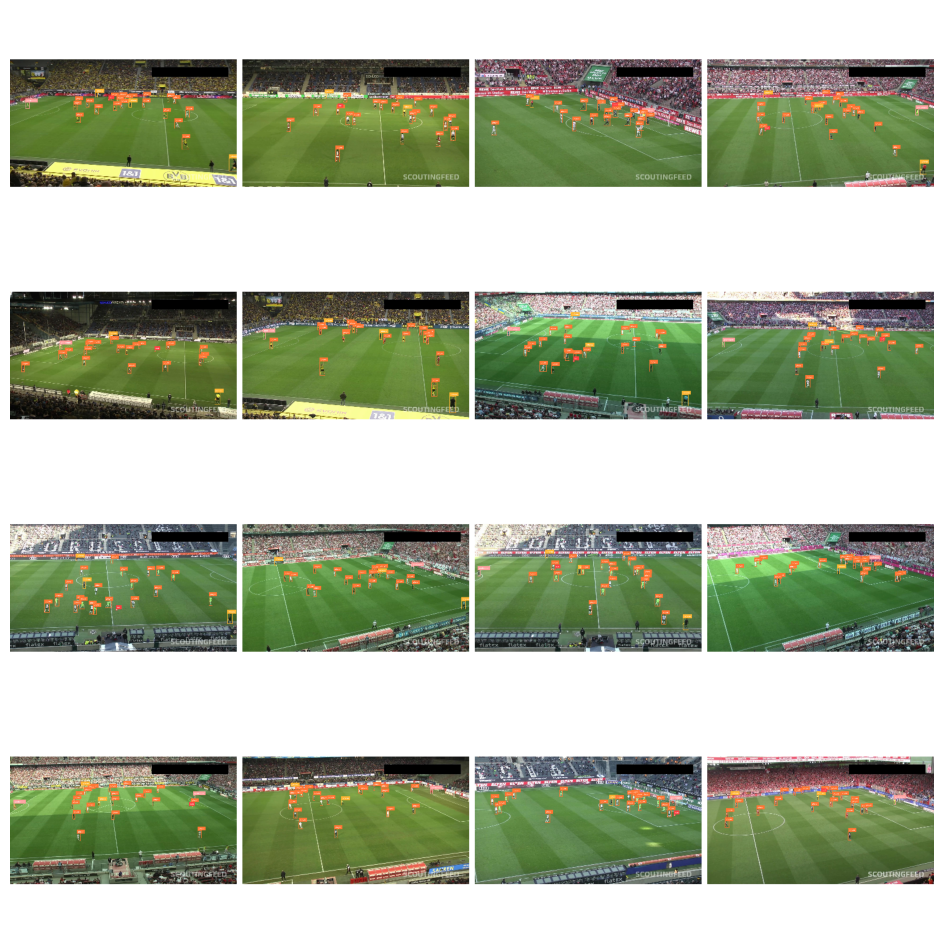
The Supervision library provides tools for easily visualizing your detection dataset. You can create a grid of annotated images to quickly inspect your data and labels. First, initialize the sv.BoxAnnotator and sv.LabelAnnotator. Then, iterate through a subset of the dataset (e.g., the first 25 images), drawing bounding boxes and class labels on each image. Finally, combine the annotated images into a grid for display.
import supervision as sv

ds = sv.DetectionDataset(...)

box_annotator = sv.BoxAnnotator()
label_annotator = sv.LabelAnnotator()

annotated_images = []
for i in range(16):
    _, image, annotations = ds[i]

    labels = [ds.classes[class_id] for class_id in annotations.class_id]

    annotated_image = image.copy()
    annotated_image = box_annotator.annotate(annotated_image, annotations)
    annotated_image = label_annotator.annotate(annotated_image, annotations, labels)
    annotated_images.append(annotated_image)

sv.plot_images_grid(
    annotated_images,
    grid_size=(4, 4),
)
Save Dataset
=== "COCO"
We can do so using the [`sv.DetectionDataset.as_coco`](https://supervision.roboflow.com/datasets/#supervision.dataset.core.DetectionDataset.as_coco) method to save annotations in [COCO](https://roboflow.com/formats/coco-json) format.

```python
import supervision as sv

ds = sv.DetectionDataset(...)

ds.as_coco(
    images_directory_path="<IMAGE_DIRECTORY_PATH>",
    annotations_path="<ANNOTATIONS_PATH>",
)
```
=== "YOLO"
We can do so using the [`sv.DetectionDataset.as_yolo`](https://supervision.roboflow.com/datasets/#supervision.dataset.core.DetectionDataset.as_yolo) method to save annotations in [YOLO](https://roboflow.com/formats/yolov8-pytorch-txt) format.

```python
import supervision as sv

ds = sv.DetectionDataset(...)

ds.as_yolo(
    images_directory_path="<IMAGE_DIRECTORY_PATH>",
    annotations_directory_path="<ANNOTATIONS_DIRECTORY_PATH>",
    data_yaml_path="<DATA_YAML_PATH>",
)
```
=== "Pascal VOC"
We can do so using the [`sv.DetectionDataset.as_pascal_voc`](https://supervision.roboflow.com/datasets/#supervision.dataset.core.DetectionDataset.as_pascal_voc) method to save annotations in [Pascal VOC](https://roboflow.com/formats/pascal-voc-xml) format.

```python
import supervision as sv

ds = sv.DetectionDataset(...)

ds.as_pascal_voc(
    images_directory_path="<IMAGE_DIRECTORY_PATH>",
    annotations_directory_path="<ANNOTATIONS_DIRECTORY_PATH>",
)
```
=== "CreateML"
We can do so using the [`sv.DetectionDataset.as_createml`](https://supervision.roboflow.com/latest/datasets/core/#supervision.dataset.core.DetectionDataset.as_createml) method to save annotations in [CreateML](https://roboflow.com/formats/createml-json) format.

```python
import supervision as sv

ds = sv.DetectionDataset(...)

ds.as_createml(
    images_directory_path="<IMAGE_DIRECTORY_PATH>",
    annotations_path="<ANNOTATIONS_PATH>",
)
```
=== "LabelMe"
We can do so using the [`sv.DetectionDataset.as_labelme`](https://supervision.roboflow.com/latest/datasets/core/#supervision.dataset.core.DetectionDataset.as_labelme) method to save annotations in [LabelMe](https://roboflow.com/formats/labelme-json) format. Detections with masks are exported as `polygon` shapes; box-only detections are exported as `rectangle` shapes.

```python
import supervision as sv

ds = sv.DetectionDataset(...)

ds.as_labelme(
    images_directory_path="<IMAGE_DIRECTORY_PATH>",
    annotations_directory_path="<ANNOTATIONS_DIRECTORY_PATH>",
)
```
Augment Dataset
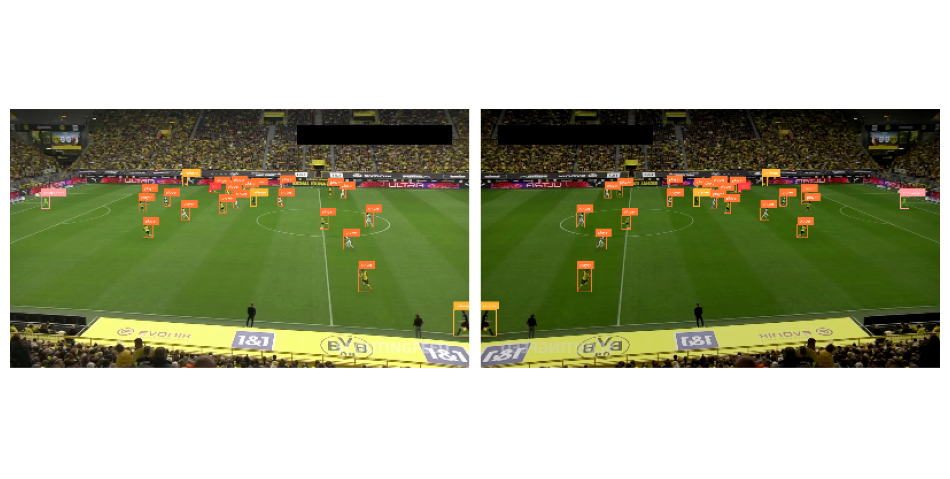
In this section, we'll explore using Supervision in combination with Albumentations to augment our dataset. Data augmentation is a common technique in computer vision to increase the size and diversity of training datasets, leading to improved model performance and generalization.
pip install albumentations
Albumentations provides a flexible and powerful API for image augmentation. The core of the library is the Compose class, which allows you to chain multiple image transformations together. Each transformation is defined using a dedicated class, such as HorizontalFlip, RandomBrightnessContrast, or Perspective.
import albumentations as A

augmentation = A.Compose(
    transforms=[
        A.Perspective(p=0.1),
        A.HorizontalFlip(p=0.5),
        A.RandomBrightnessContrast(p=0.5),
    ],
    bbox_params=A.BboxParams(
        format="pascal_voc",
        label_fields=["category"],
    ),
)
The key is to set format='pascal_voc', which corresponds to the [x_min, y_min, x_max, y_max] bounding box format used in Supervision.
import numpy as np
import supervision as sv
from dataclasses import replace

ds = sv.DetectionDataset(...)

_, original_image, original_annotations = ds[0]

output = augmentation(
    image=original_image,
    bboxes=original_annotations.xyxy,
    category=original_annotations.class_id,
)

augmented_image = output["image"]
augmented_annotations = replace(
    original_annotations,
    xyxy=np.array(output["bboxes"]),
    class_id=np.array(output["category"]),
)
Frequently Asked Questions
What dataset formats does supervision support?
For detection datasets, supervision supports YOLO, COCO JSON, Pascal VOC, CreateML, and LabelMe. Use DetectionDataset.from_yolo(), from_coco(), from_pascal_voc(), from_createml(), or from_labelme() to load, and as_yolo(), as_coco(), as_pascal_voc(), as_createml(), or as_labelme() to save. Classification datasets use ClassificationDataset.from_folder_structure() and as_folder_structure().
Can I split a dataset into train/val/test sets?
DetectionDataset.split(split_ratio=0.8) returns exactly two datasets: train (80%) and test (20%). If you need a validation set, split one of those subsets in a separate step.
Can I merge two datasets together?
Yes. DetectionDataset.merge([dataset_a, dataset_b]) combines multiple datasets into one. Useful for combining datasets from different sources.
What augmentations are available?
Common augmentations such as flip, rotate, translate, scale, crop, color jitter, and Gaussian blur can be applied using an external library like Albumentations, as shown in the augmentation example above. Supervision does not provide an sv.Augmenter pipeline.
Author
- Piotr Skalski — Computer Vision Engineer, Roboflow