 wehub-resource-sync
16031aae96
wehub-resource-sync
16031aae96
6.2 KiB
description
| description |
|---|
| Run pre-trained RF-DETR models (Nano to 2XLarge) on images, video, webcam, and RTSP streams. COCO-trained with real-time DINOv2 backbone. |
You can run any of the four supported RF-DETR base models -- Nano, Small, Medium, Large -- with Inference, an open source computer vision inference server. The base models are trained on the Microsoft COCO dataset. XLarge and 2XLarge detection models are also available via pip install rfdetr[plus] and are provided under the PML 1.0 license.
=== "Run on an Image"
To run RF-DETR on an image, use the following code:
```python
import os
import supervision as sv
from inference import get_model
from PIL import Image
from io import BytesIO
import requests
url = "https://media.roboflow.com/dog.jpeg"
image = Image.open(BytesIO(requests.get(url).content))
model = get_model("rfdetr-large")
predictions = model.infer(image, confidence=0.5)[0]
detections = sv.Detections.from_inference(predictions)
labels = [prediction.class_name for prediction in predictions.predictions]
annotated_image = image.copy()
annotated_image = sv.BoxAnnotator().annotate(annotated_image, detections)
annotated_image = sv.LabelAnnotator().annotate(annotated_image, detections, labels)
sv.plot_image(annotated_image)
```
Above, replace the image URL with any image you want to use with the model.
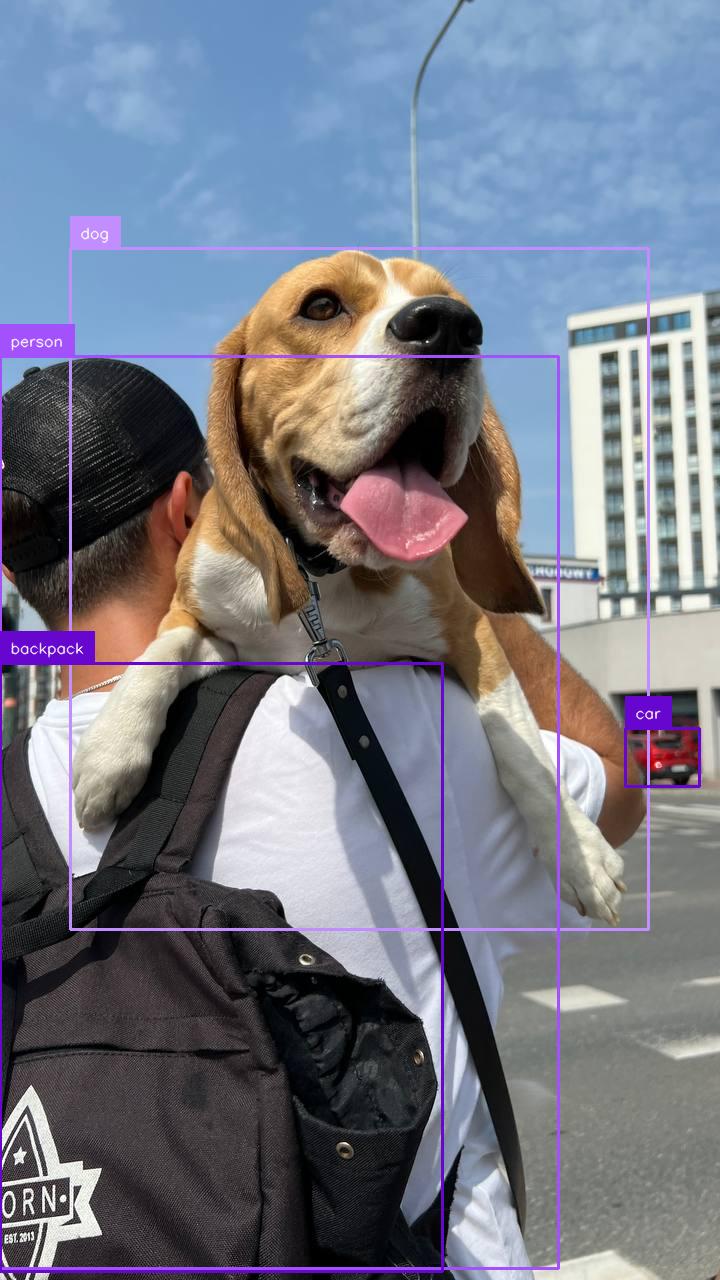
Here are the results from the code above:
<figure markdown="span">
{ width=300 }
<figcaption>RF-DETR Base predictions</figcaption>
</figure>
=== "Run on a Video File"
To run RF-DETR on a video file, use the following code:

```python
import supervision as sv
from rfdetr import RFDETRMedium
from rfdetr.assets.coco_classes import COCO_CLASSES

model = RFDETRMedium()


def callback(frame, index):
    detections = model.predict(frame[:, :, ::-1], threshold=0.5)

    labels = [
        f"{COCO_CLASSES[class_id]} {confidence:.2f}"
        for class_id, confidence in zip(detections.class_id, detections.confidence)
    ]

    annotated_frame = frame.copy()
    annotated_frame = sv.BoxAnnotator().annotate(annotated_frame, detections)
    annotated_frame = sv.LabelAnnotator().annotate(annotated_frame, detections, labels)
    return annotated_frame


sv.process_video(
    source_path="<SOURCE_VIDEO_PATH>",
    target_path="<TARGET_VIDEO_PATH>",
    callback=callback,
)
```

Above, set your `SOURCE_VIDEO_PATH` and `TARGET_VIDEO_PATH` to the directories of the video you want to process and where you want to save the results from inference, respectively.
=== "Run on a Webcam Stream"
To run RF-DETR on a webcam input, use the following code:

```python
import cv2
import supervision as sv
from rfdetr import RFDETRMedium
from rfdetr.assets.coco_classes import COCO_CLASSES

model = RFDETRMedium()

cap = cv2.VideoCapture(0)
while True:
    success, frame = cap.read()
    if not success:
        break

    detections = model.predict(frame[:, :, ::-1], threshold=0.5)

    labels = [
        f"{COCO_CLASSES[class_id]} {confidence:.2f}"
        for class_id, confidence in zip(detections.class_id, detections.confidence)
    ]

    annotated_frame = frame.copy()
    annotated_frame = sv.BoxAnnotator().annotate(annotated_frame, detections)
    annotated_frame = sv.LabelAnnotator().annotate(annotated_frame, detections, labels)

    cv2.imshow("Webcam", annotated_frame)

    if cv2.waitKey(1) & 0xFF == ord("q"):
        break

cap.release()
cv2.destroyAllWindows()
```
=== "Run on an RTSP Stream"
To run RF-DETR on an RTSP (Real Time Streaming Protocol) stream, use the following code:

```python
import cv2
import supervision as sv
from rfdetr import RFDETRMedium
from rfdetr.assets.coco_classes import COCO_CLASSES

model = RFDETRMedium()

cap = cv2.VideoCapture("<RTSP_STREAM_URL>")
while True:
    success, frame = cap.read()
    if not success:
        break

    detections = model.predict(frame[:, :, ::-1], threshold=0.5)

    labels = [
        f"{COCO_CLASSES[class_id]} {confidence:.2f}"
        for class_id, confidence in zip(detections.class_id, detections.confidence)
    ]

    annotated_frame = frame.copy()
    annotated_frame = sv.BoxAnnotator().annotate(annotated_frame, detections)
    annotated_frame = sv.LabelAnnotator().annotate(annotated_frame, detections, labels)

    cv2.imshow("RTSP Stream", annotated_frame)

    if cv2.waitKey(1) & 0xFF == ord("q"):
        break

cap.release()
cv2.destroyAllWindows()
```
You can change the RF-DETR model that the code snippet above uses. To do so, update rfdetr-base to any of the following values:
rfdetr-nanorfdetr-smallrfdetr-mediumrfdetr-large
Batch Inference
You can provide .predict() with either a single image or a list of images. When multiple images are supplied, they are processed together in a single forward pass, resulting in a corresponding list of detections.
import io
import requests
import supervision as sv
from PIL import Image
from rfdetr import RFDETRMedium
from rfdetr.assets.coco_classes import COCO_CLASSES

model = RFDETRMedium()

urls = [
    "https://media.roboflow.com/notebooks/examples/dog-2.jpeg",
    "https://media.roboflow.com/notebooks/examples/dog-3.jpeg",
]

images = [Image.open(io.BytesIO(requests.get(url).content)) for url in urls]

detections_list = model.predict(images, threshold=0.5)

for image, detections in zip(images, detections_list):
    labels = [
        f"{COCO_CLASSES[class_id]} {confidence:.2f}"
        for class_id, confidence in zip(detections.class_id, detections.confidence)
    ]

    annotated_image = image.copy()
    annotated_image = sv.BoxAnnotator().annotate(annotated_image, detections)
    annotated_image = sv.LabelAnnotator().annotate(annotated_image, detections, labels)

    sv.plot_image(annotated_image)