---
description: Run pre-trained RF-DETR models (Nano to 2XLarge) on images, video, webcam, and RTSP streams. COCO-trained with real-time DINOv2 backbone.
---
You can run any of the four supported RF-DETR base models -- Nano, Small, Medium, Large -- with [Inference](https://github.com/roboflow/inference), an open source computer vision inference server. The base models are trained on the [Microsoft COCO dataset](https://universe.roboflow.com/microsoft/coco). XLarge and 2XLarge detection models are also available via `pip install rfdetr[plus]` and are provided under the PML 1.0 license.
=== "Run on an Image"
To run RF-DETR on an image, use the following code:
```python
import os
import supervision as sv
from inference import get_model
from PIL import Image
from io import BytesIO
import requests
url = "https://media.roboflow.com/dog.jpeg"
image = Image.open(BytesIO(requests.get(url).content))
model = get_model("rfdetr-large")
predictions = model.infer(image, confidence=0.5)[0]
detections = sv.Detections.from_inference(predictions)
labels = [prediction.class_name for prediction in predictions.predictions]
annotated_image = image.copy()
annotated_image = sv.BoxAnnotator().annotate(annotated_image, detections)
annotated_image = sv.LabelAnnotator().annotate(annotated_image, detections, labels)
sv.plot_image(annotated_image)
```
Above, replace the image URL with any image you want to use with the model.
Here are the results from the code above:
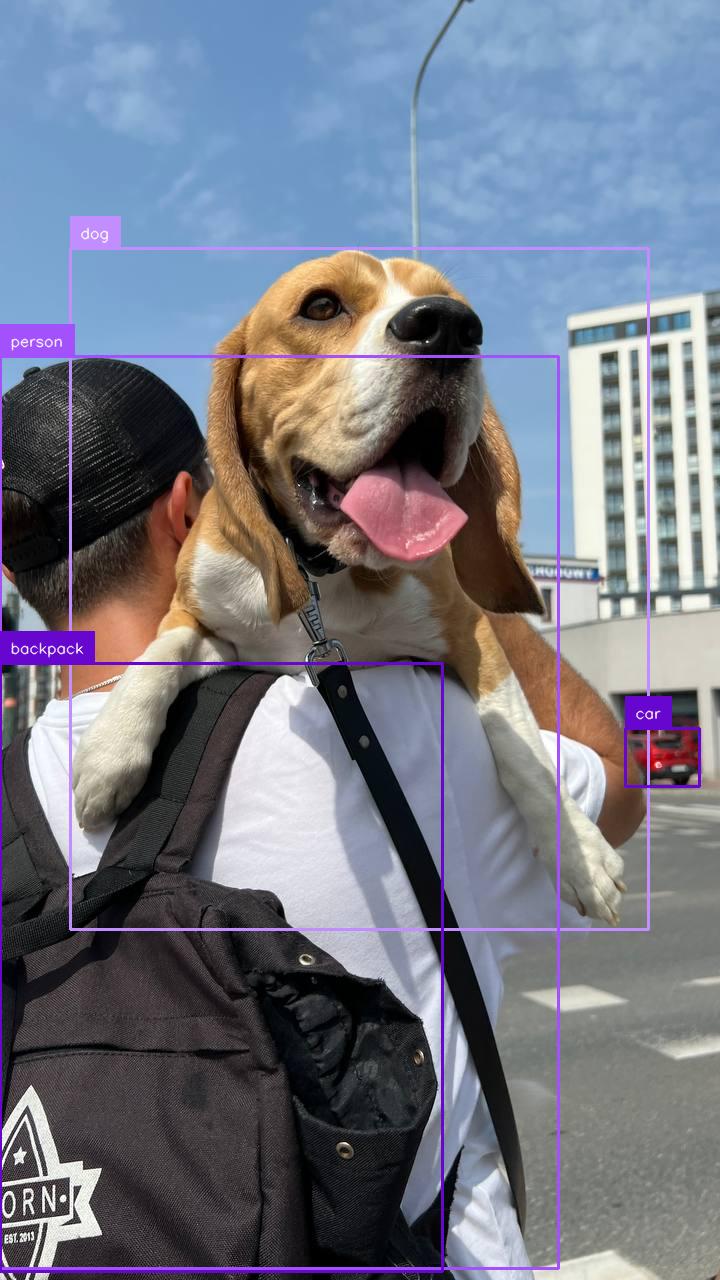{ width=300 }
RF-DETR Base predictions
=== "Run on a Video File"
To run RF-DETR on a video file, use the following code:
```python
import supervision as sv
from rfdetr import RFDETRMedium
from rfdetr.assets.coco_classes import COCO_CLASSES
model = RFDETRMedium()
def callback(frame, index):
detections = model.predict(frame[:, :, ::-1], threshold=0.5)
labels = [
f"{COCO_CLASSES[class_id]} {confidence:.2f}"
for class_id, confidence in zip(detections.class_id, detections.confidence)
]
annotated_frame = frame.copy()
annotated_frame = sv.BoxAnnotator().annotate(annotated_frame, detections)
annotated_frame = sv.LabelAnnotator().annotate(annotated_frame, detections, labels)
return annotated_frame
sv.process_video(
source_path="",
target_path="",
callback=callback,
)
```
Above, set your `SOURCE_VIDEO_PATH` and `TARGET_VIDEO_PATH` to the directories of the video you want to process and where you want to save the results from inference, respectively.
=== "Run on a Webcam Stream"
To run RF-DETR on a webcam input, use the following code:
```python
import cv2
import supervision as sv
from rfdetr import RFDETRMedium
from rfdetr.assets.coco_classes import COCO_CLASSES
model = RFDETRMedium()
cap = cv2.VideoCapture(0)
while True:
success, frame = cap.read()
if not success:
break
detections = model.predict(frame[:, :, ::-1], threshold=0.5)
labels = [
f"{COCO_CLASSES[class_id]} {confidence:.2f}"
for class_id, confidence in zip(detections.class_id, detections.confidence)
]
annotated_frame = frame.copy()
annotated_frame = sv.BoxAnnotator().annotate(annotated_frame, detections)
annotated_frame = sv.LabelAnnotator().annotate(annotated_frame, detections, labels)
cv2.imshow("Webcam", annotated_frame)
if cv2.waitKey(1) & 0xFF == ord("q"):
break
cap.release()
cv2.destroyAllWindows()
```
=== "Run on an RTSP Stream"
To run RF-DETR on an RTSP (Real Time Streaming Protocol) stream, use the following code:
```python
import cv2
import supervision as sv
from rfdetr import RFDETRMedium
from rfdetr.assets.coco_classes import COCO_CLASSES
model = RFDETRMedium()
cap = cv2.VideoCapture("")
while True:
success, frame = cap.read()
if not success:
break
detections = model.predict(frame[:, :, ::-1], threshold=0.5)
labels = [
f"{COCO_CLASSES[class_id]} {confidence:.2f}"
for class_id, confidence in zip(detections.class_id, detections.confidence)
]
annotated_frame = frame.copy()
annotated_frame = sv.BoxAnnotator().annotate(annotated_frame, detections)
annotated_frame = sv.LabelAnnotator().annotate(annotated_frame, detections, labels)
cv2.imshow("RTSP Stream", annotated_frame)
if cv2.waitKey(1) & 0xFF == ord("q"):
break
cap.release()
cv2.destroyAllWindows()
```
You can change the RF-DETR model that the code snippet above uses. To do so, update `rfdetr-base` to any of the following values:
- `rfdetr-nano`
- `rfdetr-small`
- `rfdetr-medium`
- `rfdetr-large`
## Batch Inference
You can provide `.predict()` with either a single image or a list of images. When multiple images are supplied, they are processed together in a single forward pass, resulting in a corresponding list of detections.
```python
import io
import requests
import supervision as sv
from PIL import Image
from rfdetr import RFDETRMedium
from rfdetr.assets.coco_classes import COCO_CLASSES
model = RFDETRMedium()
urls = [
"https://media.roboflow.com/notebooks/examples/dog-2.jpeg",
"https://media.roboflow.com/notebooks/examples/dog-3.jpeg",
]
images = [Image.open(io.BytesIO(requests.get(url).content)) for url in urls]
detections_list = model.predict(images, threshold=0.5)
for image, detections in zip(images, detections_list):
labels = [
f"{COCO_CLASSES[class_id]} {confidence:.2f}"
for class_id, confidence in zip(detections.class_id, detections.confidence)
]
annotated_image = image.copy()
annotated_image = sv.BoxAnnotator().annotate(annotated_image, detections)
annotated_image = sv.LabelAnnotator().annotate(annotated_image, detections, labels)
sv.plot_image(annotated_image)
```