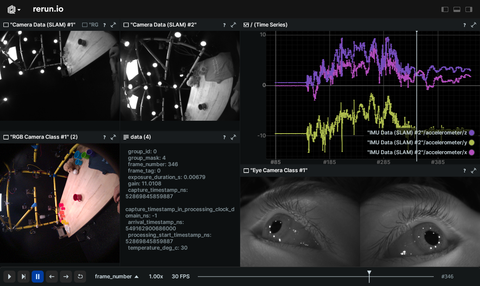
This is an example that shows how to use Rerun's C++ API to log and view [VRS](https://github.com/facebookresearch/vrs) files.
# Used Rerun types
[`Arrows3D`](https://www.rerun.io/docs/reference/types/archetypes/arrows3d), [`Image`](https://www.rerun.io/docs/reference/types/archetypes/image), [`Scalars`](https://www.rerun.io/docs/reference/types/archetypes/scalars), [`TextDocument`](https://www.rerun.io/docs/reference/types/archetypes/text_document)
# Background
This C++ example demonstrates how to visualize VRS files with Rerun.
VRS is a file format optimized to record & playback streams of sensor data, such as images, audio samples, and any other discrete sensors (IMU, temperature, etc), stored in per-device streams of time-stamped records.
# Logging and visualizing with Rerun
The visualizations in this example were created with the following Rerun code:
## 3D arrows
```cpp
void IMUPlayer::log_accelerometer(const std::array& accelMSec2) {
_rec->log(_entity_path + "/accelerometer", rerun::Arrows3D::from_vectors({accelMSec2}));
// … existing code for scalars …
}
```
## Scalars
```cpp
void IMUPlayer::log_accelerometer(const std::array& accelMSec2) {
// … existing code for Arrows3D …
_rec->log(_entity_path + "/accelerometer", rerun::Scalars(accelMSec2));
}
```
```cpp
void IMUPlayer::log_gyroscope(const std::array& gyroRadSec) {
_rec->log(_entity_path + "/gyroscope", rerun::Scalars(gyroRadSec));
}
```
```cpp
void IMUPlayer::log_magnetometer(const std::array& magTesla) {
_rec->log(_entity_path + "/magnetometer", rerun::Scalars(magTesla));
}
```
## Images
```cpp
_rec->log(
_entity_path,
rerun::Image({
frame->getHeight(),
frame->getWidth(),
frame->getSpec().getChannelCountPerPixel()},
frame->getBuffer()
)
);
```
## Text document
```cpp
_rec->log_static(_entity_path + "/configuration", rerun::TextDocument(layout_str));
```
# Run the code
You can find the build instructions here: [C++ Example: VRS Viewer](https://github.com/rerun-io/cpp-example-vrs)