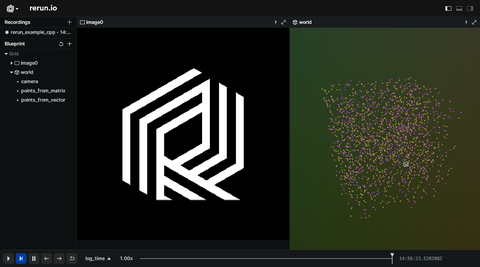
This is a minimal CMake project that shows how to use Rerun in your code in conjunction with [Eigen](https://gitlab.com/libeigen/eigen) and [OpenCV](https://opencv.org/).
# Used Rerun types
[`Image`](https://www.rerun.io/docs/reference/types/archetypes/image), [`Points3D`](https://www.rerun.io/docs/reference/types/archetypes/points3d), [`Pinhole`](https://www.rerun.io/docs/reference/types/archetypes/pinhole), [`Transform3D`](https://www.rerun.io/docs/reference/types/archetypes/transform3d)
# Background
This C++ example demonstrates the integration of the Rerun with Eigen and OpenCV libraries.
Eigen handles 3D point calculations and camera orientations, while OpenCV assists with image processing tasks like reading and converting images.
# Logging and visualizing with Rerun
The visualizations in this example were created with the following Rerun code:
## 3D points
The positions of 3D points are logged to the "world/points_from_vector" and "world/points_from_matrix" entities using the [`Points3D`](https://www.rerun.io/docs/reference/types/archetypes/points3d) archetype.
```cpp
rec.log("world/points_from_vector", rerun::Points3D(points3d_vector));
```
```cpp
rec.log("world/points_from_matrix", rerun::Points3D(points3d_matrix));
```
## Pinhole camera
A pinhole camera is logged to "world/camera" using the [`Pinhole`](https://www.rerun.io/docs/reference/types/archetypes/pinhole) archetype.
Additionally, the 3D transformation of the camera, including its position and orientation, is logged using the [`Transform3D`](https://www.rerun.io/docs/reference/types/archetypes/transform3d) archetype.
```cpp
rec.log(
"world/camera",
rerun::Pinhole::from_focal_length_and_resolution({500.0, 500.0}, {640.0, 480.0})
);
```
```cpp
rec.log(
"world/camera",
rerun::Transform3D(
rerun::Vec3D(camera_position.data()),
rerun::Mat3x3(camera_orientation.data())
)
);
```
## Images
Images are logged using the [`Image`](https://www.rerun.io/docs/reference/types/archetypes/image) archetype. Two methods are demonstrated: logging images with a tensor buffer and logging images by passing a pointer to the image data.
```cpp
// Log image to rerun by borrowing binary data into a `Collection` from a pointer.
rec.log(
"image0",
rerun::Image(
rerun::borrow(img.data, img.total() * img.elemSize()),
rerun::WidthHeight(
static_cast(img.cols),
static_cast(img.rows)
),
rerun::ColorModel::BGR
)
);
// Or by passing a pointer to the image data.
rec.log(
"image1",
rerun::Image(
reinterpret_cast(img.data),
rerun::WidthHeight(
static_cast(img.cols),
static_cast(img.rows)
),
rerun::ColorModel::BGR
)
);
```
# Run the code
You can find the build instructions here: [C++ Example with OpenCV and Eigen](https://github.com/rerun-io/cpp-example-opencv-eigen/blob/main/README.md)