 wehub-resource-sync
6.5 KiB
Runtime Env Architecture
This document describes the architecture of Ray's runtime environment feature.
Overview
For a high-level overview of runtime environments, see the blog post here. The blog post also contains a simple example of how to use runtime environments.
For a more detailed explanation of how to use runtime environments, see the documentation.
See also the relevant design doc and runtime environment section of the Ray 2.0 whitepaper here.
Architecture
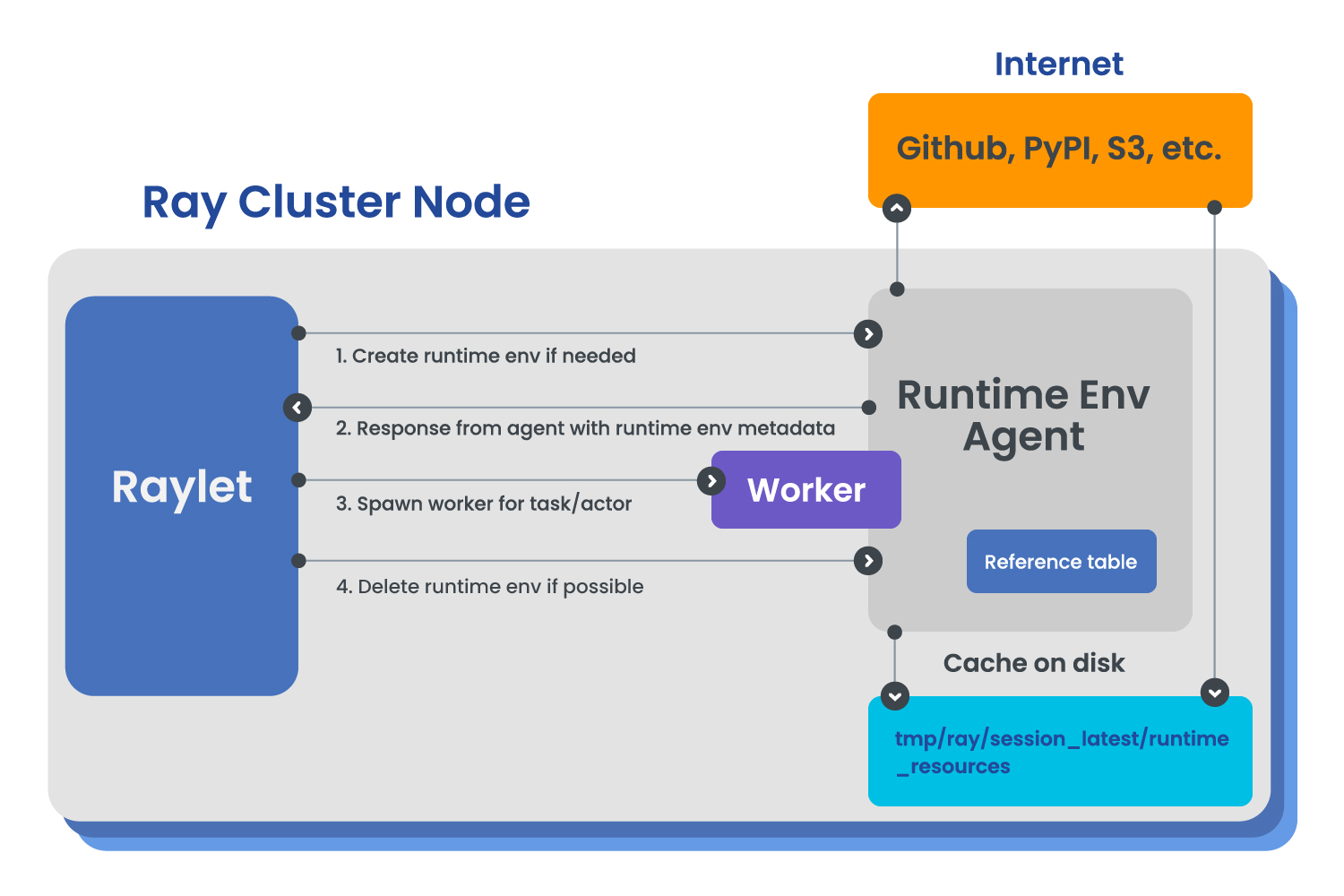
Runtime environment creation is handled by a "dashboard agent" process (RuntimeEnvAgent) that runs on each node of the cluster (python/ray/dashboard/modules/runtime_env/runtime_env_agent.py).
The dashboard agent fate-shares with the Raylet process (for more on the Raylet, see the Ray whitepaper). The reason is that if the dashboard agent fails, then runtime env creation will fail, so the Raylet will no longer be able to set up the environment for its workers. The fate sharing simplifies the failure model and because it is a core component for scheduling tasks and actors.
The artifacts of a created runtime environment are a set of files on disk and a RuntimeEnvContext Python object (python/ray/_private/runtime_env/context.py) in memory.
The RuntimeEnvContext is serialized and passed to the Raylet, where it is used when starting a new worker process for this runtime env (see "Starting a Worker Process").
Plugins
All options for runtime envs (e.g. working_dir, pip, etc) are implemented as plugins adhering to a Ray RuntimeEnvPlugin interface. This class contains public methods to be called during installation, deletion, and for updating the RuntimeEnvContext object.
For details, see the design doc.
The Worker Pool
The Raylet's worker pool (src/ray/raylet/worker_pool.cc) handles caching of worker processes and starting new worker processes. When scheduling a task, its runtime env spec is included in its TaskSpec. The worker pool then compares the hash of the runtime env spec against those of all running workers to determine whether the task can be scheduled on an existing worker process with that runtime env, or whether a new worker process needs to be started.
Creation and deletion
The RuntimeEnvAgent exposes gRPC endpoints for runtime_env creation and deletion to the Raylet.
The agent manager (src/ray/raylet/agent_manager.cc) runs in the Raylet and manages the connection to the agent, and calls the creation and deletion endpoints.
The worker pool holds a reference to the agent manager, and uses it to send CreateRuntimeEnvIfNeeded and DeleteRuntimeEnvIfPossible requests to the RuntimeEnvAgent as needed for new worker processes or when worker processes are removed.
Starting a new worker process
Worker process are started by the Raylet in python/ray/_private/services.py. In this command, python/ray/_private/workers/setup_worker.py is run, which deserializes the RuntimeEnvContext object and calls its exec_worker method. The exec_worker method sets the appropriate environment variables, modifies the worker process startup command (e.g. prepending conda activate some_env) and then calls execvp to start the worker process (python/ray/_private/worker.py).
Caching and garbage collection
For design details on caching and garbage collection, see the design doc.
The implementation is as follows:
GCS internal KV garbage collection
This section deals with files that are stored in the head node in the internal KV, such as working_dir or py_modules packages uploaded by the user.
References are tracked per package (URI). The reference counting is managed in src/ray/common/runtime_env_manager.cc. References to these files are incremented when a driver is started that uses that URI, and decremented when a driver exits. Similarly, references are incremented when a detached actor is started that uses that URI, and decremented when that actor exits.
When a reference count reaches 0, the file is deleted.
The "temporary reference" for Ray Jobs API and Ray Client
When the user specifies a local directory in working_dir or py_modules, it is zipped and uploaded to the GCS as a URI by Ray. However, as described above, the reference count is ordinarily only incremented when a driver (or detached actor) is started that uses that URI. In the case of Ray Jobs API and Ray Client, this uploading happens before the driver starts.
To prevent the file from being garbage collected before the driver starts, a special "temporary reference" is added for the URI when it is uploaded. This reference is removed after a configurable timeout (controlled by the env var RAY_RUNTIME_ENV_TEMPORARY_REFERENCE_EXPIRATION_S on the head node, default 600 seconds).
Local node garbage collection
This section deals with files that are stored on disk on all nodes, such as installed pip packages or working_dir files downloaded from the GCS or from a remote URI.
References for these files are tracked by the runtime env agent process on each node. Each agent keeps its own reference table in memory. References are incremented when a runtime env is created, and decremented when the runtime env is deleted. The files are not deleted until the reference count reaches 0 and the cache size exceeds the maximum cache size.
Each runtime_env field has its own cache size limit, which defaults to 10GB and can be configured via the env var RAY_RUNTIME_ENV_<field>_CACHE_SIZE_GB on each node (e.g. RAY_RUNTIME_ENV_WORKING_DIR_CACHE_SIZE_GB).
Testing
The runtime environment feature is tested in files matching the pattern test_runtime_env*. The names of these files should be mostly self-explanatory.