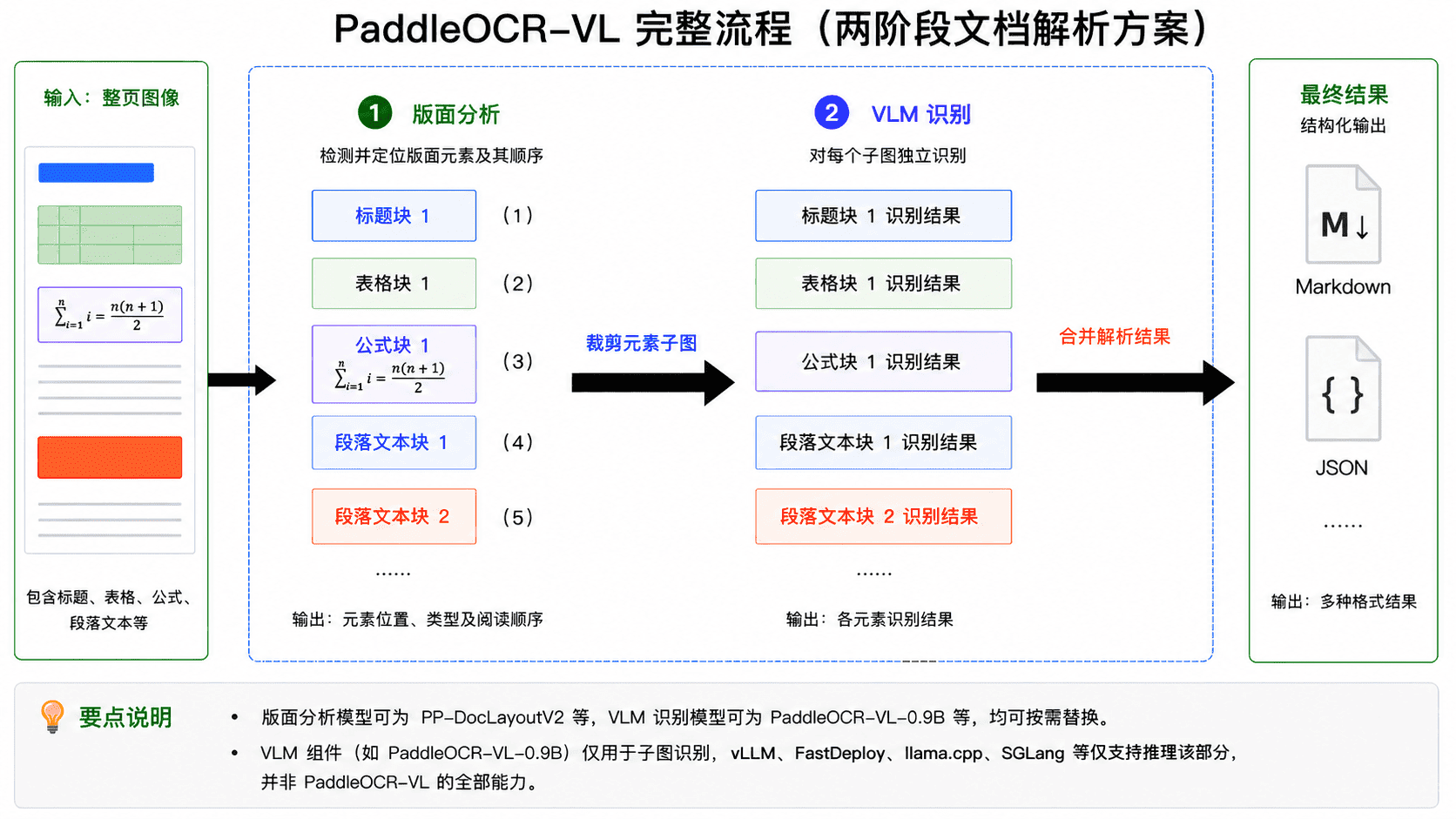
 在该流程中,第一阶段为版面分析:模型以整图作为输入,检测并定位图像中的各类版面元素(例如表格、公式等),同时确定其阅读顺序,并根据检测结果裁剪出对应的元素子图;第二阶段为 VLM 识别:将每个子图独立输入 VLM,生成对应的识别结果(例如 Markdown 文本),随后再按照版面分析阶段给出的顺序对各元素结果进行合并,得到整幅图像的完整解析结果。因此,**若需使用 PaddleOCR-VL 的完整能力,必须采用版面分析与 VLM 识别协同的完整流程,而不能仅单独使用 VLM。** 后文会多次涉及相关概念,请注意区分完整的 PaddleOCR-VL 流程与其中的 VLM 组件。以 PaddleOCR-VL v1 为例,版面分析模型为 PP-DocLayoutV2,VLM 为 PaddleOCR-VL-0.9B。需要特别说明的是,“PaddleOCR-VL-0.9B” 并不是 PaddleOCR-VL 的一个模型变种,而是 PaddleOCR-VL v1 完整流程中的 VLM 组件;这与常见 LLM / VLM 的命名习惯不同,例如 Qwen2-72B 通常表示 Qwen2 系列下的一个具体模型变体。
**如果在使用过程中出现无法复现论文或 PaddleOCR 官网精度、模型输出大量幻觉文本等问题,首先应确认当前使用的是完整的 PaddleOCR-VL 流程,而不是仅使用其中的 VLM 组件。** 例如,直接通过 Transformers 本地执行 PaddleOCR-VL-0.9B 模型,或直接请求 vLLM / SGLang / FastDeploy 服务,都不等同于运行完整的 PaddleOCR-VL 流程。
## 从这里开始
请先根据硬件选择对应教程。
| 硬件 | 阅读哪篇教程 |
| --------------------------------| ----------------------------------------------------------------------------------------------|
| x64 CPU | 继续阅读本教程。请使用第 1.2 节的手动安装路径;仅适用于 NVIDIA GPU 的 Docker 步骤不适用。 |
| 除 Blackwell 之外的 NVIDIA GPU | 继续阅读本教程。 |
| NVIDIA Blackwell GPU | 阅读 [PaddleOCR-VL NVIDIA Blackwell 架构 GPU 使用教程](./PaddleOCR-VL-NVIDIA-Blackwell.md)。 |
| Apple Silicon | 阅读 [PaddleOCR-VL Apple Silicon 使用教程](./PaddleOCR-VL-Apple-Silicon.md)。 |
| 昆仑芯 XPU | 阅读 [PaddleOCR-VL 昆仑芯 XPU 使用教程](./PaddleOCR-VL-Kunlunxin-XPU.md)。 |
| 海光 DCU | 阅读 [PaddleOCR-VL 海光 DCU 使用教程](./PaddleOCR-VL-Hygon-DCU.md)。 |
| 沐曦 GPU | 阅读 [PaddleOCR-VL 沐曦 GPU 使用教程](./PaddleOCR-VL-MetaX-GPU.md)。 |
| 天数 GPU | 阅读 [PaddleOCR-VL 天数 GPU 使用教程](./PaddleOCR-VL-Iluvatar-GPU.md)。 |
| 华为昇腾 NPU | 阅读 [PaddleOCR-VL 华为昇腾 NPU 使用教程](./PaddleOCR-VL-Huawei-Ascend-NPU.md)。 |
| AMD GPU | 阅读 [PaddleOCR-VL AMD GPU 使用教程](./PaddleOCR-VL-AMD-GPU.md)。 |
| Intel Arc GPU | 阅读 [PaddleOCR-VL Intel Arc GPU 使用教程](./PaddleOCR-VL-Intel-Arc-GPU.md)。 |
如果你只是想先确认 PaddleOCR-VL 支持在哪些硬件上部署,或是特定硬件支持哪些推理方式,请先阅读下方的 [PaddleOCR-VL 推理方式与硬件支持矩阵](#paddleocr-vl-对推理设备的支持情况)。
## PaddleOCR-VL 推理方式与硬件支持矩阵 {#paddleocr-vl-对推理设备的支持情况}
| 推理方式 | NVIDIA GPU | 昆仑芯 XPU | 海光 DCU | 沐曦 GPU | 天数 GPU | 华为昇腾 NPU | x64 CPU | Apple Silicon | AMD GPU | Intel Arc GPU |
| ------------------------- | ------- | ------- | ------ | ------ | ------ | -------- | ------- | ------------- | ------- | ------------- |
| PaddlePaddle | ✅ | ✅ | ✅ | ✅ | ✅ | 🚧 | ✅ | ✅ | ✅ | 🚧 |
| Transformers | ✅ | 🚧 | 🚧 | 🚧 | 🚧 | 🚧 | ✅ | 🚧 | 🚧 | 🚧 |
| PaddlePaddle + vLLM | ✅ | 🚧 | ✅ | 🚧 | 🚧 | ✅ | ❌ | ❌ | ✅ | ✅ |
| PaddlePaddle + SGLang | ✅ | 🚧 | 🚧 | 🚧 | 🚧 | 🚧 | ❌ | ❌ | 🚧 | 🚧 |
| PaddlePaddle + FastDeploy | ✅ | ✅ | 🚧 | ✅ | ✅ | 🚧 | ❌ | ❌ | 🚧 | 🚧 |
| PaddlePaddle + MLX-VLM | ❌ | ❌ | ❌ | ❌ | ❌ | ❌ | ❌ | ✅ | ❌ | ❌ |
| PaddlePaddle + llama.cpp | ✅ | 🚧 | 🚧 | 🚧 | 🚧 | 🚧 | ✅ | 🚧 | 🚧 | 🚧 |
| Transformers + vLLM | ✅ | 🚧 | 🚧 | 🚧 | 🚧 | 🚧 | ❌ | ❌ | 🚧 | 🚧 |
| Transformers + SGLang | ✅ | 🚧 | 🚧 | 🚧 | 🚧 | 🚧 | ❌ | ❌ | 🚧 | 🚧 |
| Transformers + FastDeploy | ✅ | 🚧 | 🚧 | 🚧 | 🚧 | 🚧 | ❌ | ❌ | 🚧 | 🚧 |
| Transformers + MLX-VLM | ❌ | ❌ | ❌ | ❌ | ❌ | ❌ | ❌ | ✅ | ❌ | ❌ |
| Transformers + llama.cpp | ✅ | 🚧 | 🚧 | 🚧 | 🚧 | 🚧 | ✅ | 🚧 | 🚧 | 🚧 |
**状态说明**
- `✅`:支持。
- `🚧`:适配中或待进一步验证。
- `❌`:当前不支持或不适用。
**推理方式说明**
`PaddlePaddle` 表示版面分析模型与 VLM 均在本地使用飞桨框架推理;在实际执行时,各模块会根据模型形态解析为 `paddle_static` 或 `paddle_dynamic`。`Transformers` 表示版面分析模型与 VLM 均在本地通过 `transformers` 引擎推理;其余推理方式遵循 `版面分析模型推理方式 + VLM 推理方式` 的格式,后者中的 VLM 部分由独立推理服务承担,例如 `PaddlePaddle + vLLM` 表示版面分析模型在客户端本地使用飞桨框架推理,VLM 由 vLLM 服务推理。
**判定补充说明**
- vLLM、SGLang 和 FastDeploy 无法在 Windows 上原生运行,请使用我们提供的 Docker 镜像。
- 由于不同库之间存在依赖冲突,使用 Transformers + vLLM 等混合推理方式时,通常需要将版面分析模型和 VLM 服务部署在不同环境中。
## 环境要求
使用 NVIDIA GPU 推理时,需要注意 Compute Capability(简称 CC)和 CUDA 版本(简称 CUDA)是否满足要求:
- PaddlePaddle:CC ≥ 7.0,CUDA ≥ 11.8
- Transformers:CC ≥ 7.0,CUDA ≥ 11.8
- vLLM:CC ≥ 8.0,CUDA ≥ 12.6
- SGLang:8.0 ≤ CC < 12.0,CUDA ≥ 12.6
- FastDeploy:8.0 ≤ CC < 12.0,CUDA ≥ 12.6
- CC ≥ 8 的常见显卡包括 RTX 30/40/50 系列及 A10/A100 等,更多型号可查看 [CUDA GPU 计算能力](https://developer.nvidia.cn/cuda-gpus)。
此外,虽然 vLLM 可在 T4/V100 等 CC 7.x 的 NVIDIA GPU 上启动,但容易出现超时或 OOM,不推荐使用。
## 本教程支持的使用目标
本教程是 x64 CPU 用户和除 Blackwell 之外的 NVIDIA GPU 用户的默认路径。
| 目标 | 在本教程中的支持情况 | 从哪里开始阅读 |
| -------------- | ----------------------------------------------------------------------------- | ------------------------------------------------------------ |
| 本地直接推理 | 支持。x64 CPU 用户应使用第 1.2 节的手动安装路径。 | 阅读第 1 节“本地运行环境准备”和第 2 节“快速开始”。 |
| 客户端 + VLM 推理服务 | 支持。 | 先完成本地直接推理,再阅读第 3 节“使用 VLM 推理服务”。 |
| 完整 API 服务 | 支持。x64 CPU 用户应使用手动部署路径;除 Blackwell 之外的 NVIDIA GPU 用户可使用 Docker Compose 或手动部署。 | 阅读第 4 节“服务化部署”:如需 Docker Compose,阅读第 4.1 节;如需手动部署,先完成第 1 节“本地运行环境准备”,然后阅读第 4.2 节。如需支持更高并发,请参考[高性能服务化部署方案](https://github.com/PaddlePaddle/PaddleOCR/blob/{{PADDLEOCR_GITHUB_REF}}/deploy/paddleocr_vl_docker/hps/README.md)。 |
| 模型微调 | 支持。 | 阅读第 5 节“模型微调”。 |
## 1. 本地运行环境准备
此步骤主要介绍如何搭建 PaddleOCR-VL 的本地运行环境。本教程主要适用于 **x64 CPU** 和 **除 Blackwell 之外的 NVIDIA GPU** 用户,其他硬件请优先参考上文列出的专用教程。
在本教程中,有以下两种本地运行环境准备方式:
- 方法一:使用官方 Docker 镜像(仅适用于 NVIDIA GPU)。
- 方法二:手动安装推理引擎和 PaddleOCR(x64 CPU 和 NVIDIA GPU 均可使用)。
**我们强烈推荐采用 Docker 镜像的方式,以最大程度减少可能出现的环境问题。**
### 1.1 方法一:使用 Docker 镜像
我们推荐使用官方 Docker 镜像(要求 Docker 版本 >= 19.03,机器装配有 GPU 且 NVIDIA 驱动支持 CUDA 12.6 或以上版本):
```shell
docker run \
-it \
--gpus all \
--network host \
--user root \
ccr-2vdh3abv-pub.cnc.bj.baidubce.com/paddlepaddle/paddleocr-vl:latest-nvidia-gpu \
/bin/bash
# 在容器中调用 PaddleOCR CLI 或 Python API
```
如果您希望在无法连接互联网的环境中使用 PaddleOCR-VL,请将上述命令中的 `ccr-2vdh3abv-pub.cnc.bj.baidubce.com/paddlepaddle/paddleocr-vl:latest-nvidia-gpu` (镜像的大小约为 8 GB)更换为离线版本镜像 `ccr-2vdh3abv-pub.cnc.bj.baidubce.com/paddlepaddle/paddleocr-vl:latest-nvidia-gpu-offline`(镜像大小约为 10 GB)。您需要在可以联网的机器上拉取镜像,将镜像导入到离线机器,然后在离线机器使用该镜像启动容器。例如:
```shell
# 在能够联网的机器上执行
docker pull ccr-2vdh3abv-pub.cnc.bj.baidubce.com/paddlepaddle/paddleocr-vl:latest-nvidia-gpu-offline
# 将镜像保存到文件中
docker save ccr-2vdh3abv-pub.cnc.bj.baidubce.com/paddlepaddle/paddleocr-vl:latest-nvidia-gpu-offline -o paddleocr-vl-latest-nvidia-gpu-offline.tar
# 将镜像文件传输到离线机器
# 在离线机器上执行
docker load -i paddleocr-vl-latest-nvidia-gpu-offline.tar
# 之后可以在离线机器上使用 `docker run` 启动容器
```
镜像中仅预装飞桨框架,未安装其他推理引擎(如 Transformers)。如果希望使用其他推理引擎,建议采用方法二手动安装(不建议在预装飞桨框架的环境中安装)。
> TIP:
> 标签后缀为 `latest-xxx` 的镜像对应最新版本。
> 如果本地已经存在对应的 `latest` 镜像,但希望使用最新功能或修复,建议在继续使用前重新执行一次 `docker pull` 更新镜像。
> 如果希望使用特定版本的镜像,可以将标签中的 `latest` 替换为 PaddleOCR 版本号:`paddleocr
在该流程中,第一阶段为版面分析:模型以整图作为输入,检测并定位图像中的各类版面元素(例如表格、公式等),同时确定其阅读顺序,并根据检测结果裁剪出对应的元素子图;第二阶段为 VLM 识别:将每个子图独立输入 VLM,生成对应的识别结果(例如 Markdown 文本),随后再按照版面分析阶段给出的顺序对各元素结果进行合并,得到整幅图像的完整解析结果。因此,**若需使用 PaddleOCR-VL 的完整能力,必须采用版面分析与 VLM 识别协同的完整流程,而不能仅单独使用 VLM。** 后文会多次涉及相关概念,请注意区分完整的 PaddleOCR-VL 流程与其中的 VLM 组件。以 PaddleOCR-VL v1 为例,版面分析模型为 PP-DocLayoutV2,VLM 为 PaddleOCR-VL-0.9B。需要特别说明的是,“PaddleOCR-VL-0.9B” 并不是 PaddleOCR-VL 的一个模型变种,而是 PaddleOCR-VL v1 完整流程中的 VLM 组件;这与常见 LLM / VLM 的命名习惯不同,例如 Qwen2-72B 通常表示 Qwen2 系列下的一个具体模型变体。
**如果在使用过程中出现无法复现论文或 PaddleOCR 官网精度、模型输出大量幻觉文本等问题,首先应确认当前使用的是完整的 PaddleOCR-VL 流程,而不是仅使用其中的 VLM 组件。** 例如,直接通过 Transformers 本地执行 PaddleOCR-VL-0.9B 模型,或直接请求 vLLM / SGLang / FastDeploy 服务,都不等同于运行完整的 PaddleOCR-VL 流程。
## 从这里开始
请先根据硬件选择对应教程。
| 硬件 | 阅读哪篇教程 |
| --------------------------------| ----------------------------------------------------------------------------------------------|
| x64 CPU | 继续阅读本教程。请使用第 1.2 节的手动安装路径;仅适用于 NVIDIA GPU 的 Docker 步骤不适用。 |
| 除 Blackwell 之外的 NVIDIA GPU | 继续阅读本教程。 |
| NVIDIA Blackwell GPU | 阅读 [PaddleOCR-VL NVIDIA Blackwell 架构 GPU 使用教程](./PaddleOCR-VL-NVIDIA-Blackwell.md)。 |
| Apple Silicon | 阅读 [PaddleOCR-VL Apple Silicon 使用教程](./PaddleOCR-VL-Apple-Silicon.md)。 |
| 昆仑芯 XPU | 阅读 [PaddleOCR-VL 昆仑芯 XPU 使用教程](./PaddleOCR-VL-Kunlunxin-XPU.md)。 |
| 海光 DCU | 阅读 [PaddleOCR-VL 海光 DCU 使用教程](./PaddleOCR-VL-Hygon-DCU.md)。 |
| 沐曦 GPU | 阅读 [PaddleOCR-VL 沐曦 GPU 使用教程](./PaddleOCR-VL-MetaX-GPU.md)。 |
| 天数 GPU | 阅读 [PaddleOCR-VL 天数 GPU 使用教程](./PaddleOCR-VL-Iluvatar-GPU.md)。 |
| 华为昇腾 NPU | 阅读 [PaddleOCR-VL 华为昇腾 NPU 使用教程](./PaddleOCR-VL-Huawei-Ascend-NPU.md)。 |
| AMD GPU | 阅读 [PaddleOCR-VL AMD GPU 使用教程](./PaddleOCR-VL-AMD-GPU.md)。 |
| Intel Arc GPU | 阅读 [PaddleOCR-VL Intel Arc GPU 使用教程](./PaddleOCR-VL-Intel-Arc-GPU.md)。 |
如果你只是想先确认 PaddleOCR-VL 支持在哪些硬件上部署,或是特定硬件支持哪些推理方式,请先阅读下方的 [PaddleOCR-VL 推理方式与硬件支持矩阵](#paddleocr-vl-对推理设备的支持情况)。
## PaddleOCR-VL 推理方式与硬件支持矩阵 {#paddleocr-vl-对推理设备的支持情况}
| 推理方式 | NVIDIA GPU | 昆仑芯 XPU | 海光 DCU | 沐曦 GPU | 天数 GPU | 华为昇腾 NPU | x64 CPU | Apple Silicon | AMD GPU | Intel Arc GPU |
| ------------------------- | ------- | ------- | ------ | ------ | ------ | -------- | ------- | ------------- | ------- | ------------- |
| PaddlePaddle | ✅ | ✅ | ✅ | ✅ | ✅ | 🚧 | ✅ | ✅ | ✅ | 🚧 |
| Transformers | ✅ | 🚧 | 🚧 | 🚧 | 🚧 | 🚧 | ✅ | 🚧 | 🚧 | 🚧 |
| PaddlePaddle + vLLM | ✅ | 🚧 | ✅ | 🚧 | 🚧 | ✅ | ❌ | ❌ | ✅ | ✅ |
| PaddlePaddle + SGLang | ✅ | 🚧 | 🚧 | 🚧 | 🚧 | 🚧 | ❌ | ❌ | 🚧 | 🚧 |
| PaddlePaddle + FastDeploy | ✅ | ✅ | 🚧 | ✅ | ✅ | 🚧 | ❌ | ❌ | 🚧 | 🚧 |
| PaddlePaddle + MLX-VLM | ❌ | ❌ | ❌ | ❌ | ❌ | ❌ | ❌ | ✅ | ❌ | ❌ |
| PaddlePaddle + llama.cpp | ✅ | 🚧 | 🚧 | 🚧 | 🚧 | 🚧 | ✅ | 🚧 | 🚧 | 🚧 |
| Transformers + vLLM | ✅ | 🚧 | 🚧 | 🚧 | 🚧 | 🚧 | ❌ | ❌ | 🚧 | 🚧 |
| Transformers + SGLang | ✅ | 🚧 | 🚧 | 🚧 | 🚧 | 🚧 | ❌ | ❌ | 🚧 | 🚧 |
| Transformers + FastDeploy | ✅ | 🚧 | 🚧 | 🚧 | 🚧 | 🚧 | ❌ | ❌ | 🚧 | 🚧 |
| Transformers + MLX-VLM | ❌ | ❌ | ❌ | ❌ | ❌ | ❌ | ❌ | ✅ | ❌ | ❌ |
| Transformers + llama.cpp | ✅ | 🚧 | 🚧 | 🚧 | 🚧 | 🚧 | ✅ | 🚧 | 🚧 | 🚧 |
**状态说明**
- `✅`:支持。
- `🚧`:适配中或待进一步验证。
- `❌`:当前不支持或不适用。
**推理方式说明**
`PaddlePaddle` 表示版面分析模型与 VLM 均在本地使用飞桨框架推理;在实际执行时,各模块会根据模型形态解析为 `paddle_static` 或 `paddle_dynamic`。`Transformers` 表示版面分析模型与 VLM 均在本地通过 `transformers` 引擎推理;其余推理方式遵循 `版面分析模型推理方式 + VLM 推理方式` 的格式,后者中的 VLM 部分由独立推理服务承担,例如 `PaddlePaddle + vLLM` 表示版面分析模型在客户端本地使用飞桨框架推理,VLM 由 vLLM 服务推理。
**判定补充说明**
- vLLM、SGLang 和 FastDeploy 无法在 Windows 上原生运行,请使用我们提供的 Docker 镜像。
- 由于不同库之间存在依赖冲突,使用 Transformers + vLLM 等混合推理方式时,通常需要将版面分析模型和 VLM 服务部署在不同环境中。
## 环境要求
使用 NVIDIA GPU 推理时,需要注意 Compute Capability(简称 CC)和 CUDA 版本(简称 CUDA)是否满足要求:
- PaddlePaddle:CC ≥ 7.0,CUDA ≥ 11.8
- Transformers:CC ≥ 7.0,CUDA ≥ 11.8
- vLLM:CC ≥ 8.0,CUDA ≥ 12.6
- SGLang:8.0 ≤ CC < 12.0,CUDA ≥ 12.6
- FastDeploy:8.0 ≤ CC < 12.0,CUDA ≥ 12.6
- CC ≥ 8 的常见显卡包括 RTX 30/40/50 系列及 A10/A100 等,更多型号可查看 [CUDA GPU 计算能力](https://developer.nvidia.cn/cuda-gpus)。
此外,虽然 vLLM 可在 T4/V100 等 CC 7.x 的 NVIDIA GPU 上启动,但容易出现超时或 OOM,不推荐使用。
## 本教程支持的使用目标
本教程是 x64 CPU 用户和除 Blackwell 之外的 NVIDIA GPU 用户的默认路径。
| 目标 | 在本教程中的支持情况 | 从哪里开始阅读 |
| -------------- | ----------------------------------------------------------------------------- | ------------------------------------------------------------ |
| 本地直接推理 | 支持。x64 CPU 用户应使用第 1.2 节的手动安装路径。 | 阅读第 1 节“本地运行环境准备”和第 2 节“快速开始”。 |
| 客户端 + VLM 推理服务 | 支持。 | 先完成本地直接推理,再阅读第 3 节“使用 VLM 推理服务”。 |
| 完整 API 服务 | 支持。x64 CPU 用户应使用手动部署路径;除 Blackwell 之外的 NVIDIA GPU 用户可使用 Docker Compose 或手动部署。 | 阅读第 4 节“服务化部署”:如需 Docker Compose,阅读第 4.1 节;如需手动部署,先完成第 1 节“本地运行环境准备”,然后阅读第 4.2 节。如需支持更高并发,请参考[高性能服务化部署方案](https://github.com/PaddlePaddle/PaddleOCR/blob/{{PADDLEOCR_GITHUB_REF}}/deploy/paddleocr_vl_docker/hps/README.md)。 |
| 模型微调 | 支持。 | 阅读第 5 节“模型微调”。 |
## 1. 本地运行环境准备
此步骤主要介绍如何搭建 PaddleOCR-VL 的本地运行环境。本教程主要适用于 **x64 CPU** 和 **除 Blackwell 之外的 NVIDIA GPU** 用户,其他硬件请优先参考上文列出的专用教程。
在本教程中,有以下两种本地运行环境准备方式:
- 方法一:使用官方 Docker 镜像(仅适用于 NVIDIA GPU)。
- 方法二:手动安装推理引擎和 PaddleOCR(x64 CPU 和 NVIDIA GPU 均可使用)。
**我们强烈推荐采用 Docker 镜像的方式,以最大程度减少可能出现的环境问题。**
### 1.1 方法一:使用 Docker 镜像
我们推荐使用官方 Docker 镜像(要求 Docker 版本 >= 19.03,机器装配有 GPU 且 NVIDIA 驱动支持 CUDA 12.6 或以上版本):
```shell
docker run \
-it \
--gpus all \
--network host \
--user root \
ccr-2vdh3abv-pub.cnc.bj.baidubce.com/paddlepaddle/paddleocr-vl:latest-nvidia-gpu \
/bin/bash
# 在容器中调用 PaddleOCR CLI 或 Python API
```
如果您希望在无法连接互联网的环境中使用 PaddleOCR-VL,请将上述命令中的 `ccr-2vdh3abv-pub.cnc.bj.baidubce.com/paddlepaddle/paddleocr-vl:latest-nvidia-gpu` (镜像的大小约为 8 GB)更换为离线版本镜像 `ccr-2vdh3abv-pub.cnc.bj.baidubce.com/paddlepaddle/paddleocr-vl:latest-nvidia-gpu-offline`(镜像大小约为 10 GB)。您需要在可以联网的机器上拉取镜像,将镜像导入到离线机器,然后在离线机器使用该镜像启动容器。例如:
```shell
# 在能够联网的机器上执行
docker pull ccr-2vdh3abv-pub.cnc.bj.baidubce.com/paddlepaddle/paddleocr-vl:latest-nvidia-gpu-offline
# 将镜像保存到文件中
docker save ccr-2vdh3abv-pub.cnc.bj.baidubce.com/paddlepaddle/paddleocr-vl:latest-nvidia-gpu-offline -o paddleocr-vl-latest-nvidia-gpu-offline.tar
# 将镜像文件传输到离线机器
# 在离线机器上执行
docker load -i paddleocr-vl-latest-nvidia-gpu-offline.tar
# 之后可以在离线机器上使用 `docker run` 启动容器
```
镜像中仅预装飞桨框架,未安装其他推理引擎(如 Transformers)。如果希望使用其他推理引擎,建议采用方法二手动安装(不建议在预装飞桨框架的环境中安装)。
> TIP:
> 标签后缀为 `latest-xxx` 的镜像对应最新版本。
> 如果本地已经存在对应的 `latest` 镜像,但希望使用最新功能或修复,建议在继续使用前重新执行一次 `docker pull` 更新镜像。
> 如果希望使用特定版本的镜像,可以将标签中的 `latest` 替换为 PaddleOCR 版本号:`paddleocr| 参数 | 参数说明 | 参数类型 | 默认值 | |
|---|---|---|---|---|
input |
含义:待预测数据,必填。 说明:如图像文件或者PDF文件的本地路径: /root/data/img.jpg;如URL链接,如图像文件或PDF文件的网络URL:示例; 如本地目录,该目录下需包含待预测图像,如本地路径: /root/data/(当前不支持目录中包含PDF文件的预测,PDF文件需要指定到具体文件路径)。
|
str |
||
save_path |
含义:指定推理结果文件保存的路径。 说明:如果不设置,推理结果将不会保存到本地。 |
str |
||
pipeline_version |
含义:指定产线版本。 说明:当前可选值为 "v1"、"v1.5"和"v1.6"。 |
str |
"v1.6" | |
layout_detection_model_name |
含义:版面分析模型名称。 说明:如果不设置,将会使用默认模型。 |
str |
||
layout_detection_model_dir |
含义:版面分析模型的目录路径。 说明:如果不设置,将会下载官方模型。 |
str |
||
layout_threshold |
含义:版面模型得分阈值。 说明: 0-1 之间的任意浮点数。如果不设置,将使用初始化的默认值。 |
float |
||
layout_nms |
含义:版面分析是否使用后处理NMS。 说明:如果不设置,将使用初始化的默认值。 |
bool |
||
layout_unclip_ratio |
含义:版面区域检测模型检测框的扩张系数。 说明:任意大于 0 浮点数。如果不设置,将使用初始化的默认值 |
float |
||
layout_merge_bboxes_mode |
含义:版面分析中模型输出的检测框的合并处理模式。 说明:
|
str |
||
vl_rec_model_name |
含义:多模态识别模型名称。 说明:如果不设置,将会使用默认模型。 |
str |
||
vl_rec_model_dir |
含义:多模态识别模型目录路径。 说明:如果不设置,将会下载官方模型。 |
str |
||
vl_rec_backend |
含义:多模态识别模型使用的推理后端。 | str |
||
vl_rec_server_url |
含义:如果多模态识别模型使用推理服务,该参数用于指定服务器URL。 | str |
||
vl_rec_max_concurrency |
含义:如果多模态识别模型使用推理服务,该参数用于指定最大并发请求数。 | int |
||
vl_rec_api_model_name |
含义:如果多模态识别模型使用推理服务,该参数用于指定服务的模型名称。 | str |
||
vl_rec_api_key |
含义:如果多模态识别模型使用推理服务,该参数用于指定服务的 API key。 | str |
||
doc_orientation_classify_model_name |
含义:文档方向分类模型的名称。 说明:如果不设置,将使用初始化的默认值。 |
str |
||
doc_orientation_classify_model_dir |
含义:文档方向分类模型的目录路径。 说明:如果不设置,将会下载官方模型。 |
str |
||
doc_unwarping_model_name |
含义:文本图像矫正模型的名称。 说明:如果不设置,将使用初始化的默认值。 |
str |
||
doc_unwarping_model_dir |
含义:文本图像矫正模型的目录路径。 说明:如果不设置,将会下载官方模型。 |
str |
||
use_doc_orientation_classify |
含义:是否加载并使用文档方向分类模块。 说明:如果不设置,将使用初始化的默认值,默认初始化为 False。 |
bool |
||
use_doc_unwarping |
含义:是否加载并使用文本图像矫正模块。 说明:如果不设置,将使用初始化的默认值,默认初始化为 False。 |
bool |
||
use_layout_detection |
含义:是否加载并使用版面分析模块。 说明:如果不设置,将使用初始化的默认值,默认初始化为 True。 |
bool |
||
use_chart_recognition |
含义:是否使用图表解析功能。 说明:如果不设置,将使用初始化的默认值,默认初始化为 False。 |
bool |
||
use_seal_recognition |
含义:是否使用印章识别功能。 说明:如果不设置,将使用初始化的默认值,默认初始化为 False。 |
bool |
||
use_ocr_for_image_block |
含义:是否对图片中的文字进行识别。 说明:如果不设置,将使用初始化的默认值,默认初始化为 False。 |
bool |
||
format_block_content |
含义:控制是否将 block_content 中的内容格式化为Markdown格式。说明:如果不设置,将使用初始化的默认值,默认初始化为 False。 |
bool |
||
merge_layout_blocks |
含义:控制是否对跨栏或上下交错分栏的版面检测框进行合并。 说明:如果不设置,将使用初始化的默认值,默认初始化为 True。 |
bool |
||
markdown_ignore_labels |
含义:需要在Markdown中忽略的版面标签。 说明:如果不设置,将使用初始化的默认值,默认初始化为 ['number','footnote','header','header_image','footer','footer_image','aside_text']。 |
str |
||
layout_shape_mode |
含义:用于指定版面分析结果的几何形状表示模式。该参数决定了检测区域(如文本块、图片、表格等)边界的计算方式及展示形态。 说明:取值说明:
|
str |
"auto" | |
use_queues |
含义:用于控制是否启用内部队列。 说明:当设置为 True 时,数据加载(如将 PDF 页面渲染为图像)、版面分析模型处理以及 VLM 推理将分别在独立线程中异步执行,通过队列传递数据,从而提升效率。对于页数较多的 PDF 文档,或是包含大量图像或 PDF 文件的目录,这种方式尤其高效。如果不设置,将使用初始化的默认值,默认初始化为True。 |
bool |
||
prompt_label |
含义:VL模型的 prompt 类型设置。 说明:当且仅当 use_layout_detection=False 时生效。 |
str |
||
repetition_penalty |
含义:VL模型采样使用的重复惩罚参数。 | float |
||
temperature |
含义:VL模型采样使用的温度参数。 | float |
||
top_p |
含义:VL模型采样使用的top-p参数。 | float |
||
min_pixels |
含义:VL模型预处理图像时允许的最小像素数。 | int |
||
max_pixels |
含义:VL模型预处理图像时允许的最大像素数。 | int |
||
device |
含义:用于推理的设备。 说明: 支持指定具体卡号:
|
str |
||
engine |
含义:推理引擎。 说明:支持 None(默认值)、paddle、paddle_static、paddle_dynamic、transformers。保持为默认值 None 时,PaddleOCR 保留旧版本的行为,在大多数配置下等价于 paddle。详细说明、取值、兼容性规则与示例请参见 推理引擎与配置说明。 |
str|None |
None |
|
enable_hpi |
含义:是否启用高性能推理。 | bool |
||
use_tensorrt |
含义:是否启用 Paddle Inference 的 TensorRT 子图引擎。 说明: 如果模型不支持通过 TensorRT 加速,即使设置了此标志,也不会使用加速。 对于 CUDA 11.8 版本的飞桨,兼容的 TensorRT 版本为 8.x(x>=6),建议安装 TensorRT 8.6.1.6。 |
bool |
False |
|
precision |
含义:计算精度,如 fp32、fp16。 |
str |
fp32 |
|
enable_mkldnn |
含义:是否启用 MKL-DNN 加速推理。 说明: 如果 MKL-DNN 不可用或模型不支持通过 MKL-DNN 加速,即使设置了此标志,也不会使用加速。 |
bool |
True |
|
mkldnn_cache_capacity |
含义:MKL-DNN 缓存容量。 | int |
10 |
|
cpu_threads |
含义:在 CPU 上进行推理时使用的线程数。 | int |
10 |
|
paddlex_config |
含义:PaddleX产线配置文件路径。 | str |
{'res': {'input_path': 'paddleocr_vl_demo.png', 'page_index': None, 'model_settings': {'use_doc_preprocessor': False, 'use_layout_detection': True, 'use_chart_recognition': False, 'format_block_content': False}, 'layout_det_res': {'input_path': None, 'page_index': None, 'boxes': [{'cls_id': 6, 'label': 'doc_title', 'score': 0.9636914134025574, 'coordinate': [np.float32(131.31366), np.float32(36.450516), np.float32(1384.522), np.float32(127.984665)]}, {'cls_id': 22, 'label': 'text', 'score': 0.9281806349754333, 'coordinate': [np.float32(585.39465), np.float32(158.438), np.float32(930.2184), np.float32(182.57469)]}, {'cls_id': 22, 'label': 'text', 'score': 0.9840355515480042, 'coordinate': [np.float32(9.023666), np.float32(200.86115), np.float32(361.41583), np.float32(343.8828)]}, {'cls_id': 14, 'label': 'image', 'score': 0.9871416091918945, 'coordinate': [np.float32(775.50574), np.float32(200.66502), np.float32(1503.3807), np.float32(684.9304)]}, {'cls_id': 22, 'label': 'text', 'score': 0.9801855087280273, 'coordinate': [np.float32(9.532196), np.float32(344.90594), np.float32(361.4413), np.float32(440.8244)]}, {'cls_id': 17, 'label': 'paragraph_title', 'score': 0.9708921313285828, 'coordinate': [np.float32(28.040405), np.float32(455.87976), np.float32(341.7215), np.float32(520.7117)]}, {'cls_id': 24, 'label': 'vision_footnote', 'score': 0.9002962708473206, 'coordinate': [np.float32(809.0692), np.float32(703.70044), np.float32(1488.3016), np.float32(750.5238)]}, {'cls_id': 22, 'label': 'text', 'score': 0.9825374484062195, 'coordinate': [np.float32(8.896561), np.float32(536.54895), np.float32(361.05237), np.float32(655.8058)]}, {'cls_id': 22, 'label': 'text', 'score': 0.9822263717651367, 'coordinate': [np.float32(8.971573), np.float32(657.4949), np.float32(362.01715), np.float32(774.625)]}, {'cls_id': 22, 'label': 'text', 'score': 0.9767460823059082, 'coordinate': [np.float32(9.407074), np.float32(776.5216), np.float32(361.31067), np.float32(846.82874)]}, {'cls_id': 22, 'label': 'text', 'score': 0.9868153929710388, 'coordinate': [np.float32(8.669495), np.float32(848.2543), np.float32(361.64703), np.float32(1062.8568)]}, {'cls_id': 22, 'label': 'text', 'score': 0.9826608300209045, 'coordinate': [np.float32(8.8025055), np.float32(1063.8615), np.float32(361.46588), np.float32(1182.8524)]}, {'cls_id': 22, 'label': 'text', 'score': 0.982555627822876, 'coordinate': [np.float32(8.820602), np.float32(1184.4663), np.float32(361.66394), np.float32(1302.4507)]}, {'cls_id': 22, 'label': 'text', 'score': 0.9584776759147644, 'coordinate': [np.float32(9.170288), np.float32(1304.2161), np.float32(361.48898), np.float32(1351.7483)]}, {'cls_id': 22, 'label': 'text', 'score': 0.9782056212425232, 'coordinate': [np.float32(389.1618), np.float32(200.38202), np.float32(742.7591), np.float32(295.65146)]}, {'cls_id': 22, 'label': 'text', 'score': 0.9844875931739807, 'coordinate': [np.float32(388.73303), np.float32(297.18463), np.float32(744.00024), np.float32(441.3034)]}, {'cls_id': 17, 'label': 'paragraph_title', 'score': 0.9680547714233398, 'coordinate': [np.float32(409.39468), np.float32(455.89386), np.float32(721.7174), np.float32(520.9387)]}, {'cls_id': 22, 'label': 'text', 'score': 0.9741666913032532, 'coordinate': [np.float32(389.71606), np.float32(536.8138), np.float32(742.7112), np.float32(608.00165)]}, {'cls_id': 22, 'label': 'text', 'score': 0.9840384721755981, 'coordinate': [np.float32(389.30988), np.float32(609.39636), np.float32(743.09247), np.float32(750.3231)]}, {'cls_id': 22, 'label': 'text', 'score': 0.9845995306968689, 'coordinate': [np.float32(389.13272), np.float32(751.7772), np.float32(743.058), np.float32(894.8815)]}, {'cls_id': 22, 'label': 'text', 'score': 0.984852135181427, 'coordinate': [np.float32(388.83267), np.float32(896.0371), np.float32(743.58215), np.float32(1038.7345)]}, {'cls_id': 22, 'label': 'text', 'score': 0.9804865717887878, 'coordinate': [np.float32(389.08478), np.float32(1039.9119), np.float32(742.7585), np.float32(1134.4897)]}, {'cls_id': 22, 'label': 'text', 'score': 0.986461341381073, 'coordinate': [np.float32(388.52643), np.float32(1135.8137), np.float32(743.451), np.float32(1352.0085)]}, {'cls_id': 22, 'label': 'text', 'score': 0.9869391918182373, 'coordinate': [np.float32(769.8341), np.float32(775.66235), np.float32(1124.9813), np.float32(1063.207)]}, {'cls_id': 22, 'label': 'text', 'score': 0.9822869896888733, 'coordinate': [np.float32(770.30383), np.float32(1063.938), np.float32(1124.8295), np.float32(1184.2192)]}, {'cls_id': 17, 'label': 'paragraph_title', 'score': 0.9689218997955322, 'coordinate': [np.float32(791.3042), np.float32(1199.3169), np.float32(1104.4521), np.float32(1264.6985)]}, {'cls_id': 22, 'label': 'text', 'score': 0.9713128209114075, 'coordinate': [np.float32(770.4253), np.float32(1279.6072), np.float32(1124.6917), np.float32(1351.8672)]}, {'cls_id': 22, 'label': 'text', 'score': 0.9236552119255066, 'coordinate': [np.float32(1153.9058), np.float32(775.5814), np.float32(1334.0654), np.float32(798.1581)]}, {'cls_id': 22, 'label': 'text', 'score': 0.9857938885688782, 'coordinate': [np.float32(1151.5197), np.float32(799.28015), np.float32(1506.3619), np.float32(991.1156)]}, {'cls_id': 22, 'label': 'text', 'score': 0.9820687174797058, 'coordinate': [np.float32(1151.5686), np.float32(991.91095), np.float32(1506.6023), np.float32(1110.8875)]}, {'cls_id': 22, 'label': 'text', 'score': 0.9866049885749817, 'coordinate': [np.float32(1151.6919), np.float32(1112.1301), np.float32(1507.1611), np.float32(1351.9504)]}]}}}
| 参数 | 参数说明 | 参数类型 | 默认值 |
|---|---|---|---|
pipeline_version |
含义:指定产线版本。 说明:当前可选值为 "v1"、"v1.5"和"v1.6"。 |
str |
"v1.6" |
layout_detection_model_name |
含义:版面分析模型名称。 说明:如果设置为 None,将会使用默认模型。 |
str|None |
None |
layout_detection_model_dir |
含义:版面分析模型的目录路径。 说明:如果设置为 None,将会下载官方模型。 |
str|None |
None |
layout_threshold |
含义:版面模型得分阈值。 说明:
|
float|dict|None |
None |
layout_nms |
含义:版面分析是否使用后处理NMS。 说明:如果设置为 None,将使用初始化的默认值。 |
bool|None |
None |
layout_unclip_ratio |
含义:版面区域检测模型检测框的扩张系数。 说明:
|
float|Tuple[float,float]|dict|None |
None |
layout_merge_bboxes_mode |
含义:版面区域检测的重叠框过滤方式。 说明:
|
str|dict|None |
None |
vl_rec_model_name |
含义:多模态识别模型名称。 说明:如果设置为 None,将会使用默认模型。 |
str|None |
None |
vl_rec_model_dir |
含义:多模态识别模型目录路径。 说明:如果设置为 None,将会下载官方模型。 |
str|None |
None |
vl_rec_backend |
含义:多模态识别模型使用的推理后端。 | str|None |
None |
vl_rec_server_url |
含义:如果多模态识别模型使用推理服务,该参数用于指定服务器URL。 | str|None |
None |
vl_rec_max_concurrency |
含义:如果多模态识别模型使用推理服务,该参数用于指定最大并发请求数。 | int|None |
None |
vl_rec_api_model_name |
含义:如果多模态识别模型使用推理服务,该参数用于指定服务的模型名称。 | str|None |
None |
vl_rec_api_key |
含义:如果多模态识别模型使用推理服务,该参数用于指定服务的 API key。 | str|None |
None |
doc_orientation_classify_model_name |
含义:文档方向分类模型的名称。 说明:如果设置为 None,将会使用默认模型。 |
str|None |
None |
doc_orientation_classify_model_dir |
含义:文档方向分类模型的目录路径。 说明:如果设置为 None,将会下载官方模型。 |
str|None |
None |
doc_unwarping_model_name |
含义:文本图像矫正模型的名称。 说明:如果设置为 None,将会使用默认模型。 |
str|None |
None |
doc_unwarping_model_dir |
含义:文本图像矫正模型的目录路径。 说明:如果设置为 None,将会下载官方模型。 |
str|None |
None |
use_doc_orientation_classify |
含义:是否加载并使用文档方向分类模块。 说明:如果设置为 None,将使用初始化的默认值,默认初始化为False。 |
bool|None |
None |
use_doc_unwarping |
含义:是否加载并使用文本图像矫正模块。 说明:如果设置为 None,将使用初始化的默认值,默认初始化为False。 |
bool|None |
None |
use_layout_detection |
含义:是否加载并使用版面分析模块。 说明:如果设置为 None,将使用初始化的默认值,默认初始化为True。 |
bool|None |
None |
use_chart_recognition |
含义:是否使用图表解析功能。 说明:如果设置为 None,将使用初始化的默认值,默认初始化为False。 |
bool|None |
None |
use_seal_recognition |
含义:是否使用印章识别功能。 说明:如果设置为 None,将使用初始化的默认值,默认初始化为False。 |
bool|None |
|
use_ocr_for_image_block |
含义:是否对图片中的文字进行识别。 说明:如果设置为 None,将使用初始化的默认值,默认初始化为False。 |
bool|None |
|
format_block_content |
含义:控制是否将 block_content 中的内容格式化为Markdown格式。说明:如果设置为 None,将使用初始化的默认值,默认初始化为False。 |
bool|None |
None |
merge_layout_blocks |
含义:控制是否对跨栏或上下交错分栏的版面检测框进行合并。 说明:如果设置为 None,将使用初始化的默认值,默认初始化为True。 |
bool|None |
|
markdown_ignore_labels |
含义:需要在Markdown中忽略的版面标签。 说明:如果设置为 None,将使用初始化的默认值,默认初始化为['number','footnote','header','header_image','footer','footer_image','aside_text']。 |
list|None |
|
use_queues |
含义:用于控制是否启用内部队列。 说明:当设置为 True 时,数据加载(如将 PDF 页面渲染为图像)、版面分析模型处理以及 VLM 推理将分别在独立线程中异步执行,通过队列传递数据,从而提升效率。对于页数较多的 PDF 文档,或是包含大量图像或 PDF 文件的目录,这种方式尤其高效。如果设置为None,将使用初始化的默认值,默认初始化为True。 |
bool|None |
None |
device |
含义:用于推理的设备。 说明:支持指定具体卡号:
|
str|None |
None |
engine |
含义:推理引擎。 说明:支持 None(默认值)、paddle、paddle_static、paddle_dynamic、transformers。保持为默认值 None 时,PaddleOCR 保留旧版本的行为,在大多数配置下等价于 paddle。详细说明、取值、兼容性规则与示例请参见 推理引擎与配置说明。 |
str|None |
None |
engine_config |
含义:推理引擎配置。 说明:推荐与 engine 搭配使用。详细字段、兼容性规则与示例请参见 推理引擎与配置说明。 |
dict|None |
None |
enable_hpi |
含义:是否启用高性能推理。 | bool |
None |
use_tensorrt |
含义:是否启用 Paddle Inference 的 TensorRT 子图引擎。 说明: 如果模型不支持通过 TensorRT 加速,即使设置了此标志,也不会使用加速。 对于 CUDA 11.8 版本的飞桨,兼容的 TensorRT 版本为 8.x(x>=6),建议安装 TensorRT 8.6.1.6。 |
bool |
False |
precision |
含义:计算精度,如 "fp32"、"fp16"。 |
str |
"fp32" |
enable_mkldnn |
含义:是否启用 MKL-DNN 加速推理。 说明: 如果 MKL-DNN 不可用或模型不支持通过 MKL-DNN 加速,即使设置了此标志,也不会使用加速。 |
bool |
True |
mkldnn_cache_capacity |
含义:MKL-DNN 缓存容量。 | int |
10 |
cpu_threads |
含义:在 CPU 上进行推理时使用的线程数。 | int |
10 |
paddlex_config |
含义:PaddleX产线配置文件路径。 | str|None |
None |
predict() 方法进行推理预测,该方法会返回一个结果列表。另外,PaddleOCR-VL 还提供了 predict_iter() 方法。两者在参数接受和结果返回方面是完全一致的,区别在于 predict_iter() 返回的是一个 generator,能够逐步处理和获取预测结果,适合处理大型数据集或希望节省内存的场景。可以根据实际需求选择使用这两种方法中的任意一种。以下是 predict() 方法的参数及其说明:| 参数 | 参数说明 | 参数类型 | 默认值 |
|---|---|---|---|
input |
含义:待预测数据,支持多种输入类型,必填。 说明:
|
Python Var|str|list |
|
use_doc_orientation_classify |
含义:是否在推理时使用文档方向分类模块。 说明: 设置为 None表示使用实例化参数,否则该参数优先级更高。 |
bool|None |
None |
use_doc_unwarping |
含义:是否在推理时使用文本图像矫正模块。 说明: 设置为 None表示使用实例化参数,否则该参数优先级更高。 |
bool|None |
None |
use_layout_detection |
含义:是否在推理时使用版面区域检测排序模块。 说明: 设置为 None表示使用实例化参数,否则该参数优先级更高。 |
bool|None |
None |
use_chart_recognition |
含义:是否使用图表解析功能。 说明:设置为 None表示使用实例化参数,否则该参数优先级更高。 |
bool|None |
None |
use_seal_recognition |
含义:是否使用印章识别功能。 说明:设置为 None表示使用实例化参数,否则该参数优先级更高。 |
bool|None |
None |
use_ocr_for_image_block |
含义:是否对图片中的文字进行识别。 说明:设置为 None表示使用实例化参数,否则该参数优先级更高。 |
bool|None |
None |
layout_threshold |
含义:参数含义与实例化参数基本相同。 说明: 设置为 None表示使用实例化参数,否则该参数优先级更高。 |
float|dict|None |
None |
layout_nms |
含义:参数含义与实例化参数基本相同。 说明: 设置为 None表示使用实例化参数,否则该参数优先级更高。 |
bool|None |
None |
layout_unclip_ratio |
含义:参数含义与实例化参数基本相同。 说明: 设置为 None表示使用实例化参数,否则该参数优先级更高。 |
float|Tuple[float,float]|dict|None |
None |
layout_merge_bboxes_mode |
含义:参数含义与实例化参数基本相同。 说明: 设置为 None表示使用实例化参数,否则该参数优先级更高。 |
str|dict|None |
None |
layout_shape_mode |
含义:用于指定版面分析结果的几何形状表示模式。该参数决定了检测区域(如文本块、图片、表格等)边界的计算方式及展示形态。 说明:取值说明:
|
str |
"auto" |
use_queues |
参数含义与实例化参数基本相同。设置为None表示使用实例化参数,否则该参数优先级更高。 |
bool|None |
None |
prompt_label |
含义:VL模型的 prompt 类型设置。 说明: 当且仅当 use_layout_detection=False 时生效。可填写参数为 ocr、formula、table 、seal、chart和 spotting。 |
str|None |
None |
format_block_content |
含义:参数含义与实例化参数基本相同。 说明: 设置为 None表示使用实例化参数,否则该参数优先级更高。 |
bool|None |
None |
repetition_penalty |
含义:VL模型采样使用的重复惩罚参数。 | float|None |
None |
temperature |
含义:VL模型采样使用的温度参数。 | float|None |
None |
top_p |
含义:VL模型采样使用的top-p参数。 | float|None |
None |
min_pixels |
含义:VL模型预处理图像时允许的最小像素数。 | int|None |
None |
max_pixels |
含义:VL模型预处理图像时允许的最大像素数。 | int|None |
None |
max_new_tokens |
含义:VL模型生成的最大token数。 | int|None |
None |
merge_layout_blocks |
含义:控制是否对跨栏或上下交错分栏的版面检测框进行合并。 | bool|None |
None |
markdown_ignore_labels |
含义:需要在Markdown中忽略的版面标签。 | list|None |
None |
vlm_extra_args |
含义:VLM额外配置参数。 说明:目前支持的自定义参数如下:
|
dict|None |
None |
restructure_pages() 方法对推理预测的多页结果列表进行页面重建,该方法会返回一个重建后的多页结果或合并后的单页结果。以下是 restructure_pages() 方法的参数及其说明:| 参数 | 参数说明 | 参数类型 | 默认值 |
|---|---|---|---|
res_list |
含义:多页 PDF 推理预测出的结果列表。 | list|None |
None |
merge_tables |
含义:控制是否进行跨页表格合并。 | Bool |
True |
relevel_titles |
含义:控制是否进行多级标题分级 | Bool |
True |
concatenate_pages |
含义:控制是否拼接多页结果为一页 | Bool |
False |
json文件的操作:| 方法 | 方法说明 | 参数 | 参数类型 | 参数说明 | 默认值 |
|---|---|---|---|---|---|
print() |
打印结果到终端 | format_json |
bool |
是否对输出内容进行使用 JSON 缩进格式化。 |
True |
indent |
int |
指定缩进级别,以美化输出的 JSON 数据,使其更具可读性,仅当 format_json 为 True 时有效。 |
4 | ||
ensure_ascii |
bool |
控制是否将非 ASCII 字符转义为 Unicode。设置为 True 时,所有非 ASCII 字符将被转义;False 则保留原始字符,仅当format_json为True时有效。 |
False |
||
save_to_json() |
将结果保存为json格式的文件 | save_path |
str |
保存的文件路径,当为目录时,保存文件命名与输入文件类型命名一致。 | 无 |
indent |
int |
指定缩进级别,以美化输出的 JSON 数据,使其更具可读性,仅当 format_json 为 True 时有效。 |
4 | ||
ensure_ascii |
bool |
控制是否将非 ASCII 字符转义为 Unicode。设置为 True 时,所有非 ASCII 字符将被转义;False 则保留原始字符,仅当format_json为True时有效。 |
False |
||
save_to_img() |
将中间各个模块的可视化图像保存在png格式的图像 | save_path |
str |
保存的文件路径,支持目录或文件路径。 | 无 |
save_to_markdown() |
将图像或者PDF文件中的每一页分别保存为markdown格式的文件 | save_path |
str |
保存的文件路径,当为目录时,保存文件命名与输入文件类型命名一致 | 无 |
pretty |
bool |
是否美化 markdown 输出结果,将图表等进行居中操作,使 markdown 渲染后更美观。 |
True | ||
show_formula_number |
bool |
控制是否在 markdown 中将保留公式编号。设置为 True 时,保留全部公式编号;False 则仅保留公式 |
False |
||
save_to_html() |
将文件中的表格保存为html格式的文件 | save_path |
str |
保存的文件路径,支持目录或文件路径。 | 无 |
save_to_xlsx() |
将文件中的表格保存为xlsx格式的文件 | save_path |
str |
保存的文件路径,支持目录或文件路径。 | 无 |
print() 方法会将结果打印到终端,打印到终端的内容解释如下:
input_path: (str) 待预测图像的输入路径page_index: (Union[int, None]) 如果输入是PDF文件,则表示当前是PDF的第几页,否则为 Nonemodel_settings: (Dict[str, bool]) 配置产线所需的模型参数
use_doc_preprocessor: (bool) 控制是否启用文档预处理子产线use_layout_detection: (bool) 控制是否启用版面分析模块use_chart_recognition: (bool) 控制是否开启图表识别功能format_block_content: (bool) 控制是否在JSON中保存格式化后的markdown内容doc_preprocessor_res: (Dict[str, Union[str, Dict[str, bool], int]]) 文档预处理子产线的输出结果。仅当use_doc_preprocessor=True时存在
input_path: (str) 文档预处理子接受的图像路径,当输入为numpy.ndarray时,保存为None,此处为Nonepage_index: None 此处的输入为numpy.ndarray时,所以值为Nonemodel_settings: (Dict[str, bool]) 文档预处理子的模型配置参数
use_doc_orientation_classify: (bool) 控制是否启用文档方向分类use_doc_unwarping: (bool) 控制是否启用文本图像扭曲矫正子模块angle: (int) 文档图像方向分类子模块的预测结果,启用时返回实际角度值parsing_res_list: (List[Dict]) 解析结果的列表,每个元素为一个字典,列表顺序为解析后的阅读顺序。
block_bbox: (np.ndarray) 版面区域的边界框。block_label: (str) 版面区域的标签,例如text、table等block_content: (str) 内容为版面区域内的内容。block_id: (int) 版面区域的索引,用于显示版面排序结果。block_order: (int) 版面区域的顺序,用于显示版面阅读顺序,对于非排序部分,默认值为 None。save_to_json() 方法会将上述内容保存到指定的save_path中,如果指定为目录,则保存的路径为save_path/{your_img_basename}_res.json;如果指定为文件,则直接保存到该文件中。由于 JSON 文件不支持保存 numpy 数组,因此会将其中的numpy.array类型转换为列表形式。JSON 中的字段内容如下:
input_path: (str) 待预测图像的输入路径page_index: (Union[int, None]) 如果输入是PDF文件,则表示当前是PDF的第几页,否则为 Nonemodel_settings: (Dict[str, bool]) 配置产线所需的模型参数
use_doc_preprocessor: (bool) 控制是否启用文档预处理子产线use_layout_detection: (bool) 控制是否启用版面分析模块use_chart_recognition: (bool) 控制是否开启图表识别功能format_block_content: (bool) 控制是否在JSON中保存格式化后的markdown内容doc_preprocessor_res: (Dict[str, Union[str, Dict[str, bool], int]]) 文档预处理子产线的输出结果。仅当use_doc_preprocessor=True时存在
input_path: (str) 文档预处理子接受的图像路径,当输入为numpy.ndarray时,保存为None,此处为Nonepage_index: None 此处的输入为numpy.ndarray时,所以值为Nonemodel_settings: (Dict[str, bool]) 文档预处理子的模型配置参数
use_doc_orientation_classify: (bool) 控制是否启用文档方向分类use_doc_unwarping: (bool) 控制是否启用文本图像扭曲矫正子模块angle: (int) 文档图像方向分类子模块的预测结果,启用时返回实际角度值parsing_res_list: (List[Dict]) 解析结果的列表,每个元素为一个字典,列表顺序为解析后的阅读顺序。
block_bbox: (np.ndarray) 版面区域的边界框。block_label: (str) 版面区域的标签,例如text、table等block_content: (str) 内容为版面区域内的内容。block_id: (int) 版面区域的索引,用于显示版面排序结果。block_order: (int) 版面区域的顺序,用于显示版面阅读顺序,对于非排序部分,默认值为 None。save_to_img() 方法会将可视化结果保存到指定的save_path中,如果指定为目录,则会将版面区域检测可视化图像、全局OCR可视化图像、版面阅读顺序可视化图像等内容保存;如果指定为文件,则直接保存到该文件中。save_to_markdown() 方法会将转化后的 Markdown 文件保存到指定的save_path中,保存的文件路径为save_path/{your_img_basename}.md。如果输入是 PDF 文件,建议直接指定目录,否则多个 Markdown 文件会被覆盖。| 属性 | 属性说明 |
|---|---|
json |
获取预测的 json 格式的结果 |
img |
获取格式为 dict 的可视化图像 |
markdown |
获取格式为 dict 的 markdown 结果 |
json 属性获取的预测结果为 dict 类型的数据,相关内容与调用 save_to_json() 方法保存的内容一致。img 属性返回的预测结果是一个 dict 类型的数据。其中,键分别为 ocr_res_img 和 preprocessed_img,对应的值是两个 Image.Image 对象:一个用于显示 OCR 结果的可视化图像,另一个用于展示图像预处理的可视化图像。如果没有使用图像预处理子模块,则 dict 中只包含 ocr_res_img。markdown 属性获取的预测结果为 dict 类型的数据,相关内容与调用 save_to_markdown() 方法保存的内容一致。compose.yaml 文件中的 paddleocr-vl-api.ports 来更改端口。例如,如果您需要将服务端口更换为 8111,可以进行以下修改:
```diff
paddleocr-vl-api:
...
ports:
- - 8080:8080
+ - 8111:8080
...
```
compose.yaml 文件中的 device_ids 来更改所使用的 GPU。例如,如果您需要使用卡 1 进行部署,可以进行以下修改:
```diff
paddleocr-vl-api:
...
deploy:
resources:
reservations:
devices:
- driver: nvidia
- device_ids: ["0"]
+ device_ids: ["1"]
capabilities: [gpu]
...
paddleocr-vlm-server:
...
deploy:
resources:
reservations:
devices:
- driver: nvidia
- device_ids: ["0"]
+ device_ids: ["1"]
capabilities: [gpu]
...
```
paddleocr-vlm-server.volumes 和 paddleocr-vlm-server.command 字段增加到您的 compose.yaml 中。请将 /path/to/your_config.yaml 替换为您的实际配置文件路径。
```yaml
paddleocr-vlm-server:
...
volumes:
- /path/to/your_config.yaml:/home/paddleocr/vlm_server_config.yaml
command: paddleocr genai_server --model_name PaddleOCR-VL-1.6-0.9B --host 0.0.0.0 --port 8118 --backend vllm --backend_config /home/paddleocr/vlm_server_config.yaml
...
```
.env 文件中的 VLM_BACKEND,例如将 VLM 推理后端修改为 fastdeploy:
```diff
API_IMAGE_TAG_SUFFIX=latest-nvidia-gpu-offline
- VLM_BACKEND=vllm
+ VLM_BACKEND=fastdeploy
VLM_IMAGE_TAG_SUFFIX=latest-nvidia-gpu-offline
```
对于服务提供的主要操作:
200,响应体的属性如下:| 名称 | 类型 | 含义 |
|---|---|---|
logId |
string |
请求的UUID。 |
errorCode |
integer |
错误码。固定为0。 |
errorMsg |
string |
错误说明。固定为"Success"。 |
result |
object |
操作结果。 |
| 名称 | 类型 | 含义 |
|---|---|---|
logId |
string |
请求的UUID。 |
errorCode |
integer |
错误码。与响应状态码相同。 |
errorMsg |
string |
错误说明。 |
服务提供的主要操作如下:
infer进行版面解析。
POST /layout-parsing
| 名称 | 类型 | 含义 | 是否必填 |
|---|---|---|---|
file |
string |
服务器可访问的图像文件(含 TIFF,多页时按页处理)或 PDF 文件的 URL,或上述类型文件内容的 Base64 编码结果。 | 是 |
fileType |
integer|null |
文件类型。0 表示 PDF 文件,1 表示图像文件(含 TIFF)。若请求体无此属性,则将根据URL推断文件类型。 |
否 |
useDocOrientationClassify |
boolean | null |
请参阅产线对象中 predict 方法的 use_doc_orientation_classify 参数相关说明。 |
否 |
useDocUnwarping |
boolean | null |
请参阅PaddleOCR-VL对象中 predict 方法的 use_doc_unwarping 参数相关说明。 |
否 |
useLayoutDetection |
boolean | null |
请参阅PaddleOCR-VL对象中 predict 方法的 use_layout_detection 参数相关说明。 |
否 |
useChartRecognition |
boolean | null |
请参阅PaddleOCR-VL对象中 predict 方法的 use_chart_recognition 参数相关说明。 |
否 |
useSealRecognition |
boolean | null |
请参阅PaddleOCR-VL对象中 predict 方法的 use_seal_recognition 参数相关说明。 |
否 |
useOcrForImageBlock |
boolean | null |
请参阅PaddleOCR-VL对象中 predict 方法的 use_ocr_for_image_block 参数相关说明。 |
否 |
layoutThreshold |
number | object | null |
请参阅PaddleOCR-VL对象中 predict 方法的 layout_threshold 参数相关说明。 |
否 |
layoutNms |
boolean | null |
请参阅PaddleOCR-VL对象中 predict 方法的 layout_nms 参数相关说明。 |
否 |
layoutUnclipRatio |
number | array | object | null |
请参阅PaddleOCR-VL对象中 predict 方法的 layout_unclip_ratio 参数相关说明。 |
否 |
layoutMergeBboxesMode |
string | object | null |
请参阅PaddleOCR-VL对象中 predict 方法的 layout_merge_bboxes_mode 参数相关说明。 |
否 |
layoutShapeMode |
string |
请参阅PaddleOCR-VL对象中 predict 方法的 layout_shape_mode 参数相关说明。 |
否 |
promptLabel |
string | null |
请参阅PaddleOCR-VL对象中 predict 方法的 prompt_label 参数相关说明。 |
否 |
formatBlockContent |
boolean | null |
请参阅PaddleOCR-VL对象中 predict 方法的 format_block_content 参数相关说明。 |
否 |
repetitionPenalty |
number | null |
请参阅PaddleOCR-VL对象中 predict 方法的 repetition_penalty 参数相关说明。 |
否 |
temperature |
number | null |
请参阅PaddleOCR-VL对象中 predict 方法的 temperature 参数相关说明。 |
否 |
topP |
number | null |
请参阅PaddleOCR-VL对象中 predict 方法的 top_p 参数相关说明。 |
否 |
minPixels |
number | null |
请参阅PaddleOCR-VL对象中 predict 方法的 min_pixels 参数相关说明。 |
否 |
maxPixels |
number | null |
请参阅PaddleOCR-VL对象中 predict 方法的 max_pixels 参数相关说明。 |
否 |
maxNewTokens |
number | null |
请参阅PaddleOCR-VL对象中 predict 方法的 max_new_tokens 参数相关说明。 |
否 |
mergeLayoutBlocks |
boolean | null |
请参阅PaddleOCR-VL对象中 predict 方法的 merge_layout_blocks 参数相关说明。 |
否 |
markdownIgnoreLabels |
array | null |
请参阅PaddleOCR-VL对象中 predict 方法的 markdown_ignore_labels 参数相关说明。 |
否 |
vlmExtraArgs |
object | null |
请参阅PaddleOCR-VL对象中 predict 方法的 vlm_extra_args 参数相关说明。 |
否 |
prettifyMarkdown |
boolean |
是否输出美化后的 Markdown 文本。默认为 true。 |
否 |
showFormulaNumber |
boolean |
输出的 Markdown 文本中是否包含公式编号。默认为 false。 |
否 |
restructurePages |
boolean |
是否重构多页结果。默认为 false。 |
否 |
mergeTables |
boolean |
请参阅PaddleOCR-VL对象中 restructure_pages 方法的 merge_tables 参数相关说明。仅当restructurePages为true时生效。 |
否 |
relevelTitles |
boolean |
请参阅PaddleOCR-VL对象中 restructure_pages 方法的 relevel_titles 参数相关说明。仅当restructurePages为true时生效。 |
否 |
returnMarkdownImages |
boolean |
是否在响应中返回 Markdown 中引用的图片。默认为 true;设为 false 时 markdown.images 为 null 或不出现,且服务端跳过图片编码 / URL 上传。 |
否 |
outputFormats |
array | null |
可选。需要额外返回的文档格式列表。默认不返回任何附加格式。当前仅支持 "docx"。 |
否 |
visualize |
boolean | null |
是否返回可视化结果图以及处理过程中的中间图像等。
例如,在配置文件中添加如下字段: visualize参数可以覆盖默认行为。如果请求体和配置文件中均未设置(或请求体传入null、配置文件中未设置),则默认返回图像。
|
否 |
result具有如下属性:| 名称 | 类型 | 含义 |
|---|---|---|
layoutParsingResults |
array |
版面解析结果。数组长度为1(对于图像输入)或实际处理的文档页数(对于PDF输入)。对于PDF输入,数组中的每个元素依次表示PDF文件中实际处理的每一页的结果。 |
dataInfo |
object |
输入数据信息。 |
下表中涉及图像等二进制文件的字段(如 outputImages、inputImage、markdown.images、exports)默认以 Base64 字符串内联返回;当服务端开启 URL 返回模式时,相应字段的值变为预签名 URL,字段类型保持不变。配置方式参见 服务化部署「以 URL 形式返回二进制内容」一节。
layoutParsingResults中的每个元素为一个object,具有如下属性:
| 名称 | 类型 | 含义 |
|---|---|---|
prunedResult |
object |
对象的 predict 方法生成结果的 JSON 表示中 res 字段的简化版本,其中去除了 input_path 和 page_index 字段。 |
markdown |
object |
Markdown结果。 |
outputImages |
object | null |
参见预测结果的 img 属性说明。图像为 JPEG 格式,默认使用 Base64 编码;启用 URL 返回模式时为预签名 URL。 |
inputImage |
string | null |
输入图像。图像为 JPEG 格式,默认使用 Base64 编码;启用 URL 返回模式时为预签名 URL。 |
exports |
object | null |
可选的附加导出结果。仅当请求体中包含 outputFormats 且列出相应格式时出现。例如 {"docx": {"content": "..."}},其中 content 默认为文件内容的 Base64 编码;启用 URL 返回模式时为预签名 URL。 |
markdown为一个object,具有如下属性:
| 名称 | 类型 | 含义 |
|---|---|---|
text |
string |
Markdown文本。 |
images |
object | null |
Markdown 图片相对路径与对应图像的键值对。图像默认为 Base64 编码字符串;启用 URL 返回模式时为预签名 URL。当请求中 returnMarkdownImages 为 false 时该字段为 null 或不出现。 |
restructurePages重构多页结果。
POST /restructure-pages
| 名称 | 类型 | 含义 | 是否必填 |
|---|---|---|---|
pages |
array |
页面数组。 | 是 |
mergeTables |
boolean |
请参阅PaddleOCR-VL对象中 restructure_pages 方法的 merge_tables 参数相关说明。 |
否 |
relevelTitles |
boolean |
请参阅PaddleOCR-VL对象中 restructure_pages 方法的 relevel_titles 参数相关说明。 |
否 |
concatenatePages |
boolean |
请参阅PaddleOCR-VL对象中 restructure_pages 方法的 concatenate_pages 参数相关说明。 |
否 |
prettifyMarkdown |
boolean |
是否输出美化后的 Markdown 文本。默认为 true。 |
否 |
showFormulaNumber |
boolean |
输出的 Markdown 文本中是否包含公式编号。默认为 false。 |
否 |
returnMarkdownImages |
boolean |
是否在响应中返回 Markdown 中引用的图片。默认为 true;设为 false 时 markdown.images 为 null 或不出现,且服务端跳过图片编码 / URL 上传。 |
否 |
outputFormats |
array | null |
可选。附加导出格式,含义与 infer 中的 outputFormats 相同。当前仅支持 "docx"。 |
否 |
pages中的每个元素为一个object,具有如下属性:
| 名称 | 类型 | 含义 |
|---|---|---|
prunedResult |
object |
对应infer操作返回的prunedResult对象。 |
markdownImages |
object|null |
对应infer操作返回的markdown对象的images属性。 |
result具有如下属性:| 名称 | 类型 | 含义 |
|---|---|---|
layoutParsingResults |
array |
重构后的版面解析结果。其中每个元素包含的字段请参见对 infer 操作返回结果的说明(不含可视化结果图和中间图像)。 |
import base64
import requests
import pathlib

BASE_URL = "http://localhost:8080"

image_path = "./demo.jpg"

# 对本地图像进行Base64编码
with open(image_path, "rb") as file:
    image_bytes = file.read()
    image_data = base64.b64encode(image_bytes).decode("ascii")

payload = {
    "file": image_data, # Base64编码的文件内容或者文件URL
    "fileType": 1, # 文件类型,1表示图像文件
}

response = requests.post(BASE_URL + "/layout-parsing", json=payload)
assert response.status_code == 200, (response.status_code, response.text)

result = response.json()["result"]
pages = []
for i, res in enumerate(result["layoutParsingResults"]):
    pages.append({"prunedResult": res["prunedResult"], "markdownImages": res["markdown"].get("images")})
    for img_name, img in res["outputImages"].items():
        img_path = f"{img_name}_{i}.jpg"
        pathlib.Path(img_path).parent.mkdir(exist_ok=True)
        with open(img_path, "wb") as f:
            f.write(base64.b64decode(img))
        print(f"Output image saved at {img_path}")

payload = {
    "pages": pages,
    "concatenatePages": True,
}

response = requests.post(BASE_URL + "/restructure-pages", json=payload)
assert response.status_code == 200, (response.status_code, response.text)

result = response.json()["result"]
res = result["layoutParsingResults"][0]
print(res["prunedResult"])
md_dir = pathlib.Path("markdown")
md_dir.mkdir(exist_ok=True)
(md_dir / "doc.md").write_text(res["markdown"]["text"])
for img_path, img in res["markdown"]["images"].items():
    img_path = md_dir / img_path
    img_path.parent.mkdir(parents=True, exist_ok=True)
    img_path.write_bytes(base64.b64decode(img))
print(f"Markdown document saved at {md_dir / 'doc.md'}")
#include <iostream>
#include <filesystem>
#include <fstream>
#include <vector>
#include <string>
#include "cpp-httplib/httplib.h" // https://github.com/Huiyicc/cpp-httplib
#include "nlohmann/json.hpp" // https://github.com/nlohmann/json
#include "base64.hpp" // https://github.com/tobiaslocker/base64

namespace fs = std::filesystem;

int main() {
    httplib::Client client("localhost", 8080);

    const std::string filePath = "./demo.jpg";

    std::ifstream file(filePath, std::ios::binary | std::ios::ate);
    if (!file) {
        std::cerr << "Error opening file: " << filePath << std::endl;
        return 1;
    }

    std::streamsize size = file.tellg();
    file.seekg(0, std::ios::beg);
    std::vector buffer(size);
    if (!file.read(buffer.data(), size)) {
        std::cerr << "Error reading file." << std::endl;
        return 1;
    }

    std::string bufferStr(buffer.data(), static_cast(size));
    std::string encodedFile = base64::to_base64(bufferStr);

    nlohmann::json jsonObj;
    jsonObj["file"] = encodedFile;
    jsonObj["fileType"] = 1;

    auto response = client.Post("/layout-parsing", jsonObj.dump(), "application/json");

    if (response && response->status == 200) {
        nlohmann::json jsonResponse = nlohmann::json::parse(response->body);
        auto result = jsonResponse["result"];

        if (!result.is_object() || !result.contains("layoutParsingResults")) {
            std::cerr << "Unexpected response format." << std::endl;
            return 1;
        }

        const auto& results = result["layoutParsingResults"];
        for (size_t i = 0; i < results.size(); ++i) {
            const auto& res = results[i];

            if (res.contains("prunedResult")) {
                std::cout << "Layout result [" << i << "]: " << res["prunedResult"].dump() << std::endl;
            }

            if (res.contains("outputImages") && res["outputImages"].is_object()) {
                for (auto& [imgName, imgBase64] : res["outputImages"].items()) {
                    std::string outputPath = imgName + "_" + std::to_string(i) + ".jpg";
                    fs::path pathObj(outputPath);
                    fs::path parentDir = pathObj.parent_path();
                    if (!parentDir.empty() && !fs::exists(parentDir)) {
                        fs::create_directories(parentDir);
                    }

                    std::string decodedImage = base64::from_base64(imgBase64.get());

                    std::ofstream outFile(outputPath, std::ios::binary);
                    if (outFile.is_open()) {
                        outFile.write(decodedImage.c_str(), decodedImage.size());
                        outFile.close();
                        std::cout << "Saved image: " << outputPath << std::endl;
                    } else {
                        std::cerr << "Failed to save image: " << outputPath << std::endl;
                    }
                }
            }
        }
    } else {
        std::cerr << "Request failed." << std::endl;
        if (response) {
            std::cerr << "HTTP status: " << response->status << std::endl;
            std::cerr << "Response body: " << response->body << std::endl;
        }
        return 1;
    }

    return 0;
}
import okhttp3.*;
import com.fasterxml.jackson.databind.ObjectMapper;
import com.fasterxml.jackson.databind.JsonNode;
import com.fasterxml.jackson.databind.node.ObjectNode;

import java.io.File;
import java.io.FileOutputStream;
import java.io.IOException;
import java.util.Base64;
import java.nio.file.Paths;
import java.nio.file.Files;

public class Main {
    public static void main(String[] args) throws IOException {
        String API_URL = "http://localhost:8080/layout-parsing";
        String imagePath = "./demo.jpg";

        File file = new File(imagePath);
        byte[] fileContent = java.nio.file.Files.readAllBytes(file.toPath());
        String base64Image = Base64.getEncoder().encodeToString(fileContent);

        ObjectMapper objectMapper = new ObjectMapper();
        ObjectNode payload = objectMapper.createObjectNode();
        payload.put("file", base64Image);
        payload.put("fileType", 1);

        OkHttpClient client = new OkHttpClient();
        MediaType JSON = MediaType.get("application/json; charset=utf-8");

        RequestBody body = RequestBody.create(JSON, payload.toString());

        Request request = new Request.Builder()
                .url(API_URL)
                .post(body)
                .build();

        try (Response response = client.newCall(request).execute()) {
            if (response.isSuccessful()) {
                String responseBody = response.body().string();
                JsonNode root = objectMapper.readTree(responseBody);
                JsonNode result = root.get("result");

                JsonNode layoutParsingResults = result.get("layoutParsingResults");
                for (int i = 0; i < layoutParsingResults.size(); i++) {
                    JsonNode item = layoutParsingResults.get(i);
                    int finalI = i;
                    JsonNode prunedResult = item.get("prunedResult");
                    System.out.println("Pruned Result [" + i + "]: " + prunedResult.toString());

                    JsonNode outputImages = item.get("outputImages");
                    outputImages.fieldNames().forEachRemaining(imgName -> {
                        try {
                            String imgBase64 = outputImages.get(imgName).asText();
                            byte[] imgBytes = Base64.getDecoder().decode(imgBase64);
                            String imgPath = imgName + "_" + finalI + ".jpg";

                            File outputFile = new File(imgPath);
                            File parentDir = outputFile.getParentFile();
                            if (parentDir != null && !parentDir.exists()) {
                                parentDir.mkdirs();
                                System.out.println("Created directory: " + parentDir.getAbsolutePath());
                            }

                            try (FileOutputStream fos = new FileOutputStream(outputFile)) {
                                fos.write(imgBytes);
                                System.out.println("Saved image: " + imgPath);
                            }
                        } catch (IOException e) {
                            System.err.println("Failed to save image: " + e.getMessage());
                        }
                    });
                }
            } else {
                System.err.println("Request failed with HTTP code: " + response.code());
            }
        }
    }
}
package main

import (
    "bytes"
    "encoding/base64"
    "encoding/json"
    "fmt"
    "io/ioutil"
    "net/http"
    "os"
    "path/filepath"
)

func main() {
    API_URL := "http://localhost:8080/layout-parsing"
    filePath := "./demo.jpg"

    fileBytes, err := ioutil.ReadFile(filePath)
    if err != nil {
        fmt.Printf("Error reading file: %v\n", err)
        return
    }
    fileData := base64.StdEncoding.EncodeToString(fileBytes)

    payload := map[string]interface{}{
        "file":     fileData,
        "fileType": 1,
    }
    payloadBytes, err := json.Marshal(payload)
    if err != nil {
        fmt.Printf("Error marshaling payload: %v\n", err)
        return
    }

    client := &http.Client{}
    req, err := http.NewRequest("POST", API_URL, bytes.NewBuffer(payloadBytes))
    if err != nil {
        fmt.Printf("Error creating request: %v\n", err)
        return
    }
    req.Header.Set("Content-Type", "application/json")

    res, err := client.Do(req)
    if err != nil {
        fmt.Printf("Error sending request: %v\n", err)
        return
    }
    defer res.Body.Close()

    if res.StatusCode != http.StatusOK {
        fmt.Printf("Unexpected status code: %d\n", res.StatusCode)
        return
    }

    body, err := ioutil.ReadAll(res.Body)
    if err != nil {
        fmt.Printf("Error reading response: %v\n", err)
        return
    }

    type Markdown struct {
        Text   string            `json:"text"`
        Images map[string]string `json:"images"`
    }

    type LayoutResult struct {
        PrunedResult map[string]interface{} `json:"prunedResult"`
        Markdown     Markdown               `json:"markdown"`
        OutputImages map[string]string      `json:"outputImages"`
        InputImage   *string                `json:"inputImage"`
    }

    type Response struct {
        Result struct {
            LayoutParsingResults []LayoutResult `json:"layoutParsingResults"`
            DataInfo             interface{}    `json:"dataInfo"`
        } `json:"result"`
    }

    var respData Response
    if err := json.Unmarshal(body, &respData); err != nil {
        fmt.Printf("Error parsing response: %v\n", err)
        return
    }

    for i, res := range respData.Result.LayoutParsingResults {
        fmt.Printf("Result %d - prunedResult: %+v\n", i, res.PrunedResult)

        mdDir := fmt.Sprintf("markdown_%d", i)
        os.MkdirAll(mdDir, 0755)
        mdFile := filepath.Join(mdDir, "doc.md")
        if err := os.WriteFile(mdFile, []byte(res.Markdown.Text), 0644); err != nil {
            fmt.Printf("Error writing markdown file: %v\n", err)
        } else {
            fmt.Printf("Markdown document saved at %s\n", mdFile)
        }

        for path, imgBase64 := range res.Markdown.Images {
            fullPath := filepath.Join(mdDir, path)
            if err := os.MkdirAll(filepath.Dir(fullPath), 0755); err != nil {
                fmt.Printf("Error creating directory for markdown image: %v\n", err)
                continue
            }
            imgBytes, err := base64.StdEncoding.DecodeString(imgBase64)
            if err != nil {
                fmt.Printf("Error decoding markdown image: %v\n", err)
                continue
            }
            if err := os.WriteFile(fullPath, imgBytes, 0644); err != nil {
                fmt.Printf("Error saving markdown image: %v\n", err)
            }
        }

        for name, imgBase64 := range res.OutputImages {
            imgBytes, err := base64.StdEncoding.DecodeString(imgBase64)
            if err != nil {
                fmt.Printf("Error decoding output image %s: %v\n", name, err)
                continue
            }
            filename := fmt.Sprintf("%s_%d.jpg", name, i)

            if err := os.MkdirAll(filepath.Dir(filename), 0755); err != nil {
                fmt.Printf("Error creating directory for output image: %v\n", err)
                continue
            }

            if err := os.WriteFile(filename, imgBytes, 0644); err != nil {
                fmt.Printf("Error saving output image %s: %v\n", filename, err)
            } else {
                fmt.Printf("Output image saved at %s\n", filename)
            }
        }
    }
}
using System;
using System.IO;
using System.Net.Http;
using System.Text;
using System.Threading.Tasks;
using Newtonsoft.Json.Linq;

class Program
{
    static readonly string API_URL = "http://localhost:8080/layout-parsing";
    static readonly string inputFilePath = "./demo.jpg";

    static async Task Main(string[] args)
    {
        var httpClient = new HttpClient();

        byte[] fileBytes = File.ReadAllBytes(inputFilePath);
        string fileData = Convert.ToBase64String(fileBytes);

        var payload = new JObject
        {
            { "file", fileData },
            { "fileType", 1 }
        };
        var content = new StringContent(payload.ToString(), Encoding.UTF8, "application/json");

        HttpResponseMessage response = await httpClient.PostAsync(API_URL, content);
        response.EnsureSuccessStatusCode();

        string responseBody = await response.Content.ReadAsStringAsync();
        JObject jsonResponse = JObject.Parse(responseBody);

        JArray layoutParsingResults = (JArray)jsonResponse["result"]["layoutParsingResults"];
        for (int i = 0; i < layoutParsingResults.Count; i++)
        {
            var res = layoutParsingResults[i];
            Console.WriteLine($"[{i}] prunedResult:\n{res["prunedResult"]}");

            JObject outputImages = res["outputImages"] as JObject;
            if (outputImages != null)
            {
                foreach (var img in outputImages)
                {
                    string imgName = img.Key;
                    string base64Img = img.Value?.ToString();
                    if (!string.IsNullOrEmpty(base64Img))
                    {
                        string imgPath = $"{imgName}_{i}.jpg";
                        byte[] imageBytes = Convert.FromBase64String(base64Img);

                        string directory = Path.GetDirectoryName(imgPath);
                        if (!string.IsNullOrEmpty(directory) && !Directory.Exists(directory))
                        {
                            Directory.CreateDirectory(directory);
                            Console.WriteLine($"Created directory: {directory}");
                        }

                        File.WriteAllBytes(imgPath, imageBytes);
                        Console.WriteLine($"Output image saved at {imgPath}");
                    }
                }
            }
        }
    }
}
const axios = require('axios');
const fs = require('fs');
const path = require('path');

const API_URL = 'http://localhost:8080/layout-parsing';
const imagePath = './demo.jpg';
const fileType = 1;

function encodeImageToBase64(filePath) {
  const bitmap = fs.readFileSync(filePath);
  return Buffer.from(bitmap).toString('base64');
}

const payload = {
  file: encodeImageToBase64(imagePath),
  fileType: fileType
};

axios.post(API_URL, payload)
  .then(response => {
    const results = response.data.result.layoutParsingResults;
    results.forEach((res, index) => {
      console.log(`\n[${index}] prunedResult:`);
      console.log(res.prunedResult);

      const outputImages = res.outputImages;
      if (outputImages) {
        Object.entries(outputImages).forEach(([imgName, base64Img]) => {
          const imgPath = `${imgName}_${index}.jpg`;

          const directory = path.dirname(imgPath);
          if (!fs.existsSync(directory)) {
            fs.mkdirSync(directory, { recursive: true });
            console.log(`Created directory: ${directory}`);
          }

          fs.writeFileSync(imgPath, Buffer.from(base64Img, 'base64'));
          console.log(`Output image saved at ${imgPath}`);
        });
      } else {
        console.log(`[${index}] No outputImages.`);
      }
    });
  })
  .catch(error => {
    console.error('Error during API request:', error.message || error);
  });
<?php

$API_URL = "http://localhost:8080/layout-parsing";
$image_path = "./demo.jpg";

$image_data = base64_encode(file_get_contents($image_path));
$payload = array("file" => $image_data, "fileType" => 1);

$ch = curl_init($API_URL);
curl_setopt($ch, CURLOPT_POST, true);
curl_setopt($ch, CURLOPT_POSTFIELDS, json_encode($payload));
curl_setopt($ch, CURLOPT_HTTPHEADER, array('Content-Type: application/json'));
curl_setopt($ch, CURLOPT_RETURNTRANSFER, true);
$response = curl_exec($ch);
curl_close($ch);

$result = json_decode($response, true)["result"]["layoutParsingResults"];

foreach ($result as $i => $item) {
    echo "[$i] prunedResult:\n";
    print_r($item["prunedResult"]);

    if (!empty($item["outputImages"])) {
        foreach ($item["outputImages"] as $img_name => $img_base64) {
            $output_image_path = "{$img_name}_{$i}.jpg";

            $directory = dirname($output_image_path);
            if (!is_dir($directory)) {
                mkdir($directory, 0777, true);
                echo "Created directory: $directory\n";
            }

            file_put_contents($output_image_path, base64_decode($img_base64));
            echo "Output image saved at $output_image_path\n";
        }
    } else {
        echo "No outputImages found for item $i\n";
    }
}
?>