---
comments: true
---
# PaddleOCR MCP Server
[](https://github.com/PaddlePaddle/PaddleOCR)
[](https://gofastmcp.com)
PaddleOCR provides a lightweight [Model Context Protocol (MCP)](https://modelcontextprotocol.io/introduction) server designed to integrate PaddleOCR’s text recognition, layout parsing, and other capabilities into various large-model applications.
### Key features include:
- **Currently Supported Models**
| Model | MCP tool name | Description |
| --- | --- | --- |
| `PP-OCRv5`, `PP-OCRv5-latin`, `PP-OCRv6` | `ocr` | Performs text detection and recognition on images and PDF files. |
| `PP-StructureV3` | `pp_structurev3` | Identifies and extracts text blocks, titles, paragraphs, images, tables, and other layout elements from images or PDF files, converting the input into Markdown documents. |
| `PaddleOCR-VL`, `PaddleOCR-VL-1.5`, `PaddleOCR-VL-1.6` | `paddleocr_vl` | Performs layout parsing with a VLM-based approach and converts the input into Markdown documents. |
- **Supported Inference Methods**
- **Local Inference**: Runs PaddleOCR pipelines directly on the local machine. This method has certain requirements for the local environment and hardware performance, and is suitable for offline use and scenarios with strict data privacy requirements.
- **Official API**: Invokes the PaddleOCR Official API. This method is suitable for quickly trying out features, validating solutions, and other no-code development scenarios.
- **Qianfan API**: Calls the API provided by Baidu AI Cloud's Qianfan platform.
- **Self-hosted API**: Invokes the user's self-hosted PaddleOCR inference service. This method offers serving advantages and high flexibility, suitable for scenarios requiring customized service configurations, as well as those with strict data privacy requirements. **Currently, only the basic serving solution is supported.**
## Examples:
The following showcases creative use cases built with the PaddleOCR MCP server combined with other tools:
### Demo 1
In Claude for Desktop, extract handwritten content from images and save to note-taking software Notion. The PaddleOCR MCP server extracts text, formulas and other information from images while preserving document structure.
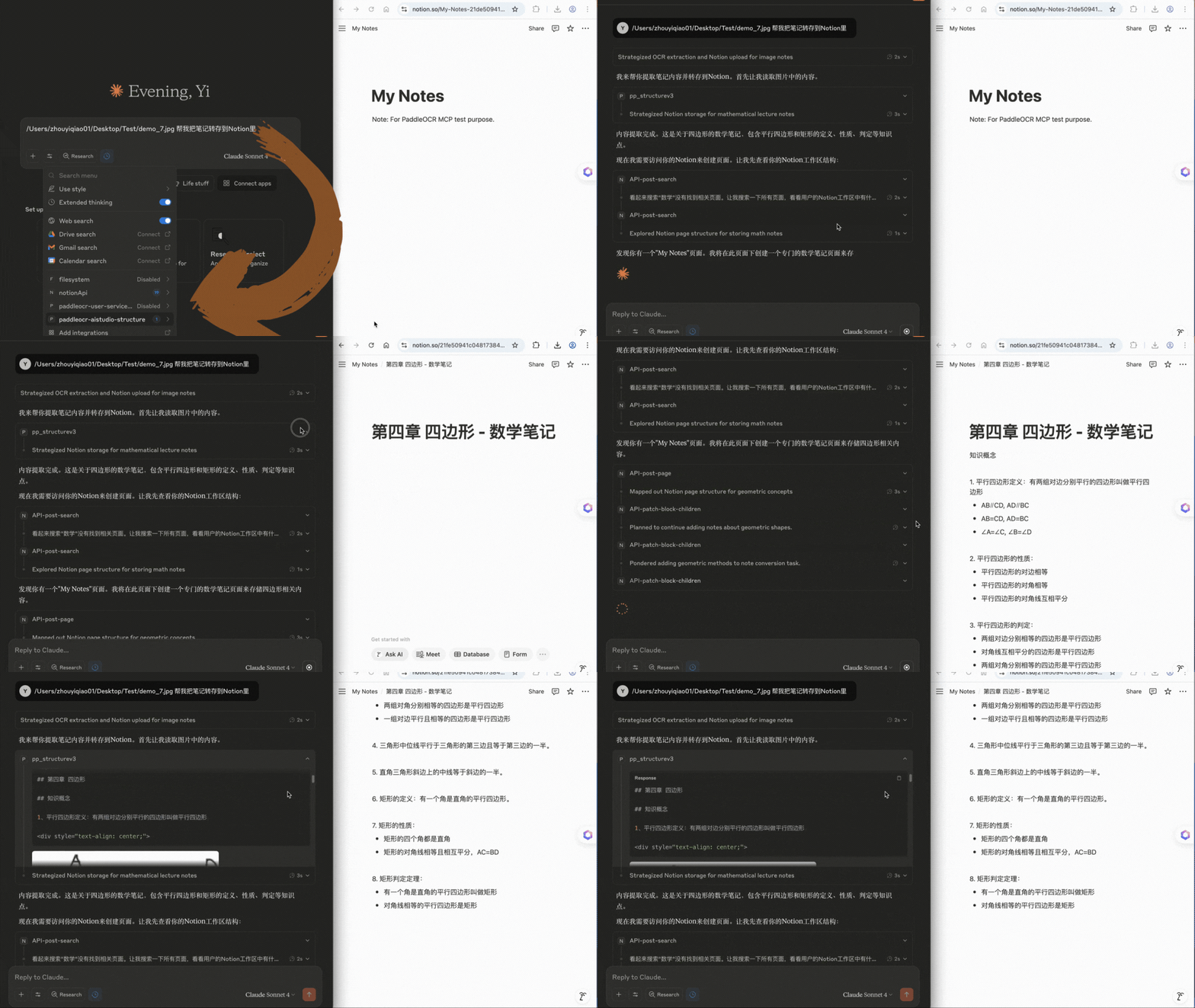
- Note: In addition to the PaddleOCR MCP server, this demo also uses the [Notion MCP server](https://developers.notion.com/docs/mcp).
---
### Demo 2
In VSCode, convert handwritten ideas or pseudocode into runnable Python scripts that comply with project coding standards with one click, and upload them to GitHub repositories. The PaddleOCR MCP server extracts explicitly handwritten code from images for subsequent processing.
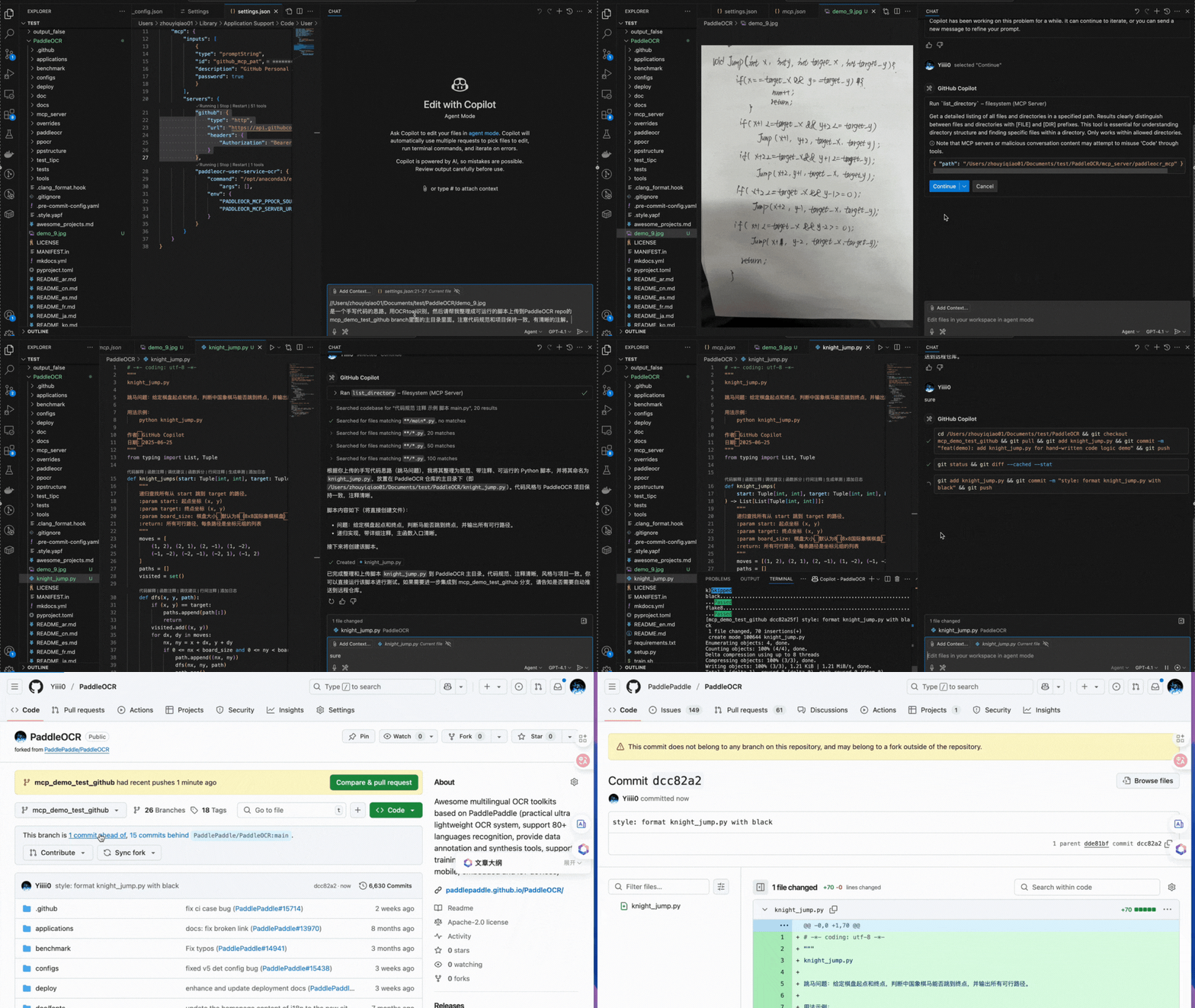
- In addition to the PaddleOCR MCP server, this demo also uses the [filesystem MCP server](https://github.com/modelcontextprotocol/servers/tree/main/src/filesystem).
---
### Demo 3
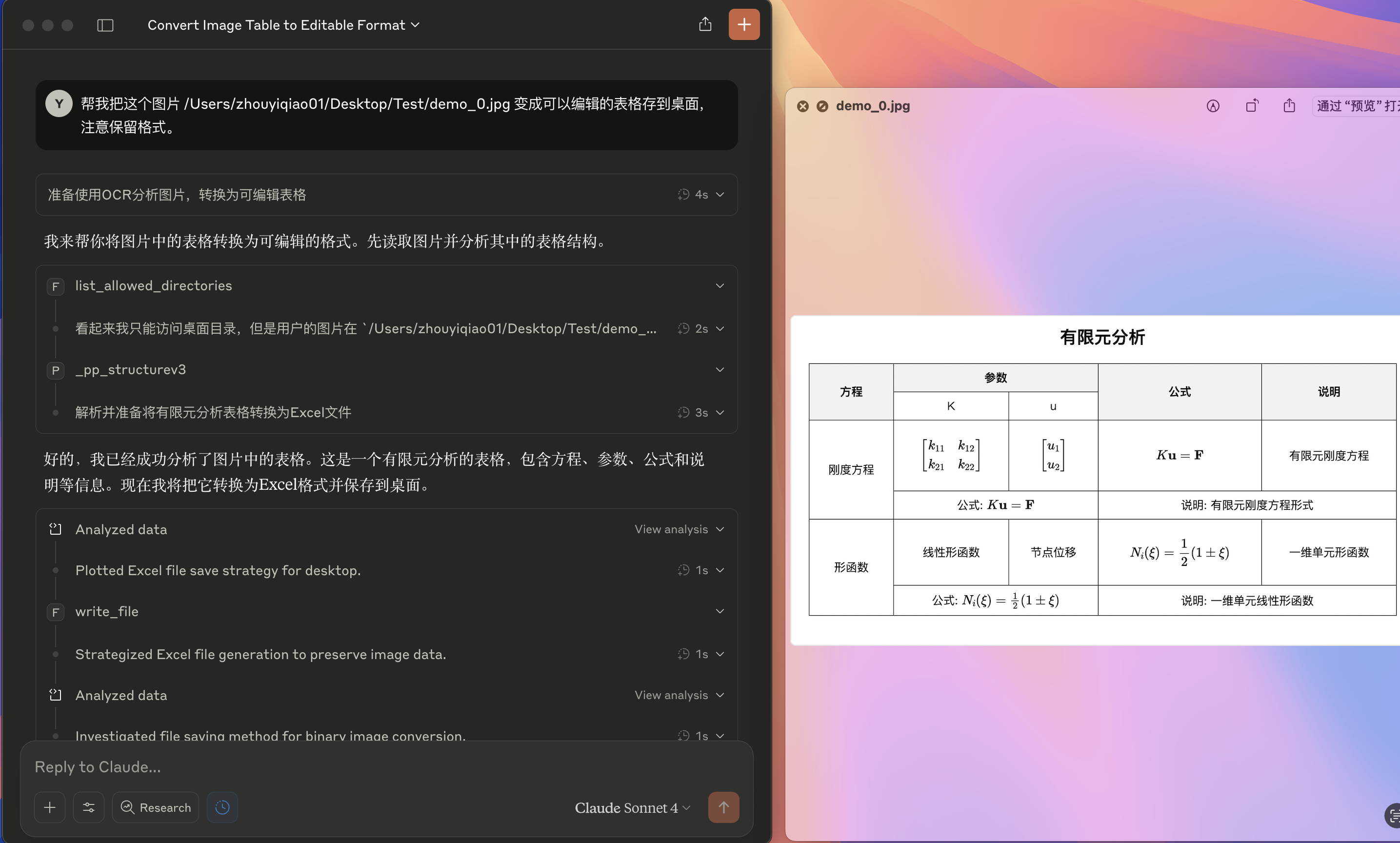
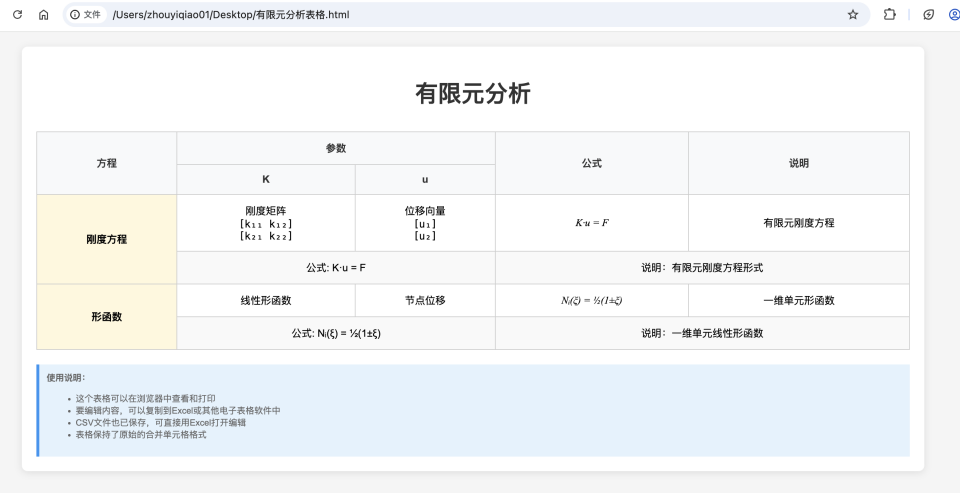
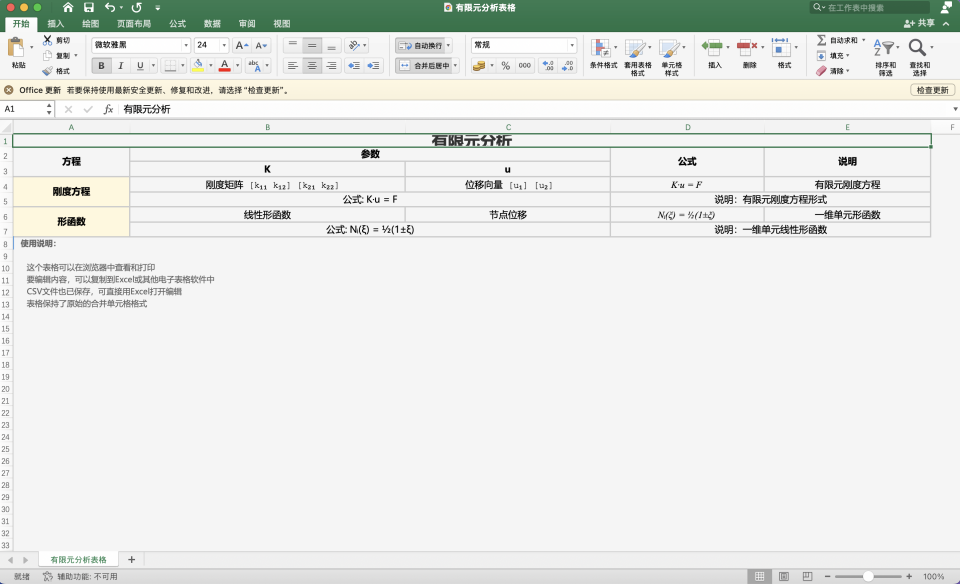
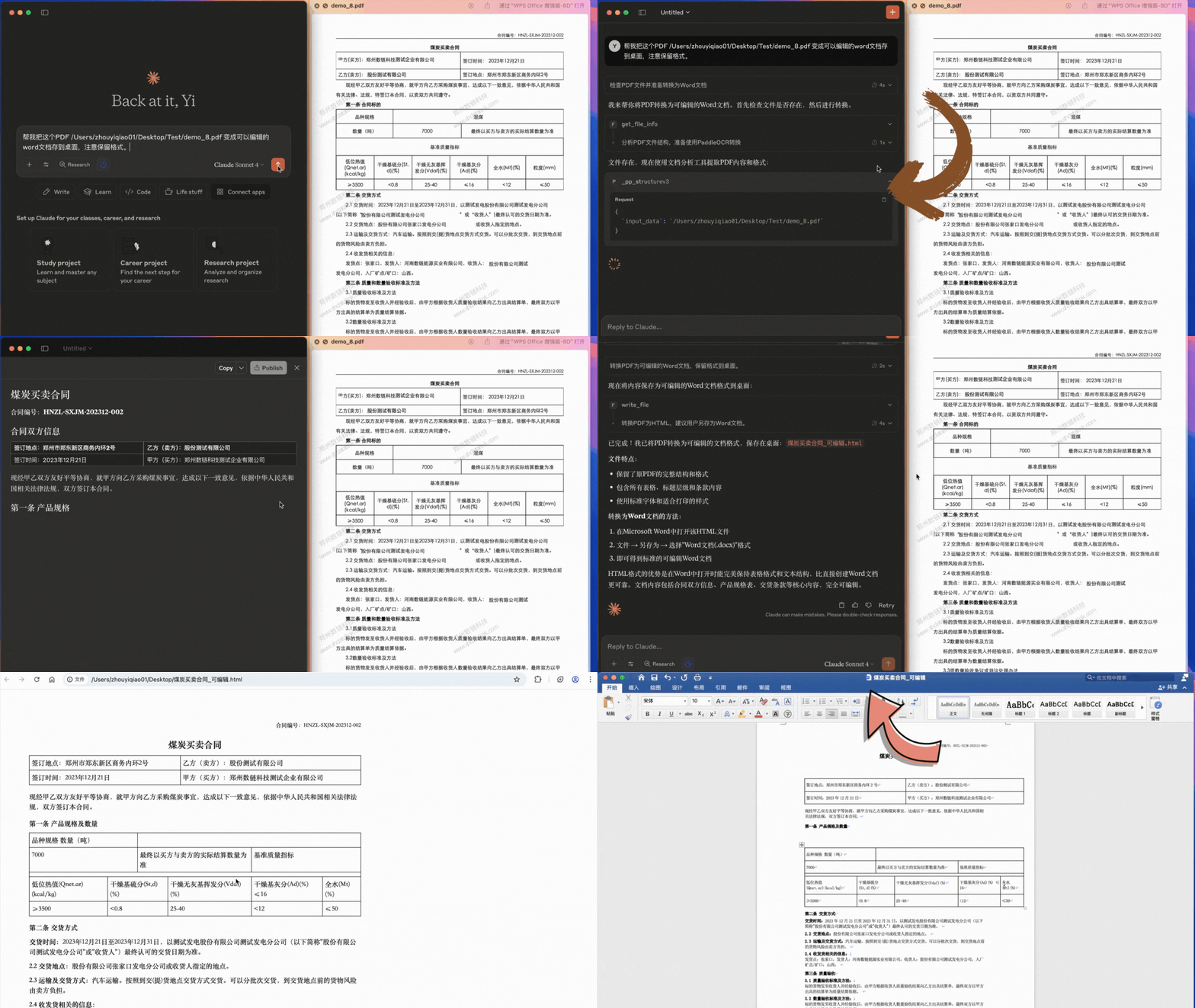
In Claude for Desktop, convert PDF documents or images containing complex tables, formulas, handwritten text and other content into locally editable files.
#### Demo 3.1
Convert complex PDF documents with tables and watermarks to editable doc/Word format:
#### Demo 3.2
Convert images containing formulas and tables to editable csv/Excel format:
- In addition to the PaddleOCR MCP server, this demo also uses the [filesystem MCP server](https://github.com/modelcontextprotocol/servers/tree/main/src/filesystem).
---
### Table of Contents
- [Table of Contents](#table-of-contents)
- [1. Installation](#1-installation)
- [2. Using with Claude for Desktop](#2-using-with-claude-for-desktop)
- [2.1 Quick Start](#21-quick-start)
- [2.2 MCP Host Configuration Details](#22-mcp-host-configuration-details)
- [2.3 Inference Methods](#23-inference-methods)
- [2.4 Using `uvx`](#24-using-uvx)
- [3. Running the Server](#3-running-the-server)
- [4. Parameter Reference](#4-parameter-reference)
- [5. Known Limitations](#5-known-limitations)
## 1. Installation
This section explains how to install the `paddleocr-mcp` library via pip.
`paddleocr-mcp` requires Python 3.10 or later.
`paddleocr-mcp` depends on `paddleocr>=3.7.0` by default, so Official API, Qianfan API, and self-hosted API modes do not require installing PaddleOCR separately. Local inference additionally requires the document-parsing dependencies and an inference engine required to run PaddleOCR pipelines locally; see [Method 1: Local Inference](#method-1-local-inference) for details.
Install from PyPI:
```bash
pip install -U paddleocr-mcp
```
Install from source:
```bash
git clone https://github.com/PaddlePaddle/PaddleOCR.git
pip install -e mcp_server
```
For local inference, install the optional extras described in [Method 1: Local Inference](#method-1-local-inference).
To verify successful installation:
```bash
paddleocr_mcp --help
```
If help information is printed after running the command above, the installation succeeded.
PaddleOCR also supports running the server without installation through methods like `uvx`; for details, see [2. Using with Claude for Desktop](#2-using-with-claude-for-desktop).
## 2. Using with Claude for Desktop
This section explains how to use the PaddleOCR MCP server within Claude for Desktop. The steps are also applicable to other MCP hosts with minor adjustments.
### 2.1 Quick Start
The following quick start uses **Official API** inference as an example to get you started.
1. **Install `paddleocr-mcp`**
Refer to [1. Installation](#1-installation).
2. **Obtain an Access Token**
Obtain your access token from the [AI Studio Access Token page](https://aistudio.baidu.com/account/accessToken).
3. **Add MCP Server Configuration**
Locate the `claude_desktop_config.json` configuration file:
- **macOS**: `~/Library/Application Support/Claude/claude_desktop_config.json`
- **Windows**: `%APPDATA%\Claude\claude_desktop_config.json`
- **Linux**: `~/.config/Claude/claude_desktop_config.json`
Open the `claude_desktop_config.json` file, adjust the configuration according to the example below, and fill it into `claude_desktop_config.json`.
```json
{
"mcpServers": {
"paddleocr": {
"command": "paddleocr_mcp",
"args": [],
"env": {
"PADDLEOCR_MCP_MODEL": "PP-OCRv5",
"PADDLEOCR_MCP_PPOCR_SOURCE": "aistudio",
"PADDLEOCR_MCP_AISTUDIO_ACCESS_TOKEN": ""
}
}
}
}
```
**Notes**:
- Replace `` with your access token.
- To use a custom service address, set the `PADDLEOCR_MCP_AISTUDIO_BASE_URL` environment variable.
**Important**:
- Do not expose your **access token**.
- If `paddleocr_mcp` is not in your system's `PATH`, set `command` to the absolute path of the executable.
4. **Restart the MCP Host**
Restart Claude for Desktop. The `paddleocr` server should now be available in the application.
### 2.2 MCP Host Configuration Details
In the configuration file for Claude for Desktop, you need to define how the MCP server is started. The key fields are as follows:
- `command`: `paddleocr_mcp` (if the executable can be found in the `PATH`) or the absolute path.
- `args`: Configurable command-line arguments, such as `["--verbose"]`. See [4. Parameter Reference](#4-parameter-reference) for details.
- `env`: Configurable environment variables. See [4. Parameter Reference](#4-parameter-reference) for details.
### 2.3 Inference Methods
You can configure the MCP server according to your requirements to use different inference methods. The operational procedures vary for different methods, which will be explained in detail below.
#### Method 1: Local Inference {#method-1-local-inference}
1. Install `paddleocr-mcp` and the local inference dependencies. `paddleocr-mcp` already depends on PaddleOCR; local inference additionally requires the document-parsing dependencies and an inference engine. You can install them manually by referring to the [PaddleOCR installation guide](../installation.en.md), or use the corresponding optional dependencies:
- `paddleocr-mcp[local]`: includes `paddleocr[doc-parser]>=3.7.0` (without the inference engine).
- `paddleocr-mcp[local-cpu]`: based on `local`, additionally includes the CPU PaddlePaddle inference engine (`paddlepaddle>=3.2.1`).
```bash
# Install document-parsing dependencies for local inference (inference engine not included):
pip install "paddleocr-mcp[local]"
# Install the CPU PaddlePaddle framework in addition to local:
pip install "paddleocr-mcp[local-cpu]"
```
To avoid dependency conflicts, **it is strongly recommended to install in an isolated virtual environment**.
2. Refer to the configuration example below to modify the `claude_desktop_config.json` file.
3. Restart the MCP host.
Configuration example:
```json
{
"mcpServers": {
"paddleocr": {
"command": "paddleocr_mcp",
"args": [],
"env": {
"PADDLEOCR_MCP_MODEL": "PP-OCRv5",
"PADDLEOCR_MCP_PPOCR_SOURCE": "local"
}
}
}
}
```
**Notes**:
- `PADDLEOCR_MCP_MODEL` should be set to the model name. See Section 4 for details.
- `PADDLEOCR_MCP_PIPELINE_CONFIG` is optional. If not set, the default pipeline configuration is used. To adjust the configuration, such as changing models, refer to the [PaddleOCR documentation](../paddleocr_and_paddlex.md) to export the pipeline configuration file, and set `PADDLEOCR_MCP_PIPELINE_CONFIG` to the absolute path of this file.
- **Inference Performance Tips**:
If you encounter long inference time or insufficient memory, consider adjusting the pipeline configuration:
- **PP-StructureV3 Pipeline**:
- Disable unused features, such as setting `use_formula_recognition` to `False` to disable formula recognition.
- Use lightweight models, such as replacing the OCR model with the `mobile` version or switching to a lightweight formula recognition model like PP-FormulaNet-S.
The following sample code exports a PP-StructureV3 pipeline configuration with most optional features disabled and some key models replaced with lightweight versions.
```python
from paddleocr import PPStructureV3
pipeline = PPStructureV3(
use_doc_orientation_classify=False, # Disable document image orientation classification
use_doc_unwarping=False, # Disable text image unwarping
use_textline_orientation=False, # Disable text line orientation classification
use_formula_recognition=False, # Disable formula recognition
use_seal_recognition=False, # Disable seal text recognition
use_table_recognition=False, # Disable table recognition
use_chart_recognition=False, # Disable chart parsing
# Use lightweight models
text_detection_model_name="PP-OCRv5_mobile_det",
text_recognition_model_name="PP-OCRv5_mobile_rec",
layout_detection_model_name="PP-DocLayout-S",
)
# The configuration file is saved to `PP-StructureV3.yaml`
pipeline.export_paddlex_config_to_yaml("PP-StructureV3.yaml")
```
**For PaddleOCR-VL series, CPU inference is not recommended.**
#### Method 2: Official API
Refer to [2.1 Quick Start](#21-quick-start).
For tasks other than text recognition, set `PADDLEOCR_MCP_MODEL` correctly (see Section 4 for parameter details).
#### Method 3: Qianfan API
1. Install `paddleocr-mcp`.
2. Obtain an API key by referring to the [Qianfan Platform Official Documentation](https://cloud.baidu.com/doc/qianfan-api/s/ym9chdsy5).
3. Refer to the configuration example below to modify the `claude_desktop_config.json` file.
4. Restart the MCP host.
Configuration example:
```json
{
"mcpServers": {
"paddleocr": {
"command": "paddleocr_mcp",
"args": [],
"env": {
"PADDLEOCR_MCP_MODEL": "PaddleOCR-VL",
"PADDLEOCR_MCP_PPOCR_SOURCE": "qianfan",
"PADDLEOCR_MCP_QIANFAN_API_KEY": ""
}
}
}
}
```
**Notes**:
- `PADDLEOCR_MCP_MODEL` should be set to the model name. Qianfan supports only `PP-StructureV3` and `PaddleOCR-VL`.
- `PADDLEOCR_MCP_QIANFAN_BASE_URL` is the Qianfan API base URL (optional).
- `PADDLEOCR_MCP_QIANFAN_API_KEY` is your Qianfan API key for authentication.
#### Method 4: Self-hosted API
1. In the environment where you need to run the PaddleOCR inference server, refer to the [PaddleOCR serving documentation](../inference_deployment/serving/serving.en.md) to run the inference server.
2. Install `paddleocr-mcp` in the environment where you need to run the MCP server.
3. Refer to the configuration example below to modify the `claude_desktop_config.json` file.
4. Restart the MCP host.
Configuration example:
```json
{
"mcpServers": {
"paddleocr": {
"command": "paddleocr_mcp",
"args": [],
"env": {
"PADDLEOCR_MCP_MODEL": "PP-OCRv5",
"PADDLEOCR_MCP_PPOCR_SOURCE": "self_hosted",
"PADDLEOCR_MCP_SELF_HOSTED_BASE_URL": ""
}
}
}
}
```
**Notes**:
- `PADDLEOCR_MCP_MODEL` should be set to the model name. See Section 4 for details.
- Replace `` with the underlying service base URL (e.g. `http://127.0.0.1:8080`, **without** path suffixes such as `/ocr` or `/layout-parsing`; MCP appends them by pipeline).
### 2.4 Using `uvx`
PaddleOCR also supports starting the MCP server via `uvx`. With this approach, manual installation of `paddleocr-mcp` is not required. The main steps are as follows:
1. Install [uv](https://docs.astral.sh/uv/#installation).
2. Modify `claude_desktop_config.json`. Examples:
Self-hosted API inference example:
```json
{
"mcpServers": {
"paddleocr": {
"command": "uvx",
"args": [
"--from",
"paddleocr-mcp",
"paddleocr_mcp"
],
"env": {
"PADDLEOCR_MCP_MODEL": "PP-OCRv5",
"PADDLEOCR_MCP_PPOCR_SOURCE": "self_hosted",
"PADDLEOCR_MCP_SELF_HOSTED_BASE_URL": ""
}
}
}
}
```
Local inference (CPU inference, using the optional `local-cpu` extra) example:
```json
{
"mcpServers": {
"paddleocr": {
"command": "uvx",
"args": [
"--from",
"paddleocr-mcp[local-cpu]",
"paddleocr_mcp"
],
"env": {
"PADDLEOCR_MCP_MODEL": "PP-OCRv5",
"PADDLEOCR_MCP_PPOCR_SOURCE": "local"
}
}
}
}
```
For local inference dependencies, performance tuning, and pipeline configuration, refer to [Method 1: Local Inference](#method-1-local-inference).
Due to the use of a different startup method, the `command` and `args` settings in the configuration file differ from the previously described approach. However, the command-line arguments and environment variables supported by the MCP service (such as `PADDLEOCR_MCP_SELF_HOSTED_BASE_URL`) can still be set in the same way.
## 3. Running the Server
In addition to MCP hosts like Claude for Desktop, you can also run the PaddleOCR MCP server via the CLI.
Run the following command to print help information:
```bash
paddleocr_mcp --help
```
Example commands:
```bash
# PP-OCRv5 + Official API + stdio
PADDLEOCR_MCP_AISTUDIO_ACCESS_TOKEN=xxxxxx paddleocr_mcp --model PP-OCRv5 --ppocr_source aistudio
# PP-OCRv6 + Official API + stdio
paddleocr_mcp --model PP-OCRv6 --ppocr_source aistudio
# PP-StructureV3 + Local Inference + stdio
paddleocr_mcp --model PP-StructureV3 --ppocr_source local
# OCR + Self-hosted API + Streamable HTTP
paddleocr_mcp --model PP-OCRv5 --ppocr_source self_hosted --self-hosted-base-url http://127.0.0.1:8080 --http
```
See [4. Parameter Reference](#4-parameter-reference) for all parameters supported by the PaddleOCR MCP server.
## 4. Parameter Reference
You can control the MCP server via environment variables or CLI arguments.
| Environment Variable | CLI Argument | Type | Description | Options | Default |
|:---------|:-----------|:-----|:-----|:-------|:-------|
| `PADDLEOCR_MCP_MODEL` | `--model` | `str` | Model to run. MCP selects the tool automatically from the model. | `"PP-OCRv5"`, `"PP-OCRv5-latin"`, `"PP-OCRv6"`, `"PP-StructureV3"`, `"PaddleOCR-VL"`, `"PaddleOCR-VL-1.5"`, `"PaddleOCR-VL-1.6"` | `"PP-OCRv6"` |
| `PADDLEOCR_MCP_PPOCR_SOURCE` | `--ppocr_source` | `str` | Source of PaddleOCR capabilities. | `"local"` (local inference), `"aistudio"` (Official API), `"qianfan"` (Qianfan API), `"self_hosted"` (self-hosted API) | `"local"` |
| `PADDLEOCR_MCP_AISTUDIO_BASE_URL` | `--aistudio-base-url` | `str` | AI Studio API base URL (optional for `aistudio` source). | - | `None` |
| `PADDLEOCR_MCP_QIANFAN_BASE_URL` | `--qianfan-base-url` | `str` | Qianfan API base URL (optional for `qianfan` source). | - | `https://qianfan.baidubce.com/v2/ocr` |
| `PADDLEOCR_MCP_SELF_HOSTED_BASE_URL` | `--self-hosted-base-url` | `str` | Self-hosted PaddleX serve base URL (required for `self_hosted` source). | - | `None` |
| `PADDLEOCR_MCP_QIANFAN_API_KEY` | `--qianfan_api_key` | `str` | Qianfan API authentication key (required for `qianfan` source). | - | `None` |
| `PADDLEOCR_MCP_AISTUDIO_ACCESS_TOKEN` | `--aistudio_access_token` | `str` | AI Studio access token (required for `aistudio` source). | - | `None` |
| `PADDLEOCR_MCP_HTTP_TIMEOUT` | `--http-timeout` | `int` | HTTP read timeout in seconds for synchronous APIs (`qianfan`, `self_hosted`). | - | `600` |
| `PADDLEOCR_MCP_AISTUDIO_REQUEST_TIMEOUT` | `--aistudio-request-timeout` | `int` | Per-request HTTP timeout in seconds for AI Studio API calls (job submission, status checks, etc.). | - | `120` |
| `PADDLEOCR_MCP_AISTUDIO_POLL_TIMEOUT` | `--aistudio-poll-timeout` | `int` | Total job polling timeout in seconds for AI Studio. | - | `600` |
| `PADDLEOCR_MCP_DEVICE` | `--device` | `str` | Device for inference (only effective for `local` source). | - | `None` |
| `PADDLEOCR_MCP_PIPELINE_CONFIG` | `--pipeline_config` | `str` | PaddleOCR pipeline configuration file path (only effective for `local` source). | - | `None` |
| - | `--http` | `bool` | Use Streamable HTTP transport instead of stdio (for remote deployment and multiple clients). | - | `False` |
| - | `--host` | `str` | Host address for Streamable HTTP mode. | - | `"127.0.0.1"` |
| - | `--port` | `int` | Port for Streamable HTTP mode. | - | `8000` |
| - | `--verbose` | `bool` | Enable verbose logging for debugging. | - | `False` |
## 5. Known Limitations
- Under local inference, the exposed MCP tool cannot process PDF document inputs that are Base64 encoded.
- Under local inference, the exposed MCP tool does not infer file type from the model's `file_type` prompt; some complex URLs may fail to process.
- For the PP-StructureV3 and PaddleOCR-VL series, if the input file contains images, the returned results may significantly increase token usage. If image content is not needed, you can explicitly exclude it through prompts to reduce resource consumption.