wehub-resource-sync
4.5 KiB
MLflow automatic Logging with SynapseML
MLflow automatic logging allows you to log metrics, parameters, and models without the need for explicit log statements. SynapseML supports autologging for every model in the library.
Install SynapseML library following this guidance
Default mlflow log_model_allowlist file already includes some SynapseML models. To enable more models, you could use mlflow.pyspark.ml.autolog(log_model_allowlist=YOUR_SET_OF_MODELS) function, or follow the below guidance by specifying a link to the file and update spark configuration.
To enable autologging with your custom log_model_allowlist file:
- Put your customized log_model_allowlist file at a place that your code has access to. (SynapseML official log_model_allowlist file) For example:
- In Synapse
wasb://<containername>@<accountname>.blob.core.windows.net/PATH_TO_YOUR/log_model_allowlist.txt - In Databricks
/dbfs/FileStore/PATH_TO_YOUR/log_model_allowlist.txt.
- Set spark configuration
spark.mlflow.pysparkml.autolog.logModelAllowlistFileto the path of yourlog_model_allowlist.txtfile. - Call
mlflow.pyspark.ml.autolog()before your training code to enable autologging for all supported models.
Note:
If you want to support autologging of PySpark models not present in the log_model_allowlist file, you can add such models to the file.
Configuration process in Databricks as an example
- Install latest MLflow via
%pip install mlflow -u - Upload your customized
log_model_allowlist.txtfile to dbfs by clicking File/Upload Data button on Databricks UI. - Set Cluster Spark configuration following this documentation
spark.mlflow.pysparkml.autolog.logModelAllowlistFile /dbfs/FileStore/PATH_TO_YOUR/log_model_allowlist.txt
- Run the following line before your training code executes.
import mlflow

mlflow.pyspark.ml.autolog()
You can customize how autologging works by supplying appropriate parameters.
- To find your experiment's results via the
Experimentstab of the MLflow UI.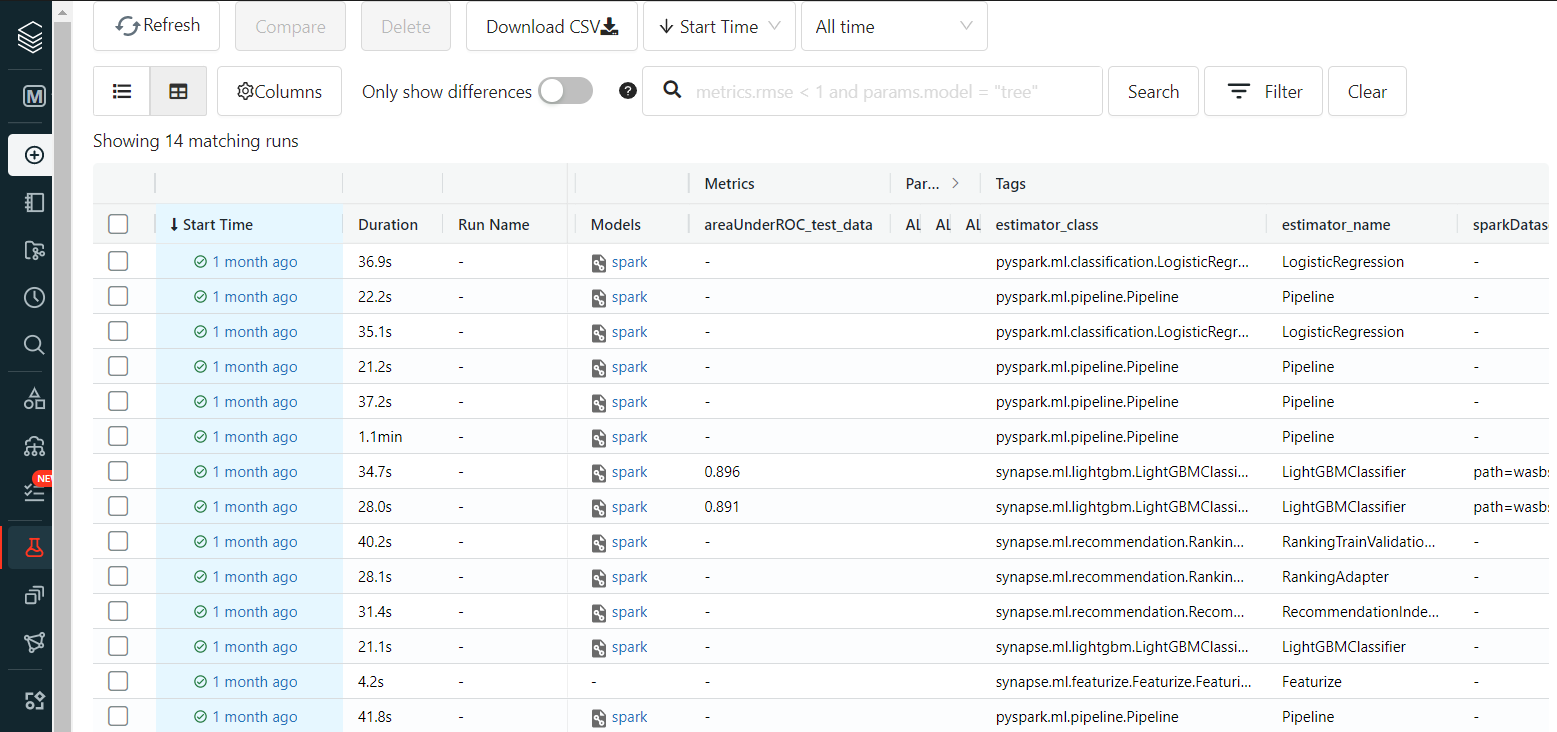
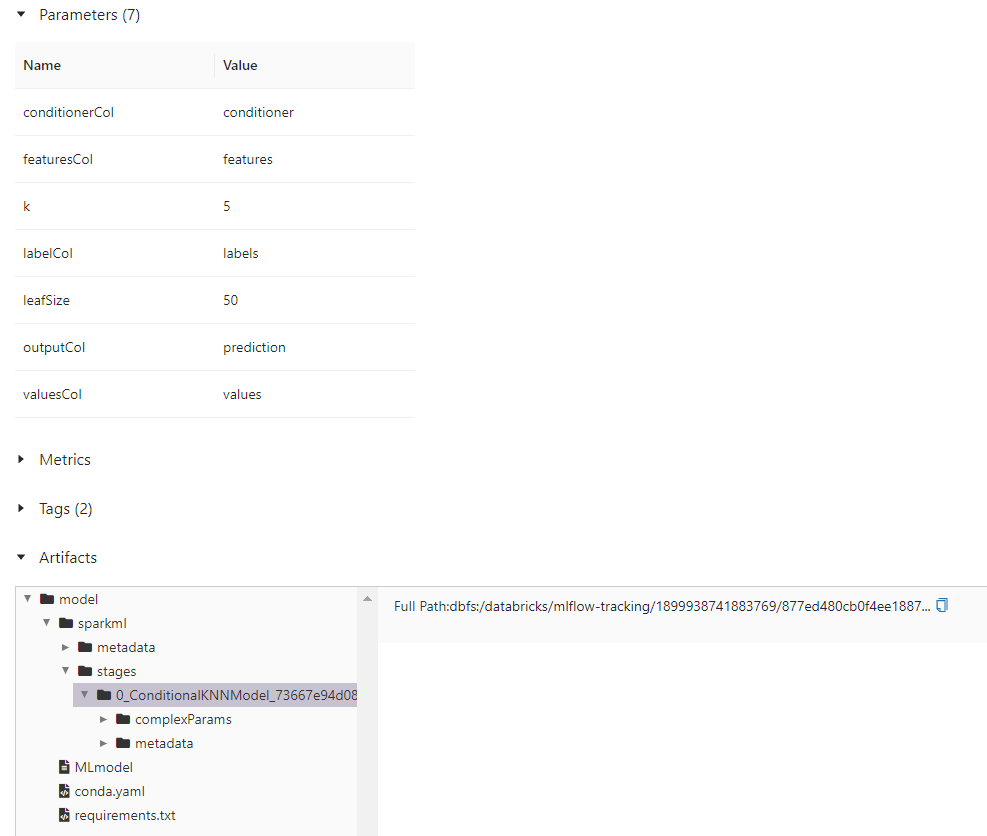
Example for ConditionalKNNModel
from pyspark.ml.linalg import Vectors
from synapse.ml.nn import ConditionalKNN

df = spark.createDataFrame(
    [
        (Vectors.dense(2.0, 2.0, 2.0), "foo", 1),
        (Vectors.dense(2.0, 2.0, 4.0), "foo", 3),
        (Vectors.dense(2.0, 2.0, 6.0), "foo", 4),
        (Vectors.dense(2.0, 2.0, 8.0), "foo", 3),
        (Vectors.dense(2.0, 2.0, 10.0), "foo", 1),
        (Vectors.dense(2.0, 2.0, 12.0), "foo", 2),
        (Vectors.dense(2.0, 2.0, 14.0), "foo", 0),
        (Vectors.dense(2.0, 2.0, 16.0), "foo", 1),
        (Vectors.dense(2.0, 2.0, 18.0), "foo", 3),
        (Vectors.dense(2.0, 2.0, 20.0), "foo", 0),
        (Vectors.dense(2.0, 4.0, 2.0), "foo", 2),
        (Vectors.dense(2.0, 4.0, 4.0), "foo", 4),
        (Vectors.dense(2.0, 4.0, 6.0), "foo", 2),
        (Vectors.dense(2.0, 4.0, 8.0), "foo", 2),
        (Vectors.dense(2.0, 4.0, 10.0), "foo", 4),
        (Vectors.dense(2.0, 4.0, 12.0), "foo", 3),
        (Vectors.dense(2.0, 4.0, 14.0), "foo", 2),
        (Vectors.dense(2.0, 4.0, 16.0), "foo", 1),
        (Vectors.dense(2.0, 4.0, 18.0), "foo", 4),
        (Vectors.dense(2.0, 4.0, 20.0), "foo", 4),
    ],
    ["features", "values", "labels"],
)

cnn = ConditionalKNN().setOutputCol("prediction")
cnnm = cnn.fit(df)

test_df = spark.createDataFrame(
    [
        (Vectors.dense(2.0, 2.0, 2.0), "foo", 1, [0, 1]),
        (Vectors.dense(2.0, 2.0, 4.0), "foo", 4, [0, 1]),
        (Vectors.dense(2.0, 2.0, 6.0), "foo", 2, [0, 1]),
        (Vectors.dense(2.0, 2.0, 8.0), "foo", 4, [0, 1]),
        (Vectors.dense(2.0, 2.0, 10.0), "foo", 4, [0, 1]),
    ],
    ["features", "values", "labels", "conditioner"],
)

display(cnnm.transform(test_df))
This code should log one run with a ConditionalKNNModel artifact and its parameters.