 wehub-resource-sync
Weather MCP Server
Dis na one sample MCP Server wey dem write for Python wey dey implement weather tools wit mock responses. You fit use am as scaffold for your own MCP Server. E get these features:
- Weather Tool: One tool wey dey provide mocked weather information based on di location wey you give.
- Connect to Agent Builder: One feature wey make you fit connect di MCP server to Agent Builder for testing and debugging.
- Debug for MCP Inspector: One feature wey make you fit debug di MCP Server with di MCP Inspector.
How to start wit di Weather MCP Server template
Things you need before
To run di MCP Server for your local dev machine, you go need:
- Python
- (Optional - if you like uv) uv
- Python Debugger Extension
How to prepare environment
You get two ways to set up environment for dis project. You fit choose any one wey you like.
Note: Reload VSCode or terminal make sure say di virtual environment python dey used after you create di virtual environment.
| Approach | Steps |
|---|---|
Using uv |
1. Create virtual environment: uv venv 2. Run VSCode Command "Python: Select Interpreter" come select di python from di virtual environment wey you don create 3. Install dependencies (including dev dependencies): uv pip install -r pyproject.toml --extra dev |
Using pip |
1. Create virtual environment: python -m venv .venv 2. Run VSCode Command "Python: Select Interpreter" come select di python from di virtual environment wey you don create 3. Install dependencies (including dev dependencies): pip install -e .[dev] |
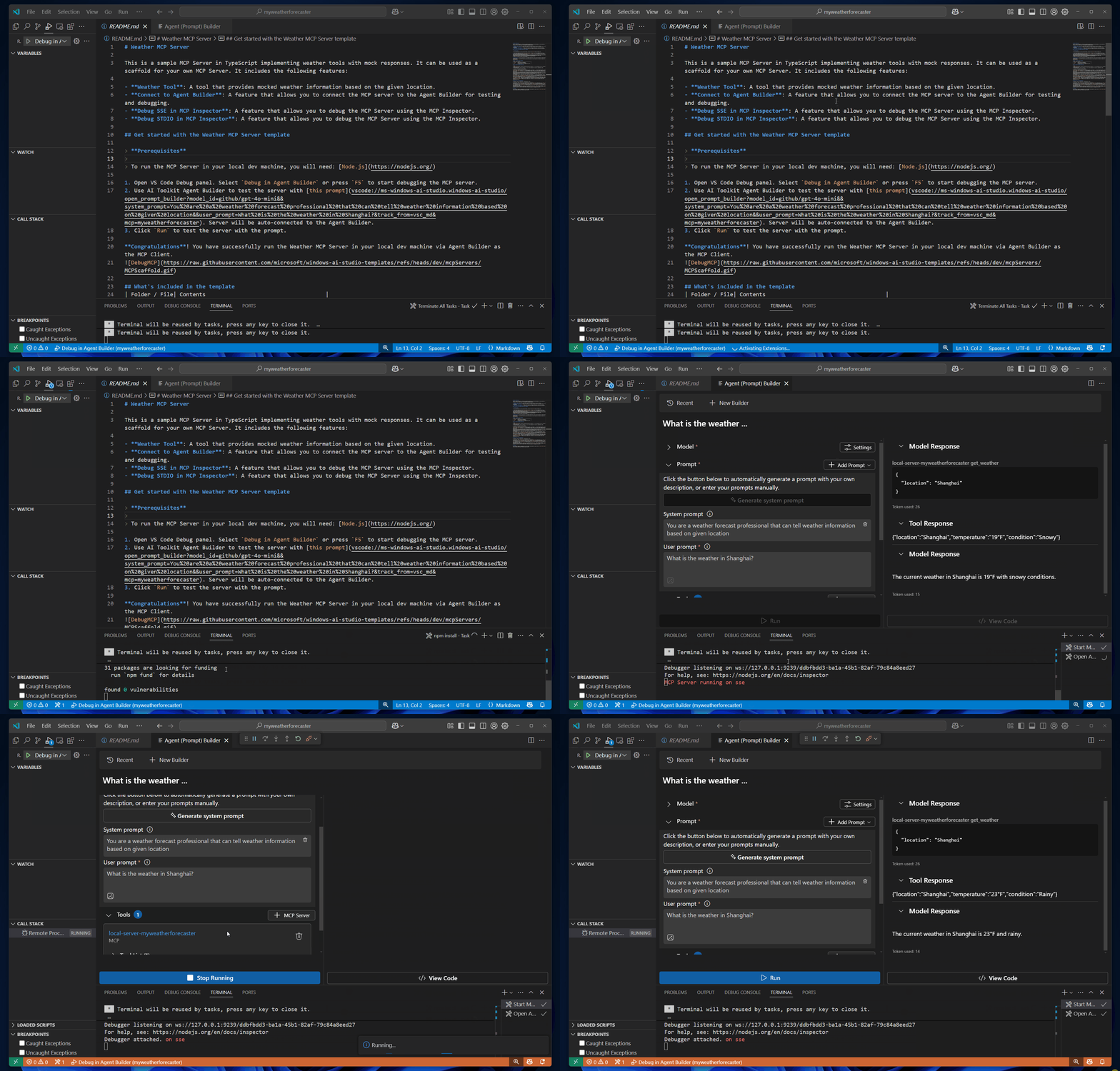
After you don set up di environment, you fit run di server for your local dev machine through Agent Builder as MCP Client to start:
- Open VS Code Debug panel. Choose
Debug in Agent Builderor pressF5to start debugging di MCP server. - Use Microsoft Foundry Toolkit Agent Builder take test di server wit dis prompt. Di server go auto-connect to Agent Builder.
- Click
Runto test di server with di prompt.
Gbosa! You don successfully run di Weather MCP Server for your local dev machine through Agent Builder as MCP Client.
Wetin dey inside di template
| Folder / File | Wetin e get |
|---|---|
.vscode |
VSCode files for debugging |
.aitk |
Configurations for Microsoft Foundry Toolkit |
src |
Di source code for di weather mcp server |
How to debug di Weather MCP Server
Notes:
- MCP Inspector na one visual developer tool for testing and debugging MCP servers.
- All debugging modes support breakpoints, so you fit add breakpoints for the tool implementation code.
| Debug Mode | Description | Steps to debug |
|---|---|---|
| Agent Builder | Debug di MCP server inside Agent Builder through Microsoft Foundry Toolkit. | 1. Open VS Code Debug panel. Choose Debug in Agent Builder and press F5 to start debugging di MCP server.2. Use Microsoft Foundry Toolkit Agent Builder test di server wit dis prompt. Di server go connect automatic to Agent Builder. 3. Click Run to test di server with di prompt. |
| MCP Inspector | Debug di MCP server wit MCP Inspector. | 1. Install Node.js 2. Set up Inspector: cd inspector && npm install 3. Open VS Code Debug panel. Choose Debug SSE in Inspector (Edge) or Debug SSE in Inspector (Chrome). Press F5 to start debugging.4. When MCP Inspector open for browser, click di Connect button to connect this MCP server.5. Then you fit List Tools, choose tool, input parameters, and Run Tool to debug your server code. |
Default Ports and customizations
| Debug Mode | Ports | Definitions | Customizations | Note |
|---|---|---|---|---|
| Agent Builder | 3001 | tasks.json | Edit launch.json, tasks.json, __init__.py, mcp.json to change above ports. | N/A |
| MCP Inspector | 3001 (Server); 5173 and 3000 (Inspector) | tasks.json | Edit launch.json, tasks.json, __init__.py, mcp.json to change above ports. | N/A |
Feedback
If you get any feedback or suggestion for dis template, abeg open issue for Microsoft Foundry Toolkit GitHub repository
Disclaimer: Dis document don translate wit AI translation service Co-op Translator. Even tho we dey try make am correct, abeg make you know say automated translation fit get errors or mistakes. Di original document for dia own language na im be di correct source. For important info, make person wey sabi human translation do am. We no go responsible for any misunderstanding or wrong understanding wey fit happen because of dis translation.