> [!NOTE]
> 本文档由 WeHub 基于上游 README 翻译整理,属于社区翻译,非官方中文文档。
> [English](./README.en.md) · [原始项目](https://github.com/lfnovo/open-notebook) · [上游 README](https://github.com/lfnovo/open-notebook/blob/HEAD/README.md)
> 原作者、版权与许可证归属以原始项目及本仓库 LICENSE 文件为准。
[![Forks][forks-shield]][forks-url]
[![Stargazers][stars-shield]][stars-url]
[![Issues][issues-shield]][issues-url]
[![MIT License][license-shield]][license-url]

## 私密、多模型、100% 本地、功能完整的 Notebook LM 替代方案

在人工智能主导的时代,能够思考 🧠 并获取新知识 💡 是一项不应成为少数人特权、也不应被单一供应商所限制的技能。
**Open Notebook 让你能够:**
- 🔒 **掌控你的数据** - 让研究内容保持私密与安全
- 🤖 **自选 AI 模型** - 支持 18+ 家提供商,包括 OpenAI、Anthropic、Ollama、LM Studio 等
- 📚 **组织多模态内容** - PDF、视频、音频、网页等
- 🎙️ **生成专业播客** - 高级多说话人播客生成
- 🔍 **智能搜索** - 针对全部内容进行全文与向量搜索
- 💬 **基于上下文对话** - 由你的研究资料驱动的 AI 对话
- 🌐 **多语言界面** - 支持英语、葡萄牙语、中文(简体与繁体)、日语、俄语和孟加拉语
在 [https://www.open-notebook.ai](https://www.open-notebook.ai) 了解更多关于本项目的信息
---
## 🆚 Open Notebook 与 Google Notebook LM 对比
| Feature | Open Notebook | Google Notebook LM | Advantage |
|---------|---------------|--------------------|-----------|
| **隐私与控制** | 自托管,数据归你 | 仅限 Google 云端 | 完整数据主权 |
| **AI 提供商选择** | 18+ 家提供商(OpenAI、Anthropic、Ollama、LM Studio 等) | 仅限 Google 模型 | 灵活性与成本优化 |
| **播客说话人** | 1-4 位说话人,支持自定义档案 | 仅 2 位说话人 | 极高灵活性 |
| **内容转换** | 自定义与内置 | 选项有限 | 无限处理能力 |
| **API 访问** | 完整 REST API | 无 API | 完整自动化能力 |
| **部署方式** | Docker、云端或本地 | 仅限 Google 托管 | 随处部署 |
| **引用** | 基础引用(将持续改进) | 带来源的完整引用 | 研究完整性 |
| **定制化** | 开源,完全可定制 | 封闭系统 | 无限可扩展性 |
| **成本** | 仅为 AI 使用付费 | 免费层 + 月度订阅 | 透明且可控 |
**为何选择 Open Notebook?**
- 🔒 **隐私优先**:你的敏感研究资料完全保持私密
- 💰 **成本可控**:选择更便宜的 AI 提供商,或使用 Ollama 在本地运行
- 🎙️ **更好的播客**:完整脚本控制与多说话人灵活性,优于受限的双说话人深度访谈格式
- 🔧 **无限定制**:按需修改、扩展与集成
- 🌐 **无供应商锁定**:切换提供商、随处部署、数据归你所有
### 技术栈
[![Python][Python]][Python-url] [![Next.js][Next.js]][Next-url] [![React][React]][React-url] [![SurrealDB][SurrealDB]][SurrealDB-url] [![LangChain][LangChain]][LangChain-url]
## 🚀 快速开始(2 分钟)
### 前置条件
- [Docker Desktop](https://www.docker.com/products/docker-desktop/) installed
- 仅此而已!(API 密钥稍后可在界面中配置)
### 步骤 1:获取 docker-compose.yml
**选项 A:** 直接下载
```bash
curl -o docker-compose.yml https://raw.githubusercontent.com/lfnovo/open-notebook/main/docker-compose.yml
```
**选项 B:** 手动创建文件
将以下内容复制到名为 `docker-compose.yml` 的新文件中:
```yaml
services:
surrealdb:
image: surrealdb/surrealdb:v2
# Credentials default to root:root for a zero-config local setup. Before
# exposing this instance to a network, set SURREAL_USER / SURREAL_PASSWORD
# in a .env file (see .env.example) — they are applied here and to the
# open_notebook service below, so the two always stay in sync.
# List (exec) form so each interpolated value stays a single argument —
# a password containing spaces would otherwise be split into several.
command: ["start", "--log", "info", "--user", "${SURREAL_USER:-root}", "--pass", "${SURREAL_PASSWORD:-root}", "rocksdb:/mydata/mydatabase.db"]
user: root # Required for bind mounts on Linux
ports:
# Bound to localhost only: the open_notebook service reaches this over
# the internal compose network regardless, so the host port is purely
# for local debugging (e.g. Surrealist, `surreal sql`). Exposing this
# on 0.0.0.0 would let anyone who can reach the host connect with the
# default root:root credentials.
- "127.0.0.1:8000:8000"
volumes:
- ./surreal_data:/mydata
environment:
- SURREAL_EXPERIMENTAL_GRAPHQL=true
restart: always
pull_policy: always
open_notebook:
image: lfnovo/open_notebook:v1-latest
ports:
- "8502:8502" # Web UI
- "5055:5055" # REST API
environment:
# REQUIRED: Change this to your own secret string
# This encrypts your API keys in the database
- OPEN_NOTEBOOK_ENCRYPTION_KEY=change-me-to-a-secret-string
# Database connection. SURREAL_USER / SURREAL_PASSWORD default to root:root
# for local use; override them in a .env file before exposing the instance
# (the same values configure the surrealdb service above).
- SURREAL_URL=ws://surrealdb:8000/rpc
- SURREAL_USER=${SURREAL_USER:-root}
- SURREAL_PASSWORD=${SURREAL_PASSWORD:-root}
- SURREAL_NAMESPACE=open_notebook
- SURREAL_DATABASE=open_notebook
volumes:
- ./notebook_data:/app/data
depends_on:
- surrealdb
restart: always
pull_policy: always
```
### 步骤 2:设置加密密钥
编辑 `docker-compose.yml` 并修改这一行:
```yaml
- OPEN_NOTEBOOK_ENCRYPTION_KEY=change-me-to-a-secret-string
```
改为任意密钥值(例如 `my-super-secret-key-123`)
### 步骤 3:启动服务
```bash
docker compose up -d
```
等待 15-20 秒,然后打开:**http://localhost:8502**
### 步骤 4:配置 AI 提供商
1. 前往 **Models**,选择你的提供商(OpenAI、Anthropic、Google 等)
2. 点击 **+ Add Configuration**
3. 按需粘贴 API 密钥及其他信息,然后点击 **Add Configuration**
4. 点击 **Test** 测试连接
5. 点击 **Sync Models** 并勾选要包含的模型
6. 在 **Default Model Assignments** 下,点击 **Auto-Assign Defaults**,或手动指定各用途使用的模型
完成!你已准备好创建第一个笔记本。
> **需要 API 密钥?** 可从以下平台获取:
> [OpenAI](https://platform.openai.com/api-keys) · [Anthropic](https://console.anthropic.com/) · [Google](https://aistudio.google.com/) · [Groq](https://console.groq.com/)(免费套餐)
> **想要免费的本地 AI?** 请参阅 [examples/docker-compose-ollama.yml](examples/) 了解 Ollama 配置
---
### 📚 更多安装选项
- **[使用 Ollama(免费本地 AI)](examples/docker-compose-ollama.yml)** - 在本地运行模型,无需 API 费用
- **[从源码安装(开发者)](docs/1-INSTALLATION/from-source.md)** - 用于开发与贡献
- **[完整安装指南](docs/1-INSTALLATION/index.md)** - 涵盖所有部署场景
---
### 📖 需要帮助?
- **🤖 AI 安装助手**:[帮助你安装的 CustomGPT](https://chatgpt.com/g/g-68776e2765b48191bd1bae3f30212631-open-notebook-installation-assistant)
- **🆘 故障排查**:[5 分钟故障排查指南](docs/6-TROUBLESHOOTING/quick-fixes.md)
- **💬 社区支持**:[Discord 服务器](https://discord.gg/37XJPXfz2w)
- **🐛 报告问题**:[GitHub Issues](https://github.com/lfnovo/open-notebook/issues)
---
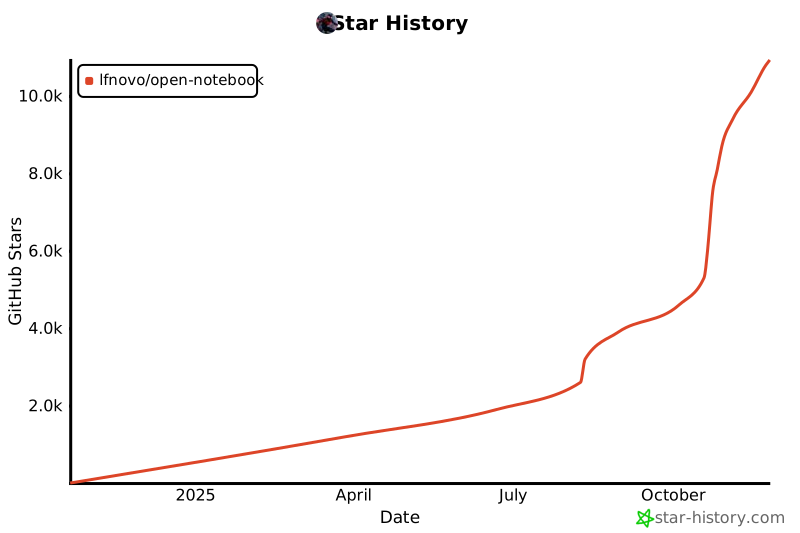
## Star 历史
[](https://www.star-history.com/#lfnovo/open-notebook&type=date&legend=top-left)
## 提供商支持矩阵
感谢 [Esperanto](https://github.com/lfnovo/esperanto) 库,我们开箱即用地支持这些提供商!
| 提供商 | LLM 支持 | 嵌入(Embedding)支持 | 语音转文字(Speech-to-Text) | 文字转语音(Text-to-Speech) |
|--------------|-------------|------------------|----------------|----------------|
| OpenAI | ✅ | ✅ | ✅ | ✅ |
| Anthropic | ✅ | ❌ | ❌ | ❌ |
| Groq | ✅ | ❌ | ✅ | ❌ |
| Google (GenAI) | ✅ | ✅ | ✅ | ✅ |
| Vertex AI | ✅ | ✅ | ❌ | ✅ |
| Ollama | ✅ | ✅ | ❌ | ❌ |
| Perplexity | ✅ | ❌ | ❌ | ❌ |
| ElevenLabs | ❌ | ❌ | ✅ | ✅ |
| Deepgram | ❌ | ❌ | ❌ | ✅ |
| Azure OpenAI | ✅ | ✅ | ✅ | ✅ |
| Mistral | ✅ | ✅ | ✅ | ✅ |
| DeepSeek | ✅ | ❌ | ❌ | ❌ |
| Voyage | ❌ | ✅ | ❌ | ❌ |
| xAI | ✅ | ❌ | ❌ | ✅ |
| OpenRouter | ✅ | ✅ | ❌ | ❌ |
| DashScope (Qwen) | ✅ | ❌ | ❌ | ❌ |
| MiniMax | ✅ | ❌ | ❌ | ❌ |
| OpenAI Compatible* | ✅ | ✅ | ✅ | ✅ |
*支持 LM Studio 及任何 OpenAI 兼容端点
## ✨ 核心特性
### 核心能力
- **🔒 隐私优先**:你的数据由你掌控——无需依赖云端
- **🎯 多笔记本组织**:无缝管理多个研究项目
- **📚 通用内容支持**:PDF、视频、音频、网页、Office 文档等
- **🤖 多模型 AI 支持**:支持 18+ 家提供商,包括 OpenAI、Anthropic、Ollama、Google、LM Studio 等
- **🎙️ 专业播客生成**:支持 Episode Profiles 的高级多说话人播客
- **🔍 智能搜索**:对所有内容进行全文与向量搜索
- **💬 上下文感知对话**:基于研究资料的 AI 对话
- **📝 AI 辅助笔记**:生成洞察或手动撰写笔记
### 高级功能
- **⚡ 推理模型支持**:完整支持 DeepSeek-R1、Qwen3 等思考型模型
- **🔧 内容转换**:强大的可自定义操作,用于摘要与洞察提取
- **🌐 全面的 REST API**:完整的编程访问能力,便于自定义集成 [](http://localhost:5055/docs)
- **🔐 可选密码保护**:通过身份验证保护公开部署
- **📊 精细的上下文控制**:精确选择要与 AI 模型共享的内容
- **📎 引用**:获得带有规范来源引用的答案
## 播客功能
[](https://www.youtube.com/watch?v=D-760MlGwaI)
## 📚 文档
### 入门指南
- **[📖 简介](docs/0-START-HERE/index.md)** - 了解 Open Notebook 的功能
- **[⚡ 使用 OpenAI 快速入门](docs/0-START-HERE/quick-start-openai.md)** - 5 分钟内上手运行
- **[🔧 安装](docs/1-INSTALLATION/index.md)** - 全面的配置指南
- **[🎯 完全本地运行](docs/0-START-HERE/quick-start-local.md)** - 使用 Ollama/LM Studio,完全私有
### 用户指南
- **[📱 界面概览](docs/3-USER-GUIDE/interface-overview.md)** - 了解界面布局
- **[📚 笔记本、来源与笔记](docs/2-CORE-CONCEPTS/notebooks-sources-notes.md)** - 组织你的研究
- **[📄 添加来源](docs/3-USER-GUIDE/adding-sources.md)** - 管理各类内容
- **[📝 使用笔记](docs/3-USER-GUIDE/working-with-notes.md)** - 创建与管理笔记
- **[💬 高效对话](docs/3-USER-GUIDE/chat-effectively.md)** - AI 对话
- **[🔍 搜索](docs/3-USER-GUIDE/search.md)** - 查找信息
### 高级主题
- **[🎙️ 播客生成](docs/2-CORE-CONCEPTS/podcasts-explained.md)** - 创建专业播客
- **[🔧 内容转换](docs/3-USER-GUIDE/transformations.md)** - 自定义内容处理
- **[🤖 AI 模型](docs/4-AI-PROVIDERS/index.md)** - AI 模型配置
- **[🔌 MCP 集成](docs/5-CONFIGURATION/mcp-integration.md)** - 连接 Claude Desktop、VS Code 及其他 MCP 客户端
- **[🔧 REST API 参考](docs/7-DEVELOPMENT/api-reference.md)** - 完整的 API 文档
- **[🔐 安全](docs/5-CONFIGURATION/security.md)** - 密码保护与隐私
- **[🚀 部署](docs/1-INSTALLATION/index.md)** - 适用于所有场景的完整部署指南
- **[🧭 愿景与原则](VISION.md)** - Open Notebook 是什么,以及它的发展方向
- **[🛠️ 开发者文档](docs/7-DEVELOPMENT/index.md)** - 架构、环境配置、贡献指南、决策记录
(返回顶部)
## 🗺️ 路线图
### 即将推出的功能
- **实时前端更新**:实时 UI 更新,带来更流畅的体验
- **异步处理**:通过异步内容处理提升 UI 响应速度
- **跨笔记本来源**:在不同项目间复用研究资料
- **书签集成**:与你常用的书签应用连接
### 最近已完成 ✅
- **Next.js 前端**:基于 React 的现代化前端,性能更优
- **全面的 REST API**:以编程方式完整访问所有功能
- **多模型支持**:支持 18+ 家 AI 提供商,包括 OpenAI、Anthropic、Ollama、LM Studio
- **高级播客生成器**:支持 Episode Profiles 的专业多说话人播客
- **内容转换**:强大的可自定义内容处理操作
- **增强的引用**:改进的布局与更精细的来源引用控制
- **多对话会话**:在笔记本内管理不同的对话
查看 [open issues](https://github.com/lfnovo/open-notebook/issues) 获取完整的功能建议与已知问题列表。
(返回顶部)
## 📖 需要帮助?
- **🤖 AI 安装助手**:我们提供了 [帮助你安装 Open Notebook 的 CustomGPT](https://chatgpt.com/g/g-68776e2765b48191bd1bae3f30212631-open-notebook-installation-assistant) ——它会逐步引导你完成安装!
- **初次使用 Open Notebook?** 请从我们的 [入门指南](docs/0-START-HERE/index.md) 开始
- **需要安装帮助?** 请查看我们的 [安装指南](docs/1-INSTALLATION/index.md)
- **想亲眼看看效果?** 试试我们的 [快速入门教程](docs/0-START-HERE/index.md)
## 🤝 社区与贡献
### 加入社区
- 💬 **[Discord Server](https://discord.gg/37XJPXfz2w)** - 获取帮助、分享想法、与其他用户交流
- 🐛 **[GitHub Issues](https://github.com/lfnovo/open-notebook/issues)** - 报告 bug 并请求功能
- ⭐ **为仓库点亮 Star** - 表示支持并帮助他人发现 Open Notebook
### 参与贡献
我们欢迎贡献!尤其希望获得以下方面的帮助:
- **前端开发(Frontend Development)**:帮助改进现代化的 Next.js/React UI
- **测试与 Bug 修复**:让 Open Notebook 更加稳定可靠
- **功能开发**:一起打造最酷的研究工具
- **文档**:改进指南与教程
**当前技术栈**:Python、FastAPI、Next.js、React、SurrealDB
**未来路线图**:实时更新、增强异步处理
详见我们的[贡献指南](CONTRIBUTING.md),了解如何开始参与,包括[AI 辅助贡献](docs/7-DEVELOPMENT/contributing.md#ai-assisted-and-agent-generated-prs)相关准则。要了解我们在构建什么(以及我们会拒绝什么),请阅读 [VISION.md](VISION.md)。
(返回顶部)
## 📄 许可证
Open Notebook 采用 MIT 许可证。详情请参阅 [LICENSE](LICENSE) 文件。
**社区支持**:
- 💬 [Discord Server](https://discord.gg/37XJPXfz2w) - 获取帮助、分享想法、与用户交流
- 🐛 [GitHub Issues](https://github.com/lfnovo/open-notebook/issues) - 报告 bug 并请求功能
- 🌐 [Website](https://www.open-notebook.ai) - 了解更多项目信息
(返回顶部)
[contributors-shield]: https://img.shields.io/github/contributors/lfnovo/open-notebook.svg?style=for-the-badge
[contributors-url]: https://github.com/lfnovo/open-notebook/graphs/contributors
[forks-shield]: https://img.shields.io/github/forks/lfnovo/open-notebook.svg?style=for-the-badge
[forks-url]: https://github.com/lfnovo/open-notebook/network/members
[stars-shield]: https://img.shields.io/github/stars/lfnovo/open-notebook.svg?style=for-the-badge
[stars-url]: https://github.com/lfnovo/open-notebook/stargazers
[issues-shield]: https://img.shields.io/github/issues/lfnovo/open-notebook.svg?style=for-the-badge
[issues-url]: https://github.com/lfnovo/open-notebook/issues
[license-shield]: https://img.shields.io/github/license/lfnovo/open-notebook.svg?style=for-the-badge
[license-url]: https://github.com/lfnovo/open-notebook/blob/master/LICENSE.txt
[linkedin-shield]: https://img.shields.io/badge/-LinkedIn-black.svg?style=for-the-badge&logo=linkedin&colorB=555
[linkedin-url]: https://linkedin.com/in/lfnovo
[product-screenshot]: images/screenshot.png
[Next.js]: https://img.shields.io/badge/Next.js-000000?style=for-the-badge&logo=next.js&logoColor=white
[Next-url]: https://nextjs.org/
[React]: https://img.shields.io/badge/React-61DAFB?style=for-the-badge&logo=react&logoColor=black
[React-url]: https://reactjs.org/
[Python]: https://img.shields.io/badge/Python-3776AB?style=for-the-badge&logo=python&logoColor=white
[Python-url]: https://www.python.org/
[LangChain]: https://img.shields.io/badge/LangChain-3A3A3A?style=for-the-badge&logo=chainlink&logoColor=white
[LangChain-url]: https://www.langchain.com/
[SurrealDB]: https://img.shields.io/badge/SurrealDB-FF5E00?style=for-the-badge&logo=databricks&logoColor=white
[SurrealDB-url]: https://surrealdb.com/
