 wehub-resource-sync
20 KiB
Note
本文档由 WeHub 基于上游 README 翻译整理,属于社区翻译,非官方中文文档。
English · 原始项目 · 上游 README
原作者、版权与许可证归属以原始项目及本仓库 LICENSE 文件为准。




PyTorch 的高级 AI 可解释性
pip install grad-cam
包含进阶教程的文档:https://jacobgil.github.io/pytorch-gradcam-book
本软件包提供了计算机视觉领域最先进的可解释 AI(Explainable AI)方法。 可用于诊断模型预测,无论是在生产环境还是模型开发过程中。 其目标还包括作为算法和指标的基准,用于研究新的可解释性方法。
⭐ 计算机视觉像素归因(Pixel Attribution)方法的全面集合。
⭐ 已在多种常见 CNN 网络和视觉 Transformer(Vision Transformers)上测试。
⭐ 高级用例:支持分类、目标检测、语义分割、嵌入相似度等。
⭐ 包含平滑方法,使 CAM 可视化效果更好。
⭐ 高性能:所有方法均完全支持批量图像处理。
⭐ 包含用于检验解释是否可信以及调优以获得最佳性能的指标。
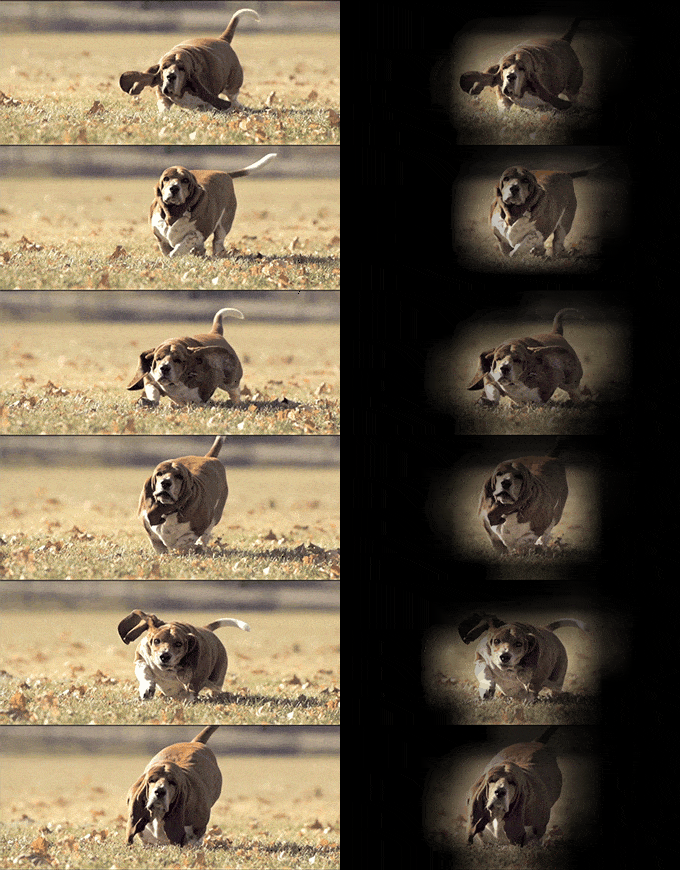
| 方法 | 功能说明 |
|---|---|
| GradCAM | 用平均梯度对二维激活进行加权 |
| HiResCAM | 类似 GradCAM,但将激活与梯度逐元素相乘;对某些模型可证明保证忠实性(faithfulness) |
| GradCAMElementWise | 类似 GradCAM,但将激活与梯度逐元素相乘,求和前应用 ReLU 操作 |
| GradCAM++ | 类似 GradCAM,但使用二阶梯度 |
| XGradCAM | 类似 GradCAM,但用归一化激活对梯度进行缩放 |
| AblationCAM | 将激活置零并测量输出下降程度(本仓库包含快速批量实现) |
| ScoreCAM | 用缩放后的激活扰动图像并测量输出下降程度 |
| EigenCAM | 取二维激活的第一主成分(无类别区分,但似乎效果很好) |
| EigenGradCAM | 类似 EigenCAM 但具有类别区分:Activations*Grad 的第一主成分。看起来像 GradCAM,但更清晰 |
| LayerCAM | 用正梯度对激活进行空间加权。在较低层效果尤其更好 |
| FullGrad | 计算整个网络中偏置的梯度,然后求和 |
| Deep Feature Factorizations | 对二维激活进行非负矩阵分解(Non Negative Matrix Factorization) |
| KPCA-CAM | 类似 EigenCAM,但使用核 PCA(Kernel PCA)而非 PCA |
| FEM | 一种无梯度方法,通过 activation > mean + k * std 规则对激活进行二值化。 |
| ShapleyCAM | 使用梯度和 Hessian-向量积对激活进行加权。 |
| FinerCAM | 通过比较相似类别、抑制共享特征并突出判别性细节,改进细粒度分类。 |
| SegEigenCAM | 类似 EigenCAM,但在 SVD 前进行梯度加权(绝对梯度 ⊙ activations),并通过符号校正修复 SVD 符号歧义;专为语义分割设计 |
| RefineCAM | 一种元方法,在多个层计算 CAM,然后组合它们以获得更高分辨率和更聚焦的 CAM。可与任何其他 CAM 方法配合使用。 |
可视化示例
| 是什么让网络认为图像标签是「pug, pug-dog」 | 是什么让网络认为图像标签是「tabby, tabby cat」 | 将 Grad-CAM 与 Guided Backpropagation 结合用于「pug, pug-dog」类别 |
|---|---|---|
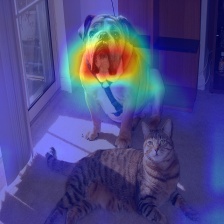 |
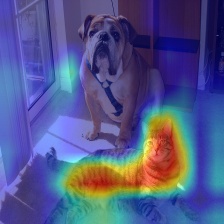 |
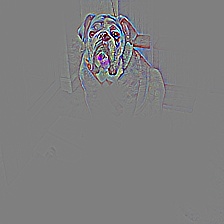 |
目标检测与语义分割
| 目标检测 | 语义分割 |
|---|---|
 |
 |
| 3D 医学语义分割 |
|---|
 |
解释与其他图像/嵌入的相似性

深度特征分解


CLIP
| 解释文本提示「a dog」 | 解释文本提示「a cat」 |
|---|---|
 |
 |
分类
Resnet50:
| 类别 | 图像 | GradCAM | AblationCAM | ScoreCAM |
|---|---|---|---|---|
| Dog |  |
 |
 |
 |
| Cat |  |
 |
 |
 |
Vision Transfomer (Deit Tiny):
| 类别 | 图像 | GradCAM | AblationCAM | ScoreCAM |
|---|---|---|---|---|
| Dog | |
 |
 |
 |
| Cat | |
 |
 |
 |
Swin Transfomer (Tiny window:7 patch:4 input-size:224):
| 类别 | 图像 | GradCAM | AblationCAM | ScoreCAM |
|---|---|---|---|---|
| Dog | |
 |
 |
 |
| Cat | |
 |
 |
 |
XAI 的指标与评估


使用示例
from pytorch_grad_cam import GradCAM, HiResCAM, ScoreCAM, GradCAMPlusPlus, AblationCAM, XGradCAM, EigenCAM, FullGrad
from pytorch_grad_cam.utils.model_targets import ClassifierOutputTarget
from pytorch_grad_cam.utils.image import show_cam_on_image
from torchvision.models import resnet50, ResNet50_Weights

model = resnet50(weights=ResNet50_Weights.DEFAULT)
target_layers = [model.layer4[-1]]
input_tensor = # Create an input tensor image for your model..
# Note: input_tensor can be a batch tensor with several images!

# We have to specify the target we want to generate the CAM for.
targets = [ClassifierOutputTarget(281)]

# Construct the CAM object once, and then re-use it on many images.
with GradCAM(model=model, target_layers=target_layers) as cam:
  # You can also pass aug_smooth=True and eigen_smooth=True, to apply smoothing.
  grayscale_cam = cam(input_tensor=input_tensor, targets=targets)
  # In this example grayscale_cam has only one image in the batch:
  grayscale_cam = grayscale_cam[0, :]
  visualization = show_cam_on_image(rgb_img, grayscale_cam, use_rgb=True)
  # You can also get the model outputs without having to redo inference
  model_outputs = cam.outputs
cam.py 中有更详细的使用示例。
选择用于提取激活值的层
你需要选择用于计算 CAM 的目标层。 一些常见选择如下:
- FasterRCNN: model.backbone
- Resnet18 and 50: model.layer4[-1]
- VGG, densenet161 and mobilenet: model.features[-1]
- mnasnet1_0: model.layers[-1]
- ViT: model.blocks[-1].norm1
- SwinT: model.layers[-1].blocks[-1].norm1
如果你传入包含多个层的列表,CAM 将在这些层之间取平均。 如果你不确定哪一层效果最好,这会很有用。
适配新架构与任务
GradCAM 等方法最初是为分类模型而设计,且最早主要应用于 CNN 分类模型。 不过,你也可以在新架构(如 Vision Transformer)以及非分类任务(如目标检测 Object Detection 或语义分割 Semantic Segmentation)中使用本包。
为了能够适配非标准情况,我们引入了两个概念。
- reshape transform(重塑变换)—— 如何将激活值转换为表示空间图像的形式?
- model targets(模型目标)—— 可解释性方法究竟应尝试解释什么?
reshape_transform 参数
在 CNN 中,模型的中间激活值是多通道图像,维度为 channel x rows x cols, 各种可解释性方法基于这些激活值生成新图像。
对于其他架构(如 Vision Transformer),形状可能不同,例如 (rows x cols + 1) x channels,或其他形式。 reshape transform 将激活值转换回多通道图像,例如在 Vision Transformer 中通过移除 class token 实现。 示例请参见 这里
model_target 参数
model target 只是一个可调用对象,能够获取模型输出,并筛选出我们想要解释的特定标量输出。
对于分类任务,model target 通常是某个特定类别的输出。
传给 CAM 方法的 targets 参数随后可使用 ClassifierOutputTarget:
targets = [ClassifierOutputTarget(281)]
不过在更复杂的情况下,你可能需要不同的行为。 更多示例请参见 这里 for more examples.
教程
这里提供了如何在各种自定义用例(如目标检测)中使用本包的详细示例:
这些链接指向新的文档 jupyter-book,以便快速渲染。 Jupyter notebook 本身可在 git 仓库的 tutorials 文件夹中找到。
引导式反向传播
from pytorch_grad_cam import GuidedBackpropReLUModel
from pytorch_grad_cam.utils.image import (
    show_cam_on_image, deprocess_image, preprocess_image
)
gb_model = GuidedBackpropReLUModel(model=model, device=model.device())
gb = gb_model(input_tensor, target_category=None)

cam_mask = cv2.merge([grayscale_cam, grayscale_cam, grayscale_cam])
cam_gb = deprocess_image(cam_mask * gb)
result = deprocess_image(gb)
指标与解释结果评估
from pytorch_grad_cam.utils.model_targets import ClassifierOutputSoftmaxTarget
from pytorch_grad_cam.metrics.cam_mult_image import CamMultImageConfidenceChange
# Create the metric target, often the confidence drop in a score of some category
metric_target = ClassifierOutputSoftmaxTarget(281)
scores, batch_visualizations = CamMultImageConfidenceChange()(input_tensor,
  inverse_cams, targets, model, return_visualization=True)
visualization = deprocess_image(batch_visualizations[0, :])

# State of the art metric: Remove and Debias
from pytorch_grad_cam.metrics.road import ROADMostRelevantFirst, ROADLeastRelevantFirst
cam_metric = ROADMostRelevantFirst(percentile=75)
scores, perturbation_visualizations = cam_metric(input_tensor,
  grayscale_cams, targets, model, return_visualization=True)

# You can also average across different percentiles, and combine
# (LeastRelevantFirst - MostRelevantFirst) / 2
from pytorch_grad_cam.metrics.road import ROADMostRelevantFirstAverage,
                                          ROADLeastRelevantFirstAverage,
                                          ROADCombined
cam_metric = ROADCombined(percentiles=[20, 40, 60, 80])
scores = cam_metric(input_tensor, grayscale_cams, targets, model)

# You can also use aggregate metrics such as ARCC
from pytorch_grad_cam.metrics.ARCC import ARCC

cam_metric = ARCC(base_method=cam)
arcc_score = cam_metric(input_tensor, grayscale_cams, targets, model)
平滑处理以获得更美观的 CAM
为减少 CAM 中的噪声,并使其更好地贴合目标对象, 本包支持两种平滑方法:
-
aug_smooth=True测试时增强(Test time augmentation):运行时间增加约 6 倍。
组合应用水平翻转,并将图像乘以 [1.0, 1.1, 0.9]。
这样可使 CAM 更好地围绕目标对象居中。
-
eigen_smooth=Trueactivations*weights的第一主成分。这能去除大量噪声。
| AblationCAM | 增强平滑(aug smooth) | 特征向量平滑(eigen smooth) | 增强+特征向量平滑(aug+eigen smooth) |
|---|---|---|---|
 |
 |
 |
 |
运行示例脚本:
用法:python cam.py --image-path <path_to_image> --method <method> --output-dir <output_dir_path>
若要指定设备运行,例如 cpu、cuda、cuda:0、mps 或 hpu:
python cam.py --image-path <path_to_image> --device cuda --output-dir <output_dir_path>
你可以从以下方法中选择:
GradCAM , HiResCAM, ScoreCAM, GradCAMPlusPlus, AblationCAM, XGradCAM , LayerCAM, FullGrad, EigenCAM, ShapleyCAM, FinerCAM, SegEigenCAM and RefineCAM.
部分方法(如 ScoreCAM 和 AblationCAM)需要进行大量前向传播(forward passes), 并且提供了批处理(batched)实现。
你可以通过以下方式控制批大小(batch size):
cam.batch_size =
引用
若你在研究中使用本项目,请引用。以下是一个 BibTeX 条目示例:
@misc{jacobgilpytorchcam,
  title={PyTorch library for CAM methods},
  author={Jacob Gildenblat and contributors},
  year={2021},
  publisher={GitHub},
  howpublished={\url{https://github.com/jacobgil/pytorch-grad-cam}},
}
参考文献
https://arxiv.org/abs/1610.02391
Grad-CAM: Visual Explanations from Deep Networks via Gradient-based Localization Ramprasaath R. Selvaraju, Michael Cogswell, Abhishek Das, Ramakrishna Vedantam, Devi Parikh, Dhruv Batra
https://arxiv.org/abs/2011.08891
Use HiResCAM instead of Grad-CAM for faithful explanations of convolutional neural networks Rachel L. Draelos, Lawrence Carin
https://arxiv.org/abs/1710.11063
Grad-CAM++: Improved Visual Explanations for Deep Convolutional Networks Aditya Chattopadhyay, Anirban Sarkar, Prantik Howlader, Vineeth N Balasubramanian
https://arxiv.org/abs/1910.01279
Score-CAM: Score-Weighted Visual Explanations for Convolutional Neural Networks Haofan Wang, Zifan Wang, Mengnan Du, Fan Yang, Zijian Zhang, Sirui Ding, Piotr Mardziel, Xia Hu
https://ieeexplore.ieee.org/abstract/document/9093360/
Ablation-cam: Visual explanations for deep convolutional network via gradient-free localization. Saurabh Desai and Harish G Ramaswamy. In WACV, pages 972–980, 2020
https://arxiv.org/abs/2008.02312
Axiom-based Grad-CAM: Towards Accurate Visualization and Explanation of CNNs Ruigang Fu, Qingyong Hu, Xiaohu Dong, Yulan Guo, Yinghui Gao, Biao Li
https://arxiv.org/abs/2008.00299
Eigen-CAM: Class Activation Map using Principal Components Mohammed Bany Muhammad, Mohammed Yeasin
http://mftp.mmcheng.net/Papers/21TIP_LayerCAM.pdf
LayerCAM: Exploring Hierarchical Class Activation Maps for Localization Peng-Tao Jiang; Chang-Bin Zhang; Qibin Hou; Ming-Ming Cheng; Yunchao Wei
https://arxiv.org/abs/1905.00780
Full-Gradient Representation for Neural Network Visualization Suraj Srinivas, Francois Fleuret
https://arxiv.org/abs/1806.10206
Deep Feature Factorization For Concept Discovery Edo Collins, Radhakrishna Achanta, Sabine Süsstrunk
https://arxiv.org/abs/2410.00267
KPCA-CAM: Visual Explainability of Deep Computer Vision Models using Kernel PCA Sachin Karmani, Thanushon Sivakaran, Gaurav Prasad, Mehmet Ali, Wenbo Yang, Sheyang Tang
https://hal.science/hal-02963298/document
Features Understanding in 3D CNNs for Actions Recognition in Video Kazi Ahmed Asif Fuad, Pierre-Etienne Martin, Romain Giot, Romain Bourqui, Jenny Benois-Pineau, Akka Zemmar
https://arxiv.org/abs/2501.06261
CAMs as Shapley Value-based Explainers Huaiguang Cai
https://arxiv.org/pdf/2501.11309
Finer-CAM : Spotting the Difference Reveals Finer Details for Visual Explanation
Ziheng Zhang*, Jianyang Gu*, Arpita Chowdhury, Zheda Mai, David Carlyn,Tanya Berger-Wolf, Yu Su, Wei-Lun Chao
https://doi.org/10.3390/app15137562
Seg-Eigen-CAM: Eigen-Value-Based Visual Explanations for Semantic Segmentation Models Ching-Ting Chung, Josh Jia-Ching Ying
https://arxiv.org/abs/2605.14641
How to Evaluate and Refine your CAM
Luca Domeniconi, Alessandra Stramiglio, Michele Lombardi, Samuele Salti