 wehub-resource-sync
e06fe8e8c6
wehub-resource-sync
e06fe8e8c6
3.9 KiB
This model was published in HF papers on 2020-10-08 and contributed to Hugging Face Transformers on 2022-09-14.
Deformable DETR
Deformable DETR improves on the original DETR by using a deformable attention module. This mechanism selectively attends to a small set of key sampling points around a reference. It improves training speed and improves accuracy.
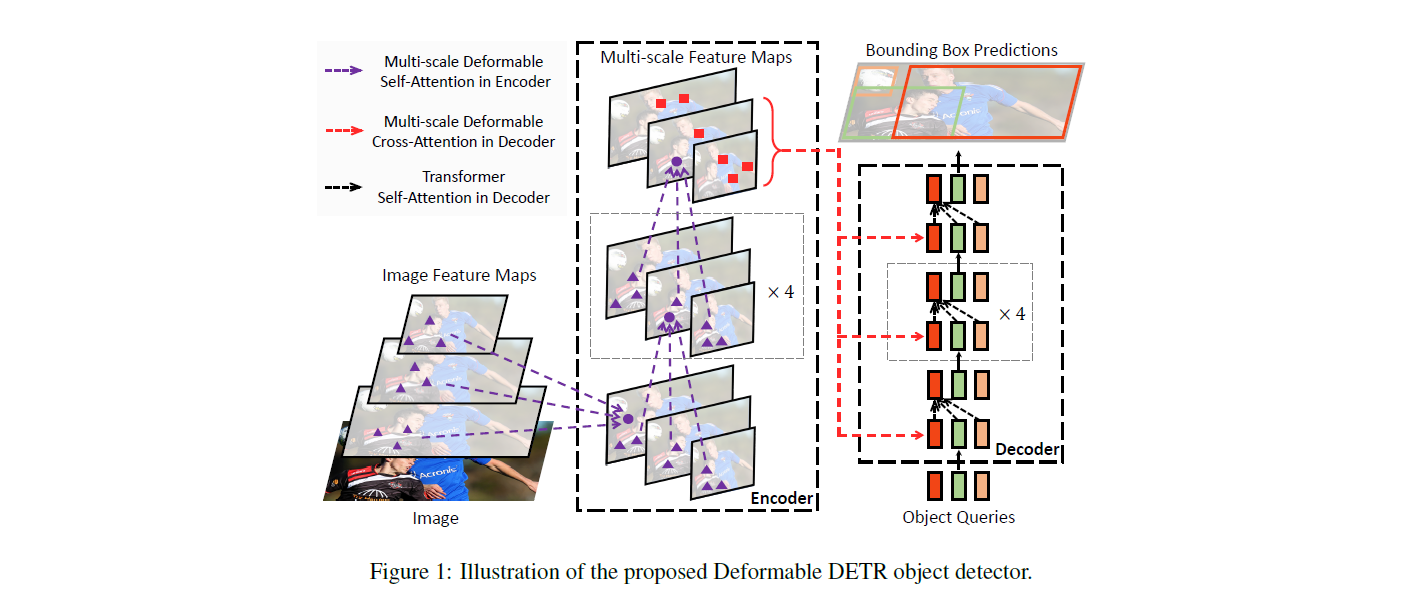
Deformable DETR architecture. Taken from the original paper.
You can find all the available Deformable DETR checkpoints under the SenseTime organization.
Tip
This model was contributed by nielsr.
Click on the Deformable DETR models in the right sidebar for more examples of how to apply Deformable DETR to different object detection and segmentation tasks.
The example below demonstrates how to perform object detection with the [Pipeline] and the [AutoModel] class.
from transformers import pipeline


pipeline = pipeline(
    "object-detection",
    model="SenseTime/deformable-detr",
    device_map=0
)

pipeline("http://images.cocodataset.org/val2017/000000039769.jpg")
import requests
import torch
from PIL import Image

from transformers import AutoImageProcessor, AutoModelForObjectDetection


url = "http://images.cocodataset.org/val2017/000000039769.jpg"
image = Image.open(requests.get(url, stream=True).raw)

image_processor = AutoImageProcessor.from_pretrained("SenseTime/deformable-detr")
model = AutoModelForObjectDetection.from_pretrained("SenseTime/deformable-detr", device_map="auto")

# prepare image for the model
inputs = image_processor(images=image, return_tensors="pt").to(model.device)

with torch.no_grad():
    outputs = model(**inputs)

results = image_processor.post_process_object_detection(outputs, target_sizes=torch.tensor([image.size[::-1]]), threshold=0.3)

for result in results:
    for score, label_id, box in zip(result["scores"], result["labels"], result["boxes"]):
        score, label = score.item(), label_id.item()
        box = [round(i, 2) for i in box.tolist()]
        print(f"{model.config.id2label[label]}: {score:.2f} {box}")
Resources
- Refer to this set of notebooks for inference and fine-tuning [
DeformableDetrForObjectDetection] on a custom dataset.
DeformableDetrImageProcessor
autodoc DeformableDetrImageProcessor - preprocess - post_process_object_detection
DeformableDetrImageProcessorPil
autodoc DeformableDetrImageProcessorPil - preprocess - post_process_object_detection
DeformableDetrConfig
autodoc DeformableDetrConfig
DeformableDetrModel
autodoc DeformableDetrModel - forward
DeformableDetrForObjectDetection
autodoc DeformableDetrForObjectDetection - forward