 wehub-resource-sync
caf324b09d
wehub-resource-sync
caf324b09d
12 KiB
Quicktour
PEFT offers parameter-efficient methods for finetuning large pretrained models. The traditional paradigm is to finetune all of a model's parameters for each downstream task, but this is becoming exceedingly costly and impractical because of the enormous number of parameters in models today. Instead, it is more efficient to train a smaller number of prompt parameters or use a reparametrization method like low-rank adaptation (LoRA) to reduce the number of trainable parameters.

This quicktour will show you PEFT's main features and how you can train or run inference on large models that would typically be inaccessible on consumer devices.
PEFT configuration and model
For any PEFT method, you'll need to create a configuration which contains all the parameters that specify how the PEFT method should be applied, most importantly which layers of the existing model to target with trainable parameters. Once the configuration is setup, pass it to the [~peft.get_peft_model] function along with the base model to create a trainable [PeftModel].
Let's use LoRA as an example but only discuss common parameters - you might want to use one of the many other PEFT methods. The configuration usually entails this:
target_modules: which modules of the base model to adapttask_type(default:None, see availableTaskTypes): the nature of the trained task; if provided may help to automatically save relevant layers alongside the adapter weights or warn you about incompatibilitiesinference_mode(default:False): whether you're using the model for inference or not
Depending on the PEFT method you choose you will add specific parameters that, for example, determine the size of the update matrices. Here's an example of a config you may encounter in the wild:
from peft import LoraConfig, TaskType

peft_config = LoraConfig(target_modules=["q_proj"], task_type=TaskType.CAUSAL_LM, inference_mode=False, r=8, lora_alpha=32, lora_dropout=0.1)
Tip
See the configuration guide for more details on how the PEFT configuration works under the hood.
Once the [LoraConfig] is set up, create a [PeftModel] with the [get_peft_model] function. It takes a base model - which you can (but don't have to) load from the Transformers library - and the [LoraConfig] containing the parameters for how to configure a model for training with LoRA.
Load the base model you want to finetune.
from transformers import AutoModelForCausalLM

model = AutoModelForCausalLM.from_pretrained("meta-llama/Llama-3.2-1B")
Now wrap the base model and peft_config with the [get_peft_model] function to create a [PeftModel].
Wrapping means that PEFT replaces the targeted layers (here: all q_proj layers) with the adapter-specific layer for the target layer's type. Since we're dealing with linear layers, it will be, in this case, a lora.Linear layer. Note that these changes are done in-place to save memory, so your base model is now modified.
Note that we've only specified q_proj but in actuality we are targeting all model.layers[:].self_attn.q_proj layers. This is because PEFT searches for matching suffixes by default. Pass a string with a regular expression if you want to target more complex layer patterns.


The base model's layer will be wrapped, retained and not trained while new, trainable weights are added and are combined. How these new weights are structured and combined with the weights of the base model is a good portion of what sets the different PEFT methods apart.
To get a sense of the number of trainable parameters in your model, use the [print_trainable_parameters] method.
from peft import get_peft_model

peft_model = get_peft_model(model, peft_config)
peft_model.print_trainable_parameters()
"output: trainable params: 524,288 || all params: 1,236,338,688 || trainable%: 0.0424"
Out of meta-llama/Llama-3.2-1B's 1B parameters, you're only training 0.04% of them!
That is it 🎉! Now you can train the model with the Transformers [~transformers.Trainer], Accelerate, or any custom PyTorch training loop.
For example, to train with the [~transformers.Trainer] class, setup a [~transformers.TrainingArguments] class with some training hyperparameters.
training_args = TrainingArguments(
    output_dir="your-name/meta-llama/my-llama3.2-adapter",
    learning_rate=1e-3,
    per_device_train_batch_size=32,
    per_device_eval_batch_size=32,
    num_train_epochs=2,
    weight_decay=0.01,
    eval_strategy="epoch",
    save_strategy="epoch",
    load_best_model_at_end=True,
)
Pass the model, training arguments, dataset, tokenizer, and any other necessary component to the [~transformers.Trainer], and call [~transformers.Trainer.train] to start training.
trainer = Trainer(
    model=peft_model,
    args=training_args,
    train_dataset=tokenized_datasets["train"],
    eval_dataset=tokenized_datasets["test"],
    data_collator=data_collator,
    compute_metrics=compute_metrics,
)

trainer.train()
Save model
After your model is finished training, you can save your model to a directory using the [~PeftModel.save_pretrained] function.
peft_model.save_pretrained("output_dir")
You can also save your model to the Hub (make sure you're logged in to your Hugging Face account first) with the [~transformers.PreTrainedModel.push_to_hub] function.
from huggingface_hub import notebook_login

notebook_login()
peft_model.push_to_hub("your-name/my-llama3.2-adapter")
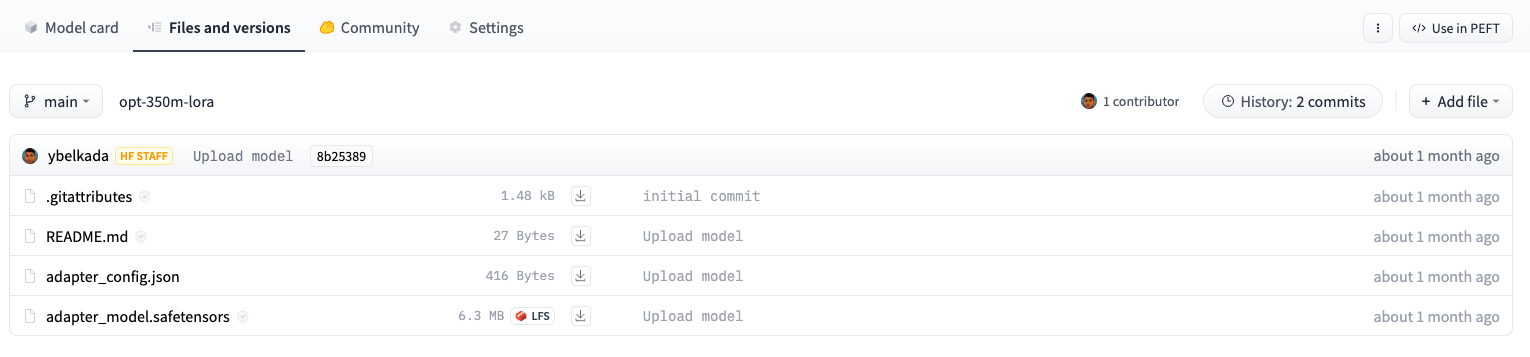
Both methods only save the extra PEFT weights that were trained, meaning it is super efficient to store, transfer, and load. For example, this facebook/opt-350m model trained with LoRA only contains two files: adapter_config.json and adapter_model.safetensors. The adapter_model.safetensors file is just 6.3MB!
Inference
Tip
Take a look at the AutoPeftModel API reference for a complete list of available
AutoPeftModelclasses.
Easily load any PEFT-trained model for inference with the [AutoPeftModel] class and the [~transformers.PreTrainedModel.from_pretrained] method:
from peft import AutoPeftModelForCausalLM
from transformers import AutoTokenizer
import torch

peft_model = AutoPeftModelForCausalLM.from_pretrained("ybelkada/opt-350m-lora")
tokenizer = AutoTokenizer.from_pretrained("facebook/opt-350m")

peft_model = peft_model.to("cuda")
peft_model.eval()
inputs = tokenizer("Preheat the oven to 350 degrees and place the cookie dough", return_tensors="pt")

outputs = peft_model.generate(input_ids=inputs["input_ids"].to("cuda"), max_new_tokens=50)
print(tokenizer.batch_decode(outputs.detach().cpu().numpy(), skip_special_tokens=True)[0])

"Preheat the oven to 350 degrees and place the cookie dough in the center of the oven. In a large bowl, combine the flour, baking powder, baking soda, salt, and cinnamon. In a separate bowl, combine the egg yolks, sugar, and vanilla."
For other tasks that aren't explicitly supported with an AutoPeftModelFor class - such as automatic speech recognition - you can still use the base [AutoPeftModel] class to load a model for the task.
from peft import AutoPeftModel

peft_model = AutoPeftModel.from_pretrained("smangrul/openai-whisper-large-v2-LORA-colab")
The most general way of loading a trained PEFT adapter onto a model is to use [~PeftModel.from_pretrained]:
from transformers import AutoPeftModelForCausalLM
from peft import PeftModel

base_model = AutoModelForCausalLM.from_pretrained("meta-llama/llama3.2-1B")
peft_model = PeftModel.from_pretrained(base_model, "my-user/my-llama-adapter")  # you can also pass a directory instead of a hub path
Multiple adapters
PEFT supports installing multiple adapters (of the same kind, in this document this would be LoRA) on top of a base model. When you call get_peft_model there is only one adapter named "default" but you can add as many additional adapters as you want by calling peft_model.add_adapter(adapter_name=...).
This works because the wrapped layer actually has a unique set of trainable weights for each adapter name. Not every adapter is active and trainable by default. You have to explicitly enable adapters by name before they are active. This allows you to quickly swap between adapters where task-specific knowledge is needed or serve different use-cases on top of one model.

Just remember to call peft_model.set_adapter(<adapter_name>) first to enable the adapter.
Quick example:
peft_model.add_adapter(adapter_name='new_adapter')
peft_model.set_adapter('new_adapter')
Next steps
Now that you've seen how to train a model with one of the PEFT methods, we encourage you to try out some of the other methods like prompt tuning. The steps are very similar to the ones shown in the quicktour:
- prepare a [
PeftConfig] for a PEFT method, e.g. a [LoraConfig] or some other config (see the method overview) - use the [
get_peft_model] method to create a [PeftModel] from the configuration and base model
Then you can train it however you like! To load a PEFT model for inference, you can use the [AutoPeftModel] class.
Feel free to also take a look at the task guides if you're interested in training a model with another PEFT method for a specific task such as semantic segmentation, multilingual automatic speech recognition, DreamBooth, token classification, and more.