 wehub-resource-sync
1849 lines
63 KiB
Plaintext
1849 lines
63 KiB
Plaintext
{
|
||
"cells": [
|
||
{
|
||
"cell_type": "code",
|
||
"execution_count": null,
|
||
"metadata": {
|
||
"id": "WtxoQixAqoNu"
|
||
},
|
||
"outputs": [],
|
||
"source": [
|
||
"# Copyright 2025-2026 Google LLC\n",
|
||
"#\n",
|
||
"# Licensed under the Apache License, Version 2.0 (the \"License\");\n",
|
||
"# you may not use this file except in compliance with the License.\n",
|
||
"# You may obtain a copy of the License at\n",
|
||
"#\n",
|
||
"# https://www.apache.org/licenses/LICENSE-2.0\n",
|
||
"#\n",
|
||
"# Unless required by applicable law or agreed to in writing, software\n",
|
||
"# distributed under the License is distributed on an \"AS IS\" BASIS,\n",
|
||
"# WITHOUT WARRANTIES OR CONDITIONS OF ANY KIND, either express or implied.\n",
|
||
"# See the License for the specific language governing permissions and\n",
|
||
"# limitations under the License."
|
||
]
|
||
},
|
||
{
|
||
"cell_type": "markdown",
|
||
"metadata": {
|
||
"id": "ke8cM4GQln_c"
|
||
},
|
||
"source": [
|
||
"# Generating Consistent Imagery with Gemini 🍌\n"
|
||
]
|
||
},
|
||
{
|
||
"cell_type": "markdown",
|
||
"metadata": {
|
||
"id": "BPRBl_orqoNv"
|
||
},
|
||
"source": [
|
||
"<table align=\"left\">\n",
|
||
" <tr>\n",
|
||
" <td style=\"text-align: center\">\n",
|
||
" <a href=\"https://colab.research.google.com/github/GoogleCloudPlatform/generative-ai/blob/main/gemini/use-cases/media-generation/consistent_imagery_generation.ipynb\">\n",
|
||
" <img width=\"32px\" src=\"https://www.gstatic.com/pantheon/images/bigquery/welcome_page/colab-logo.svg\" alt=\"Google Colaboratory logo\"><br> Open in Colab\n",
|
||
" </a>\n",
|
||
" </td>\n",
|
||
" <td style=\"text-align: center\">\n",
|
||
" <a href=\"https://console.cloud.google.com/agent-platform/colab/import/https:%2F%2Fraw.githubusercontent.com%2FGoogleCloudPlatform%2Fgenerative-ai%2Fmain%2Fgemini%2Fuse-cases%2Fmedia-generation%2Fconsistent_imagery_generation.ipynb\">\n",
|
||
" <img width=\"32px\" src=\"https://lh3.googleusercontent.com/JmcxdQi-qOpctIvWKgPtrzZdJJK-J3sWE1RsfjZNwshCFgE_9fULcNpuXYTilIR2hjwN\" alt=\"Google Cloud Colab Enterprise logo\"><br> Open in Colab Enterprise\n",
|
||
" </a>\n",
|
||
" </td>\n",
|
||
" <td style=\"text-align: center\">\n",
|
||
" <a href=\"https://console.cloud.google.com/agent-platform/workbench/instances?download_url=https://raw.githubusercontent.com/GoogleCloudPlatform/generative-ai/main/gemini/use-cases/media-generation/consistent_imagery_generation.ipynb\">\n",
|
||
" <img width=\"32px\" src=\"https://storage.googleapis.com/github-repo/workbench-icon.svg\" alt=\"Workbench logo\"><br> Open in Workbench\n",
|
||
" </a>\n",
|
||
" </td>\n",
|
||
" <td style=\"text-align: center\">\n",
|
||
" <a href=\"https://github.com/GoogleCloudPlatform/generative-ai/blob/main/gemini/use-cases/media-generation/consistent_imagery_generation.ipynb\">\n",
|
||
" <img width=\"32px\" src=\"https://raw.githubusercontent.com/primer/octicons/refs/heads/main/icons/mark-github-24.svg\" alt=\"GitHub logo\"><br> View on GitHub\n",
|
||
" </a>\n",
|
||
" </td>\n",
|
||
" </tr>\n",
|
||
"</table>\n",
|
||
"\n",
|
||
"<div style=\"clear: both;\"></div>\n",
|
||
"\n",
|
||
"<p>\n",
|
||
"<b>Share to:</b>\n",
|
||
"\n",
|
||
"<a href=\"https://www.linkedin.com/sharing/share-offsite/?url=https%3A//github.com/GoogleCloudPlatform/generative-ai/blob/main/gemini/use-cases/media-generation/consistent_imagery_generation.ipynb\" target=\"_blank\">\n",
|
||
" <img width=\"20px\" src=\"https://upload.wikimedia.org/wikipedia/commons/8/81/LinkedIn_icon.svg\" alt=\"LinkedIn logo\">\n",
|
||
"</a>\n",
|
||
"\n",
|
||
"<a href=\"https://bsky.app/intent/compose?text=https%3A//github.com/GoogleCloudPlatform/generative-ai/blob/main/gemini/use-cases/media-generation/consistent_imagery_generation.ipynb\" target=\"_blank\">\n",
|
||
" <img width=\"20px\" src=\"https://upload.wikimedia.org/wikipedia/commons/7/7a/Bluesky_Logo.svg\" alt=\"Bluesky logo\">\n",
|
||
"</a>\n",
|
||
"\n",
|
||
"<a href=\"https://twitter.com/intent/tweet?url=https%3A//github.com/GoogleCloudPlatform/generative-ai/blob/main/gemini/use-cases/media-generation/consistent_imagery_generation.ipynb\" target=\"_blank\">\n",
|
||
" <img width=\"20px\" src=\"https://upload.wikimedia.org/wikipedia/commons/5/5a/X_icon_2.svg\" alt=\"X logo\">\n",
|
||
"</a>\n",
|
||
"\n",
|
||
"<a href=\"https://reddit.com/submit?url=https%3A//github.com/GoogleCloudPlatform/generative-ai/blob/main/gemini/use-cases/media-generation/consistent_imagery_generation.ipynb\" target=\"_blank\">\n",
|
||
" <img width=\"20px\" src=\"https://redditinc.com/hubfs/Reddit%20Inc/Brand/Reddit_Logo.png\" alt=\"Reddit logo\">\n",
|
||
"</a>\n",
|
||
"\n",
|
||
"<a href=\"https://www.facebook.com/sharer/sharer.php?u=https%3A//github.com/GoogleCloudPlatform/generative-ai/blob/main/gemini/use-cases/media-generation/consistent_imagery_generation.ipynb\" target=\"_blank\">\n",
|
||
" <img width=\"20px\" src=\"https://upload.wikimedia.org/wikipedia/commons/5/51/Facebook_f_logo_%282019%29.svg\" alt=\"Facebook logo\">\n",
|
||
"</a>\n",
|
||
"</p>\n"
|
||
]
|
||
},
|
||
{
|
||
"cell_type": "markdown",
|
||
"metadata": {
|
||
"id": "C0AcsmQ5hl9a"
|
||
},
|
||
"source": [
|
||
"| Author |\n",
|
||
"| ------------------------------------------------ |\n",
|
||
"| [Laurent Picard](https://github.com/PicardParis) |\n"
|
||
]
|
||
},
|
||
{
|
||
"cell_type": "markdown",
|
||
"metadata": {
|
||
"id": "DwKb-__qK02C"
|
||
},
|
||
"source": [
|
||
"---\n",
|
||
"\n",
|
||
"## 🔥 Challenge\n"
|
||
]
|
||
},
|
||
{
|
||
"cell_type": "markdown",
|
||
"metadata": {},
|
||
"source": [
|
||
"\n"
|
||
]
|
||
},
|
||
{
|
||
"cell_type": "markdown",
|
||
"metadata": {
|
||
"id": "35E-CpC6qoNw"
|
||
},
|
||
"source": [
|
||
"We all have existing images worth reusing in different contexts. This typically involves modifying the images, a complex (if not impossible) task requiring very specific skills and tools. This explains why our archives are full of forgotten or unused treasures. State-of-the-art vision models have evolved so much that we can reconsider this problem.\n",
|
||
"\n",
|
||
"So, can we breathe new life into our visual archives?\n",
|
||
"\n",
|
||
"Let's try to complete this challenge with the following steps:\n",
|
||
"\n",
|
||
"- 1️⃣ Start with an archive image we'd like to reuse\n",
|
||
"- 2️⃣ Extract a character to create a brand-new reference image\n",
|
||
"- 3️⃣ Generate a series of images to illustrate the character's journey, using only prompts and the new assets\n",
|
||
"\n",
|
||
"For this, we'll explore the capabilities of \"Gemini 2.5 Flash Image\", also known as \"Nano Banana\" 🍌.\n"
|
||
]
|
||
},
|
||
{
|
||
"cell_type": "markdown",
|
||
"metadata": {
|
||
"id": "W0_VsUthqoNx"
|
||
},
|
||
"source": [
|
||
"---\n",
|
||
"\n",
|
||
"## 🏁 Setup\n"
|
||
]
|
||
},
|
||
{
|
||
"cell_type": "markdown",
|
||
"metadata": {
|
||
"id": "5wbID7ORqoNx"
|
||
},
|
||
"source": [
|
||
"### 🐍 Python packages\n"
|
||
]
|
||
},
|
||
{
|
||
"cell_type": "markdown",
|
||
"metadata": {
|
||
"id": "MZCjtEXjhj3z"
|
||
},
|
||
"source": [
|
||
"We'll use the following packages:\n",
|
||
"\n",
|
||
"- `google-genai`: The [Google Gen AI Python SDK](https://pypi.org/project/google-genai) lets us call Gemini with a few lines of code\n",
|
||
"- `networkx` for graph management\n",
|
||
"\n",
|
||
"We'll also need:\n",
|
||
"\n",
|
||
"- `tenacity` for request management (a dependency of `google-genai`)\n",
|
||
"- `matplotlib` and `pillow` for data visualization (dependencies of `networkx`)\n"
|
||
]
|
||
},
|
||
{
|
||
"cell_type": "code",
|
||
"execution_count": null,
|
||
"metadata": {
|
||
"id": "kZBN80r7qtgs"
|
||
},
|
||
"outputs": [],
|
||
"source": [
|
||
"%pip install --quiet \"google-genai>=2.6.0\" \"networkx[default]\""
|
||
]
|
||
},
|
||
{
|
||
"cell_type": "markdown",
|
||
"metadata": {
|
||
"id": "yGgmHVdQqoNz"
|
||
},
|
||
"source": [
|
||
"---\n",
|
||
"\n",
|
||
"### 🤝 Gemini API\n"
|
||
]
|
||
},
|
||
{
|
||
"cell_type": "markdown",
|
||
"metadata": {
|
||
"id": "zOJv5DjZhj3z"
|
||
},
|
||
"source": [
|
||
"To use the Gemini API, we have two main options:\n",
|
||
"\n",
|
||
"1. Via **Agent Platform** (formerly Vertex AI) with a Google Cloud project\n",
|
||
"2. Via **Google AI Studio** with a Gemini API key\n",
|
||
"\n",
|
||
"The Google Gen AI SDK provides a unified interface to these APIs and we can use environment variables for the configuration.\n",
|
||
"\n",
|
||
"**🛠️ Option 1 - Gemini API via Agent Platform**\n",
|
||
"\n",
|
||
"Requirements:\n",
|
||
"\n",
|
||
"- A Google Cloud project\n",
|
||
"- The Agent Platform API must be enabled for this project: ▶️ [Enable the Agent Platform API](https://console.cloud.google.com/flows/enableapi?apiid=aiplatform.googleapis.com,storage-component.googleapis.com)\n",
|
||
"\n",
|
||
"Gen AI SDK environment variables:\n",
|
||
"\n",
|
||
"- `GOOGLE_GENAI_USE_ENTERPRISE=\"True\"`\n",
|
||
"- `GOOGLE_CLOUD_PROJECT=\"<PROJECT_ID>\"`\n",
|
||
"- `GOOGLE_CLOUD_LOCATION=\"<LOCATION>\"`\n",
|
||
"\n",
|
||
"> 💡 For preview models, the location must be set to `global`. For generally available models, we can choose the closest location among the [Google model endpoint locations](https://docs.cloud.google.com/vertex-ai/generative-ai/docs/learn/locations#google-models).\n",
|
||
"\n",
|
||
"> ℹ️ Learn more about [setting up a project and a development environment](https://docs.cloud.google.com/vertex-ai/docs/start/cloud-environment).\n",
|
||
"\n",
|
||
"**🛠️ Option 2 - Gemini API via Google AI Studio**\n",
|
||
"\n",
|
||
"Requirement:\n",
|
||
"\n",
|
||
"- A Gemini API key\n",
|
||
"\n",
|
||
"Gen AI SDK environment variables:\n",
|
||
"\n",
|
||
"- `GOOGLE_GENAI_USE_ENTERPRISE=\"False\"`\n",
|
||
"- `GOOGLE_API_KEY=\"<API_KEY>\"`\n",
|
||
"\n",
|
||
"> ℹ️ Learn more about [getting a Gemini API key from Google AI Studio](https://aistudio.google.com/app/apikey).\n"
|
||
]
|
||
},
|
||
{
|
||
"cell_type": "markdown",
|
||
"metadata": {
|
||
"id": "wZcmLBKqhdvX"
|
||
},
|
||
"source": [
|
||
"💡 You can store your environment configuration outside of the source code:\n",
|
||
"\n",
|
||
"| Environment | Method |\n",
|
||
"| ---------------- | ----------------------------------------------------------- |\n",
|
||
"| IDE | `.env` file (or equivalent) |\n",
|
||
"| Colab | Colab Secrets (🗝️ icon in left panel, see code below) |\n",
|
||
"| Colab Enterprise | Google Cloud project and location are automatically defined |\n",
|
||
"| Workbench | Google Cloud project and location are automatically defined |\n"
|
||
]
|
||
},
|
||
{
|
||
"cell_type": "markdown",
|
||
"metadata": {
|
||
"id": "ky2Escg3a1E2"
|
||
},
|
||
"source": [
|
||
"Define the following environment detection functions. You can also define your configuration manually if needed.\n"
|
||
]
|
||
},
|
||
{
|
||
"cell_type": "code",
|
||
"execution_count": null,
|
||
"metadata": {
|
||
"id": "VTov81qlqoNz"
|
||
},
|
||
"outputs": [],
|
||
"source": [
|
||
"# @title {display-mode: \"form\"}\n",
|
||
"import os\n",
|
||
"import sys\n",
|
||
"from collections.abc import Callable\n",
|
||
"\n",
|
||
"from google import genai\n",
|
||
"\n",
|
||
"# Manual setup (leave unchanged if setup is environment-defined)\n",
|
||
"\n",
|
||
"# @markdown **Which API: Agent Platform (formerly Vertex AI) or Google AI Studio?**\n",
|
||
"GOOGLE_GENAI_USE_ENTERPRISE = True # @param {type: \"boolean\"}\n",
|
||
"\n",
|
||
"# @markdown **Option A - Google Cloud project [+location]**\n",
|
||
"GOOGLE_CLOUD_PROJECT = \"\" # @param {type: \"string\"}\n",
|
||
"GOOGLE_CLOUD_LOCATION = \"global\" # @param {type: \"string\"}\n",
|
||
"\n",
|
||
"# @markdown **Option B - Google AI Studio API key**\n",
|
||
"GOOGLE_API_KEY = \"\" # @param {type: \"string\"}\n",
|
||
"\n",
|
||
"\n",
|
||
"def check_environment() -> bool:\n",
|
||
" check_colab_user_authentication()\n",
|
||
" return check_manual_setup() or check_enterprise() or check_colab() or check_local()\n",
|
||
"\n",
|
||
"\n",
|
||
"def check_manual_setup() -> bool:\n",
|
||
" return check_define_env_vars(\n",
|
||
" GOOGLE_GENAI_USE_ENTERPRISE,\n",
|
||
" GOOGLE_CLOUD_PROJECT.strip(), # Might have been pasted with a newline\n",
|
||
" GOOGLE_CLOUD_LOCATION,\n",
|
||
" GOOGLE_API_KEY,\n",
|
||
" )\n",
|
||
"\n",
|
||
"\n",
|
||
"def check_enterprise() -> bool:\n",
|
||
" # Workbench and Colab Enterprise\n",
|
||
" match os.getenv(\"VERTEX_PRODUCT\", \"\"):\n",
|
||
" case \"WORKBENCH_INSTANCE\":\n",
|
||
" pass\n",
|
||
" case \"COLAB_ENTERPRISE\":\n",
|
||
" if not running_in_colab_env():\n",
|
||
" return False\n",
|
||
" case _:\n",
|
||
" return False\n",
|
||
"\n",
|
||
" return check_define_env_vars(\n",
|
||
" True,\n",
|
||
" os.getenv(\"GOOGLE_CLOUD_PROJECT\", \"\"),\n",
|
||
" os.getenv(\"GOOGLE_CLOUD_REGION\", \"\"),\n",
|
||
" \"\",\n",
|
||
" )\n",
|
||
"\n",
|
||
"\n",
|
||
"def check_colab() -> bool:\n",
|
||
" if not running_in_colab_env():\n",
|
||
" return False\n",
|
||
"\n",
|
||
" # Colab Enterprise was checked before, so this is Colab only\n",
|
||
" from google.colab import auth as colab_auth # type: ignore\n",
|
||
"\n",
|
||
" colab_auth.authenticate_user()\n",
|
||
"\n",
|
||
" # Use Colab Secrets (🗝️ icon in left panel) to store the environment variables\n",
|
||
" # Secrets are private, visible only to you and the notebooks that you select\n",
|
||
" # - Agent Platform: Store your settings as secrets\n",
|
||
" # - Google AI: Directly import your Gemini API key from the UI\n",
|
||
" enterprise, project, location, api_key = get_vars(get_colab_secret)\n",
|
||
"\n",
|
||
" return check_define_env_vars(enterprise, project, location, api_key)\n",
|
||
"\n",
|
||
"\n",
|
||
"def check_local() -> bool:\n",
|
||
" enterprise, project, location, api_key = get_vars(os.getenv)\n",
|
||
"\n",
|
||
" return check_define_env_vars(enterprise, project, location, api_key)\n",
|
||
"\n",
|
||
"\n",
|
||
"def running_in_colab_env() -> bool:\n",
|
||
" # Colab or Colab Enterprise\n",
|
||
" return \"google.colab\" in sys.modules\n",
|
||
"\n",
|
||
"\n",
|
||
"def check_colab_user_authentication() -> None:\n",
|
||
" if running_in_colab_env():\n",
|
||
" from google.colab import auth as colab_auth # type: ignore\n",
|
||
"\n",
|
||
" colab_auth.authenticate_user()\n",
|
||
"\n",
|
||
"\n",
|
||
"def get_colab_secret(secret_name: str, default: str) -> str:\n",
|
||
" from google.colab import errors, userdata # type: ignore\n",
|
||
"\n",
|
||
" try:\n",
|
||
" return userdata.get(secret_name)\n",
|
||
" except errors.SecretNotFoundError:\n",
|
||
" return default\n",
|
||
"\n",
|
||
"\n",
|
||
"def disable_colab_cell_scrollbar() -> None:\n",
|
||
" if running_in_colab_env():\n",
|
||
" from google.colab import output # type: ignore\n",
|
||
"\n",
|
||
" output.no_vertical_scroll()\n",
|
||
"\n",
|
||
"\n",
|
||
"def get_vars(getenv: Callable[[str, str], str]) -> tuple[bool, str, str, str]:\n",
|
||
" # Limit getenv calls to the minimum (may trigger UI confirmation for secret access)\n",
|
||
" enterprise_str = getenv(\"GOOGLE_GENAI_USE_ENTERPRISE\", \"\")\n",
|
||
" if not enterprise_str:\n",
|
||
" enterprise_str = getenv(\"GOOGLE_GENAI_USE_VERTEXAI\", \"\")\n",
|
||
" if enterprise_str:\n",
|
||
" enterprise = enterprise_str.lower() in [\"true\", \"1\"]\n",
|
||
" else:\n",
|
||
" enterprise = bool(getenv(\"GOOGLE_CLOUD_PROJECT\", \"\"))\n",
|
||
"\n",
|
||
" project = getenv(\"GOOGLE_CLOUD_PROJECT\", \"\") if enterprise else \"\"\n",
|
||
" location = getenv(\"GOOGLE_CLOUD_LOCATION\", \"\") if project else \"\"\n",
|
||
" api_key = getenv(\"GOOGLE_API_KEY\", \"\") if not project else \"\"\n",
|
||
"\n",
|
||
" return enterprise, project, location, api_key\n",
|
||
"\n",
|
||
"\n",
|
||
"def check_define_env_vars(\n",
|
||
" enterprise: bool,\n",
|
||
" project: str,\n",
|
||
" location: str,\n",
|
||
" api_key: str,\n",
|
||
") -> bool:\n",
|
||
" match (enterprise, bool(project), bool(location), bool(api_key)):\n",
|
||
" case (True, True, _, _):\n",
|
||
" # Agent Platform - Google Cloud project [+location]\n",
|
||
" location = location or \"global\"\n",
|
||
" define_env_vars(enterprise, project, location, \"\")\n",
|
||
" case (True, False, _, True):\n",
|
||
" # Agent Platform - API key\n",
|
||
" define_env_vars(enterprise, \"\", \"\", api_key)\n",
|
||
" case (False, _, _, True):\n",
|
||
" # Google AI Studio - API key\n",
|
||
" define_env_vars(enterprise, \"\", \"\", api_key)\n",
|
||
" case _:\n",
|
||
" return False\n",
|
||
"\n",
|
||
" return True\n",
|
||
"\n",
|
||
"\n",
|
||
"def define_env_vars(\n",
|
||
" enterprise: bool,\n",
|
||
" project: str,\n",
|
||
" location: str,\n",
|
||
" api_key: str,\n",
|
||
") -> None:\n",
|
||
" os.environ[\"GOOGLE_GENAI_USE_ENTERPRISE\"] = str(enterprise)\n",
|
||
" os.environ[\"GOOGLE_GENAI_USE_VERTEXAI\"] = str(enterprise)\n",
|
||
" os.environ[\"GOOGLE_CLOUD_PROJECT\"] = project\n",
|
||
" os.environ[\"GOOGLE_CLOUD_LOCATION\"] = location\n",
|
||
" os.environ[\"GOOGLE_API_KEY\"] = api_key\n",
|
||
"\n",
|
||
"\n",
|
||
"def check_configuration(client: genai.Client) -> None:\n",
|
||
" service = \"Agent Platform\" if client.vertexai else \"Google AI Studio\"\n",
|
||
" print(f\"✅ Using the {service} API\", end=\"\")\n",
|
||
"\n",
|
||
" if client._api_client.project:\n",
|
||
" print(f' with project \"{client._api_client.project[:7]}…\"', end=\"\")\n",
|
||
" print(f' in location \"{client._api_client.location}\"')\n",
|
||
" elif client._api_client.api_key:\n",
|
||
" api_key = client._api_client.api_key\n",
|
||
" print(f' with API key \"{api_key[:5]}…{api_key[-5:]}\"', end=\"\")\n",
|
||
" print(f\" (in case of error, make sure it was created for {service})\")\n",
|
||
"\n",
|
||
"\n",
|
||
"print(\"✅ Environment functions defined\")"
|
||
]
|
||
},
|
||
{
|
||
"cell_type": "markdown",
|
||
"metadata": {
|
||
"id": "GEYSAFqrqoNz"
|
||
},
|
||
"source": [
|
||
"---\n",
|
||
"\n",
|
||
"### 🤖 Gen AI SDK\n"
|
||
]
|
||
},
|
||
{
|
||
"cell_type": "markdown",
|
||
"metadata": {
|
||
"id": "1Q_Irs4D1EAf"
|
||
},
|
||
"source": [
|
||
"To send Gemini requests, we'll use a `google.genai` client:\n"
|
||
]
|
||
},
|
||
{
|
||
"cell_type": "code",
|
||
"execution_count": null,
|
||
"metadata": {
|
||
"id": "DR77aUhzqoNz"
|
||
},
|
||
"outputs": [],
|
||
"source": [
|
||
"from google import genai\n",
|
||
"\n",
|
||
"check_environment()\n",
|
||
"\n",
|
||
"client = genai.Client()\n",
|
||
"\n",
|
||
"check_configuration(client)"
|
||
]
|
||
},
|
||
{
|
||
"cell_type": "markdown",
|
||
"metadata": {
|
||
"id": "4TDJ59_u2jhb"
|
||
},
|
||
"source": [
|
||
"---\n",
|
||
"\n",
|
||
"## 🧠 Gemini model\n"
|
||
]
|
||
},
|
||
{
|
||
"cell_type": "markdown",
|
||
"metadata": {
|
||
"id": "9Ls-wVEq2jhc"
|
||
},
|
||
"source": [
|
||
"For this challenge, we'll select the latest Gemini 2.5 Flash Image model:\n",
|
||
"\n",
|
||
"`GEMINI_2_5_FLASH_IMAGE = \"gemini-2.5-flash-image\"`\n",
|
||
"\n",
|
||
"> 💡 \"Gemini 2.5 Flash Image\" is also known as \"Nano Banana\" 🍌\n"
|
||
]
|
||
},
|
||
{
|
||
"cell_type": "markdown",
|
||
"metadata": {
|
||
"id": "eUBe2u8IqoNz"
|
||
},
|
||
"source": [
|
||
"---\n",
|
||
"\n",
|
||
"## 🛠️ Helpers\n"
|
||
]
|
||
},
|
||
{
|
||
"cell_type": "markdown",
|
||
"metadata": {
|
||
"id": "jsuIT4f1-CFe"
|
||
},
|
||
"source": [
|
||
"Now, let's define some helper functions to generate and display images:\n"
|
||
]
|
||
},
|
||
{
|
||
"cell_type": "code",
|
||
"execution_count": null,
|
||
"metadata": {
|
||
"id": "Bus2ODLIK02F"
|
||
},
|
||
"outputs": [],
|
||
"source": [
|
||
"import IPython.display\n",
|
||
"import tenacity\n",
|
||
"from google.genai.errors import ClientError\n",
|
||
"from google.genai.types import GenerateContentConfig, ImageConfig, PIL_Image\n",
|
||
"\n",
|
||
"GEMINI_2_5_FLASH_IMAGE = \"gemini-2.5-flash-image\"\n",
|
||
"\n",
|
||
"# You can add the \"TEXT\" modality for potential textual feedback (or in iterative chat mode)\n",
|
||
"RESPONSE_MODALITIES = [\"IMAGE\"]\n",
|
||
"\n",
|
||
"# Supported aspect ratios: \"1:1\", \"2:3\", \"3:2\", \"3:4\", \"4:3\", \"4:5\", \"5:4\", \"9:16\", \"16:9\", and \"21:9\"\n",
|
||
"ASPECT_RATIO = \"16:9\"\n",
|
||
"\n",
|
||
"GENERATION_CONFIG = GenerateContentConfig(\n",
|
||
" response_modalities=RESPONSE_MODALITIES,\n",
|
||
" image_config=ImageConfig(aspect_ratio=ASPECT_RATIO),\n",
|
||
")\n",
|
||
"\n",
|
||
"\n",
|
||
"def generate_content(sources: list[PIL_Image], prompt: str) -> PIL_Image | None:\n",
|
||
" prompt = prompt.strip()\n",
|
||
" contents = [*sources, prompt] if sources else prompt\n",
|
||
"\n",
|
||
" response = None\n",
|
||
" for attempt in get_retrier():\n",
|
||
" with attempt:\n",
|
||
" response = client.models.generate_content(\n",
|
||
" model=GEMINI_2_5_FLASH_IMAGE,\n",
|
||
" contents=contents,\n",
|
||
" config=GENERATION_CONFIG,\n",
|
||
" )\n",
|
||
"\n",
|
||
" if not response or not response.candidates:\n",
|
||
" return None\n",
|
||
" if not (content := response.candidates[0].content):\n",
|
||
" return None\n",
|
||
" if not (parts := content.parts):\n",
|
||
" return None\n",
|
||
"\n",
|
||
" image: PIL_Image | None = None\n",
|
||
" for part in parts:\n",
|
||
" if part.text:\n",
|
||
" display_markdown(part.text)\n",
|
||
" continue\n",
|
||
" assert (sdk_image := part.as_image())\n",
|
||
" assert (image := sdk_image._pil_image)\n",
|
||
" display_image(image)\n",
|
||
"\n",
|
||
" return image\n",
|
||
"\n",
|
||
"\n",
|
||
"def get_retrier() -> tenacity.Retrying:\n",
|
||
" return tenacity.Retrying(\n",
|
||
" stop=tenacity.stop_after_attempt(7),\n",
|
||
" wait=tenacity.wait_incrementing(start=10, increment=1),\n",
|
||
" retry=tenacity.retry_if_exception(should_retry_request),\n",
|
||
" reraise=True,\n",
|
||
" )\n",
|
||
"\n",
|
||
"\n",
|
||
"def should_retry_request(err: BaseException) -> bool:\n",
|
||
" if not isinstance(err, ClientError):\n",
|
||
" return False\n",
|
||
" print(f\"❌ ClientError {err.code}: {err.message}\")\n",
|
||
"\n",
|
||
" retry = False\n",
|
||
" match err.code:\n",
|
||
" case 400 if err.message is not None and \" try again \" in err.message:\n",
|
||
" # Workshop: project accessing Cloud Storage for the first time (service agent provisioning)\n",
|
||
" retry = True\n",
|
||
" case 429:\n",
|
||
" # Workshop: temporary project with 1 QPM quota\n",
|
||
" retry = True\n",
|
||
" print(f\"🔄 Retry: {retry}\")\n",
|
||
"\n",
|
||
" return retry\n",
|
||
"\n",
|
||
"\n",
|
||
"def display_markdown(markdown: str) -> None:\n",
|
||
" IPython.display.display(IPython.display.Markdown(markdown))\n",
|
||
"\n",
|
||
"\n",
|
||
"def display_image(image: PIL_Image) -> None:\n",
|
||
" IPython.display.display(image)"
|
||
]
|
||
},
|
||
{
|
||
"cell_type": "markdown",
|
||
"metadata": {
|
||
"id": "3jONuiQS2jhc"
|
||
},
|
||
"source": [
|
||
"---\n",
|
||
"\n",
|
||
"## 🖼️ Assets\n"
|
||
]
|
||
},
|
||
{
|
||
"cell_type": "markdown",
|
||
"metadata": {
|
||
"id": "0TK5tdo12jhc"
|
||
},
|
||
"source": [
|
||
"Let's define the assets for our character's journey and the functions to manage them:\n"
|
||
]
|
||
},
|
||
{
|
||
"cell_type": "code",
|
||
"execution_count": null,
|
||
"metadata": {
|
||
"id": "uFnwc1fU2jhc"
|
||
},
|
||
"outputs": [],
|
||
"source": [
|
||
"import enum\n",
|
||
"from collections.abc import Sequence\n",
|
||
"from dataclasses import dataclass\n",
|
||
"\n",
|
||
"\n",
|
||
"class AssetId(enum.StrEnum):\n",
|
||
" ARCHIVE = \"0_archive\"\n",
|
||
" ROBOT = \"1_robot\"\n",
|
||
" MOUNTAINS = \"2_mountains\"\n",
|
||
" VALLEY = \"3_valley\"\n",
|
||
" FOREST = \"4_forest\"\n",
|
||
" CLEARING = \"5_clearing\"\n",
|
||
" ASCENSION = \"6_ascension\"\n",
|
||
" SUMMIT = \"7_summit\"\n",
|
||
" BRIDGE = \"8_bridge\"\n",
|
||
" HAMMOCK = \"9_hammock\"\n",
|
||
"\n",
|
||
"\n",
|
||
"@dataclass\n",
|
||
"class Asset:\n",
|
||
" id: str\n",
|
||
" source_ids: Sequence[str]\n",
|
||
" prompt: str\n",
|
||
" pil_image: PIL_Image\n",
|
||
"\n",
|
||
"\n",
|
||
"class Assets(dict[str, Asset]):\n",
|
||
" def set_asset(self, asset: Asset) -> None:\n",
|
||
" # Note: This replaces any existing asset (if needed, add guardrails to auto-save or keep all versions)\n",
|
||
" self[asset.id] = asset\n",
|
||
"\n",
|
||
"\n",
|
||
"def generate_image(source_ids: Sequence[str], prompt: str, new_id: str = \"\") -> None:\n",
|
||
" sources = [assets[source_id].pil_image for source_id in source_ids]\n",
|
||
" prompt = prompt.strip()\n",
|
||
" image = generate_content(sources, prompt)\n",
|
||
" if image and new_id:\n",
|
||
" assets.set_asset(Asset(new_id, source_ids, prompt, image))\n",
|
||
"\n",
|
||
"\n",
|
||
"assets = Assets()"
|
||
]
|
||
},
|
||
{
|
||
"cell_type": "markdown",
|
||
"metadata": {
|
||
"id": "pgOW5Izd2jhc"
|
||
},
|
||
"source": [
|
||
"---\n",
|
||
"\n",
|
||
"### 📦 Reference archive\n"
|
||
]
|
||
},
|
||
{
|
||
"cell_type": "markdown",
|
||
"metadata": {
|
||
"id": "DaMbCBrM2jhc"
|
||
},
|
||
"source": [
|
||
"We can now fetch our reference archive and make it our first asset:\n"
|
||
]
|
||
},
|
||
{
|
||
"cell_type": "code",
|
||
"execution_count": null,
|
||
"metadata": {
|
||
"id": "MwR0sjIj2jhc"
|
||
},
|
||
"outputs": [],
|
||
"source": [
|
||
"import urllib.request\n",
|
||
"from io import BytesIO\n",
|
||
"\n",
|
||
"import PIL.Image\n",
|
||
"\n",
|
||
"ARCHIVE_URL = \"https://storage.googleapis.com/github-repo/generative-ai/gemini/use-cases/media-generation/consistent_imagery_generation/0_archive.png\"\n",
|
||
"\n",
|
||
"\n",
|
||
"def load_archive() -> None:\n",
|
||
" image = get_image_from_url(ARCHIVE_URL)\n",
|
||
" assets.set_asset(Asset(AssetId.ARCHIVE, [], \"\", image))\n",
|
||
" display_image(image)\n",
|
||
"\n",
|
||
"\n",
|
||
"def get_image_from_url(image_url: str) -> PIL_Image:\n",
|
||
" with urllib.request.urlopen(image_url, timeout=10) as response:\n",
|
||
" return PIL.Image.open(BytesIO(response.read()))\n",
|
||
"\n",
|
||
"\n",
|
||
"load_archive()"
|
||
]
|
||
},
|
||
{
|
||
"cell_type": "markdown",
|
||
"metadata": {
|
||
"id": "0_752MsD2jhd"
|
||
},
|
||
"source": [
|
||
"This archive image was generated in July 2024 with a beta version of Imagen 3, prompted with _\"On white background, a small hand-felted toy of a blue robot. The felt is soft and cuddly…\"_. The result looked really good, but there was absolutely no determinism or consistency at the time. This was a nice one-shot generation, and the cute little robot seemed lost forever…\n"
|
||
]
|
||
},
|
||
{
|
||
"cell_type": "markdown",
|
||
"metadata": {
|
||
"id": "rGdDA_wr2jhd"
|
||
},
|
||
"source": [
|
||
"---\n",
|
||
"\n",
|
||
"### ⛏️ Asset extraction\n"
|
||
]
|
||
},
|
||
{
|
||
"cell_type": "markdown",
|
||
"metadata": {
|
||
"id": "6iBKtcN12jhd"
|
||
},
|
||
"source": [
|
||
"Let's try to extract our little robot:\n"
|
||
]
|
||
},
|
||
{
|
||
"cell_type": "code",
|
||
"execution_count": null,
|
||
"metadata": {},
|
||
"outputs": [],
|
||
"source": [
|
||
"source_ids = [AssetId.ARCHIVE]\n",
|
||
"prompt = \"Extract the robot in a sharp cutout over pure white.\"\n",
|
||
"\n",
|
||
"generate_image(source_ids, prompt)"
|
||
]
|
||
},
|
||
{
|
||
"cell_type": "markdown",
|
||
"metadata": {
|
||
"id": "xw2c-L1s2jhd"
|
||
},
|
||
"source": [
|
||
"⚠️ The robot is extracted perfectly, but this is essentially just a good background removal job (something many models can already do). This prompt uses terms from graphics software, whereas we can now think in terms of image composition. It's also not necessarily a good idea to use traditional binary masks, as object edges and shadows convey significant details about shapes, textures, positions, and lighting.\n",
|
||
"\n",
|
||
"Let's go back to our archive to perform an advanced extraction instead and directly generate a character sheet…\n"
|
||
]
|
||
},
|
||
{
|
||
"cell_type": "markdown",
|
||
"metadata": {
|
||
"id": "NBLVNM4c2jhd"
|
||
},
|
||
"source": [
|
||
"---\n",
|
||
"\n",
|
||
"### 🪄 Character sheet\n"
|
||
]
|
||
},
|
||
{
|
||
"cell_type": "markdown",
|
||
"metadata": {
|
||
"id": "oW7RyrJy2jhd"
|
||
},
|
||
"source": [
|
||
"Gemini has spatial understanding, so it can provide different views while preserving visual features. Let's generate a front/back character sheet and add a backpack at the same time, since our little robot is going on a journey:\n"
|
||
]
|
||
},
|
||
{
|
||
"cell_type": "code",
|
||
"execution_count": null,
|
||
"metadata": {
|
||
"id": "n9_HtlBy2jhd"
|
||
},
|
||
"outputs": [],
|
||
"source": [
|
||
"source_ids = [AssetId.ARCHIVE]\n",
|
||
"prompt = \"\"\"\n",
|
||
"- Scene: Robot character sheet.\n",
|
||
"- Left: Front view of the extracted robot.\n",
|
||
"- Right: Back view of the extracted robot (seamless back).\n",
|
||
"- In both views, the robot wears the same small, brown felt backpack, with a tiny polished-brass buckle and simple straps.\n",
|
||
"- Background: Pure white.\n",
|
||
"- Text: At the top, caption the image \"ROBOT CHARACTER SHEET\" and, at the bottom, caption the views \"FRONT VIEW\" and \"BACK VIEW\".\n",
|
||
"\"\"\"\n",
|
||
"new_id = AssetId.ROBOT\n",
|
||
"\n",
|
||
"generate_image(source_ids, prompt, new_id)"
|
||
]
|
||
},
|
||
{
|
||
"cell_type": "markdown",
|
||
"metadata": {
|
||
"id": "TtcCfjNJ2jhh"
|
||
},
|
||
"source": [
|
||
"💡 A few notes:\n",
|
||
"\n",
|
||
"- Our prompt focuses on the composition of the scene, a common practice in media studios.\n",
|
||
"- Repeated generations will be consistent, preserving all robot features visible in the provided image. However, since we only described a few features of the backpack (e.g., a single buckle) and left the rest open to interpretation, we'll get slightly different backpacks.\n",
|
||
"- For simplicity, we directly included the backpack in the character sheet. In a real production pipeline, we would likely make it part of a separate accessory sheet.\n",
|
||
"- To control the backpack's exact shape and design, we could also use a reference photo of a real backpack and instruct Gemini to \"transform the backpack into a stylized felt version.\"\n",
|
||
"- Gemini can generate `1024 × 1024` images (`1:1` aspect ratio) or equivalent resolutions (token-wise) for other supported aspect ratios (`2:3`, `3:2`, `3:4`, `4:3`, `4:5`, `5:4`, `9:16`, `16:9`, and `21:9`).\n",
|
||
"- In the request configuration, we specified `aspect_ratio=\"16:9\"`, which generates images at `1344 × 768` pixels. If this parameter is omitted, Gemini uses the aspect ratio of the input image (the last one if multiple are provided) to select the closest supported aspect ratio.\n",
|
||
"\n",
|
||
"This new asset can now serve as a design reference for our future image-generation tasks.\n"
|
||
]
|
||
},
|
||
{
|
||
"cell_type": "markdown",
|
||
"metadata": {
|
||
"id": "zuNg8w0k2jhh"
|
||
},
|
||
"source": [
|
||
"---\n",
|
||
"\n",
|
||
"### ✨ First scene\n"
|
||
]
|
||
},
|
||
{
|
||
"cell_type": "markdown",
|
||
"metadata": {
|
||
"id": "p7etLsjD2jhh"
|
||
},
|
||
"source": [
|
||
"Let's get started with a mountain scene:\n"
|
||
]
|
||
},
|
||
{
|
||
"cell_type": "code",
|
||
"execution_count": null,
|
||
"metadata": {
|
||
"id": "3KjM88602jhh"
|
||
},
|
||
"outputs": [],
|
||
"source": [
|
||
"source_ids = [AssetId.ROBOT]\n",
|
||
"prompt = \"\"\"\n",
|
||
"- Image 1: Robot character sheet.\n",
|
||
"- Scene: Macro photography of a beautifully crafted miniature diorama.\n",
|
||
"- Background: Soft-focus of a panoramic range of interspersed, dome-like felt mountains, in various shades of medium blue/green, with curvy white snowcaps, extending over the entire horizon.\n",
|
||
"- Foreground: In the bottom-left, the robot stands on the edge of a medium-gray felt cliff, viewed from a 3/4 back angle, looking out over a sea of clouds (made of white cotton).\n",
|
||
"- Lighting: Studio, clean and soft.\n",
|
||
"\"\"\"\n",
|
||
"new_id = AssetId.MOUNTAINS\n",
|
||
"\n",
|
||
"generate_image(source_ids, prompt, new_id)"
|
||
]
|
||
},
|
||
{
|
||
"cell_type": "markdown",
|
||
"metadata": {
|
||
"id": "pyGWgPp-2jhh"
|
||
},
|
||
"source": [
|
||
"> 💡 The mountain shape is specified as \"dome-like\", so our character can stand on one of the summits later on.\n",
|
||
"\n",
|
||
"It's important to spend some time on this first scene, as it will have a cascading effect that defines the overall look of our story. Take some time to refine the prompt or run it a couple of times to get your preferred variation.\n",
|
||
"\n",
|
||
"From now on, our generation inputs will typically include the character sheet for consistency, along with a previous scene to provide context for the next step…\n"
|
||
]
|
||
},
|
||
{
|
||
"cell_type": "markdown",
|
||
"metadata": {
|
||
"id": "pmbGtc4j2jhh"
|
||
},
|
||
"source": [
|
||
"---\n",
|
||
"\n",
|
||
"### ✨ Successive scenes\n"
|
||
]
|
||
},
|
||
{
|
||
"cell_type": "markdown",
|
||
"metadata": {
|
||
"id": "7xIQxlfd2jhh"
|
||
},
|
||
"source": [
|
||
"Let's get the robot down into a valley:\n"
|
||
]
|
||
},
|
||
{
|
||
"cell_type": "code",
|
||
"execution_count": null,
|
||
"metadata": {
|
||
"id": "dNg3LCq82jhh"
|
||
},
|
||
"outputs": [],
|
||
"source": [
|
||
"source_ids = [AssetId.ROBOT, AssetId.MOUNTAINS]\n",
|
||
"prompt = \"\"\"\n",
|
||
"- Image 1: Robot character sheet.\n",
|
||
"- Image 2: Previous scene.\n",
|
||
"- The robot has descended from the cliff into a gray felt valley. It stands in the center, seen directly from the back. It is holding/reading a felt map with outstretched arms.\n",
|
||
"- Large, smooth, round felt rocks in various beige/gray shades are visible on the sides.\n",
|
||
"- Background: The distant mountain range. A thin layer of clouds obscures its base and the end of the valley.\n",
|
||
"- Lighting: Golden hour light, soft and diffused.\n",
|
||
"\"\"\"\n",
|
||
"new_id = AssetId.VALLEY\n",
|
||
"\n",
|
||
"generate_image(source_ids, prompt, new_id)"
|
||
]
|
||
},
|
||
{
|
||
"cell_type": "markdown",
|
||
"metadata": {
|
||
"id": "BM44h_jE2jhi"
|
||
},
|
||
"source": [
|
||
"> 💡 A few notes:\n",
|
||
">\n",
|
||
"> - The specific references to our input images (`\"Image 1:…\"` and `\"Image 2:…\"`) are important. Without them, \"the robot\" could refer to any of the three robots in the input images (two in the character sheet, one in the previous scene). With them, we indicate that it is the same robot. In case of confusion, we can be more specific with `\"the [entity] from image [number]\"`.\n",
|
||
"> - On the other hand, since we didn't provide a precise description of the valley, repeated requests will produce different, interesting, and creative results (we can pick our favorite or make the prompt more precise for greater determinism).\n",
|
||
"> - Here, we also tested different lighting, which significantly changes the whole scene.\n"
|
||
]
|
||
},
|
||
{
|
||
"cell_type": "markdown",
|
||
"metadata": {
|
||
"id": "nyOOtD5k2jhi"
|
||
},
|
||
"source": [
|
||
"Then, we can move forward with the story:\n"
|
||
]
|
||
},
|
||
{
|
||
"cell_type": "code",
|
||
"execution_count": null,
|
||
"metadata": {
|
||
"id": "TXKljQps2jhi"
|
||
},
|
||
"outputs": [],
|
||
"source": [
|
||
"source_ids = [AssetId.ROBOT, AssetId.VALLEY]\n",
|
||
"prompt = \"\"\"\n",
|
||
"- Image 1: Robot character sheet.\n",
|
||
"- Image 2: Previous scene.\n",
|
||
"- The robot continues its journey and faces a dense, infinite forest of simple, giant, thin trees that fill the entire background.\n",
|
||
"- The trees are made of various shades of light/medium/dark green felt.\n",
|
||
"- The robot is on the right, viewed from a 3/4 rear angle, no longer holding the map, with both hands clasped over its ears in despair.\n",
|
||
"- On the bottom-left and bottom-right sides, rocks (similar to image 2) are partially visible.\n",
|
||
"\"\"\"\n",
|
||
"new_id = AssetId.FOREST\n",
|
||
"\n",
|
||
"generate_image(source_ids, prompt, new_id)"
|
||
]
|
||
},
|
||
{
|
||
"cell_type": "markdown",
|
||
"metadata": {
|
||
"id": "GPPt8c_W2jhi"
|
||
},
|
||
"source": [
|
||
"> 💡 A few things to note:\n",
|
||
">\n",
|
||
"> - We can position the character, change its point of view, and even \"animate\" its arms for more expressiveness.\n",
|
||
"> - The \"no longer holding the map\" clarification prevents the model from carrying it over from the previous scene in an awkward or unwanted way (like having the robot drop the map on the floor).\n",
|
||
"> - Since we didn't provide lighting details, the light source, quality, and direction are preserved from the previous scene.\n"
|
||
]
|
||
},
|
||
{
|
||
"cell_type": "markdown",
|
||
"metadata": {
|
||
"id": "wOzXXqkI2jhi"
|
||
},
|
||
"source": [
|
||
"Let's go through the forest:\n"
|
||
]
|
||
},
|
||
{
|
||
"cell_type": "code",
|
||
"execution_count": null,
|
||
"metadata": {
|
||
"id": "GU9oEeNj2jhi"
|
||
},
|
||
"outputs": [],
|
||
"source": [
|
||
"source_ids = [AssetId.ROBOT, AssetId.FOREST]\n",
|
||
"prompt = \"\"\"\n",
|
||
"- Image 1: Robot character sheet.\n",
|
||
"- Image 2: Previous scene.\n",
|
||
"- The robot makes its way through the dense forest and emerges into a clearing, pushing aside two tree trunks.\n",
|
||
"- The robot is in the center, now seen from the front view.\n",
|
||
"- The ground is made of green felt, with flat patches of white felt snow. Rocks are no longer visible.\n",
|
||
"\"\"\"\n",
|
||
"new_id = AssetId.CLEARING\n",
|
||
"\n",
|
||
"generate_image(source_ids, prompt, new_id)"
|
||
]
|
||
},
|
||
{
|
||
"cell_type": "markdown",
|
||
"metadata": {
|
||
"id": "ElMVmWqk2jhi"
|
||
},
|
||
"source": [
|
||
"> 💡 We changed the ground but didn't provide additional details for the view or the forest: The model will generally preserve most of the trees.\n"
|
||
]
|
||
},
|
||
{
|
||
"cell_type": "markdown",
|
||
"metadata": {
|
||
"id": "oudFjUYT2jhi"
|
||
},
|
||
"source": [
|
||
"Now that the valley-forest sequence is over, we can journey up to the mountains, using the original mountain scene as our reference to return to that environment:\n"
|
||
]
|
||
},
|
||
{
|
||
"cell_type": "code",
|
||
"execution_count": null,
|
||
"metadata": {
|
||
"id": "-1q1RG512jhi"
|
||
},
|
||
"outputs": [],
|
||
"source": [
|
||
"source_ids = [AssetId.ROBOT, AssetId.MOUNTAINS]\n",
|
||
"prompt = \"\"\"\n",
|
||
"- Image 1: Robot character sheet.\n",
|
||
"- Image 2: Previous scene.\n",
|
||
"- Close-up of the robot now climbing the peak of a medium-green mountain and reaching its summit.\n",
|
||
"- The mountain is right in the center, with the robot on its left slope, viewed from a 3/4 rear angle.\n",
|
||
"- The robot has both feet on the mountain and is using two felt ice axes (brown handles, gray heads), reaching the snowcap.\n",
|
||
"- Horizon: The distant mountain range.\n",
|
||
"\"\"\"\n",
|
||
"new_id = AssetId.ASCENSION\n",
|
||
"\n",
|
||
"generate_image(source_ids, prompt, new_id)"
|
||
]
|
||
},
|
||
{
|
||
"cell_type": "markdown",
|
||
"metadata": {
|
||
"id": "NlgOaEfs2jhi"
|
||
},
|
||
"source": [
|
||
"> 💡 The mountain close-up, inferred from the blurred background, is pretty impressive.\n"
|
||
]
|
||
},
|
||
{
|
||
"cell_type": "markdown",
|
||
"metadata": {
|
||
"id": "YdFYQ0S32jhi"
|
||
},
|
||
"source": [
|
||
"Let's climb to the summit:\n"
|
||
]
|
||
},
|
||
{
|
||
"cell_type": "code",
|
||
"execution_count": null,
|
||
"metadata": {
|
||
"id": "fL3TBiCu2jhi"
|
||
},
|
||
"outputs": [],
|
||
"source": [
|
||
"source_ids = [AssetId.ROBOT, AssetId.ASCENSION]\n",
|
||
"prompt = \"\"\"\n",
|
||
"- Image 1: Robot character sheet.\n",
|
||
"- Image 2: Previous scene.\n",
|
||
"- The robot reaches the top and stands on the summit, seen in the front view, in close-up.\n",
|
||
"- It is no longer holding the ice axes, which are planted upright in the snow on either side.\n",
|
||
"- It has both arms raised as a sign of victory.\n",
|
||
"\"\"\"\n",
|
||
"new_id = AssetId.SUMMIT\n",
|
||
"\n",
|
||
"generate_image(source_ids, prompt, new_id)"
|
||
]
|
||
},
|
||
{
|
||
"cell_type": "markdown",
|
||
"metadata": {
|
||
"id": "ZqS10CmY2jhi"
|
||
},
|
||
"source": [
|
||
"> 💡 This is a logical follow-up but also a great alternative view.\n"
|
||
]
|
||
},
|
||
{
|
||
"cell_type": "markdown",
|
||
"metadata": {
|
||
"id": "z1RkWkqy2jhi"
|
||
},
|
||
"source": [
|
||
"Now, let's try something different to significantly recompose the scene:\n"
|
||
]
|
||
},
|
||
{
|
||
"cell_type": "code",
|
||
"execution_count": null,
|
||
"metadata": {
|
||
"id": "jWSOc5rV2jhi"
|
||
},
|
||
"outputs": [],
|
||
"source": [
|
||
"source_ids = [AssetId.ROBOT, AssetId.SUMMIT]\n",
|
||
"prompt = \"\"\"\n",
|
||
"- Image 1: Robot character sheet.\n",
|
||
"- Image 2: Previous scene.\n",
|
||
"- Remove the ice axes.\n",
|
||
"- Move the center mountain to the left edge of the image and add a slightly taller medium-blue mountain to the right edge.\n",
|
||
"- Suspend a stylized felt bridge between the two mountains: Its deck is made of thick felt planks in various wood shades.\n",
|
||
"- Place the robot in the center of the bridge with one arm pointing toward the blue mountain.\n",
|
||
"- View: Close-up.\n",
|
||
"\"\"\"\n",
|
||
"new_id = AssetId.BRIDGE\n",
|
||
"\n",
|
||
"generate_image(source_ids, prompt, new_id)"
|
||
]
|
||
},
|
||
{
|
||
"cell_type": "markdown",
|
||
"metadata": {
|
||
"id": "7KZF6bJ72jhj"
|
||
},
|
||
"source": [
|
||
"> 💡 Cool things to notice:\n",
|
||
">\n",
|
||
"> - This imperative prompt composes the scene in terms of actions. It's sometimes easier than writing descriptions.\n",
|
||
"> - A new mountain is added as instructed, and it is both different and consistent.\n",
|
||
"> - The bridge attaches to the summits in very plausible ways and seems to obey the laws of physics.\n",
|
||
"> - The \"Remove the ice axes\" instruction is here for a reason. Without it, the model would need to decide what to do with them (leave them planted, have the robot carry them, or something else entirely), leading to random results.\n",
|
||
"> - It's also possible to get the robot to walk on the bridge, seen from the side (which we haven't generated before), but getting it to consistently walk from left to right is tricky. Adding left and right views in the character sheet should fix this.\n"
|
||
]
|
||
},
|
||
{
|
||
"cell_type": "markdown",
|
||
"metadata": {
|
||
"id": "sD_09k4d2jhj"
|
||
},
|
||
"source": [
|
||
"Let's generate a final scene and let the robot get some well-deserved rest:\n"
|
||
]
|
||
},
|
||
{
|
||
"cell_type": "code",
|
||
"execution_count": null,
|
||
"metadata": {
|
||
"id": "TCfLo-PB2jhj"
|
||
},
|
||
"outputs": [],
|
||
"source": [
|
||
"source_ids = [AssetId.ROBOT, AssetId.BRIDGE]\n",
|
||
"prompt = \"\"\"\n",
|
||
"- Image 1: Robot character sheet.\n",
|
||
"- Image 2: Previous scene.\n",
|
||
"- The robot is sleeping peacefully in a comfortable brown-and-tan tartan hammock that has replaced the bridge.\n",
|
||
"- Both of the robot's eyes are closed, in a \"sleeping\" state.\n",
|
||
"\"\"\"\n",
|
||
"new_id = AssetId.HAMMOCK\n",
|
||
"\n",
|
||
"generate_image(source_ids, prompt, new_id)"
|
||
]
|
||
},
|
||
{
|
||
"cell_type": "markdown",
|
||
"metadata": {
|
||
"id": "AL75Usr42jhj"
|
||
},
|
||
"source": [
|
||
"> 💡 What's interesting here:\n",
|
||
">\n",
|
||
"> - This time, the prompt is descriptive, and it works just as well as the previous imperative one.\n",
|
||
"> - The bridge-hammock transformation is really nice and preserves the attachments on the mountain summits.\n",
|
||
"> - The robot's transformation is also impressive, as it hasn't been seen in this position before.\n",
|
||
"> - The closed eyes are the most difficult detail to get consistently (which might take a few tries), probably because we're accumulating many different transformations at once (and diluting the model's attention). For full control and more deterministic results, we can focus on significant changes over iterative steps, or create various character sheets upfront.\n"
|
||
]
|
||
},
|
||
{
|
||
"cell_type": "markdown",
|
||
"metadata": {
|
||
"id": "qtOBpebH2jhj"
|
||
},
|
||
"source": [
|
||
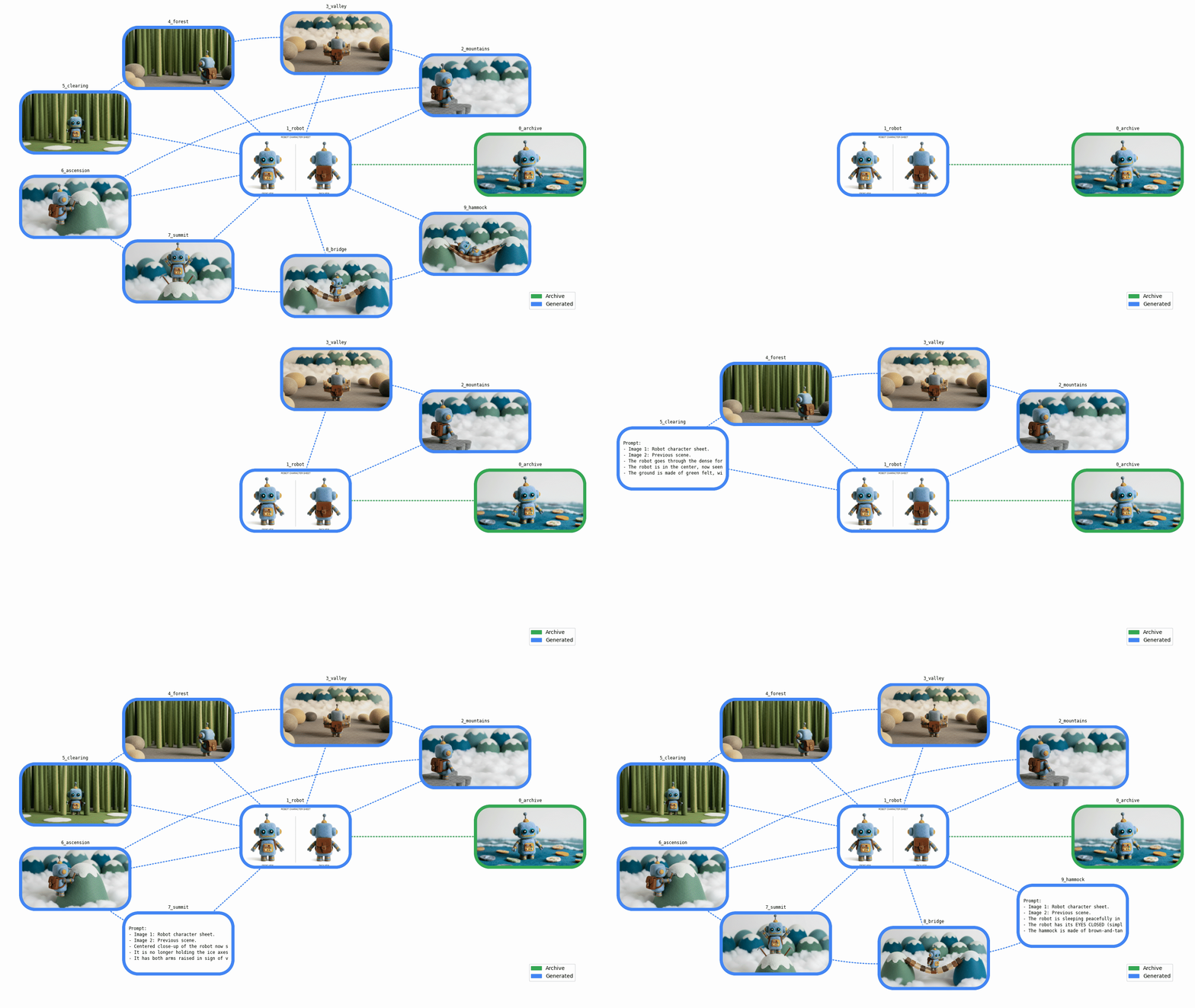
"We've illustrated our story with nine new, consistent images! Let's take a step back to understand what we've built…\n"
|
||
]
|
||
},
|
||
{
|
||
"cell_type": "markdown",
|
||
"metadata": {
|
||
"id": "2JZpWmZL2jhj"
|
||
},
|
||
"source": [
|
||
"---\n",
|
||
"\n",
|
||
"## 🗺️ Graph visualization\n"
|
||
]
|
||
},
|
||
{
|
||
"cell_type": "markdown",
|
||
"metadata": {
|
||
"id": "l8jtvd542jhj"
|
||
},
|
||
"source": [
|
||
"We now have a collection of image assets, from the original archive to brand-new generated images.\n",
|
||
"\n",
|
||
"Let's add some data visualization to get a better sense of the steps completed…\n"
|
||
]
|
||
},
|
||
{
|
||
"cell_type": "markdown",
|
||
"metadata": {
|
||
"id": "R-U7ChRw2jhj"
|
||
},
|
||
"source": [
|
||
"---\n",
|
||
"\n",
|
||
"### 🔗 Directed graph\n"
|
||
]
|
||
},
|
||
{
|
||
"cell_type": "markdown",
|
||
"metadata": {
|
||
"id": "KJpes8dj2jhj"
|
||
},
|
||
"source": [
|
||
"Our new assets are all related, connected by one or more \"generated from\" links. In terms of data structures, this is a directed graph.\n",
|
||
"\n",
|
||
"We can build the corresponding directed graph using the `networkx` library:\n"
|
||
]
|
||
},
|
||
{
|
||
"cell_type": "code",
|
||
"execution_count": null,
|
||
"metadata": {
|
||
"id": "5Lo20wLU2jhj"
|
||
},
|
||
"outputs": [],
|
||
"source": [
|
||
"import networkx as nx\n",
|
||
"\n",
|
||
"\n",
|
||
"def build_graph(assets: Assets) -> nx.DiGraph:\n",
|
||
" graph = nx.DiGraph(assets=assets)\n",
|
||
" # Nodes\n",
|
||
" for asset in assets.values():\n",
|
||
" graph.add_node(asset.id, asset=asset)\n",
|
||
" # Edges\n",
|
||
" for asset in assets.values():\n",
|
||
" for source_id in asset.source_ids:\n",
|
||
" graph.add_edge(source_id, asset.id)\n",
|
||
" return graph\n",
|
||
"\n",
|
||
"\n",
|
||
"asset_graph = build_graph(assets)\n",
|
||
"print(asset_graph)"
|
||
]
|
||
},
|
||
{
|
||
"cell_type": "markdown",
|
||
"metadata": {
|
||
"id": "UcXNbeBk2jhj"
|
||
},
|
||
"source": [
|
||
"Let's place the most used asset in the center and display the other assets around it:\n"
|
||
]
|
||
},
|
||
{
|
||
"cell_type": "code",
|
||
"execution_count": null,
|
||
"metadata": {
|
||
"id": "znWDmKoX2jhj"
|
||
},
|
||
"outputs": [],
|
||
"source": [
|
||
"import matplotlib.pyplot as plt\n",
|
||
"import numpy as np\n",
|
||
"\n",
|
||
"\n",
|
||
"def display_basic_graph(graph: nx.Graph) -> None:\n",
|
||
" pos = compute_node_positions(graph)\n",
|
||
" color = \"#4285F4\"\n",
|
||
" nx.draw(\n",
|
||
" graph,\n",
|
||
" pos,\n",
|
||
" with_labels=True,\n",
|
||
" node_color=color,\n",
|
||
" edge_color=color,\n",
|
||
" arrowstyle=\"wedge\",\n",
|
||
" font_size=\"small\",\n",
|
||
" bbox=dict(ec=\"black\", fc=\"white\", alpha=0.7),\n",
|
||
" )\n",
|
||
" plt.show()\n",
|
||
"\n",
|
||
"\n",
|
||
"def compute_node_positions(graph: nx.Graph) -> dict[str, np.ndarray]:\n",
|
||
" # Put the most connected node in the center\n",
|
||
" center_node = most_connected_node(graph)\n",
|
||
" edge_nodes = set(graph) - {center_node}\n",
|
||
" pos = nx.circular_layout(graph.subgraph(edge_nodes))\n",
|
||
" pos[center_node] = np.array([0.0, 0.0])\n",
|
||
" return pos\n",
|
||
"\n",
|
||
"\n",
|
||
"def most_connected_node(graph: nx.Graph) -> str:\n",
|
||
" if not graph.nodes():\n",
|
||
" return \"\"\n",
|
||
" centrality_by_id = nx.degree_centrality(graph)\n",
|
||
" return max(centrality_by_id, key=lambda s: centrality_by_id.get(s, 0.0))\n",
|
||
"\n",
|
||
"\n",
|
||
"display_basic_graph(asset_graph)"
|
||
]
|
||
},
|
||
{
|
||
"cell_type": "markdown",
|
||
"metadata": {
|
||
"id": "sCdNWkpU2jhj"
|
||
},
|
||
"source": [
|
||
"That's an accurate summary of our different steps. It would be nice if we could also visualize our assets…\n"
|
||
]
|
||
},
|
||
{
|
||
"cell_type": "markdown",
|
||
"metadata": {
|
||
"id": "HlBKVFBK2jhj"
|
||
},
|
||
"source": [
|
||
"---\n",
|
||
"\n",
|
||
"### 🌟 Asset graph\n"
|
||
]
|
||
},
|
||
{
|
||
"cell_type": "markdown",
|
||
"metadata": {
|
||
"id": "ioowOWhb2jhj"
|
||
},
|
||
"source": [
|
||
"Let's add custom `matplotlib` functions to render the graph nodes with the assets in a more visually appealing way:\n"
|
||
]
|
||
},
|
||
{
|
||
"cell_type": "code",
|
||
"execution_count": null,
|
||
"metadata": {
|
||
"id": "TdZBthQA2jhj"
|
||
},
|
||
"outputs": [],
|
||
"source": [
|
||
"# @title {display-mode: \"form\"}\n",
|
||
"import typing\n",
|
||
"from collections.abc import Iterator\n",
|
||
"from pathlib import Path\n",
|
||
"\n",
|
||
"import PIL.Image\n",
|
||
"import PIL.ImageDraw\n",
|
||
"from google.genai.types import PIL_Image\n",
|
||
"from matplotlib.axes import Axes\n",
|
||
"from matplotlib.backends.backend_agg import FigureCanvasAgg\n",
|
||
"from matplotlib.figure import Figure\n",
|
||
"from matplotlib.image import AxesImage\n",
|
||
"from matplotlib.patches import Patch\n",
|
||
"from matplotlib.text import Annotation\n",
|
||
"from matplotlib.transforms import Bbox, TransformedBbox\n",
|
||
"\n",
|
||
"\n",
|
||
"@enum.unique\n",
|
||
"class ImageFormat(enum.StrEnum):\n",
|
||
" # Matches PIL.Image.Image.format\n",
|
||
" WEBP = enum.auto()\n",
|
||
" PNG = enum.auto()\n",
|
||
" GIF = enum.auto()\n",
|
||
"\n",
|
||
"\n",
|
||
"def yield_generation_graph_frames(\n",
|
||
" graph: nx.DiGraph,\n",
|
||
" animated: bool,\n",
|
||
") -> Iterator[PIL_Image]:\n",
|
||
" def get_fig_ax() -> tuple[Figure, Axes]:\n",
|
||
" factor = 1.0\n",
|
||
" figsize = (16 * factor, 9 * factor)\n",
|
||
" fig, ax = plt.subplots(figsize=figsize)\n",
|
||
" fig.tight_layout(pad=3)\n",
|
||
" handles = [\n",
|
||
" Patch(color=COL_OLD, label=\"Archive\"),\n",
|
||
" Patch(color=COL_NEW, label=\"Generated\"),\n",
|
||
" ]\n",
|
||
" ax.legend(handles=handles, loc=\"lower right\")\n",
|
||
" ax.set_axis_off()\n",
|
||
" return fig, ax\n",
|
||
"\n",
|
||
" def prepare_graph() -> None:\n",
|
||
" arrows = nx.draw_networkx_edges(graph, pos, ax=ax)\n",
|
||
" if isinstance(arrows, list):\n",
|
||
" for arrow in arrows:\n",
|
||
" arrow.set_visible(False)\n",
|
||
"\n",
|
||
" def get_box_size() -> tuple[float, float]:\n",
|
||
" xlim_l, xlim_r = ax.get_xlim()\n",
|
||
" ylim_t, ylim_b = ax.get_ylim()\n",
|
||
" factor = 0.08\n",
|
||
" box_w = (xlim_r - xlim_l) * factor\n",
|
||
" box_h = (ylim_b - ylim_t) * factor\n",
|
||
" return box_w, box_h\n",
|
||
"\n",
|
||
" def add_axes() -> Axes:\n",
|
||
" xf, yf = tr_figure(pos[node])\n",
|
||
" xa, ya = tr_axes([xf, yf])\n",
|
||
" x_y_w_h = (xa - box_w / 2.0, ya - box_h / 2.0, box_w, box_h)\n",
|
||
" a = plt.axes(x_y_w_h)\n",
|
||
" a.set_title(\n",
|
||
" asset.id,\n",
|
||
" loc=\"center\",\n",
|
||
" backgroundcolor=\"#FFF8\",\n",
|
||
" fontfamily=\"monospace\",\n",
|
||
" fontsize=\"small\",\n",
|
||
" )\n",
|
||
" a.set_axis_off()\n",
|
||
" return a\n",
|
||
"\n",
|
||
" def draw_box(color: str, image: bool) -> AxesImage:\n",
|
||
" if image:\n",
|
||
" result = pil_image.copy()\n",
|
||
" else:\n",
|
||
" result = PIL.Image.new(\"RGB\", image_size, color=\"white\")\n",
|
||
" xy = ((0, 0), image_size)\n",
|
||
" # Draw box outline\n",
|
||
" draw = PIL.ImageDraw.Draw(result)\n",
|
||
" draw.rounded_rectangle(xy, box_r, outline=color, width=outline_w)\n",
|
||
" # Make everything outside the box outline transparent\n",
|
||
" mask = PIL.Image.new(\"L\", image_size, 0)\n",
|
||
" draw = PIL.ImageDraw.Draw(mask)\n",
|
||
" draw.rounded_rectangle(xy, box_r, fill=0xFF)\n",
|
||
" result.putalpha(mask)\n",
|
||
" return a.imshow(result)\n",
|
||
"\n",
|
||
" def draw_prompt() -> Annotation:\n",
|
||
" text = f\"Prompt:\\n{asset.prompt}\"\n",
|
||
" margin = 2 * outline_w\n",
|
||
" image_w, image_h = image_size\n",
|
||
" bbox = Bbox([[0, margin], [image_w - margin, image_h - margin]])\n",
|
||
" clip_box = TransformedBbox(bbox, a.transData)\n",
|
||
" return a.annotate(\n",
|
||
" text,\n",
|
||
" xy=(0, 0),\n",
|
||
" xytext=(0.06, 0.5),\n",
|
||
" xycoords=\"axes fraction\",\n",
|
||
" textcoords=\"axes fraction\",\n",
|
||
" verticalalignment=\"center\",\n",
|
||
" fontfamily=\"monospace\",\n",
|
||
" fontsize=\"small\",\n",
|
||
" linespacing=1.3,\n",
|
||
" annotation_clip=True,\n",
|
||
" clip_box=clip_box,\n",
|
||
" )\n",
|
||
"\n",
|
||
" def draw_edges() -> None:\n",
|
||
" STYLE_STRAIGHT = \"arc3\"\n",
|
||
" STYLE_CURVED = \"arc3,rad=0.15\"\n",
|
||
" for parent in graph.predecessors(node):\n",
|
||
" edge = (parent, node)\n",
|
||
" color = COL_NEW if assets[parent].prompt else COL_OLD\n",
|
||
" style = STYLE_STRAIGHT if center_node in edge else STYLE_CURVED\n",
|
||
" nx.draw_networkx_edges(\n",
|
||
" graph,\n",
|
||
" pos,\n",
|
||
" [edge],\n",
|
||
" width=2,\n",
|
||
" edge_color=color,\n",
|
||
" style=\"dotted\",\n",
|
||
" ax=ax,\n",
|
||
" connectionstyle=style,\n",
|
||
" )\n",
|
||
"\n",
|
||
" def get_frame() -> PIL_Image:\n",
|
||
" canvas = typing.cast(FigureCanvasAgg, fig.canvas)\n",
|
||
" canvas.draw()\n",
|
||
" image_size = canvas.get_width_height(physical=True)\n",
|
||
" image_bytes = canvas.buffer_rgba()\n",
|
||
" return PIL.Image.frombytes(\"RGBA\", image_size, image_bytes).convert(\"RGB\")\n",
|
||
"\n",
|
||
" COL_OLD = \"#34A853\"\n",
|
||
" COL_NEW = \"#4285F4\"\n",
|
||
" assets = graph.graph[\"assets\"]\n",
|
||
" center_node = most_connected_node(graph)\n",
|
||
" pos = compute_node_positions(graph)\n",
|
||
" fig, ax = get_fig_ax()\n",
|
||
" prepare_graph()\n",
|
||
" box_w, box_h = get_box_size()\n",
|
||
" tr_figure = ax.transData.transform # Data → display coords\n",
|
||
" tr_axes = fig.transFigure.inverted().transform # Display → figure coords\n",
|
||
"\n",
|
||
" for node, data in graph.nodes(data=True):\n",
|
||
" if animated:\n",
|
||
" yield get_frame()\n",
|
||
" # Edges and sub-plot\n",
|
||
" asset = data[\"asset\"]\n",
|
||
" pil_image = asset.pil_image\n",
|
||
" image_size = pil_image.size\n",
|
||
" box_r = min(image_size) * 25 / 100 # Radius for rounded rect\n",
|
||
" outline_w = min(image_size) * 5 // 100\n",
|
||
" draw_edges()\n",
|
||
" a = add_axes() # a is used in sub-functions\n",
|
||
" # Prompt\n",
|
||
" if animated and asset.prompt:\n",
|
||
" box = draw_box(COL_NEW, image=False)\n",
|
||
" prompt = draw_prompt()\n",
|
||
" yield get_frame()\n",
|
||
" box.set_visible(False)\n",
|
||
" prompt.set_visible(False)\n",
|
||
" # Generated image\n",
|
||
" color = COL_NEW if asset.prompt else COL_OLD\n",
|
||
" draw_box(color, image=True)\n",
|
||
"\n",
|
||
" plt.close()\n",
|
||
" yield get_frame()\n",
|
||
"\n",
|
||
"\n",
|
||
"def draw_generation_graph(\n",
|
||
" graph: nx.DiGraph,\n",
|
||
" format: ImageFormat,\n",
|
||
") -> BytesIO:\n",
|
||
" frames = list(yield_generation_graph_frames(graph, animated=False))\n",
|
||
" assert len(frames) == 1\n",
|
||
" frame = frames[0]\n",
|
||
"\n",
|
||
" params: dict[str, typing.Any] = dict()\n",
|
||
" match format:\n",
|
||
" case ImageFormat.WEBP:\n",
|
||
" params.update(lossless=True)\n",
|
||
"\n",
|
||
" image_io = BytesIO()\n",
|
||
" frame.save(image_io, format, **params)\n",
|
||
"\n",
|
||
" return image_io\n",
|
||
"\n",
|
||
"\n",
|
||
"def draw_generation_graph_animation(\n",
|
||
" graph: nx.DiGraph,\n",
|
||
" format: ImageFormat,\n",
|
||
") -> BytesIO:\n",
|
||
" frames = list(yield_generation_graph_frames(graph, animated=True))\n",
|
||
" assert 1 <= len(frames)\n",
|
||
"\n",
|
||
" if format == ImageFormat.GIF:\n",
|
||
" # Dither all frames with the same palette to optimize the animation\n",
|
||
" # The animation is cumulative, so most colors are in the last frame\n",
|
||
" method = PIL.Image.Quantize.MEDIANCUT\n",
|
||
" palettized = frames[-1].quantize(method=method)\n",
|
||
" frames = [frame.quantize(method=method, palette=palettized) for frame in frames]\n",
|
||
"\n",
|
||
" # The animation will be played in a loop: start cycling with the most complete frame\n",
|
||
" first_frame = frames[-1]\n",
|
||
" next_frames = frames[:-1]\n",
|
||
" INTRO_DURATION = 3000\n",
|
||
" FRAME_DURATION = 1000\n",
|
||
" durations = [INTRO_DURATION] + [FRAME_DURATION] * len(next_frames)\n",
|
||
" params: dict[str, typing.Any] = dict(\n",
|
||
" save_all=True,\n",
|
||
" append_images=next_frames,\n",
|
||
" duration=durations,\n",
|
||
" loop=0,\n",
|
||
" )\n",
|
||
" match format:\n",
|
||
" case ImageFormat.GIF:\n",
|
||
" params.update(optimize=False)\n",
|
||
" case ImageFormat.WEBP:\n",
|
||
" params.update(lossless=True)\n",
|
||
"\n",
|
||
" image_io = BytesIO()\n",
|
||
" first_frame.save(image_io, format, **params)\n",
|
||
"\n",
|
||
" return image_io\n",
|
||
"\n",
|
||
"\n",
|
||
"def display_generation_graph(\n",
|
||
" graph: nx.DiGraph,\n",
|
||
" format: ImageFormat | None = None,\n",
|
||
" animated: bool = False,\n",
|
||
" save_image: bool = False,\n",
|
||
") -> None:\n",
|
||
" if format is None:\n",
|
||
" format = ImageFormat.WEBP if running_in_colab_env() else ImageFormat.PNG\n",
|
||
" if animated:\n",
|
||
" image_io = draw_generation_graph_animation(graph, format)\n",
|
||
" else:\n",
|
||
" image_io = draw_generation_graph(graph, format)\n",
|
||
"\n",
|
||
" image_bytes = image_io.getvalue()\n",
|
||
" IPython.display.display(IPython.display.Image(image_bytes))\n",
|
||
"\n",
|
||
" if save_image:\n",
|
||
" stem = \"graph_animated\" if animated else \"graph\"\n",
|
||
" Path(f\"./{stem}.{format.value}\").write_bytes(image_bytes)"
|
||
]
|
||
},
|
||
{
|
||
"cell_type": "markdown",
|
||
"metadata": {
|
||
"id": "pfX1N7-q2jhk"
|
||
},
|
||
"source": [
|
||
"We can now display our generation graph:\n"
|
||
]
|
||
},
|
||
{
|
||
"cell_type": "code",
|
||
"execution_count": null,
|
||
"metadata": {
|
||
"id": "TnwQk6fM2jhk"
|
||
},
|
||
"outputs": [],
|
||
"source": [
|
||
"display_generation_graph(asset_graph)"
|
||
]
|
||
},
|
||
{
|
||
"cell_type": "markdown",
|
||
"metadata": {
|
||
"id": "d1YcSgMvy_fl"
|
||
},
|
||
"source": [
|
||
"---\n",
|
||
"\n",
|
||
"### ℹ️ Asset metadata\n"
|
||
]
|
||
},
|
||
{
|
||
"cell_type": "markdown",
|
||
"metadata": {
|
||
"id": "ED1Sgui6y_fm"
|
||
},
|
||
"source": [
|
||
"Have you ever generated something nice without saving the exact context?\n",
|
||
"\n",
|
||
"Our assets can be made self-sufficient by saving prompts and ancestors in the image metadata (e.g., in PNG chunks), allowing for full local storage and retrieval (without needing a database or worrying about lost prompts!).\n",
|
||
"\n",
|
||
"Let's add archive and restore functions, which might come in handy:\n"
|
||
]
|
||
},
|
||
{
|
||
"cell_type": "code",
|
||
"execution_count": null,
|
||
"metadata": {
|
||
"id": "59o5AZgoy_fm"
|
||
},
|
||
"outputs": [],
|
||
"source": [
|
||
"# @title {display-mode: \"form\"}\n",
|
||
"from datetime import datetime\n",
|
||
"\n",
|
||
"from PIL.PngImagePlugin import PngInfo\n",
|
||
"\n",
|
||
"\n",
|
||
"def save_assets(assets: Assets) -> Path:\n",
|
||
" # Saves assets to a dated folder\n",
|
||
" now_here = datetime.now().astimezone()\n",
|
||
" folder = Path(\".\") / now_here.strftime(\"%Y-%m-%d_%H-%M-%S\")\n",
|
||
" folder.mkdir()\n",
|
||
" for asset in assets.values():\n",
|
||
" save_asset(asset, folder)\n",
|
||
" return folder\n",
|
||
"\n",
|
||
"\n",
|
||
"def save_asset(asset: Asset, folder: Path) -> None:\n",
|
||
" image_path = folder / f\"{asset.id}.png\"\n",
|
||
" assert not image_path.is_file()\n",
|
||
" metadata = PngInfo()\n",
|
||
" metadata.add_text(\"source_ids\", \"\\n\".join(asset.source_ids))\n",
|
||
" metadata.add_text(\"prompt\", asset.prompt)\n",
|
||
" asset.pil_image.save(image_path, pnginfo=metadata)\n",
|
||
"\n",
|
||
"\n",
|
||
"def load_assets(folder: Path) -> Assets:\n",
|
||
" assets = Assets()\n",
|
||
" for image_path in folder.glob(\"*.png\"):\n",
|
||
" assets.set_asset(load_asset(image_path))\n",
|
||
" return assets\n",
|
||
"\n",
|
||
"\n",
|
||
"def load_asset(image_path: Path) -> Asset:\n",
|
||
" asset_id = image_path.stem\n",
|
||
" image = PIL.Image.open(image_path)\n",
|
||
" image_info = image.info\n",
|
||
" source_ids = image_info.get(\"source_ids\", \"\")\n",
|
||
" source_ids = source_ids.split(\"\\n\") if source_ids else []\n",
|
||
" prompt = image_info.get(\"prompt\", \"\")\n",
|
||
" return Asset(asset_id, source_ids, prompt, image)\n",
|
||
"\n",
|
||
"\n",
|
||
"def demonstrate_save_and_restore(assets: Assets) -> None:\n",
|
||
" # Save\n",
|
||
" folder = save_assets(assets)\n",
|
||
" # Restore & use\n",
|
||
" restored_assets = load_assets(folder)\n",
|
||
" graph = build_graph(restored_assets)\n",
|
||
" display_generation_graph(graph)\n",
|
||
"\n",
|
||
"\n",
|
||
"# Uncomment to test\n",
|
||
"# demonstrate_save_and_restore(assets)"
|
||
]
|
||
},
|
||
{
|
||
"cell_type": "markdown",
|
||
"metadata": {
|
||
"id": "RFO_u1-8hj3-"
|
||
},
|
||
"source": [
|
||
"---\n",
|
||
"\n",
|
||
"## 🚀 Challenge completed\n"
|
||
]
|
||
},
|
||
{
|
||
"cell_type": "markdown",
|
||
"metadata": {
|
||
"id": "nubJgw0Ahj3-"
|
||
},
|
||
"source": [
|
||
"We generated a full set of new, consistent images with Nano Banana, and we learned a few things along the way:\n",
|
||
"\n",
|
||
"- This proves once again that an image is worth a thousand words: It's now a lot easier to generate new images from existing ones using simple instructions.\n",
|
||
"- We can create or edit images purely through composition (letting us all become artistic directors).\n",
|
||
"- We can use descriptive or imperative instructions.\n",
|
||
"- The model's spatial understanding enables 3D manipulations.\n",
|
||
"- We can add text to our outputs (character sheet) and also refer to text in our inputs (front/back views).\n",
|
||
"- Consistency can be preserved across various levels: character, scene, texture, lighting, camera angle/type…\n",
|
||
"- The generation process can still be iterative, but it feels 10x to 100x faster to reach results that exceed expectations.\n",
|
||
"- It is now possible to breathe new life into our archives!\n",
|
||
"\n",
|
||
"Possible next steps:\n",
|
||
"\n",
|
||
"- The process we followed is essentially a generation pipeline. It can be adapted for automation (e.g., changing a node regenerates its descendants) or to generate multiple variations in parallel (e.g., the same set of images could be generated for different aesthetics, audiences, or simulations).\n",
|
||
"- For the sake of clarity and exploration, the prompts are intentionally simple. In a production environment, they could have a fixed structure with a standardized set of parameters.\n",
|
||
"- We described the scenes as if they were shot in a photo studio. Virtually any other imaginable artistic style is possible (photorealistic, abstract, 2D…).\n",
|
||
"\n",
|
||
"As a bonus, let's end with an animated version of our journey, with the generation graph also showing a glimpse of our instructions:\n"
|
||
]
|
||
},
|
||
{
|
||
"cell_type": "code",
|
||
"execution_count": null,
|
||
"metadata": {
|
||
"id": "wiTx1Nk0y_fm"
|
||
},
|
||
"outputs": [],
|
||
"source": [
|
||
"display_generation_graph(asset_graph, animated=True)"
|
||
]
|
||
},
|
||
{
|
||
"cell_type": "markdown",
|
||
"metadata": {
|
||
"id": "huldfEHkhj3-"
|
||
},
|
||
"source": [
|
||
"---\n",
|
||
"\n",
|
||
"## ➕ More!\n"
|
||
]
|
||
},
|
||
{
|
||
"cell_type": "markdown",
|
||
"metadata": {
|
||
"id": "H_-odeqEln_s"
|
||
},
|
||
"source": [
|
||
"- Check out the [Nano Banana recipes notebook](https://github.com/GoogleCloudPlatform/generative-ai/blob/main/gemini/nano-banana/nano_banana_recipes.ipynb) for more practical examples.\n",
|
||
"- Explore typical use cases in the [Agent Platform Prompt Gallery](https://console.cloud.google.com/agent-platform/studio/prompt-gallery)\n",
|
||
"- Stay updated with the [Agent Platform Release Notes](https://docs.cloud.google.com/gemini-enterprise-agent-platform/release-notes)\n"
|
||
]
|
||
}
|
||
],
|
||
"metadata": {
|
||
"colab": {
|
||
"provenance": [
|
||
{
|
||
"file_id": "1pmb_xmjaw8F4reXMLba3RO3QzxkGpuJd",
|
||
"timestamp": 1736858287414
|
||
}
|
||
],
|
||
"toc_visible": true
|
||
},
|
||
"kernelspec": {
|
||
"display_name": "Python 3",
|
||
"language": "python",
|
||
"name": "python3"
|
||
},
|
||
"language_info": {
|
||
"codemirror_mode": {
|
||
"name": "ipython",
|
||
"version": 3
|
||
},
|
||
"file_extension": ".py",
|
||
"mimetype": "text/x-python",
|
||
"name": "python",
|
||
"nbconvert_exporter": "python",
|
||
"pygments_lexer": "ipython3",
|
||
"version": "3.12.10"
|
||
}
|
||
},
|
||
"nbformat": 4,
|
||
"nbformat_minor": 0
|
||
}
|