 wehub-resource-sync
Gen AI MLOps Tune and Evaluation
Author: Chris Willis
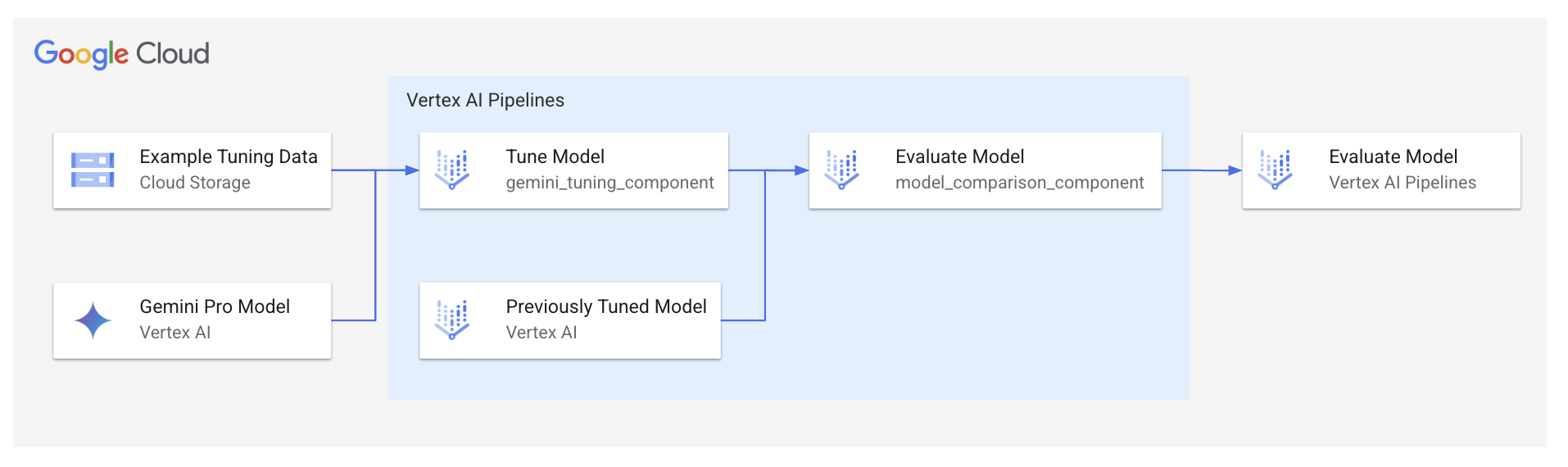
This tutorial will take you through using Vertex AI Pipelines to automate tuning an LLM and evaluating it against a previously tuned LLM. The example used is an LLM that summarizes a week of glucose values for a diabetes patient.
Optional: Prepare the data
This step is optional because I've already prepared the data in gs://github-repo/generative-ai/gemini/tuning/mlops-tune-and-eval/patient_1_glucose_examples.jsonl.
-
Create a week of glucose sample data for one patient using the following prompt with Gemini:
Create a CSV with a week's worth of example glucose values for a diabetic patient. The columns should be date, time, patient ID, and glucose value. Each day there should be timestamps for 7am, 8am, 11am, 12pm, 5pm, and 6pm. Most of the glucose values should be between 70 and 100. Some of the glucose values should be 100-150. -
Flatten the CSV by doing the following:
- Open the CSV
- Press Ctrl + a to select all text
- Press Alt + Shift + i to go to the end of each line
- Add a newline character (i.e. \n)
- Press Delete to squash it all to a single line
-
Copy
glucose_examples_template.jsonl(or create it if it doesn't exist) topatient_X_glucose_examples.jsonl -
Copy the flattened CSV and paste it into the patient_X_glucose_examples.jsonl
-
Flatten the contents of the patient_X_glucose_examples.jsonl file using a JSON to JSONL converter online
Setup IAM, Tuning Examples, and Vertex AI Pipelines
-
Grant Default Compute Service Account IAM permissions
PROJECT_NUMBER=$(gcloud projects describe $(gcloud config get-value project) --format="value(projectNumber)") SERVICE_ACCOUNT="${PROJECT_NUMBER}-compute@developer.gserviceaccount.com" gcloud projects add-iam-policy-binding $PROJECT_NUMBER \ --member="serviceAccount:${SERVICE_ACCOUNT}" \ --role="roles/aiplatform.user" gcloud projects add-iam-policy-binding $PROJECT_NUMBER \ --member="serviceAccount:${SERVICE_ACCOUNT}" \ --role="roles/storage.objectUser" -
Enable the Cloud Resource Manager API
gcloud services enable cloudresourcemanager.googleapis.com -
Create the pipeline root bucket
gcloud storage buckets create gs://vertex-ai-pipeline-root-$(date +%Y%m%d)
Run Vertex AI Pipelines
-
Install required packages and compile the pipeline
python3 -m venv venv source venv/bin/activate pip install -r requirements.txt kfp dsl compile --py pipeline.py --output pipeline.json -
Edit
pipeline.pyand change the following:project- change to your project ID
-
Edit
submit_pipeline_job.pyand change the following:pipeline_root- change to thegs://vertex-ai-pipeline-root-<DATETIME>bucket you created earlierproject- change to your project ID
-
Create the pipeline run
python submit_pipeline_job.py -
For subsequent runs, change
baseline_model_endpointinsubmit_pipeline_job.pyto a tuned model endpoint you want to compare against (typically the previously trained endpoint)