 wehub-resource-sync
14 KiB
Non-blocking Chat app with Quart + Gemini Live API + Cloud Run
| Author(s) | Kaz Sato |
This application demonstrates a non-blocking communication with Quart and Gemini Live API running on Cloud Run.
Application screenshot
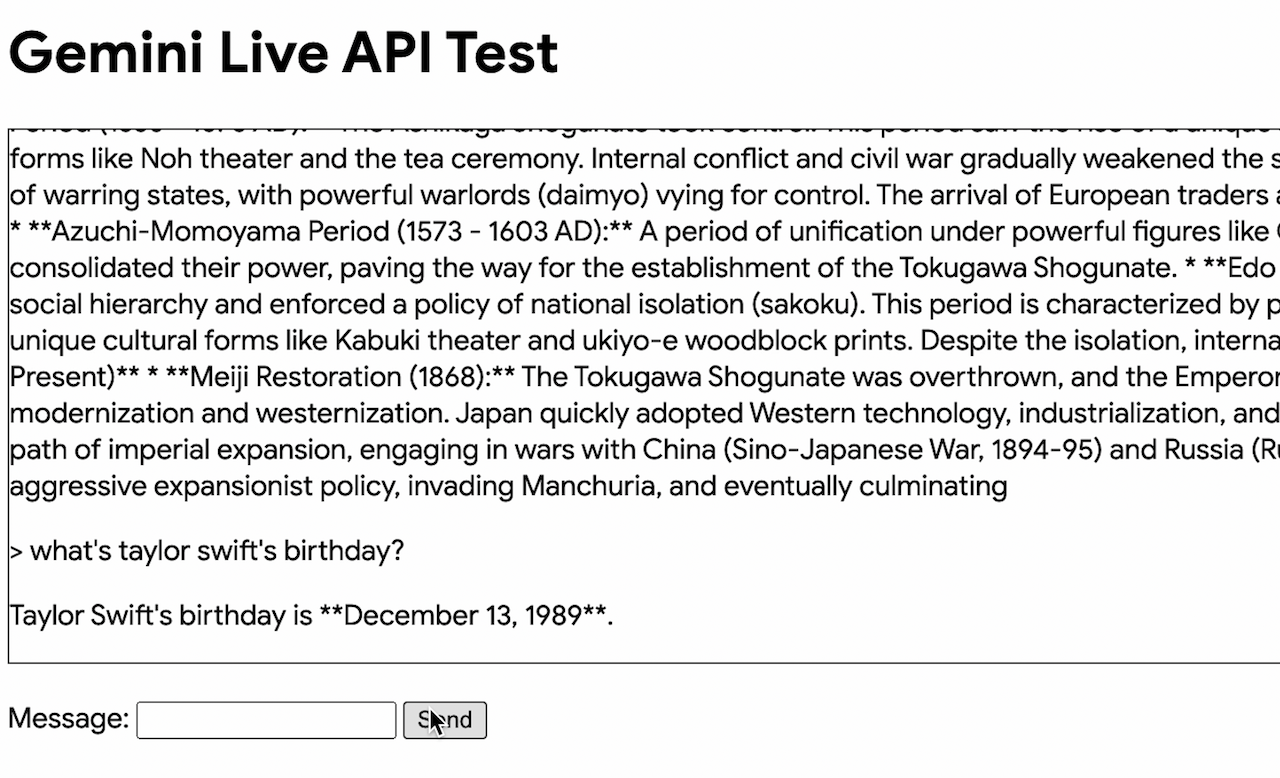
Interruption example with the demo chat app
Design Concepts
Why Quart + Gemini Live API?
Quart is an asynchronous Python web framework built upon the ASGI standard, designed to facilitate the development of high-performance, concurrent applications. Its architecture and feature set render it particularly well-suited for constructing sophisticated generative AI applications that leverage real-time communication technologies like WebSockets and Gemini Live API.
Key Benefits of Quart:
- Asynchronous Architecture: Quart's foundation in
asyncioenables efficient handling of concurrent I/O-bound operations, crucial for interacting with AI models and managing real-time data streams without performance degradation. - Native WebSocket Support: The framework offers robust, integrated support for WebSockets, enabling persistent, bidirectional communication channels essential for interactive AI applications requiring real-time data exchange.
- Flask-Inspired API: Quart's API design, mirroring the widely adopted Flask framework, promotes rapid development and leverages a familiar paradigm for developers, reducing the learning curve.
- Optimized for Multimodal Streaming Data: The framework is engineered to process and transmit large data streams efficiently, a vital capability when dealing with the potentially voluminous multimodal outputs of generative AI models.
Key Benefits building Gen AI app with Quart + Gemini Live API:
- Responsiveness and Natural Conversation: Quart supports non-blocking, full-duplex WebSocket communication natively, crucial for a truly interactive Gen AI experience. It doesn't halt while waiting for Gemini, ensuring quick replies and a smooth conversation flow, especially when the app supports multimodal interaction using audio and images and is network-latency sensitive. Users can send text or voice messages in quick succession, and Quart handles them and interrupts with less delays.
- Concurrency and Scalability: Handles many users and their messages simultaneously. Quart can process multiple requests and replies with Gemini concurrently, making the gen AI app faster and more efficient. Quart makes better use of server resources with the single thread event-loop design, leading to lower operational costs and better scalability.
Flask (blocking) v. Quart (non-blocking)
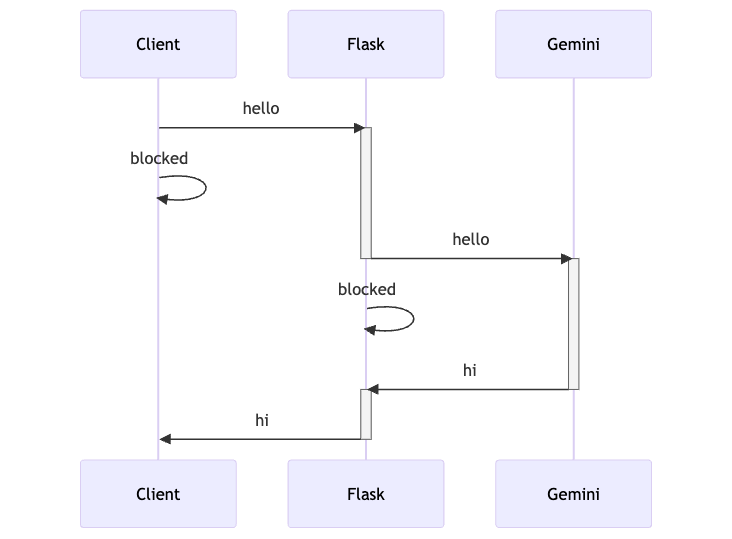
How Flask works:
- Blocking: Flask handles one request at a time. It blocks while waiting for Gemini, causing delays. The diagram shows Flask "blocked" while waiting for a response.
- Sequential: The client must wait for each response before sending the next message, making the interaction slow.
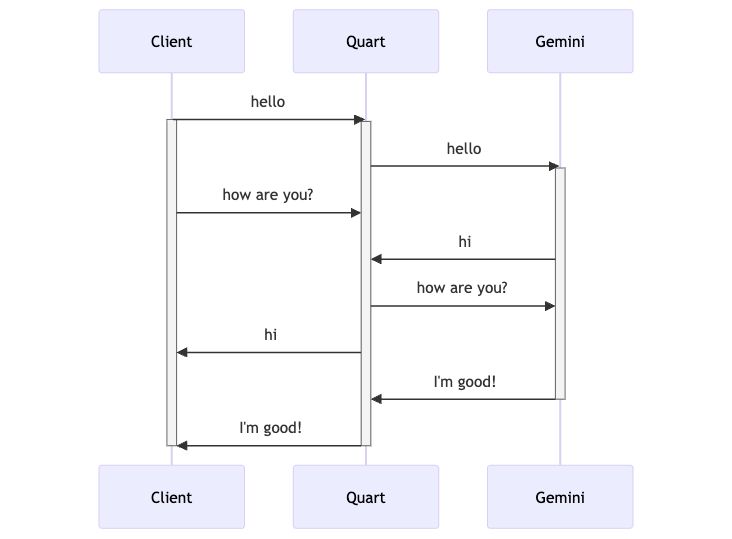
How Quart works:
- Non-Blocking: Quart handles multiple requests concurrently. It doesn't wait for Gemini to respond before handling other messages.
- Concurrent: The client can send messages continuously, and Quart processes them without blocking, leading to a smoother flow.
Flask vs. Quart: Key Architectural Differences:
| Feature | Flask (Synchronous) | Quart (Asynchronous) |
| Request Handling | One at a time, blocking | Concurrent, non-blocking |
| Server Interface | WSGI | ASGI |
| Concurrency | Through multiple processes/threads (WSGI) | Single-threaded with event loop (asyncio) |
| View Functions | Regular def functions | async def functions |
| I/O Operations | Blocking | Non-blocking (using await) |
| Performance | Lower throughput for I/O-bound tasks | Higher throughput for I/O-bound tasks |
| Complexity | Simpler to write (initially) | Steeper learning curve (async/await) |
Raw WebSocket v. Quart
In Gemini Multimodal Live API Demo, it uses raw WebSockets API to provide a proxy function that connects the client with Gemini Live API. This is an alternative way to implement a scalable non-blocking Gen AI app with Gemini. You would typically choose this when you need maximum control, have very specific performance requirements, or are implementing a highly custom protocol.
Compared to it, Quart offers a higher level of abstraction, making it easier to develop, manage, and scale real-time applications built with WebSockets. It simplifies common tasks, integrates well with HTTP, and benefits from the Python ecosystem. Especially, it fit smoothly with Google Gen AI Python SDK and make it easier to take advantage of the high level API for handling multimodal content and function calling at the server-side.
Run the demo app
The following sections provide instructions to run the app on Cloud Shell and deploy to Cloud Run.
Download the app on Cloud Shell
Download the source code on Cloud Shell, with the following steps:
git clone https://github.com/GoogleCloudPlatform/generative-ai.git \
   gemini/sample-apps/gemini-quart-cloudrun
cd gemini/sample-apps/gemini-quart-cloudrun
Run the app on Cloud Shell locally
To run the app on Cloud Shell locally, follow these steps:
-
Set project ID:
In Cloud Shell, execute the following commands with replacing
YOUR_PROJECT_ID:gcloud config set project YOUR_PROJECT_ID -
Install the dependencies:
pip install -r app/requirements.txt -
To run the app locally, execute the following command:
cd app chmod +x run.sh ./run.sh -
(Optional) To run the app with Gemini API key:
If you like to run the app with Gemini API key instead of Vertex AI, edit
run.shto specify your Gemini API Key.
The application will start up. Use Cloud Shell's web preview button at top right to launch the preview page. You may also visit that in the browser to view the application.
Build and Deploy the Application to Cloud Run
To deploy the Quart Application in Cloud Run, we need to perform the following steps:
-
Set project ID:
In Cloud Shell, execute the following commands with replacing
YOUR_PROJECT_ID:gcloud config set project YOUR_PROJECT_ID -
To deploy the app to Cloud Run, execute the following command:
cd app
chmod +x deploy.sh
./deploy.sh
On successful deployment, you will be provided a URL to the Cloud Run service. You can visit that in the browser to view the Cloud Run application that you just deployed.
If you see RESOURCE_EXHAUSTED errors
While running the app using Vertex AI, you might occasionally encounter RESOURCE_EXHAUSTED errors on the Cloud Run logs tab. This typically means you've hit the quota limit on the number of concurrent sessions you can open with the Gemini API. If this happens, you have a couple of options: you can either wait a few minutes and try running the app again, or switch to using the Gemini Developer API by specifying your Gemini API Key in the run.sh or deploy.sh script accordintly. This can provide a workaround.
Congratulations!
How the demo app works
How app.py works
The app.py file defines a Quart web application that facilitates real-time interaction with the Google Gemini API for large language model processing. Here's a breakdown of the flow:
-
WebSocket Endpoint (
/live): The /live route establishes a WebSocket connection for real-time communication with Gemini. This is the core of the application's interactive functionality. -
WebSocket Handlers (
upstream_workeranddownstream_worker): Within the/liveWebSocket handler, two asynchronous tasks are created:-
upstream_worker: This task continuously reads messages from the client's WebSocket connection and sends them to the Gemini API using
gemini_session.send(). Each message from the client is treated as a turn in the conversation. -
downstream_worker: This task continuously receives streaming responses from Gemini using
gemini_session.receive(). It then formats these responses into JSON packets containing the text and turn completion status, and sends them back to the client via the WebSocket.
-
-
Concurrency Management: The
upstream_workeranddownstream_workeroperate concurrently usingasyncio. This enables bidirectional, real-time communication between the client and Gemini. Theasyncio.wait()function is used to monitor both tasks for exceptions, allowing the application to handle errors gracefully. -
Session Management: The
gemini_sessionis established within an async with block, ensuring that the session is properly closed when the WebSocket connection is terminated. This prevents resource leaks and maintains a clean state.
How index.html works
-
Structure of
index.html: The HTML sets up a basic page with a title, a heading ("Gemini Live API Test"), a message display area (messages div), and a form for sending messages. -
WebSocket Connection: The core functionality lies in the JavaScript section. It establishes a WebSocket connection to the
/liveendpoint on the same host as the page. -
WebSocket Event Handlers: Several event handlers manage the WebSocket interaction:
-
onopen: When the WebSocket connection is successfully established, this handler enables theSendbutton, displays aConnection openedmessage, and adds a submit handler to the message form. -
onmessage: This handler processes incoming messages from the server (Gemini responses). It parses the JSON data, checks for turn completion, updates message display with response, scrolls messages into view, creates new message entry for new turns, and displays ongoing responses piece by piece for incomplete turns. -
onclose: This handler is called when the WebSocket connection is closed. It disables theSendbutton, displays aConnection closedmessage, and initiates a timer to retry connecting to the server in 5 seconds.
-
Improvement for production deployment
While this is a minimal demo app, you could extend it to a production app by improving the following areas:
-
Handling audio and images: The application can be extended to support audio and images. See Getting Started with the Multimodal Live API using Gen AI SDK on how to process the multimodal content.
-
Gemini Live API Rate Limits: The application doesn't handle the Gemini Live API rate limits. In production you need a rate throttling mechanism for the
concurrent sessions per keyandtokens per minuteto handle traffic from multiple clients. -
Security: The
allow-unauthenticatedflag indeploy.shmakes the application publicly accessible. For production use, authentication and authorization should be implemented to control access. -
Session Management: While the current session management within the WebSocket handler is functional, more robust session handling could be explored for scenarios involving multiple users or persistent sessions.