**CodeBurn is a free, open-source, local-first tool that tracks AI coding token usage and cost across 32 tools and agents (Claude Code, Cursor, Codex, Gemini, Grok and more), broken down by model, project, and task.**
You pay for Claude, Codex, Cursor, and a stack of other AI tools. The bill tells you the total. It never tells you that half of it went to conversation instead of code, or that an expensive model burned your budget on work a cheaper one would have one-shot.
CodeBurn does. It reads the session files your tools already write to disk and breaks down every token and dollar by **task, model, tool, and project**, across **32 AI tools**.
Everything runs locally. No wrapper, no proxy, no API keys, nothing leaves your machine. Pricing comes from [LiteLLM](https://github.com/BerriAI/litellm), refreshed daily.
## Quick start
**Run it instantly**, no install needed:
```bash
npx codeburn
```
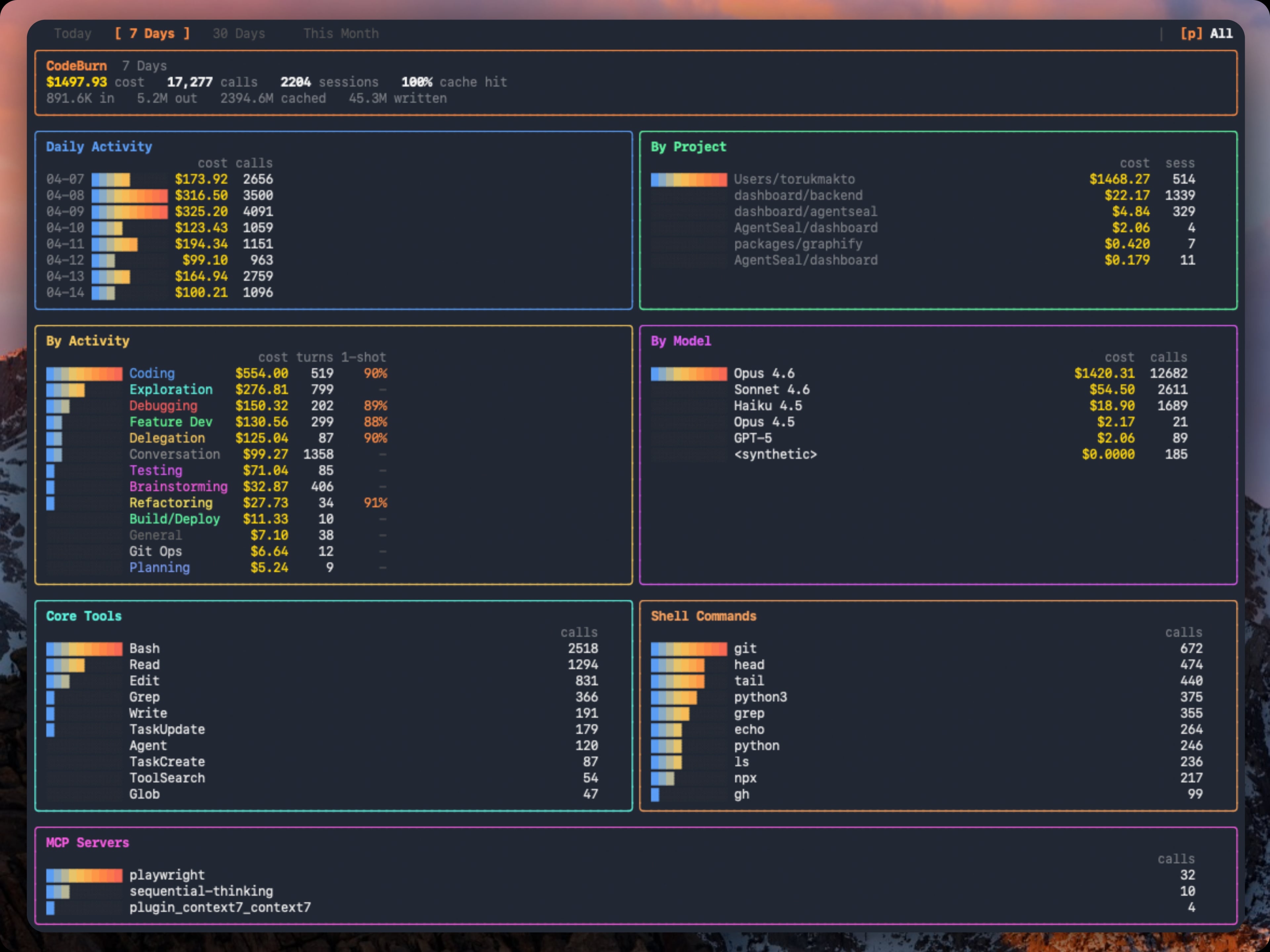
That opens the interactive dashboard (last 7 days by default). Arrow keys switch periods, `q` quits. That is the 30-second version. You now know where your AI budget goes.
**Install it** for a permanent `codeburn` command:
```bash
npm install -g codeburn
```
Also runs via `bunx codeburn` or `dx codeburn`, or `brew install codeburn` on macOS.
**Menu bar app** for macOS, with your spend always in the menu bar:
```bash
codeburn menubar
```
On Linux, a GNOME Shell extension gives the same panel view; see [Linux (GNOME)](#linux-gnome).
Requires **Node.js 22.13+** and at least one supported tool with session data on disk. For Cursor and OpenCode, `better-sqlite3` installs automatically.
## Your month at a glance
```bash
codeburn overview # this month, clean tables
codeburn overview --no-color # plain text, ready to paste
codeburn overview --from 2026-06-01 --to 2026-06-15 # any date range
codeburn overview -p all # all time
codeburn overview --provider claude # one tool only
```
`codeburn overview` prints a copy-pasteable summary of where your AI spend went: totals (cost, tokens, cache hit), a breakdown by tool and by top model, your highest-value days, top projects, a per-day table, and activity and tool usage. Pipe it anywhere (into `pbcopy`, a PR, Slack, or a tweet); color drops automatically when the output is not a terminal, or pass `--no-color`.
```text
CodeBurn June 2026
Totals
Cost $2,795.10
Tokens 3.49B in 23.9M / out 20.2M / cache-w 72.5M / cache-r 3.38B
Calls 14,755 sessions 753
Cache hit 99.3%
By tool
┌──────────┬───────────┬────────┬───────┐
│ Tool │ Cost │ Tokens │ Share │
├──────────┼───────────┼────────┼───────┤
│ claude │ $2,662.37 │ 3.34B │ 95% │
│ codex │ $119.12 │ 128.1M │ 4% │
└──────────┴───────────┴────────┴───────┘
(plus Top models, Highest-value days, Top projects, a per-day table, By activity, and Tools)
```
## Find and fix waste
```bash
codeburn optimize # scan the last 30 days
codeburn optimize -p today # today only
codeburn optimize -p week # last 7 days
codeburn optimize --provider claude # restrict to one provider
codeburn optimize --format json # setup health + findings as JSON
```
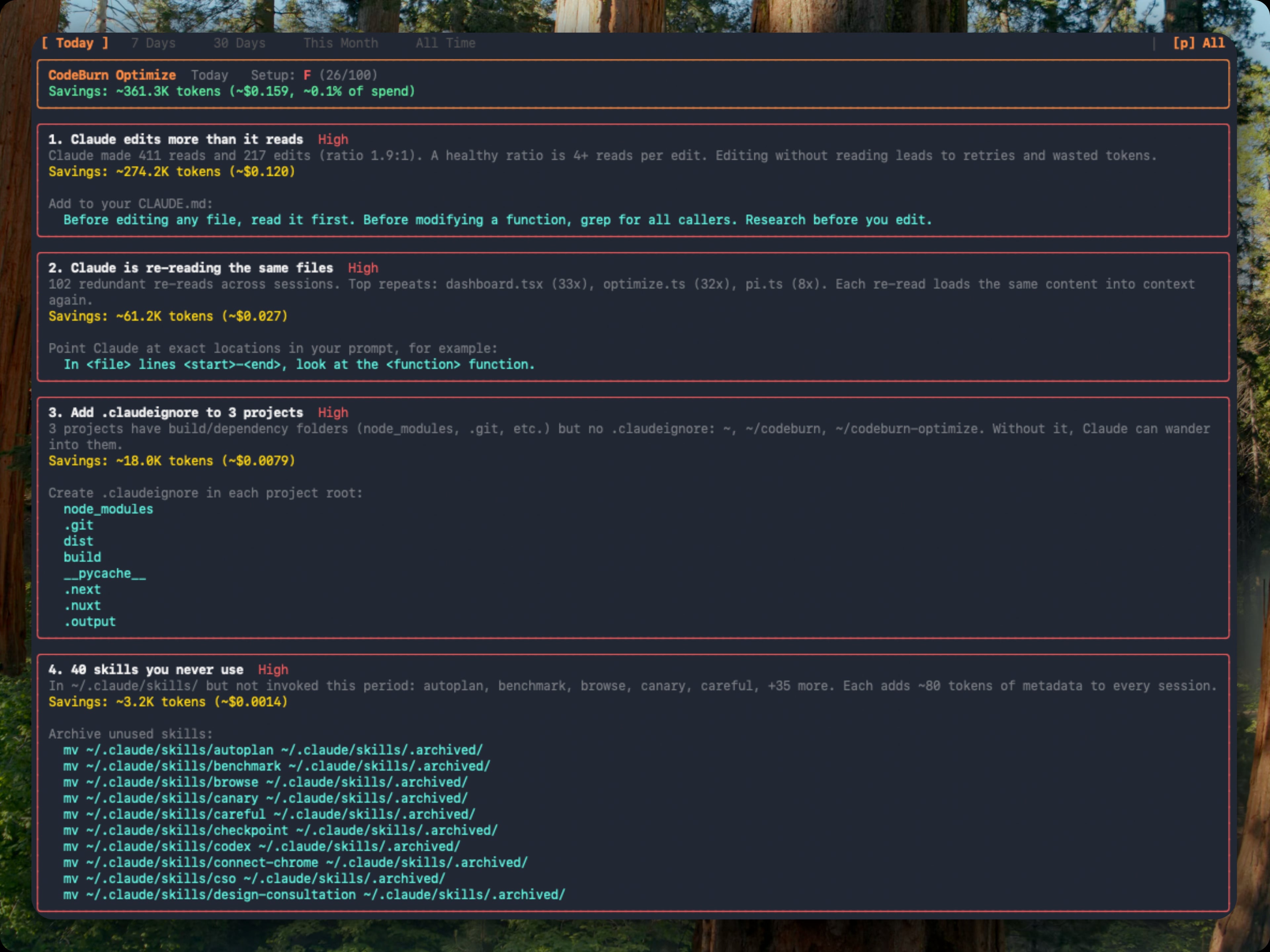
`codeburn optimize` scans your sessions and your `~/.claude/` setup for waste patterns:
- Files Claude re-reads across sessions (same content, same context, over and over)
- Low Read:Edit ratio (editing without reading leads to retries and wasted tokens)
- Wasted bash output (uncapped `BASH_MAX_OUTPUT_LENGTH`, trailing noise)
- Unused MCP servers still paying their tool-schema overhead every session
- Ghost agents, skills, and slash commands defined in `~/.claude/` but never invoked
- Bloated `CLAUDE.md` files (with `@-import` expansion counted)
- Cache creation overhead and junk directory reads
- Context-heavy sessions where effective input/cache tokens swamp output
- Possibly low-worth expensive sessions with no edit turns or repeated retries
when no `git`/`gh` delivery command is observed
Each finding shows the estimated token and dollar savings plus a ready-to-paste fix: a `CLAUDE.md` line, an environment variable, or a `mv` command to archive unused items. Findings are ranked by urgency (impact weighted against observed waste) and rolled up into an A to F setup health grade. Repeat runs classify each finding as new, improving, or resolved against a 48-hour recent window.
You can also open it inline from the dashboard: press `o` when a finding count appears in the status bar, `b` to return.
## Apply fixes, undo anytime
```bash
codeburn optimize --apply # review and apply fixes interactively
codeburn optimize --apply --dry-run # print the plan, change nothing
codeburn optimize --apply --yes # apply every appliable fix without prompting
codeburn act list # every change CodeBurn has made
codeburn act undo --last # roll the most recent change back
codeburn act report # realized vs estimated savings
```
`codeburn optimize` finds the waste; `--apply` fixes the config-class findings for you: settings values, environment variables, archiving unused agents and skills. Every change is backed up and journaled before it lands. `codeburn act list` shows the history and `codeburn act undo ` restores the original files (it refuses if the files changed since being applied, unless you pass `--force`).
The loop closes on honesty: once an applied fix is at least 3 days old, `codeburn act report` compares its estimated savings against what your sessions actually did, and later `codeburn optimize` runs show that realized figure in the header. Estimates get checked against reality, not just claimed.
## Guard your budget
```bash
codeburn guard install # hooks into this project's .claude/settings.json
codeburn guard install --global # or into ~/.claude/settings.json
codeburn guard status # caps, install locations, flagged projects
codeburn guard uninstall # removes cleanly, leaves your own hooks alone
```
Guard installs opt-in hooks into Claude Code that watch session cost while you work:
- **Soft cap** (default $5): a one-time in-session warning when a session passes it.
- **Hard cap** (default $15): stops the session; `codeburn guard allow` lifts it for that session only.
- **Checkpoint** (default $3): if a session ends past this with no edits and no commits, a nudge suggests starting fresh with a named deliverable.
- **Session openers**: projects where optimize found waste get a one-line flag at session start.
Caps are edited in `~/.config/codeburn/guard.json` (set a value to `null` to disable it). Add `--statusline` to show session cost in the Claude Code status line. Installs go through the same journal as everything else, so `codeburn act undo` removes them too. Hooks fail open: a broken guard never blocks a session.
## Compare models
```bash
codeburn compare # interactive model picker (default: last 6 months)
codeburn compare -p week # last 7 days
codeburn compare -p today # today only
codeburn compare --provider claude # Claude Code sessions only
```
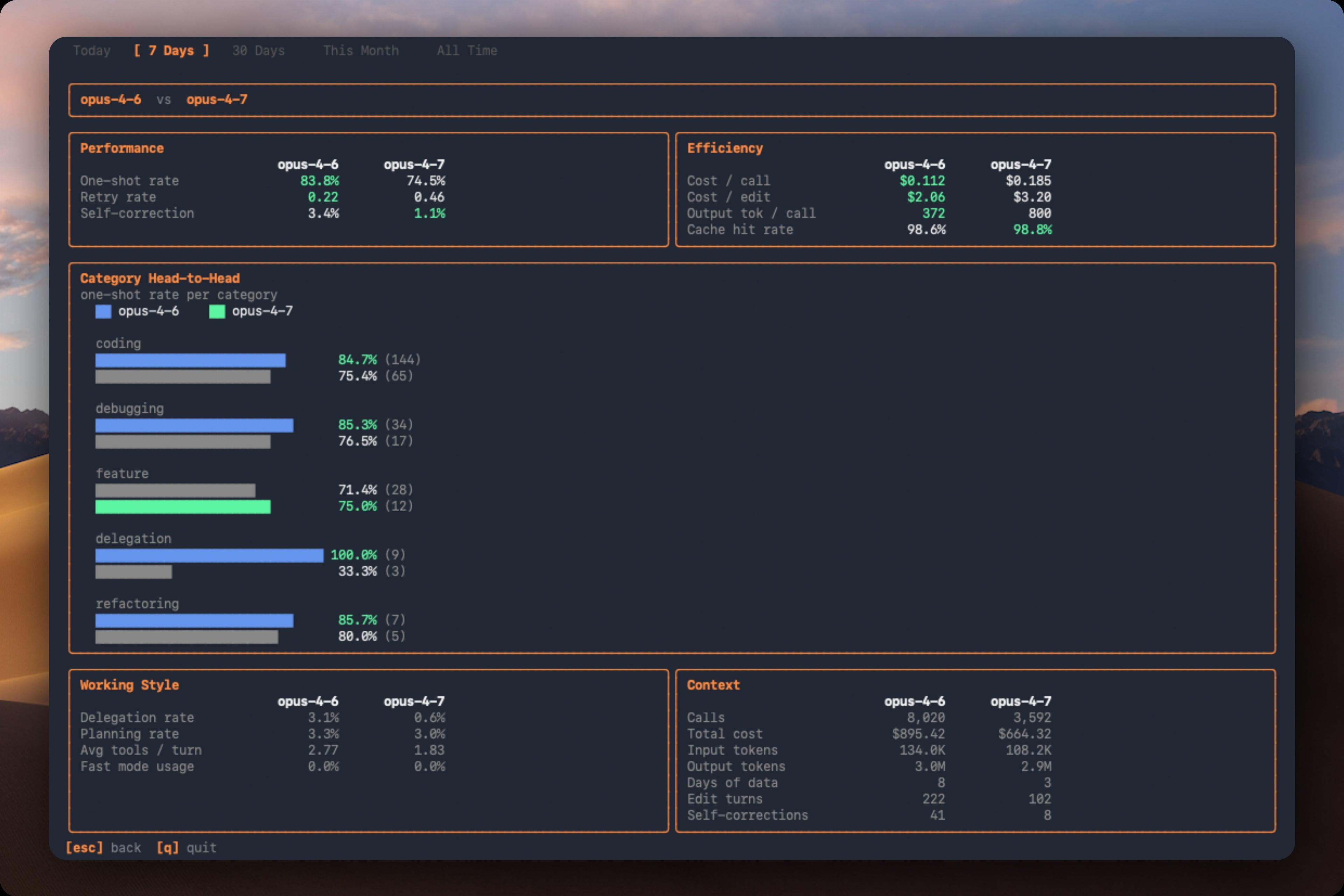
Which model is actually better for *your* work? Press `c` in the dashboard, or run `codeburn compare`. Arrow keys switch periods, `b` to return.
| Section | Metric | What it measures |
|---------|--------|-----------------|
| Performance | One-shot rate | Edits that succeed without retries |
| Performance | Retry rate | Average retries per edit turn |
| Performance | Self-correction | Turns where the model corrected its own mistake |
| Efficiency | Cost per call | Average cost per API call |
| Efficiency | Cost per edit | Average cost per edit turn |
| Efficiency | Output tokens per call | Average output tokens per call |
| Efficiency | Cache hit rate | Proportion of input from cache |
Also compares per-category one-shot rates, delegation rate, planning rate, average tools per turn, and fast mode usage.
## Track what shipped
```bash
codeburn yield # last 7 days (default)
codeburn yield -p today # today only
codeburn yield -p 30days # last 30 days
codeburn yield -p month # this calendar month
codeburn yield --format json # productive/reverted/abandoned spend as JSON
```
Did the spend actually ship? `codeburn yield` correlates AI sessions with git commits by timestamp:
| Category | Meaning |
|----------|---------|
| Productive | Commits from this session landed in main |
| Reverted | Commits were later reverted |
| Abandoned | No commits near session, or commits never merged |
Requires a git repository. Run from your project directory.
## Browser dashboard
```bash
codeburn web # opens http://localhost:4747 in your browser
codeburn web -p 30days # start on a different period
codeburn web --port 8080 # pick a port (falls back to a free one if taken)
codeburn web --no-open # start the server without opening a browser
```
A local web dashboard with the same task, model, tool, and project breakdowns as the TUI, rendered with charts. Everything is read from disk on your machine and the server binds to localhost; nothing is uploaded.
### Combine usage across your devices
See one total across your laptop, desktop, and work machine on the same network. On each other device, share its usage:
```bash
codeburn share --pair # opens a pairing window and prints a PIN
```
Then add it once from your main device (the PIN authorizes the pairing):
```bash
codeburn devices add # find nearby devices and pair, or: add --pin
codeburn devices # combined totals by machine
codeburn devices rm # forget a device
```
Pairing is PIN-authorized and stays on your local network. You can also discover and pair devices straight from the browser dashboard.
## Menu bar
```bash
codeburn menubar
```
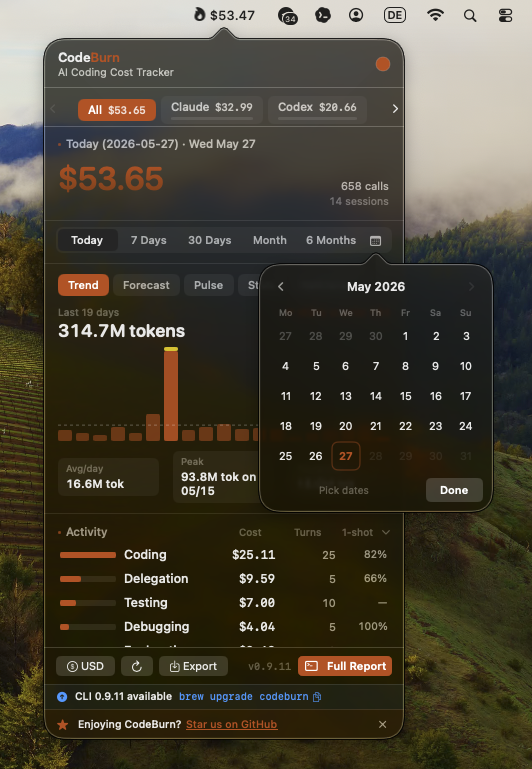
One command: downloads the latest `.app`, installs into `~/Applications`, and launches it. Re-run with `--force` to reinstall. Native Swift and SwiftUI app lives in `mac/` (see `mac/README.md` for build details).
The menubar icon shows the spend period selected in Settings (Today by default; Week, Month, and 6 Months are also available). Non-today periods add a short suffix such as `$42 / mo` so the menu bar value stays clear. Click to open a popover with agent tabs, period switcher (Today, 7 Days, 30 Days, Month, All), Trend, Forecast, Pulse, Stats, and Plan insights, activity and model breakdowns, optimize findings, and CSV/JSON export. Refreshes every 30 seconds.
You can also set the menubar status period from Terminal:
```bash
defaults write org.agentseal.codeburn-menubar CodeBurnMenubarPeriod -string month
```
Allowed values are `today`, `week`, `month`, and `sixMonths`. Relaunch the app to apply external defaults changes.
**Compact mode** shrinks the menubar item to fit the text, dropping decimals (e.g. `$110` instead of `$110.20`):
```bash
defaults write org.agentseal.codeburn-menubar CodeBurnMenubarCompact -bool true
```
Relaunch the app to apply. To revert: `defaults delete org.agentseal.codeburn-menubar CodeBurnMenubarCompact`.
**Refresh cadence** is set in Settings under Usage Refresh. Auto (the default) refreshes every 30 seconds on AC power and backs off on battery, in Low Power Mode, and while the display sleeps; fixed 1, 5, or 15 minute cadences and a Manual mode (refresh only when you open the popover or click Refresh Now) are also available. From Terminal:
```bash
defaults write org.agentseal.codeburn-menubar CodeBurnMenubarRefreshSeconds -int 300
```
Seconds between refreshes: `60`, `300`, or `900`; `0` is Manual and `-1` is Auto. Takes effect on the next refresh tick, no relaunch needed.
### Linux (GNOME)
Linux gets the same ambient view through a GNOME Shell extension (GNOME 45+): spend in the top panel, period switcher, compact mode, and daily budget alerts. It lives in [`gnome/`](gnome/):
```bash
git clone https://github.com/getagentseal/codeburn && cd codeburn/gnome
./install.sh
gnome-extensions enable codeburn@codeburn.dev
```
See [gnome/README.md](gnome/README.md) for settings and development notes. On Windows, `codeburn web` is the always-on view for now.
## CodeBurn in your agent (MCP)
```bash
claude mcp add codeburn -- npx -y codeburn mcp
```
`codeburn mcp` runs a local MCP server over stdio, so Claude Code, Cursor, or any MCP client can ask "where did my tokens go this week?" or "how do I spend less?" mid-conversation. It exposes two tools:
| Tool | What it returns |
|------|-----------------|
| `get_usage` | Spend and usage with breakdowns by tool, model, project, and task (fast) |
| `get_savings` | Cost reductions: waste findings, retry tax, routing waste (slower, deeper analysis) |
Everything is read from local disk, same as the CLI. Project names are pseudonymized by default; the agent only sees real names if it asks with `include_project_names: true`. For other MCP clients, configure a stdio server with command `npx` and args `-y codeburn mcp`.
## Supported tools
CodeBurn auto-detects which AI tools you use. Each logo links to its provider doc.
If multiple providers have session data on disk, press `p` in the dashboard to toggle between them.
Each provider doc lists the exact data location, storage format, and known quirks. Linux and Windows paths are detected automatically. If a path has changed or is wrong, please [open an issue](https://github.com/getagentseal/codeburn/issues).
The `--provider` flag filters any command to a single provider: `codeburn report --provider claude`, `codeburn today --provider codex`, `codeburn export --provider cursor`. Works on all commands: `report`, `today`, `month`, `overview`, `status`, `export`, `web`, `optimize`, `compare`, `yield`.
Adding a new provider is a single file. See `src/providers/codex.ts` for an example.
## Commands
All commands and keyboard shortcuts
Run `codeburn` for the dashboard, or use a subcommand below. Most commands also accept `--provider`, `--project` / `--exclude`, and a period flag (`-p today|week|30days|month|all`).
**Dashboard & reports**
| Command | What it does |
|---------|--------------|
| `codeburn` | Interactive dashboard, last 7 days (the default view) |
| `codeburn today` | Today's usage |
| `codeburn month` | This calendar month's usage |
| `codeburn overview` | Plain-text monthly summary, copy-pasteable (`--no-color`, `--from`/`--to`) |
| `codeburn report -p 30days` | Rolling 30-day window |
| `codeburn report -p all` | Every recorded session |
| `codeburn report --from 2026-04-01 --to 2026-04-10` | An exact date range |
| `codeburn report --format json` | Full dashboard data as JSON, printed to stdout |
| `codeburn report --refresh 60` | Auto-refresh every 60s (default 30s; `--refresh 0` disables) |
**Status & export**
| Command | What it does |
|---------|--------------|
| `codeburn status` | Compact one-liner: today + month totals |
| `codeburn status --format json` | The same totals as JSON |
| `codeburn export` | CSV covering today, 7 days, and 30 days |
| `codeburn export -f json` | Export as JSON instead of CSV |
**Web & devices**
| Command | What it does |
|---------|--------------|
| `codeburn web` | Local browser dashboard with charts (http://localhost:4747) |
| `codeburn share --pair` | Share this device's usage to your other devices (PIN pairing) |
| `codeburn devices add` | Find and pair a nearby device |
| `codeburn devices` | Combined usage totals across your paired devices |
**Analysis**
| Command | What it does |
|---------|--------------|
| `codeburn audit` | Per provider-model token source table: where every number comes from |
| `codeburn context` | What fills a session's context window: interactive browser (Claude Code and Codex) |
| `codeburn context --json` | The same context tree, scriptable |
| `codeburn optimize` | Scan for waste and print copy-paste fixes (last 30 days) |
| `codeburn optimize -p week` | Scope the waste scan to the last 7 days |
| `codeburn compare` | Side-by-side model comparison |
| `codeburn yield` | Productive vs reverted/abandoned spend, correlated against git |
| `codeburn yield -p 30days` | Yield analysis for the last 30 days |
**Fix & control**
| Command | What it does |
|---------|--------------|
| `codeburn optimize --apply` | Interactively apply config-class fixes (`--yes`, `--dry-run`, `--only `) |
| `codeburn act list` | Every change CodeBurn has applied, newest first |
| `codeburn act undo ` | Roll a change back (`--last` for the most recent, `--force` if files drifted) |
| `codeburn act report` | Realized vs estimated savings for applied fixes |
| `codeburn guard install` | Budget-cap hooks for Claude Code (`--global`, `--statusline`) |
| `codeburn guard status` | Show caps, install locations, and flagged projects |
| `codeburn guard allow` | Lift the hard cap for the current session |
| `codeburn mcp` | MCP server (stdio) exposing usage and savings to AI agents |
**Models**
| Command | What it does |
|---------|--------------|
| `codeburn models` | Per-model token + cost table (last 30 days) |
| `codeburn models --by-task` | Break each model into per-task-type rows |
| `codeburn models --top 10` | Only the 10 most expensive models |
| `codeburn models --format markdown` | Emit a paste-friendly markdown table |
| `codeburn models --task feature` | Filter to feature-development work |
| `codeburn models --provider claude` | Filter to a single provider |
Arrow keys switch between Today, 7 Days, 30 Days, Month, and 6 Months (use `--from` / `--to` for an exact historical window). Press `q` to quit, `1` `2` `3` `4` `5` as shortcuts, `c` to open model comparison, `o` to open optimize. The dashboard auto-refreshes every 30 seconds by default (`--refresh 0` to disable). It also shows average cost per session and the five most expensive sessions across all projects.
## Features
Pricing, task categories, plans, currency, filtering, and more
### Pricing
Prices every API call using input, output, cache read, cache write, and web search token counts, with a fast mode multiplier for Claude. Prices are fetched from [LiteLLM](https://github.com/BerriAI/litellm) and cached locally for 24 hours at `~/.cache/codeburn/`. Hardcoded fallbacks for all Claude and GPT-5 models prevent fuzzy-matching mispricing.
### Task Categories
13 categories classified from tool usage patterns and user message keywords. No LLM calls, fully deterministic.
| Category | What triggers it |
|---|---|
| Coding | Edit, Write tools |
| Debugging | Error/fix keywords + tool usage |
| Feature Dev | "add", "create", "implement" keywords |
| Refactoring | "refactor", "rename", "simplify" |
| Testing | pytest, vitest, jest in Bash |
| Exploration | Read, Grep, WebSearch without edits |
| Planning | EnterPlanMode, TaskCreate tools |
| Delegation | Agent tool spawns |
| Git Ops | git push/commit/merge in Bash |
| Build/Deploy | npm build, docker, pm2 |
| Brainstorming | "brainstorm", "what if", "design" |
| Conversation | No tools, pure text exchange |
| General | Skill tool, uncategorized |
### Breakdowns
Daily cost chart, per-project, per-model (Opus, Sonnet, Haiku, GPT-5, GPT-4o, Gemini, Kiro, and more), per-activity with one-shot rate, core tools, shell commands, and MCP servers.
### One-Shot Rate
For categories that involve code edits, CodeBurn tracks file-aware retry cycles. A retry is when the same file is re-edited after a shell command in between (Edit foo.ts, Bash, Edit foo.ts). Editing different files across shell steps is not a retry. The one-shot column shows the percentage of edit turns that succeeded without retries. Coding at 90% means the AI got it right first try 9 out of 10 times. File-level tracking is available for Claude, Codex, and Goose; other providers fall back to tool-name-based detection.
### Plans
```bash
codeburn plan set claude-max # $200/month
codeburn plan set claude-pro # $20/month
codeburn plan set cursor-pro # $20/month
codeburn plan set custom --monthly-usd 200 --provider codex # ChatGPT Pro-style custom plan
codeburn plan reset --provider codex # remove one provider plan
codeburn plan set none # disable plan view
codeburn plan # show configured plans
codeburn plan reset # remove plan config
```
Subscription tracking for Claude Pro, Claude Max, Cursor Pro, and custom provider plans. Plans are stored per provider, so you can track Claude and Codex/Cursor subscriptions at the same time; the dashboard shows one overage line per active provider plan. A legacy/custom `all` plan remains a single aggregate plan and is replaced when you add a provider-specific plan, avoiding double-counted overage rows. Existing single-plan config is still read as a fallback. Presets use publicly stated plan prices (as of April 2026); they do not model exact token allowances, because vendors do not publish precise consumer-plan limits.
### Currency
```bash
codeburn currency GBP # set to British Pounds
codeburn currency AUD # set to Australian Dollars
codeburn currency JPY # set to Japanese Yen
codeburn currency CNY # set to Chinese Yuan
codeburn currency RON # set to Romanian Leu
codeburn currency # show current setting
codeburn currency --reset # back to USD
```
Any [ISO 4217 currency code](https://en.wikipedia.org/wiki/ISO_4217#List_of_ISO_4217_currency_codes) is supported (162 currencies). Exchange rates fetched from [Frankfurter](https://www.frankfurter.app/) (European Central Bank data, free, no API key) and cached for 24 hours. Config stored at `~/.config/codeburn/config.json`. The currency setting applies everywhere: dashboard, status bar, menu bar, CSV/JSON exports, and JSON API output.
### Model Aliases
If you see `$0.00` for some models, the model name reported by your provider does not match any entry in the LiteLLM pricing data. This commonly happens when using a proxy that rewrites model names.
```bash
codeburn model-alias "my-proxy-model" "claude-opus-4-6" # add alias
codeburn model-alias --list # show configured aliases
codeburn model-alias --remove "my-proxy-model" # remove alias
```
Aliases are stored in `~/.config/codeburn/config.json` and applied at runtime before pricing lookup. The target name can be anything in the [LiteLLM model list](https://github.com/BerriAI/litellm/blob/main/model_prices_and_context_window.json) or a canonical name from the fallback table (e.g. `claude-sonnet-4-6`, `claude-opus-4-5`, `gpt-4o`). Built-in aliases ship for known proxy model name variants. User-configured aliases take precedence over built-ins.
### Local Models, Custom Prices, and Proxies
```bash
codeburn price-override my-model --input 0.27 --output 1.10 # USD per 1M tokens
codeburn model-savings "llama3.1:8b" gpt-4o # local model, counted as savings
codeburn proxy-path ~/work/copilot-repo # subscription-covered project
```
`price-override` sets exact rates for any model (input, output, cache read, cache creation), useful for private deployments or models LiteLLM prices wrong. `model-savings` maps a free local model to a paid baseline: the local calls stay $0, and the dashboard shows what the same tokens would have cost on the baseline. `proxy-path` marks a project routed through a subscription-backed proxy (e.g. Claude Code over GitHub Copilot), so its API-rate cost is reported as subscription-covered and your net out-of-pocket stays honest. All three support `--list` and `--remove`.
### Filtering
```bash
codeburn report --project myapp # show only projects matching "myapp"
codeburn report --exclude myapp # show everything except "myapp"
codeburn report --exclude myapp --exclude tests # exclude multiple projects
codeburn month --project api --project web # include multiple projects
codeburn export --project inventory # export only "inventory" project data
```
Filter by provider, project name (case-insensitive substring), or exact date range. The `--project` and `--exclude` flags work on all commands and can be combined with `--provider`.
```bash
codeburn report --from 2026-04-01 --to 2026-04-10 # explicit window
codeburn report --from 2026-04-01 # this date through today
codeburn report --to 2026-04-10 # earliest data through this date
```
Either flag alone is valid. Inverted or malformed dates exit with a clear error. In the TUI, the custom range sets the initial load only; pressing `1` through `5` switches back to predefined periods.
### JSON Output
`report`, `today`, and `month` support `--format json` to output the full dashboard data as structured JSON to stdout:
```bash
codeburn report --format json # 7-day JSON report
codeburn today --format json # today's data as JSON
codeburn month --format json # this month as JSON
codeburn report -p 30days --format json # 30-day window
```
The JSON includes all dashboard panels: overview (cost, calls, sessions, cache hit %), daily breakdown, projects (with `avgCostPerSession`), models with token counts, activities with one-shot rates, core tools, MCP servers, and shell commands. Pipe to `jq` for filtering:
```bash
codeburn report --format json | jq '.projects'
codeburn today --format json | jq '.overview.cost'
```
For lighter output, use `status --format json` (today and month totals only), `optimize --format json` (setup health, findings, and copy-paste fixes), `yield --format json` (productive/reverted/abandoned spend), or file exports (`export -f json`).
## Reading the dashboard
Signals and what they might mean
CodeBurn surfaces the data, you read the story. A few patterns worth knowing:
| Signal you see | What it might mean |
|---|---|
| Cache hit < 80% | System prompt or context is not stable, or caching not enabled |
| Lots of `Read` calls per session | Agent re-reading same files, missing context |
| Low 1-shot rate (Coding 30%) | Agent struggling with edits, retry loops |
| Opus 4.6 dominating cost on small turns | Overpowered model for simple tasks |
| `dispatch_agent` / `task` heavy | Sub-agent fan-out, expected or excessive |
| No MCP usage shown | Either you don't use MCP servers, or your config is broken |
| Bash dominated by `git status`, `ls` | Agent exploring instead of executing |
| Conversation category dominant | Agent talking instead of doing |
These are starting points, not verdicts. A 60% cache hit on a single experimental session is fine. A persistent 60% cache hit across weeks of work is a config issue.
## How it reads your data
Per-tool data locations and parsing
| Provider | Data location | Notes |
|----------|---------------|-------|
| **Claude Code** | `~/.claude/projects//.jsonl` | Each assistant entry carries model name, token usage (input, output, cache read, cache write), `tool_use` blocks, and timestamps. |
| **Claude (multiple config dirs)** | Set via `CLAUDE_CONFIG_DIRS` (e.g. `~/.claude-work:~/.claude-personal`) | Scans every listed directory and merges sessions into one row per project so totals reflect all your Claude usage. Use `:` on POSIX, `;` on Windows; overrides `CLAUDE_CONFIG_DIR`. Missing or unreadable directories are skipped. |
| **Codex (OpenAI)** | `~/.codex/sessions/YYYY/MM/DD/rollout-*.jsonl` | Reads `token_count` events (per-call and cumulative usage) and `function_call` entries for tool tracking; attributes cost by project working directory. `codeburn report --provider codex` views Codex alone. |
| **Cursor** | SQLite `state.vscdb` under `globalStorage`: macOS `~/Library/Application Support/Cursor/User/globalStorage/`, Linux `~/.config/Cursor/User/globalStorage/`, Windows `%APPDATA%/Cursor/User/globalStorage/`; results cached at `~/.cache/codeburn/cursor-results.json` | Input tokens come from Cursor's own per-conversation context meter (`composerData.promptTokenBreakdown`), credited once per conversation on a stable anchor; tool calls and shell commands are read from the agent stream (`agentKv`), and Composer house models are priced from Cursor's published rates. Output is a reply-text estimate and cache tokens are server-side only, so figures are marked estimated and undercount the Cursor admin console for long conversations. The cache auto-invalidates when the database changes; first run on a large database can take a minute. |
| **OpenCode** | SQLite `~/.local/share/opencode/opencode*.db` (respects `XDG_DATA_HOME`) | Queries `session`, `message`, and `part` read-only and recalculates cost via LiteLLM (falling back to OpenCode's own cost field for unpriced models). Subtask sessions (`parent_id IS NOT NULL`) are excluded to avoid double counting; multiple channel databases are supported. |
| **Gemini CLI** | `~/.gemini/tmp//chats/session-*.json` | One JSON file per session with real token counts (input, output, cached, thoughts) per message, so no estimation is needed. Input is reported inclusive of cached, so CodeBurn subtracts cached before pricing to avoid double charging. |
| **Antigravity (CLI & IDE)** | Session files under `.gemini/` folders, plus the running language server | Pulls granular trajectory and pricing from the language server process. For the short-lived CLI, optionally install a status-line hook with `codeburn antigravity-hook install` so usage is captured between menubar refreshes. The IDE is detected via the `--app-data-dir antigravity-ide` flag on Windows. |
| **GitHub Copilot** | `~/.copilot/session-state/` (legacy CLI); VS Code/VSCodium `workspaceStorage/*` chat sessions, `GitHub.copilot-chat/transcripts/`, and the `agent-traces.db` OpenTelemetry store; JetBrains IDEs (IntelliJ, PyCharm, …) under `~/.config/github-copilot////copilot-*-nitrite.db` | The OTel SQLite store is preferred when present (it carries real input/output/cache token counts). Other sources carry no explicit counts, so tokens are estimated from content length and the model is inferred from tool call ID prefixes. JetBrains sessions read from a Nitrite (H2 MVStore) `.db`; project comes from the plugin's `projectName` field (else the `.git` root of a referenced file). See [docs/providers/copilot.md](docs/providers/copilot.md). |
| **Kiro** | `.chat` JSON files | Token counts are estimated from content length. The model is not exposed, so sessions are labeled `kiro-auto` and costed at Sonnet rates. |
| **Mistral Vibe** | `~/.vibe/logs/session/` (or `$VIBE_HOME/logs/session/`); each folder has `meta.json` + `messages.jsonl` | Reads cumulative prompt/completion totals and model pricing from `meta.json`, then the first user prompt and tool calls from `messages.jsonl`. Emits one record per session (source data is cumulative, not per turn); subagent sessions under `agents/` are counted separately. |
| **OpenClaw** | `~/.openclaw/agents/*.jsonl` (legacy `.clawdbot`, `.moltbot`, `.moldbot`) | Token usage comes from assistant message `usage` blocks; the model from `modelId` or `message.model`. |
| **Warp** | `~/Library/Group Containers/2BBY89MBSN.dev.warp/Library/Application Support/dev.warp.Warp-Stable/warp.sqlite` (Preview fallback) | Reads `agent_conversations`, `ai_queries`, and `blocks`, emitting one call per finalized exchange. Exchange token share is estimated from prompt-size weighting normalized to conversation totals; `run_command` blocks attach to the nearest preceding exchange by timestamp. |
| **Zed** | SQLite `~/Library/Application Support/Zed/threads/threads.db` (Linux `~/.local/share/zed/threads/`) | One row per agent thread; the blob is zstd-compressed JSON with per-request token usage (input, output, cache read, cache write) and the thread's model. Threads are topped up to the exact cumulative counter so totals match the store. Needs Node 22.15+ for built-in zstd. |
| **Forge** | SQLite `~/.forge/.forge.db` | Queries `conversations` read-only and parses `context.messages`. Assistant usage entries provide prompt, completion, and cached counts; CodeBurn subtracts cached from prompt for input pricing, emits one call per assistant message, and extracts tool calls plus shell commands. |
| **Pi / OMP** | `~/.pi/agent/sessions//*.jsonl` (Pi), `~/.omp/agent/sessions//*.jsonl` (OMP) | Each assistant message carries usage (input, output, cacheRead, cacheWrite) plus inline `toolCall` blocks. Tool names normalize to the standard set (`bash` → `Bash`, `dispatch_agent` → `Agent`); bash commands come from `toolCall.arguments.command`. |
| **Codebuff** (formerly Manicode) | `~/.config/manicode/projects//chats//chat-messages.json` (honors `CODEBUFF_DATA_DIR`; walks `manicode-dev` / `manicode-staging`) | Bills in credits, so each completed assistant message is costed at the public rate of $0.01/credit via `msg.credits`. When an upstream provider's stashed RunState records token-level usage (`message.metadata.runState.sessionState.mainAgentState.messageHistory[*].providerOptions`), the real tokens and LiteLLM cost take precedence. Native tool names (`read_files`, `str_replace`, `run_terminal_command`, `spawn_agents`) normalize to `Read`, `Edit`, `Bash`, `Agent`. |
| **Cline / Roo Code / KiloCode** | VS Code `globalStorage`: Cline at `saoudrizwan.claude-dev` and `~/.cline/data`; Roo Code and KiloCode across VS Code, VS Code Insiders, and VSCodium | Cline-family agents. CodeBurn reads `ui_messages.json` from each task directory, extracting token counts from `type: "say"` entries with `say: "api_req_started"`. |
| **IBM Bob** | `User/globalStorage/ibm.bob-code/tasks//` (GA `IBM Bob` and preview `Bob-IDE` app folders) | Reads `ui_messages.json` for API request token/cost records and `api_conversation_history.json` for the selected model. |
| **Kimi Code CLI** | `$KIMI_SHARE_DIR/sessions///` or `~/.kimi/sessions///` | Reads `wire.jsonl` `StatusUpdate.token_usage` records, mapping `input_other`, `input_cache_read`, `input_cache_creation`, and `output` into the standard token columns; includes subagents under each session's `subagents/` folder. |
| **LingTai TUI** | `~/.lingtai//logs/token_ledger.jsonl` plus project homes from `~/.lingtai-tui/registry.jsonl` (`/.lingtai//logs/token_ledger.jsonl`); honors `LINGTAI_HOME` / `LINGTAI_TUI_HOME` | Reads LingTai's append-only token ledger, mapping `input - cached` to fresh input, `cached` to cache reads, `output` to output, and `thinking` to reasoning. Nested daemon ledgers are skipped because parent ledgers already mirror daemon usage with `source`/`run_id` tags. |
| **Vercel AI Gateway** | [Vercel AI Gateway reporting API](https://vercel.com/docs/ai-gateway/capabilities/custom-reporting) (cloud, not local logs) | Set `AI_GATEWAY_API_KEY` or `VERCEL_OIDC_TOKEN` (from `vercel env pull` / `vercel dev`); requires a Vercel plan with Custom Reporting. Without credentials it's skipped silently in the combined dashboard. |
CodeBurn deduplicates messages (by API message ID for Claude, by cumulative token cross-check for Codex, by conversation/timestamp for Cursor, by session ID for Gemini, by session+message ID for OpenCode, by responseId for Pi/OMP, by chat folder + message ID for Codebuff, by session+message ID for Kimi), filters by date range per entry, and classifies each turn.
## Environment Variables
Override data directories and paths
| Variable | Description |
|----------|-------------|
| `CLAUDE_CONFIG_DIR` | Override Claude Code data directory (default: `~/.claude`) |
| `CLAUDE_CONFIG_DIRS` | OS-delimited list of Claude data directories to scan together (e.g. `~/.claude-work:~/.claude-personal`). Sessions merge into one row per project. Overrides `CLAUDE_CONFIG_DIR` when set. |
| `CODEX_HOME` | Override Codex data directory (default: `~/.codex`) |
| `CODEBUFF_DATA_DIR` | Override Codebuff data directory (default: `~/.config/manicode`) |
| `FACTORY_DIR` | Override Droid data directory (default: `~/.factory`) |
| `KIMI_SHARE_DIR` | Override Kimi Code CLI share directory (default: `~/.kimi`) |
| `KIMI_MODEL_NAME` | Override Kimi model name when Kimi sessions do not record the model |
| `LINGTAI_HOME` | Override LingTai data directory (default: `~/.lingtai`) |
| `LINGTAI_TUI_HOME` | Alternate override for LingTai data directory; `LINGTAI_HOME` takes precedence |
| `LINGTAI_TUI_GLOBAL_DIR` | Override LingTai TUI global directory used for project registry discovery (default: `~/.lingtai-tui`) |
| `QWEN_DATA_DIR` | Override Qwen data directory (default: `~/.qwen/projects`) |
| `VIBE_HOME` | Override Mistral Vibe home directory (default: `~/.vibe`) |
| `WARP_DB_PATH` | Override Warp database path (default: Warp Stable, then Warp Preview) |
## Sponsoring CodeBurn
CodeBurn is free, runs entirely on your machine, and exists to cut your AI bill. If it has already saved you more than a sponsorship costs, consider sending a little of that back.
Keeping 30 integrations accurate is constant work. The tools underneath change every week: Cursor reshapes its database, Claude moves a config path, new models ship at new prices. Sponsorship keeps CodeBurn current with all of it, so the numbers you see are always the real ones.
Where your sponsorship goes:
- **Honest numbers.** New models and price changes mapped quickly, so your cost is the real cost, not a guess.
- **More tools.** Every one of the 30 providers started as a single file. Sponsorship funds the next one.
- **Fast fixes.** When a vendor breaks something, paid time is what gets it patched now instead of someday.
Sponsoring as a team or company? Your logo lands right here, in front of every developer who opens the repo. The first sponsor gets it to themselves until the next one shows up.
## Star History
## License
MIT
CodeBurn is an AgentSeal open-source project and is not affiliated with CodeBurn Bt. or codeburn.hu.
## Credits
Pricing data from [LiteLLM](https://github.com/BerriAI/litellm). Exchange rates from [Frankfurter](https://www.frankfurter.app/).
Built by [AgentSeal](https://agentseal.org).