
> [!NOTE] > 本文档由 WeHub 基于上游 README 翻译整理,属于社区翻译,非官方中文文档。 > [English](./README.en.md) · [原始项目](https://github.com/CoplayDev/unity-mcp) · [上游 README](https://github.com/CoplayDev/unity-mcp/blob/HEAD/README.md) > 原作者、版权与许可证归属以原始项目及本仓库 LICENSE 文件为准。

MCP for Unity

[English](README.md) ↔ [简体中文](docs/i18n/README-zh.md)    |    [Discord](https://discord.gg/y4p8KfzrN4) ↔ [Wiki](https://coplaydev.github.io/unity-mcp/) #### 由 [Aura](https://www.tryaura.dev/) 自豪赞助并维护 —— 面向 Unreal 与 Unity 的 AI 助手。 ##### 另请关注 [Godot AI](https://github.com/hi-godot/godot-ai), —— MCP for Unity 团队推出的全新开源项目。

用 LLM 构建你的 Unity 应用。 MCP for Unity 通过 Model Context Protocol(模型上下文协议),将 AI 助手 —— Claude、Codex、VS Code、本地 LLM 等 —— 与你的 Unity Editor 连接起来。让你的 LLM 能够管理资源、控制场景、编辑脚本、运行测试,并自动化你的游戏开发工作流。
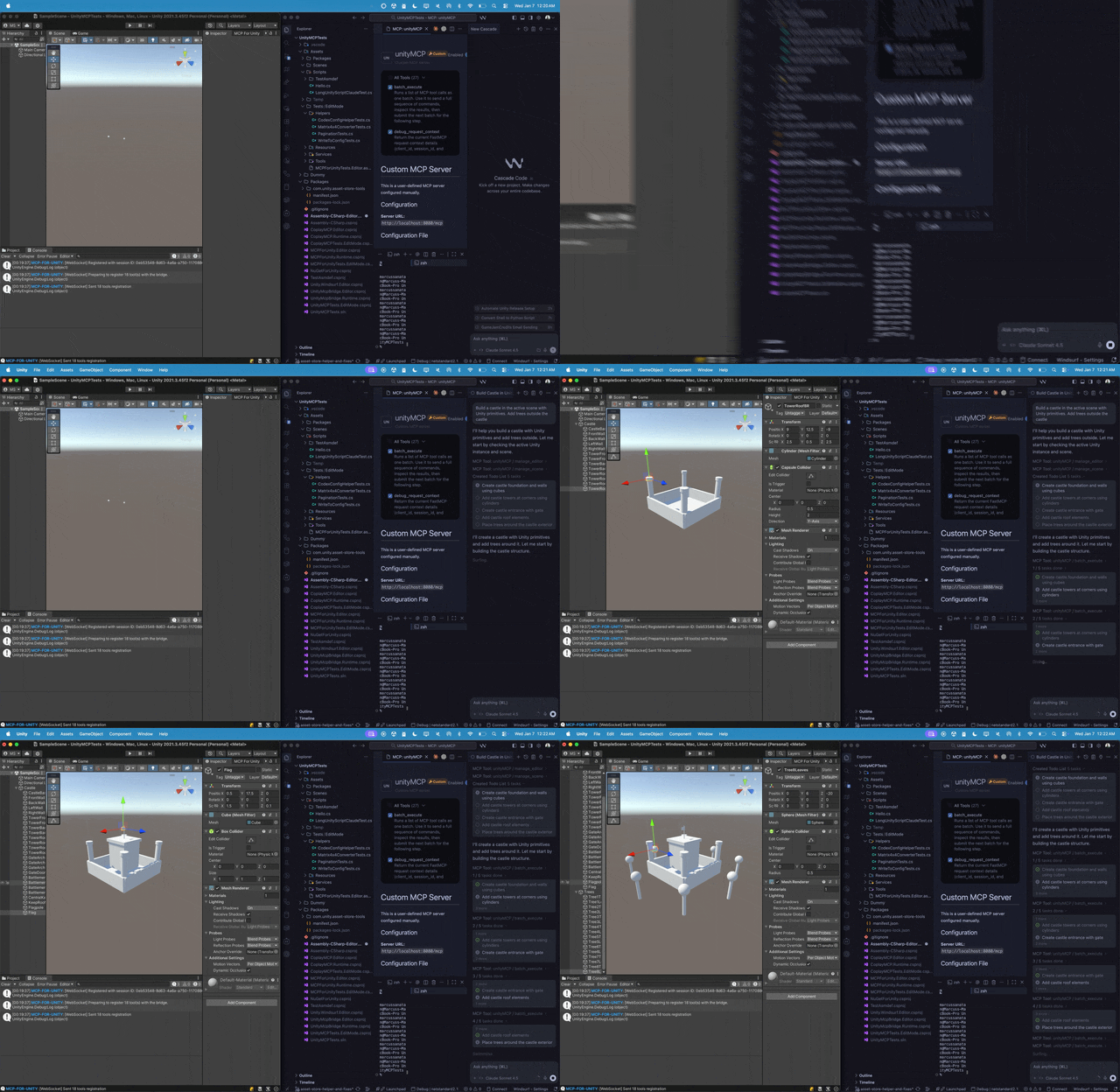
MCP for Unity 构建场景

---
最近更新 * **[v10.0.0](https://github.com/CoplayDev/unity-mcp/releases/tag/v10.0.0)** (2026-06-30) * **[v9.7.3](https://github.com/CoplayDev/unity-mcp/releases/tag/v9.7.3)** (2026-06-15) * **[v9.7.1](https://github.com/CoplayDev/unity-mcp/releases/tag/v9.7.1)** (2026-05-24) * **[v9.7.0](https://github.com/CoplayDev/unity-mcp/releases/tag/v9.7.0)** (2026-05-22) * **[v9.6.8](https://github.com/CoplayDev/unity-mcp/releases/tag/v9.6.8)** (2026-04-27) 完整历史:[发布说明](https://coplaydev.github.io/unity-mcp/releases).
--- ## 功能概览 通过任意 MCP 客户端,用自然语言控制 Unity Editor —— 创建场景与 GameObject、编辑 C# 脚本、管理资源、运行测试、性能分析并构建项目。47 个聚焦的 MCP 工具入口,兼容任意客户端,免费且采用 MIT 许可。 **[浏览完整工具目录 →](https://coplaydev.github.io/unity-mcp/reference/tools/)** --- ## 快速开始 **环境要求:** Unity **2021.3 LTS → 6.x** · Python **3.10+**(通过 [`uv`](https://docs.astral.sh/uv/)). 兼容**任意 MCP 客户端** —— Claude Desktop & Code、Cursor、VS Code、Windsurf、Cline、Gemini CLI 等。 1. **安装** —— Unity → Package Manager → Add from git URL: `https://github.com/CoplayDev/unity-mcp.git?path=/MCPForUnity#main`  _(固定使用 `#v10.0.0` 以匹配本版本,或使用 `openupm add com.coplaydev.unity-mcp`)_ 2. **配置** —— `Window → MCP for Unity → Configure All Detected Clients`。 3. **提示** —— *"Create a cube at the origin and add a Rigidbody."* 数秒内即可看到立方体出现。 --- ## 社区 - [Discord](https://discord.gg/y4p8KfzrN4) —— 与维护者及其他贡献者交流 - [Issues](https://github.com/CoplayDev/unity-mcp/issues) —— 提交 Bug 与功能请求 - [Discussions](https://github.com/CoplayDev/unity-mcp/discussions) —— 设计想法与更广泛的问题讨论 - 安全:请参阅 [SECURITY.md](SECURITY.md) 进行私密报告 ## 贡献 请参阅 [CONTRIBUTING.md](CONTRIBUTING.md)。请从 `beta` 分支,而非 `main`。完整的开发环境搭建、测试与发布流程见 [Contributing](https://coplaydev.github.io/unity-mcp/contributing/dev-setup) 文档。 ## 高级 - **多个 Unity 实例** —— [Multi-Instance Routing(多实例路由)](https://coplaydev.github.io/unity-mcp/guides/multi-instance) - **工具分组(vfx / animation / ui / testing / 等)** —— [Tool Groups(工具分组)](https://coplaydev.github.io/unity-mcp/guides/tool-groups) - **v10 资源生成与升级说明** —— [v10 Migration(v10 迁移)](https://coplaydev.github.io/unity-mcp/migrations/v10) - **Roslyn 脚本验证** —— [Roslyn Validation](https://coplaydev.github.io/unity-mcp/guides/roslyn) - **带身份验证的远程托管服务器** —— [Remote Server Auth(远程服务器认证)](https://coplaydev.github.io/unity-mcp/guides/remote-server-auth) ## Star History [![Star History Chart](https://api.star-history.com/svg?repos=CoplayDev/unity-mcp&type=Date)](https://www.star-history.com/#CoplayDev/unity-mcp&Date) ## 引用 如果 MCP for Unity 对你的研究有所帮助,欢迎引用。 ```bibtex @inproceedings{wu2025mcpunity, author = {Wu, Shutong and Barnett, Justin P.}, title = {{MCP-Unity}: {Protocol-Driven} Framework for Interactive {3D} Authoring}, year = {2025}, isbn = {9798400721366}, publisher = {Association for Computing Machinery}, address = {New York, NY, USA}, url = {https://doi.org/10.1145/3757376.3771417}, doi = {10.1145/3757376.3771417}, series = {SA Technical Communications '25} } ``` ## Aura 的 Unity AI 工具 Aura 为 Unity 提供 2 款 AI 工具: - **MCP for Unity** 在 MIT 许可下免费提供。 - **Aura for Unity** 是面向游戏开发者的付费 Unity/Unreal AI 助手。 ## 免责声明 本项目是面向 Unity Editor 的免费开源工具,与 Unity Technologies 无任何关联。 --- **许可证:** MIT —— 详见 [LICENSE](LICENSE)。