> [!NOTE]
> 本文档由 WeHub 基于上游 README 翻译整理,属于社区翻译,非官方中文文档。
> [English](./README.en.md) · [原始项目](https://github.com/browser-use/browser-use) · [上游 README](https://github.com/browser-use/browser-use/blob/HEAD/README.md)
> 原作者、版权与许可证归属以原始项目及本仓库 LICENSE 文件为准。
 ---
# Browser Use 能做什么?
Browser Use 让 AI 智能体(agent)像你一样使用网页浏览器——打开页面、点击按钮、输入文字、填写表单。你描述任务,它就能完成。例如,你可以让它:
### 📋 填写表单
#### 任务:"用我的简历和信息填写这份工作申请。"

[示例代码 ↗](https://github.com/browser-use/browser-use/blob/main/examples/use-cases/apply_to_job.py)
### 🍎 购买日用品
#### 任务:"把这份物品清单加入我的 instacart。"
https://github.com/user-attachments/assets/a6813fa7-4a7c-40a6-b4aa-382bf88b1850
[示例代码 ↗](https://github.com/browser-use/browser-use/blob/main/examples/use-cases/buy_groceries.py)
### 💻 做你的个人助理
#### 任务:"帮我找组装定制 PC 的零件。"
https://github.com/user-attachments/assets/ac34f75c-057a-43ef-ad06-5b2c9d42bf06
[示例代码 ↗](https://github.com/browser-use/browser-use/blob/main/examples/use-cases/pcpartpicker.py)
---
# Browser Use 能做什么?
Browser Use 让 AI 智能体(agent)像你一样使用网页浏览器——打开页面、点击按钮、输入文字、填写表单。你描述任务,它就能完成。例如,你可以让它:
### 📋 填写表单
#### 任务:"用我的简历和信息填写这份工作申请。"

[示例代码 ↗](https://github.com/browser-use/browser-use/blob/main/examples/use-cases/apply_to_job.py)
### 🍎 购买日用品
#### 任务:"把这份物品清单加入我的 instacart。"
https://github.com/user-attachments/assets/a6813fa7-4a7c-40a6-b4aa-382bf88b1850
[示例代码 ↗](https://github.com/browser-use/browser-use/blob/main/examples/use-cases/buy_groceries.py)
### 💻 做你的个人助理
#### 任务:"帮我找组装定制 PC 的零件。"
https://github.com/user-attachments/assets/ac34f75c-057a-43ef-ad06-5b2c9d42bf06
[示例代码 ↗](https://github.com/browser-use/browser-use/blob/main/examples/use-cases/pcpartpicker.py)
# 快速入门
如果你想在智能体(Claude Code、Codex、Cursor、Hermes、OpenClaw 等)中使用 Browser Use,粘贴这段提示词,它会自动完成所有设置:
```text
Install or upgrade browser-use to the latest stable version with uv using Python 3.12, run `browser-use skill install` to register the skill, and connect it to my browser. If setup or connection fails, follow https://github.com/browser-use/browser-harness/blob/main/install.md.
```
然后告诉你的智能体你想做什么。
# Python 库:自动化网页的最简方式
想在自己的代码里、配合任意大语言模型(LLM)、大规模自动化网页操作?请使用 Python 库:
**1. 安装 Browser Use(Python >= 3.11):**
```bash
uv add browser-use
# or: pip install browser-use
```
**2. 将你的 LLM API 密钥添加到 `.env`**。可从 [Browser Use Cloud](https://cloud.browser-use.com/new-api-key?utm_source=github&utm_medium=readme-quickstart-api-key), 获取,或使用你自己的服务商密钥:
```bash
# .env
BROWSER_USE_API_KEY=your-key
# GOOGLE_API_KEY=your-key
# ANTHROPIC_API_KEY=your-key
```
**3. 运行你的第一个智能体:**
```python
import asyncio
from browser_use import Agent, ChatBrowserUse
async def main():
agent = Agent(
task="Find the number of stars of the browser-use repo",
llm=ChatBrowserUse(model='openai/gpt-5.5'),
# llm=ChatBrowserUse(model='bu-2-0'), # Browser Use's optimized model
# llm=ChatOpenAI(model='gpt-5.5'),
# llm=ChatAnthropic(model='claude-opus-4-8'), # Sonnet also works well
)
history = await agent.run()
if __name__ == "__main__":
asyncio.run(main())
```
更多内容请参阅[库文档](https://docs.browser-use.com/open-source/introduction) 和[云端文档](https://docs.cloud.browser-use.com?utm_source=github&utm_medium=readme-cloud-docs)!
# 开源版 vs 云端版
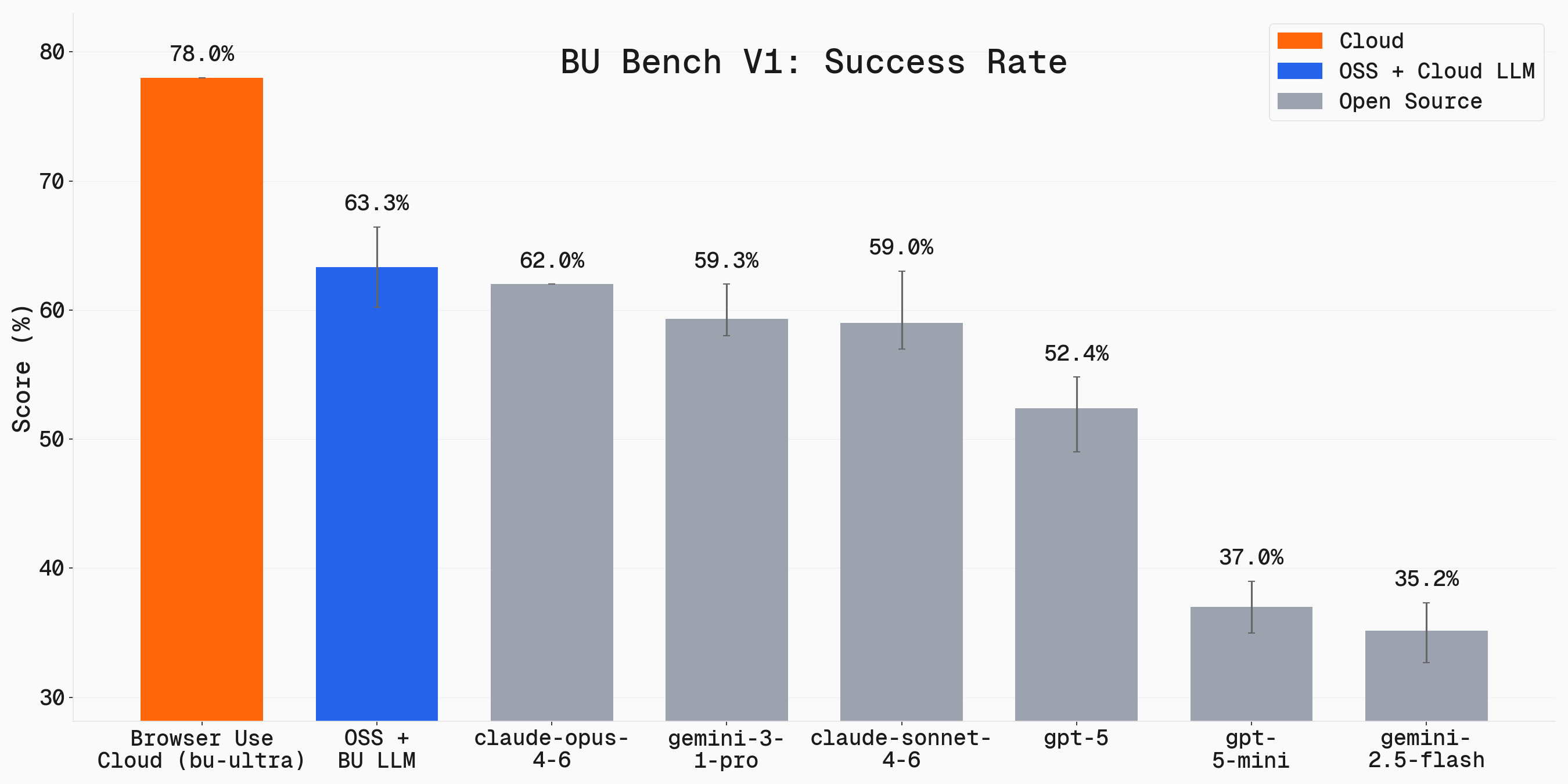 我们在 100 个真实浏览器任务上对 Browser Use 进行基准测试。完整基准测试已开源:**[browser-use/benchmark](https://github.com/browser-use/benchmark)**.
Browser Use 在 **[Odysseys 排行榜](https://odysseysbench.com/leaderboard)** 上也位列 **#1**,平均得分 87.4%,领先于 OpenAI、Anthropic、Google 和 Microsoft 的 computer-use 智能体。Odysseys 会衡量智能体在 200 个长周期网页任务上的表现。
**使用开源智能体**
- 免费,可在本机运行
- 深度代码级集成与控制:自选 LLM、自定义智能体行为
- 建议搭配我们的[云端浏览器](https://docs.browser-use.com/open-source/customize/browser/remote),以获得领先的隐身能力、代理轮换和弹性扩展
**使用[全托管云端智能体](https://cloud.browser-use.com?utm_source=github&utm_medium=readme-hosted-agent)(推荐)**
- 应对复杂任务的智能体能力更强(见上图)
- 上手和扩展最简单的方式
- 最佳隐身能力,支持代理轮换与验证码(captcha)破解
- 1000+ 集成(Gmail、Slack、Notion 等)
- 持久化文件系统与记忆
我们在 100 个真实浏览器任务上对 Browser Use 进行基准测试。完整基准测试已开源:**[browser-use/benchmark](https://github.com/browser-use/benchmark)**.
Browser Use 在 **[Odysseys 排行榜](https://odysseysbench.com/leaderboard)** 上也位列 **#1**,平均得分 87.4%,领先于 OpenAI、Anthropic、Google 和 Microsoft 的 computer-use 智能体。Odysseys 会衡量智能体在 200 个长周期网页任务上的表现。
**使用开源智能体**
- 免费,可在本机运行
- 深度代码级集成与控制:自选 LLM、自定义智能体行为
- 建议搭配我们的[云端浏览器](https://docs.browser-use.com/open-source/customize/browser/remote),以获得领先的隐身能力、代理轮换和弹性扩展
**使用[全托管云端智能体](https://cloud.browser-use.com?utm_source=github&utm_medium=readme-hosted-agent)(推荐)**
- 应对复杂任务的智能体能力更强(见上图)
- 上手和扩展最简单的方式
- 最佳隐身能力,支持代理轮换与验证码(captcha)破解
- 1000+ 集成(Gmail、Slack、Notion 等)
- 持久化文件系统与记忆
## 集成、托管、自定义工具、MCP 等更多内容,请查看我们的[文档 ↗](https://docs.browser-use.com)
# 常见问题
我该用 CLI 还是 Python 库?
**使用 CLI**:如果你已有智能体(Claude Code、Codex、Cursor、Hermes、OpenClaw 等),想让它帮你完成浏览器任务。智能体只需安装一次技能(见[快速入门](#quickstart)),之后即可控制浏览器。示例:
- "把这个视频上传到 YouTube"
- "对比这三台笔记本电脑,给我一张带价格的表格"
- "用我的简历填写这份工作申请"
**使用 Python 库**:当你要构建自动化网页的软件时。示例:
- 按计划或并行运行大量任务(抓取、监控、QA)
- 将浏览器智能体嵌入你自己的产品
- 自定义工具、自定义系统提示词、结构化输出、细粒度浏览器控制
经验法则:通过智能体做一次性任务 → CLI;在代码中做可重复自动化 → Python 库。
最好用什么模型?
我们专门针对浏览器自动化任务优化了 **ChatBrowserUse()**。平均而言,它在达到 SOTA 准确率的同时,完成任务的速度比其他模型快 3-5 倍。
关于定价及其他 LLM 提供商,请参阅我们的[支持的模型文档](https://docs.browser-use.com/supported-models).
能否通过 ChatBrowserUse 使用 Claude / GPT / Gemini?
可以。`ChatBrowserUse` 接受带提供商前缀的 model id,因此单个 `BROWSER_USE_API_KEY` 即可访问全部模型——无需单独的 OpenAI/Anthropic/Google 密钥:
```python
from browser_use import Agent, ChatBrowserUse
llm = ChatBrowserUse(model='anthropic/claude-sonnet-4-6') # or 'openai/gpt-5.5', 'google/gemini-3-pro'
agent = Agent(task='...', llm=llm)
```
为获得最佳速度与成本,我们仍推荐使用默认的 `bu-*` 模型。
使用开源预览模型时,是否应使用 Browser Use 系统提示词(system prompt)?
是的。若将 `ChatBrowserUse(model='browser-use/bu-30b-a3b-preview')` 与普通的 `Agent(...)` 搭配使用,Browser Use 仍会为你发送其默认的 agent 系统提示词。
切换到开源预览模型后,你**无需**额外添加自定义的「Browser Use 系统消息」。仅当你有意针对任务自定义默认行为时,才使用 `extend_system_message` 或 `override_system_message`。
若追求默认情况下的最佳速度/准确度,我们仍推荐使用较新的托管 `bu-*` 模型。若使用开源预览模型,除 `model=` 取值外,配置方式保持不变。
能否为 agent 使用自定义工具?
可以!你可以添加自定义工具以扩展 agent 的能力:
```python
from browser_use import Tools
tools = Tools()
@tools.action(description='Description of what this tool does.')
def custom_tool(param: str) -> str:
return f"Result: {param}"
agent = Agent(
task="Your task",
llm=llm,
browser=browser,
tools=tools,
)
```
可以免费使用吗?
可以!Browser-Use 是开源的,可免费使用。你只需选择 LLM 提供商(如 OpenAI、Google、ChatBrowserUse,或通过 Ollama 在本地运行模型)。
服务条款
本开源库采用 MIT License 许可。有关 Browser Use 服务与数据政策,请参阅我们的[服务条款](https://browser-use.com/legal/terms-of-service) 和[隐私政策](https://browser-use.com/privacy/).
如何处理身份验证?
请参阅我们的身份验证示例:
- [使用真实浏览器配置文件](https://github.com/browser-use/browser-use/blob/main/examples/browser/real_browser.py) - 复用已保存登录信息的现有 Chrome 配置文件
- 若需使用带收件箱的临时账号,可选择 AgentMail
- 要将身份验证配置文件同步到远程浏览器,请运行 `curl -fsSL https://browser-use.com/profile.sh | BROWSER_USE_API_KEY=XXXX sh`(将 XXXX 替换为你的 API key)
这些示例展示了如何无缝维护会话并处理身份验证。
如何解决 CAPTCHA?
处理 CAPTCHA 需要更好的浏览器指纹与代理。请使用 [Browser Use Cloud](https://cloud.browser-use.com?utm_source=github&utm_medium=readme-faq-captcha),它提供专为规避检测与 CAPTCHA 挑战而设计的隐身浏览器。
如何投入生产环境?
Chrome 会占用大量内存,并行运行多个 agent 的管理也可能较为棘手。
生产场景请使用我们的 [Browser Use Cloud API](https://cloud.browser-use.com?utm_source=github&utm_medium=readme-faq-production),它提供:
- 可扩展的浏览器基础设施
- 内存管理
- 代理轮换
- 隐身浏览器指纹
- 高性能并行执行
## 引用
若在你的研究或项目中使用了 Browser Use,请引用:
```bibtex
@software{browser_use2024,
author = {Müller, Magnus and Žunič, Gregor},
title = {Browser Use: Enable AI to control your browser},
year = {2024},
publisher = {GitHub},
url = {https://github.com/browser-use/browser-use}
}
```
**告诉电脑做什么,它就能帮你完成。**

[](https://x.com/intent/user?screen_name=mamagnus00)
[](https://x.com/intent/user?screen_name=gregpr07)
Made with ❤️ in Zurich and San Francisco



