> [!NOTE]
> 本文档由 WeHub 基于上游 README 翻译整理,属于社区翻译,非官方中文文档。
> [English](./README.en.md) · [原始项目](https://github.com/alibaba/page-agent) · [上游 README](https://github.com/alibaba/page-agent/blob/HEAD/README.md)
> 原作者、版权与许可证归属以原始项目及本仓库 LICENSE 文件为准。
# Page Agent
 [](https://github.com/alibaba/page-agent/actions/workflows/main-ci.yml)
[](https://www.npmjs.com/package/page-agent)
[](https://www.npmjs.com/package/page-agent)
[](https://bundlephobia.com/package/page-agent)
[](https://opensource.org/licenses/MIT)
[](http://www.typescriptlang.org/)
[](https://chromewebstore.google.com/detail/page-agent-ext/akldabonmimlicnjlflnapfeklbfemhj)
[](https://github.com/alibaba/page-agent)
驻留在网页中的 GUI Agent。只需一段脚本,即可为任意网页赋予专属 AI Agent。
[](https://github.com/alibaba/page-agent/actions/workflows/main-ci.yml)
[](https://www.npmjs.com/package/page-agent)
[](https://www.npmjs.com/package/page-agent)
[](https://bundlephobia.com/package/page-agent)
[](https://opensource.org/licenses/MIT)
[](http://www.typescriptlang.org/)
[](https://chromewebstore.google.com/detail/page-agent-ext/akldabonmimlicnjlflnapfeklbfemhj)
[](https://github.com/alibaba/page-agent)
驻留在网页中的 GUI Agent。只需一段脚本,即可为任意网页赋予专属 AI Agent。
 🌐 **English** | [中文](./docs/README-zh.md)
🚀 Demo | 📖 Docs | 📢 HN Discussion | 𝕏 Follow on X
[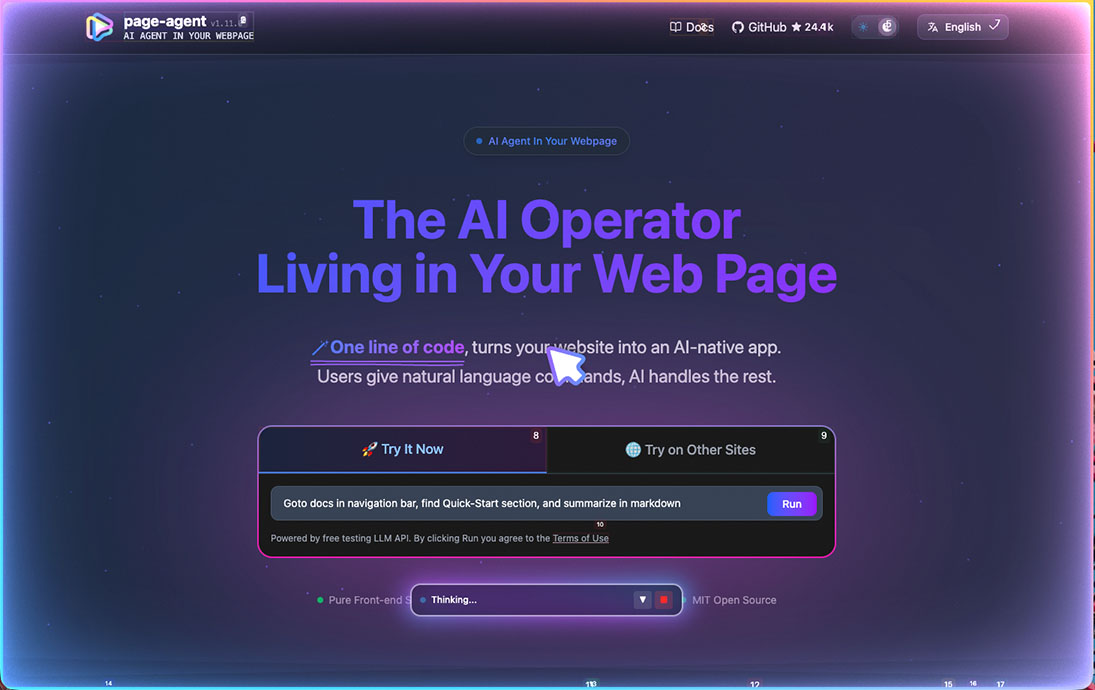](https://github.com/user-attachments/assets/a1f2eae2-13fb-4aae-98cf-a3fc1620a6c2)
---
## ✨ Features
- **🎯 轻松集成**
- 无需 `browser extension` / `python` / `headless browser`。
- 纯页面内 JavaScript,一切都在你的网页中完成。
- **📖 基于文本的 DOM 操作**
- 无需截图,也无需多模态 LLM 或特殊权限。
- **🧠 自带 LLM(Bring your own LLMs)**
- 兼容大多数主流模型,包括本地部署的模型。请参阅[支持的模型](https://alibaba.github.io/page-agent/docs/features/models).
- **🐙 可选 [Chrome 扩展](https://alibaba.github.io/page-agent/docs/features/chrome-extension),用于多页面任务。**
- 还提供 [MCP Server(Beta)](https://alibaba.github.io/page-agent/docs/features/mcp-server),可从外部进行控制
## 💡 Use Cases
- **SaaS AI Copilot** — 几行代码即可在产品中上线 AI 副驾驶,无需重写后端。
- **智能表单填写** — 将 20 次点击的工作流压缩为一句话,非常适合 ERP、CRM 和管理系统。
- **无障碍访问** — 通过自然语言让任意 Web 应用可用:语音指令、屏幕阅读器,零门槛。
- **多页面 Agent** — 通过 [Chrome 扩展](https://alibaba.github.io/page-agent/docs/features/chrome-extension).,将你的 Web Agent 扩展到多个浏览器标签页。
- **MCP** — 让你的 Agent 客户端控制浏览器。
## 🚀 Quick Start
### 一行集成
使用免费 Demo LLM 体验 PageAgent 的最快方式:
```html
```
> **⚠️ 仅供技术评估。** 此演示 CDN 使用我们免费的[测试 LLM API](https://alibaba.github.io/page-agent/docs/features/models#free-testing-api).。使用即表示你同意其[条款](https://github.com/alibaba/page-agent/blob/main/docs/terms-and-privacy.md).
> 添加 `?autoInit=false` 可在加载脚本时不自动创建演示 Agent。随后可用 `new window.PageAgent(...)` 自行实例化。
| 镜像 | URL |
| ------- | ----------------------------------------------------------------------------------- |
| 全球 | https://cdn.jsdelivr.net/npm/page-agent@1.12.1/dist/iife/page-agent.demo.js |
| 中国 | https://registry.npmmirror.com/page-agent/1.12.1/files/dist/iife/page-agent.demo.js |
### NPM 安装
```bash
npm install page-agent
```
```javascript
import { PageAgent } from 'page-agent'
const agent = new PageAgent({
model: 'qwen3.5-plus',
baseURL: 'https://dashscope.aliyuncs.com/compatible-mode/v1',
apiKey: 'YOUR_API_KEY',
language: 'en-US',
})
await agent.execute('Click the login button')
```
更多编程式用法请参阅[📖 文档](https://alibaba.github.io/page-agent/docs/introduction/overview).
## 🤝 参与贡献
欢迎社区贡献!指南请参阅 [CONTRIBUTING.md](CONTRIBUTING.md),本地开发流程请参阅 [docs/developer-guide.md](docs/developer-guide.md)。
用 PageAgent 做出了酷东西?欢迎在 [Show and Tell](https://github.com/alibaba/page-agent/discussions/categories/show-and-tell). 分享 🙌
请阅读[维护者说明](https://github.com/alibaba/page-agent/issues/349),了解原则与当前状态。
完全由**机器人或 AI** 生成、缺乏实质性人工参与的贡献**不会被接受**。
## ⚖️ 许可证
[MIT License](LICENSE)
## 👏 致谢
本项目建立在 **[`browser-use`](https://github.com/browser-use/browser-use)**. 的优秀工作之上。
`PageAgent` 面向**客户端 Web 增强**,而非服务端自动化。
```
DOM processing components and prompt are derived from browser-use:
Browser Use
Copyright (c) 2024 Gregor Zunic
Licensed under the MIT License
We gratefully acknowledge the browser-use project and its contributors for their
excellent work on web automation and DOM interaction patterns that helped make
this project possible.
```
**⭐ 如果觉得 PageAgent 有用,欢迎给本仓库点 Star!**
🌐 **English** | [中文](./docs/README-zh.md)
🚀 Demo | 📖 Docs | 📢 HN Discussion | 𝕏 Follow on X
[](https://github.com/user-attachments/assets/a1f2eae2-13fb-4aae-98cf-a3fc1620a6c2)
---
## ✨ Features
- **🎯 轻松集成**
- 无需 `browser extension` / `python` / `headless browser`。
- 纯页面内 JavaScript,一切都在你的网页中完成。
- **📖 基于文本的 DOM 操作**
- 无需截图,也无需多模态 LLM 或特殊权限。
- **🧠 自带 LLM(Bring your own LLMs)**
- 兼容大多数主流模型,包括本地部署的模型。请参阅[支持的模型](https://alibaba.github.io/page-agent/docs/features/models).
- **🐙 可选 [Chrome 扩展](https://alibaba.github.io/page-agent/docs/features/chrome-extension),用于多页面任务。**
- 还提供 [MCP Server(Beta)](https://alibaba.github.io/page-agent/docs/features/mcp-server),可从外部进行控制
## 💡 Use Cases
- **SaaS AI Copilot** — 几行代码即可在产品中上线 AI 副驾驶,无需重写后端。
- **智能表单填写** — 将 20 次点击的工作流压缩为一句话,非常适合 ERP、CRM 和管理系统。
- **无障碍访问** — 通过自然语言让任意 Web 应用可用:语音指令、屏幕阅读器,零门槛。
- **多页面 Agent** — 通过 [Chrome 扩展](https://alibaba.github.io/page-agent/docs/features/chrome-extension).,将你的 Web Agent 扩展到多个浏览器标签页。
- **MCP** — 让你的 Agent 客户端控制浏览器。
## 🚀 Quick Start
### 一行集成
使用免费 Demo LLM 体验 PageAgent 的最快方式:
```html
```
> **⚠️ 仅供技术评估。** 此演示 CDN 使用我们免费的[测试 LLM API](https://alibaba.github.io/page-agent/docs/features/models#free-testing-api).。使用即表示你同意其[条款](https://github.com/alibaba/page-agent/blob/main/docs/terms-and-privacy.md).
> 添加 `?autoInit=false` 可在加载脚本时不自动创建演示 Agent。随后可用 `new window.PageAgent(...)` 自行实例化。
| 镜像 | URL |
| ------- | ----------------------------------------------------------------------------------- |
| 全球 | https://cdn.jsdelivr.net/npm/page-agent@1.12.1/dist/iife/page-agent.demo.js |
| 中国 | https://registry.npmmirror.com/page-agent/1.12.1/files/dist/iife/page-agent.demo.js |
### NPM 安装
```bash
npm install page-agent
```
```javascript
import { PageAgent } from 'page-agent'
const agent = new PageAgent({
model: 'qwen3.5-plus',
baseURL: 'https://dashscope.aliyuncs.com/compatible-mode/v1',
apiKey: 'YOUR_API_KEY',
language: 'en-US',
})
await agent.execute('Click the login button')
```
更多编程式用法请参阅[📖 文档](https://alibaba.github.io/page-agent/docs/introduction/overview).
## 🤝 参与贡献
欢迎社区贡献!指南请参阅 [CONTRIBUTING.md](CONTRIBUTING.md),本地开发流程请参阅 [docs/developer-guide.md](docs/developer-guide.md)。
用 PageAgent 做出了酷东西?欢迎在 [Show and Tell](https://github.com/alibaba/page-agent/discussions/categories/show-and-tell). 分享 🙌
请阅读[维护者说明](https://github.com/alibaba/page-agent/issues/349),了解原则与当前状态。
完全由**机器人或 AI** 生成、缺乏实质性人工参与的贡献**不会被接受**。
## ⚖️ 许可证
[MIT License](LICENSE)
## 👏 致谢
本项目建立在 **[`browser-use`](https://github.com/browser-use/browser-use)**. 的优秀工作之上。
`PageAgent` 面向**客户端 Web 增强**,而非服务端自动化。
```
DOM processing components and prompt are derived from browser-use:
Browser Use
Copyright (c) 2024 Gregor Zunic
Licensed under the MIT License
We gratefully acknowledge the browser-use project and its contributors for their
excellent work on web automation and DOM interaction patterns that helped make
this project possible.
```
**⭐ 如果觉得 PageAgent 有用,欢迎给本仓库点 Star!**