 wehub-resource-sync
16 KiB
Contributing to Nacos
Welcome to Nacos! This document is a guideline about how to contribute to Nacos.
Nacos is released under the non-restrictive Apache 2.0 license, and follows a very standard Github development process, using Github tracker for issues and merging pull requests into develop. If you want to contribute even something trivial, please do not hesitate, but follow the guidelines below.
We are always very happy to have contributions, whether for trivial cleanups or big new features. We want to have high quality, well documented codes for each programming language. Nor is code the only way to contribute to the project. We strongly value documentation, integration with other projects, and gladly accept improvements for these aspects.
Before You Get Started
Code of Conduct
Please make sure to read and observe our Code of Conduct.
Code Style
Please read and set up the Nacos code style correctly before contributing:
- Checkstyle config:
style/NacosCheckStyle.xml - IDEA code style:
style/nacos-code-style-for-idea.xml - Code style guide:
style/codeStyle.md
Nacos uses Spotless with Eclipse JDT Formatter for automated code formatting. The formatter configuration is at style/nacos-eclipse-formatter.xml. Run mvn spotless:apply before committing to auto-format your code.
Contact Us
- Nacos Gitter: https://gitter.im/alibaba/nacos
- Nacos Weibo: https://weibo.com/u/6574374908
- Nacos SegmentFault: https://segmentfault.com/t/nacos
Mailing List
Mailing list is recommended for discussing almost anything related to Nacos:
- dev-nacos@googlegroups.com: The develop mailing list. You can ask questions here if you encounter any problem when using or developing Nacos.
- commits-nacos@googlegroups.com: All commits will be sent to this mailing list. You can subscribe to it if you are interested in Nacos' development.
- users-nacos@googlegroups.com: All Github issue updates and pull request updates will be sent to this mailing list.
- nacos_dev@linux.alibaba.com
Reporting Bugs
If any part of the Nacos project has bugs or documentation mistakes, please let us know by opening an issue. We treat bugs and mistakes very seriously and believe no issue is too small. Before creating a bug report, please check that an issue reporting the same problem does not already exist.
To make the bug report accurate and easy to understand, please try to create bug reports that are:
-
Specific: Include as much details as possible: which version, what environment, what configuration, etc. If the bug is related to running the Nacos server, please attach the Nacos log (the starting log with Nacos configuration is especially important).
-
Reproducible: Include the steps to reproduce the problem. We understand some issues might be hard to reproduce, please include the steps that might lead to the problem. If possible, please attach the affected Nacos data dir and stack trace to the bug report.
-
Unique: Do not duplicate existing bug reports.
It may be worthwhile to read Elika Etemad's article on filing good bug reports before creating a bug report.
Reporting Security Bugs
Do NOT report security vulnerabilities via GitHub Issues. Please report them through ASRC (Alibaba Security Response Center).
Contributing Code
Nacos welcomes new participants of any role, including user, contributor, committer and PMC.
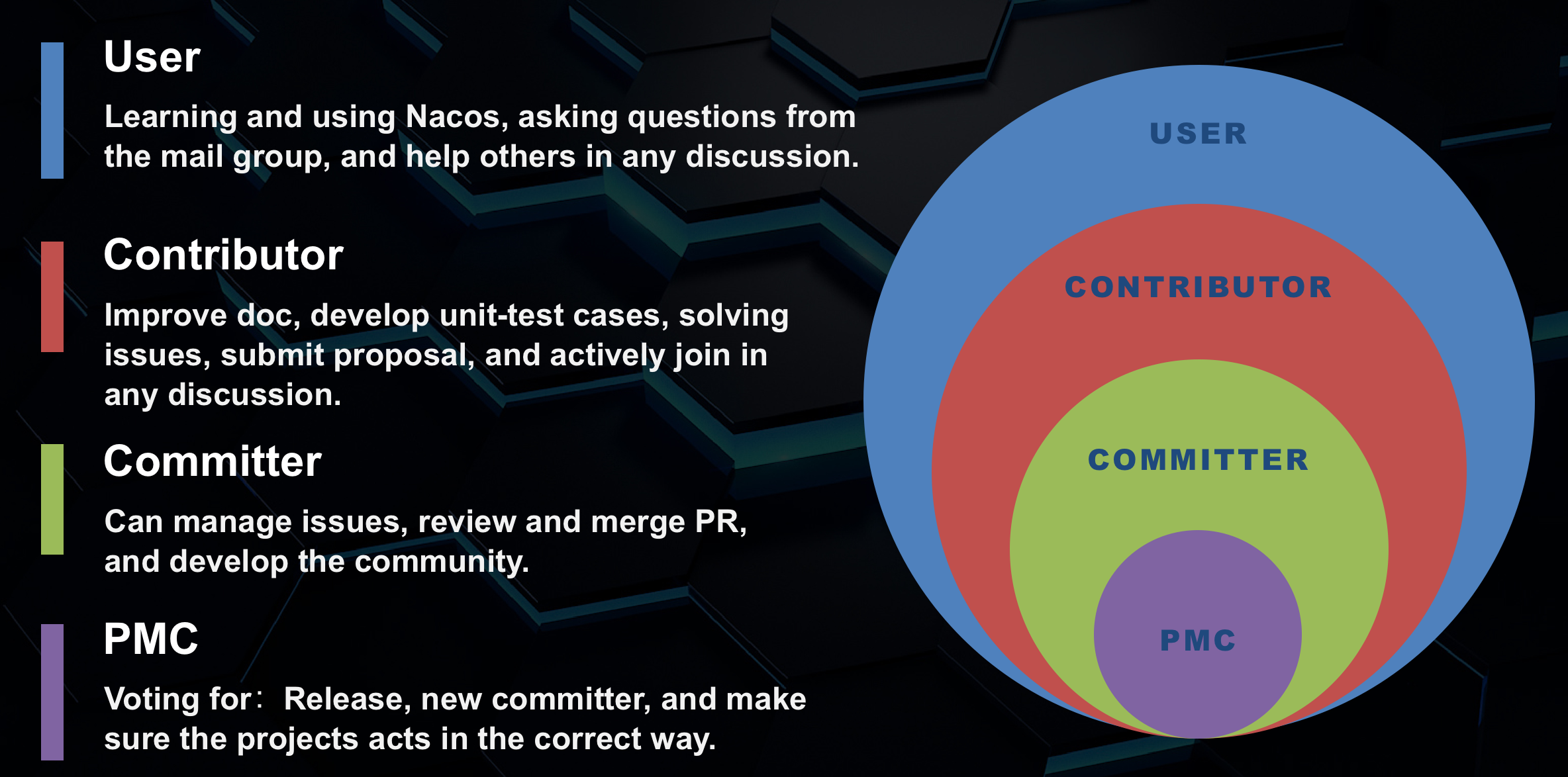
We encourage newcomers actively joining in Nacos projects and involving from user roles to committer roles, and even PMC roles.
Finding Issues to Work On
If you find a typo in a document, find a bug in code or want new features, or want to give suggestions, you can open an issue on GitHub to report it.
If you just want to contribute directly you can choose the issues below:
- Contribution Welcome: Heavily needed issues, but currently short of hands.
- Good First Issue: Good for newcomers, newcomers can pick up one for warm-up.
Please note that any PR must be associated with a valid issue. Otherwise, the PR will be rejected.
Issue Assignment
To avoid duplicate work and ensure efficient collaboration, please follow this process when claiming an issue:
How to claim an issue
- Comment
/assignon the issue to claim it — you will be automatically assigned - If the issue is already assigned, please wait or discuss in the comments
- To give up a claimed issue, comment
/unassign
Tips
- Check if an issue already has an assignee before claiming
- For complex issues, consider discussing your approach in the issue before starting
- If you need more time, comment on the issue to let others know your progress
- If you can't continue, comment
/unassignto release the issue for others
Contribution Notice
Before submitting a change, please ensure:
-
Read and follow the Nacos Code Style, and make sure your IDE has the code style configured and required plugins installed.
-
If the change is non-trivial, please include unit tests that cover the new functionality.
-
If you are introducing a completely new feature or API, it is a good idea to start a discussion and get consensus on the basic design first.
Contribution Flow (Step by Step)
This contribution flow is applicable to all Nacos community content, including but not limited to Nacos, Nacos wiki/doc, Nacos SDK.
1. Fork the Repository
Fork alibaba/nacos repository to your Github account.
2. Clone Your Fork to Local
git clone ${your_fork_nacos_repo_address}
cd nacos
3. Add Upstream Repository
git remote add upstream https://github.com/alibaba/nacos.git

git remote -v
# origin     ${your_fork_nacos_repo_address} (fetch)
# origin     ${your_fork_nacos_repo_address} (push)
# upstream   https://github.com/alibaba/nacos.git (fetch)
# upstream   https://github.com/alibaba/nacos.git (push)

git fetch origin
git fetch upstream
4. Create a Development Branch
We use the develop branch as the development branch, which indicates that this is an unstable branch. Create a new branch based on upstream/develop:
# Checkout branch from remote repo to local
git checkout -b upstream-develop upstream/develop

# Create a development branch (usually using the issue number as branch name)
git checkout -b develop-issue#${issue-number}
5. Make Your Changes
When making changes, please ensure:
- Changes on this branch are only relevant to the issue
- Try to be as small as possible - one branch for one thing, one PR for one issue
- Use English descriptions for your commits, mainly using predicate + object format, such as:
Fix xxx problem/bug - Simple commits can be described using
For xxx, such as:For codestyle - If the commit is related to an ISSUE, add the ISSUE number as prefix, such as:
For #10000, Fix xxx problem/bug
6. Run Pre-submission Checks
Before pushing your commits, run the following command locally to catch issues early:
mvn -B clean compile apache-rat:check checkstyle:check spotbugs:check spotless:check -DskipTests
| Check | What it verifies |
|---|---|
compile |
Code compiles without errors |
apache-rat:check |
All source files have the required Apache License header |
checkstyle:check |
Code style complies with Alibaba Java Coding Guidelines |
spotbugs:check |
No high-priority bug patterns detected by SpotBugs |
spotless:check |
Code formatting matches Nacos Eclipse JDT style (config). Run mvn spotless:apply to auto-fix |
To run unit tests:
mvn clean test
7. Rebase Your Branch
When you make changes, other people's changes may have been committed and merged. At this time, there may be conflicts. Please use the rebase command to merge and resolve:
git fetch upstream
git rebase -i upstream/develop
OR
git checkout upstream-develop
git pull
git checkout develop-issue#${issue-number}
git rebase -i upstream-develop
Benefits of rebasing:
- Your submission record will be clean, without
Merge xxxx branchmessages - After rebase, the commit log of your branch is a single chain, making it easier to review
If you are using IntelliJ IDEA, it is recommended to use the IDE's version control panel for a more convenient visual interface to resolve conflicts and perform squash operations.
8. Push to Your Fork Repository
git push origin develop-issue#${issue-number}
Note: If you are prompted that there are conflicts when pushing again after a rebase, force push to your fork branch: git push -f origin develop-issue#${issue-number}. This happens because the commit ID has changed after rebasing.
9. Create a Pull Request
Create a pull request to the develop branch and follow the pull request template.
Pull Request Checklist
- Make sure there is a Github issue filed for the change (usually before you start working on it). Trivial changes like typos do not require a Github issue. Your pull request should address just this issue, without pulling in other changes - one PR resolves one issue.
- Format the pull request title like
[ISSUE #123] Fix UnknownException when host config not exist. Each commit in the pull request should have a meaningful subject line and body. - Write a pull request description that is detailed enough to understand what the pull request does, how, and why.
- Write necessary unit tests to verify your logic correction. Use mocking when cross-module dependencies exist. If a new feature or significant change is committed, please remember to add integration tests.
- Run
mvn -B clean apache-rat:check checkstyle:check spotbugs:check spotless:check -DskipTeststo make sure basic checks pass. - Run
mvn clean installto make sure unit tests pass. - Run
mvn clean test-compile failsafe:integration-testto make sure integration tests pass. - If this contribution is large, please file an Apache Individual Contributor License Agreement.
Pull Request Guidelines
- Please create the request to the develop branch.
- Please make sure the PR has a corresponding issue.
- If your PR contains large changes, e.g. component refactor or new components, please write detailed documents about its design and usage.
- Note that a single PR should not be too large. If heavy changes are required, it's better to separate the changes into individual PRs.
- After creating a PR, one or more reviewers will be assigned to the pull request.
- Before merging a PR, squash any fix review feedback, typo, merged and rebased sorts of commits. The final commit message should be clear and concise.
10. Wait for Review and Merge
The Nacos community will review your Pull Request and may propose comments. You can return to step 5 to modify code according to the comments and use step 7 to resubmit.
If there are no more issues, the Nacos community will merge your PR. Congratulations on becoming an official contributor of Nacos!
License Header
Every new source file (.java, .xml, etc.) must include the Apache License 2.0 header. CI enforces this via apache-rat:check and your PR will fail without it.
Copy the header below into every new file (adjust the comment style for non-Java files):
/*
 * Copyright 1999-2025 Alibaba Group Holding Ltd.
 *
 * Licensed under the Apache License, Version 2.0 (the "License");
 * you may not use this file except in compliance with the License.
 * You may obtain a copy of the License at
 *
 *      http://www.apache.org/licenses/LICENSE-2.0
 *
 * Unless required by applicable law or agreed to in writing, software
 * distributed under the License is distributed on an "AS IS" BASIS,
 * WITHOUT WARRANTIES OR CONDITIONS OF ANY KIND, either express or implied.
 * See the License for the specific language governing permissions and
 * limitations under the License.
 */
Contributing Documentation
When contributing documents, please confirm and check the following:
- The document is indeed incorrect or missing.
- You are familiar with Markdown.
- You are familiar with the documentation site and can complete local debugging according to the documentation README.
Code Review Guidance
Committers will rotate reviewing the code to make sure all PRs are reviewed timely and by at least one committer before merge. If we aren't doing our job (sometimes we drop things), please feel free to ping us. And as always, we welcome volunteers for code review.
Review Principles
- Readability: Important code should be well-documented. APIs should have Javadoc. Code style should comply with the existing standards.
- Elegance: New functions, classes or components should be well-designed.
- Testability: 80% of the new code should be covered by unit test cases.
- Maintainability: Comply with our code style spec, and maintain at least a 3-month update frequency.
Becoming a Committer
We are always interested in adding new contributors. What we look for are series of contributions, good taste and ongoing interest in the project. If you are interested in becoming a committer, please let one of the existing committers know and they can help you walk through the process.
Important Contribution Areas
- Wiki & JavaDoc
- Nacos Console
- Nacos SDK (C++, .NET, PHP, Python, Go, Node.js)
Prerequisites for Committer
- Readability: APIs as well as important methods must have Javadoc.
- Testability: Ensure over 80% unit test coverage for main processes.
- Maintainability: Comply with our Code Style, with an update frequency at least once every 3 months.
- Deployability: We encourage you to deploy into Maven Repository.
Nomination Process
Generally speaking, contribute 8 non-trivial patches and get at least three different people to review them (you'll need three people to support you). Then ask someone to nominate you. You're demonstrating your:
- At least 8 PRs and the associated issues to the project
- Ability to collaborate with the team
- Understanding of the project's code base and coding style
- Ability to write good code (last but certainly not least)
A current committer nominates you by creating a Nacos issue with the label "nomination" containing:
- Your first and last name
- A link to your Git profile
- An explanation of why you should be a committer
- Elaboration on the top 3 PRs and the associated issues that demonstrate your ability
Two other committers need to second your nomination. If no one objects in 5 working days (China), you're a committer. If anyone objects or wants more information, the committers discuss and usually come to a consensus (within the 5 working days). If issues cannot be resolved, there's a vote among current committers.
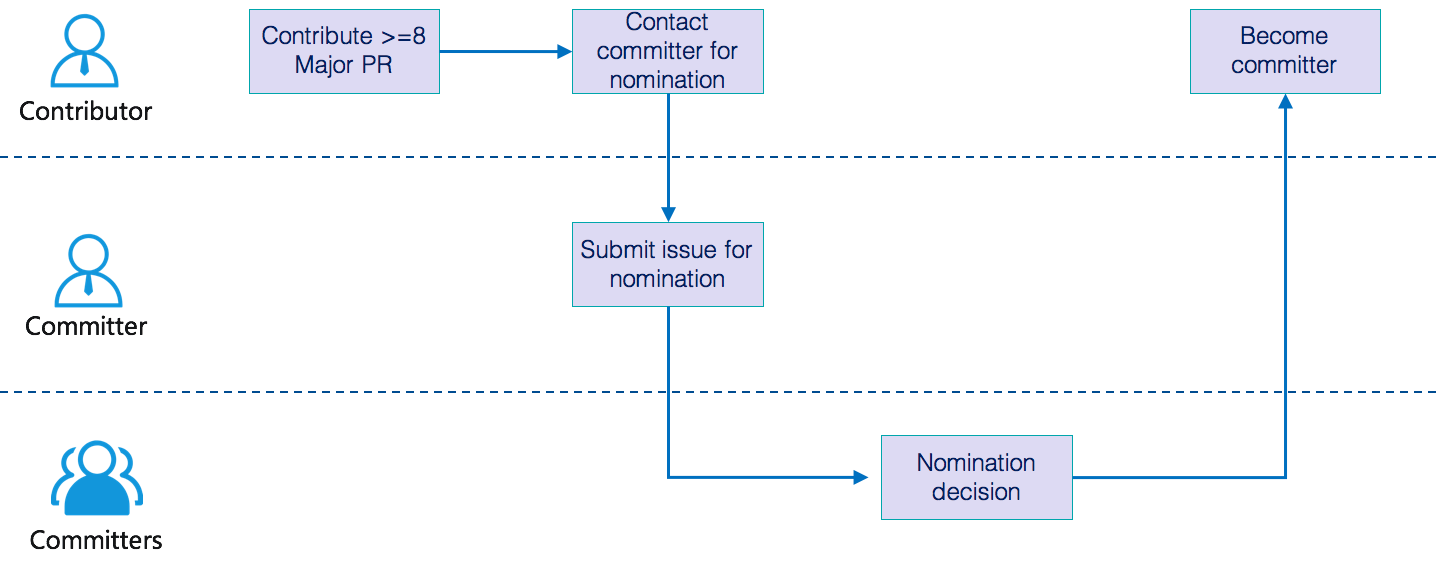
In the worst case, this can drag out for two weeks. Keep contributing! Even in the rare cases where a nomination fails, the objection is usually something easy to address like "more patches" or "not enough people are familiar with this person's work."